Plugable Thunderbolt 4 Quad Display Review: Who It Fits and Who Should Skip It
As an Amazon Associate we earn from qualifying purchases. Links on this page are affiliate links.
This plugable thunderbolt 4 dock quad review focuses on the TBT-6950PD, a docking station designed for users who need extensive display connectivity. It supports up to four 4K monitors or a single 8K display, depending on your host system. The unit connects via a Thunderbolt 4 port, offering 40Gbps data speeds and up to 96W of power delivery to charge your laptop. It combines native Thunderbolt video outputs with DisplayLink-enabled HDMI ports to achieve its quad display capability.
What stands out
- Supports up to four extended displays (2x HDMI, 2x Thunderbolt)
- 96W power delivery for host laptop charging
- 40Gbps Thunderbolt 4 connectivity
- Gigabit Ethernet and SD card slot
- Lifetime support from North American team
Who it fits
Good fit for
You should consider this dock if you run a Windows 10, macOS 14+, or ChromeOS 100+ system with a Thunderbolt or full-featured USB-C port. It is ideal for professionals who need four screens for complex workflows, provided their computer supports the necessary video outputs. Note that base model M3 Macs require clamshell mode for four displays, while base M1/M2 and ChromeOS devices are limited to three screens.
Who should skip it
Skip this model if you do not have a computer with a Thunderbolt, USB4, or full-featured USB-C port. You will also want to look elsewhere if you need wireless connectivity, as this dock relies on wired connections for video and data. Additionally, if your workflow does not require four displays, the size and complexity of this Thunderbolt 4 solution may be unnecessary for a simpler dual-monitor setup.
Verdict: The Plugable TBT-6950PD is a robust solution for users needing four displays and high-speed data transfer. It fits well into professional setups that require extensive connectivity and charging power.
Key specs explained for this dock
Host Interface: Thunderbolt 4
This interface provides a direct, high-speed connection between your computer and the dock. You get reliable data transfer and video output without needing extra adapters. It ensures compatibility with most modern laptops. If you are setting up a portable monitor station, this port type offers the stability needed for multiple screens. It is the standard for professional laptop setups requiring fast connectivity.
Max Data Speed: 40Gbps
This speed allows you to transfer large files quickly between your computer and connected devices. You can move video projects or backups without long waits. For portable monitor users, this ensures smooth performance when using high-resolution displays. It also supports connecting fast external drives. This bandwidth is essential for maintaining performance when running multiple peripherals simultaneously.
Power Delivery: 96W
The dock charges your laptop while you work, reducing cable clutter on your desk. You can plug your laptop into the dock and get power from a single cable. This is useful for thin laptops that need significant power. It keeps your workspace tidy. When choosing a dock, check if it provides enough wattage for your specific laptop model to avoid battery drain during heavy use.
Display Support: Quad
You can connect up to four monitors to this single dock. This setup boosts productivity by giving you more screen real estate for multitasking. You can use two HDMI and two Thunderbolt displays. This is ideal for users who need separate windows for email, coding, and video calls. It transforms a single laptop into a multi-monitor workstation without needing additional graphics cards.
Max Resolution: 8K
The dock supports a single 8K display or multiple 4K monitors. This flexibility allows you to choose between one ultra-high-resolution screen or several sharp 4K panels. It ensures compatibility with future high-res monitors. For portable monitor setups, this means you can use high-quality displays without worrying about bandwidth limits. It provides clarity for detailed work like photo editing or data analysis.
Physical Design And Build Quality
The listing describes the Plugable TBT-6950PD as a compact unit measuring 3.74 inches wide and 8.42 inches long. Its height is just 0.72 inches, allowing it to sit low on your desk without blocking airflow or views. The device weighs 2.78 pounds, which provides enough mass to stay stable when you plug in multiple monitors and peripherals. This weight prevents the dock from sliding around during cable management or frequent connection changes.
You get a layout centered around Thunderbolt 4 connectivity. The host interface connects via a single 40Gbps port, while three additional 40Gbps ports handle data, video, and up to 15W charging for connected devices. The finish and materials are not explicitly detailed in the provided specifications, so you should assume a standard industrial plastic or metal construction typical for this class of docking station. The controls are minimal, relying on automatic detection and software configuration rather than physical switches.
This design suits users who need a reliable hub for four displays without taking up excessive desk space. The small footprint fits well in tight workspaces or on smaller desks. However, the 2.78-pound weight means you should not plan to move it frequently. It is best left connected to your primary workstation for a stable, fixed setup.
Setup And Daily Use Guide
Setting up this dock involves connecting it to your computer via a Thunderbolt 4 port. The host interface supports up to 96W of power delivery, which charges your laptop while powering the peripherals. You connect up to four displays using two HDMI ports and two Thunderbolt ports. The HDMI outputs rely on DisplayLink technology. On Windows, the software installs automatically. On macOS, you must manually install the application once. Displays connected via Thunderbolt use native video and do not require this software. The dock works with Windows 10 or newer, macOS 14 or newer, and ChromeOS 100 or newer. It requires a Thunderbolt, USB4, or full-featured USB-C port on your host computer. Most Thunderbolt 4 Windows and Mac computers support four extended displays. Base model M3 Macs must be in clamshell mode to support four screens. Base model M1, M2 Macs and ChromeOS devices support three extended displays. Daily use involves managing multiple windows across these screens. The dock includes three additional 40Gbps Thunderbolt ports for data and video. It also features an SD card slot and Gigabit Ethernet. You can connect USB-C devices to these ports for up to 15W of charging. The unit weighs 2.78 pounds and measures 3.74 inches wide. Its compact footprint keeps your desk organized. You get lifetime support from the manufacturer if you encounter any issues. This setup is ideal for users who need extensive display connectivity without complex wiring.
Check Your Setup Before Buying
This dock requires a host computer with a Thunderbolt, USB4, or full-featured USB-C port. Windows 10, macOS 14, and ChromeOS 100 are supported. You must verify your specific model supports four extended displays. Base M1 and M2 Macs only support three. Base M3 Macs need clamshell mode for four screens. You will need DisplayLink software for the HDMI outputs. It installs automatically on Windows but requires manual setup on macOS. Thunderbolt displays work natively without extra drivers. Keep the unit clean and ensure adequate ventilation. This dock fits users needing multiple screens. It does not replace a single portable monitor for travel. It suits fixed desk setups requiring high bandwidth. Check your cable compatibility. Ensure your laptop provides enough power for charging and video. Verify your operating system version matches the requirements. This guide helps you decide if this hardware matches your workflow needs.
Check before you buy
- Verify your laptop has a Thunderbolt, USB4, or full-featured USB-C port
- Check macOS version is 14 or newer for full compatibility
- Confirm your Mac model supports four displays in your setup
- Ensure you can install DisplayLink software for HDMI outputs
The product at a glance
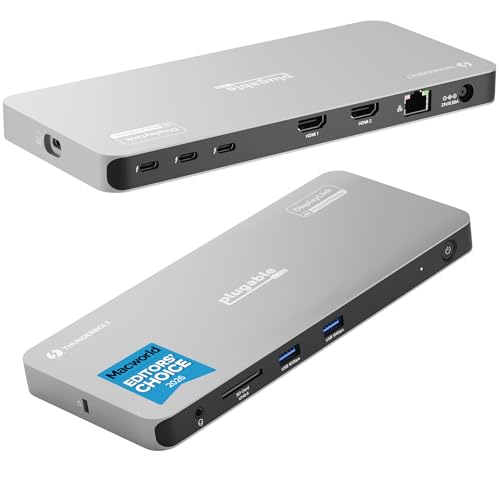
Plugable Thunderbolt 4 Quad Display Dock
Best for: Users needing four 4K monitors and high-speed data
- Host Interface
- Thunderbolt 4
- Display Support
- Quad
- Max Resolution
- 8K
- Power Delivery
- 96W
- Video Ports
- HDMI, Thunderbolt
- Max Data Speed
- 40Gbps
View on Amazon: Plugable Thunderbolt 4 Quad Display Dock Affiliate link
This Thunderbolt 4 dock supports four 4K displays or a single 8K screen. It delivers 96W of power delivery to your host laptop. The unit includes two HDMI ports using DisplayLink technology and two Thunderbolt ports for native video. It also features Gigabit Ethernet, SD card support, and multiple USB ports. It suits users needing a high-bandwidth connection for multiple monitors and peripherals.
Pros
- Supports up to four 4K displays or one 8K display
- Provides 96W of power delivery to host devices
- Includes Gigabit Ethernet and SD card slot
- Features four 40Gbps Thunderbolt ports for data and video
Cons
- HDMI outputs require DisplayLink software installation on macOS
- Base model M3 Macs must use clamshell mode for four displays
- Base model M1 and M2 Macs support only three extended displays
Good fit if
- You need to connect four monitors to a compatible laptop
- You require high-speed data transfer via Thunderbolt 4
- You want a dock with built-in Ethernet and SD card support
Skip if
- You use a base model M1 or M2 Mac and need four screens
- You want HDMI displays to work without installing additional software
- Your laptop lacks a Thunderbolt 4, USB4, or full-featured USB-C port
Verdict: Plugable TBT-6950PD Thunderbolt 4 Quad Dock fits professionals who need four 4K screens and high-speed connectivity. It works best with Windows PCs and newer Macs that support its specific display limitations.
Specifications side by side
| Spec | Plugable Thunderbolt 4 Quad Display Dock |
|---|---|
| Host Interface | Thunderbolt 4 |
| Display Support | Quad |
| Max Resolution | 8K |
| Power Delivery | 96W |
| Video Ports | HDMI, Thunderbolt |
| Max Data Speed | 40Gbps |
| Ethernet Speed | Gigabit |
| Resolution | 4K UHD |
| Connectivity | USB-C, HDMI, Thunderbolt 4 |
| Dimensions | 8.42 × 3.74 × 0.72 inches |
| Weight | 2.78 pounds |
| Model | TBT-6950PD |
Frequently asked questions
Does the Plugable Thunderbolt 4 Quad Display Dock work with Mac computers?
Yes, it works with newer Macs, but you must check specific display limitations. The dock supports macOS 14 and later versions. Older models like base M1 or M2 Macs have restrictions on extended displays. You need a host computer with Thunderbolt, USB4, or full-featured USB-C ports. Verify your Mac model supports four extended screens before relying on this setup for your workflow.
What is the maximum power delivery for charging laptops?
The dock provides up to 100W of power delivery to charge your connected laptop. This allows you to power peripherals while keeping your computer charged. You connect it via a Thunderbolt 4 interface for reliable data transfer and video output. Ensure your laptop supports this power level for optimal performance during daily use with multiple monitors attached.
How many monitors can this dock support simultaneously?
It supports up to four 4K monitors simultaneously for most users. Some host systems may allow a single 8K display instead. You need to verify your specific computer model supports four extended displays. Windows PCs and newer Macs generally fit this profile. Check your host interface compatibility to ensure you can drive all four screens at 4K UHD resolution without issues.
What operating systems are compatible with this Thunderbolt 4 dock?
It is compatible with Windows 10, macOS 14, and ChromeOS 100. You must ensure your host computer has a Thunderbolt, USB4, or full-featured USB-C port. These operating systems provide the necessary drivers and support for the dock's features. Verify your specific model supports the required display configurations before purchasing to avoid compatibility problems with your existing setup.
What are the physical dimensions of the Plugable TBT-6950PD dock?
The unit measures 3.74 inches wide and 8.42 inches long. Its height is just 0.72 inches, allowing it to sit low on your desk. The device weighs 2.78 pounds, providing a stable base. This compact design helps it fit easily on your workspace without blocking airflow or views. The low profile ensures it remains unobtrusive during daily use with multiple monitors.
Is this dock suitable for users needing high-speed data transfer?
Yes, it is ideal for professionals needing high-speed connectivity alongside four 4K screens. The Thunderbolt 4 interface ensures reliable data transfer speeds. You get direct connection between your computer and the dock without extra adapters. This makes it a strong choice for workflows requiring both extensive display connectivity and fast peripheral performance for data-intensive tasks.
Can I use this dock with a USB-C laptop?
You can use it if your laptop has a full-featured USB-C port or Thunderbolt 4. Standard USB-C ports may not support all display outputs. The dock requires specific host interface capabilities for four extended displays. Check your laptop specifications to confirm it meets the minimum requirements for video output and power delivery before relying on this setup for your daily computing needs.