Plugable Thunderbolt 4 Dual HDMI Review: Who It Fits and Who Should Skip It
As an Amazon Associate we earn from qualifying purchases. Links on this page are affiliate links.
This plugable thunderbolt 4 dock m4 m5 review covers the TBT-UDM, a 13-port docking station built for modern Macs. It connects via Thunderbolt 4, offering 40Gbps data speeds. The unit supports dual 4K displays at 60Hz and provides 100W of power delivery to your laptop. It features a space gray aluminum design and includes multiple USB-A and USB-C ports. The dock is driverless and works with M1 through M5 series MacBooks, as well as compatible Windows systems. It aims to reduce cable clutter for professional setups.
What stands out
- 13 total ports including dual HDMI, USB-A, and USB-C
- Dual 4K 60Hz display support on Pro/Max M-series Macs
- 100W power delivery for host device charging
- 40Gbps Thunderbolt 4 upstream connection
- Driverless plug-and-play operation on supported Macs
Who it fits
Good fit for
This dock suits video editors, designers, and developers who need two high-resolution screens for their M4 or M5 MacBook Air or Pro. It also fits users with M3 Macs who use clamshell mode. The 100W charging keeps your laptop powered during long work sessions. IT departments may appreciate the reliable build and lifetime support. It is ideal for desk setups where you want to connect peripherals without managing multiple adapters.
Who should skip it
Skip this if you have a base M1 or M2 MacBook. These models only support a single external display, so the dual HDMI feature will not work as advertised. You might also look elsewhere if you need more than 13 ports. The dock is heavy at 2.85 pounds, which limits portability. If you require a lighter, more compact solution for travel, this aluminum-clad unit may be too bulky for your bag.
Verdict: The Plugable TBT-UDM is a robust docking solution for users with Pro or Max M-series Macs who need dual 4K displays and fast data transfer. It delivers on its promise of a streamlined, high-performance workspace connection.
Key specs explained for this dock
Host Interface: Thunderbolt 4
This connection type uses a single cable to link your laptop to the dock. It provides a high-speed data path and delivers power simultaneously. You get faster file transfers and stable video output compared to older USB-C standards. This interface ensures your MacBook Air or Pro communicates efficiently with external devices without needing multiple adapters.
Max Data Speed: 40Gbps
This number indicates the maximum bandwidth available for data transfer. It allows you to move large video files or backup data quickly. For users connecting external SSDs or high-resolution displays, this speed prevents bottlenecks. It is significantly faster than standard USB 3.0 connections, making it suitable for professional creative workflows and heavy multitasking.
Max Resolution: 4K@60Hz
This spec defines the clarity and smoothness of the external video output. It means you can drive two monitors at 4K resolution with a 60Hz refresh rate. This is ideal for sharp text, detailed design work, and smooth scrolling. It ensures a crisp visual experience that matches modern laptop screens, providing ample screen real estate for productivity.
Power Delivery: 100W
This value shows how much power the dock sends back to your laptop. A 100W rating is sufficient to charge most MacBook Air and Pro models while you work. You can keep your laptop powered through a single cable connection. This reduces desk clutter and ensures your device stays charged during long sessions without needing a separate power brick.
Display Support: Dual
This indicates the dock can drive two external monitors simultaneously. It expands your workspace significantly, allowing you to spread applications across multiple screens. This is essential for multitasking, coding, or editing. Note that compatibility varies by Mac model, so check if your specific laptop supports dual displays in clamshell or open mode for the best setup.
Design and build quality details
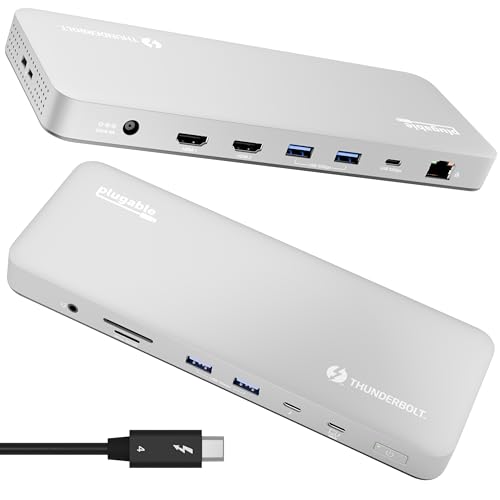
The Plugable TBT-UDM dock features a space gray aluminum-clad exterior. According to the listing, this material choice gives the unit a professional look that matches modern MacBooks. The enclosure is compact, measuring 8.86 inches in length, 3.35 inches in width, and just 0.91 inches in height. This low profile allows it to sit flat on your desk without taking up much horizontal space. The unit weighs 2.85 pounds. This mass provides stability, preventing the dock from sliding around when you plug or unplug cables during use.
The layout centers on a single upstream Thunderbolt 4 port for host connection. This interface handles data speeds up to 40Gbps and delivers 100W of power to your laptop. You do not need to manage multiple power bricks. The remaining twelve ports are arranged for easy access. These include dual HDMI outputs, four USB-A ports, one USB-C port, an Ethernet jack, audio jacks, and SD card slots. The design prioritizes a single-cable solution to reduce desk clutter.
This build style suits users who value organization. The aluminum body helps with heat dissipation during long work sessions. The fixed position means you will likely keep it plugged in at a primary workstation. It is not designed for frequent travel due to its weight and rigid port configuration. You get a stable, high-performance hub that stays put while you work.
Setup and everyday use
Setup begins with a single Thunderbolt 4 cable. You connect the dock to your Mac or Windows PC. This single cable handles data, video, and power. The listing states the device is driverless. You do not need to download software or install drivers. It is plug-and-play. This simplifies the initial configuration significantly. You can connect up to two 4K displays at 60Hz. This works on all M4 and M5 MacBooks. It also works with M1, M2, and M3 Macs that have Pro or Max CPUs. Base M1 and M2 models support only one external screen. Base M3 Macs support dual displays only in clamshell mode. Windows systems with Thunderbolt 4 or USB4 are also supported. Daily use involves plugging in peripherals. The dock offers 13 ports. You have access to four USB-A ports, an SD card slot, an Ethernet port, and audio jacks. The 100W power delivery keeps your MacBook charged while you work. This is useful for hot-desks or home offices. The aluminum-clad design matches modern MacBooks. It is compact enough for most desks. The 40Gbps data speed ensures fast file transfers. You can connect multiple devices without cable chaos. The unit weighs 2.85 pounds. It is stable on a desk. You get lifetime support from the manufacturer. This setup is ideal for video editors and multitaskers who need a clean desk. It reduces the number of cables you need to manage each day.
Before You Buy This Dock
You should verify your Mac model before buying this dock. It works best with M4, M5, and M3 Pro or Max chips. Base M1 and M2 Macs only support one external screen. Base M3 models need clamshell mode for dual displays. Windows users with Thunderbolt 4 or USB4 can also use it. You will need a Thunderbolt cable if one is not included. The 100W power delivery handles most laptops, but check your specific charger needs. This dock fits well in setups where you want a clean, single-cable solution. It replaces multiple dongles. Keep the space gray aluminum clean with a dry cloth. Dust can clog the ports. This option suits users who need dual 4K monitors and fast data transfers. It is not ideal for those with older Macs or those who need more than two screens. Consider your cable management and desk space. This dock is a solid choice for fixed workstations rather than mobile setups.
Check before you buy
- Check if your Mac model supports dual 4K displays.
- Ensure your laptop has a Thunderbolt 4 or USB4 port.
- Verify you need 100W power delivery for your device.
- Confirm you have space for a 2.85 pound dock.
The product at a glance
Plugable Thunderbolt 4 Dual HDMI Dock
Best for: M4/M5 MacBook dual monitor setups
- Host Interface
- Thunderbolt 4, USB4
- Display Support
- Dual
- Max Resolution
- Single 6K, Dual 4K 60Hz
- Power Delivery
- 100W
- Port Count
- 13
- Video Ports
- HDMI
View on Amazon: Plugable Thunderbolt 4 Dual HDMI Dock Affiliate link
This Plugable dock connects to your M4 or M5 MacBook via Thunderbolt 4. It supports two 4K 60Hz HDMI displays and delivers 100W of power to your laptop. The aluminum unit includes 13 ports, such as USB-A, SD cards, and Ethernet. It works with most M-series Macs and Windows systems. You get a single-cable solution for your desk setup without needing extra drivers.
Pros
- Dual 4K 60Hz HDMI output for two monitors
- 100W Power Delivery charges your laptop
- 13 ports including USB-A, SD, and Ethernet
- Plug-and-play setup with no drivers required
- Aluminum build in Space Grey color
Cons
- Base M1 and M2 Macs support only one external display
- Base M3 Macs require clamshell mode for dual displays
- Heavy at 2.85 pounds for a desktop dock
Good fit if
- You use an M4 or M5 MacBook Pro or Air
- You need dual 4K monitors for your workflow
- You want a single cable for power and data
Skip if
- You have a base M1 or M2 MacBook
- You need more than two external displays
- You prefer a lightweight portable dock
Verdict: Plugable TBT-UDM Thunderbolt 4 Dock provides a stable dual-monitor setup for M4/M5 MacBooks. It fits users who need high-speed data and reliable power delivery on their desk.
Specifications side by side
| Spec | Plugable Thunderbolt 4 Dual HDMI Dock |
|---|---|
| Host Interface | Thunderbolt 4, USB4 |
| Display Support | Dual |
| Max Resolution | Single 6K, Dual 4K 60Hz |
| Power Delivery | 100W |
| Port Count | 13 |
| Video Ports | HDMI |
| Max Data Speed | 40Gbps |
| Resolution | 4K UHD |
| Connectivity | HDMI, Ethernet, Thunderbolt 4 |
| Slot Count | 1 Slot |
| Dimensions | 3.35 × 8.86 × 0.91 inches |
| Weight | 2.85 pounds |
| Color | Space Grey |
| Model | TBT-UDM |
Frequently asked questions
Does the Plugable TBT-UDM support dual monitors on M4 MacBooks?
Yes, it provides a stable dual-monitor setup for M4 MacBooks. The dock connects via Thunderbolt 4, allowing you to use two HDMI outputs simultaneously. This configuration is ideal for users who need expanded screen real estate on their desk without complexity.
What is the maximum power delivery for laptops using this dock?
The device delivers up to 100W of power to your connected laptop. This high-speed power delivery ensures your Mac stays charged while you work. You can rely on this single cable for both data transfer and consistent power supply during daily tasks.
How large is the Plugable Thunderbolt 4 dock?
The unit measures 8.86 inches in length, 3.35 inches in width, and 0.91 inches in height. It weighs 2.85 pounds. These dimensions allow it to sit compactly on your desk. The space gray aluminum-clad exterior matches modern MacBooks for a professional look.
Is driver installation required for the TBT-UDM dock?
No, the dock is driverless. You do not need to download software or install drivers to use it. Setup begins with connecting a single Thunderbolt 4 cable between your computer and the dock. It handles data, video, and power automatically upon connection.
Can I use this dock with Windows computers?
Yes, Windows users with Thunderbolt capabilities can use this dock. The listing confirms compatibility with Windows PCs. It provides 40Gbps data speeds via the Thunderbolt 4 interface. This ensures fast file transfers and stable video output regardless of your operating system.
What connectivity standard does the Plugable TBT-UDM use?
It uses the Thunderbolt 4 connectivity standard. This interface offers 40Gbps data speeds and supports dual 4K displays at 60Hz. Thunderbolt 4 uses a single cable to link your laptop, providing a high-speed data path and simultaneous power delivery for a clean setup.