Plugable 7-in-1 Dual 4K HDMI Review (2026): A Spec-Based Look
As an Amazon Associate we earn from qualifying purchases. Links on this page are affiliate links.
This plugable 7 in 1 USB c displaylink dock review covers the USBC-6950PDZ, a compact docking station designed to expand your laptop’s connectivity. It features two HDMI ports capable of outputting dual 4K 60Hz displays, even on systems without native dual video support. The unit also includes Gigabit Ethernet, SD card slots, and USB-A ports. It supports up to 82W pass-through charging for your host device. This dock relies on DisplayLink technology to function, requiring a driver installation on macOS. It is built for users who need multiple screens and robust I/O in a small footprint.
What stands out
- Dual 4K 60Hz HDMI outputs via DisplayLink chipset
- Up to 82W pass-through charging from a 100W adapter
- Compact dimensions of 4.72 x 4.72 x 1.02 inches
- Built-in Gigabit Ethernet and SD card slot
Who it fits
Good fit for
You should consider this dock if you need to run two external monitors on a laptop that does not natively support dual displays. It is ideal for Windows users who want a plug-and-play experience, as the driver installs automatically. It also suits macOS users who are willing to manually install the DisplayLink software. The compact size makes it suitable for travel, while the SD slot and Ethernet port help users who need reliable file transfers and wired internet without carrying extra adapters.
Who should skip it
Skip this model if you require a setup that works without installing additional software drivers. macOS users who prefer native display support without manual configuration should look elsewhere. It is also not suitable if you need more than two HDMI outputs or require Thunderbolt speeds for high-bandwidth peripherals. Users who need USB4 or Thunderbolt 4 connectivity will find the USB-C host interface limiting. Additionally, if you need a remote control or wireless connectivity features, this dock does not include them.
Verdict: This dock effectively expands your workspace with dual 4K displays and essential ports in a small package. It is a solid choice for users who need multi-monitor support and do not mind installing a driver.
Key specs explained for this dock
Max Resolution: 4K@60Hz
This specification means each connected HDMI display can output a 4K UHD image at sixty frames per second. You get smooth video for streaming and clear text for spreadsheets. This refresh rate is standard for modern productivity setups. When comparing portable monitors, check if they match this speed to avoid lag in cursor movement or video playback.
Display Support: Dual
The dock outputs two separate extended displays simultaneously. You can arrange your workspace across two screens for better multitasking. This feature relies on DisplayLink technology, which requires a specific driver on macOS. If you need more than one external screen, this spec confirms the hardware capability, unlike single-display adapters.
Power Delivery: 82W
The dock passes up to 82 watts of power from your charger to your laptop. This keeps your computer running while connected to the dock. You need a charger that supports at least 100 watts to achieve this level. Check your laptop’s power requirements to ensure this output is sufficient for your specific model during heavy use.
Host Interface: USB-C
You connect the dock to your laptop using a single USB-C cable. This single connection handles data, video, and power delivery. It simplifies your desk by reducing the number of cables plugged into your computer. Verify your laptop has a compatible USB-C port that supports video output and data transfer for full functionality.
Ethernet Speed: Gigabit
The built-in Ethernet port supports network speeds up to one gigabit per second. This provides a stable wired connection for video calls and large file transfers. Wired connections are often more reliable than Wi-Fi in crowded areas. This spec ensures you can maintain a strong internet link while using your portable monitor setup.
Design and Build Overview
The listing describes the Plugable USBC-6950PDZ as a compact docking station with a black finish. According to the listing, the unit measures 4.72 inches in width and length, with a height of 1.02 inches. This small footprint allows it to sit neatly beside your laptop without consuming excessive desk space. The design prioritizes a low profile, making it suitable for tight workspaces or temporary setups where clearance is limited.
Weight is listed at 8.82 ounces. This light mass suggests the dock is easy to move between locations. You can carry it in a laptop bag or briefcase without adding significant bulk. The compact dimensions and manageable weight support its classification as a travel-ready device for professionals who switch between office and remote locations.
The layout includes seven ports, featuring dual HDMI outputs for video, USB-A and USB-C data connections, Gigabit Ethernet, and an SD card slot. The host interface connects via USB-C. This configuration centralizes your peripherals into a single connection point. The finish appears to be a standard durable plastic, typical for portable electronics. The design focuses on functionality and port density rather than premium materials. You get a straightforward tool that expands connectivity without requiring a large physical footprint.
Setup and Daily Use Guide
Setting up this dock requires a USB-C host connection. You connect your laptop to the dock via the USB-C port. The listing notes that a DisplayLink driver is required for dual display functionality. On Windows, this driver installs automatically. On macOS, you must manually install the software. Without this driver, the dock may not function as intended for extended displays.
For power, the dock accepts up to 100W from a power adapter. It provides up to 82W pass-through charging to your laptop. You plug your laptop’s power adapter directly into the dock. This keeps your system powered while connected. Charging performance depends on both your laptop and charger capabilities. The dock is compatible with USB-C power adapters ranging from 45W to 100W. It also works with MagSafe Charger and other USB-C devices like iPads and Galaxy phones. Note that the charging cable is sold separately.
In daily use, you benefit from seven ports. These include two HDMI outputs, USB-A, USB-C, Gigabit Ethernet, and an SD slot. The SD slot supports dual-lane SDR104/DDR for quick file transfers. The compact design, measuring 4.72 inches square and weighing 8.82 ounces, allows for easy transport. You can simplify your workspace by connecting multiple peripherals through a single cable. The dock supports dual 4K 60Hz HDMI displays, making it suitable for productivity and multitasking. You get extended desktop space even if your system lacks native dual video support. The unit includes a two-year coverage against defects and lifetime support from a North American-based team.
Check Compatibility Before You Buy
This dock expands your setup using DisplayLink technology, which allows dual 4K 60Hz outputs even if your laptop lacks native dual video support. You must ensure your system supports this driver-based approach. On Windows, the driver installs automatically. On macOS, you need to manually install the software before use. Verify your laptop has a compatible USB-C port for the host connection. The dock provides up to 82W of pass-through charging, but this depends on your specific laptop and charger capabilities. You will need to supply your own charging cable. This device fits well into multi-screen laptop setups where native ports are limited. It complements portable monitors by adding stable, high-resolution outputs. Check your operating system requirements carefully. Ensure your workspace has a nearby power outlet for the dock’s adapter. This compact unit sits easily on your desk alongside your primary display.
Check before you buy
- Confirm your laptop has a compatible USB-C host port.
- Verify macOS requires manual driver installation for dual displays.
- Check if your laptop supports pass-through charging via USB-C.
- Ensure you have a suitable USB-C power adapter available.
The product at a glance
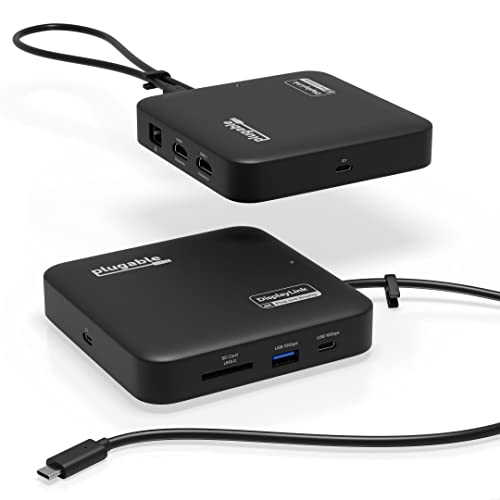
Plugable 7-in-1 Dual 4K HDMI USB-C Dock
Best for: Users needing dual 4K HDMI and compact design
- Host Interface
- USB-C
- Display Support
- Dual
- Max Resolution
- 4K@60Hz
- Power Delivery
- 82W
- Port Count
- 7
- Video Ports
- HDMI
View on Amazon: Plugable 7-in-1 Dual 4K HDMI USB-C Dock Affiliate link
This Plugable dock adds dual 4K 60Hz HDMI outputs to laptops via DisplayLink technology. It features a 7-in-1 design with USB-C, USB-A, Gigabit Ethernet, and an SD card slot. The unit supports up to 82W pass-through charging for your host device. Its compact black chassis measures 4.72 inches square and weighs 8.82 ounces. It suits users needing expanded connectivity and multi-screen setups on systems without native dual video support.
Pros
- Outputs two extended 4K 60Hz HDMI displays
- Provides up to 82W pass-through charging
- Includes Gigabit Ethernet and SD card slot
- Compact travel-ready design at 8.82 ounces
Cons
- Requires DisplayLink driver installation on macOS
- Pass-through charging capped at 82W
- Charging cable sold separately
Good fit if
- You need dual 4K monitors on a single USB-C port
- You want a compact dock for travel
- You use Windows or macOS and can install drivers
Skip if
- You require plug-and-play dual displays on macOS without software
- You need more than 82W pass-through charging
- You prefer a dock with an included charging cable
Verdict: Plugable 7-in-1 USB-C Dock Dual 4K delivers dual 4K 60Hz video and essential ports in a small form factor. It fits professionals who need reliable multi-screen productivity and do not mind installing macOS drivers.
Specifications side by side
| Spec | Plugable 7-in-1 Dual 4K HDMI USB-C Dock |
|---|---|
| Host Interface | USB-C |
| Display Support | Dual |
| Max Resolution | 4K@60Hz |
| Power Delivery | 82W |
| Port Count | 7 |
| Video Ports | HDMI |
| Max Data Speed | 10Gbps |
| Ethernet Speed | 1Gbps |
| Resolution | 4K UHD |
| Connectivity | USB-C, HDMI, Ethernet, USB-A |
| Refresh Rate | 60Hz |
| Features | DisplayLink |
| Dimensions | 4.72 × 4.72 × 1.02 inches |
| Weight | 8.82 ounces |
| Color | Black |
| Model | USBC-6950PDZ |
Frequently asked questions
Does the Plugable 7-in-1 dock support dual 4K monitors?
Yes, it supports dual 4K UHD displays. The device uses DisplayLink technology to output two separate 4K signals at 60Hz via its two HDMI ports. This allows you to run two high-resolution screens simultaneously, even if your laptop does not natively support dual video output.
What is the maximum power delivery for laptops?
The dock provides up to 100W of Power Delivery. This allows you to charge your connected laptop while using the dock. You can maintain your device’s battery and power your peripherals through a single USB-C connection to your computer.
Is a driver required for macOS users?
Yes, macOS users must manually install the DisplayLink driver. Unlike Windows, where the driver often installs automatically, Apple systems require a specific software installation to enable the dual 4K HDMI functionality. You need to download and install this driver before using the dual screens.
How large is the Plugable USBC-6950PDZ?
The dock measures 4.72 inches in width and length, with a height of 1.02 inches. This compact form factor allows it to sit neatly on a desk without taking up much space. It is designed to be unobtrusive while providing multiple connection points.
What is the weight of this docking station?
The unit weighs 8.82 ounces. This lightweight design makes it easy to move between workspaces or pack for travel. The compact size and light weight ensure it does not add significant bulk to your laptop bag or desk setup.
Can I connect this dock to a Windows laptop?
Yes, it works with Windows laptops. The system typically installs the necessary DisplayLink driver automatically upon connection. This allows you to utilize the dual 4K 60Hz outputs and other ports without manual configuration, providing a straightforward setup experience for Windows users.
What connectivity options does this dock offer?
It features a 7-in-1 configuration with USB-C and HDMI connections. The two HDMI ports handle the dual 4K video output. The USB-C port connects to your host laptop, providing both data transfer and power delivery. This setup consolidates your connections into a single hub.
Is this dock suitable for professional productivity?
Yes, it is designed for professionals needing reliable multi-screen productivity. The dual 4K 60Hz outputs provide clear text and smooth video for spreadsheets and streaming. Its compact design and 100W power delivery make it a practical choice for users who require efficient workspace expansion.