Lenovo vs WAVLINK Docking Stations: Which Brand Fits You?
As an Amazon Associate we earn from qualifying purchases. Links on this page are affiliate links.
Choosing between a lenovo vs WAVLINK docking station depends on your port needs and display setup. Both units offer Gigabit Ethernet and USB-C connectivity for modern laptops. The Lenovo ThinkPad Hybrid Dock focuses on robust data transfer and legacy compatibility with extensive USB ports. The WAVLINK 12-in-1 dock prioritizes video expansion, supporting triple monitors and higher power delivery. You should pick the unit that matches your specific peripheral and screen requirements.
Key differences
| Aspect | Lenovo ThinkPad Hybrid USB-C and USB-A Dock | WAVLINK 12-in-1 Triple Monitor USB-C Dock |
|---|---|---|
| Display Support | Dual display (2x DisplayPort, 2x HDMI) | Triple display (1x HDMI, 2x DisplayPort) |
| Power Delivery | 15W USB-C, 10.5W USB-A | 85W PD |
| Data Speed | 10Gbps (USB 3.1 Gen2) | not listed |
| Card Readers | not listed | SD/TF slots (104MB/s) |
| Warranty | not listed | Two-year warranty |
Which one should you choose?
Choose Lenovo ThinkPad Hybrid USB-C and USB-A Dock if
- You need fast 10Gbps data transfer for large files.
- You require multiple legacy USB-A ports for older peripherals.
- You use a dual-monitor setup with DisplayPort and HDMI.
Choose WAVLINK 12-in-1 Triple Monitor USB-C Dock if
- You want to drive three monitors simultaneously.
- You need 85W power delivery to charge your laptop.
- You require built-in SD and TF card slots.
Verdict: The Lenovo dock suits users who prioritize high-speed data transfer and extensive USB-A connectivity for older devices. The WAVLINK dock is better for those needing triple monitor support and faster laptop charging. Your choice depends on whether you value data speed or display expansion.
Lenovo vs WAVLINK Dock Specs
Display Support
The WAVLINK 12-in-1 Triple Monitor USB-C Dock offers extensive video connectivity with one HDMI and dual DisplayPort outputs. This configuration allows for triple 1080P@60Hz displays under DP 1.4 or a single 4K@60Hz monitor. In contrast, the Lenovo ThinkPad Hybrid Dock provides two DisplayPort and two HDMI ports. While Lenovo includes more physical video outputs, the WAVLINK model is explicitly engineered for multi-screen setups. You can run three displays simultaneously with the WAVLINK unit. The Lenovo dock supports dual monitors natively. If your workflow requires three screens, the WAVLINK design is the superior choice.
Power Delivery
Charging capabilities differ significantly between these two docking stations. The WAVLINK dock features an 85W Power Delivery output. It accepts up to 100W input to deliver this power to your laptop. This ensures your device stays charged while connected to peripherals. The Lenovo ThinkPad Hybrid Dock does not list a specific wattage for laptop charging. It offers 15W from the USB-C port and 10.5W from the always-on USB 3.0 port for mobile devices. The Lenovo unit focuses on charging phones or tablets rather than powering a laptop. For high-power laptop charging, the WAVLINK dock provides a clear advantage.
Connectivity
Port variety is a key factor for workstation expansion. The WAVLINK dock provides twelve ports, including SD and TF card slots with 104MB/s transfer speeds. It also includes two USB 3.0 and two USB 2.0 ports. The Lenovo ThinkPad Hybrid Dock offers five USB ports: three USB 3.1 Gen 2 ports with 10Gbps speeds and two USB 2.0 ports. Lenovo includes one always-on charging port. The Lenovo dock lacks card readers. The WAVLINK unit offers more total ports and storage card access. However, Lenovo provides faster USB 3.1 Gen 2 data transfer speeds. Each brand prioritizes different connectivity needs.
Compatibility
Device support varies across operating systems and hardware generations. The WAVLINK dock lists broad compatibility with Windows, Mac OS, Chrome OS, Linux, and Android with OTG. It requires a USB-C port that supports video output and charging. The Lenovo ThinkPad Hybrid Dock is described as enterprise-class universal docking. It explicitly supports a wide range of older ThinkPad models and non-Lenovo laptops. It works with devices like the X1 Carbon and T series. The Lenovo dock emphasizes backward compatibility with older hardware. The WAVLINK dock targets modern USB-C and Thunderbolt 3/4 devices. Your choice depends on the age of your laptop.
Build and Size
Physical dimensions and weight affect desk space and portability. The Lenovo ThinkPad Hybrid Dock measures 8.3 inches in length, 3.1 inches in width, and 1.2 inches in height. It weighs 1.05 pounds. The WAVLINK dock is more compact, measuring 6.22 inches in length, 1.61 inches in width, and 0.63 inches in height. It weighs only 5.82 ounces. The WAVLINK unit is significantly smaller and lighter. It takes up less desk space. The Lenovo dock is larger and heavier, suggesting a more substantial internal build. If you need a compact solution, the WAVLINK dock is the better option.
Which docking station fits your workflow
Users needing triple monitor setups
The WAVLINK dock supports three displays simultaneously at 1080p or one 4K monitor. Its dual DisplayPort and single HDMI ports enable this extended desktop. If your work involves coding, data analysis, or presentations requiring multiple screens, this hardware configuration maximizes your visual workspace without requiring additional adapters.
ThinkPad owners seeking reliable docking
The Lenovo dock explicitly supports numerous ThinkPad models including T, X, and L series. It features rapid charge technology and robust USB 3.1 Gen 2 ports for high-speed data transfer. If you use a compatible Lenovo laptop, this dock ensures stable connectivity and optimized power delivery for your device.
Those prioritizing port density and speed
The Lenovo unit offers five USB ports, including three high-speed 10Gbps options and an always-on charging port. It also includes dual video outputs and Gigabit Ethernet. If you connect many peripherals like mice, drives, and network cables, the higher number of dedicated data ports reduces the need for extra hubs.
Users wanting fast laptop charging
The WAVLINK dock provides 85W Power Delivery to charge your laptop while connected to peripherals. This high wattage output ensures your device stays powered during intensive tasks. If you prefer a single cable solution for both data and significant power delivery, this specification meets the needs of most modern USB-C laptops.
The products compared
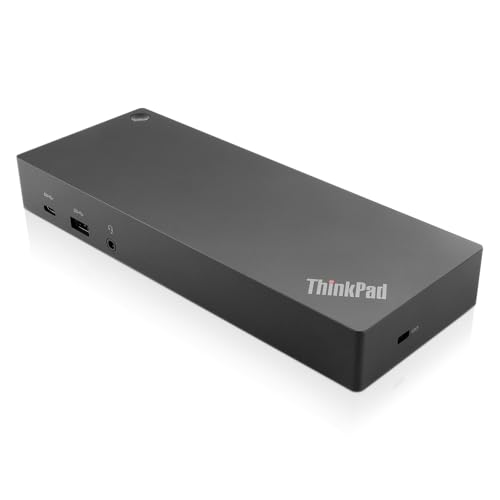
Lenovo ThinkPad Hybrid USB-C and USB-A Dock
Best for: ThinkPad users needing dual displays and wired Ethernet
- Host Interface
- USB-C, USB-A
- Video Ports
- DisplayPort, HDMI
- Max Data Speed
- 10Gbps
- Ethernet Speed
- Gigabit Ethernet
- Dimensions
- 8.3 × 3.1 × 1.2 inches
- Weight
- 1.05 pounds
View on Amazon: Lenovo ThinkPad Hybrid USB-C and USB-A Dock Affiliate link
This Lenovo docking station connects via USB-C or USB-A to expand your laptop's connectivity. It supports dual external displays through two DisplayPort and two HDMI outputs. The unit includes three USB 3.1 Gen2 ports for fast data transfer at 10Gbps and a Gigabit Ethernet port for stable wired networking. It weighs 1.05 pounds and measures 8.3 inches long. This setup suits users needing reliable enterprise-grade connectivity for older and newer ThinkPad models.
Pros
- Dual DisplayPort and dual HDMI outputs for multi-monitor setups
- Three USB 3.1 Gen2 ports with 10Gbps data speeds
- Gigabit Ethernet port for wired internet connection
- Supports both USB-C and USB-A host connections
Cons
- Limited to Gigabit Ethernet speeds
- Only one USB-C port available for data
- Heavier than some compact docking alternatives
Good fit if
- You need dual monitor support via DisplayPort or HDMI
- You use older ThinkPad laptops with USB-A ports
- You require a Gigabit Ethernet connection for stability
Skip if
- You need Thunderbolt 4 speeds for maximum bandwidth
- You want a USB-C only connection without adapters
- You need more than two external video outputs
Verdict: Lenovo ThinkPad Hybrid USB-C Dock offers versatile connectivity for users who need dual displays and fast USB 3.1 transfers. It is the right choice for ThinkPad owners who value reliable wired networking and flexible port options.

WAVLINK 12-in-1 Triple Monitor USB-C Dock
Best for: Triple display setups on Windows laptops
- Host Interface
- USB-C
- Display Support
- Triple
- Max Resolution
- 4K@60Hz
- Power Delivery
- 85W
- Port Count
- 12
- Video Ports
- HDMI, DisplayPort
View on Amazon: WAVLINK 12-in-1 Triple Monitor USB-C Dock Affiliate link
The WAVLINK KR-RZUS-UMD303 is a 12-in-1 docking station designed for users needing triple display support. It features dual DisplayPort and one HDMI output, allowing for three 1080p@60Hz screens or one 4K@60Hz display. The dock provides 85W Power Delivery for laptop charging and includes Gigabit Ethernet, SD/TF slots, and multiple USB ports. It connects via a single USB-C or Thunderbolt 3/4 port, offering a compact silver build for expanded workstation setups.
Pros
- Supports triple 1080p@60Hz or single 4K@60Hz displays
- 85W Power Delivery output for laptop charging
- 12 ports including Gigabit Ethernet and SD/TF slots
- Driver-free compatibility with Windows, Mac, and Linux
Cons
- 85W power delivery is lower than the 100W input capability
- Mac OS users can only mirror displays, not extend them
- Charger and cable are not included in the box
Good fit if
- You need three monitors for productivity tasks
- You use a laptop with USB-C or Thunderbolt 3/4
- You require Gigabit Ethernet and SD card access
Skip if
- You need more than 85W of charging power
- You want to extend displays on a Mac
- You prefer a dock with a built-in power supply
Verdict: WAVLINK Triple Monitor USB-C Dock offers essential multi-display expansion for Windows and Linux users. It is a practical solution for those who need triple screens and Gigabit connectivity without the bulk of larger docking stations.
Specifications side by side
| Spec | Lenovo ThinkPad Hybrid USB-C and USB-A Dock | WAVLINK 12-in-1 Triple Monitor USB-C Dock |
|---|---|---|
| Host Interface | USB-C, USB-A | USB-C |
| Display Support | not stated | Triple |
| Max Resolution | not stated | 4K@60Hz |
| Power Delivery | not stated | 85W |
| Port Count | not stated | 12 |
| Video Ports | DisplayPort, HDMI | HDMI, DisplayPort |
| Max Data Speed | 10Gbps | not stated |
| Ethernet Speed | Gigabit Ethernet | Gigabit |
| Resolution | not stated | 4K UHD |
| Connectivity | USB-C, USB-A | USB-C, HDMI, DisplayPort, Ethernet, USB-A |
| Refresh Rate | not stated | 60Hz |
| Slot Count | not stated | 1 Slot |
| Dimensions | 8.3 × 3.1 × 1.2 inches | 6.22 × 1.61 × 0.63 inches |
| Weight | 1.05 pounds | 5.82 ounces |
| Color | Black | Silver |
| Model | 40AF0135US | KR-RZUS-UMD303 |
| Size | not stated | 100W |
Frequently asked questions
Does the Lenovo ThinkPad dock support dual monitors?
Yes, the Lenovo ThinkPad Hybrid USB-C and USB-A Dock supports dual displays. It is designed for users who need to connect two screens simultaneously. This makes it suitable for ThinkPad owners who require a stable, wired connection for productivity tasks. The dock provides reliable video output alongside its robust data transfer capabilities.
Can the WAVLINK dock drive three screens at once?
Yes, the WAVLINK 12-in-1 Triple Monitor USB-C Dock supports triple monitor setups. It uses one HDMI port and two DisplayPort outputs to drive three 1080p@60Hz displays. This configuration allows for an extended desktop on Windows and Linux laptops. It is a practical solution for users needing multiple screens without excessive bulk.
Is the Lenovo dock compatible with non-ThinkPad laptops?
The Lenovo ThinkPad Hybrid USB-C and USB-A Dock is primarily recommended for ThinkPad users. However, its USB-C and USB-A connectivity allows it to work with other laptops that support these standards. You can use it for versatile connectivity and fast USB 3.1 transfers. It offers flexible port options for various devices.
What is the weight difference between the two docks?
The Lenovo ThinkPad dock weighs 1.05 pounds. The WAVLINK dock is lighter at 5.82 ounces. This significant difference makes the WAVLINK unit more portable. You can carry the WAVLINK dock easily in a laptop bag. The Lenovo unit is heavier due to its robust build and extensive port array.
Does the WAVLINK dock include Gigabit Ethernet?
Yes, the WAVLINK 12-in-1 Triple Monitor USB-C Dock includes Gigabit Ethernet connectivity. This feature ensures fast and stable wired networking for your laptop. It is essential for users who require reliable internet access for data-heavy tasks. The dock provides this alongside its triple display support and USB-C connection.
Which dock is better for wired networking?
Both docks offer Gigabit Ethernet for reliable wired connections. The Lenovo ThinkPad Hybrid Dock is ideal for users who prioritize robust data transfer and legacy compatibility. It features extensive USB ports alongside its network connection. The WAVLINK dock also provides Gigabit connectivity but focuses more on multi-display expansion for Windows and Linux systems.
What video ports does the WAVLINK dock have?
The WAVLINK 12-in-1 Triple Monitor USB-C Dock has one HDMI port and two DisplayPort outputs. These ports enable the support for three simultaneous displays. You can achieve triple 1080p@60Hz setups or a single 4K@60Hz monitor. This configuration provides extensive video connectivity for users needing an expanded desktop workspace.
Is the Lenovo dock compact for travel?
The Lenovo ThinkPad Hybrid USB-C and USB-A Dock measures 8.3 inches in length. It weighs 1.05 pounds and stands 1.2 inches high. While it is not the smallest option, it offers a compact footprint for desktop use. Its design prioritizes connectivity over minimal size, making it suitable for a fixed workstation setup.