Best Lenovo Docking Stations with USB-A: 4 Spec-Based Picks
As an Amazon Associate we earn from qualifying purchases. Links on this page are affiliate links.
Finding the best lenovo docking stations with USB-A requires looking at published specs rather than marketing claims. We compared 4 models to help you choose based on data. The top pick is the Lenovo ThinkPad Hybrid USB-C and USB-A Dock, which leads because it supports dual displays and wired internet setups. This guide helps you decide which dock fits your portability and connectivity needs by comparing width, weight, and power delivery.
Quick picks
| # | Product | Best for | Price |
|---|---|---|---|
| 1 | Lenovo ThinkPad Hybrid USB-C and USB-A Dock Best overall | dual display and wired internet setups | Check price of Lenovo ThinkPad Hybrid USB-C and USB-A Dock on Amazon |
| 2 | Lenovo USB-C Universal Business Dock Also great | Dual monitor setups with standard USB-C laptops | Check price of Lenovo USB-C Universal Business Dock on Amazon |
| 3 | Lenovo ThinkPad Hybrid Dual Monitor Dock Best premium | users needing dual displays and 135W power | Check price of Lenovo ThinkPad Hybrid Dual Monitor Dock on Amazon |
| 4 | Lenovo GaN 60W Multiport Charging Dock Best budget | travelers needing 4K output and charging | Check price of Lenovo GaN 60W Multiport Charging Dock on Amazon |
The best fit for you
- You need dual displays and wired internet Lenovo ThinkPad Hybrid USB-C and USB-A Dock This dock supports dual displays and includes Ethernet for wired connectivity.
- You want the most compact model on the list Lenovo GaN 60W Multiport Charging Dock It weighs 8.82 ounces and measures 3.15 inches in length.
- You need high power for dual monitors Lenovo ThinkPad Hybrid Dual Monitor Dock It delivers 135W of power while supporting dual monitor setups.
- You want a budget-friendly dual monitor setup Lenovo USB-C Universal Business Dock It supports dual monitors and includes HDMI and DisplayPort outputs.
Our 4 picks
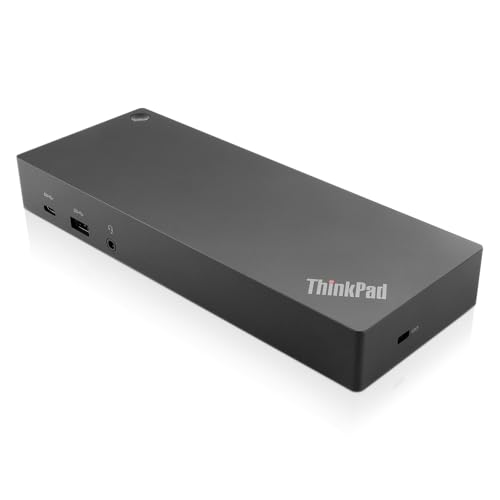
Lenovo ThinkPad Hybrid USB-C and USB-A Dock
Best for: dual display and wired internet setups
- Connectivity
- USB-C, USB-A (what this guide is about)
- Host Interface
- USB-C, USB-A
- Video Ports
- DisplayPort, HDMI
- Max Data Speed
- 10Gbps
- Ethernet Speed
- Gigabit Ethernet
- Dimensions
- 8.3 × 3.1 × 1.2 inches
View on Amazon: Lenovo ThinkPad Hybrid USB-C and USB-A Dock Affiliate link
This Lenovo dock connects via USB-C and USB-A, supporting dual displays through two HDMI and two DisplayPort outputs. It delivers up to 10Gbps data speeds and includes a Gigabit Ethernet port. The unit weighs 1.05 pounds and measures 8.3 inches long. It is suitable for users needing reliable multi-monitor setups and wired networking on compatible laptops.
Pros
- Dual HDMI and dual DisplayPort outputs for multi-monitor support
- Gigabit Ethernet port for stable wired internet
- USB-C port with 5V 3A power delivery
- 10Gbps data transfer speed on USB 3.1 Gen2 ports
Cons
- Limited to 15W charging power from the USB-C port
- No Thunderbolt support for higher bandwidth
- Heavier and bulkier than GaN charging docks
Good fit if
- You need dual monitors with HDMI or DisplayPort connections
- You require a Gigabit Ethernet port for your setup
- You use compatible ThinkPad or Lenovo laptops
Skip if
- You need high-speed charging above 15W
- You prefer a lightweight, travel-friendly dock
- Your laptop requires Thunderbolt connectivity
Verdict: Lenovo ThinkPad Hybrid USB-C with USB-A Dock offers robust video and networking options for stationary setups. It is best for users who prioritize dual displays and wired internet over portability.

Lenovo USB-C Universal Business Dock
Best for: Dual monitor setups with standard USB-C laptops
- Connectivity
- USB-C, HDMI, DisplayPort, USB-A (what this guide is about)
- Host Interface
- USB-C
- Display Support
- Dual
- Max Resolution
- 4K
- Power Delivery
- 65W
- Port Count
- 9
View on Amazon: Lenovo USB-C Universal Business Dock Affiliate link
This Lenovo docking station connects via USB-C to support dual 4K displays using DisplayPort 1.4 and HDMI 2.0. It delivers up to 65W of power delivery to your laptop, though the included 90W adapter allows for higher output. The unit features nine expansion ports and measures 6.06 by 3.15 inches. It suits users needing a compact, multi-port hub for mixed PC environments without complex setup.
Pros
- Supports dual 4K monitors via DP 1.4 and HDMI 2.0
- Nine expansion ports for peripheral connectivity
- Compact dimensions of 6.06 x 3.15 x 0.94 inches
- USB-C host interface with standard plug-and-play functionality
Cons
- Base power delivery is limited to 65W
- Requires a separate 135W adapter for 100W charging
- Does not support Thunderbolt protocols
Good fit if
- You need dual monitor support for productivity
- You want a compact dock for a small desk
- You use standard USB-C Alt-Mode laptops
Skip if
- You require Thunderbolt 3 or 4 speeds
- You need more than 65W charging without extra hardware
- You prefer a single HDMI-only connection
Verdict: Lenovo Universal Business Dock offers a solid dual-display setup for standard USB-C laptops. It is a practical choice for users who prioritize port variety and compact size over high-speed Thunderbolt connectivity.
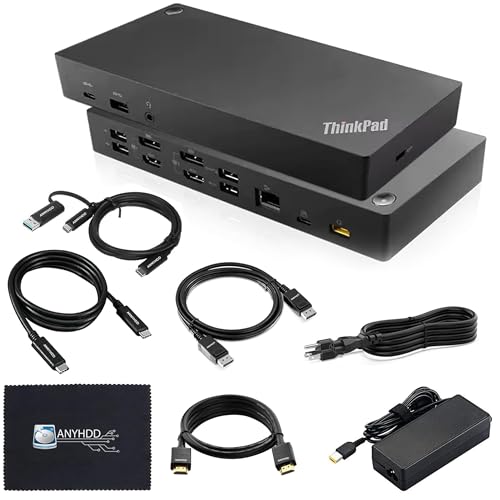
Lenovo ThinkPad Hybrid Dual Monitor Dock
Best for: users needing dual displays and 135W power
- Connectivity
- USB-C, HDMI, DisplayPort, USB-A (what this guide is about)
- Host Interface
- USB-C, USB-A
- Display Support
- Dual
- Video Ports
- DisplayPort, HDMI
- Ethernet Speed
- 1Gbps
- Power Delivery
- 135W
View on Amazon: Lenovo ThinkPad Hybrid Dual Monitor Dock Affiliate link
This Lenovo docking station connects via USB-C and USB-A to support dual monitor setups. It includes two HDMI and two DisplayPort 1.2 outputs for flexible display connections. The unit provides 135W power delivery to keep your laptop charged while connected. It also features a Gigabit Ethernet port for wired networking. You get included cables for HDMI, DisplayPort, and USB-C. This setup suits users needing reliable port expansion and stable power.
Pros
- 135W power delivery for laptop charging
- Dual monitor support with 2 HDMI and 2 DisplayPort 1.2 ports
- Includes HDMI, DisplayPort, and USB-C cables
- Gigabit Ethernet port for wired internet
- Compatible with USB-C and USB-A host connections
Cons
- Ethernet speed limited to 10/100/1000 Mb/s
- Model listed as Renewed condition
- No Thunderbolt support mentioned in specifications
Good fit if
- You need dual external displays with HDMI or DisplayPort
- You require 135W power delivery for your laptop
- You want a dock with included video cables
Skip if
- You need 2.5G or faster Ethernet speeds
- You prefer brand new units only
- You require Thunderbolt 4 connectivity
Verdict: Lenovo ThinkPad Hybrid 135W Dock offers robust dual-display options and high power output for users who prioritize wired connectivity and included cables over newer Thunderbolt standards.

Lenovo GaN 60W Multiport Charging Dock
Best for: travelers needing 4K output and charging
- Connectivity
- USB-C, HDMI, USB-A (what this guide is about)
- Host Interface
- USB-C
- Max Resolution
- 4K@60Hz
- Power Delivery
- 60W
- Video Ports
- HDMI 2.1
- Max Data Speed
- 10Gbps
View on Amazon: Lenovo GaN 60W Multiport Charging Dock Affiliate link
This Lenovo GaN dock delivers 60W power delivery through a USB-C host interface. It supports HDMI 2.1 output for 4K resolution at 60Hz. The unit includes two USB-C ports and one USB-A port for 10Gbps data transfer. It weighs 8.82 ounces and measures 1.32 inches wide. The design includes a silicone stand for upright use. It suits users needing a compact, sustainable docking solution for home or office setups.
Pros
- 60W Power Delivery via USB-C
- HDMI 2.1 supports 4K at 60Hz
- Includes silicone kickstand for stability
- Compact 8.82 oz weight
- Made from 90% recycled materials
Cons
- Only one USB-A port available
- No Ethernet or audio ports listed
- Lower 60W power limit than full-size docks
Good fit if
- You need a lightweight dock for travel
- You require 4K display output at 60Hz
- You want a built-in stand for desk use
Skip if
- You need multiple USB-A ports
- You require Ethernet connectivity
- You need more than 60W charging power
Verdict: Lenovo GaN 60W Portable Dock is a compact, sustainable option for users who prioritize portability and a built-in stand over extensive port variety.
Specifications side by side
| Spec | Lenovo ThinkPad Hybrid USB-C and USB-A Dock | Lenovo USB-C Universal Business Dock | Lenovo ThinkPad Hybrid Dual Monitor Dock | Lenovo GaN 60W Multiport Charging Dock |
|---|---|---|---|---|
| Host Interface | USB-C, USB-A | USB-C | USB-C, USB-A | USB-C |
| Display Support | not stated | Dual | Dual | not stated |
| Max Resolution | not stated | 4K | not stated | 4K@60Hz |
| Power Delivery | not stated | 65W | not stated | 60W |
| Port Count | not stated | 9 | not stated | not stated |
| Video Ports | DisplayPort, HDMI | DP 1.4, HDMI 2.0 | DisplayPort, HDMI | HDMI 2.1 |
| Max Data Speed | 10Gbps | not stated | not stated | 10Gbps |
| Ethernet Speed | Gigabit Ethernet | not stated | 1Gbps | not stated |
| Connectivity | USB-C, USB-A | USB-C, HDMI, DisplayPort, USB-A | USB-C, HDMI, DisplayPort, USB-A | USB-C, HDMI, USB-A |
| Features | not stated | not stated | not stated | Kickstand |
| Use | not stated | not stated | not stated | Gaming, Office |
| Recommended Use | not stated | not stated | not stated | Home |
| Dimensions | 8.3 × 3.1 × 1.2 inches | 6.06 × 3.15 × 0.94 inches | not stated | 3.15 × 1.32 × 3.15 inches |
| Weight | 1.05 pounds | 9.12 ounces | not stated | 8.82 ounces |
| Color | Black | Multicolor | Black | Black |
| Model | 40AF0135US | 40B30090US | 40AF0135US RENEWED | not stated |
How to choose the right one
-
Check power delivery needs
Your laptop’s charging requirements determine the right dock. The Lenovo ThinkPad Hybrid 135W Dock delivers 135W for high-power machines. The Universal Business Dock provides 90W for standard devices. The GaN 60W model offers 60W for lighter use. Check your laptop’s maximum input wattage before buying. Selecting a dock with insufficient power may prevent charging or slow it down significantly. Ensure the dock’s output meets or exceeds your laptop’s needs for reliable operation.
-
Verify display support options
Dual monitor setups require specific connectivity. The Lenovo ThinkPad Hybrid USB-C and USB-A Dock supports dual displays effectively. The Universal Business Dock also enables dual monitor configurations for standard USB-C laptops. The ThinkPad Hybrid Dual Monitor Dock is another strong option for this use case. If you only need a single screen, port variety might be more important than dual video outputs. Check the specifications to confirm the number of supported displays matches your workflow requirements.
-
Assess port connectivity types
USB-A ports are essential for legacy peripherals. All listed docks include USB-A connectivity. The Universal Business Dock adds HDMI and DisplayPort for flexible video connections. The GaN 60W Multiport Charging Dock includes HDMI for direct monitor attachment. Consider which cables you currently use. If you rely on older USB-A devices, ensure the dock provides enough ports. More ports reduce the need for additional adapters, keeping your workspace tidy and functional.
-
Consider physical dimensions and weight
Portability matters for mobile professionals. The GaN 60W dock weighs 8.82 ounces and measures 3.15 inches in length. It is the most compact option on this list. The ThinkPad Hybrid USB-C and USB-A Dock is larger, measuring 8.3 inches in length and weighing 1.05 pounds. If you travel frequently, the smaller footprint and lighter weight of the GaN model may be preferable. Stationary setups can accommodate the larger, more feature-rich options without issue.
-
Look for built-in features
Some docks include unique hardware elements. The Lenovo GaN 60W Multiport Charging Dock features a built-in kickstand. This allows for easier viewing angles without needing a separate stand. Other models do not list this feature in their specifications. If you frequently set up in different environments, a built-in stand adds convenience. Check the attributes section for features like kickstands or specific use recommendations that match your daily routine.
Frequently asked questions
Which Lenovo dock supports dual monitors with USB-A?
The Lenovo Universal Business Dock supports dual monitors. It features HDMI and DisplayPort outputs alongside USB-A ports. This model is designed for standard USB-C laptops that need expanded connectivity. It also delivers 90W of power to your device. This makes it a practical choice for multi-screen office setups.
Does the Lenovo ThinkPad Hybrid Dock have Ethernet?
Yes, the Lenovo ThinkPad Hybrid USB-C and USB-A Dock includes Ethernet. It is best for users who prioritize wired internet over portability. The dock connects via USB-C and USB-A interfaces. It also supports dual displays for stationary workstations. This setup ensures stable network connectivity for your laptop.
What is the smallest Lenovo docking station with USB-A?
The Lenovo GaN 60W Multiport Charging Dock is the most compact option. It weighs 8.82 ounces and measures 3.15 inches in length. This model includes a built-in kickstand for easy viewing. It provides 60W of power delivery and HDMI output. Its small footprint makes it ideal for travelers who need portability.
Can I use a Lenovo dock with a Thunderbolt laptop?
The Lenovo Universal Business Dock works with standard USB-C laptops. It does not require Thunderbolt connectivity for basic operation. It offers HDMI and DisplayPort for video output. The dock includes USB-A ports for peripherals. This makes it a versatile choice for users who do not need Thunderbolt speeds.
Which dock provides 135W of power delivery?
The Lenovo ThinkPad Hybrid Dual Monitor Dock provides 135W of power. This high output suits high-power machines that need substantial charging. It supports dual displays via HDMI and DisplayPort. The dock also includes USB-A ports for connectivity. This model is best for users needing robust power and video options.
Does the GaN dock support 4K video output?
The Lenovo GaN 60W Multiport Charging Dock supports 4K output. It connects via USB-C and includes an HDMI port. This model is designed for travelers needing compact solutions. It weighs 8.82 ounces and features a built-in kickstand. The dock provides 60W of power for compatible devices.
What connectivity ports are on the Universal Business Dock?
The Lenovo USB-C Universal Business Dock includes HDMI, DisplayPort, and USB-A ports. It connects to laptops via USB-C. This configuration supports dual monitor setups. The dock also delivers 90W of power. These ports provide versatile connectivity for office peripherals and displays.