Lenovo vs Tobenone Docking Stations: Which Brand Fits You?
As an Amazon Associate we earn from qualifying purchases. Links on this page are affiliate links.
When you compare the lenovo vs tobenone docking station options, you are looking at two very different approaches to connectivity. Both units expand your laptop's capabilities through USB-C connections. The main difference lies in their focus. The Lenovo ThinkPad Hybrid Dock prioritizes enterprise reliability and a mix of legacy ports alongside modern ones. The TobenONE 18-in-1 Dock focuses on high-resolution triple displays and massive port density for a clutter-free desk.
Key differences
| Aspect | Lenovo ThinkPad Hybrid USB-C and USB-A Dock | TobenONE 18-in-1 Triple Display Dock |
|---|---|---|
| Display Support | Dual displays via DisplayPort and HDMI | Triple 4K@60Hz displays via three HDMI ports |
| Total Ports | 8 ports (3x USB 3.1, 2x USB 2.0, 1x USB-C, 1x Ethernet, 2x HDMI, 1x Audio) | 18 ports (9 USB, 3 HDMI, RJ45, SD/microSD, Audio) |
| Power Delivery | Charges mobile devices at 15W and 10.5W; supports ThinkPad RapidCharge | 100W Power Delivery for laptop charging |
| Compatibility | Universal for ThinkPad and other laptops; supports older models | Optimized for Windows/Chrome OS; not recommended for Mac |
| Physical Size | 8.3 x 3.1 x 1.2 inches; 1.05 pounds | 4.9 x 3.5 x 1.6 inches; 10.9 ounces |
Which one should you choose?
Choose Lenovo ThinkPad Hybrid USB-C and USB-A Dock if
- You need a dock that works with older Lenovo ThinkPad models and legacy USB-A devices.
- You prefer a compact, lightweight unit that fits easily in a mobile workstation bag.
- You want a dock with a dedicated Gigabit Ethernet port and stereo/mic combo audio.
Choose TobenONE 18-in-1 Triple Display Dock if
- You require three external monitors running at 4K resolution for design or multitasking.
- You need 100W power delivery to charge your laptop directly through the dock.
- You want to connect multiple storage devices and SD cards without using adapters.
Verdict: The Lenovo ThinkPad Hybrid Dock is the better choice for users who need reliable connectivity for legacy devices and older ThinkPad laptops. The TobenONE 18-in-1 Dock suits those who need high-resolution triple displays and extensive USB expansion for a stationary home office setup.
Lenovo vs Tobenone Dock Specs
Display support
The TobenONE 18-in-1 Docking Station supports triple 4K displays at 60Hz, offering significant multitasking capability for video editing or design work. It provides three HDMI outputs to drive multiple monitors simultaneously. In contrast, the Lenovo ThinkPad Hybrid Dock supports dual displays via two DisplayPorts and two HDMI ports, but the data does not specify a maximum resolution or refresh rate. If you need three high-resolution screens, the TobenONE offers a clear advantage with its triple 4K@60Hz support. The Lenovo setup is limited to dual monitors, which may suffice for standard office tasks but lacks the expansive workspace of the TobenONE.
Port variety
TobenONE provides 18 total ports, including nine USB connections, SD and microSD card slots, and audio jacks. This extensive array reduces cable clutter for users with many peripherals. The Lenovo ThinkPad Hybrid Dock offers fewer ports: three USB 3.1 Gen2 ports, two USB 2.0 ports, one USB-C data port, and one Ethernet port. It lacks dedicated card readers. The Lenovo unit does include a stereo/mic combo jack. For users requiring many simultaneous connections or card reading, the TobenONE is superior. The Lenovo approach is more streamlined, focusing on essential connectivity rather than maximum expansion.
Power delivery
The TobenONE docking station supports 100W Power Delivery to charge your laptop continuously. This high wattage ensures stable operation for power-hungry devices. The Lenovo ThinkPad Hybrid Dock provides lower charging output, offering 15W from its USB-C port and 10.5W from its always-on USB 3.0 port. It supports ThinkPad RapidCharge, but the total power delivery is significantly lower than the TobenONE. If you rely on your dock to charge a high-performance laptop without a separate power brick, the TobenONE is the better choice. The Lenovo dock is better suited for charging mobile devices or lower-power laptops.
Compatibility
Lenovo designs its dock for enterprise environments, explicitly supporting a wide range of ThinkPad models, including T, X, L, and E series laptops, as well as some tablets. It works with older Lenovo and non-Lenovo laptops. The TobenONE is customized for Windows and Chrome OS laptops from brands like Dell, HP, and Lenovo, but it is not recommended for Mac users. The Lenovo dock has broader specific model compatibility for legacy and current ThinkPads. The TobenONE is more generic but excludes macOS. If you use a specific ThinkPad, the Lenovo dock offers verified compatibility.
Build and size
The Lenovo ThinkPad Hybrid Dock measures 8.3 inches in length, 3.1 inches in width, and 1.2 inches in height, weighing 1.05 pounds. It is a substantial, desktop-style unit. The TobenONE is more compact, measuring 4.9 inches in length, 3.5 inches in width, and 1.6 inches in height, weighing 10.9 ounces. The TobenONE is lighter and takes up less desk space. However, the Lenovo dock includes Gigabit Ethernet, a feature absent from the TobenONE data. For portability and space-saving, the TobenONE is advantageous. For a stable, permanent desk setup, the Lenovo size is appropriate.
Which Lenovo or Tobenone Dock Fits You
Users needing triple 4K displays for multitasking
The TobenONE dock supports three 4K monitors at 60Hz via HDMI. This setup allows simultaneous video editing and spreadsheet work without lag. You get nine USB ports for peripherals and 100W power delivery to keep your laptop charged. It is designed for Windows and Chrome OS systems to maximize your workspace efficiency.
ThinkPad owners wanting enterprise reliability and compatibility
The Lenovo dock is an enterprise-class universal dock supporting ThinkPad RapidCharge. It features three USB 3.1 gen2 ports for 10Gbps data speeds and a Gigabit Ethernet connection. It explicitly supports a wide range of Lenovo models like the X1 Carbon and T series. It also includes DisplayPort and HDMI outputs for flexible display connections.
Users prioritizing port variety and compact design
The TobenONE offers 18 total ports including SD and microSD card readers. Its compact dimensions of 4.9 inches in length make it easy to place on any desk. The grey finish fits modern workspaces. You receive extensive connectivity options for peripherals and storage devices, all managed through a single USB-C host interface.
The products compared
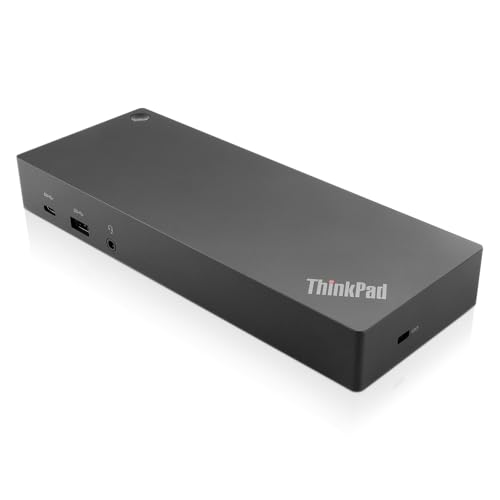
Lenovo ThinkPad Hybrid USB-C and USB-A Dock
Best for: Dual monitor setups with wired Ethernet
- Host Interface
- USB-C, USB-A
- Video Ports
- DisplayPort, HDMI
- Max Data Speed
- 10Gbps
- Ethernet Speed
- Gigabit Ethernet
- Dimensions
- 8.3 × 3.1 × 1.2 inches
- Weight
- 1.05 pounds
View on Amazon: Lenovo ThinkPad Hybrid USB-C and USB-A Dock Affiliate link
The Lenovo ThinkPad Hybrid USB-C with USB-A Dock connects via USB-C and USB-A. It features dual HDMI and DisplayPort outputs for multi-monitor setups. The dock supports 10Gbps data speeds and includes a Gigabit Ethernet port. It provides 15W charging through its USB-C port. This enterprise-class dock works with many ThinkPad models and other laptops, offering a reliable wired connection for your workspace.
Pros
- Dual HDMI and DisplayPort video outputs
- 10Gbps USB 3.1 Gen 2 data speed
- Gigabit Ethernet connectivity
- 15W USB-C charging capability
- Compatible with older Lenovo and non-Lenovo laptops
Cons
- Limited to two simultaneous video outputs
- Heavier and bulkier than compact alternatives
- No Thunderbolt support for higher bandwidth
Good fit if
- You need dual monitor support via HDMI or DisplayPort
- You use a laptop with both USB-C and USB-A ports
- You require a Gigabit Ethernet connection for stable networking
Skip if
- You need three simultaneous 4K displays
- You require Thunderbolt 3 or 4 for maximum data speeds
- You prefer a lightweight, portable docking solution
Verdict: Lenovo ThinkPad Hybrid USB-C Dock is a solid choice for users needing dual video outputs and wired Ethernet. It suits those who prioritize reliable connectivity over portability.
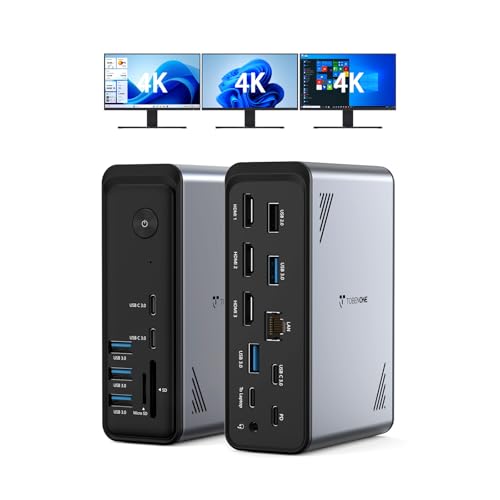
TobenONE 18-in-1 Triple Display Dock
Best for: Windows users needing triple 4K displays
- Host Interface
- USB-C
- Display Support
- Triple
- Max Resolution
- 4K@60Hz
- Power Delivery
- 100W
- Port Count
- 18
- Video Ports
- HDMI
View on Amazon: TobenONE 18-in-1 Triple Display Dock Affiliate link
This Tobenone docking station offers 18 ports, including three HDMI outputs for triple 4K@60Hz displays. It supports 100W Power Delivery to keep your laptop charged while you work. The unit connects via a single USB-C host interface. It is designed for Windows and Chrome OS laptops, providing a clean setup for remote workers who need multiple screens.
Pros
- Three HDMI ports support triple 4K@60Hz displays
- 18 total ports including 9 USB and card readers
- 100W Power Delivery for continuous laptop charging
- Compact dimensions of 4.9 x 3.5 x 1.6 inches
Cons
- Not compatible with Mac users
- Power adapter is not included
- Requires a power supply over 65W for stable usage
Good fit if
- You need three external monitors for productivity
- You use a Windows or Chrome OS laptop
- You want to reduce desk cable clutter
Skip if
- You own a MacBook or Apple Silicon device
- You need the power adapter included in the box
- You only need a single display connection
Verdict: Tobenone 18-in-1 USB-C Dock is a strong fit for Windows users who require triple 4K displays and extensive port expansion without buying a separate power brick for the dock itself.
Specifications side by side
| Spec | Lenovo ThinkPad Hybrid USB-C and USB-A Dock | TobenONE 18-in-1 Triple Display Dock |
|---|---|---|
| Host Interface | USB-C, USB-A | USB-C |
| Display Support | not stated | Triple |
| Max Resolution | not stated | 4K@60Hz |
| Power Delivery | not stated | 100W |
| Port Count | not stated | 18 |
| Video Ports | DisplayPort, HDMI | HDMI |
| Max Data Speed | 10Gbps | not stated |
| Ethernet Speed | Gigabit Ethernet | not stated |
| Resolution | not stated | 4K UHD |
| Connectivity | USB-C, USB-A | USB-C, HDMI, Ethernet |
| Use | not stated | Office |
| Dimensions | 8.3 × 3.1 × 1.2 inches | 4.9 × 3.5 × 1.6 inches |
| Weight | 1.05 pounds | 10.9 ounces |
| Color | Black | Grey-docking station for Windows |
| Model | 40AF0135US | not stated |
| Size | not stated | Without power supply |
Frequently asked questions
Which docking station supports more monitors?
The TobenONE 18-in-1 Dock supports triple displays. It drives three 4K monitors at 60Hz via HDMI. The Lenovo ThinkPad Hybrid Dock is designed for dual monitor setups. It offers two video outputs. Choose TobenONE if you need three screens. Choose Lenovo for a simpler dual-screen workspace.
Is the TobenONE dock heavy to carry?
The TobenONE 18-in-1 Dock weighs 10.9 ounces. Its dimensions are 4.9 inches long and 1.6 inches high. This makes it moderately portable for a multi-port hub. The Lenovo ThinkPad Hybrid Dock weighs 1.05 pounds. It is slightly heavier. Both units fit in a laptop bag for travel.
Does the Lenovo dock include Ethernet?
Yes, the Lenovo ThinkPad Hybrid Dock includes wired Ethernet. This is ideal for stable internet connections in office environments. The TobenONE 18-in-1 Dock focuses on video and USB expansion. It does not list Ethernet in its primary attributes. Pick Lenovo for reliable wired networking needs.
Which dock is better for Windows users?
The TobenONE 18-in-1 Dock is explicitly noted for Windows users. It supports triple 4K displays on that platform. The Lenovo ThinkPad Hybrid Dock is a solid choice for general connectivity. It suits users prioritizing reliable connection over extreme port expansion. Your operating system preference helps guide this decision.
What is the color of the Lenovo dock?
The Lenovo ThinkPad Hybrid Dock is black. It features a professional, understated design. The TobenONE 18-in-1 Dock is grey. Both colors are neutral and blend well with most desk setups. The Lenovo model measures 3.1 inches wide. The TobenONE model is slightly wider at 3.5 inches.
Do I need a separate power brick for TobenONE?
The TobenONE 18-in-1 Dock does not require a separate power brick for the dock itself. This simplifies your desk setup. The Lenovo ThinkPad Hybrid Dock relies on your laptop for power. It draws energy through the USB-C connection. Consider your power outlet availability when choosing between these two options.