Lenovo or PULWTOP? Docking Stations Compared in 2026
As an Amazon Associate we earn from qualifying purchases. Links on this page are affiliate links.
This lenovo vs PULWTOP docking station comparison examines two distinct approaches to expanding your laptop’s capabilities. Both units provide Gigabit Ethernet and USB-C connectivity, ensuring reliable wired networking and data transfer. The primary difference lies in their target ecosystem and video output. The Lenovo model focuses on broad compatibility with older ThinkPad hardware and hybrid port layouts. The PULWTOP dock is engineered specifically for modern MacBooks, offering dual 4K displays and higher power delivery for creative workflows.
Key differences
| Aspect | Lenovo ThinkPad Hybrid USB-C and USB-A Dock | PULWTOP Dual 4K MacBook Dock Stand |
|---|---|---|
| Display Support | Dual monitors via DisplayPort and HDMI | Dual 4K@60Hz monitors via HDMI |
| Max Resolution | not listed | 4K UHD at 60Hz |
| Power Delivery | 15W USB-C charging; 10.5W USB-A charging | 95W output via 100W PD input |
| Compatibility | ThinkPad and non-Lenovo laptops | MacBook Pro/Air (M1 Pro/Max and newer) |
| Host Interface | USB-C and USB-A | USB-C |
| Weight | 1.05 pounds | 14.1 ounces |
Which one should you choose?
Choose Lenovo ThinkPad Hybrid USB-C and USB-A Dock if
- You own a Lenovo ThinkPad or older Windows laptop requiring broad compatibility.
- You need a dock with both USB-A and USB-C host connections for legacy peripherals.
- You prefer a compact, lightweight unit for basic multi-monitor expansion.
Choose PULWTOP Dual 4K MacBook Dock Stand if
- You use a MacBook Pro or Air with M1 Pro/Max, M2, M3, M4, or M5 chips.
- You require dual 4K displays at 60Hz for video editing or detailed design work.
- You need high-speed 95W power delivery to keep your laptop charged under heavy load.
Verdict: Choose the Lenovo dock if you prioritize legacy compatibility and hybrid port options for Windows or older ThinkPad systems. Select the PULWTOP dock if you are a MacBook user needing dual 4K@60Hz displays and substantial power delivery for professional workflows. Your operating system and specific display requirements should drive this decision.
Lenovo vs PULWTOP Docking Stations
video resolution
The PULWTOP dock supports dual monitors with 4K resolution at 60Hz via its two HDMI ports. This allows for sharp, smooth visuals suitable for video editing or detailed design work on compatible MacBooks. The Lenovo ThinkPad dock offers two DisplayPort outputs and two HDMI ports, but the data does not specify the maximum resolution or refresh rate for these ports. While Lenovo provides more port variety for displays, PULWTOP guarantees high-resolution performance for its target ecosystem. You get confirmed 4K@60Hz capability with PULWTOP, whereas Lenovo’s specs leave the resolution limits undefined in the provided data.
compatibility
Lenovo designs this dock for broad compatibility, supporting numerous ThinkPad models and other non-Lenovo laptops with USB-C ports. It works with older devices and various Windows systems, making it a versatile choice for mixed environments. In contrast, PULWTOP is precision-engineered specifically for MacBook Pro and Air models with Pro or Max chips, explicitly excluding base chips and Windows laptops. If you use a Windows PC or an older Mac, Lenovo is the only viable option. PULWTOP restricts you to a specific subset of modern Apple hardware, while Lenovo offers universal docking capabilities for a wider range of devices.
power delivery
PULWTOP supports up to 100W PD input and delivers 95W output to charge your MacBook Pro or Air, even when running dual monitors or heavy applications. This ensures your laptop stays powered during intensive tasks. The Lenovo dock provides charging capabilities through its USB ports, offering 15W from the USB-C port and 10.5W from an always-on USB 3.0 port. However, it does not list a high-wattage Power Delivery specification for charging the host laptop directly. PULWTOP provides significantly more power for the host device, while Lenovo focuses on charging peripherals rather than the laptop itself.
connectivity ports
Lenovo offers a diverse array of ports, including three USB 3.1 Gen 2 ports, two USB 2.0 ports, a USB-C data port, two DisplayPorts, two HDMI ports, and an audio jack. This variety supports many peripherals without needing adapters. PULWTOP provides two USB-C ports at 10Gbps, one USB-A 10Gbps port, one USB-A 2.0 port, SD/TF card readers, and audio, but lacks DisplayPort outputs. Lenovo’s port selection is more comprehensive for general office use, supporting more simultaneous connections. PULWTOP simplifies connectivity for Mac users but offers fewer physical ports overall.
build and form
PULWTOP combines a docking station with a vertical laptop stand, holding your MacBook upright to save desk space. It measures 4.21 inches wide, 5.4 inches long, and 3.37 inches high, weighing 14.1 ounces. The Lenovo dock is a flat, horizontal unit measuring 8.3 inches long, 3.1 inches wide, and 1.2 inches high, weighing 1.05 pounds. Lenovo’s design is compact and low-profile, suitable for placing under a monitor or on a desk surface. PULWTOP’s vertical design integrates stand functionality, which Lenovo does not offer. You choose between Lenovo’s traditional dock form factor or PULWTOP’s all-in-one stand solution.
Choose the right dock for your setup
MacBook Pro users with M1 Pro/Max or newer
This PULWTOP dock is built specifically for modern MacBooks with Pro or Max chips. It supports dual 4K displays at 60Hz via HDMI, which is ideal for creative workflows. It also delivers up to 95W of power delivery to keep your laptop charged while running intensive tasks. Note that it does not work with base M1, M2, or M3 chips.
Lenovo ThinkPad users needing broad compatibility
The Lenovo dock is designed for ThinkPad laptops and older non-Lenovo models. It features a hybrid interface with both USB-C and USB-A ports. You get two HDMI and two DisplayPort outputs for flexible monitor setups. It also includes Gigabit Ethernet and supports ThinkPad RapidCharge. This makes it a versatile choice for enterprise environments and legacy systems.
Users wanting a laptop stand with docking
This PULWTOP unit combines a docking station with a vertical laptop stand. It holds your MacBook securely while providing access to two 4K HDMI ports, USB-C data ports, and Gigabit Ethernet. The design saves desk space by elevating your screen. It is a compact solution for home office setups where you need both connectivity and physical elevation.
The products compared
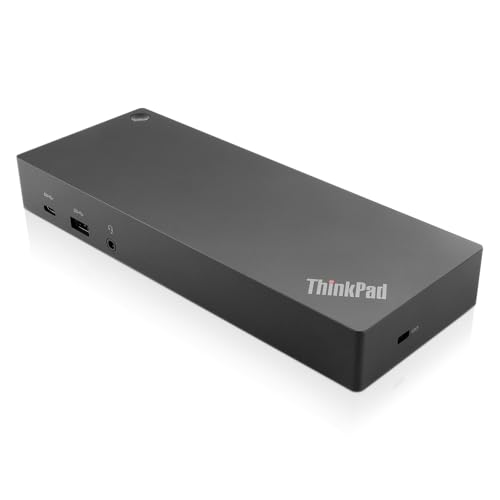
Lenovo ThinkPad Hybrid USB-C and USB-A Dock
Best for: Users needing dual displays and wired networking
- Host Interface
- USB-C, USB-A
- Video Ports
- DisplayPort, HDMI
- Max Data Speed
- 10Gbps
- Ethernet Speed
- Gigabit Ethernet
- Dimensions
- 8.3 × 3.1 × 1.2 inches
- Weight
- 1.05 pounds
View on Amazon: Lenovo ThinkPad Hybrid USB-C and USB-A Dock Affiliate link
This docking station connects via USB-C and USB-A, offering versatile compatibility with older and newer laptops. It features dual video outputs through DisplayPort and HDMI ports, supporting external monitors. The Gigabit Ethernet port ensures stable wired networking. With a 10Gbps data speed on select USB ports, it handles high-speed transfers. Its compact build fits easily on a desk while providing essential connectivity for work setups.
Pros
- Dual video outputs via DisplayPort and HDMI
- Gigabit Ethernet for reliable wired networking
- USB-C and USB-A host interfaces
- 10Gbps data speed on USB 3.1 Gen 2 ports
Cons
- No Thunderbolt support for higher bandwidth
- Limited to Gigabit Ethernet speeds
- No wireless connectivity options like Wi-Fi or Bluetooth
Good fit if
- You need dual monitor support with DisplayPort and HDMI
- You use older Lenovo ThinkPad models or non-Lenovo laptops
- You require a wired Gigabit Ethernet connection
Skip if
- You need Thunderbolt 3 or 4 for maximum data speeds
- You require wireless connectivity for peripherals
- You want a dock with built-in Wi-Fi
Verdict: Lenovo ThinkPad Hybrid USB-C Dock provides essential connectivity for users needing dual displays and wired networking. It is ideal for those with older ThinkPads or non-Lenovo laptops who prioritize reliable, wired connections over wireless convenience. This dock suits users who need a straightforward, no-frills docking solution.

PULWTOP Dual 4K MacBook Dock Stand
Best for: MacBook Pro/Max users needing dual 4K displays
- Host Interface
- USB-C
- Display Support
- Dual
- Max Resolution
- 4K@60Hz
- Power Delivery
- 95W
- Video Ports
- HDMI
- Max Data Speed
- 10Gbps
View on Amazon: PULWTOP Dual 4K MacBook Dock Stand Affiliate link
This PULWTOP dock combines a vertical stand with dual HDMI ports for 4K@60Hz output. It supports 95W power delivery and includes gigabit Ethernet. The unit is designed specifically for MacBook Pro and Air models with Pro or Max chips. It offers fast 10Gbps data transfer and audio connectivity. This setup suits creative professionals needing a stable, dual-monitor workspace for their Apple laptops.
Pros
- Dual HDMI ports deliver 4K@60Hz video output
- 95W power delivery charges MacBook at full speed
- Built-in gigabit Ethernet ensures stable wired connections
- 10Gbps USB-C ports enable fast data transfers
- Integrated vertical stand holds MacBook securely
Cons
- Incompatible with Windows laptops and base-chip MacBooks
- Requires terminal command to enable clamshell mode
- PD adapter not included with the dock
Good fit if
- You use a MacBook with a Pro or Max chip
- You need a stable dual 4K@60Hz display setup
- You prefer a vertical stand for your laptop
Skip if
- You own a Windows laptop or base-chip MacBook
- You need a plug-and-play clamshell solution without commands
- You want an included power adapter for your device
Verdict: PULWTOP MacBook Dock Dual 4K@60Hz is a specialized hub for users with Pro or Max chip MacBooks who require dual 4K displays and a vertical stand. It fits creative workflows but excludes base-chip models and Windows systems.
Specifications side by side
| Spec | Lenovo ThinkPad Hybrid USB-C and USB-A Dock | PULWTOP Dual 4K MacBook Dock Stand |
|---|---|---|
| Host Interface | USB-C, USB-A | USB-C |
| Display Support | not stated | Dual |
| Max Resolution | not stated | 4K@60Hz |
| Power Delivery | not stated | 95W |
| Video Ports | DisplayPort, HDMI | HDMI |
| Max Data Speed | 10Gbps | 10Gbps |
| Ethernet Speed | Gigabit Ethernet | Gigabit |
| Resolution | not stated | 4K UHD |
| Connectivity | USB-C, USB-A | not stated |
| Refresh Rate | not stated | 60Hz |
| Use | not stated | Office |
| Recommended Use | not stated | Home |
| Dimensions | 8.3 × 3.1 × 1.2 inches | 5.4 × 4.21 × 3.37 inches |
| Weight | 1.05 pounds | 14.1 ounces |
| Color | Black | Midnight |
| Model | 40AF0135US | BD239B-Midnight |
Frequently asked questions
Which dock is better for older ThinkPad laptops?
The Lenovo ThinkPad Hybrid USB-C and USB-A Dock is the better choice for older models. It features both USB-C and USB-A ports, ensuring compatibility with legacy devices that lack modern connectivity options. This makes it a practical, no-frills solution for users prioritizing reliable wired connections over wireless convenience.
Does the PULWTOP dock support Windows laptops?
No, the PULWTOP Dual 4K MacBook Dock Stand is not recommended for Windows systems. The product data specifies it is designed specifically for MacBook Pro or Max chip models. It excludes base-chip MacBooks and Windows laptops, making it a specialized hub for Apple users with compatible hardware.
How heavy is the Lenovo docking station?
The Lenovo ThinkPad Hybrid USB-C and USB-A Dock weighs 1.05 pounds. Its compact dimensions are 8.3 inches in length, 3.1 inches in width, and 1.2 inches in height. This lightweight design allows for easy placement on a desk without taking up excessive space.
Can the PULWTOP dock drive two 4K monitors?
Yes, the PULWTOP Dual 4K MacBook Dock Stand supports dual 4K displays. It delivers 4K UHD resolution at a 60Hz refresh rate via its HDMI ports. This setup is suitable for video editing or detailed design work on compatible MacBooks, providing sharp and smooth visuals.
What is the difference in connectivity ports?
The Lenovo dock offers a hybrid approach with both USB-C and USB-A ports. This versatility helps users connect a wider range of peripherals, including older devices. The PULWTOP dock focuses on video output and specific Mac connectivity, lacking the explicit USB-A mention found in the Lenovo model.
Is the PULWTOP dock suitable for office use?
Yes, the PULWTOP dock is recommended for office and home use. It supports dual monitor setups with 4K resolution, which is ideal for productivity tasks. The vertical stand design also helps save desk space while maintaining a professional appearance for creative workflows.