Lenovo vs CalDigit Docking Stations: Which Brand Fits You?
As an Amazon Associate we earn from qualifying purchases. Links on this page are affiliate links.
You are comparing the lenovo vs CalDigit docking station options to find the right setup for your workflow. Both devices expand your laptop’s connectivity, but they target different needs. The Lenovo ThinkPad Hybrid Dock focuses on reliable USB-based connections for business laptops. The CalDigit TS5 uses Thunderbolt 5 technology for extreme bandwidth and power. You need to decide between broad compatibility and high-speed performance.
Key differences
| Aspect | Lenovo ThinkPad Hybrid USB-C and USB-A Dock | CalDigit TS5 15-Port Thunderbolt 5 Dock |
|---|---|---|
| Host Interface | USB-C, USB-A | Thunderbolt 5 |
| Max Data Speed | 10Gbps | 80Gb/s |
| Power Delivery | 15W (USB-C) | 140W |
| Ethernet Speed | Gigabit Ethernet | 2.5GbE |
| Display Support | 2x HDMI, 2x DisplayPort | Dual 8K 60Hz or Triple 4K 144Hz |
| Port Count | 9 total ports | 15 ports |
Which one should you choose?
Choose Lenovo ThinkPad Hybrid USB-C and USB-A Dock if
- You use a ThinkPad or older USB-C laptop without Thunderbolt.
- You need a simple dock for standard office peripherals.
- You prefer a wider, flatter footprint for desk space.
Choose CalDigit TS5 15-Port Thunderbolt 5 Dock if
- You require 140W charging for a high-power MacBook Pro.
- You need to drive dual 8K displays or high-refresh monitors.
- You want 2.5GbE speeds for fast file transfers.
Verdict: Choose the Lenovo dock if you prioritize universal compatibility with standard USB-C laptops and basic video output. The CalDigit TS5 is the better choice if you need maximum bandwidth, high-wattage charging, and support for multiple high-resolution displays.
Lenovo vs CalDigit Docking Stations
Connectivity options
The CalDigit TS5 offers significantly more ports than the Lenovo dock. It provides fifteen total ports, including three Thunderbolt 5 downstream ports, multiple USB-A and USB-C options, SD card readers, and audio jacks. The Lenovo ThinkPad Hybrid Dock provides a more modest set of connections. It includes three USB 3.1 Gen2 ports, two USB 2.0 ports, and a single USB-C data port. It also features two DisplayPorts and two HDMI ports. If you need to connect many peripherals simultaneously, the CalDigit TS5 has a clear advantage with its extensive port selection and card readers.
Power delivery
Power delivery capabilities differ greatly between these two docking stations. The CalDigit TS5 supports up to 140W of power delivery to your host laptop, which is sufficient for high-performance machines like the 16-inch MacBook Pro. It also includes a robust 240W power supply to sustain this output. The Lenovo ThinkPad Hybrid Dock charges mobile devices at 15W from its USB-C port and 10.5W from an always-on USB 3.0 port. It does not list high-wattage laptop charging capabilities. For users powering demanding laptops, the CalDigit TS5 is the superior choice.
Display support
Display capabilities vary based on your host system and monitor needs. The CalDigit TS5 supports dual 8K displays at 60Hz on Thunderbolt 5 hosts, or dual 4K at 240Hz. It utilizes DisplayPort 2.1 and offers bandwidth boost for high-refresh-rate monitors. The Lenovo ThinkPad Hybrid Dock supports dual displays via its two DisplayPorts and two HDMI ports. It does not list specific resolution limits or high-refresh-rate support. If you plan to use high-resolution or high-refresh-rate monitors, the CalDigit TS5 provides better technical specifications and flexibility.
Ethernet speed
Network connectivity speeds are a key differentiator for professional workflows. The CalDigit TS5 features a 2.5GbE port, which is 2.5 times faster than standard Gigabit Ethernet. This allows for quicker file transfers and better performance in fast network environments. The Lenovo ThinkPad Hybrid Dock includes a standard Gigabit Ethernet port. While reliable for general use, it lacks the enhanced throughput of the CalDigit option. Users requiring faster wired network speeds for large data transfers will find the CalDigit TS5 more suitable.
Compatibility
Compatibility depends on your existing hardware. The Lenovo ThinkPad Hybrid Dock is designed as an enterprise-class universal dock that works with older Lenovo ThinkPads and various non-Lenovo laptops. It supports a wide range of models from the E, L, T, X, and Yoga series. The CalDigit TS5 requires a Thunderbolt 5 or USB4 v2 host for maximum performance. Users with Thunderbolt 3 or 4 hosts will see reduced functionality. If you use older USB-C laptops without Thunderbolt, the Lenovo dock offers broader compatibility.
Build and size
Physical characteristics and build materials also differ. The CalDigit TS5 features an aluminum chassis that acts as an external heat sink to dissipate heat from its high-power components. It measures 2.75 inches wide, 1.12 inches high, and 4.5 inches long, weighing 8.9 ounces. The Lenovo ThinkPad Hybrid Dock is larger, measuring 8.3 inches long, 3.1 inches wide, and 1.2 inches high, weighing 1.05 pounds. It is black in color. The CalDigit TS5 is more compact and uses premium materials, while the Lenovo dock is bulkier but designed for stable desktop placement.
Choose the right docking station
Mac users needing high speed and power
The CalDigit TS5 supports 140W power delivery, which is ideal for 16-inch MacBook Pros. It features Thunderbolt 5 with 80Gb/s speeds, allowing dual 6K or 8K displays. The 2.5GbE port offers faster network transfers. This dock handles high-refresh rates and complex video setups efficiently.
ThinkPad owners wanting reliable USB connections
This Lenovo dock uses USB-C and USB-A for broad compatibility with older ThinkPad models. It includes Gigabit Ethernet and dual HDMI or DisplayPort outputs. The 10Gbps data speed is sufficient for most business tasks. It provides stable charging and connectivity for standard office laptops without needing Thunderbolt.
Users requiring extensive peripheral connectivity
The TS5 provides fifteen ports, including SD and microSD card readers, multiple USB options, and audio jacks. It connects ultra-fast peripherals via PCIe-based Thunderbolt 5. The aluminum chassis acts as a heat sink for sustained performance. This setup suits users who connect many devices simultaneously.
The products compared
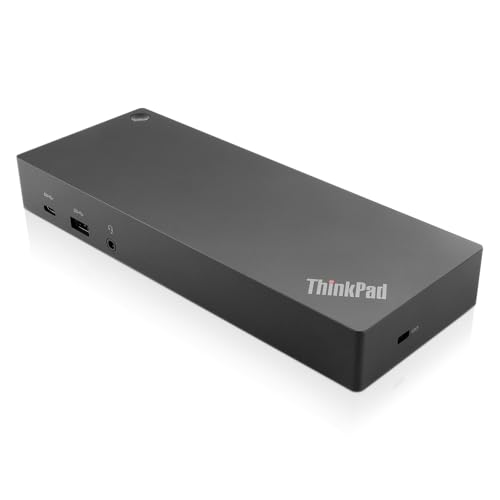
Lenovo ThinkPad Hybrid USB-C and USB-A Dock
Best for: Dual-monitor setups with standard USB-C laptops
- Host Interface
- USB-C, USB-A
- Video Ports
- DisplayPort, HDMI
- Max Data Speed
- 10Gbps
- Ethernet Speed
- Gigabit Ethernet
- Dimensions
- 8.3 × 3.1 × 1.2 inches
- Weight
- 1.05 pounds
View on Amazon: Lenovo ThinkPad Hybrid USB-C and USB-A Dock Affiliate link
This Lenovo dock connects via USB-C and USB-A, supporting up to 10Gbps data speeds. It features dual DisplayPort and HDMI outputs for multi-monitor setups. The unit includes Gigabit Ethernet and audio jacks. Weighing 1.05 pounds, it is a compact enterprise-class solution. It suits users needing reliable video expansion and peripheral connectivity for compatible ThinkPad or other laptops.
Pros
- Dual DisplayPort and dual HDMI video outputs
- USB-C port with 5V 3A power delivery
- Gigabit Ethernet connectivity
- Supports 10Gbps data transfer speeds
Cons
- Only one USB-C data port available
- No Thunderbolt 4 or 5 support
- Limited to Gigabit Ethernet speeds
Good fit if
- You need dual monitor support via HDMI and DisplayPort
- You require a stable Gigabit Ethernet connection
- You use compatible Lenovo ThinkPad laptops
Skip if
- You need Thunderbolt 5 connectivity
- You require more than two external displays
- You need USB4 or higher data speeds
Verdict: Lenovo ThinkPad Hybrid USB-C Dock provides solid dual-video output and reliable Ethernet for compatible laptops. It fits users who prioritize standard USB-C connectivity over high-speed Thunderbolt standards.

CalDigit TS5 15-Port Thunderbolt 5 Dock
Best for: Thunderbolt 5 hosts needing 140W charging
- Host Interface
- Thunderbolt 5
- Display Support
- Dual
- Max Resolution
- 8K 60Hz
- Power Delivery
- 140W
- Port Count
- 15
- Video Ports
- DisplayPort 2.1, Thunderbolt 5
View on Amazon: CalDigit TS5 15-Port Thunderbolt 5 Dock Affiliate link
The CalDigit TS5 is a high-end docking station built for Thunderbolt 5 hosts. It features 15 ports, including three Thunderbolt 5 connections and a 2.5GbE network port. The dock delivers 140W of power to your laptop and supports dual 8K displays. Its aluminum chassis acts as a heat sink. This setup suits users needing maximum bandwidth and display performance on compatible systems.
Pros
- 140W power delivery for high-end laptops
- 15 ports including three Thunderbolt 5 connections
- 2.5GbE Ethernet for fast network transfers
- Supports dual 8K displays at 60Hz
- Aluminum chassis for heat dissipation
Cons
- Requires Thunderbolt 5 or USB4 v2 host for full performance
- Limited to dual display support on macOS
- No mention of built-in battery backup
Good fit if
- You use a Thunderbolt 5 or USB4 v2 host
- You need to charge a 140W laptop through the dock
- You require dual 8K display support
Skip if
- You only have Thunderbolt 3 or 4 ports
- You need triple display support on macOS
- You want a compact travel dock
Verdict: CalDigit TS5 Thunderbolt 5 Dock is the right choice for users with Thunderbolt 5 hosts who need high-speed data and dual 8K displays. It does not fit users with older Thunderbolt 3 or 4 systems.
Specifications side by side
| Spec | Lenovo ThinkPad Hybrid USB-C and USB-A Dock | CalDigit TS5 15-Port Thunderbolt 5 Dock |
|---|---|---|
| Host Interface | USB-C, USB-A | Thunderbolt 5 |
| Display Support | not stated | Dual |
| Max Resolution | not stated | 8K 60Hz |
| Power Delivery | not stated | 140W |
| Port Count | not stated | 15 |
| Video Ports | DisplayPort, HDMI | DisplayPort 2.1, Thunderbolt 5 |
| Max Data Speed | 10Gbps | 80Gb/s |
| Ethernet Speed | Gigabit Ethernet | 2.5GbE |
| Connectivity | USB-C, USB-A | not stated |
| Dimensions | 8.3 × 3.1 × 1.2 inches | 4.5 × 2.75 × 1.12 inches |
| Weight | 1.05 pounds | 8.9 ounces |
| Color | Black | Space Gray |
| Model | 40AF0135US | TBT5-TS5-US-AMZ |
| Size | not stated | 4.25 |
Frequently asked questions
Can the CalDigit TS5 work with Thunderbolt 3 or 4 laptops?
No, it does not fit older systems. The CalDigit TS5 is designed specifically for Thunderbolt 5 hosts. It requires a compatible port to function correctly. If your laptop uses Thunderbolt 3 or 4, this dock will not work for you. You need a newer host system to access its features.
Does the Lenovo ThinkPad Hybrid Dock support dual monitors?
Yes, it supports dual-video output. This makes it suitable for dual-monitor setups with standard USB-C laptops. You get reliable video connectivity without needing Thunderbolt standards. It is a solid choice if you prioritize standard USB-C connections over high-speed data transfer protocols for your display needs.
Which dock is smaller and lighter?
The CalDigit TS5 is more compact. It measures 4.5 inches in length and weighs only 8.9 ounces. The Lenovo ThinkPad Hybrid Dock is larger at 8.3 inches long and weighs 1.05 pounds. If you need a smaller footprint for your desk, the CalDigit option takes up less space.
What connectivity types does the Lenovo dock offer?
It provides both USB-C and USB-A connections. This hybrid approach allows you to connect various peripherals without needing adapters. It focuses on standard USB-C connectivity rather than Thunderbolt. You get reliable Ethernet and video output through these standard ports for compatible business laptops.
Is the CalDigit TS5 good for MacBook Pro users?
It is ideal for 16-inch MacBook Pros. The dock supports 140W power delivery, which matches the power needs of high-end Macs. It also features Thunderbolt 5 for high-speed data. This combination makes it a strong fit for Mac users who need both charging and high-performance connectivity.
Can the CalDigit TS5 drive 8K displays?
Yes, it supports dual 8K displays. This capability is part of its Thunderbolt 5 specification. You get high-resolution video output for demanding workflows. However, this requires a Thunderbolt 5 host laptop. It does not fit users with older Thunderbolt 3 or 4 systems.