Lenovo vs Belkin Docking Stations: Which Brand Fits You?
As an Amazon Associate we earn from qualifying purchases. Links on this page are affiliate links.
Choosing between the Lenovo ThinkPad Hybrid Dock and the Belkin 15-in-1 Dock depends on your port needs. This lenovo vs belkin docking station comparison highlights key differences. Both units provide Gigabit Ethernet and USB-C connectivity. The main difference lies in display support and power delivery. The Belkin model supports triple 4K displays and offers 85W charging. The Lenovo dock focuses on hybrid USB-C and USB-A compatibility with lower power output.
Key differences
| Aspect | Lenovo ThinkPad Hybrid USB-C and USB-A Dock | Belkin 15-in-1 Triple DisplayLink Dock |
|---|---|---|
| Display Support | Dual display | Triple display |
| Max Resolution | Not listed | 4K |
| Power Delivery | 15W max | 85W |
| Host Interface | USB-C and USB-A | USB-C |
| USB Ports | 3x USB 3.1 Gen 2, 2x USB 2.0 | 5x USB-A |
Which one should you choose?
Choose Lenovo ThinkPad Hybrid USB-C and USB-A Dock if
- You need a dock that works with older laptops using USB-A connections.
- You prefer a compact unit that weighs just over one pound.
- You require always-on USB charging for mobile devices.
Choose Belkin 15-in-1 Triple DisplayLink Dock if
- You need to drive three 4K monitors simultaneously.
- You want fast 85W pass-through charging for your laptop.
- You need a wide variety of ports including an SD card reader.
Verdict: The Lenovo dock is best for users with older hardware or those who prioritize a lightweight, hybrid interface. The Belkin dock suits professionals needing high-resolution triple displays and fast laptop charging. Your choice depends on whether you value legacy port compatibility or modern multi-screen performance.
Lenovo vs Belkin Dock Specs
Display Support
The Belkin 15-in-1 Dock supports triple 4K displays simultaneously. It uses three HDMI ports and two DisplayPort outputs to drive multiple screens. This setup requires specific DisplayLink drivers for Windows and macOS. The Lenovo ThinkPad Hybrid Dock offers dual display support via one HDMI and two DisplayPort connectors. It does not list triple-screen capability in its specifications. If your workflow requires three monitors, the Belkin configuration provides the necessary hardware connections. The Lenovo unit is sufficient for dual-screen setups. You must check driver compatibility for the Belkin option to ensure smooth operation across different operating systems.
Power Delivery
Power delivery capabilities differ significantly between these two docking stations. The Belkin 15-in-1 Dock provides 85W of pass-through charging via its USB-C port. This high wattage can power most modern laptops while connected. The Lenovo ThinkPad Hybrid Dock does not list a specific high-wattage PD output for the host laptop. It offers 15W from a USB-C port and 10.5W from an always-on USB 3.0 port for mobile devices. These lower outputs are suitable for phones or tablets but may not charge a laptop efficiently. For users needing substantial power delivery to their computer, the Belkin specification is superior.
Connectivity Ports
Port variety is a key factor for many users. The Belkin 15-in-1 Dock includes five USB-A ports, three HDMI ports, two DisplayPorts, an Ethernet port, an SD card reader, and a USB-C port. This extensive array supports many peripherals without adapters. The Lenovo ThinkPad Hybrid Dock features three USB 3.1 Gen 2 ports, two USB 2.0 ports, one USB-C data port, two DisplayPorts, one HDMI port, and a Gigabit Ethernet port. It lacks an SD card reader. The Belkin option offers more USB-A ports and storage card access. The Lenovo unit provides faster USB 3.1 Gen 2 speeds on three ports. Choose based on your peripheral count.
Compatibility
Compatibility lists reveal different target audiences. The Lenovo ThinkPad Hybrid Dock is an enterprise-class universal dock. It explicitly supports a wide range of Lenovo ThinkPad models, including T, X, L, and E series from various generations. It also works with some non-Lenovo laptops. The Belkin 15-in-1 Dock uses DisplayLink technology for universal compatibility across Windows and macOS devices, including MacBooks and Chromebooks. It does not list specific laptop model support. If you use a Lenovo ThinkPad, the Lenovo dock may offer optimized features like RapidCharge. For mixed ecosystems, the Belkin DisplayLink approach provides broader OS support.
Data Speed
Data transfer speeds depend on the USB standards used. The Lenovo ThinkPad Hybrid Dock features three USB 3.1 Gen 2 ports, which support data rates up to 10Gbps. This is ideal for fast external storage or high-bandwidth peripherals. The Belkin 15-in-1 Dock lists high bandwidth for quick data transfer but does not specify the USB version or maximum speed for its USB-A ports. It relies on USB-C for the host connection. If you frequently move large files, the specified 10Gbps speed on the Lenovo dock offers a clear performance advantage. The Belkin specs are less precise regarding maximum throughput rates.
Physical Dimensions
Size matters for desk space and portability. The Lenovo ThinkPad Hybrid Dock measures 8.3 inches in length, 3.1 inches in width, and 1.2 inches in height. It weighs 1.05 pounds. The Belkin 15-in-1 Dock is larger, measuring 10.5 inches in length, 6 inches in width, and 3.5 inches in height. The Belkin unit is significantly bulkier due to its triple display and higher power components. The Lenovo dock is more compact and lighter. If you need a small footprint on your desk or plan to move the dock frequently, the Lenovo dimensions are more practical. The Belkin requires more dedicated space.
Which Lenovo or Belkin Dock Fits You
Users needing triple 4K screens
The Belkin 15-in-1 Dock supports three 4K displays simultaneously via three HDMI and two DisplayPort outputs. You must install DisplayLink drivers for Windows or macOS to enable this triple-monitor setup. This configuration provides ultimate clarity for desktop workflows requiring multiple high-resolution screens.
ThinkPad owners wanting compact docking
The Lenovo ThinkPad Hybrid Dock is designed for enterprise-class universal docking and supports ThinkPad RapidCharge. It measures 3.1 inches wide and weighs just 1.05 pounds. It works with older Lenovo models and non-Lenovo laptops, offering a compact footprint with USB-C and USB-A connectivity.
Those prioritizing high-speed data transfer
This Lenovo dock features three USB 3.1 Gen 2 ports with a max data speed of 10Gbps. It includes an always-on USB charging port and a USB-C port providing 5V 3A power. This setup ensures fast data transfer rates for connected peripherals and devices.
Users requiring strong pass-through charging
The Belkin dock delivers 85W pass-through charging via a USB-C to USB-C cable included in the box. This power delivery keeps your laptop powered while connected. It also includes a Gigabit Ethernet port for a stable internet connection, making it a complete all-in-one hub solution.
The products compared
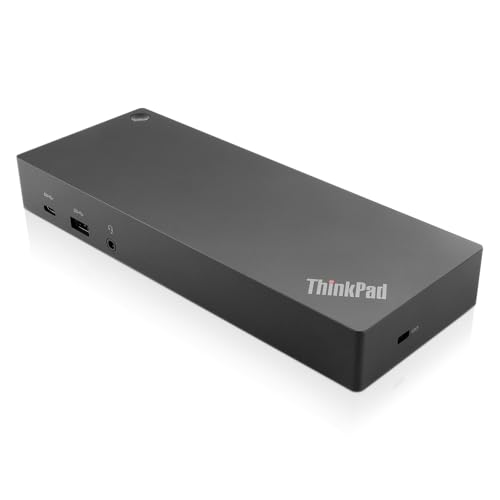
Lenovo ThinkPad Hybrid USB-C and USB-A Dock
Best for: Dual monitor setups with wired Ethernet needs
- Host Interface
- USB-C, USB-A
- Video Ports
- DisplayPort, HDMI
- Max Data Speed
- 10Gbps
- Ethernet Speed
- Gigabit Ethernet
- Dimensions
- 8.3 × 3.1 × 1.2 inches
- Weight
- 1.05 pounds
View on Amazon: Lenovo ThinkPad Hybrid USB-C and USB-A Dock Affiliate link
This Lenovo docking station connects via USB-C and USB-A to expand your laptop's connectivity. It features Gigabit Ethernet and dual DisplayPort or HDMI outputs for multi-monitor setups. The dock supports 10Gbps data speeds and includes an always-on USB port for charging devices. It is designed for enterprise use and works with older ThinkPad models as well as non-Lenovo laptops.
Pros
- Dual video outputs via DisplayPort and HDMI for extended displays
- Gigabit Ethernet port for stable wired internet connections
- 10Gbps data transfer speed on USB 3.1 Gen 2 ports
- Always-on USB port provides 10.5W charging for mobile devices
Cons
- Limited to two external displays rather than triple display support
- Heavier build at 1.05 pounds compared to lighter adapters
- No Thunderbolt certification for maximum bandwidth potential
Good fit if
- You need a wired Gigabit Ethernet connection for your workstation
- You want to connect two external monitors to your laptop
- You use older ThinkPad models that lack Thunderbolt ports
Skip if
- You require three simultaneous external displays for your workflow
- You need Thunderbolt speeds for high-bandwidth data transfers
- You prefer a lightweight dock under one pound for travel
Verdict: Lenovo ThinkPad Hybrid USB-C Dock offers reliable dual-monitor support and wired networking for users who prioritize stability over portability. It fits professionals who need consistent connectivity for older ThinkPad systems or non-Lenovo laptops without Thunderbolt.

Belkin 15-in-1 Triple DisplayLink Dock
Best for: users needing three 4K monitors
- Host Interface
- USB-C
- Display Support
- Triple
- Max Resolution
- 4K
- Power Delivery
- 85W
- Port Count
- 15
- Video Ports
- HDMI, DisplayPort
View on Amazon: Belkin 15-in-1 Triple DisplayLink Dock Affiliate link
This Belkin docking station supports three 4K displays via DisplayLink technology. It offers 15 ports, including three HDMI and two DisplayPort outputs. The unit provides 85W pass-through charging over a USB-C host interface. A Gigabit Ethernet port ensures stable internet. You should consider this dock if you need a multi-monitor setup for Mac or Windows laptops and require extensive connectivity options.
Pros
- Supports triple 4K displays simultaneously
- Includes 15 total ports
- Provides 85W power delivery
- Features Gigabit Ethernet connectivity
Cons
- Requires driver download for triple display support
- Lacks Thunderbolt certification
- Limited to USB-C host interface
Good fit if
- You need to run three monitors at 4K resolution
- You use a MacBook or Chromebook and need multiple video outputs
- You require a stable Gigabit Ethernet connection for your laptop
Skip if
- You want a plug-and-play setup without installing drivers
- You need Thunderbolt 4 speeds for maximum data transfer
- You only need a single external display
Verdict: Belkin 15-in-1 Triple Display Dock delivers extensive port selection and triple 4K support for users who need to expand their workspace significantly. It is best for professionals who prioritize display count over native Thunderbolt performance.
Specifications side by side
| Spec | Lenovo ThinkPad Hybrid USB-C and USB-A Dock | Belkin 15-in-1 Triple DisplayLink Dock |
|---|---|---|
| Host Interface | USB-C, USB-A | USB-C |
| Display Support | not stated | Triple |
| Max Resolution | not stated | 4K |
| Power Delivery | not stated | 85W |
| Port Count | not stated | 15 |
| Video Ports | DisplayPort, HDMI | HDMI, DisplayPort |
| Max Data Speed | 10Gbps | not stated |
| Ethernet Speed | Gigabit Ethernet | Gigabit |
| Resolution | not stated | 4K UHD |
| Connectivity | USB-C, USB-A | USB-C, HDMI, DisplayPort, USB-A |
| Features | not stated | Built-in Speakers, DisplayLink |
| Dimensions | 8.3 × 3.1 × 1.2 inches | 10.5 × 6 × 3.5 inches |
| Weight | 1.05 pounds | not stated |
| Color | Black | black |
| Model | 40AF0135US | INC007TTBK |
| Size | not stated | 85W |
Frequently asked questions
Does the Lenovo ThinkPad Hybrid Dock support multiple monitors?
Yes, it supports dual-monitor setups. The device provides reliable connectivity for users who prioritize stability. It is ideal for professionals needing consistent wired networking alongside display output. This makes it a solid choice for older ThinkPad systems or non-Lenovo laptops without Thunderbolt capabilities.
What is the weight of the Lenovo ThinkPad Hybrid Dock?
The Lenovo ThinkPad Hybrid Dock weighs 1.05 pounds. Its compact dimensions are 8.3 inches in length, 3.1 inches in width, and 1.2 inches in height. This lightweight design allows for easy placement on a desk without taking up excessive space.
Can the Belkin 15-in-1 Dock drive three 4K screens?
Yes, the Belkin 15-in-1 Dock supports triple 4K UHD displays. It uses DisplayLink technology to enable this extensive port selection. You must install specific DisplayLink drivers for Windows or macOS to activate the triple-monitor configuration effectively.
How large is the Belkin 15-in-1 Triple DisplayLink Dock?
The Belkin dock measures 10.5 inches in length, 6 inches in width, and 3.5 inches in height. It includes an 85W power size component. The black finish helps it blend into professional workspaces while providing a substantial footprint for its many ports.
Does the Lenovo dock use Thunderbolt connectivity?
No, it uses USB-C and USB-A connections. The Lenovo ThinkPad Hybrid Dock is designed for stability over portability. It fits users who need consistent connectivity for systems that may not support Thunderbolt, ensuring reliable performance for daily tasks.
Which dock is better for wired Ethernet needs?
The Lenovo ThinkPad Hybrid Dock is excellent for wired Ethernet needs. It offers reliable dual-monitor support alongside stable networking. This makes it a strong option for professionals who require consistent connectivity for older ThinkPad systems or standard laptops without advanced Thunderbolt features.