Lenovo vs ANYHDD Docking Stations: Which Brand Fits You?
As an Amazon Associate we earn from qualifying purchases. Links on this page are affiliate links.
You are comparing a lenovo vs ANYHDD docking station to decide which fits your workflow. Both units offer dual monitor support and connect via USB-C. They share black finishes and similar footprints. The main difference lies in their underlying technology and power delivery. One uses standard USB-C with Gigabit Ethernet and legacy ports. The other relies on Thunderbolt 4 with a higher wattage adapter for faster data and video throughput.
Key differences
| Aspect | Lenovo ThinkPad Hybrid USB-C and USB-A Dock | ANYHDD ThinkPad Dual 4K USB-C Dock |
|---|---|---|
| Host Interface | USB-C and USB-A | Thunderbolt 4 and USB-C |
| Max Data Speed | 10Gbps | not listed |
| Power Delivery | 15W via USB-C | 90W AC adapter |
| Ethernet | Gigabit Ethernet | not listed |
| Display Support | Dual monitors | Dual monitors |
Which one should you choose?
Choose Lenovo ThinkPad Hybrid USB-C and USB-A Dock if
- You need built-in Gigabit Ethernet for wired networking.
- You require legacy USB-A ports for older peripherals.
- You want a dock that explicitly supports ThinkPad RapidCharge.
Choose ANYHDD ThinkPad Dual 4K USB-C Dock if
- You need high-speed data transfer via Thunderbolt 4.
- You require 90W power delivery to charge a laptop.
- You prefer a package that includes 4K HDMI and DisplayPort cables.
Verdict: Choose the Lenovo dock if you prioritize wired networking and legacy USB-A connectivity for older devices. Opt for the ANYHDD dock if you need Thunderbolt 4 speeds and higher power delivery to charge your laptop while docked.
Lenovo vs ANYHDD Dock Specs
Display resolution
The ANYHDD dock explicitly supports 4K resolution on dual monitors, providing sharper visuals for detailed work. The Lenovo model lists DisplayPort and HDMI ports but does not specify a maximum resolution in its data. This means you cannot confirm if the Lenovo unit handles 4K signals without checking external sources. If your workflow requires high-definition clarity for design or data analysis, the ANYHDD specification offers a clear advantage. The Lenovo dock may support lower resolutions, which is sufficient for standard office tasks but less ideal for media-heavy setups.
Power delivery
Power delivery capabilities differ significantly between these two units. The ANYHDD dock includes a 90W AC adapter, allowing it to charge compatible laptops at a higher wattage. The Lenovo dock provides charging via specific USB ports, offering 15W from the USB-C port and 10.5W from the always-on USB 3.0 port. These lower wattages are suitable for charging phones or tablets but insufficient for powering most modern laptops directly through the dock. If you need to charge your computer while docked, the ANYHDD option is the practical choice.
Connectivity standard
Connectivity protocols define how data and video signals travel. The ANYHDD dock utilizes Thunderbolt 4, which offers higher bandwidth and more reliable video transmission than standard USB-C. The Lenovo dock uses a hybrid USB-C and USB-A interface, relying on standard USB 3.1 Gen 2 for data at 10Gbps. Thunderbolt 4 generally provides better stability for dual monitor setups and faster data transfer. The Lenovo approach is more versatile for older devices with USB-A ports, but the ANYHDD dock offers modern, high-speed connectivity.
Port variety
Port selection varies by use case. The Lenovo dock offers a wider array of legacy and modern ports, including two DisplayPorts, two HDMI ports, three USB 3.1 Gen 2 ports, two USB 2.0 ports, and a Gigabit Ethernet jack. The ANYHDD dock lists HDMI and DisplayPort video outputs and USB-C connectivity but does not detail the number of USB-A or Ethernet ports in the provided data. If you need to connect multiple peripherals or a wired network, the Lenovo unit provides more physical connection options.
Compatibility
Compatibility lists help determine if the dock works with your hardware. The Lenovo dock provides an extensive list of supported ThinkPad models, ranging from older T460s to newer X1 Carbons, ensuring broad support for enterprise devices. The ANYHDD dock notes compatibility with USB-C or Thunderbolt laptops but does not list specific model numbers. This makes the Lenovo dock a safer bet for users with specific ThinkPad hardware. For general laptops with USB-C, both likely work, but Lenovo offers verified support for more devices.
Choose your ideal docking station
Users needing fast data transfer
The Lenovo ThinkPad Hybrid Dock supports USB 3.1 Gen 2 ports with a max data speed of 10Gbps. This higher bandwidth benefits you if you frequently move large files between devices. The ANYHDD dock lists Thunderbolt 4 but does not specify a data transfer rate in the provided data. For confirmed high-speed connectivity, the Lenovo specification is the clear choice.
Buyers wanting included cables
The ANYHDD package explicitly includes a 4K HDMI cable, a 4K DisplayPort cable, and a USB-C cable. This convenience saves you from purchasing separate connections. The Lenovo product data lists the ports available but does not mention any included cables in the package contents. If you prefer a complete setup out of the box, the ANYHDD option is more practical.
Those needing stable power delivery
The ANYHDD dock comes with a 90W AC adapter, ensuring stable power delivery for your laptop and connected devices. The Lenovo model mentions charging mobile devices at 15W and 10.5W but does not specify a total power delivery wattage for the host laptop. For guaranteed high-wattage power support, the ANYHDD specification provides the necessary clarity for your setup.
The products compared
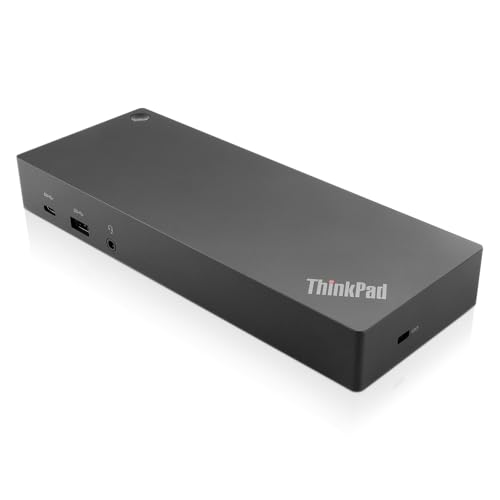
Lenovo ThinkPad Hybrid USB-C and USB-A Dock
Best for: Dual monitor setups with USB-A or C laptops
- Host Interface
- USB-C, USB-A
- Video Ports
- DisplayPort, HDMI
- Max Data Speed
- 10Gbps
- Ethernet Speed
- Gigabit Ethernet
- Dimensions
- 8.3 × 3.1 × 1.2 inches
- Weight
- 1.05 pounds
View on Amazon: Lenovo ThinkPad Hybrid USB-C and USB-A Dock Affiliate link
This Lenovo docking station connects via USB-C or USB-A. It supports dual monitors through two DisplayPorts and two HDMI ports. Data speeds reach 10Gbps on the three USB 3.1 gen2 ports. It includes Gigabit Ethernet and audio jacks. The unit weighs 1.05 pounds. It suits users needing enterprise-class connectivity for older and newer ThinkPad laptops.
Pros
- Dual video output with two DisplayPorts and two HDMI ports
- Fast data transfer with 10Gbps USB 3.1 gen2 ports
- Includes Gigabit Ethernet and stereo/mic combo audio port
- Works with both USB-C and USB-A host interfaces
Cons
- Only supports Gigabit Ethernet speeds
- No Thunderbolt support for higher bandwidth
- Limited to 10Gbps data speed maximum
Good fit if
- You need dual monitor support via HDMI and DisplayPort
- You use older ThinkPads with USB-A ports
- You require Gigabit Ethernet connectivity
Skip if
- You need 4K dual monitor support at high refresh rates
- You require Thunderbolt 3 or 4 connectivity
- You want faster than Gigabit Ethernet speeds
Verdict: Lenovo ThinkPad Hybrid USB-C Dock offers reliable dual video output and fast USB data transfer. It fits users who need versatile port selection for older and newer ThinkPad laptops without requiring Thunderbolt.

ANYHDD ThinkPad Dual 4K USB-C Dock
Best for: Dual 4K display setups with included cables
- Host Interface
- Thunderbolt 4
- Display Support
- Dual
- Max Resolution
- 4K
- Power Delivery
- 90W
- Video Ports
- HDMI, DisplayPort
- Connectivity
- USB-C, HDMI, DisplayPort
View on Amazon: ANYHDD ThinkPad Dual 4K USB-C Dock Affiliate link
This ANYHDD docking station supports dual 4K displays via HDMI and DisplayPort. It connects through Thunderbolt 4 or USB-C and includes a 90W power adapter. The unit measures 8 by 3 inches and weighs 1 pound. It suits users needing a reliable dual-monitor setup with stable power delivery for their laptop.
Pros
- Supports dual 4K displays
- Includes 90W AC adapter
- Uses Thunderbolt 4 or USB-C
- Comes with HDMI and DisplayPort cables
Cons
- No mention of Ethernet port
- No mention of USB-A ports
- No mention of SD card reader
Good fit if
- You need dual 4K monitors
- You want included video cables
- You use Thunderbolt 4 laptops
Skip if
- You need Ethernet connectivity
- You require USB-A ports
- You need an SD card reader
Verdict: ANYHDD 90W Thunderbolt 4 Dual Monitor Dock provides a straightforward dual 4K setup with included cables. It fits users who prioritize display count and power delivery over extra connectivity ports.
Specifications side by side
| Spec | Lenovo ThinkPad Hybrid USB-C and USB-A Dock | ANYHDD ThinkPad Dual 4K USB-C Dock |
|---|---|---|
| Host Interface | USB-C, USB-A | Thunderbolt 4 |
| Display Support | not stated | Dual |
| Max Resolution | not stated | 4K |
| Power Delivery | not stated | 90W |
| Video Ports | DisplayPort, HDMI | HDMI, DisplayPort |
| Max Data Speed | 10Gbps | not stated |
| Ethernet Speed | Gigabit Ethernet | not stated |
| Resolution | not stated | 4K UHD |
| Connectivity | USB-C, USB-A | USB-C, HDMI, DisplayPort |
| Dimensions | 8.3 × 3.1 × 1.2 inches | not stated |
| Weight | 1.05 pounds | 1 pounds |
| Color | Black | Black |
| Model | 40AF0135US | DOCK-40AY0090US-New |
| Size | not stated | 8 x 3 inch |
Frequently asked questions
Does the Lenovo dock support Thunderbolt?
No, the Lenovo ThinkPad Hybrid USB-C and USB-A Dock does not support Thunderbolt. It relies on standard USB-C and USB-A connections for video and data. This design fits users with older ThinkPad laptops that lack Thunderbolt ports. You get reliable dual video output without needing a Thunderbolt-compatible host device.
What is the power delivery on the ANYHDD dock?
The ANYHDD ThinkPad Dual 4K USB-C Dock provides 90W of power delivery. This allows you to charge your laptop while it is connected to the dock. The included cables simplify your setup by providing necessary connections right out of the box. It prioritizes display count and charging over extra connectivity ports.
How heavy is the Lenovo docking station?
The Lenovo ThinkPad Hybrid Dock weighs 1.05 pounds. Its dimensions are 8.3 inches in length, 3.1 inches in width, and 1.2 inches in height. This compact size allows it to sit neatly on your desk. The black finish helps it blend with most laptop setups.
What connectivity ports does the Lenovo dock have?
The Lenovo dock features both USB-C and USB-A ports. This hybrid approach supports both newer and older laptops. You can connect peripherals using either port type. The model number is 40AF0135US, and it offers versatile port selection for various ThinkPad models without requiring Thunderbolt.
Does the ANYHDD dock come with cables?
Yes, the ANYHDD ThinkPad Dual 4K USB-C Dock includes the necessary cables. This feature simplifies your initial setup process. You do not need to purchase additional display or power cables separately. The dock supports dual 4K displays via HDMI and DisplayPort connections.
Which dock is better for dual 4K monitors?
The ANYHDD dock is better for dual 4K monitors. It explicitly supports 4K UHD resolution on both screens. The Lenovo dock lists DisplayPort and HDMI ports but does not specify a maximum resolution in its data. If sharp visuals on two 4K screens are your priority, the ANYHDD unit is the clear choice.
What is the model number for the Lenovo dock?
The model number for the Lenovo ThinkPad Hybrid Dock is 40AF0135US. This specific identifier helps you verify compatibility with your laptop. It ensures you are purchasing the correct hybrid USB-C and USB-A variant. The device is designed for reliable performance with ThinkPad series laptops.