Lenovo vs Anker: Docking Stations Compared by Specs
As an Amazon Associate we earn from qualifying purchases. Links on this page are affiliate links.
The lenovo vs anker docking station debate centers on your connection needs. Both devices expand your laptop’s capabilities through a single host port. The Lenovo ThinkPad Hybrid Dock offers a mix of USB-C and legacy USB-A connectivity with enterprise features. The Anker PowerExpand hub relies entirely on USB-C for data and power. Your choice depends on whether you prioritize port variety or modern compact design.
Key differences
| Aspect | Lenovo ThinkPad Hybrid USB-C and USB-A Dock | Anker PowerExpand 8-in-1 Dual HDMI USB-C Hub |
|---|---|---|
| Host Interface | USB-C and USB-A | USB-C only |
| Video Ports | 2x DisplayPort, 2x HDMI | 2x HDMI |
| Max Resolution | Not listed | 4K@60Hz |
| Power Delivery | 15W charging | 85W pass-through |
| Ethernet | Gigabit Ethernet | Gigabit Ethernet |
Which one should you choose?
Choose Lenovo ThinkPad Hybrid USB-C and USB-A Dock if
- You need to connect older devices via USB-A ports without extra adapters.
- You require DisplayPort outputs for specific monitor compatibility.
- You use a ThinkPad laptop and want RapidCharge support.
Choose Anker PowerExpand 8-in-1 Dual HDMI USB-C Hub if
- You want higher power delivery to charge your laptop while working.
- You prefer a compact, lightweight hub that fits easily in a bag.
- You need a single USB-C connection for both data and video.
Verdict: Choose the Lenovo dock if you need versatile legacy connectivity and enterprise-grade features for older hardware. Pick the Anker hub if you prioritize high-speed charging, a compact form factor, and straightforward USB-C connectivity. Both devices provide reliable Ethernet and dual display support.
Lenovo vs Anker Dock Specs
Video Output
The Lenovo ThinkPad Hybrid Dock provides a mixed array of video ports, featuring two DisplayPort outputs and two HDMI ports. This setup allows for flexible connection options depending on your monitor inputs. In contrast, the Anker PowerExpand 8-in-1 Hub relies solely on two HDMI ports for display output. While the Anker unit supports 4K resolution at 60Hz on a single display, or 4K at 30Hz on dual monitors, the Lenovo does not list specific resolution limits in its provided specifications. The Lenovo offers more port variety, whereas the Anker specifies higher refresh rates for single-display setups.
Connectivity
Connectivity options differ significantly between these two docking stations. The Lenovo ThinkPad Hybrid Dock includes three USB 3.1 Gen2 ports with 10Gbps data speeds, two USB 2.0 ports, and one USB-C data port. It also features a Gigabit Ethernet connection and a stereo/mic combo audio jack. The Anker PowerExpand Hub offers two USB-A data ports and a USB-C PD-IN charging port, along with an Ethernet port and a microSD/SD card reader. The Lenovo provides more USB ports and higher data transfer speeds, while the Anker includes integrated card readers for media workflows.
Power Delivery
Power delivery capabilities vary between the two devices. The Anker PowerExpand 8-in-1 Hub supports USB-C Power Delivery pass-through charging up to 85W, provided you use a 100W PD wall charger and a compatible cable. The Lenovo ThinkPad Hybrid Dock focuses on charging peripherals rather than the host laptop, offering 15W from its USB-C port and 10.5W from its always-on USB 3.0 port. The Anker is clearly superior if you need to charge your laptop through the dock, while the Lenovo is designed primarily for peripheral power and data.
Compatibility
Compatibility ranges are distinct for each product. The Lenovo ThinkPad Hybrid Dock is marketed as an enterprise-class universal dock that works with older Lenovo and non-Lenovo laptops. It explicitly lists support for numerous ThinkPad models, including the T, X, and L series, as well as some tablets. The Anker PowerExpand Hub supports USB-C, USB4, and Thunderbolt connections, and is compatible with Windows 10, 11, and ChromeOS. Notably, the Anker documentation states it is not compatible with Linux. The Lenovo offers broader legacy support, while the Anker excludes Linux users.
Portability
Physical dimensions and weight impact portability. The Lenovo ThinkPad Hybrid Dock measures 8.3 inches in length, 3.1 inches in width, and 1.2 inches in height, weighing 1.05 pounds. It is a substantial desktop unit. The Anker PowerExpand 8-in-1 Hub is much more compact, measuring 4.65 inches in length, 2.01 inches in width, and 0.69 inches in height, with a weight of just 3.2 ounces. The Anker is significantly smaller and lighter, making it far easier to carry in a laptop bag for travel or remote work.
Choose based on port and power needs
Users needing legacy USB-A device support
The Lenovo dock includes five USB-A ports, including three high-speed 10Gbps options. This allows you to connect multiple peripherals without adapters. The Anker model only offers two USB-A ports. If you rely on older USB-A accessories, the Lenovo layout provides more direct connectivity options for your setup.
Buyers prioritizing compact size and high power
The Anker hub weighs only 3.2 ounces and measures 4.65 inches long. It supports 85W pass-through charging for your laptop. The Lenovo unit is heavier at 1.05 pounds and larger. If you value a portable form factor and strong power delivery for your host device, the Anker specs fit your needs better.
Professionals requiring dual 4K displays at 60Hz
The Anker dock supports dual 4K monitors at 60Hz. The Lenovo dock lists HDMI and DisplayPort outputs but does not specify 60Hz refresh rates for dual setups. For smooth video editing or high-refresh gaming on two screens, the Anker specifications ensure you get the frame rate you require for your workflow.
Enterprise users with ThinkPad laptops
The Lenovo dock supports ThinkPad RapidCharge and lists extensive compatibility with ThinkPad models. It is designed for enterprise environments. The Anker hub does not mention specific brand optimization or rapid charging protocols. If you use a ThinkPad and want features tailored to that ecosystem, the Lenovo data supports this choice.
The products compared
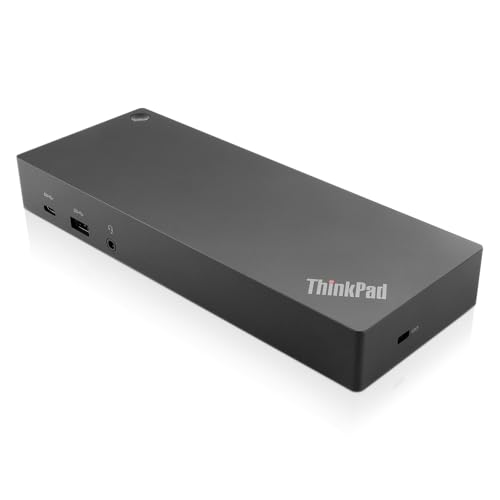
Lenovo ThinkPad Hybrid USB-C and USB-A Dock
Best for: Dual monitor setups with wired Ethernet
- Host Interface
- USB-C, USB-A
- Video Ports
- DisplayPort, HDMI
- Max Data Speed
- 10Gbps
- Ethernet Speed
- Gigabit Ethernet
- Dimensions
- 8.3 × 3.1 × 1.2 inches
- Weight
- 1.05 pounds
View on Amazon: Lenovo ThinkPad Hybrid USB-C and USB-A Dock Affiliate link
This Lenovo dock offers dual display support via DisplayPort and HDMI. It features USB 3.1 Gen 2 ports for 10Gbps data speeds and Gigabit Ethernet. The unit weighs 1.05 pounds and measures 8.3 inches long. It supports ThinkPad RapidCharge and works with older Lenovo models. This setup suits users needing reliable enterprise-class connectivity and multiple video outputs for their workstation.
Pros
- Dual HDMI and DisplayPort video outputs
- USB 3.1 Gen 2 ports with 10Gbps speed
- Built-in Gigabit Ethernet connection
- Supports 15W device charging
Cons
- Only one USB-C host port
- Heavier than compact USB hubs
- Limited to Gigabit Ethernet speeds
Good fit if
- You need two external displays connected simultaneously
- You require wired Gigabit Ethernet for stable internet
- You use a Lenovo laptop with compatible docking ports
Skip if
- You only need a single video output connection
- You prioritize ultra-portability and minimal weight
- You require Thunderbolt 3 or 4 data speeds
Verdict: Lenovo ThinkPad Hybrid Dock provides robust multi-display and wired networking for desktop setups. It is the right choice for users who need stable, high-speed data transfer and dual monitor support without moving the station.

Anker PowerExpand 8-in-1 Dual HDMI USB-C Hub
Best for: Windows users needing Ethernet and dual 4K@30Hz
- Host Interface
- USB-C
- Display Support
- Dual
- Max Resolution
- 4K @ 60Hz
- Power Delivery
- 85W
- Port Count
- 8
- Video Ports
- HDMI
View on Amazon: Anker PowerExpand 8-in-1 Dual HDMI USB-C Hub Affiliate link
The Anker A83800A1 is a compact gray hub with eight ports. It supports dual HDMI displays at 4K resolution. Single screens reach 4K at 60Hz, while dual setups run at 30Hz. It offers 85W pass-through charging. The unit weighs 3.2 ounces and measures 4.65 inches long. It fits users needing extra connectivity for Windows or macOS laptops via a single USB-C host interface.
Pros
- Dual HDMI ports for two displays
- 4K@60Hz support for single monitor
- 85W USB-C Power Delivery
- Built-in Ethernet port
- Compact 3.2-ounce design
Cons
- Dual monitors limited to 4K@30Hz
- Not compatible with Linux operating systems
- macOS mirrors both external displays
Good fit if
- You need dual 4K displays at 30Hz
- You require an Ethernet connection on the go
- You use a Windows laptop with USB-C
Skip if
- You need Linux compatibility
- You want independent dual 4K@60Hz output
- You use a macOS laptop with unique display needs
Verdict: Anker 8-in-1 USB-C Hub Dual Monitor provides essential expansion for Windows users. It suits those who need Ethernet and dual screens without bulk. Skip it if you require Linux support or higher refresh rates on two monitors.
Specifications side by side
| Spec | Lenovo ThinkPad Hybrid USB-C and USB-A Dock | Anker PowerExpand 8-in-1 Dual HDMI USB-C Hub |
|---|---|---|
| Host Interface | USB-C, USB-A | USB-C |
| Display Support | not stated | Dual |
| Max Resolution | not stated | 4K @ 60Hz |
| Power Delivery | not stated | 85W |
| Port Count | not stated | 8 |
| Video Ports | DisplayPort, HDMI | HDMI |
| Max Data Speed | 10Gbps | not stated |
| Ethernet Speed | Gigabit Ethernet | 1Gbps |
| Resolution | not stated | 4K UHD |
| Connectivity | USB-C, USB-A | USB-C, HDMI, Ethernet |
| Features | not stated | Card Reader |
| Dimensions | 8.3 × 3.1 × 1.2 inches | 4.65 × 2.01 × 0.69 inches |
| Weight | 1.05 pounds | 3.2 ounces |
| Color | Black | Gray |
| Model | 40AF0135US | A83800A1 |
| Size | not stated | 8-in-1 USB C Hub |
Frequently asked questions
Which docking station is better for dual monitor setups?
The Lenovo ThinkPad Hybrid Dock is better for stable dual monitor support. It is designed for desktop setups that require robust multi-display capabilities. The Anker hub also supports dual monitors but is limited to 4K at 30Hz. Choose Lenovo if you need a fixed, high-performance station for a desk.
Do I need Ethernet for my laptop setup?
Both devices provide Ethernet connectivity for stable wired networking. The Lenovo dock includes a wired Ethernet port for reliable data transfer. The Anker hub also features an Ethernet port. If you need consistent internet speeds without Wi-Fi interference, either option works, though Lenovo offers more overall ports.
Which dock is more portable and lightweight?
The Anker PowerExpand hub is significantly more portable. It weighs only 3.2 ounces and measures 4.65 inches in length. The Lenovo dock weighs 1.05 pounds and is much larger. If you travel frequently or need a small footprint, the Anker model is the practical choice.
How many USB-A ports does each dock have?
The Lenovo ThinkPad Dock offers more USB-A connectivity. It includes five USB-A ports, with three supporting high-speed 10Gbps data transfer. The Anker hub provides only two USB-A ports. You should choose the Lenovo model if you need to connect multiple legacy peripherals simultaneously.
Can I connect two 4K monitors to the Anker hub?
Yes, the Anker hub supports dual 4K displays. However, it is limited to a 30Hz refresh rate on both screens. This setup works well for standard office tasks. If you require higher refresh rates for gaming or video editing, the Anker hub may not meet your performance needs.
Which docking station fits better in a small workspace?
The Anker PowerExpand hub fits better in small spaces. Its compact design measures just 2.01 inches wide and 0.69 inches high. The Lenovo dock is bulkier, measuring 8.3 inches in length. For tight desks or minimal setups, the Anker unit takes up less surface area.
Is the Lenovo dock suitable for Windows users?
Yes, the Lenovo ThinkPad Hybrid Dock is designed for Windows environments. It provides robust features suitable for enterprise and desktop use. The Anker hub is also noted as suitable for Windows users. Both devices expand your laptop’s capabilities effectively, but Lenovo offers more specialized connectivity options.