Lenovo ThinkPad Hybrid USB-C USB-A vs Lenovo ThinkPad Universal USB-C Dock: Spec Comparison
As an Amazon Associate we earn from qualifying purchases. Links on this page are affiliate links.
You are comparing the lenovo thinkpad hybrid USB c USB a vs thinkpad universal USB c dock. Both docks connect to laptops via USB-C and support Gigabit Ethernet. They share a black finish and serve as universal docking solutions for various ThinkPad models. The main difference lies in their host interface options. The Hybrid dock accepts both USB-C and USB-A connections, while the Universal dock relies solely on USB-C. This distinction affects compatibility with older laptops and cable management.
Key differences
| Aspect | Lenovo ThinkPad Hybrid USB-C and USB-A Dock | Lenovo ThinkPad Universal USB-C Dock |
|---|---|---|
| Host Interface | USB-C and USB-A | USB-C only |
| Video Outputs | 2x DisplayPort, 2x HDMI | not listed |
| USB Data Speed | 10Gbps (USB 3.1 Gen2) | not listed |
| Weight | 1.05 pounds | 1.98 pounds |
| Dimensions (L x W x H) | 8.3 x 3.1 x 1.2 inches | 8.27 x 6.22 x 2.95 inches |
Which one should you choose?
Choose Lenovo ThinkPad Hybrid USB-C and USB-A Dock if
- You need to connect older laptops that only have USB-A ports.
- You require multiple display outputs like HDMI and DisplayPort.
- You prefer a lighter and more compact dock for travel.
Choose Lenovo ThinkPad Universal USB-C Dock if
- You want a dock designed for modern USB-C only workflows.
- You need automatic firmware updates and remote IT management features.
- You are setting up a hot-desking or remote work environment.
Verdict: The Hybrid dock suits users with mixed laptop generations or those needing specific video ports. The Universal dock is better for modern setups requiring streamlined USB-C connectivity and IT management tools.
Hybrid vs Universal Dock Specs
Host Connectivity
The Lenovo ThinkPad Hybrid USB-C and USB-A Dock supports both USB-C and USB-A host interfaces. This flexibility allows you to connect it to older laptops that only have USB-A ports. The Lenovo ThinkPad Universal USB-C Dock uses a single USB-C host interface. This design requires a USB-C port on your laptop. The Hybrid model offers broader compatibility for legacy systems. The Universal dock is streamlined for modern USB-C only devices. Choose the Hybrid if you need USB-A connectivity. Choose the Universal if you prefer a single cable setup.
Video Output Options
The Hybrid dock provides two DisplayPort outputs and two HDMI ports. This gives you four total video outputs for multi-monitor setups. The Universal dock’s video port specifications are not listed in the provided data. You must check the manual for its display support. The Hybrid dock clearly offers more visible video connectivity options. It supports dual monitor configurations with mixed port types. The Universal dock may support multiple displays, but the data does not confirm the port count. The Hybrid dock is the safer choice for known video flexibility.
Data Transfer Speed
The Hybrid dock features USB 3.1 Gen 2 ports with a max data speed of 10Gbps. It includes three of these high-speed ports for fast file transfers. The Universal dock does not list specific data transfer speeds in the provided data. You cannot verify if it supports Gen 2 speeds without further info. The Hybrid dock guarantees 10Gbps performance on its primary ports. This is useful for moving large files quickly. The Universal dock likely supports standard USB speeds, but the data is silent. The Hybrid dock wins on confirmed high-speed data capabilities.
Physical Dimensions
The Hybrid dock measures 8.3 inches in length, 3.1 inches in width, and 1.2 inches in height. It is relatively compact and slim for desk placement. The Universal dock measures 8.27 inches in length, 6.22 inches in width, and 2.95 inches in height. The Universal dock is significantly wider and taller. It takes up more desk space. The Hybrid dock is narrower, saving lateral space. The length is nearly identical between the two. If desk real estate is tight, the Hybrid dock is the better fit. The Universal dock is bulkier in width and height.
Weight and Build
The Hybrid dock weighs 1.05 pounds. It is lighter and easier to move if needed. The Universal dock weighs 1.98 pounds. It is nearly twice as heavy as the Hybrid model. The extra weight may provide more stability on a desk. It is less likely to slide around during cable insertion. The Hybrid dock is lighter, which might make it feel less substantial. Both docks are black and built for office use. The weight difference is notable. The Universal dock feels more robust due to its mass. The Hybrid dock is more portable.
Choose the Right Dock for Your Setup
Users with older USB-A laptops
This dock supports USB-A host interfaces, allowing connection to older laptops without USB-C ports. It also offers three USB 3.1 Gen2 ports with 10Gbps speeds and an always-on charging port. This flexibility ensures compatibility with legacy devices while providing robust data transfer options for your workflow.
Those needing multiple display outputs
You get two DisplayPort and two HDMI ports for extensive multi-monitor setups. The Universal Dock lists only USB-C host connectivity, implying fewer native video outputs. If you require connecting multiple displays simultaneously without adapters, this hybrid dock provides the necessary physical ports for your expanded desktop environment.
Modern USB-C only setups
This universal dock relies on a single USB-C cable for connectivity, reducing desk clutter. It supports automatic firmware updates and IT management tools like PXE boot. Its compact design fits modern workflows where you only need USB-C connectivity, offering a streamlined solution for current laptops and remote work environments.
The products compared
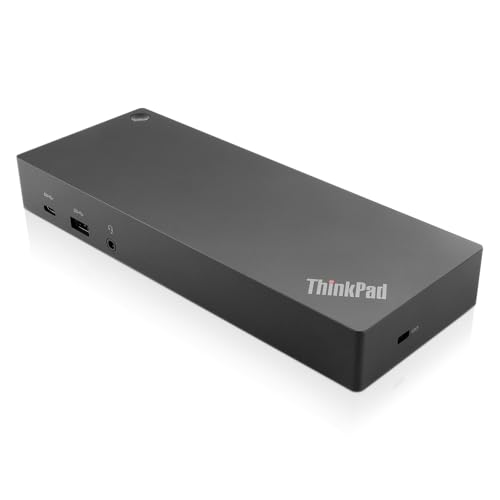
Lenovo ThinkPad Hybrid USB-C and USB-A Dock
Best for: older ThinkPads needing dual monitors
- Host Interface
- USB-C, USB-A
- Video Ports
- DisplayPort, HDMI
- Max Data Speed
- 10Gbps
- Ethernet Speed
- Gigabit Ethernet
- Dimensions
- 8.3 × 3.1 × 1.2 inches
- Weight
- 1.05 pounds
View on Amazon: Lenovo ThinkPad Hybrid USB-C and USB-A Dock Affiliate link
This docking station bridges USB-C and USB-A connections for older and newer ThinkPads. It offers three USB 3.1 ports with 10Gbps speeds and dual video outputs via HDMI and DisplayPort. The Gigabit Ethernet port ensures stable wired internet. It supports 15W charging for mobile devices. This unit suits users who need versatile connectivity without a dedicated USB-C host.
Pros
- Three USB 3.1 Gen 2 ports with 10Gbps data transfer
- Dual video output with two HDMI and two DisplayPort connectors
- Gigabit Ethernet port for reliable wired networking
- 15W charging capability on the USB-C port
- Works with both older and newer ThinkPad models
Cons
- Requires a USB-A connection for primary host interface
- No Thunderbolt support for higher bandwidth needs
- Heavier and bulkier than dedicated USB-C docks
Good fit if
- You use a laptop with only USB-A ports
- You need multiple video outputs for a dual monitor setup
- You require a Gigabit Ethernet connection
Skip if
- You need Thunderbolt 3 or 4 speeds
- You prefer a compact, lightweight travel dock
- Your laptop only has USB-C ports
Verdict: Lenovo ThinkPad Hybrid USB-C Dock provides essential connectivity for legacy systems. It is ideal for users who need to connect multiple displays and peripherals to older ThinkPad models via USB-A.

Lenovo ThinkPad Universal USB-C Dock
Best for: USB-C laptops needing IT management tools
- Host Interface
- USB-C
- Dimensions
- 8.27 × 6.22 × 2.95 inches
- Weight
- 1.98 pounds
View on Amazon: Lenovo ThinkPad Universal USB-C Dock Affiliate link
The Lenovo ThinkPad Universal USB-C Dock (40AY0090) connects via a single USB-C interface. It measures 8.27 by 6.22 by 2.95 inches and weighs 1.98 pounds. This black dock supports firmware updates and IT tools like PXE boot. You get fast data transfers and rapid charging for compatible notebooks. It suits users needing a compact, single-cable solution for office or remote work.
Pros
- Single USB-C host interface for clean desk setups
- Supports PXE boot, WOL, and MAC Address Pass Through
- Automatic critical firmware updates for IT management
- Compact dimensions at 8.27 x 6.22 x 2.95 inches
Cons
- Limited to USB-C connectivity without native USB-A ports
- No mention of AC power adapter inclusion in specs
- Heavier build at 1.98 pounds compared to lighter docks
Good fit if
- You use a USB-C only laptop and want one cable
- You need IT management features like WOL and PXE boot
- You prefer a compact footprint for limited desk space
Skip if
- You require native USB-A ports for legacy peripherals
- You need a dock with multiple display outputs listed
- You prioritize a lightweight travel accessory under 1 pound
Verdict: Lenovo ThinkPad Universal USB-C Dock fits users who prioritize a single-cable USB-C connection and IT management features over native USB-A ports.
Specifications side by side
| Spec | Lenovo ThinkPad Hybrid USB-C and USB-A Dock | Lenovo ThinkPad Universal USB-C Dock |
|---|---|---|
| Host Interface | USB-C, USB-A | USB-C |
| Video Ports | DisplayPort, HDMI | not stated |
| Max Data Speed | 10Gbps | not stated |
| Ethernet Speed | Gigabit Ethernet | not stated |
| Connectivity | USB-C, USB-A | USB-C |
| Dimensions | 8.3 × 3.1 × 1.2 inches | 8.27 × 6.22 × 2.95 inches |
| Weight | 1.05 pounds | 1.98 pounds |
| Color | Black | Black |
| Model | 40AF0135US | 40AY0090 |
Frequently asked questions
Which dock is better for older ThinkPad laptops?
The Lenovo ThinkPad Hybrid USB-C and USB-A Dock is the better choice for older models. It supports both USB-C and USB-A host interfaces. This allows you to connect it to laptops that only have USB-A ports. The Universal Dock requires a USB-C host connection, which older machines may lack.
What are the physical dimensions of each dock?
The Hybrid Dock measures 8.3 inches in length, 3.1 inches in width, and 1.2 inches in height. The Universal Dock is slightly longer at 8.27 inches but much wider at 6.22 inches and taller at 2.95 inches. The Universal Dock is also heavier, weighing 1.98 pounds compared to the Hybrid Dock's 1.05 pounds.
Can I use the Universal Dock with USB-A laptops?
No, the Lenovo ThinkPad Universal USB-C Dock does not support USB-A host interfaces. It connects exclusively via USB-C. If your laptop only has USB-A ports, you must use the Hybrid Dock, which explicitly supports USB-A connectivity for legacy systems.
Do both docks have the same color finish?
Yes, both docks share a black finish. The Lenovo ThinkPad Hybrid USB-C and USB-A Dock is black. The Lenovo ThinkPad Universal USB-C Dock is also black. This consistent color scheme helps them blend into most office environments.
Which dock is lighter and easier to transport?
The Lenovo ThinkPad Hybrid USB-C and USB-A Dock is lighter. It weighs 1.05 pounds. The Universal Dock weighs 1.98 pounds, making it nearly twice as heavy. If you need a portable solution, the Hybrid Dock is the more practical option due to its lower weight.
What is the model number for the Universal Dock?
The model number for the Lenovo ThinkPad Universal USB-C Dock is 40AY0090. The Hybrid Dock uses the model number 40AF0135US. You can use these numbers to verify compatibility with your specific laptop when purchasing accessories or drivers.
Is the Universal Dock better for IT management?
The Lenovo ThinkPad Universal USB-C Dock is designed for users who prioritize IT management tools. It fits users who need a single-cable USB-C connection. The Hybrid Dock focuses on essential connectivity for legacy systems. Choose the Universal Dock if your organization relies on advanced management features.