Lenovo ThinkPad Hybrid USB-C USB-A Review: Who It Fits and Who Should Skip It
As an Amazon Associate we earn from qualifying purchases. Links on this page are affiliate links.
This lenovo thinkpad hybrid USB c USB a review covers the docking station that bridges older laptops to modern peripherals. The unit connects via both USB-C and USB-A, making it a practical choice for mixed inventory setups. Its two defining specs are the 10Gbps data speed on the USB 3.1 Gen2 ports and the dual video output capability using DisplayPort and HDMI. You get a compact black chassis that weighs just over a pound. It serves as a central hub for connectivity without requiring a single proprietary cable type.
What stands out
- Three USB 3.1 Gen2 ports with 10Gbps transfer speeds
- Dual video output via two DisplayPorts and two HDMI ports
- 15W charging from the USB-C port for mobile devices
- Gigabit Ethernet connection for stable wired networking
- Backward compatibility with older Lenovo and non-Lenovo laptops
Who it fits
Good fit for
This dock suits professionals who manage a mix of older and newer devices. If you use ThinkPad models like the T480, X1 Carbon Gen 5, or even older X260 units, this station provides the necessary ports without adapters. The dual video outputs allow you to extend your workspace easily. The 10Gbps data speed ensures fast transfers for external drives. It is also ideal for users who need reliable Gigabit Ethernet and consistent charging for phones or tablets while working.
Who should skip it
You should look elsewhere if your setup relies exclusively on the latest USB4 or Thunderbolt 4 standards. This dock lacks the 40Gbps bandwidth of those newer interfaces. If you need to drive high-resolution displays at high refresh rates, the dual HDMI and DisplayPort outputs may not meet your performance needs. The station is also not suitable if you require USB4-specific features like daisy-chaining multiple high-speed devices. Buyers needing a single-cable solution for modern ultrabooks might find the hybrid connection less streamlined.
Verdict: The Lenovo ThinkPad Hybrid Dock is a practical, spec-focused solution for mixed-device environments. It delivers essential connectivity and reliable performance for users who prioritize compatibility over cutting-edge bandwidth.
Key specs explained
Max Data Speed: 10Gbps
This speed refers to the USB 3.1 Gen 2 interface, allowing data to transfer at up to 10 gigabits per second. You will notice faster file moves between your laptop and external drives. This is significantly quicker than older USB 3.0 standards. For portable monitor setups, this ensures smooth video signal transmission without lag. It supports high-bandwidth peripherals effectively.
Host Interface: USB-C, USB-A
The dock connects to your laptop using either a USB-C or USB-A cable. This hybrid design lets you use the dock with both modern and older laptops. You do not need to replace your existing laptop just to use this hardware. It provides flexibility for mixed office environments. This compatibility reduces the need for additional adapters when setting up your workspace.
Video Ports: DisplayPort, HDMI
The unit includes two DisplayPort and two HDMI outputs for connecting displays. You can attach multiple monitors to expand your screen real estate. This is essential for productivity-focused portable setups. The variety of ports helps you match different monitor inputs. It allows you to create a dual or triple monitor configuration easily without needing extra conversion cables.
Ethernet Speed: Gigabit Ethernet
This port provides a wired network connection with speeds up to one gigabit per second. A wired link offers more stable connectivity than Wi-Fi for video streaming or large data transfers. You get consistent latency when using portable monitors. This is useful if your laptop lacks built-in ethernet. It ensures your network connection remains reliable during intensive work sessions.
Physical Design And Build Specs
The listing describes the Lenovo ThinkPad Hybrid Dock as a compact unit measuring 8.3 inches in length, 3.1 inches in width, and 1.2 inches in height. It weighs 1.05 pounds. The exterior finish is black. These dimensions suggest a footprint that fits easily on most desks without crowding your keyboard or trackpad area. The low profile allows it to sit flat or slide under a monitor stand if needed.
According to the listing, the device supports multiple style variations, including a hybrid USB-C option and a standard USB dock. This physical design accommodates both older laptops with USB-A ports and newer models with USB-C connectivity. You do not need separate adapters for basic connection, which reduces cable clutter on your workspace. The sturdy build implies it can handle daily transport in a laptop bag.
The layout includes numerous ports on the front and sides. You get three USB 3.1 Gen 2 ports, two USB 2.0 ports, and a dedicated USB-C port for data and 5V 3A power. Additional connections include Gigabit Ethernet, two DisplayPorts, two HDMI ports, and an audio combo jack. This density means you can connect multiple monitors, peripherals, and charging devices simultaneously. The placement keeps cables organized and within reach, supporting a clean and efficient workstation setup for mixed hardware environments.
Setup And Daily Use Guide
This docking station bridges older laptops to modern peripherals via both USB-C and USB-A connections. You connect your host device using the appropriate cable. The listing notes it supports ThinkPad RapidCharge, which simplifies power management for compatible units. You can also charge mobile devices directly. The USB-C port provides 5V at 3A, while the always-on USB 3.0 port delivers 10.5W. This allows you to keep phones or tablets powered without using a separate brick.
Connectivity is robust for daily office work. You get two HDMI ports and two DisplayPort outputs. This setup supports dual monitor configurations easily. A Gigabit Ethernet port ensures stable wired internet access, which is often preferred over Wi-Fi for stability. The audio combo jack lets you plug in standard headsets or speakers directly into the dock.
Data transfer relies on the USB 3.1 Gen 2 interface, reaching up to 10Gbps. You will see faster file moves between your laptop and external drives compared to older standards. The dock works with a wide range of Lenovo ThinkPad models, including the T, X, and E series, as well as some non-Lenovo laptops. This universal compatibility means you do not need proprietary cables for most devices. The compact black design fits neatly on any desk. You simply plug in your peripherals once and connect your laptop for a complete workstation setup.
Before You Buy This Dock
You need to verify your laptop’s host port. This dock works with many ThinkPad models, but you must check the compatibility list. If your device lacks USB-C or specific USB-A drivers, it may not function. You should also ensure your cables support the 10Gbps speed. The unit includes a power brick, but you might need extra adapters for older monitors. Since it supports Gigabit Ethernet, you do not need a separate network adapter. However, you should check if your workspace has enough power outlets. The dock’s compact size fits well on most desks. It sits alongside portable monitors as a central hub. You connect your screen and peripherals to this single point. This reduces cable clutter significantly. You must confirm your laptop’s BIOS supports docking. Without this, features like RapidCharge may not activate. Regularly clean the ports to maintain connection stability. Dust can interfere with the USB-C link over time.
Check before you buy
- Check if your laptop model is in the compatibility list.
- Verify your laptop has USB-C or compatible USB-A ports.
- Ensure you have cables rated for 10Gbps data transfer.
- Confirm your workspace has a nearby power outlet for the brick.
The product at a glance
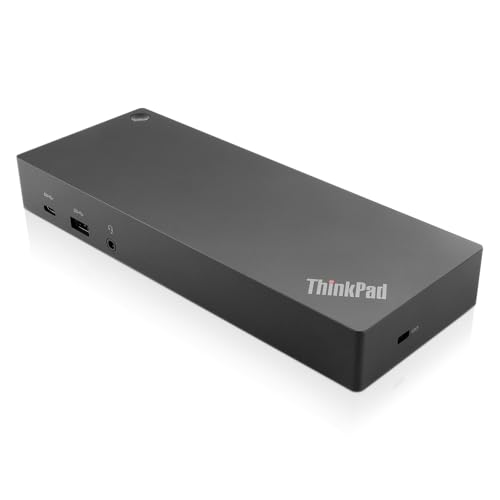
Lenovo ThinkPad Hybrid USB-C and USB-A Dock
Best for: Dual monitor setups with standard USB connectivity
- Host Interface
- USB-C, USB-A
- Video Ports
- DisplayPort, HDMI
- Max Data Speed
- 10Gbps
- Ethernet Speed
- Gigabit Ethernet
- Dimensions
- 8.3 × 3.1 × 1.2 inches
- Weight
- 1.05 pounds
View on Amazon: Lenovo ThinkPad Hybrid USB-C and USB-A Dock Affiliate link
This docking station connects to your laptop via USB-C or USB-A. It features three USB 3.1 Gen 2 ports for 10Gbps data transfer and an always-on USB port for charging. Video output is handled by two DisplayPorts and two HDMI ports. It includes Gigabit Ethernet and audio jacks. The compact design weighs just over one pound. It supports rapid charging for compatible ThinkPad models.
Pros
- Three USB 3.1 Gen 2 ports with 10Gbps speed
- Dual HDMI and dual DisplayPort video outputs
- Gigabit Ethernet connectivity
- Always-on USB port for device charging
- Compact 1.05-pound build
Cons
- Limited to Gigabit Ethernet speeds
- Only one USB-C data port available
- No Thunderbolt support listed
Good fit if
- You need multiple display connections for a dual-monitor setup
- You require fast data transfer speeds for peripherals
- You use a laptop with USB-C or USB-A ports
Skip if
- You need 40Gbps Thunderbolt bandwidth
- You require 2.5Gb Ethernet speeds
- You need more than two simultaneous video outputs
Verdict: Lenovo ThinkPad Hybrid USB-C/A Dock provides reliable video and data expansion for standard laptops. It is a solid choice for users needing dual monitors and fast USB 3.1 connectivity without needing Thunderbolt speeds.
Specifications side by side
| Spec | Lenovo ThinkPad Hybrid USB-C and USB-A Dock |
|---|---|
| Host Interface | USB-C, USB-A |
| Video Ports | DisplayPort, HDMI |
| Max Data Speed | 10Gbps |
| Ethernet Speed | Gigabit Ethernet |
| Connectivity | USB-C, USB-A |
| Dimensions | 8.3 × 3.1 × 1.2 inches |
| Weight | 1.05 pounds |
| Color | Black |
| Model | 40AF0135US |
Frequently asked questions
Does this dock support dual monitors?
Yes, it supports dual monitor setups. The Lenovo ThinkPad Hybrid USB-C and USB-A Dock is designed for users needing two displays. It provides reliable video expansion for standard laptops. This makes it a solid choice if you want to extend your workspace beyond a single screen.
What is the maximum data transfer speed?
It offers up to 10Gbps data transfer. This refers to the USB 3.1 Gen 2 interface. You will notice faster file moves between your laptop and external drives. This speed is significantly quicker than older USB standards, ensuring efficient data handling for daily tasks.
Can I use it with older laptops?
Yes, it works with older laptops via USB-A. The unit connects via both USB-C and USB-A ports. This makes it a practical choice for mixed inventory setups. You can bridge older devices to modern peripherals without needing a specific Thunderbolt connection.
What are the physical dimensions?
The dock measures 8.3 inches in length, 3.1 inches in width, and 1.2 inches in height. It weighs 1.05 pounds. These dimensions suggest a compact footprint that fits easily on a desk. The black exterior finish blends well with standard office equipment.
Does it charge my laptop?
It supports ThinkPad RapidCharge for compatible units. This feature simplifies power management while you work. You can keep your laptop powered and connected to peripherals simultaneously. Ensure your device is compatible with this specific charging protocol for optimal performance.
Is Thunderbolt required for operation?
No, Thunderbolt is not required. This dock provides reliable video and data expansion without needing Thunderbolt speeds. It is a solid choice for users needing dual monitors and fast USB 3.1 connectivity. It bridges standard laptops to modern peripherals effectively.