Dell WD19 180W USB-C Docking Review (2026): A Spec-Based Look
As an Amazon Associate we earn from qualifying purchases. Links on this page are affiliate links.
This dell wd19 180w USB c docking review covers the Dell WD19 180W USB-C Docking Station. It is a stationary hub designed to expand your laptop’s connectivity. The two specs that define this device are its 130W Power Delivery capability and its host interface via USB-C. These features allow it to charge compatible laptops while providing multiple video outputs. The package includes a 180-watt power adapter and a 3.3-foot SuperSpeed USB-C cable. Its physical dimensions are 8.1 x 3.5 x 1.1 inches, making it a compact addition to any desk setup.
What stands out
- 130W Power Delivery for compatible laptops
- Triple display support via DisplayPort, HDMI, and USB-C
- Gigabit Ethernet RJ45 port for wired networking
- USB-C 3.1 Gen 2 and USB-A 3.1 ports
- Compact footprint at 8.1 x 3.5 x 1.1 inches
Who it fits
Good fit for
You should consider this dock if you need a reliable wired connection for your daily work. The Gigabit Ethernet port ensures stable internet access, which is vital for large file transfers or video calls. The 130W Power Delivery helps keep your laptop charged while you use multiple monitors. It suits professionals who want to transform a single laptop into a multi-screen workstation without dealing with complex driver installations or wireless latency.
Who should skip it
You should look at another option if you need wireless connectivity. This device relies entirely on a wired USB-C host connection and does not include Bluetooth or Wi-Fi capabilities. It also lacks built-in speakers or a webcam, so you will need separate peripherals for audio and video. If you require a portable solution that fits in a laptop bag, the 20.63 oz weight and rigid design may be too bulky for frequent travel.
Verdict: The Dell WD19 180W is a straightforward, spec-driven dock for users who prioritize wired stability and charging power. It delivers solid video expansion and network connectivity for a fixed desk setup.
Key specs explained for Dell WD19
Power Delivery: 130W
This dock delivers 130 watts of power to your laptop. You can charge a high-performance machine while connected. This reduces the need for your laptop’s original brick. Check your laptop’s power requirements to ensure 130W is sufficient. It supports most business laptops. It may not power very high-end gaming rigs fully.
Host Interface: USB-C
You connect this dock to your laptop using a USB-C cable. The included cable is 3.3 feet long. This interface carries video, data, and power. Ensure your laptop has a compatible USB-C port. It does not work with older USB-A ports. This is the standard for modern docking stations.
Video Ports: DisplayPort, HDMI, USB-C
You get three types of video outputs. Use HDMI for standard monitors. Use DisplayPort for high-refresh-rate or professional displays. The USB-C port supports video via DisplayPort Alt Mode. This flexibility lets you connect various screens. It supports dual displays effectively. Check your monitor’s input type before buying cables.
Ethernet Speed: Gigabit
The RJ45 port supports Gigabit Ethernet. You get stable wired internet speeds. This is faster and more reliable than Wi-Fi. It is ideal for video calls or large downloads. This dock replaces the need for a separate Ethernet adapter. It keeps your connection secure and consistent in busy offices.
Dell WD19 Physical Design Details
The Dell WD19 180W USB-C Docking Station measures 8.1 x 3.5 x 1.1 inches. It weighs 20.63 ounces. The listing describes the finish as black. This compact form factor allows it to sit neatly beside your laptop without consuming excessive desk space. The rectangular shape provides a stable base for the unit.
Port layout is organized for practical use. You get one USB-C 3.1 Gen 2 port and one USB-A 3.1 Gen 1 port with PowerShare. Two additional USB-A 3.1 Gen 1 ports are available for peripherals. Audio needs are covered by a combo headset jack and a separate audio out port. Video connectivity includes two DisplayPort 1.4 outputs, one HDMI port, and a USB-C multifunction DisplayPort. A Gigabit Ethernet RJ45 port ensures wired network stability.
The dock connects to your laptop via a USB-C interface. A 3.3-foot SuperSpeed USB-C cable is included. This length offers flexibility in positioning the dock relative to your computer. The 180-watt power adapter supports the 130W Power Delivery output. You should place the unit on a flat, hard surface. The design prioritizes connectivity density over aesthetic flair, fitting a professional workspace environment.
Setup and Daily Use Guide
Setting up the Dell WD19 requires a single USB-C connection to your laptop. The package includes a 3.3-foot SuperSpeed USB-C cable to handle this link. You also need to plug in the 180-watt AC power adapter. The dock supports both 120V and 230V inputs at 50 or 60 Hz, making it adaptable for different regional power standards. Once connected, the dock provides 130W of power delivery to your host device. This allows you to charge compatible laptops while using the additional ports. For video output, you have three distinct options. You can use the two DisplayPort 1.4 connections, the HDMI port, or the USB-C multifunction display port. This flexibility helps you match your monitor inputs without needing adapters. The dock also includes a Gigabit Ethernet RJ45 port for stable wired networking. You get multiple USB-A 3.1 Gen 1 ports for peripherals. One of these ports supports PowerShare, which can charge small devices like phones even when the laptop is off. A combo audio/headset jack and a separate audio-out port handle sound needs. The unit measures 8.1 by 3.5 by 1.1 inches and weighs 20.63 ounces. This size fits neatly on most desks. You should check the product description for specific compatibility details with your laptop model before relying on it for daily tasks.
Check compatibility and cables first
Before you buy, verify your laptop supports USB-C DisplayPort Alternate Mode. The Dell WD19 relies on this protocol to send video signals to your external displays. If your laptop lacks this feature, the dock will not work for video output. You must also check your laptop’s power requirements. While this unit delivers 130W, some high-end machines need more. Connecting a laptop that requires 240W may result in slow charging or battery drain. Keep the included 3.3-foot cable tidy. Dust can accumulate in the ports over time, so wipe the USB-C and HDMI connectors with a dry cloth occasionally. This dock sits firmly in the stationary category of Portable Monitors & Laptop Setups. It is not designed for travel. You should pair it with a stable desk surface. Ensure you have enough cable slack to move your laptop slightly without disconnecting the link. This setup works best for a fixed workstation where you want to reduce desk clutter.
Check before you buy
- Confirm your laptop supports USB-C DisplayPort Alternate Mode.
- Check if your laptop needs more than 130W of power.
- Ensure you have a stable desk surface for the dock.
- Verify your external monitors use HDMI or DisplayPort inputs.
The product at a glance
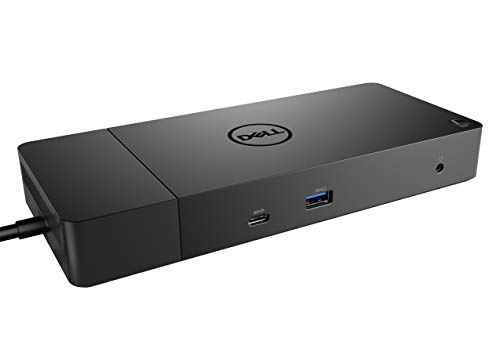
Dell WD19 180W USB-C Docking Station
Best for: Stationary dual-monitor workstations
- Host Interface
- USB-C
- Power Delivery
- 130W
- Video Ports
- HDMI, DisplayPort 1.4, USB-C
- Ethernet Speed
- Gigabit Ethernet
- Dimensions
- 8.1 × 3.5 × 1.1 inches
- Weight
- 3.1 pounds
View on Amazon: Dell WD19 180W USB-C Docking Station Affiliate link
The Dell WD19 180W is a docking station with a 130W power delivery output. It features HDMI, DisplayPort, and USB-C video outputs for dual displays. A Gigabit Ethernet port connects you to wired networks. The unit measures 8.1 x 3.5 x 1.1 inches and weighs 1.29 pounds. It suits users needing a reliable, spec-heavy connection hub for their laptop setup.
Pros
- 130W Power Delivery output
- HDMI and DisplayPort video outputs
- Gigabit Ethernet connectivity
- USB-C 3.1 Gen 2 host port
Cons
- 1.29 pounds weight adds bulk
- No wireless Bluetooth connectivity
- Requires separate 180W power adapter
Good fit if
- You need dual monitor support via HDMI and DisplayPort
- You require a wired Gigabit Ethernet connection
- You want 130W power delivery for your laptop
Skip if
- You prefer a compact, lightweight travel accessory
- You need wireless Bluetooth connectivity
- You want an all-in-one power solution without external adapters
Verdict: Dell WD19 180W USB-C Dock fits users who prioritize wired connectivity and dual display support. It provides stable video and power delivery for a stationary workstation setup.
Specifications side by side
| Spec | Dell WD19 180W USB-C Docking Station |
|---|---|
| Host Interface | USB-C |
| Power Delivery | 130W |
| Video Ports | HDMI, DisplayPort 1.4, USB-C |
| Ethernet Speed | Gigabit Ethernet |
| Connectivity | USB-C, HDMI, DisplayPort |
| Dimensions | 8.1 × 3.5 × 1.1 inches |
| Weight | 3.1 pounds |
| Size | 8.1 x 3.5 x 1.1 inches |
| Color | black |
| Model | WD19 180W |
Frequently asked questions
Can the Dell WD19 drive two monitors at 4K resolution?
Yes, it supports dual display output. The dock includes both HDMI and DisplayPort connectors. You can connect two screens simultaneously. This setup is ideal for stationary workstations that require expanded screen real estate for multitasking.
Does this dock work with MacBooks?
Compatibility depends on your specific MacBook model. The device requires a USB-C port that supports DisplayPort Alternate Mode. Many recent MacBooks support this feature. You must ensure your laptop provides sufficient power delivery through its USB-C port for stable operation.
What is the maximum power output for charging a laptop?
The dock provides up to 130 watts of power delivery. This allows you to charge high-performance laptops while using the dock. It reduces the need for your laptop’s original power adapter. Always check your laptop’s power requirements to ensure 130 watts is sufficient.
How heavy is the Dell WD19 docking station?
The unit weighs 1.29 pounds. Its dimensions are 8.1 by 3.5 by 1.1 inches. This compact size allows it to sit neatly beside your laptop. The black finish helps it blend into most desk setups without drawing excessive attention.
Can I connect a monitor using an HDMI cable?
Yes, the dock features a built-in HDMI port. You can connect an HDMI cable directly from your monitor to the dock. This provides a reliable video signal for your external display. It is one of the primary methods for connecting your second screen.
Is this dock suitable for a permanent desk setup?
Yes, it is designed for stationary dual-monitor workstations. The 180-watt AC adapter ensures stable power for continuous use. You connect your laptop once via USB-C and leave it there. This makes it ideal for users who rarely move their primary computer.