CalDigit TS3 Plus Thunderbolt 3 Review: Specs, Pros and Cons
As an Amazon Associate we earn from qualifying purchases. Links on this page are affiliate links.
This caldigit ts3 plus thunderbolt 3 review covers a dock that consolidates your workspace connections. It features 15 ports for broad compatibility and delivers up to 87W of power delivery to charge your laptop. The unit supports dual 4K displays or a single 5K screen, making it suitable for high-resolution workflows. You also get a fast UHS-II SD card slot for photographers. The aluminum chassis includes an integrated heat sink, ensuring stable operation without a fan. This setup simplifies cable management while providing essential connectivity for modern devices.
What stands out
- 15 ports including two Thunderbolt 3 connections
- 87W power delivery for laptop charging
- Supports dual 4K or single 5K displays
- UHS-II SD card slot with 312 MB/s speed
- Fanless aluminum design with integrated heat sink
Who it fits
Good fit for
This dock suits professionals who need extensive connectivity from a single cable. Photographers will appreciate the UHS-II SD slot for rapid footage transfers. Users with Thunderbolt 3 or 4 hosts can benefit from the 87W charging and dual 4K display support. It is ideal for those who want to reduce desk clutter while maintaining high-speed data transfer for peripherals. The sturdy build and passive cooling make it a reliable choice for daily office or studio use.
Who should skip it
You should look elsewhere if your computer lacks a Thunderbolt 3, 4, or 5 port, as the host device must have one to function. M1 Mac users cannot support dual displays over Thunderbolt, limiting their video output options. If you require Wi-Fi or Bluetooth connectivity, this dock does not include those features. Additionally, users needing more than two external monitors may find the display support insufficient for their specific multi-screen workflow needs.
Verdict: The CalDigit TS3 Plus offers robust connectivity and strong charging capabilities for Thunderbolt-enabled devices. It is a practical choice for users prioritizing port expansion and display performance.
Key specs explained
Port Count: 15
This dock provides 15 total connection points. You get two Thunderbolt 3 ports, five USB-A ports, one USB-C Gen 1, one USB-C Gen 2, Gigabit Ethernet, an SD card slot, and audio jacks. This count reduces the need for multiple hubs. It suits users with many peripherals. When comparing laptop setups, check if your current hub offers similar density to avoid cable clutter on your desk.
Max Data Speed: 40Gb/s
The Thunderbolt 3 interface supports up to 40Gb/s transfer rates. This speed handles large files, such as video footage, much faster than standard USB 3.0. It benefits editors and photographers who move large media libraries. When shopping for portable monitors or docks, ensure your host device also supports 40Gb/s to utilize this bandwidth fully for fast data exchange.
Power Delivery: 87W
The dock delivers up to 87W of power to your laptop. This allows you to charge high-performance machines while using the dock. It simplifies your workspace by using a single cable for power and data. This is useful for MacBook Pro users. Compare this to lower-wattage docks that may only charge smaller laptops or fail to power your device while working.
Max Resolution: 5K@60Hz
You can connect a single 5K display at 60Hz through the Thunderbolt 3 port. Alternatively, it supports dual 4K monitors. This resolution offers sharp visuals for detailed work. It suits designers and developers needing screen real estate. When buying portable monitors, verify your dock supports the resolution you plan to use, as some docks limit output to lower resolutions.
Host Interface: Thunderbolt 3
The dock connects via a Thunderbolt 3 port on your computer. Your host device must have this specific port to function. It is not compatible with standard USB-C ports that lack Thunderbolt support. This requirement limits which laptops can use the dock. Check your laptop specifications before purchasing to ensure it has a Thunderbolt 3, 4, or 5 port for compatibility.
Design and build quality
The CalDigit TS3 Plus dock uses a sturdy full aluminum construction with an integrated heat sink. According to the listing, this design omits a fan. You get passive cooling that reduces noise while managing thermal output during heavy use. The unit measures 6.8 inches in length, 5.4 inches in width, and 4.8 inches in height. It weighs 1.32 pounds, making it a compact desktop accessory that fits neatly beside your laptop without taking up excessive desk space.
You can position the dock in either a vertical or horizontal orientation. This flexibility allows you to arrange your workspace to suit your cable management preferences. The space gray finish blends with most modern laptop chassis. The dock includes a 0.8-meter cable for host connection. This length provides enough reach to place the unit slightly away from your computer while keeping cables organized.
The layout prioritizes connectivity density without requiring complex controls. You do not need to adjust settings to switch between orientations or manage the heat sink. The design relies on the aluminum body to dissipate heat. This approach means the dock remains silent during operation. You get a reliable, quiet connection hub that does not require active airflow. The solid build suggests durability for daily office or studio environments where noise and space are factors.
Setup and daily operation guide
You need a host device with at least a Thunderbolt 3 port to use this dock. It works with M1, M2, M3, and M5 Macs, as well as Windows 8, 10, 11, and 2016+ MacBook Pro systems. The unit includes a 0.8-meter cable. You can place it vertically or horizontally on your desk. The sturdy aluminum construction with an integrated heat sink keeps it cool without a fan. This passive cooling means quiet operation during long work sessions. You connect your laptop to the Thunderbolt 3 input. Then, you plug in your peripherals. The dock provides up to 87W of power delivery. This charges your laptop while powering connected USB devices. The secondary Thunderbolt 3 port offers 15W for downstream gear. For video, you can connect two 4K monitors at 60Hz. Alternatively, a single 5K display at 60Hz is supported via the Thunderbolt 3 port. Note that M1 Macs cannot support dual displays over Thunderbolt. You must use active adapters for DisplayPort to HDMI, DVI, or VGA connections. Passive dongles will not work. Data transfers through the UHS-II SD card slot reach up to 312 MB/s. This allows faster footage uploads from cameras. Gigabit Ethernet provides wired internet stability. You also get optical audio and stereo jacks for audio output. The setup is straightforward once your computer meets the port requirement.
Before You Buy This Dock
Before you buy, check your host device compatibility. You need at least a Thunderbolt 3 port. This dock works with M1, M2, M3, and M5 Macs, plus Windows systems with Thunderbolt 3, 4, or 5. Note that M1 Macs cannot support dual displays over Thunderbolt. You may need active DisplayPort to HDMI adapters for non-native connections. Passive dongles will not work. The 0.8-meter cable limits placement flexibility. You might want a longer cable or a stand for vertical orientation. The aluminum body dissipates heat passively, so ensure adequate airflow. This dock suits users needing extensive connectivity and high-resolution displays. It fits well in setups requiring dual 4K or single 5K monitors. Consider your power needs, as it delivers 87W. Verify your laptop supports this charging level. The UHS-II SD slot benefits photographers. Ensure your camera uses compatible cards. This dock is ideal for professionals needing reliable, fanless operation and robust port expansion.
Check before you buy
- Verify host device has Thunderbolt 3 port
- Check M1 Mac dual display limitations
- Ensure active adapters for non-native displays
- Confirm laptop supports 87W charging
The product at a glance
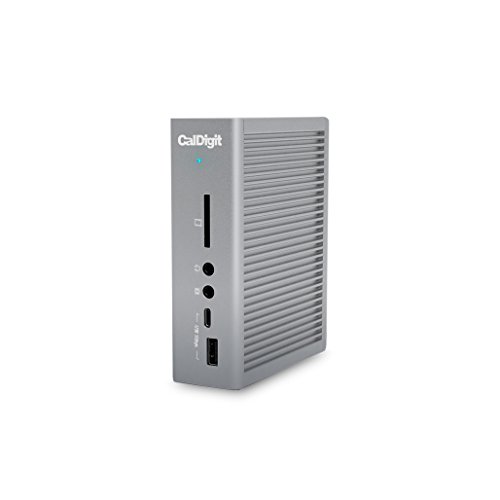
CalDigit TS3 Plus Thunderbolt 3 Dock
Best for: Users needing extensive I/O and fast data transfer
- Host Interface
- Thunderbolt 3
- Display Support
- Dual
- Max Resolution
- 5K@60Hz
- Power Delivery
- 87W
- Port Count
- 15
- Video Ports
- DisplayPort, Thunderbolt 3
View on Amazon: CalDigit TS3 Plus Thunderbolt 3 Dock Affiliate link
The CalDigit TS3 Plus is a robust docking station built for heavy connectivity. It features 15 ports, including two Thunderbolt 3 connections and a UHS-II SD slot. It supports dual 4K displays or a single 5K screen. With 87W power delivery, it charges laptops while powering peripherals. This dock suits users who need extensive I/O options and fast data transfer speeds for their workflow.
Pros
- 15 ports including two Thunderbolt 3 connections
- 87W laptop charging capability
- UHS-II SD card slot with 312 MB/s speed
- Supports dual 4K or single 5K displays
- Sturdy aluminum construction without a fan
Cons
- Requires a host device with Thunderbolt 3 or newer
- Passive adapters for HDMI or VGA will not work
- M1 Macs cannot support dual displays over Thunderbolt
Good fit if
- You need to connect multiple high-resolution monitors
- You frequently transfer large files from an SD card
- You require 87W power delivery for your laptop
Skip if
- Your computer lacks a Thunderbolt 3 port
- You are using an M1 Mac and need dual screens
- You prefer passive HDMI adapters for older displays
Verdict: CalDigit TS3 Plus Thunderbolt 3 Dock offers extensive connectivity and fast data speeds for users who need to manage multiple peripherals and high-resolution displays. It is ideal for professionals who require a reliable, fanless dock with robust power delivery.
Specifications side by side
| Spec | CalDigit TS3 Plus Thunderbolt 3 Dock |
|---|---|
| Host Interface | Thunderbolt 3 |
| Display Support | Dual |
| Max Resolution | 5K@60Hz |
| Power Delivery | 87W |
| Port Count | 15 |
| Video Ports | DisplayPort, Thunderbolt 3 |
| Max Data Speed | 40Gb/s |
| Ethernet Speed | Gigabit Ethernet |
| Connectivity | USB-C, DisplayPort, Ethernet, Thunderbolt 4, Thunderbolt 3 |
| Features | Card Reader |
| Dimensions | 6.8 × 5.4 × 4.8 inches |
| Weight | 1.32 pounds |
| Size | 0.8 Meter Cable |
| Color | TS3 Plus - Space Gray |
| Model | TS3PLUS-US07-SG |
Frequently asked questions
Does the CalDigit TS3 Plus support dual monitors?
Yes, it supports dual 4K displays or a single 5K screen. You can connect multiple high-resolution monitors to expand your workspace. This feature helps professionals manage complex workflows. The dock handles video output efficiently through its Thunderbolt and DisplayPort connections. You get reliable performance for multi-screen setups without lag.
Is the CalDigit TS3 Plus fanless?
Yes, this dock uses passive cooling and omits a fan. It features a sturdy full aluminum construction with an integrated heat sink. This design reduces noise while managing thermal output during heavy use. You benefit from a quieter workspace. The metal body helps dissipate heat effectively without moving parts.
What is the power delivery output of this dock?
It delivers up to 87W of power to charge your laptop. This allows you to keep your computer charged while using other peripherals. You can connect multiple devices without draining your battery. The high wattage supports most modern laptops. This feature simplifies your desk by reducing the number of power adapters needed.
Does it include an SD card reader?
Yes, the CalDigit TS3 Plus includes an SD card slot. You can transfer photos and videos directly from your camera. This feature is useful for photographers and video editors. It eliminates the need for a separate card reader. The card slot is integrated into the rear panel for easy access.
What is the cable length of the dock?
The dock comes with an 0.8-meter cable. This length provides enough reach for typical desk setups. You can position the dock conveniently without stretching connections. The cable connects your host device to the dock. It ensures stable data transfer and power delivery over the required distance.
Is the CalDigit TS3 Plus compatible with M1 Macs?
Yes, it works with M1, M2, M3, and M5 Macs. You can use it with various Apple silicon devices. Note that M1 Macs cannot support dual displays over Thunderbolt. You should check your specific model requirements. The dock offers broad compatibility for both Mac and Windows systems.
What connectivity options does the TS3 Plus offer?
It features 15 ports including Thunderbolt 3, USB-A, and USB-C. You get two Thunderbolt 3 ports and five USB-A ports. The dock also includes Gigabit Ethernet and audio jacks. This variety supports many peripherals simultaneously. You can connect keyboards, mice, drives, and displays all through one connection.