CalDigit TS5 15-Port Thunderbolt 5 or CalDigit TS4 Thunderbolt 4 Dock? Which CalDigit Model to Buy
As an Amazon Associate we earn from qualifying purchases. Links on this page are affiliate links.
When evaluating the caldigit ts5 thunderbolt 5 dock vs ts4 18 port thunderbolt dock, you face a choice between new speed and established connectivity. Both units offer 2.5GbE Ethernet, USB card readers, and aluminum chassis designs in Space Gray. The main difference lies in the host interface and power delivery. The TS5 brings Thunderbolt 5 speeds and higher wattage charging, while the TS4 provides a higher total port count with Thunderbolt 4 infrastructure.
Key differences
| Aspect | CalDigit TS5 15-Port Thunderbolt 5 Dock | CalDigit TS4 Thunderbolt 4 Dock |
|---|---|---|
| Host Interface | Thunderbolt 5 | Thunderbolt 4 |
| Max Data Speed | 80Gb/s | 40Gb/s |
| Power Delivery | 140W | 98W |
| Port Count | 15 | 18 |
| Display Support | Dual 8K 60Hz or Triple 4K 144Hz | Dual 6K 60Hz or Single 8K |
| Video Port Standard | DisplayPort 2.1 | DisplayPort 1.4 |
Which one should you choose?
Choose CalDigit TS5 15-Port Thunderbolt 5 Dock if
- You need 140W charging for high-power laptops
- You want to connect triple displays at high refresh rates
- You require 80Gb/s bandwidth for ultra-fast peripherals
Choose CalDigit TS4 Thunderbolt 4 Dock if
- You need the highest total number of physical ports
- You are using a Thunderbolt 4 host computer
- You prefer a slightly more compact footprint
Verdict: The TS5 is the better choice if you need maximum power delivery and the latest bandwidth for high-resolution displays. The TS4 remains a strong option if you prioritize total port count and are already using a Thunderbolt 4 setup. Both docks provide reliable 2.5GbE connectivity and robust build quality.
TS5 vs TS4 Dock Specs
Host Interface Speed
The CalDigit TS5 uses a Thunderbolt 5 host interface with a maximum data speed of 80Gb/s. This newer standard supports Bandwidth Boost, allowing up to 120Gb/s of performance for connected displays. The CalDigit TS4 relies on a Thunderbolt 4 host interface capped at 40Gb/s. While the TS4 is fully compatible with older Thunderbolt 3 and USB4 hosts, the TS5 requires a Thunderbolt 5 or USB4 v2 connection to achieve its peak speeds. If you need maximum bandwidth for high-resolution displays and fast peripherals, the TS5 offers double the raw throughput. However, the TS4 remains a robust option for users who do not require the latest interface standard or who are using older host computers.
Power Delivery
Charging capabilities differ significantly between these two docks. The CalDigit TS5 includes a 240W power supply and provides up to 140W of power delivery through its host charging port. This makes it suitable for power-hungry laptops, including the 16-inch M3, M4, and M5 Pro and Max series MacBook Pros. The CalDigit TS4 features a 98W power delivery rating. While 98W is sufficient for many large-screen laptops, it may not sustain peak performance for the most demanding workstations under heavy load. The TS5 also dedicates specific downstream ports to power accessories, ensuring that connected devices receive consistent energy. For users charging high-performance machines, the TS5 provides a substantial advantage in sustained power output.
Display Support
Both docks support dual display configurations, but the TS5 pushes higher resolutions and refresh rates. The TS5 supports dual 6K at 60Hz on macOS, and dual 8K at 60Hz on compatible Macs. It also handles dual 4K at 240Hz. On Windows, it can drive triple 4K at 144Hz on Thunderbolt 5 hosts. The TS4 supports a single 8K display at 30Hz on Windows, or dual 4K at 60Hz. On macOS, it supports dual 6K at 60Hz on Pro and Max chips, but is limited to a single display on non-Pro models. If you require high refresh rates or multiple high-resolution monitors, the TS5 offers more flexible and powerful display options.
Connectivity Ports
The CalDigit TS4 offers 18 ports of connectivity, including three Thunderbolt 4 ports, three USB-C ports, five USB-A ports, and card readers. The CalDigit TS5 provides 15 ports, featuring three downstream Thunderbolt 5 ports, three USB-C ports, one USB-A Gen 2 port, and one legacy USB-A port. While the TS4 has a higher total port count, the TS5 focuses on newer standards. The TS5 includes a DisplayPort 2.1 output, whereas the TS4 uses DisplayPort 1.4. Both include SD and microSD UHS-II card readers and 2.5GbE Ethernet. If you need more physical connection points for legacy devices, the TS4 has the edge. If you prioritize newer USB standards and faster Thunderbolt connections, the TS5 is superior.
Build and Design
Both docks feature an aluminum chassis in Space Gray, designed to act as an external heat sink. The CalDigit TS4 is compact, measuring 1.65 inches in width, 5.55 inches in height, and 4.46 inches in length, weighing 1.41 pounds. The CalDigit TS5 is slightly wider at 2.75 inches, with a height of 1.12 inches and a length of 4.5 inches, weighing 8.9 ounces. The TS5 is notably lighter and flatter, which may affect desk space usage. Both designs prioritize efficient heat dissipation to ensure optimal performance during sustained use. The TS4 includes a security slot, a detail not explicitly listed for the TS5 in the provided data. Both builds appear sturdy and professional, suitable for office or studio environments.
Choose the Right CalDigit Dock for You
Users needing high power delivery for Pro laptops
The TS5 provides 140W power delivery, making it suitable for 16-inch M3, M4, or M5 Pro and Max MacBook Pros. The included 240W power supply ensures sustained output for all ports. This higher wattage supports power-hungry devices better than the TS4, which offers only 98W charging capability for host devices.
Those requiring high refresh rate multi-display setups
Thunderbolt 5 bandwidth allows the TS5 to support dual 4K displays at 240Hz or dual 8K at 60Hz. Bandwidth Boost allocates up to 120Gb/s to displays. This enables high-refresh-rate workflows that the TS4 cannot match, as the TS4 is limited to 60Hz refresh rates and lower bandwidth allocation for video signals.
Professionals prioritizing maximum port count connectivity
The TS4 features 18 ports, offering more physical connections than the TS5's 15 ports. It includes five USB-A ports at 10Gb/s speed, whereas the TS5 has fewer USB-A options. This makes the TS4 ideal for users who need to connect many legacy peripherals simultaneously without relying on additional hubs.
Users with existing Thunderbolt 4 infrastructure
The TS4 operates on Thunderbolt 4 with 40Gb/s speeds, providing reliable compatibility with older hosts. It works with Thunderbolt 3, USB4, and USB-C devices. If your current setup uses Thunderbolt 4, this dock integrates seamlessly without requiring an upgrade to a Thunderbolt 5 host for full functionality.
The products compared

CalDigit TS5 15-Port Thunderbolt 5 Dock
Best for: Thunderbolt 5 hosts needing 140W charging
- Host Interface
- Thunderbolt 5
- Display Support
- Dual
- Max Resolution
- 8K 60Hz
- Power Delivery
- 140W
- Port Count
- 15
- Video Ports
- DisplayPort 2.1, Thunderbolt 5
View on Amazon: CalDigit TS5 15-Port Thunderbolt 5 Dock Affiliate link
The CalDigit TS5 is a 15-port Thunderbolt 5 dock designed for high-performance setups. It features an 80Gb/s host interface and delivers 140W of power delivery to your laptop. The dock supports dual 8K displays at 60Hz or dual 4K at 240Hz. It includes a 2.5GbE port for faster network speeds. This unit suits users with Thunderbolt 5 hosts who need maximum bandwidth and charging power for large laptops.
Pros
- 140W power delivery for high-end laptops
- 80Gb/s Thunderbolt 5 connectivity
- Supports dual 8K@60Hz displays
- 2.5GbE Ethernet port
Cons
- Requires Thunderbolt 5 host for full 80Gb/s performance
- Only supports dual displays, not triple
- Heavier build at 8.9 ounces
Good fit if
- You have a Thunderbolt 5 host device
- You need 140W charging for a large laptop
- You require dual 8K display support
Skip if
- You only have Thunderbolt 3 or 4 hosts
- You need triple display support on macOS
- You prefer a lighter, more portable dock
Verdict: CalDigit TS5 Thunderbolt 5 Dock is the right choice for users with Thunderbolt 5 hosts who need 140W charging and dual 8K display support.
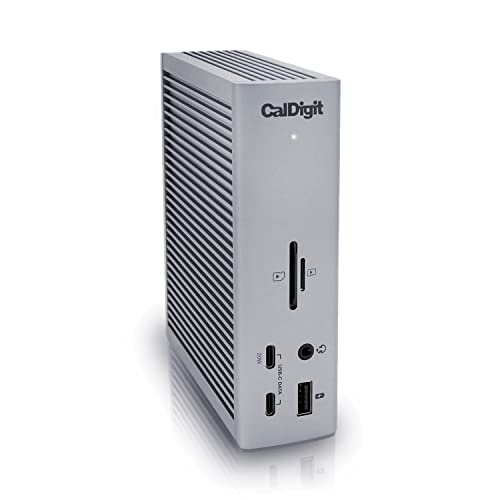
CalDigit TS4 Thunderbolt 4 Dock
Best for: Users needing 18 ports and 2.5GbE
- Host Interface
- Thunderbolt 4
- Display Support
- Dual
- Max Resolution
- 8K@30Hz
- Power Delivery
- 98W
- Port Count
- 18
- Video Ports
- DisplayPort
View on Amazon: CalDigit TS4 Thunderbolt 4 Dock Affiliate link
The CalDigit TS4 is an 18-port Thunderbolt 4 dock with 98W power delivery. It supports up to 8K@30Hz on Windows or dual 6K displays on Apple Silicon. The 2.5GbE port offers faster networking than standard gigabit. This dock suits users needing high port counts and reliable video output for complex workstation setups.
Pros
- 18 total ports including 3 Thunderbolt 4, 5 USB-A, and 3 USB-C
- 98W power delivery for charging host laptops
- 2.5GbE Ethernet port for faster network speeds
- Supports dual displays up to 6K 60Hz on M-series Macs
Cons
- Max resolution capped at 8K@30Hz on Windows
- Non-Pro M1/M2/M3 Macs limited to single display
- Requires Thunderbolt 4 or fully optioned USB4 for max performance
Good fit if
- You need 18 ports for a dense workstation
- You use a Mac with Pro or Ultra chips
- You require 2.5GbE network speeds
Skip if
- You need 8K@60Hz video output
- You use a non-Pro M1/M2/M3 Mac for dual screens
- You prefer Thunderbolt 5 connectivity
Verdict: CalDigit TS4 18-Port Thunderbolt 4 Dock provides extensive connectivity for users who prioritize port count and 2.5GbE networking over the latest Thunderbolt standard.
Specifications side by side
| Spec | CalDigit TS5 15-Port Thunderbolt 5 Dock | CalDigit TS4 Thunderbolt 4 Dock |
|---|---|---|
| Host Interface | Thunderbolt 5 | Thunderbolt 4 |
| Display Support | Dual | Dual |
| Max Resolution | 8K 60Hz | 8K@30Hz |
| Power Delivery | 140W | 98W |
| Port Count | 15 | 18 |
| Video Ports | DisplayPort 2.1, Thunderbolt 5 | DisplayPort |
| Max Data Speed | 80Gb/s | 40Gb/s |
| Ethernet Speed | 2.5GbE | 2.5GbE |
| Connectivity | not stated | USB-C, USB-A, Thunderbolt 4 |
| Refresh Rate | not stated | 60Hz |
| Dimensions | 4.5 × 2.75 × 1.12 inches | 4.46 × 1.65 × 5.55 inches |
| Weight | 8.9 ounces | 1.41 pounds |
| Size | 4.25 | compact |
| Color | Space Gray | Space Gray |
| Model | TBT5-TS5-US-AMZ | TS4-US 500971 |
Frequently asked questions
How many total ports do the CalDigit TS5 and TS4 provide?
You get 18 ports on the CalDigit TS4 and 15 ports on the CalDigit TS5. While the TS5 introduces Thunderbolt 5 connectivity, the TS4 offers three additional connections for your desk setup. Choose the TS4 if your workflow relies heavily on connecting maximum external accessories simultaneously.
Which CalDigit dock provides higher laptop charging wattage?
The CalDigit TS5 provides higher charging capacity with support for up to 140W power delivery. This spec benefits you if you use power-hungry Thunderbolt 5 laptops that require high-wattage charging over a single cable. In contrast, the TS4 dock is targeted at standard host charging profiles and everyday setups.
What external display resolutions can you run with the CalDigit TS5?
You can drive dual 8K displays when you connect compatible monitors to the CalDigit TS5 dock. This high display capability relies on the unit's Thunderbolt 5 host interface. If your setup demands ultra-high-resolution external screens for creative workflows, the TS5 provides the necessary display bandwidth.
How do the physical dimensions and weights of the TS4 and TS5 compare?
The CalDigit TS5 weighs 8.9 ounces with dimensions of 4.5 by 2.75 by 1.12 inches. The TS4 is larger and heavier, measuring 4.46 by 1.65 by 5.55 inches and weighing 1.41 pounds. The TS5 features a flatter, lower-profile footprint on your workspace compared to the upright TS4.
Do both CalDigit docks include fast Ethernet networking?
Yes, you get 2.5GbE network connectivity with both models. The CalDigit TS4 lists 2.5GbE networking among its core specifications, and high-speed wired networking is standard across these workstation docks. This allows you to plug into multi-gigabit local networks or network-attached storage arrays without requiring a separate adapter.
What types of USB connectivity are available on the CalDigit TS4?
The CalDigit TS4 provides both USB-C and USB-A connections alongside its Thunderbolt 4 host ports. This mix of port types lets you plug in legacy accessories as well as newer Type-C peripherals. If you have an extensive collection of standard USB devices, the TS4 accommodates them directly.