CalDigit Docking Stations: 3 Picks Ranked by Specs
As an Amazon Associate we earn from qualifying purchases. Links on this page are affiliate links.
CalDigit designs docking stations that prioritize high port density and fast charging for professional setups. These devices vary in size and shape, ranging from compact units to larger hubs with integrated cables. We compared 3 models based strictly on their published specifications. The CalDigit TS5 15-Port Thunderbolt 5 Dock leads this list. It is the best choice for high-end workstations and dual 8K setups due to its 140W charging and 80Gb/s bandwidth.
Quick picks
| # | Product | Best for | Price |
|---|---|---|---|
| 1 | CalDigit TS5 15-Port Thunderbolt 5 Dock Best overall | High-end workstations and dual 8K setups | Check price of CalDigit TS5 15-Port Thunderbolt 5 Dock on Amazon |
| 2 | CalDigit TS4 Thunderbolt 4 Dock Best budget | users needing high port density and fast charging | Check price of CalDigit TS4 Thunderbolt 4 Dock on Amazon |
| 3 | CalDigit TS3 Plus Thunderbolt 3 Dock Also great | Thunderbolt 3 users needing SD slots | Check price of CalDigit TS3 Plus Thunderbolt 3 Dock on Amazon |
Our 3 picks

CalDigit TS5 15-Port Thunderbolt 5 Dock
Best for: High-end workstations and dual 8K setups
- Host Interface
- Thunderbolt 5
- Display Support
- Dual
- Max Resolution
- 8K 60Hz
- Power Delivery
- 140W
- Port Count
- 15
- Video Ports
- DisplayPort 2.1, Thunderbolt 5
View on Amazon: CalDigit TS5 15-Port Thunderbolt 5 Dock Affiliate link
The CalDigit TS5 is a high-performance docking station featuring 15 ports and a 240W power supply. It delivers 140W host charging and supports 80Gb/s Thunderbolt 5 connectivity. You get dual 8K 60Hz or 4K 240Hz display support, plus 2.5GbE networking. This dock suits users needing maximum bandwidth and power for professional workstations or high-end laptops.
Pros
- 140W host power delivery for high-end laptops
- 80Gb/s Thunderbolt 5 bandwidth with Bandwidth Boost
- Dual 8K 60Hz or 4K 240Hz display support
- 2.5GbE Ethernet for faster network transfers
Cons
- Requires Thunderbolt 5 or USB4 v2 host for full performance
- Limited to dual display configurations on macOS
- Requires ample clearance for heat dissipation
Good fit if
- You need 140W charging for a 16-inch MacBook Pro
- You require 2.5GbE Ethernet for fast file transfers
- You plan to run dual 4K 240Hz displays
Skip if
- You only have Thunderbolt 3 or Thunderbolt 4 hosts
- You need triple display support on macOS
- You cannot provide ample clearance around the dock
Verdict: CalDigit TS5 Thunderbolt 5 Dock is the top pick for professionals needing 140W charging and 80Gb/s bandwidth. It fits users with Thunderbolt 5 hosts who demand dual 8K or high-refresh 4K displays.
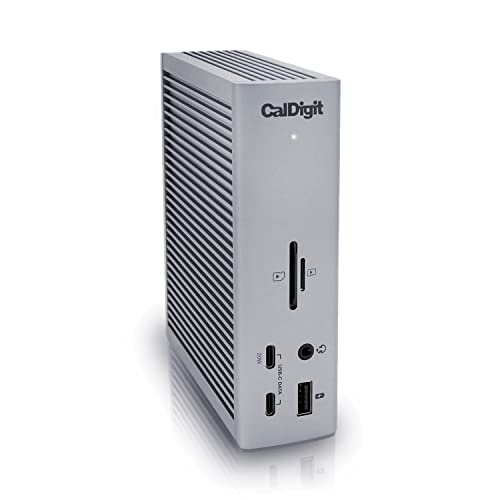
CalDigit TS4 Thunderbolt 4 Dock
Best for: users needing high port density and fast charging
- Host Interface
- Thunderbolt 4
- Display Support
- Dual
- Max Resolution
- 8K@30Hz
- Power Delivery
- 98W
- Port Count
- 18
- Video Ports
- DisplayPort
View on Amazon: CalDigit TS4 Thunderbolt 4 Dock Affiliate link
The CalDigit TS4 is an 18-port Thunderbolt 4 dock featuring 98W power delivery. It supports dual 6K displays on Apple Silicon or a single 8K screen on Windows. The 2.5GbE port offers faster network speeds than standard gigabit options. This compact unit suits users needing extensive connectivity and high-speed data transfer for demanding workflows.
Pros
- 18 total ports including 3 Thunderbolt 4 and 5 USB-A
- 98W power delivery for charging host laptops
- 2.5GbE Ethernet for faster network connectivity
- Supports dual 6K displays on M1-M4 Pro/Max/Ultra Macs
- Compact size at 1.65 inches wide
Cons
- 8K resolution limited to 30Hz refresh rate
- Non-Pro M1/M2/M3 Macs restricted to single display output
- Requires Thunderbolt 4 or full USB4 host for max performance
Good fit if
- You need high port density for multiple peripherals
- You use Apple Silicon Macs with Pro or Max chips
- You require 2.5GbE for faster local network speeds
Skip if
- You need 8K resolution at 60Hz refresh rate
- You use a base model M1 or M3 Mac without Pro/Max chips
- You require a standard 1GbE connection only
Verdict: CalDigit TS4 18-Port Thunderbolt 4 Dock delivers robust connectivity and fast charging for users who need to connect many devices simultaneously. It is ideal for professionals using high-end Apple Silicon or Windows systems who value extensive I/O options.
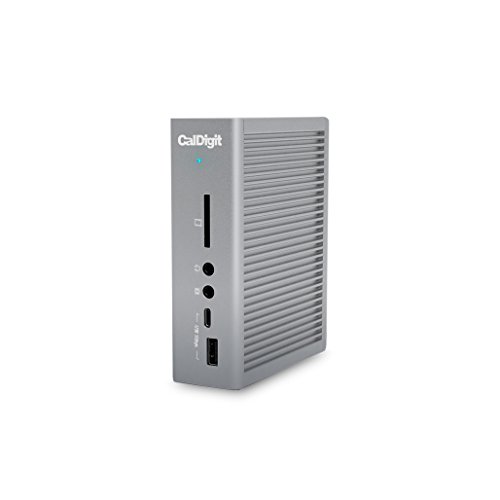
CalDigit TS3 Plus Thunderbolt 3 Dock
Best for: Thunderbolt 3 users needing SD slots
- Host Interface
- Thunderbolt 3
- Display Support
- Dual
- Max Resolution
- 5K@60Hz
- Power Delivery
- 87W
- Port Count
- 15
- Video Ports
- DisplayPort, Thunderbolt 3
View on Amazon: CalDigit TS3 Plus Thunderbolt 3 Dock Affiliate link
The CalDigit TS3 Plus is a 15-port docking station built for Thunderbolt 3 hosts. It delivers 87W of power delivery and supports dual 4K displays or a single 5K@60Hz monitor. You get an UHS-II SD card slot for fast media transfers and Gigabit Ethernet. It features a sturdy aluminum chassis with an integrated heat sink. This dock suits creators needing reliable connectivity and high-resolution video output.
Pros
- 87W power delivery for laptops
- Supports dual 4K or single 5K displays
- UHS-II SD card slot with 312 MB/s speed
- 15 ports including 5 USB-A and 1 USB-C
- Sturdy aluminum construction with fanless cooling
Cons
- Limited to Thunderbolt 3 host interface
- Gigabit Ethernet speed only
- DisplayPort requires active adapters for HDMI/DVI/VGA
Good fit if
- You need an SD card slot for camera work
- You use a Thunderbolt 3 laptop or desktop
- You require dual 4K monitor support
Skip if
- You need Thunderbolt 4 or 5 connectivity
- You require 2.5GbE or faster Ethernet
- You want to avoid active display adapters
Verdict: CalDigit TS3 Plus Thunderbolt 3 Dock offers solid 4K/5K display support and fast SD transfers for Thunderbolt 3 users, but lacks the bandwidth of newer Thunderbolt standards.
Specifications side by side
| Spec | CalDigit TS5 15-Port Thunderbolt 5 Dock | CalDigit TS4 Thunderbolt 4 Dock | CalDigit TS3 Plus Thunderbolt 3 Dock |
|---|---|---|---|
| Host Interface | Thunderbolt 5 | Thunderbolt 4 | Thunderbolt 3 |
| Display Support | Dual | Dual | Dual |
| Max Resolution | 8K 60Hz | 8K@30Hz | 5K@60Hz |
| Power Delivery | 140W | 98W | 87W |
| Port Count | 15 | 18 | 15 |
| Video Ports | DisplayPort 2.1, Thunderbolt 5 | DisplayPort | DisplayPort, Thunderbolt 3 |
| Max Data Speed | 80Gb/s | 40Gb/s | 40Gb/s |
| Ethernet Speed | 2.5GbE | 2.5GbE | Gigabit Ethernet |
| Connectivity | not stated | USB-C, USB-A, Thunderbolt 4 | USB-C, DisplayPort, Ethernet, Thunderbolt 4, Thunderbolt 3 |
| Refresh Rate | not stated | 60Hz | not stated |
| Features | not stated | not stated | Card Reader |
| Dimensions | 4.5 × 2.75 × 1.12 inches | 4.46 × 1.65 × 5.55 inches | 6.8 × 5.4 × 4.8 inches |
| Weight | 8.9 ounces | 1.41 pounds | 1.32 pounds |
| Size | 4.25 | compact | 0.8 Meter Cable |
| Color | Space Gray | Space Gray | TS3 Plus - Space Gray |
| Model | TBT5-TS5-US-AMZ | TS4-US 500971 | TS3PLUS-US07-SG |
CalDigit Docking Stations Ranked
The CalDigit TS5 15-Port Thunderbolt 5 Dock leads this list for professionals requiring 80Gb/s bandwidth and 140W charging. Its compact Space Gray chassis fits high-end workstations and dual 8K setups. This model suits users who need the latest Thunderbolt 5 host compatibility and maximum display performance.
The CalDigit TS4 Thunderbolt 4 Dock offers robust connectivity with USB-C and USB-A ports. It delivers 60Hz refresh rates and fast charging for Apple Silicon or Windows systems. The CalDigit TS3 Plus Thunderbolt 3 Dock supports 4K/5K displays and includes SD card slots. It is ideal for Thunderbolt 3 users needing reliable card reader features.
Who CalDigit docks fit best
CalDigit offers three distinct form factors. The TS5 is a small, dense block at 4.25 inches long. The TS4 is a taller, slender unit measuring 5.55 inches high. The TS3 Plus is the largest, featuring an integrated 0.8-meter cable and a wider footprint. All models use a Space Gray finish. You will not find wireless charging pads or battery packs in this lineup. The range covers Thunderbolt 3 through 5 standards. This suits users who prioritize wired connectivity and high port density over wireless convenience or compact travel sizes.
How to choose the right CalDigit dock
-
Match your host connection
Start by checking the Thunderbolt generation on your computer. The CalDigit TS5 requires a Thunderbolt 5 host to utilize its 80Gb/s bandwidth and 140W charging. If your system only supports Thunderbolt 4, the TS4 is the compatible choice, offering robust connectivity for high-end Apple Silicon or Windows machines. Older Thunderbolt 3 systems must use the TS3 Plus. Selecting the correct dock version ensures you get the full data transfer speeds and power delivery your devices need without bottlenecks.
-
Check display resolution limits
Your monitor resolution determines which dock fits your workflow. The TS5 supports dual 8K displays or high-refresh 4K screens, making it ideal for creative professionals. The TS4 is limited to a 60Hz refresh rate, which suits standard office work but may feel sluggish for gaming or fast motion. The TS3 Plus supports 4K or 5K displays but lacks the bandwidth of newer standards. Verify your monitor specs against the dock’s output capabilities to avoid blurry images or low frame rates.
-
Evaluate power delivery needs
Power delivery capability varies significantly across the lineup. The TS5 provides up to 140W of charging, sufficient for large laptops and workstations. The TS4 offers fast charging for most professional devices. The TS3 Plus delivers less power due to its older architecture. If you rely on a single cable for both data and high-wattage charging, the TS5 is the strongest option. Ensure your laptop’s power requirements align with the dock’s output to maintain performance during intensive tasks.
-
Assess port density and layout
Port availability affects how many devices you can connect. The TS5 offers 15 ports, while the TS4 provides 18 ports, catering to users with extensive peripheral setups. The TS3 Plus includes dedicated SD card slots, which benefit photographers and video editors. Consider the physical size as well; the TS5 is compact, whereas the TS3 Plus includes a 0.8-meter cable and is larger. Choose the model that accommodates your specific cable and device count without cluttering your desk.
-
Verify compatibility with your OS
Ensure the dock supports your operating system’s requirements. The TS4 is noted as ideal for high-end Apple Silicon systems, offering stable connectivity for macOS users. The TS5 and TS3 Plus also support Windows environments but may have different driver or firmware needs. Check the manufacturer’s specifications for your specific laptop model. Proper compatibility ensures stable connections for external drives, monitors, and networking equipment, preventing unexpected disconnects during critical work sessions.
Frequently asked questions
Which CalDigit dock is best for dual 8K monitors?
The CalDigit TS5 15-Port Thunderbolt 5 Dock is the top choice for this setup. It provides 80Gb/s bandwidth and 140W charging, making it ideal for high-end workstations. This model supports dual 8K displays or high-refresh 4K screens for users requiring maximum visual performance.
What is the most compact CalDigit docking station available?
The CalDigit TS5 15-Port Thunderbolt 5 Dock is the most compact option, measuring 4.25 inches long and 1.12 inches high. It weighs just 8.9 ounces. This small, dense block fits easily into tight workspaces while delivering Thunderbolt 5 connectivity and high-speed charging capabilities.
Does CalDigit offer a dock with an SD card reader?
Yes, the CalDigit TS3 Plus Thunderbolt 3 Dock includes a card reader feature. It supports solid 4K and 5K display output along with fast SD transfers. This model is designed for Thunderbolt 3 users who need direct access to media card slots for their workflow.
Which CalDigit dock supports the fastest charging speed?
The CalDigit TS5 15-Port Thunderbolt 5 Dock delivers 140W charging, the highest power output in this lineup. It is designed for professionals needing robust power delivery alongside 80Gb/s bandwidth. This makes it suitable for high-performance laptops and workstations that require significant power input.
Is there a CalDigit dock with an integrated cable?
The CalDigit TS3 Plus Thunderbolt 3 Dock features an integrated 0.8-meter cable. It is the largest unit in the series, measuring 6.8 inches long. This design simplifies connections for Thunderbolt 3 hosts while providing extensive I/O options and display support for professional environments.
Which dock is best for users needing many ports?
The CalDigit TS4 Thunderbolt 4 Dock offers 18 ports, providing high port density for simultaneous device connections. It supports USB-C, USB-A, and Thunderbolt 4 connectivity. This model is ideal for professionals using high-end systems who require extensive I/O options without sacrificing charging speed.
What is the weight of the CalDigit TS4 dock?
The CalDigit TS4 Thunderbolt 4 Dock weighs 1.41 pounds. It has a compact form factor, standing 5.55 inches high and measuring 4.46 inches long. This taller, slender unit balances port density with a manageable footprint for desktop setups requiring multiple peripheral connections.