10 Best Docking Stations with Kickstand, Compared
As an Amazon Associate we earn from qualifying purchases. Links on this page are affiliate links.
These are the 10 best docking stations with kickstand, ranked by their published specifications. The Mukiya Foldable Laptop Stand 8-in-1 USB-C Hub leads because it supports 4K UHD resolution while remaining lightweight at 11.2 ounces. We compared these options strictly using the data listed on each product page. This guide helps you decide which hub matches your portability and display needs.
Quick picks
The best fit for you
- You want the most portable overall setup Mukiya Foldable Laptop Stand 8-in-1 USB-C Hub Its 11.2-ounce weight and 8-in-1 hub support basic 4K display needs.
- You need the smallest footprint for a console UGREEN 9-in-1 Foldable Kickstand Dock The UGREEN dock measures 4.53 by 1.65 inches for handheld gaming.
- You require wired Ethernet for your Steam Deck Baseus 6-in-1 Docking Station Stand The Baseus dock includes Gigabit Ethernet and fast charging capabilities.
- You want high refresh rates on dual monitors QUUGE Dual HDMI Docking Station Stand The QUUGE dock supports dual 4K displays at 120Hz refresh rates.
- You need three 4K screens with elevation Baseus 12-in-1 Triple Display Laptop Stand Dock The Baseus dock provides triple 4K output and a built-in stand.
Our 10 picks

Mukiya Foldable Laptop Stand 8-in-1 USB-C Hub
Best for: portable setups requiring basic 4K display support
- Features
- Kickstand (what this guide is about)
- Host Interface
- USB-C
- Max Resolution
- 4K@30Hz
- Power Delivery
- 90W
- Port Count
- 8
- Video Ports
- HDMI
View on Amazon: Mukiya Foldable Laptop Stand 8-in-1 USB-C Hub
This Mukiya dock combines an 8-port hub with an adjustable aluminum stand. It supports 4K video at 30Hz via HDMI and delivers up to 90W of power delivery to your laptop. The foldable design weighs 11.2 ounces, making it portable for travel. You get two USB 3.0 ports, card readers, and a data USB-C port. It suits users who need a tidy desk setup with reliable connectivity for macOS and Windows laptops.
Pros
- 8-in-1 port configuration including HDMI, USB 3.0, and card slots
- Adjustable 9-level kickstand with stable triangular structure
- 90W power delivery supports fast laptop charging
- Foldable aluminum alloy build weighs only 11.2 ounces
- 4K UHD resolution support for external displays
Cons
- HDMI output is limited to 30Hz refresh rate
- SD and TF card transfer speeds are capped at 25MB/s
- Single HDMI port restricts dual monitor expansion
Good fit if
- You need a compact, foldable dock for travel or small desks
- You want to elevate your laptop for better ergonomics
- You require basic 4K display support at 30Hz
Skip if
- You need 4K video output at 60Hz for smooth motion
- You require dual monitor support via a single dock
- You need high-speed SD card transfers exceeding 25MB/s
Verdict: Mukiya 8-in-1 USB-C Laptop Dock with Kickstand is a practical solution for travelers who prioritize portability and desk organization over high-refresh-rate video performance.

UGREEN 9-in-1 Foldable Kickstand Dock
Best for: handheld gaming consoles requiring compact stands
- Features
- Kickstand, Foldable (what this guide is about)
- Host Interface
- USB-C
- Max Resolution
- 4K@60Hz
- Power Delivery
- 100W
- Port Count
- 9
- Max Data Speed
- 10Gbps
This UGREEN docking station features a 9-in-1 port layout with a foldable kickstand. It supports 4K@60Hz video output and delivers up to 100W power delivery. The design includes two foldable panels that keep the back open for better heat dissipation from gaming consoles. It offers 10Gbps data transfer speeds on its USB-C ports. This unit suits handheld gamers who need a compact, adjustable stand.
Pros
- Foldable kickstand design for adjustable viewing angles
- 100W Power Delivery for fast charging
- Supports 4K@60Hz and high refresh rate displays
- Dual USB 3.2 Gen 2 ports with 10Gbps speed
Cons
- Maximum resolution limited to 4K@60Hz
- Not compatible with Switch 2
- Steam Deck charging capped at 45W
Good fit if
- You use a Steam Deck or ROG Ally
- You need a compact stand for portable gaming
- You want 100W charging for supported devices
Skip if
- You require triple monitor support
- You own a Nintendo Switch 2
- You need more than 4K@60Hz resolution
Verdict: UGREEN Steam Deck Dock 9-in-1 Foldable is a practical option for handheld console owners who prioritize portability and thermal management over multi-monitor setups.

Baseus 6-in-1 Docking Station Stand
Best for: Steam Deck users needing Ethernet
- Features
- Kickstand (what this guide is about)
- Max Resolution
- 4K@60Hz
- Power Delivery
- 100W
- Port Count
- 6
- Video Ports
- HDMI
- Ethernet Speed
- Gigabit
This Baseus docking station is a 6-in-1 hub with an adjustable kickstand. It supports 4K@60Hz video output via HDMI and includes a 100W Power Delivery port for charging. The unit also features three USB 3.0 ports and a Gigabit Ethernet connection. It is designed primarily for Steam Deck but works with other Type-C devices. The compact build fits well on desks.
Pros
- 100W Power Delivery charging port
- 4K@60Hz HDMI video output
- Gigabit Ethernet RJ45 port
- Adjustable kickstand design
- Three USB 3.0 ports
Cons
- Only one HDMI port limits dual monitor setups
- Power adapter and input cable are not included
- Smaller port count than 11-in-1 competitors
Good fit if
- You want a dedicated dock for Steam Deck
- You need Gigabit Ethernet for stable internet
- You prefer a compact footprint on your desk
Skip if
- You require dual monitor support
- You do not have a compatible power adapter
- You need more than three USB ports
Verdict: Baseus Steam Deck 6-in-1 Dock is a solid choice for handheld gamers who need Gigabit Ethernet and fast charging. It fits users who prioritize a compact setup over multi-monitor expansion.

Lenovo GaN 60W Multiport Charging Dock
Best for: Compact 4K gaming and office setups
- Features
- Kickstand (what this guide is about)
- Host Interface
- USB-C
- Max Resolution
- 4K@60Hz
- Power Delivery
- 60W
- Video Ports
- HDMI 2.1
- Max Data Speed
- 10Gbps
This Lenovo dock combines a 60W GaN charger with a portable docking station. It features an HDMI 2.1 port for 4K@60Hz video and supports dual monitor setups via USB-C. The included silicone stand allows for vertical or angled placement. It is built from recycled materials and includes a travel pouch. You will appreciate the compact design for gaming or office work.
Pros
- 60W Power Delivery for efficient charging
- HDMI 2.1 supports 4K@60Hz resolution
- Includes silicone stand for positioning
- Made from 90% post-consumer recycled materials
Cons
- Only one HDMI port limits dual monitor setups
- USB-C downstream ports limited to 7.5W
- No built-in battery for true cordless use
Good fit if
- You need a single cable solution for gaming
- You want a compact dock with a stand
- You prioritize sustainable materials in your gear
Skip if
- You require dual HDMI outputs for two monitors
- You need high-speed charging above 60W
- You want a dock with a built-in battery
Verdict: Lenovo GaN Charging Dock 60W offers a compact, sustainable solution for users needing 4K@60Hz video and 60W charging in one device. It fits gamers or office workers who value portability over multiple display outputs.

Tobenone MacBook Docking Station Stand
Best for: MacBook users needing a vertical stand and dual 4K displays
- Features
- Kickstand (what this guide is about)
- Host Interface
- USB-C
- Display Support
- Dual
- Max Resolution
- 4K@60Hz
- Power Delivery
- Up to 87W
- Video Ports
- HDMI, VGA
This TobenONE dock combines a vertical stand with dual 4K@60Hz HDMI output for compatible MacBooks. It delivers up to 87W of power delivery through its 100W PD port. The unit includes VGA, Ethernet, SD slots, and multiple USB ports. It is designed specifically for MacBook Pro and Air models. You get a tidy desk setup with organized connectivity for peripherals and displays.
Pros
- Dual 4K@60Hz HDMI output for extended displays
- Up to 87W Power Delivery for fast charging
- Vertical stand design saves desk space
- Gigabit Ethernet and SD card slots included
- Specifically optimized for MacBook Pro and Air
Cons
- Only works with MacBook models, not Windows laptops
- M1/M2/M3 MacBooks limited to single-screen expansion
- HDMI2 and VGA ports mirror content instead of extending
Good fit if
- You own a MacBook Pro or Air and want a dedicated vertical stand
- You need dual 4K displays for editing or design work
- You want to consolidate charging and peripherals into one dock
Skip if
- You use a Windows laptop or non-Apple device
- You have an M1/M2/M3 MacBook and need dual external monitors
- You require independent HDMI and VGA outputs for separate screens
Verdict: TobenONE MacBook Docking Station Stand is a specialized hub for Apple laptop users who prioritize a vertical stand and dual 4K display support. It fits those who want a clean desk and do not need Windows compatibility or extended multi-screen setups on M-series chips.
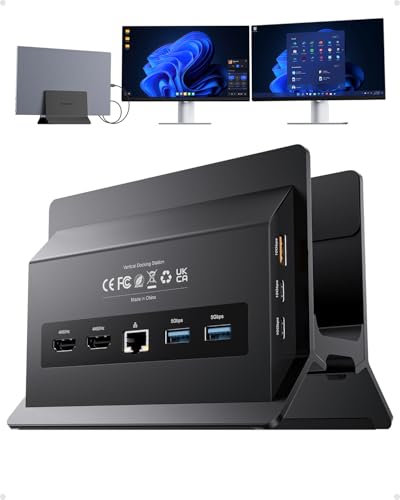
PULWTOP Dual 4K Vertical Docking Station Stand
Best for: Windows laptops needing dual 4K displays
- Features
- Kickstand (what this guide is about)
- Host Interface
- USB-C
- Display Support
- Dual
- Max Resolution
- 4K@60Hz
- Power Delivery
- 85W
- Port Count
- 11
View on Amazon: PULWTOP Dual 4K Vertical Docking Station Stand
This vertical docking station combines a laptop stand with an 11-port hub. It supports dual 4K@60Hz displays via two HDMI ports, ideal for Windows multitasking. The design includes a Gigabit Ethernet port and delivers 85W of Power Delivery charging to your laptop. You get high-speed 10Gbps data transfer on select USB-C ports. It is a space-saving solution for users needing a dedicated vertical workspace and expanded connectivity.
Pros
- Dual HDMI ports support 4K@60Hz resolution
- Vertical stand design saves desk space
- 100W PD input delivers 85W to laptop
- Gigabit Ethernet port for stable internet
- 11 ports including USB 3.2 Gen 2
Cons
- Not compatible with Mac users
- USB-C ports are data-only, no video
- Power adapter is not included
Good fit if
- You use a Windows laptop with USB-C
- You need dual external 4K monitors
- You want a vertical laptop stand
Skip if
- You use a Mac computer
- You need video output from USB-C ports
- You prefer a horizontal laptop stand
Verdict: PULWTOP BD216C USB-C Vertical Dock is a practical vertical hub for Windows users who need dual 4K displays and a space-saving stand, provided you have your own PD adapter.

PULWTOP Dual 4K USB-C Dock Stand
Best for: Windows laptops needing dual 4K displays and mobile device stand
- Features
- Kickstand (what this guide is about)
- Host Interface
- Thunderbolt 4/3, USB4, USB-C
- Display Support
- Dual
- Max Resolution
- 4K@60Hz
- Power Delivery
- 85W
- Port Count
- 11
This PULWTOP docking station offers 11 ports, including dual HDMI outputs for 4K@60Hz displays. It features a built-in stand for tablets or phones and supports 85W power delivery to your laptop. The unit connects via a single USB-C cable to Thunderbolt 3/4 or USB4 hosts. It is designed for users who need expanded connectivity and a vertical setup for their workspace. Note that it does not support MacBooks or iPads.
Pros
- Dual HDMI 2.0 ports support 4K@60Hz resolution
- 11-in-1 connectivity with Gigabit Ethernet
- Integrated stand for tablets and smartphones
- 85W safe power delivery output
- 10Gbps data transfer speeds on USB-C ports
Cons
- Not compatible with MacBooks or iPads
- Power adapter is not included
- Laptop clamshell mode requires lid thickness under 18mm
Good fit if
- You use a Windows or ChromeOS laptop with USB-C or Thunderbolt
- You need dual 4K monitors for multitasking
- You want a compact dock with a built-in stand for mobile devices
Skip if
- You own a MacBook or iPad
- You require a single HDMI port for one monitor
- You need a dock that includes a power adapter
Verdict: The PULWTOP 11-in-1 USB-C Dual 4K Dock fits Windows users who need dual 4K displays and a stand for mobile devices. It provides robust connectivity but excludes Apple products.
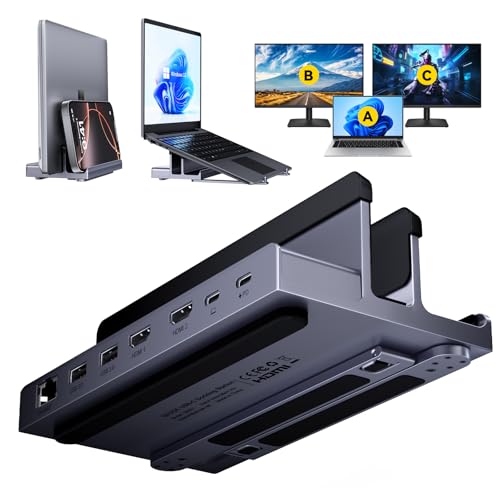
QUUGE Dual HDMI Docking Station Stand
Best for: High refresh rate dual-monitor setups
- Features
- Kickstand (what this guide is about)
- Host Interface
- Thunderbolt 3/4
- Display Support
- Dual
- Max Resolution
- 4K@120Hz
- Power Delivery
- 85W
- Port Count
- 6
The QUUGE QS601 combines a laptop stand with a docking station. It offers dual 4K outputs at 60Hz, with one HDMI 2.1 port supporting 4K@120Hz for smoother visuals. It delivers 85W Power Delivery and includes a 1000Mbps Ethernet port. The metal build with silicone padding protects your device. This setup suits users needing high refresh rates and stable wired connections.
Pros
- HDMI 2.1 port supports single-screen 4K@120Hz output
- Dual HDMI ports enable 4K@60Hz dual-monitor setup
- Provides 85W Power Delivery for fast charging
- Includes 1000Mbps Ethernet for stable network connection
Cons
- Max data speed is 5Gbps, slower than 10Gbps options
- Power delivery caps at 85W, not 100W
- Requires Thunderbolt 3/4 cable for best performance
Good fit if
- You need 4K@120Hz for gaming or sports videos
- You want a dual-monitor setup with a built-in stand
- You require a wired Ethernet connection for stability
Skip if
- You need more than 85W of power delivery
- You require 10Gbps data transfer speeds
- You prefer wireless connectivity over Ethernet
Verdict: QUUGE QS601 Dual 4K@120Hz Docking Station fits users who prioritize high refresh rates and dual displays. It is a solid choice for those needing a stable Ethernet link and a space-saving stand design.

PULWTOP Dual Monitor Vertical Stand Dock
Best for: Windows laptops needing dual 4K displays
- Features
- Kickstand (what this guide is about)
- Host Interface
- USB-C
- Display Support
- Dual
- Max Resolution
- 4K@60Hz
- Power Delivery
- 85W
- Port Count
- 11
The PULWTOP dock combines a vertical laptop stand with an 11-port hub. It supports dual 4K@60Hz displays via MST, making it suitable for Windows laptops. The unit delivers 85W PD charging and includes Gigabit Ethernet. Its vertical design saves desk space while providing robust connectivity for peripherals. This setup is ideal for users needing a stable, single-cable connection for multiple monitors and devices.
Pros
- Supports dual 4K@60Hz monitors via HDMI
- Vertical stand design saves desk space
- 100W PD input with 85W output
- 11 ports including Gigabit Ethernet
- 10Gbps data transfer on USB-C ports
Cons
- Not compatible with Mac users
- Power adapter is not included
- USB-C ports do not support video output
Good fit if
- You use a Windows laptop with a full-featured USB-C port
- You need to drive two external 4K monitors simultaneously
- You want to save desk space with a vertical stand
Skip if
- You own a Mac or Apple Silicon laptop
- You need a dock that includes a power adapter
- You require video output through the USB-C data ports
Verdict: PULWTop Vertical USB-C Dock, Dual 4K is a practical solution for Windows users who need dual 4K displays and a space-saving vertical stand. It fits professionals who prioritize connectivity and screen real estate over cross-platform compatibility.
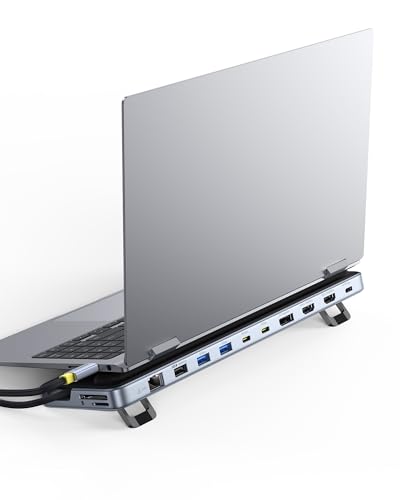
Baseus 12-in-1 Triple Display Laptop Stand Dock
Best for: Triple 4K display setups with laptop elevation
- Features
- Kickstand (what this guide is about)
- Host Interface
- USB-C
- Display Support
- Triple
- Max Resolution
- 4K
- Power Delivery
- 85W
- Port Count
- 12
View on Amazon: Baseus 12-in-1 Triple Display Laptop Stand Dock
This Baseus docking station offers 12 ports, including two HDMI and one DisplayPort for triple 4K displays. It features a built-in kickstand to elevate your laptop and improve airflow. The unit supports up to 85W Power Delivery output and includes a Gigabit Ethernet port for stable wired connections. It is designed for users who need extensive connectivity and multiple high-resolution screens in a single compact device.
Pros
- Supports triple 4K displays via two HDMI and one DisplayPort
- Includes a built-in kickstand for ergonomic elevation
- Provides 85W Power Delivery output for fast charging
- Features a Gigabit Ethernet port for stable connectivity
Cons
- 85W PD output is lower than the 100W input capability
- Only one DisplayPort limits native 4K@60Hz options on some laptops
- No mention of USB-C data transfer speeds beyond 10Gbps on all ports
Good fit if
- You need to drive three separate 4K monitors simultaneously
- You want an elevated laptop setup with built-in ventilation
- You require a Gigabit Ethernet port for stable internet
Skip if
- You need more than 85W of power delivery for your laptop
- You prefer a single DisplayPort for maximum compatibility
- You do not need a physical stand to elevate your device
Verdict: Baseus 12-in-1 Triple 4K Docking Station is ideal for users who need three 4K screens and a built-in stand. It suits those who value wired Ethernet and high port counts over maximum power delivery speed.
Specifications side by side
| Spec | Mukiya Foldable Laptop Stand 8-in-1 USB-C Hub | UGREEN 9-in-1 Foldable Kickstand Dock | Baseus 6-in-1 Docking Station Stand | Lenovo GaN 60W Multiport Charging Dock | Tobenone MacBook Docking Station Stand | PULWTOP Dual 4K Vertical Docking Station Stand | PULWTOP Dual 4K USB-C Dock Stand | QUUGE Dual HDMI Docking Station Stand | PULWTOP Dual Monitor Vertical Stand Dock | Baseus 12-in-1 Triple Display Laptop Stand Dock |
|---|---|---|---|---|---|---|---|---|---|---|
| Host Interface | USB-C | USB-C | not specified | USB-C | USB-C | USB-C | Thunderbolt 4/3, USB4, USB-C | Thunderbolt 3/4 | USB-C | USB-C |
| Display Support | not specified | not specified | not specified | not specified | Dual | Dual | Dual | Dual | Dual | Triple |
| Max Resolution | 4K@30Hz | 4K@60Hz | 4K@60Hz | 4K@60Hz | 4K@60Hz | 4K@60Hz | 4K@60Hz | 4K@120Hz | 4K@60Hz | 4K |
| Power Delivery | 90W | 100W | 100W | 60W | Up to 87W | 85W | 85W | 85W | 85W | 85W |
| Port Count | 8 | 9 | 6 | not specified | not specified | 11 | 11 | 6 | 11 | 12 |
| Video Ports | HDMI | not specified | HDMI | HDMI 2.1 | HDMI, VGA | HDMI | HDMI | HDMI | HDMI | HDMI, DisplayPort |
| Max Data Speed | 5Gbps | 10Gbps | not specified | 10Gbps | 5Gbps | 10Gbps | 10Gbps | 5Gbps | 10Gbps | 10Gbps |
| Ethernet Speed | not specified | not specified | Gigabit | not specified | Gigabit Ethernet (10/100/1000Mbps) | Gigabit | Gigabit Ethernet | 1000Mbps | Gigabit | Gigabit Ethernet |
| Resolution | 4K UHD | not specified | not specified | not specified | 4K UHD | 4K UHD | 4K UHD | 4K UHD | 4K UHD | 4K UHD |
| Connectivity | USB-C, HDMI | USB-C | not specified | USB-C, HDMI, USB-A | HDMI | USB-C | USB-C | USB-C, HDMI, Ethernet | USB-C | USB-C, HDMI, DisplayPort, Ethernet, USB-A |
| Refresh Rate | not specified | not specified | not specified | not specified | not specified | 60Hz | not specified | 120Hz | 60Hz | not specified |
| Features | Kickstand | Kickstand, Foldable | Kickstand | Kickstand | Kickstand | Kickstand | Kickstand | Kickstand | Kickstand | Kickstand |
| Use | not specified | not specified | not specified | Gaming, Office | not specified | not specified | Office | not specified | not specified | not specified |
| Recommended Use | not specified | not specified | not specified | Home | not specified | not specified | Home | not specified | not specified | not specified |
| Slot Count | not specified | not specified | not specified | not specified | not specified | not specified | not specified | 1 Slot | not specified | not specified |
| Weight | 11.2 ounces | not specified | 11.2 ounces | 8.82 ounces | not specified | not specified | 1.04 pounds | not specified | not specified | not specified |
| Dimensions | not specified | 6.3 × 4.53 × 1.65 inches | 5.31 × 3.38 × 1.18 inches | 3.15 × 1.32 × 3.15 inches | 9 × 2 × 3 inches | 5.91 × 4.53 × 4.13 inches | 4.9 × 0.58 × 4.9 inches | 7.1 × 3.8 × 2.3 inches | 5.91 × 4.53 × 4.13 inches | 3.15 × 1 × 11.2 inches |
| Color | black | grey | Black | Black | Grey | Black | Gray | space grey | Gray | Silver |
| Model | HUB-M48 | 25869 | not specified | not specified | UDS020-100W | BD216C | not specified | QS601 | BD216C | not specified |
| Size | not specified | not specified | not specified | not specified | not specified | not specified | not specified | QS601 for Windows【2 × HDMI】 | not specified | not specified |
How to choose the right one
-
Check power delivery needs
You need to verify the dock can charge your laptop while connected. The TobenONE and Baseus 12-in-1 models offer 100W power delivery, which handles most modern laptops. The Lenovo GaN provides 60W, suitable for smaller devices. If your laptop requires more power than the dock supplies, you must use a separate charger. This ensures your battery does not drain during use. Always match the wattage to your laptop’s requirements for stable performance.
-
Verify display output limits
You must check how many screens the dock supports. The Baseus 12-in-1 handles triple 4K displays, while most others support single or dual monitors. The TobenONE and PULWTOP models offer dual 4K support for vertical setups. If you plan to use three screens, the Baseus is your only option here. Single monitor users have many choices. Ensure the dock’s output count matches your workspace layout to avoid connectivity issues.
-
Match refresh rate requirements
You should check the refresh rate if you game or edit video. The QUUGE QS601 supports 120Hz on dual displays, providing smoother motion. Most other docks listed here operate at 60Hz. This is standard for office work and general media consumption. If you need higher frame rates for gaming, the QUUGE is the specific choice. Lower refresh rates may feel less responsive during fast-paced actions. Select based on your visual performance needs.
-
Assess portability and weight
You need to consider the dock’s weight if you travel often. The Lenovo GaN is the lightest at 8.82 ounces, making it easy to pack. The UGREEN and Baseus 6-in-1 are also compact. Heavier options like the PULWTOP 11-in-1 weigh over a pound. A lighter dock reduces bag weight. If you move your setup frequently, prioritize low weight. Stationary users may prefer heavier, more robust builds with more ports.
-
Confirm connectivity options
You must ensure the dock has the ports you actually use. The Baseus 12-in-1 includes DisplayPort and Ethernet, offering versatile connectivity. The UGREEN and Mukiya docks focus on USB-C and HDMI. If you need wired internet, the Baseus 6-in-1 and QUUGE QS601 include Ethernet. HDMI is essential for many monitors. Check that the physical port types match your cables to avoid needing extra adapters for your setup.
Frequently asked questions
Which docking station with a kickstand is best for a MacBook?
The TobenONE MacBook Docking Station Stand is designed specifically for Apple laptops. It features a vertical stand and supports dual 4K displays. This model provides 100W power delivery to charge your device. It is not compatible with Windows systems. This makes it the ideal choice for users who want a clean desk setup with their Mac.
Can I use a dock with a kickstand for a Steam Deck?
Yes, several options work well for handheld consoles. The UGREEN 9-in-1 Foldable Kickstand Dock is compact and fits handheld gaming needs. The Baseus 6-in-1 Docking Station Stand includes Gigabit Ethernet, which is useful for online gaming. Both docks offer portable designs that prioritize thermal management and space saving over multi-monitor expansion.
What is the lightest docking station with a kickstand?
The Lenovo GaN 60W Multiport Charging Dock is the lightest option at 8.82 ounces. It measures 3.15 by 3.15 inches, making it very compact. This dock supports 4K@60Hz video and provides 60W charging. It is suitable for users who need a lightweight solution for office or gaming setups without extra bulk.
Do these docks support dual 4K monitors?
Several models support dual 4K displays. The PULWTOP Dual 4K Vertical Docking Station Stand and the PULWTOP Dual 4K USB-C Dock Stand both offer dual monitor support at 60Hz. The QUUGE Dual HDMI Docking Station Stand goes further with dual 4K@120Hz output. The Baseus 12-in-1 model supports triple 4K screens for expanded workspace.
Which dock offers the highest refresh rate for gaming?
The QUUGE Dual HDMI Docking Station Stand supports a 120Hz refresh rate. It provides dual 4K UHD output, which is ideal for high-speed gaming. Other docks in this list typically support 60Hz. If you need smoother visuals for fast-paced games, the QUUGE QS601 is the best choice among these options for high refresh rates.
Is there a dock with a vertical stand design?
Yes, the TobenONE MacBook Docking Station Stand features a vertical design. It measures 9 inches in length and 3 inches in height. The PULWTOP models also offer vertical stand options to save desk space. These designs help keep your setup organized and reduce clutter. They are particularly useful for users who want to elevate their laptop while connecting peripherals.
Which docking station has the most ports?
The Baseus 12-in-1 Triple Display Laptop Stand Dock has the most ports. It includes HDMI, DisplayPort, Ethernet, USB-A, and USB-C connections. The UGREEN 9-in-1 Foldable Kickstand Dock is another high-count option with nine ports. These models provide extensive connectivity for users who need to attach multiple devices without using additional hubs.
Can I use these docks for office work?
Yes, many are suitable for office environments. The Lenovo GaN 60W Multiport Charging Dock is recommended for office use. It supports 4K video and provides stable charging. The PULWTOP Dual 4K USB-C Dock Stand is also designed for office settings. These docks help create a professional, organized workspace with multiple display support and reliable connectivity for daily tasks.