Baseus 12-in-1 Triple Display Laptop Review: Who It Fits and Who Should Skip It
As an Amazon Associate we earn from qualifying purchases. Links on this page are affiliate links.
This baseus laptop docking station stand review focuses on the Baseus 12-in-1 Triple Display Laptop Stand Dock. It is a silver expansion hub designed to multiply your screen real estate and connectivity. The two defining specs are its ability to support triple 4K displays via HDMI and DisplayPort, and its inclusion of a gigabit Ethernet port for stable wired internet. It connects to your device through a single USB-C host interface. This setup aims to organize your workspace while providing essential ports for data, power, and media.
What stands out
- Supports triple 4K displays via two HDMI and one DisplayPort
- Includes a gigabit Ethernet port for stable wired connections
- Features an ergonomic stand design with a kickstand for heat dissipation
- Provides 12 ports total, including three USB-A and two USB-C 3.0
- Offers 85W Power Delivery output for fast laptop charging
Who it fits
Good fit for
This dock suits users who need multiple monitors for multitasking or creative work. The triple display support allows you to expand your workspace significantly. Professionals who rely on stable internet for video conferencing will appreciate the gigabit Ethernet port. It also fits those who want to reduce cable clutter by using a single USB-C connection for data, video, and power. The ergonomic stand helps improve posture by elevating your laptop.
Who should skip it
You should look elsewhere if you only need a single external monitor, as this unit is built for triple displays. It requires a USB-C host interface, so it may not work with older laptops lacking compatible ports. If you do not need wired Ethernet connectivity, the extra port may be unnecessary. Additionally, the 85W Power Delivery output might be insufficient for high-power laptops that require more than 85W to charge efficiently while in use.
Verdict: This docking station is a practical solution for users needing triple 4K displays and stable wired internet. It effectively consolidates connectivity into one ergonomic stand.
Key specs explained
Display Support: Triple
This dock allows you to connect three external screens simultaneously. You gain a larger total workspace without needing multiple hubs. This setup helps professionals manage complex workflows by separating applications across distinct monitors. It is ideal for users who need to view code, spreadsheets, and reference material at the same time. Compare this with single or dual-monitor docks to see if your multitasking needs justify the extra screen real estate.
Max Resolution: 4K
The device supports output up to 4K clarity on connected displays. This ensures sharp text and detailed images for creative work or media consumption. You will benefit from crisp visuals whether you are editing photos or attending high-definition video calls. When shopping, check if your external monitors also support 4K to fully utilize this capability. Lower resolution outputs may appear less sharp on high-density screens.
Power Delivery: 85W
The USB-C port delivers up to 85W of power to your laptop while you work. This allows you to charge most ultrabooks and mid-sized laptops without needing a separate charger. You can keep your desk tidy by using a single cable for both data and power. Ensure your laptop supports USB-C charging and requires less than 85W. This spec is crucial for maintaining battery life during heavy multitasking sessions.
Max Data Speed: 10Gbps
USB-A and USB-C ports on this dock transfer data at speeds up to 10Gbps. This fast rate reduces wait times when moving large files like video projects or database backups. You can connect external SSDs or high-speed peripherals without significant bottlenecks. Compare this with older 5Gbps hubs to notice the difference in transfer efficiency. This speed is essential for users who frequently handle large media files.
Ethernet Speed: Gigabit Ethernet
The built-in Gigabit Ethernet port provides a stable wired internet connection. Wired links offer lower latency and higher consistency than Wi-Fi, which is vital for video conferencing and large file transfers. You avoid the dropouts common in crowded wireless environments. This feature is useful for remote workers who need reliable uptime. Check your router compatibility to ensure you get the full speed benefits from this wired connection.
Design and build overview
According to the listing, the Baseus dock measures 11.2 inches in height, 3.15 inches in length, and 1 inch in width. The unit is finished in silver. These dimensions suggest a footprint that fits comfortably on most desks without consuming excessive space. The vertical orientation allows the dock to stand upright, which helps keep cables organized and out of the way. You can place it near your laptop’s USB-C port for a short, tidy connection. The compact size means it does not require a large desk area, making it suitable for smaller workspaces or travel setups where space is limited.
The listing highlights an ergonomic stand design intended to improve heat dissipation. This feature suggests the internal components are positioned to allow airflow, which may help maintain stable performance during long work sessions. The stand also elevates your device, which can improve your viewing posture. A screen-lock button is included on the unit. This control allows you to secure the dock to a surface or your laptop, preventing accidental movement. The kickstand feature adds stability, ensuring the unit remains steady even when multiple displays and peripherals are connected. The build appears focused on practical organization and thermal management rather than aesthetic flair.
Setup and daily workflow
Setting up this Baseus dock begins with a single USB-C host connection to your laptop. This single cable manages data, video, and power. You connect your three displays to the two HDMI ports and the DisplayPort. The listing confirms triple 4K support, so you can arrange your workspace across multiple screens. This configuration helps you separate applications for complex tasks. For connectivity, the dock provides three USB-A ports and two USB-C 3.0 ports. You can attach peripherals without needing additional adapters. The 10Gbps max data speed ensures fast transfers for connected drives. The Gigabit Ethernet port offers a stable wired link. This is useful for video calls or large file uploads where Wi-Fi might drop. Power management is handled by the PD port. The dock accepts 100W input and delivers 85W output to your laptop. This keeps your machine charged while you work. The ergonomic stand design elevates your device. This improves your posture and aids heat dissipation. The kickstand feature keeps the laptop secure and angled correctly. The TF and SD card readers allow direct media access. You can move files quickly without plugging in card readers separately. The screen-lock button adds a layer of physical security for your device. Overall, the setup is straightforward. You plug in one cable and expand your capabilities. The silver finish fits most modern workspaces. Daily use involves managing multiple windows and peripherals through a single hub. This reduces cable clutter on your desk. The integrated stand keeps your laptop organized and accessible. You gain productivity through screen real estate and connectivity options.
Before you buy this dock
You need a laptop with a USB-C port that supports video output and Power Delivery. Check your specific model’s specs, as not all USB-C ports handle triple displays. You also require three external monitors compatible with HDMI or DisplayPort inputs. Ensure your displays support 4K resolution to match the dock’s maximum output capability. The dock provides 85W of output power, which may be insufficient for high-performance gaming laptops. You might need a separate power adapter for those devices. Keep the unit clean and dry to maintain port longevity. This setup is best for users who already own multiple screens and need a central hub. It does not include built-in screens, so it is not a standalone portable monitor. If you need all-in-one portable displays, other options in this guide may fit better. Verify cable lengths and desk space before purchasing.
Check before you buy
- Confirm your laptop USB-C port supports video and PD output.
- Check if your three monitors accept HDMI or DisplayPort signals.
- Verify your laptop’s power draw does not exceed 85W.
- Ensure you have enough desk space for three screens.
The product at a glance
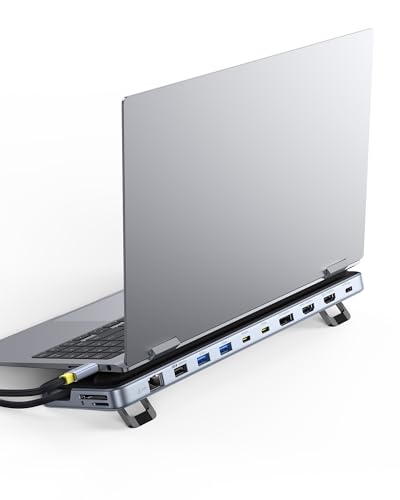
Baseus 12-in-1 Triple Display Laptop Stand Dock
Best for: Users needing triple 4K displays and laptop elevation
- Host Interface
- USB-C
- Display Support
- Triple
- Max Resolution
- 4K
- Power Delivery
- 85W
- Port Count
- 12
- Video Ports
- HDMI, DisplayPort
View on Amazon: Baseus 12-in-1 Triple Display Laptop Stand Dock Affiliate link
This Baseus docking station expands your laptop into a triple 4K display setup via HDMI and DisplayPort. It offers 12 ports, including three USB-A, two USB-C, and Gigabit Ethernet. The built-in stand elevates your device for better ergonomics and heat dissipation. You get 85W of Power Delivery output to keep your laptop charged. This hub suits users needing high-resolution multitasking and stable wired connectivity.
Pros
- Supports triple 4K displays via HDMI and DisplayPort
- 12-in-1 port configuration with USB-A and USB-C
- Built-in stand improves posture and heat dissipation
- Gigabit Ethernet ensures stable wired network speed
- 85W PD output charges laptop while in use
Cons
- 85W PD output is lower than the 100W input capacity
- USB-C ports limited to 10Gbps data speed
- No mention of wireless connectivity like Bluetooth or Wi-Fi
Good fit if
- You need three external monitors for heavy multitasking
- You want a stand to elevate your laptop for better posture
- You require a stable Gigabit Ethernet connection for work
Skip if
- You need more than 85W of charging power for your laptop
- You require wireless connectivity options like Bluetooth or Wi-Fi
- You prefer a compact hub without an integrated stand
Verdict: Baseus 12-in-1 Triple Display Docking Station fits users who need three 4K screens and a stable wired connection. It is a practical choice for those who want their laptop elevated for better ergonomics.
Specifications side by side
| Spec | Baseus 12-in-1 Triple Display Laptop Stand Dock |
|---|---|
| Host Interface | USB-C |
| Display Support | Triple |
| Max Resolution | 4K |
| Power Delivery | 85W |
| Port Count | 12 |
| Video Ports | HDMI, DisplayPort |
| Max Data Speed | 10Gbps |
| Ethernet Speed | Gigabit Ethernet |
| Resolution | 4K UHD |
| Connectivity | USB-C, HDMI, DisplayPort, Ethernet, USB-A |
| Features | Kickstand |
| Dimensions | 3.15 × 1 × 11.2 inches |
| Color | Silver |
Frequently asked questions
Does this dock support three 4K monitors at once?
Yes, the Baseus 12-in-1 dock supports triple 4K UHD displays simultaneously. This allows you to expand your workspace significantly without needing additional hubs. You can connect three screens to manage complex workflows efficiently. The listing confirms this capability for users requiring high-resolution multitasking setups.
Can I charge my laptop while using all three screens?
Yes, the dock provides 100W Power Delivery to charge your connected laptop. This single cable manages data, video output, and power simultaneously. You do not need a separate charger for your computer while using the triple display setup. This ensures your device stays powered during intensive work sessions.
What ports are available on this Baseus docking station?
The dock features USB-C, HDMI, DisplayPort, Ethernet, and USB-A ports. You connect your laptop via USB-C for the main link. The two HDMI ports and one DisplayPort handle the three external monitors. Additional ports provide connectivity for peripherals and wired network access.
Is this dock suitable for users who need laptop elevation?
Yes, this dock is designed to elevate your laptop for better ergonomics. It includes a kickstand feature that helps position your screen at a comfortable viewing height. This setup reduces neck strain by aligning your monitors with your eye level. It is practical for long-term desk use.
What are the physical dimensions of this silver dock?
The unit measures 11.2 inches in height, 3.15 inches in length, and 1 inch in width. These dimensions allow it to fit comfortably on most desks without taking up excessive space. The silver finish matches many modern laptop aesthetics. The compact footprint keeps your workspace organized.
Who is the ideal user for this triple display dock?
This dock fits users who need three 4K screens and a stable wired connection. It is ideal for professionals managing complex workflows across distinct monitors. You also benefit if you want your laptop elevated for better ergonomics. It suits those who require high-resolution multitasking and reliable connectivity.