Baseus 12-in-1 Triple Display Laptop Alternatives: 6 Similar Picks Compared
As an Amazon Associate we earn from qualifying purchases. Links on this page are affiliate links.
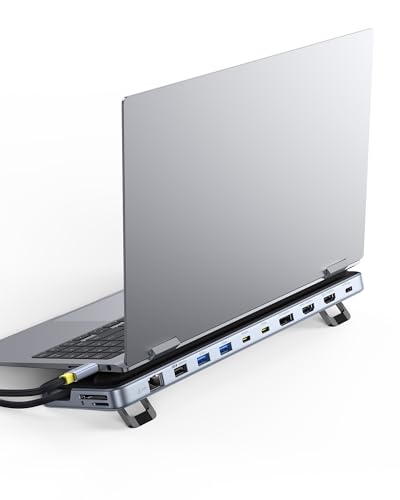
The Baseus 12-in-1 Triple Display Laptop Stand Dock offers triple 4K output, a built-in stand, and Gigabit Ethernet in one silver unit. If you need baseus laptop docking station stand alternatives, this guide compares 6 similar picks based on their published specifications. You might look for different port counts, display refresh rates, or card readers that this model does not include. Some users prefer brands with more USB-A ports or compact designs that lack an integrated stand.
We selected these alternatives because their specs overlap with the original product’s core features. Each option supports multiple displays, often reaching 4K resolution, and connects via USB-C. You will find variations in power delivery, data speeds, and connectivity options like SD card slots or VGA ports. This list helps you compare practical details such as port layout, physical dimensions, and maximum resolution. You can choose a dock that matches your specific workspace needs without guessing about compatibility.
How alternatives compare to Baseus
Mukiya 10-in-1 Triple Display Laptop Stand Dock
The Mukiya 10-in-1 dock also supports triple 4K displays and includes a kickstand, similar to the Baseus. However, it lacks the Gigabit Ethernet port found on the Baseus, so you will need Wi-Fi or a separate adapter for wired networking. It offers 100W Power Delivery, matching the Baseus charging capability. This model is a lighter option if you do not need wired internet. It fits Windows users who prioritize video output and charging in a compact unit. You save one port count but lose network stability. Choose this if your desk setup relies entirely on wireless connections.
Baseus Quadruple Display 8-in-1 USB-C Dock
The Baseus 8-in-1 Quadruple Display Dock supports four screens instead of three, adding a VGA port for legacy devices. This makes it better for older projectors or monitors. It shares the 100W Power Delivery feature with the original Baseus dock. However, it drops the Gigabit Ethernet and the integrated stand design. You gain display count and legacy support but lose modern networking and ergonomic elevation. This is a practical choice if you need to connect four monitors and have older hardware. It is not ideal if you require a built-in stand or fast wired internet for video calls.
MOKiN 17-in-1 Triple Display USB-C Dock
The MOKiN 17-in-1 dock expands port variety significantly with 17 connections, including Gigabit Ethernet and multiple USB ports. It supports triple 4K displays at 60Hz, offering smoother motion than the Baseus if your laptop supports it. It matches the 100W Power Delivery rating. However, it lacks the integrated stand found on the Baseus, so you must provide your own support. You gain data speed and port density but lose the all-in-one ergonomic design. This pick suits professionals who need maximum connectivity and high refresh rates without desk clutter from a stand.
NOVOO 11-in-1 4K 60Hz USB-C Dock
The NOVOO 11-in-1 dock supports triple 4K displays at 60Hz, which is a spec advantage over the Baseus if you need higher refresh rates. It includes Gigabit Ethernet and 100W Power Delivery, matching the Baseus networking and charging. However, it is a flat hub without a kickstand, so you need an external monitor arm or stand. It is more compact and lighter than the Baseus unit. You gain smoother video performance but lose the built-in ergonomic elevation. This is a solid choice for users who already have a monitor stand and prioritize display refresh rates over integrated hardware design.
MOKiN 13-in-1 USB-C Docking Station
The MOKiN 13-in-1 dock offers triple 4K display support and includes Gigabit Ethernet, similar to the Baseus. It adds a built-in card reader for SD and TF cards, which the Baseus also has. It provides 100W Power Delivery. However, it lacks the integrated kickstand, requiring you to support the laptop separately. You gain slightly more port variety in the USB category but lose the ergonomic stand feature. This model fits professionals who need frequent card access and wired networking. It is a better fit if you do not mind using a separate laptop stand for elevation.
NOVOO 7-in-1 USB-C Hub with Gigabit Ethernet
The NOVOO 7-in-1 hub is a single-monitor solution, unlike the Baseus triple-display dock. It supports one 4K@60Hz screen via HDMI and includes Gigabit Ethernet and 100W Power Delivery. It is significantly smaller and lighter than the Baseus unit. You lose dual and triple display capabilities entirely. This is not for multi-screen setups. It is ideal if you only need one external monitor and wired internet. You save desk space and cost but give up the productivity boost of multiple screens. Choose this only if your workflow requires a single display and a compact footprint.
Quick picks
Our 7 picks
Baseus 12-in-1 Triple Display Laptop Stand Dock
Best for: multi-screen productivity setups with ergonomic needs
- Host Interface
- USB-C
- Display Support
- Triple
- Max Resolution
- 4K
- Power Delivery
- 85W
- Port Count
- 12
- Video Ports
- HDMI, DisplayPort
View on Amazon: Baseus 12-in-1 Triple Display Laptop Stand Dock Affiliate link
This Baseus docking station expands your laptop into a triple 4K display setup via HDMI and DisplayPort. It features a 12-port hub with Gigabit Ethernet, SD/TF readers, and 10Gbps data speeds. The integrated stand elevates your device for better posture and heat dissipation. With 85W Power Delivery output, it keeps your laptop charged while you work. It suits users needing a stable, multi-screen workspace without clutter.
Pros
- Supports triple 4K displays across HDMI and DisplayPort outputs
- 12-in-1 port count includes Gigabit Ethernet and card readers
- Integrated stand design improves ergonomics and cooling
- 85W PD output charges laptops while in use
- 10Gbps data transfer speed on USB-A and USB-C ports
Cons
- Maximum resolution is limited to 4K, not 8K
- 85W power delivery output is lower than 100W input
- No mention of wireless connectivity like Bluetooth or Wi-Fi
Good fit if
- You need three external monitors for productivity
- You want a stable wired Ethernet connection
- You prefer an elevated stand design for your laptop
Skip if
- You require 8K display support
- You need more than 85W of power delivery output
- You prefer a compact dongle over a full docking station
Verdict: Baseus 12-in-1 Triple 4K Docking Station fits users who need a robust, stand-integrated hub for three 4K screens and stable wired networking. It is a solid choice for desktop setups where ergonomics and port variety matter more than maximum power output.

Mukiya 10-in-1 Triple Display Laptop Stand Dock
Best for: Windows users needing triple 4K displays and charging
- Host Interface
- USB-C, Thunderbolt 3/4
- Display Support
- Triple
- Max Resolution
- 4K@60Hz
- Power Delivery
- 100W
- Port Count
- 10
- Video Ports
- HDMI, DisplayPort
View on Amazon: Mukiya 10-in-1 Triple Display Laptop Stand Dock Affiliate link
This Mukiya 10-in-1 USB-C dock combines a laptop stand with triple display support. It features two HDMI and one DisplayPort output, enabling 4K resolution at 60Hz for Windows systems. The unit includes a 100W Power Delivery port for charging, along with USB 3.0 data ports and SD/TF card slots. Its aluminum alloy construction offers adjustable height settings and portability, making it a functional hub for organized workspaces.
Pros
- Triple display output via 2 HDMI and 1 DisplayPort
- 4K resolution support at 60Hz refresh rate
- 100W Power Delivery charging capability
- Adjustable 9-level ergonomic laptop stand
- Includes SD and TF card reader slots
Cons
- macOS users limited to single-screen mirroring mode
- Windows 10 or newer required for full triple display expansion
- No Ethernet port included for wired networking
Good fit if
- You need a single device for charging, data, and three monitors
- You use a Windows laptop with USB-C DP Alt Mode
- You want an adjustable stand to improve viewing angles
Skip if
- You rely exclusively on macOS for multi-monitor setups
- You require wired Ethernet connectivity for stable internet
- You need more than ten connection ports simultaneously
Verdict: Mukiya 10-in-1 Triple 4K Docking Station Stand is a solid choice for Windows users who need to drive three displays while keeping their desk organized. It fits those who prioritize video output and charging in one compact, adjustable unit.

Baseus Quadruple Display 8-in-1 USB-C Dock
Best for: multi-monitor setups with legacy VGA needs
- Host Interface
- USB-C
- Display Support
- Quadruple
- Max Resolution
- 8K@30Hz
- Power Delivery
- 92W
- Video Ports
- DisplayPort, HDMI, VGA
- Max Data Speed
- 5Gbps
View on Amazon: Baseus Quadruple Display 8-in-1 USB-C Dock Affiliate link
This Baseus docking station supports up to four displays via DisplayPort, HDMI, and VGA. It delivers 8K@30Hz resolution and includes a VGA port for older hardware. The unit accepts 100W PD input and passes 92W to your laptop. It also offers 20W USB-C charging for phones. You get individual power buttons for each screen. This setup suits users needing maximum screen real estate and legacy connectivity.
Pros
- Supports quadruple display output for expanded workspace
- Includes VGA port for legacy monitor compatibility
- Passes 92W power delivery to host laptop
- Features individual power buttons for each display
Cons
- 8K resolution is limited to 30Hz refresh rate
- No Ethernet port listed for wired networking
- Max data transfer speed capped at 5Gbps
Good fit if
- You need to connect four monitors simultaneously
- You have older VGA monitors to integrate
- You want physical buttons to turn off screens
Skip if
- You require 4K resolution at 60Hz or higher
- You need built-in Ethernet for stable internet
- You prefer USB 3.1 Gen 2 speeds above 5Gbps
Verdict: Baseus 8-in-1 Quadruple Display Dock is a practical choice for users who need four screens and legacy VGA support. It fits those who prioritize display count over high refresh rates.

MOKiN 17-in-1 Triple Display USB-C Dock
Best for: Triple 4K@60Hz setups and 10Gbps data
- Host Interface
- USB-C, USB4, Thunderbolt
- Display Support
- Triple
- Max Resolution
- 4K@60Hz
- Power Delivery
- 85W
- Port Count
- 17
- Video Ports
- HDMI, DisplayPort
View on Amazon: MOKiN 17-in-1 Triple Display USB-C Dock Affiliate link
This MOKiN docking station supports three 4K@60Hz monitors via HDMI and DisplayPort. It offers 17 ports, including 10Gbps USB transfers and a 1Gbps Ethernet jack. The unit provides up to 85W pass-through charging for your laptop. A digital display shows real-time connection status. It suits users needing extensive connectivity and high-resolution triple-screen setups on Windows or macOS.
Pros
- Supports triple 4K@60Hz displays simultaneously
- 17 total ports including 10Gbps USB
- 1Gbps Gigabit Ethernet connectivity
- Digital status display with screen lock
Cons
- 85W pass-through charging is lower than 100W competitors
- Requires a separate 100W power adapter
- Driver installation needed for video output
Good fit if
- You need three 4K monitors for trading or coding
- You require 10Gbps data transfer speeds
- You want a digital status display
Skip if
- You need 100W pass-through charging
- You prefer plug-and-play without drivers
- You want a bundled power adapter
Verdict: MOKiN 17-in-1 Triple Display Dock fits professionals needing three 4K screens and 10Gbps data speeds, though you must supply your own 100W charger.

NOVOO 11-in-1 4K 60Hz USB-C Dock
Best for: compact triple 4K@60Hz setups
- Host Interface
- USB-C
- Display Support
- Triple
- Max Resolution
- 4K@60Hz
- Power Delivery
- 100W
- Port Count
- 11
- Video Ports
- HDMI, DP
View on Amazon: NOVOO 11-in-1 4K 60Hz USB-C Dock Affiliate link
The NOVOO 11-in-1 dock supports three monitors at 4K@60Hz via HDMI and DisplayPort. It delivers 100W power delivery to your laptop and includes an Ethernet port. This gray unit measures 3.94 by 1.57 by 0.39 inches and weighs 0.7 ounces. It connects via a single USB-C host interface. You get a compact solution for expanding your workspace without heavy hardware.
Pros
- Supports triple display output
- 4K resolution at 60Hz refresh rate
- 100W power delivery capability
- Includes Ethernet connectivity
Cons
- Weighs 0.7 ounces, which is light for a dock
- Only offers 11 ports compared to 12-in-1 competitors
- Maximum resolution capped at 4K@60Hz, not 8K
Good fit if
- You need three screens at 60Hz
- You want a compact 11-port setup
- You require Ethernet connectivity
Skip if
- You need more than 11 ports
- You require 8K display support
- You prefer a heavier, sturdier build
Verdict: The NOVOO 11-in-1 Triple Display USB-C Dock fits users who need three 4K@60Hz screens and a compact form factor. It is a practical choice for those who prioritize port count and speed over maximum resolution.

MOKiN 13-in-1 USB-C Docking Station
Best for: users needing SD card access and triple monitors
- Host Interface
- USB-C
- Display Support
- Triple
- Max Resolution
- 4K
- Power Delivery
- 85W
- Port Count
- 13
- Video Ports
- HDMI, DisplayPort
View on Amazon: MOKiN 13-in-1 USB-C Docking Station Affiliate link
This MOKiN docking station supports triple displays via two HDMI and one DisplayPort. It includes a built-in SD and microSD card reader for quick media access. The hub provides gigabit Ethernet and up to 85W power delivery. You get three 10Gbps USB ports for fast data transfer. It weighs 4.66 ounces and connects via USB-C. This setup suits users needing multiple screens and card access.
Pros
- Triple display support with 2 HDMI and 1 DP ports
- Built-in SD and microSD card readers
- Gigabit Ethernet port for stable wired internet
- Up to 85W power delivery output
- Three 10Gbps USB 3.1 ports
Cons
- macOS users are limited to one extended display
- Maximum resolution is capped at 4K
- Power delivery output is 85W, not 100W
Good fit if
- You need to read SD or microSD cards directly
- You require a wired gigabit Ethernet connection
- You want to connect three monitors simultaneously
Skip if
- You use a Mac and need three extended displays
- You require 8K resolution support
- You need full 100W pass-through charging
Verdict: MOKiN 13-in-1 USB-C Triple Display Dock fits professionals who need card reading and wired networking alongside multiple screens. It is a solid choice for Windows users needing triple displays.

NOVOO 7-in-1 USB-C Hub with Gigabit Ethernet
Best for: Single monitor setups with Ethernet needs
- Host Interface
- USB-C
- Max Resolution
- 4K@60Hz
- Power Delivery
- 88W
- Port Count
- 7
- Video Ports
- HDMI
- Max Data Speed
- 5Gbps
View on Amazon: NOVOO 7-in-1 USB-C Hub with Gigabit Ethernet Affiliate link
This NOVOO hub adds a single HDMI port to your laptop, supporting 4K video at 60Hz. It includes a Gigabit Ethernet port for wired internet and a USB-C port delivering up to 88W of power delivery. You get three USB-A ports and one USB-C data port for peripherals. The compact unit weighs 2.79 ounces and features a dedicated screen-off button for privacy.
Pros
- Supports 4K@60Hz video output via HDMI
- Includes Gigabit Ethernet for stable wired internet
- Provides up to 88W power delivery for laptops
- Features a one-click screen-off privacy button
Cons
- Only one video output port
- No built-in display panel
- Limited to 5Gbps data transfer speeds
Good fit if
- You need a single external display
- You require a wired Ethernet connection
- You want a compact hub for travel
Skip if
- You need multiple external monitors
- You require 8K resolution support
- You want a portable display screen
Verdict: NOVOO 7-in-1 USB-C Hub with HDMI suits users who need one 4K@60Hz screen and wired internet in a small form factor. It is not for those seeking multi-monitor setups.
Specifications side by side
| Spec | Baseus 12-in-1 Triple Display Laptop Stand Dock | Mukiya 10-in-1 Triple Display Laptop Stand Dock | Baseus Quadruple Display 8-in-1 USB-C Dock | MOKiN 17-in-1 Triple Display USB-C Dock | NOVOO 11-in-1 4K 60Hz USB-C Dock | MOKiN 13-in-1 USB-C Docking Station | NOVOO 7-in-1 USB-C Hub with Gigabit Ethernet |
|---|---|---|---|---|---|---|---|
| Host Interface | USB-C | USB-C, Thunderbolt 3/4 | USB-C | USB-C, USB4, Thunderbolt | USB-C | USB-C | USB-C |
| Display Support | Triple | Triple | Quadruple | Triple | Triple | Triple | not stated |
| Max Resolution | 4K | 4K@60Hz | 8K@30Hz | 4K@60Hz | 4K@60Hz | 4K | 4K@60Hz |
| Power Delivery | 85W | 100W | 92W | 85W | 100W | 85W | 88W |
| Port Count | 12 | 10 | not stated | 17 | 11 | 13 | 7 |
| Video Ports | HDMI, DisplayPort | HDMI, DisplayPort | DisplayPort, HDMI, VGA | HDMI, DisplayPort | HDMI, DP | HDMI, DisplayPort | HDMI |
| Max Data Speed | 10Gbps | 5Gbps | 5Gbps | 10Gbps | not stated | 10Gbps | 5Gbps |
| Ethernet Speed | Gigabit Ethernet | not stated | not stated | 1Gbps | not stated | Gigabit | 1Gbps |
| Resolution | 4K UHD | 4K UHD | 4K UHD | not stated | 4K UHD | 4K UHD | 4K UHD |
| Connectivity | USB-C, HDMI, DisplayPort, Ethernet, USB-A | USB-C, HDMI, DisplayPort, USB-A | USB-C, HDMI, DisplayPort, USB-A, VGA | USB-C, HDMI, DisplayPort, Ethernet, USB-A | USB-C, HDMI, DisplayPort, Ethernet | USB-C, HDMI, DisplayPort, Ethernet | USB-C, HDMI, Ethernet, USB-A |
| Refresh Rate | not stated | 60Hz | not stated | not stated | 60Hz | not stated | not stated |
| Features | Kickstand | Kickstand | not stated | not stated | not stated | Card Reader | not stated |
| Dimensions | 3.15 × 1 × 11.2 inches | not stated | not stated | not stated | 3.94 × 1.57 × 0.39 inches | not stated | 1.57 × 0.39 × 3.94 inches |
| Weight | not stated | not stated | not stated | not stated | 0.7 ounces | 4.66 ounces | 2.79 ounces |
| Color | Silver | Silver | black | not stated | Gray | Gray | Champagne |
| Model | not stated | HUB-M94 | not stated | not stated | not stated | 0231 | NH07D-168D |
| Size | not stated | not stated | small | not stated | 11 in 1 DP | 13 IN 1 | 7-in-1 |
If you require dedicated drive cloning, you can review orico m 2 nvme docking station alternatives to handle offline data tasks.
Frequently asked questions
Can I use these docks to drive three 4K monitors simultaneously?
Yes, several options support triple 4K UHD output. The Baseus 12-in-1, Mukiya 10-in-1, and NOVOO 11-in-1 docks all handle three displays at 4K resolution. The Baseus Quadruple Display model supports four screens, though it may prioritize display count over high refresh rates. Check the specific model attributes to confirm triple monitor support.
Do these hubs include a stand for my laptop?
Many of the top picks feature a built-in kickstand for ergonomic viewing. The Baseus 12-in-1 and Mukiya 10-in-1 docks both include this stand feature. This design helps position your laptop at a comfortable height while you use the external displays. Other models, like the NOVOO 11-in-1, focus on a compact form factor without an integrated stand.
Which dock provides the best wired Ethernet connection?
Most triple display docks include Gigabit Ethernet for stable networking. The Baseus 12-in-1 and MOKiN 17-in-1 docks both offer this connectivity alongside video outputs. The NOVOO 7-in-1 hub also includes Ethernet, but it is designed for single-monitor setups. If you need wired internet with multiple screens, the Baseus or MOKiN options are reliable choices.
Is Power Delivery fast enough to charge my laptop while using multiple screens?
Yes, most listed docks support 100W Power Delivery. This allows you to charge your laptop while driving up to three 4K displays. The Baseus, Mukiya, NOVOO, and MOKiN models all feature 100W PD. Note that the MOKiN 17-in-1 dock requires you to supply your own 100W charger for this function to work effectively.
Do I need a special cable to connect these to my computer?
You need a USB-C connection to use the video and power features. All listed docks connect via USB-C. Some models also include HDMI, DisplayPort, and USB-A ports for peripherals. Ensure your laptop has a USB-C port that supports video output and Power Delivery to fully utilize the triple display capabilities of these hubs.
Which alternative is best for users who need SD card access?
The MOKiN 13-in-1 USB-C Docking Station is the top choice for card readers. It includes a dedicated card reader feature alongside triple 4K display support. This makes it ideal for professionals who transfer files frequently. Other models like the Baseus 12-in-1 or Mukiya 10-in-1 do not list card reader capabilities in their attributes.
Are there options that support legacy VGA monitors?
Yes, the Baseus Quadruple Display 8-in-1 USB-C Dock includes VGA connectivity. This allows you to connect older monitors that lack HDMI or DisplayPort inputs. It supports up to four displays, making it useful for mixed-display environments. Most other alternatives in this list focus on modern HDMI and DisplayPort connections without VGA support.