Anker 10-in-1 Triple Display USB-C Review: Specs, Pros and Cons
As an Amazon Associate we earn from qualifying purchases. Links on this page are affiliate links.
This anker docking station review covers the DL6350, a 10-in-1 USB-C hub designed to expand your laptop’s connectivity. It supports triple displays via DisplayLink technology, allowing you to connect two HDMI ports and one DisplayPort. The unit also delivers up to 100W of power delivery to charge your host laptop. You get ten total ports, including USB-A and USB-C data options. This setup turns a single USB-C port into a full workstation. It is built for users who need multiple screens and high-speed data transfer without replacing their current computer.
What stands out
- Supports triple displays with resolutions up to 4K@30Hz on the main screen and 1080p@60Hz on secondary screens.
- Provides 100W Power Delivery to charge your laptop while connected.
- Includes 10 total ports: 2 HDMI, 1 DisplayPort, 1 USB-C 3.2, 1 USB-A 3.2, 2 USB-A 2.0, Ethernet, and AUX.
- Features DisplayLink technology to enable three screens on MacBooks and other systems.
- Transfers data at speeds up to 5 Gbps via USB-C 3.2 Gen 1 ports.
Who it fits
Good fit for
This dock suits professionals who need a triple-monitor setup on a single USB-C port. It is ideal for MacBook users who require DisplayLink drivers to extend their workspace. You will benefit if you need to charge your laptop at 100W while using multiple displays. It also helps those who need Ethernet, audio, and multiple USB-A devices connected simultaneously. The compact design fits well on desks where space is limited but connectivity needs are high.
Who should skip it
You should skip this if you need native display support without installing DisplayLink drivers. If you require 4K@60Hz on all three screens, this model only offers 4K@30Hz on the primary display. Users who do not need a third monitor may find the 10-in-1 feature set excessive for their needs. Additionally, if your laptop’s USB-C port does not support data transfer or power delivery, this dock will not function as intended. Check your host device’s specifications before purchasing.
Verdict: The Anker DL6350 delivers a robust triple-display solution with strong charging capabilities. It is a practical choice for users needing extensive port expansion and multiple screens from one USB-C connection.
Key specs explained
Display Support: Triple
This dock lets you connect three screens at once. You get one main display at 4K resolution and two additional screens at 1080p. This setup is ideal for users who need separate windows for work, communication, and reference. It transforms a single laptop into a multi-monitor workstation. You can arrange these screens to match your workflow, reducing the need to switch tabs constantly. This is a significant upgrade over single-screen setups.
Port Count: 10
The device offers ten distinct connection points on one unit. You gain access to video outputs, USB data ports, audio jacks, and Ethernet. This consolidates your workspace by replacing multiple dongles with a single hub. You can connect a mouse, keyboard, external drive, and network cable simultaneously. This reduces cable clutter on your desk. It is particularly useful for laptops with limited native ports, allowing you to expand connectivity without sacrificing portability.
Power Delivery: 100W
This specification indicates the maximum power the dock can send to your laptop. Up to 100W is sufficient to charge most modern laptops, including high-performance models. You can plug your laptop charger into the dock, and the dock powers the computer. This simplifies your desk setup by using one power source for both the computer and the hub. Ensure your laptop supports USB-C charging to utilize this feature effectively for a cleaner workspace.
Max Data Speed: 5 Gbps
This value refers to the speed at which you can transfer files between your computer and connected USB devices. At 5 Gbps, large files move quickly, reducing wait times for backups or media transfers. This speed applies to the USB 3.2 Gen 1 ports. It is faster than older USB 2.0 connections. When shopping for hubs, check this spec to ensure it meets your needs for external drives. Faster speeds are crucial for video editors and data-heavy workflows.
Physical Design and Build Quality
According to the listing, the Anker DL6350 measures 6.7 inches in length, 3.15 inches in width, and 0.96 inches in height. The unit weighs 1.6 ounces. These dimensions indicate a compact footprint that sits low on your desk. The gray finish provides a neutral look that blends with most laptop setups. The small height means it will not block airflow or obstruct your view of the screen. The light weight makes it easy to move between workspaces or pack into a laptop bag for travel.
The device features a flat, rectangular layout with ports arranged along the sides. This design keeps cables organized and reduces clutter on your desk. You connect your laptop via a single USB-C host interface. The dock includes an 180W power adapter to support the 100W power delivery for your computer. This separate power brick ensures stable performance when driving three displays and charging your device simultaneously. The included USB-C 3.2 Gen 2 cable connects the dock to your laptop. This cable length allows flexible placement of the dock relative to your computer. The build focuses on utility rather than premium materials. It is a practical tool for expanding connectivity without taking up much space.
Setup and Everyday Use Guide
You connect this dock to a single USB-C port on your laptop. The listing includes a USB-C 3.2 Gen 2 cable for this host connection. You also need to plug in the included 180W power adapter. This powers the dock and delivers up to 100W to your laptop. This allows you to charge devices like MacBooks while using the hub. You can also charge a phone via the separate 30W USB-C Power Delivery port.
For video, you use the two HDMI ports and one DisplayPort. The main screen supports up to 4K at 30Hz. The second and third displays support up to 1920x1080 at 60Hz. You must use DisplayLink technology to enable three screens. This requires enabling screen recording permissions on MacBooks to maintain normal port functionality. This is a standard requirement for this type of expansion.
Data transfer happens through the USB-C 3.2 Gen 1 and USB-A 3.2 Gen 1 ports. These allow file transfers at speeds up to 5 Gbps. You also get two USB-A 2.0 ports for peripherals. An Ethernet port provides wired network connectivity. An AUX in/out port handles audio. The setup is straightforward. You plug in the power, connect the host cable, and attach your displays and devices. The dock manages the connections based on its internal specifications.
Key Checks Before Buying
Before you commit to this dock, verify your laptop’s USB-C port supports DisplayLink. This technology is required to drive three screens simultaneously. Without it, you may only see one or two displays. Check if your operating system allows screen recording permissions, as the listing notes this is needed for normal functionality. You will also need a power outlet nearby for the 180W adapter. While the dock charges your laptop at 100W, ensure your power brick is compatible with your device’s requirements. Keep the USB-C 3.2 Gen 2 cable clean and free of kinks to maintain the 5 Gbps data speeds. This setup fits well into a multi-monitor workspace alongside portable monitors. It serves as a stable central hub rather than a travel accessory. Consider how this stationary unit complements your mobile display strategy. It handles the heavy lifting for your desk, freeing up your laptop’s ports for other peripherals. This approach maximizes productivity without cluttering your workflow.
Check before you buy
- Confirm your laptop supports DisplayLink technology for triple screens.
- Ensure your OS allows screen recording permissions for functionality.
- Verify your laptop’s USB-C port handles 100W power delivery.
- Check that you have a nearby power outlet for the adapter.
The product at a glance
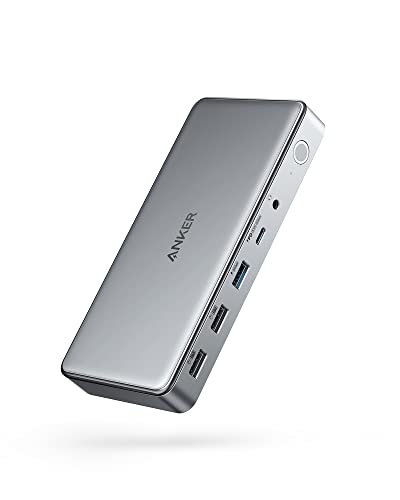
Anker 10-in-1 Triple Display USB-C Dock
Best for: single-port laptops needing triple monitor setups
- Host Interface
- USB-C
- Display Support
- Triple
- Max Resolution
- 4K@30Hz
- Power Delivery
- 100W
- Port Count
- 10
- Video Ports
- HDMI, DisplayPort
View on Amazon: Anker 10-in-1 Triple Display USB-C Dock Affiliate link
The Anker DL6350 expands a single USB-C port into ten connections, including two HDMI and one DisplayPort for triple monitors. It supports 4K@30Hz on the main screen and 1080p@60Hz on the others via DisplayLink. You get 100W power delivery for your laptop and 30W for a phone. This dock suits users needing multiple screens and fast file transfers at 5 Gbps.
Pros
- Supports triple displays with HDMI and DisplayPort outputs
- Provides 100W Power Delivery for laptop charging
- Includes 10 total ports for peripherals and data
- Transfers files at up to 5 Gbps
Cons
- Main display resolution is limited to 4K@30Hz
- Requires DisplayLink drivers for multi-monitor support
- Includes only an 18-month warranty
Good fit if
- You need to connect three monitors to one laptop port
- You want to charge your laptop and phone simultaneously
- You require Ethernet and audio connectivity on one dock
Skip if
- You need 4K@60Hz refresh rates on your primary screen
- You prefer a dock without external driver software
- You need more than 10 connection ports
Verdict: Anker DL6350 10-in-1 Triple Display Dock fits professionals who need three screens and extensive port expansion from a single USB-C connection. It is a solid choice for workspace setups requiring stable multi-monitor performance.
Specifications side by side
| Spec | Anker 10-in-1 Triple Display USB-C Dock |
|---|---|
| Host Interface | USB-C |
| Display Support | Triple |
| Max Resolution | 4K@30Hz |
| Power Delivery | 100W |
| Port Count | 10 |
| Video Ports | HDMI, DisplayPort |
| Max Data Speed | 5Gbps |
| Resolution | 4K UHD |
| Connectivity | HDMI, DisplayPort |
| Features | DisplayLink |
| Dimensions | 6.7 × 3.15 × 0.96 inches |
| Weight | 1.6 ounces |
| Color | Gray |
| Model | A83951A1 |
Frequently asked questions
Does the Anker DL6350 support three monitors at 4K resolution?
No, it does not run all three screens at 4K. The dock supports one main display at 4K resolution. The two additional screens operate at 1080p. This configuration allows for a triple-monitor setup while maintaining stability. You get one high-resolution screen for primary tasks and two lower-resolution screens for auxiliary windows.
What technology enables the triple display output?
The device uses DisplayLink technology to drive three screens. This software-based solution allows you to connect two HDMI ports and one DisplayPort simultaneously. It expands your laptop’s connectivity beyond native USB-C video limits. You must ensure your operating system supports DisplayLink drivers for this feature to function correctly.
How much power does this dock deliver to a laptop?
It delivers up to 100W of power to your host device. You connect the dock via a single USB-C port on your laptop. The listing includes an 180W power adapter to ensure stable operation. This power delivery allows you to charge your laptop while running multiple external displays and peripherals.
Is the Anker DL6350 suitable for single-port laptops?
Yes, it is ideal for laptops with only one USB-C port. The dock consolidates multiple connections into a single hub. You get ten ports in total, including video outputs and data connections. This setup is designed for professionals who need extensive port expansion without replacing their existing hardware.
What are the physical dimensions of the docking station?
The unit measures 6.7 inches in length, 3.15 inches in width, and 0.96 inches in height. It weighs 1.6 ounces. These compact dimensions allow it to sit low on your desk. The gray finish blends with most office environments. Its small footprint helps keep your workspace organized and uncluttered.
Can I use this dock with any USB-C laptop?
You must verify that your laptop’s USB-C port supports DisplayLink. This technology is required to drive three screens simultaneously. Without compatible hardware or drivers, you may only see one or two displays. Check your laptop’s specifications and operating system permissions before purchasing to ensure full functionality.