Acer 5-in-1 4K 60Hz USB-C Review (2026): A Spec-Based Look
As an Amazon Associate we earn from qualifying purchases. Links on this page are affiliate links.
This acer USB c hub review covers the Acer 5-in-1 4K 60Hz USB-C Hub. It expands a single USB-C port into a small workstation. The device delivers 4K@60Hz video output for clear visuals. It also provides up to 90W of power delivery to keep your laptop charged. The aluminum shell helps with heat dissipation during use. You get two USB 3.0 ports for fast data transfers. One USB 2.0 port handles peripherals like mice. It works with Windows, macOS, and ChromeOS devices. This hub aims to reduce desk clutter while maintaining performance.
What stands out
- Supports 4K@60Hz HDMI output for smooth video
- Provides up to 90W pass-through charging
- Includes two USB 3.0 ports at 5Gbps
- Aluminum shell aids in cooling
- Compact 5-in-1 port configuration
Who it fits
Good fit for
You should consider this hub if you need a reliable display connection for presentations or video editing. The 4K@60Hz HDMI port ensures sharp visuals without motion blur. Users who frequently move between locations will appreciate the slim aluminum design. It fits easily into a laptop bag. If you rely on multiple USB devices, the dual 3.0 ports offer sufficient speed. The 90W charging capability supports intensive tasks without draining your battery quickly. It is a practical choice for standard laptop setups.
Who should skip it
You should look at another option if you require ultra-wide monitor support. The product data explicitly states that ultra-wide monitors are not supported. If you need more than five ports, this hub lacks the additional connectivity. Users requiring USB 4.0 or Thunderbolt speeds will find the 5Gbps limit insufficient. Those needing Wi-Fi or Ethernet connectivity will also find this device lacking those features. It is strictly a video and data hub, not a comprehensive docking station.
Verdict: This hub offers solid 4K@60Hz video and fast charging for standard laptops. It is a practical tool for users needing basic expansion without extra bulk.
Key specs explained for this hub
Max Resolution 4K@60Hz
This specification indicates the device supports Ultra HD video at sixty frames per second. You get smooth motion without the stuttering common in thirty hertz displays. This is essential for professional video editing or crisp presentations. When shopping for portable monitors, sixty hertz is the standard for fluid desktop use. Thirty hertz often feels laggy during mouse movement.
Power Delivery 90W
The hub delivers up to ninety watts of power to your laptop through the single USB-C connection. This allows you to charge your computer while using the display. You can keep your desk tidy with one cable instead of two. Ensure your laptop charger supports this wattage for optimal performance during heavy workloads like rendering.
Max Data Speed 5Gbps
This speed refers to the USB 3.0 ports on the hub. It transfers files ten times faster than older USB 2.0 connections. You can move large video projects or backups quickly. This speed is sufficient for external drives and high-speed storage. It is not intended for the fastest Thunderbolt devices, but it handles daily file transfers efficiently.
Port Count 5
The device offers five connection points in one small unit. You get HDMI for video, USB-C for data, and USB-A ports for peripherals. This reduces cable clutter on your desk significantly. It is ideal for travelers who need multiple connections without carrying separate adapters. It consolidates your workspace into a single plug.
Design and Build Quality
According to the listing, the Acer 5-in-1 4K 60Hz USB-C Hub features a durable aluminum shell. This material choice directly impacts thermal management by improving heat dissipation during extended use. You do not need to worry about overheating when running high-bandwidth tasks like 3D rendering or continuous video streaming. The metal casing also provides a solid feel that resists bending compared to cheaper plastic alternatives.
The physical form factor is described as ultra-slim and lightweight. These dimensions allow the device to slip easily into your bag without adding significant bulk. This portability makes it suitable for travel, office desks, or remote work setups where space is limited. You can carry it alongside your laptop without needing a separate protective case.
The layout integrates five ports into a single compact unit. This design eliminates the clutter of multiple dongles on your desk. The host interface connects via USB-C, while the outputs include HDMI, USB-C 3.0, USB-A 3.0, and USB-A 2.0. The placement of these ports allows for organized cable management. You can connect your display, peripherals, and power source simultaneously without tangling wires. The finish is consistent with the aluminum body, providing a uniform aesthetic that matches modern laptops.
Setup And Daily Use Guide
You set up this hub by connecting it to a laptop with a full-featured USB-C port. The port must support DisplayPort Alt Mode, Power Delivery, and data transfer. This ensures all five functions work correctly. The device is compatible with Windows, macOS, and ChromeOS. You can use it with MacBook Pro, MacBook Air, Surface, and other similar laptops. Note that ultra-wide monitors are not supported. For daily use, you plug your devices into the available ports. The HDMI port delivers 4K video at 60Hz. This provides smooth motion for video editing or presentations. You avoid the motion blur found in 30Hz displays. You also use the USB-C 3.0 and USB-A 3.0 ports for data. These ports transfer files at 5Gbps. This speed is ten times faster than USB 2.0. The separate USB 2.0 port is best for wireless mice and keyboards. It ensures a stable connection without interference. You can charge your laptop while using the hub. The power delivery feature supports up to 90W output. This keeps your device powered during intensive tasks like 3D rendering. You need a 100W power adapter and cable for optimal charging. The aluminum shell helps dissipate heat. This allows for reliable performance during long work sessions. The slim design fits easily into your bag for travel or remote work. You eliminate clutter by replacing multiple dongles with this single adapter.
Before You Buy This Hub
This hub expands a single port into a full workstation, but you must verify your laptop supports DisplayPort Alt Mode, Power Delivery, and data transfer. Without these, the HDMI and charging features will not work. The listing notes that ultrawide monitors are not supported, so check your display resolution before purchasing. You will need a separate 100W power adapter and cable to achieve the maximum 90W output for your laptop. Keep the aluminum shell clean with a dry cloth to maintain its heat dissipation capabilities. This device fits well in setups where you need a stable 4K@60Hz connection without the bulk of a docking station. It complements portable monitors by providing a reliable video source. Ensure your USB-C ports handle the bandwidth for both video and 5Gbps data transfers simultaneously to avoid performance drops during heavy use.
Check before you buy
- Verify your USB-C port supports DisplayPort Alt Mode and Power Delivery.
- Confirm your laptop model is not listed as incompatible with ultrawide monitors.
- Purchase a 100W power adapter and cable for maximum charging speed.
- Check that your external display supports 4K resolution at 60Hz.
The product at a glance
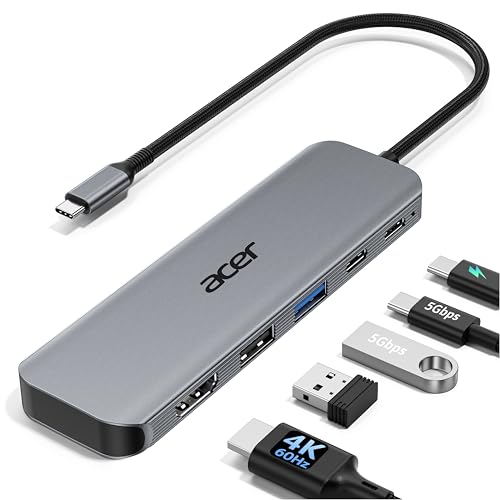
Acer 5-in-1 4K 60Hz USB-C Hub
Best for: Standard 4K@60Hz displays and charging
- Host Interface
- USB-C
- Max Resolution
- 4K@60Hz
- Power Delivery
- 90W
- Port Count
- 5
- Video Ports
- HDMI 2.0
- Max Data Speed
- 5Gbps
View on Amazon: Acer 5-in-1 4K 60Hz USB-C Hub Affiliate link
This Acer USB-C hub expands a single port into a five-port workstation. It supports 4K video at 60Hz through HDMI, which reduces motion blur compared to 30Hz models. The device passes up to 90W of power to your laptop while transferring data at 5Gbps. It fits users who need a stable, single-cable connection for work or media consumption on Windows or Mac systems.
Pros
- HDMI port outputs 4K resolution at 60Hz
- Supports 90W power delivery pass-through
- USB-A and USB-C ports run at 5Gbps
- Aluminum shell aids heat dissipation
Cons
- Only one HDMI video output
- One USB-A port is limited to 2.0 speed
- Does not support ultrawide monitors
Good fit if
- You need 4K video at 60Hz for smooth playback
- You want to charge your laptop through the hub
- You use a laptop with a single USB-C port
Skip if
- You require support for ultrawide displays
- You need more than one video output
- You require gigabit Ethernet connectivity
Verdict: Acer 5-in-1 USB-C Hub 4K@60Hz delivers reliable 4K@60Hz video and 90W charging for users who need a simple, single-cable solution for standard displays.
Specifications side by side
| Spec | Acer 5-in-1 4K 60Hz USB-C Hub |
|---|---|
| Host Interface | USB-C |
| Max Resolution | 4K@60Hz |
| Power Delivery | 90W |
| Port Count | 5 |
| Video Ports | HDMI 2.0 |
| Max Data Speed | 5Gbps |
| Resolution | 4K UHD |
| Connectivity | USB-C, HDMI, USB-A |
| Refresh Rate | 60Hz |
| Color | Grey |
| Model | ODK5U0 |
Frequently asked questions
Does this hub support 4K resolution at 60Hz?
Yes, the Acer 5-in-1 USB-C Hub supports 4K UHD resolution at a 60Hz refresh rate. This specification ensures smooth motion and clear visuals for professional tasks like video editing or crisp presentations. It avoids the stuttering often seen in lower refresh rate displays, providing a stable connection for standard 4K monitors.
What model number is associated with this device?
The specific model number for this hub is ODK5U0. You can use this identifier to verify compatibility with your laptop or to locate the official product listing. It distinguishes this 5-in-1 configuration from other Acer peripheral models that may have different port layouts or power delivery capabilities.
How many ports are included in this hub?
This device features a 5-in-1 port configuration. It expands a single USB-C connection into multiple outputs, including HDMI for video and additional ports for data or power. This design allows you to connect several peripherals simultaneously without needing multiple adapters or occupying every available port on your laptop.
Is this hub suitable for charging a laptop?
Yes, it is designed for charging. The hub supports up to 90W of power delivery, allowing you to charge your laptop while using the display. This single-cable solution simplifies your desk setup by combining video output and power transmission into one connection, reducing cable clutter on your workspace.
What connectivity options does this Acer hub provide?
The hub provides USB-C and HDMI connectivity options. The USB-C input connects to your computer, while the HDMI port delivers video to your external display. This combination ensures you can transmit high-resolution video signals and maintain data transfer capabilities through the USB-C interface, depending on your laptop's port specifications.
Can this hub handle standard 4K displays effectively?
Yes, it is best for standard 4K@60Hz displays. The device delivers reliable video performance for users who need a simple, single-cable solution. It is not designed for ultrawide monitors, so you should ensure your display matches the standard 4K UHD resolution to fully utilize the hub's capabilities without compatibility issues.