UGREEN vs Lenovo Docking Stations: Which Brand Fits You?
As an Amazon Associate we earn from qualifying purchases. Links on this page are affiliate links.
When you compare the UGREEN vs lenovo docking station options, you see two very different approaches to expanding your laptop. Both devices provide extra ports and display support for your setup. The main difference lies in their design and port selection. The UGREEN unit is a compact, direct USB-C hub. The Lenovo device is a larger, hybrid dock with dedicated Ethernet and multiple video outputs. You need to decide which form factor matches your daily workflow.
Key differences
| Aspect | UGREEN 5-in-1 USB-C Hub with 100W PD | Lenovo ThinkPad Hybrid USB-C and USB-A Dock |
|---|---|---|
| Video Output | 1x HDMI (4K) | 2x HDMI, 2x DisplayPort |
| Data Ports | 1x USB-A 5Gbps, 2x USB-A 480Mbps | 3x USB 3.1 (10Gbps), 2x USB 2.0 |
| Network Connectivity | Not listed | 1x Gigabit Ethernet |
| Power Delivery | 100W USB-C PD | 5V 3A via USB-C (no PD listed) |
| Host Interface | USB-C | USB-C, USB-A |
Which one should you choose?
Choose UGREEN 5-in-1 USB-C Hub with 100W PD if
- You need a small adapter that fits easily in a bag
- Your laptop requires high-power charging up to 100W
- You only need one external display connection
Choose Lenovo ThinkPad Hybrid USB-C and USB-A Dock if
- You require a wired Gigabit Ethernet connection
- You want to connect multiple monitors simultaneously
- You need faster USB data speeds up to 10Gbps
Verdict: The UGREEN hub is the better choice if you prioritize portability and high-speed charging for a single display. The Lenovo dock is more suitable for stationary desks where you need wired networking and multi-monitor support. Your decision should depend on whether you move your laptop often or keep it in one place.
UGREEN vs Lenovo Docking Stations
Display Support
The UGREEN hub offers a single HDMI port capable of 4K resolution. This is sufficient for most single-monitor setups. Lenovo provides more video flexibility. It includes two DisplayPort connectors and two HDMI ports. This allows you to connect up to four displays simultaneously. If you need a multi-monitor workspace, Lenovo is the better choice. UGREEN is limited to one external screen. The resolution difference is minor, but the port count is significant for productivity.
Power Delivery
Power delivery is a key difference. UGREEN supports up to 100W through its USB-C port. This is ideal for charging high-power laptops. Lenovo does not list a specific wattage for laptop charging. It offers 5V 3A from its USB-C port and 15W or 10.5W from other ports. These are meant for charging mobile devices, not the laptop itself. If you need to charge your computer through the dock, UGREEN is superior. Lenovo requires a separate power source for your laptop.
Connectivity Options
UGREEN provides five ports total. It has one HDMI, one USB-C PD, one 5Gbps USB-A, and two 480Mbps USB-A ports. Lenovo offers a hybrid approach. It includes three USB 3.1 Gen 2 ports, two USB 2.0 ports, and one USB-C data port. Lenovo also adds Gigabit Ethernet and audio jacks. UGREEN lacks Ethernet and audio. If you need wired internet or audio output, Lenovo is the only option. UGREEN is simpler but less versatile.
Data Speed
Data transfer speeds vary by port. UGREEN has one 5Gbps USB-A port and two 480Mbps ports. Lenovo features three USB 3.1 Gen 2 ports. These support 10Gbps speeds. This is twice as fast as UGREEN’s fastest data port. If you move large files often, Lenovo’s faster USB ports are beneficial. UGREEN’s slower 480Mbps ports are suitable for keyboards and mice. Lenovo handles high-speed peripherals better.
Portability and Size
Size matters for travel. UGREEN is small and light. It weighs 3.21 ounces and measures 4.79 inches in length. It fits easily in a laptop bag. Lenovo is much larger. It weighs 1.05 pounds and is 8.3 inches long. It is designed for a desk, not a bag. If you travel frequently, UGREEN is the clear winner. Lenovo is a stationary dock. It stays on your desk when you are at work.
Which portable dock fits your workflow
Users needing simple plug-and-play expansion
The UGREEN hub offers a straightforward 5-in-1 design with a single 4K HDMI port and 100W power delivery. Its compact size, weighing just 3.21 ounces, makes it ideal for carrying in a bag. You get one high-speed USB-A port for data and two standard ports for peripherals. This setup requires minimal configuration and fits easily into tight spaces on your desk or while traveling.
Professionals requiring multiple external displays
The Lenovo ThinkPad Dock supports up to four displays simultaneously with two HDMI and two DisplayPort outputs. This flexibility allows you to create a complex multi-monitor workstation. The Gigabit Ethernet port ensures stable wired connectivity for large file transfers. With 10Gbps data speeds on its USB ports, you can connect high-performance peripherals without bandwidth bottlenecks in a fixed office environment.
Office workers needing extensive connectivity
This docking station provides seven USB ports, including three high-speed USB 3.1 Gen 2 ports and two always-on charging ports. It also features a stereo/mic combo jack for audio. The 15W and 10.5W charging capabilities allow you to power mobile devices directly from the dock. This all-in-one solution reduces cable clutter by consolidating data, video, and power connections into a single unit.
The products compared

UGREEN 5-in-1 USB-C Hub with 100W PD
Best for: Single-display mobile laptop setups
- Host Interface
- USB-C
- Max Resolution
- 4K
- Power Delivery
- 100W
- Port Count
- 5
- Video Ports
- HDMI
- Max Data Speed
- 5Gbps
View on Amazon: UGREEN 5-in-1 USB-C Hub with 100W PD Affiliate link
This compact multiport adapter connects to your laptop through a USB-C interface. It supplies one 4K HDMI port, 100W Power Delivery pass-through, a 5Gbps USB-A port, and two 480Mbps USB-A ports. At 3.21 ounces and under five inches long, it fits portable setups where you need external display output and peripheral connections without carrying a bulky desktop dock.
Pros
- 100W USB-C Power Delivery pass-through
- 4K HDMI video output
- Compact 3.21-ounce weight for travel
- Dedicated 5Gbps USB-A data port
Cons
- Two USB-A ports operate at 480Mbps data speeds
- Single video port limits you to one external monitor
Good fit if
- You need a lightweight hub for single-monitor 4K output on the go.
- You want 100W Power Delivery pass-through charging for your host laptop.
Skip if
- You require multiple external display outputs.
- You need high-speed 5Gbps transfers across more than one USB-A accessory.
Verdict: UGREEN 5-in-1 USB-C Hub suits mobile professionals who need lightweight 4K display connectivity and 100W power delivery on a single external screen.
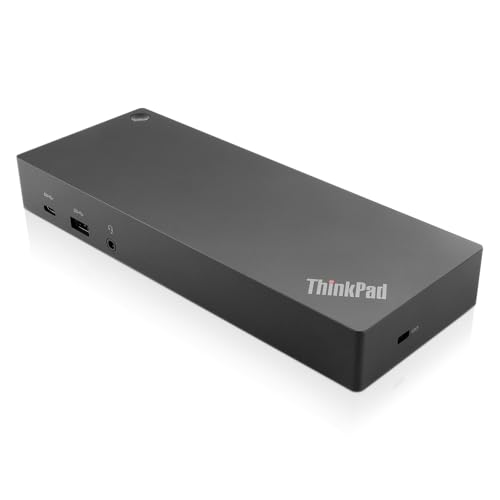
Lenovo ThinkPad Hybrid USB-C and USB-A Dock
Best for: stationary dual-monitor Lenovo setups
- Host Interface
- USB-C, USB-A
- Video Ports
- DisplayPort, HDMI
- Max Data Speed
- 10Gbps
- Ethernet Speed
- Gigabit Ethernet
- Dimensions
- 8.3 × 3.1 × 1.2 inches
- Weight
- 1.05 pounds
View on Amazon: Lenovo ThinkPad Hybrid USB-C and USB-A Dock Affiliate link
This Lenovo dock expands your laptop with dual video outputs and gigabit Ethernet. It features three USB 3.1 ports for fast 10Gbps data transfer and an always-on USB port for charging devices. The unit includes HDMI and DisplayPort connections for multi-monitor setups. It supports ThinkPad RapidCharge and works with older Lenovo models as well as non-Lenovo laptops.
Pros
- Dual HDMI and DisplayPort video outputs
- Gigabit Ethernet connectivity
- Three USB 3.1 Gen 2 ports with 10Gbps speed
- Always-on USB port for device charging
Cons
- Only one USB-C host port
- Limited to 15W charging from the USB-C port
- Heavier build at 1.05 pounds
Good fit if
- You need dual external displays
- You require wired gigabit internet
- You use older Lenovo ThinkPad models
Skip if
- You need Thunderbolt 4 speeds
- You require wireless Bluetooth audio
- You want a lightweight travel setup
Verdict: Lenovo ThinkPad Hybrid USB-C Dock provides robust connectivity for stationary workstations. It fits users who prioritize wired stability and dual monitors over portability.
Specifications side by side
| Spec | UGREEN 5-in-1 USB-C Hub with 100W PD | Lenovo ThinkPad Hybrid USB-C and USB-A Dock |
|---|---|---|
| Host Interface | USB-C | USB-C, USB-A |
| Max Resolution | 4K | not stated |
| Power Delivery | 100W | not stated |
| Port Count | 5 | not stated |
| Video Ports | HDMI | DisplayPort, HDMI |
| Max Data Speed | 5Gbps | 10Gbps |
| Ethernet Speed | not stated | Gigabit Ethernet |
| Resolution | 4K UHD | not stated |
| Connectivity | USB-C, HDMI, USB-A | USB-C, USB-A |
| Dimensions | 4.79 × 1.09 × 0.47 inches | 8.3 × 3.1 × 1.2 inches |
| Weight | 3.21 ounces | 1.05 pounds |
| Size | 0.65 feet | not stated |
| Color | grey | Black |
| Model | CM478 | 40AF0135US |
Frequently asked questions
Does the UGREEN hub support dual monitors?
No, the UGREEN 5-in-1 USB-C Hub supports only a single display. It provides one HDMI port capable of 4K UHD resolution. If you need to connect two screens simultaneously, this specific model will not work for your needs. You would need a different docking station with multiple video outputs to achieve a dual-monitor setup.
Can I charge my laptop through the UGREEN hub?
Yes, the UGREEN hub includes 100W Power Delivery. This allows you to charge your connected laptop while using the other ports. It is designed to handle standard charging needs for most ultrabooks and laptops that support USB-C charging. This feature ensures you do not need a separate charger for your device.
Is the Lenovo ThinkPad dock portable?
The Lenovo ThinkPad Hybrid Dock is not designed for portability. It weighs 1.05 pounds and measures 8.3 inches in length. Its size and weight make it better suited for a stationary desk setup. You should keep it plugged in at your workstation rather than carrying it in your bag for travel.
What is the maximum resolution for the UGREEN display?
The UGREEN hub supports a maximum resolution of 4K UHD. It delivers this output through its single HDMI connector. This resolution is suitable for most standard 4K monitors and TVs. It provides clear visuals for general productivity tasks and media consumption on a single external screen.
Does the Lenovo dock use USB-C or USB-A?
The Lenovo ThinkPad Hybrid Dock supports both USB-C and USB-A connectivity. This hybrid design allows you to connect it to various laptop models. You can choose the cable type that matches your computer’s available ports. This flexibility makes it compatible with a wider range of older and newer ThinkPad devices.
How heavy is the UGREEN 5-in-1 hub?
The UGREEN 5-in-1 USB-C Hub weighs 3.21 ounces. This lightweight construction makes it easy to carry in a laptop bag or pocket. Its small form factor, measuring 4.79 inches in length, ensures it does not take up much space. You can easily transport it between home and office without adding significant weight.
Which dock is better for a single 4K screen?
The UGREEN 5-in-1 USB-C Hub is better for a single 4K screen. It offers a dedicated HDMI port for 4K UHD output and includes 100W power delivery. This combination provides a balanced solution for users who prioritize video quality and charging in a compact package. The Lenovo dock is larger and more complex for this specific need.