Best UGREEN Docking Stations with HDMI: 5 Spec-Based Picks
As an Amazon Associate we earn from qualifying purchases. Links on this page are affiliate links.
You need a reliable connection for your portable setup. This list of the best UGREEN docking stations with HDMI covers 5 models ranked by their published specifications. The UGREEN 5-in-1 USB-C Hub with 100W PD leads because it offers 100W Power Delivery in a compact 3.21-ounce package. These picks are based strictly on the specs found on the product listings. We compare resolution, refresh rates, and port counts to help you choose. Use this guide to decide which hub fits your single or multi-monitor workflow.
Quick picks
| # | Product | Best for | Price |
|---|---|---|---|
| 1 | UGREEN 5-in-1 USB-C Hub with 100W PD Best overall | Single 4K monitor setups with charging needs | Check price of UGREEN 5-in-1 USB-C Hub with 100W PD on Amazon |
| 2 | UGREEN Foldable 6-in-1 4K 120Hz Dock Also great | handheld gaming with 4K@120Hz and Ethernet | Check price of UGREEN Foldable 6-in-1 4K 120Hz Dock on Amazon |
| 3 | UGREEN Revodok 10-in-1 NVMe Dock Best premium | Users needing NVMe storage expansion and 10 ports | Check price of UGREEN Revodok 10-in-1 NVMe Dock on Amazon |
| 4 | UGREEN 8-in-1 Triple Display USB-C Dock Best budget | Windows triple display setups with VGA support | Check price of UGREEN 8-in-1 Triple Display USB-C Dock on Amazon |
| 5 | UGREEN 8-in-1 USB-C Hub 2-Pack Also great | users needing two identical 4K HDMI hubs | Check price of UGREEN 8-in-1 USB-C Hub 2-Pack on Amazon |
The best fit for you
- You want a single 4K monitor with fast charging UGREEN 5-in-1 USB-C Hub with 100W PD It supports 4K resolution and offers 100W power delivery for your laptop.
- You need high refresh rates for handheld gaming UGREEN Foldable 6-in-1 4K 120Hz Dock This dock provides 120Hz refresh rates and includes an Ethernet port.
- You require NVMe storage expansion and many ports UGREEN Revodok 10-in-1 NVMe Dock It features an NVMe slot and ten total ports for connectivity.
- You drive three displays with legacy VGA devices UGREEN 8-in-1 Triple Display USB-C Dock It supports triple monitors and includes a VGA port for older gear.
- You need two identical hubs for separate workspaces UGREEN 8-in-1 USB-C Hub 2-Pack This pack includes two 8-in-1 hubs for duplicate setups.
Our 5 picks

UGREEN 5-in-1 USB-C Hub with 100W PD
Best for: Single 4K monitor setups with charging needs
- Connectivity
- USB-C, HDMI, USB-A (what this guide is about)
- Host Interface
- USB-C
- Max Resolution
- 4K
- Power Delivery
- 100W
- Port Count
- 5
- Video Ports
- HDMI
View on Amazon: UGREEN 5-in-1 USB-C Hub with 100W PD Affiliate link
This UGREEN adapter adds a 4K HDMI port to your USB-C laptop. It supports 100W power delivery to keep your device charged while you work. The hub includes one 5 Gbps USB-A port for fast data transfer and two 480 Mbps ports for peripherals. It is a compact grey unit that weighs just 3.21 ounces. This setup suits users who need a simple, single-monitor expansion with reliable charging.
Pros
- 4K HDMI output for external display connection
- 100W USB-C Power Delivery pass-through
- 5 Gbps data speed on the primary USB-A port
- Compact size at 4.79 x 1.09 x 0.47 inches
- Lightweight build weighing 3.21 ounces
Cons
- Only one HDMI port limits you to a single external monitor
- Two USB-A ports are limited to 480 Mbps speeds
- No built-in Ethernet or SD card slots for connectivity
Good fit if
- You need a single 4K display for your laptop
- You want to charge your device through the hub
- You prefer a small, portable adapter for travel
Skip if
- You require dual or triple monitor setups
- You need high-speed 5 Gbps connections for all ports
- You want to connect wired Ethernet or SD cards directly
Verdict: UGREEN 5-in-1 USB-C Hub with 4K HDMI is a solid choice for users who need one 4K screen and fast charging without the bulk of a larger docking station.

UGREEN Foldable 6-in-1 4K 120Hz Dock
Best for: handheld gaming with 4K@120Hz and Ethernet
- Connectivity
- USB-C, HDMI, Ethernet, USB-A (what this guide is about)
- Host Interface
- USB-C
- Max Resolution
- 4K@120Hz
- Power Delivery
- 85W
- Port Count
- 6
- Video Ports
- HDMI
View on Amazon: UGREEN Foldable 6-in-1 4K 120Hz Dock Affiliate link
This UGREEN dock delivers 4K resolution at 120Hz via HDMI 2.1, supporting VRR and FreeSync for smooth visuals. It provides 85W power delivery to your host device while managing a 100W input. The unit includes two USB-A 3.0 ports, one USB-C 3.0 data port, and a Gigabit Ethernet connection. Its foldable aluminum alloy design keeps the footprint small for portable setups.
Pros
- HDMI 2.1 output supports 4K@120Hz with VRR and FreeSync
- 85W Power Delivery charges your host device
- Includes Gigabit Ethernet for stable wired internet
- Foldable aluminum alloy stand saves desk space
Cons
- Only one USB-C data port available
- Does not support Nintendo Switch 2
- No wireless connectivity like Bluetooth or Wi-Fi
Good fit if
- You need 4K@120Hz HDMI output for gaming handhelds
- You want a Gigabit Ethernet port for stable connections
- You prefer a foldable design for portable use
Skip if
- You require wireless connectivity options
- You need multiple USB-C data ports
- You are using a Nintendo Switch 2
Verdict: UGREEN Steam Deck Dock 6-in-1 4K@120Hz fits handheld gamers who need high refresh rates and wired internet. It suits users who value a compact, foldable build for their portable setup.

UGREEN Revodok 10-in-1 NVMe Dock
Best for: Users needing NVMe storage expansion and 10 ports
- Connectivity
- USB-C, HDMI, Ethernet (what this guide is about)
- Max Resolution
- 4K@60Hz
- Power Delivery
- 100W
- Port Count
- 10
- Video Ports
- HDMI
- Max Data Speed
- 10Gbps
View on Amazon: UGREEN Revodok 10-in-1 NVMe Dock Affiliate link
This UGREEN docking station offers 10 ports, including a 4K@60Hz HDMI output and a built-in M.2 NVMe SSD slot. It supports 100W Power Delivery and Gigabit Ethernet. The device features USB 3.2 Gen2 ports for 10Gbps data transfer. It is designed for users who need extensive connectivity and local storage expansion without extra enclosures. It suits those who want a single cable solution for laptops and tablets.
Pros
- Includes an M.2 NVMe SSD slot for direct storage expansion
- HDMI 2.0 supports 4K resolution at 60Hz refresh rate
- Provides 100W Power Delivery to charge connected laptops
- Features 10Gbps USB-C and USB-A ports for fast data transfer
- Integrates Gigabit Ethernet for stable wired network connections
Cons
- HDMI output is limited to 4K@60Hz, lacking 120Hz support
- Ethernet speed is capped at Gigabit, not 2.5Gbps
- No USB-C video output capability listed in specifications
Good fit if
- You need to add an NVMe SSD to your setup
- You require 100W charging for your laptop
- You want a single dock for multiple peripherals
Skip if
- You need 4K video output at 120Hz or higher
- You require 2.5Gbps or faster Ethernet speeds
- You prefer a dock without built-in storage slots
Verdict: UGREEN Revodok NVMe 10-in-1 Dock fits users who prioritize storage expansion and high-speed data transfer over high-refresh-rate video output.

UGREEN 8-in-1 Triple Display USB-C Dock
Best for: Windows triple display setups with VGA support
- Connectivity
- USB-C, HDMI, USB-A, VGA (what this guide is about)
- Host Interface
- USB-C
- Display Support
- Triple
- Max Resolution
- 4K
- Power Delivery
- 85W
- Port Count
- 8
View on Amazon: UGREEN 8-in-1 Triple Display USB-C Dock Affiliate link
This UGREEN 8-in-1 docking station supports triple displays via two HDMI and one VGA port. It offers 4K resolution on HDMI and 1080p on VGA. The dock includes two 10 Gbps USB-C and two USB-A ports. It provides up to 85W of power delivery to your laptop. Windows users can run three screens simultaneously using MST. Mac users are limited to dual displays via SST.
Pros
- Supports triple monitor setups on Windows systems
- Includes dedicated VGA port for legacy displays
- Two 10 Gbps USB-C and two USB-A ports
- Up to 85W pass-through charging capability
Cons
- Mac systems only support dual displays, not triple
- VGA port is limited to 1080p resolution
- One USB-C port is data-only, no video or charging
Good fit if
- You need to connect three monitors to a Windows laptop
- You require a VGA port for older projectors or screens
- You want high-speed data transfer with 10 Gbps ports
Skip if
- You use a Mac and need triple display support
- You require 4K resolution on all connected screens
- You need a single USB-C port to handle video, data, and power
Verdict: UGREEN 8-in-1 USB-C Dock with Triple Display fits Windows users who need to drive three screens and connect legacy VGA devices. It is less suitable for Mac users or those requiring 4K on every monitor.
UGREEN 8-in-1 USB-C Hub 2-Pack
Best for: users needing two identical 4K HDMI hubs
- Connectivity
- USB-C, HDMI (what this guide is about)
- Host Interface
- USB-C
- Max Resolution
- 4K@60Hz
- Power Delivery
- 85W
- Port Count
- 8
- Video Ports
- HDMI
View on Amazon: UGREEN 8-in-1 USB-C Hub 2-Pack Affiliate link
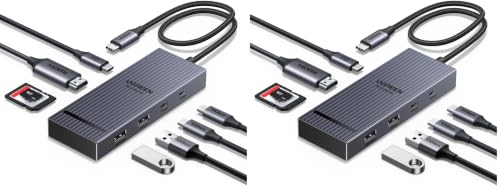
This UGREEN Revodok Pro is a dual-pack USB-C hub featuring an HDMI port that outputs 4K resolution at 60Hz. It includes two USB-C and two USB-A data ports with speeds up to 10Gbps. The device supports up to 85W pass-through charging for your laptop. Its compact design measures 4.69 inches in length. You will get two identical units in this package, making it suitable for multiple setups.
Pros
- Outputs 4K@60Hz video via HDMI
- Includes two hubs in one package
- Supports 85W pass-through charging
- 10Gbps data transfer speeds on USB-C port
- Compact dimensions of 1.77 x 0.63 x 4.69 inches
Cons
- Only one HDMI port per unit
- 15W reserved for hub operations reduces charging power
- No display port or displayport alternative listed
Good fit if
- You need two identical hubs for different locations
- You require 4K@60Hz output from a single HDMI port
- You want 85W charging capability for your laptop
Skip if
- You need dual monitor support from a single hub
- You require 100W charging pass-through
- You prefer a single unit rather than a pair
Verdict: UGREEN Revodok Pro 8-in-1 Hub (Pack of 2) is a practical solution for users who need duplicate 4K@60Hz HDMI hubs. It fits those who value the convenience of having two identical units for separate workspaces or travel needs.
Specifications side by side
| Spec | UGREEN 5-in-1 USB-C Hub with 100W PD | UGREEN Foldable 6-in-1 4K 120Hz Dock | UGREEN Revodok 10-in-1 NVMe Dock | UGREEN 8-in-1 Triple Display USB-C Dock | UGREEN 8-in-1 USB-C Hub 2-Pack |
|---|---|---|---|---|---|
| Host Interface | USB-C | USB-C | not stated | USB-C | USB-C |
| Display Support | not stated | not stated | not stated | Triple | not stated |
| Max Resolution | 4K | 4K@120Hz | 4K@60Hz | 4K | 4K@60Hz |
| Power Delivery | 100W | 85W | 100W | 85W | 85W |
| Port Count | 5 | 6 | 10 | 8 | 8 |
| Video Ports | HDMI | HDMI | HDMI | HDMI, VGA | HDMI |
| Max Data Speed | 5Gbps | 5Gbps | 10Gbps | 10Gbps | 10Gbps |
| Ethernet Speed | not stated | Gigabit Ethernet | Gigabit Ethernet | not stated | not stated |
| Resolution | 4K UHD | 4K UHD | 4K UHD | 4K UHD | 4K UHD |
| Connectivity | USB-C, HDMI, USB-A | USB-C, HDMI, Ethernet, USB-A | USB-C, HDMI, Ethernet | USB-C, HDMI, USB-A, VGA | USB-C, HDMI |
| Refresh Rate | not stated | 120Hz | 60Hz | not stated | 60Hz |
| Dimensions | 4.79 × 1.09 × 0.47 inches | 5.79 × 3.35 × 1.13 inches | 0.79 × 0.39 × 0.39 inches | 5.28 × 2.27 × 0.63 inches | 4.69 × 1.77 × 0.63 inches |
| Weight | 3.21 ounces | 10.6 ounces | 0.71 ounces | not stated | 5.64 ounces |
| Size | 0.65 feet | not stated | not stated | not stated | USB C (Pack of 2) |
| Color | grey | Grey | Grey | grey | black |
| Model | CM478 | 75126 | 55735 | 35588 | 75027 |
How to Choose the Right Docking Station
-
Check Power Delivery Needs
You must verify that the dock provides enough power for your laptop. The UGREEN 5-in-1 USB-C Hub delivers 100W PD, which suits most modern ultrabooks. If your device requires less power, you might save space. Higher wattage ensures your laptop charges while you work. Always check your laptop’s maximum input power. Selecting a dock with insufficient PD can lead to slow charging or battery drain during heavy use. Match the spec to your device’s requirements.
-
Evaluate Port Count and Type
Look at the total number of ports and their types. The UGREEN 8-in-1 Triple Display Dock offers USB-A and VGA ports for legacy devices. This is useful if you still use older peripherals. Other models focus on USB-C and HDMI only. Count the ports you actually need. Do not buy extra ports you will never use. The UGREEN 10-in-1 NVMe Dock provides ten ports for maximum connectivity. Choose based on the specific devices you plan to connect daily.
-
Consider Physical Size and Weight
Portability matters if you move your setup often. The UGREEN 5-in-1 Hub weighs only 3.21 ounces and measures 4.79 inches long. It fits easily in a laptop bag. The Foldable 6-in-1 Dock is heavier at 10.6 ounces. It is bulkier but offers more features. Compare the dimensions and weight. A lighter dock reduces travel burden. Choose a compact model if you prioritize mobility over extensive connectivity options.
-
Match Display Support Requirements
Determine how many monitors you need to drive. The UGREEN 8-in-1 Triple Display Dock supports three screens simultaneously. This is ideal for productivity-heavy workflows. Most other docks support a single external display. Check your laptop’s output capabilities. Some laptops cannot drive three monitors via a single dock. Ensure your hardware matches the dock’s display support. Single-monitor setups are simpler and more portable.
-
Verify HDMI Refresh Rate
Check the maximum refresh rate for your HDMI output. The Foldable 6-in-1 Dock supports 120Hz, which is beneficial for gaming or smooth motion. Most other models, like the Revodok NVMe, limit output to 60Hz. Higher refresh rates require compatible monitors and laptops. If you only browse the web, 60Hz is sufficient. Gamers should prioritize the 120Hz option. Always verify that both your source device and monitor support the desired rate.
Frequently asked questions
Which UGREEN dock supports 120Hz refresh rates?
The UGREEN Foldable 6-in-1 4K 120Hz Dock is the only model in this list that supports 120Hz output. This specification makes it suitable for handheld gaming or high-motion tasks. Other models, such as the Revodok NVMe, are limited to 60Hz. You should verify your display and source device support this rate before relying on it for smooth visuals.
Does the UGREEN 5-in-1 hub support 4K resolution?
Yes, the UGREEN 5-in-1 USB-C Hub with 100W PD supports 4K UHD resolution via its HDMI port. It is designed for users who need a single external monitor with fast charging capabilities. The 100W Power Delivery allows you to charge your laptop while connected to the display. It is a compact option for simple setups.
Can I use this dock for three monitors?
The UGREEN 8-in-1 Triple Display USB-C Dock supports driving three screens simultaneously. It includes HDMI, VGA, and USB-C video outputs. This configuration is ideal for Windows users who need legacy VGA support. Note that it may not provide 4K resolution on every monitor, so check your specific display requirements before purchasing for a triple setup.
Does the UGREEN Revodok NVMe dock include storage?
The UGREEN Revodok 10-in-1 NVMe Dock is designed for users who need NVMe storage expansion. It provides ten ports in total, prioritizing data transfer and storage over high-refresh-rate video. The HDMI output supports 4K UHD at 60Hz. This model is best for users who value internal storage integration in their docking station solution.
Is there a pack of two UGREEN hubs available?
Yes, the UGREEN 8-in-1 USB-C Hub 2-Pack offers two identical units. Each hub supports 4K UHD resolution at 60Hz via HDMI. This option is practical for users who need duplicate setups for separate workspaces or travel. The 8-in-1 configuration provides multiple connection points on each device for a streamlined desk or bag setup.
Which dock is best for handheld gaming?
The UGREEN Foldable 6-in-1 4K 120Hz Dock is the best choice for handheld gaming. It delivers 120Hz refresh rates for smoother visuals and includes an Ethernet port for stable wired internet. Its compact, foldable build makes it easy to carry. This model suits gamers who need high performance and connectivity in a portable form factor.