UGREEN vs Acer Docking Stations: Which Brand Fits You?
As an Amazon Associate we earn from qualifying purchases. Links on this page are affiliate links.
When you search for UGREEN vs acer docking station options, you will find two distinct 5-in-1 USB-C hubs. Both devices offer 100W power delivery, 4K video output, and high-speed data ports to expand your laptop connectivity. The main difference lies in the video performance and power output specifications. UGREEN provides a standard 4K HDMI connection with 100W pass-through input. Acer supports a smoother 4K at 60Hz refresh rate but delivers slightly less output power to your device. You need to check which specs match your workflow.
Key differences
| Aspect | UGREEN 5-in-1 USB-C Hub with 100W PD | Acer 5-in-1 4K 60Hz USB-C Hub |
|---|---|---|
| Max Resolution & Refresh Rate | 4K | 4K@60Hz |
| Power Delivery Output | 100W | 90W |
| Build Material | not listed | Aluminum shell |
| Port Configuration | 1x USB-A 5Gbps, 2x USB-A 480Mbps, 1x HDMI, 1x USB-C PD | 1x USB-C 3.0 5Gbps, 1x USB-A 3.0 5Gbps, 1x USB-A 2.0, 1x HDMI, 1x USB-C PD |
| Weight | 3.21 ounces | not listed |
Which one should you choose?
Choose UGREEN 5-in-1 USB-C Hub with 100W PD if
- You need the highest possible power delivery output of 100W for your laptop.
- You prefer a compact, lightweight design that weighs 3.21 ounces.
- You only require standard 4K resolution without needing a 60Hz refresh rate.
Choose Acer 5-in-1 4K 60Hz USB-C Hub if
- You want smoother video playback with 4K at 60Hz support.
- You need a durable aluminum shell for better heat dissipation.
- You prefer having a dedicated USB-A 3.0 port for faster data transfers on peripherals.
Verdict: Choose the UGREEN hub if you prioritize maximum 100W power output and a lighter, compact form factor. Select the Acer hub if you need smoother 4K@60Hz video performance and a more robust aluminum build. Both devices effectively expand your connectivity with similar port counts and speeds.
UGREEN vs Acer Hub Specs
video resolution
The Acer hub supports 4K output at 60Hz. This higher refresh rate delivers smoother motion for video editing and streaming. The UGREEN hub lists a maximum resolution of 4K. Its data sheet does not specify a refresh rate. Standard HDMI outputs often default to 30Hz at this resolution. You get clearer motion with the Acer unit. The UGREEN model works for static displays. It lacks the explicit 60Hz claim found in the Acer specs. Choose the Acer for fluid visuals. Pick the UGREEN if you only need basic 4K projection.
power delivery
Both hubs support 100W power delivery input. The Acer hub provides up to 90W output to your laptop. It uses a PD 3.0 chip for stable charging. The UGREEN hub lists 100W power delivery in its key specs. It does not specify the output wattage delivered to the connected device. You might get full 100W output from the UGREEN unit. The Acer guarantees 90W. Both models keep your laptop powered during intensive tasks. The Acer spec is more detailed. The UGREEN spec suggests equal capability. This is a close call.
data speed
Both devices feature 5Gbps data transfer speeds. The Acer hub includes a USB-C 3.0 port and a USB-A 3.0 port. Both support the 5Gbps rate. It also has a USB-A 2.0 port for peripherals. The UGREEN hub offers one 5Gbps USB-A port. It includes two 480 Mbps USB-A ports. The UGREEN model provides more low-speed ports. The Acer model offers more high-speed connectivity. You get faster transfers with the Acer for large files. The UGREEN fits mice and keyboards better. Both handle standard data tasks efficiently.
build quality
The Acer hub is built with a durable aluminum shell. This material improves heat dissipation during long use. The UGREEN hub is described as grey. Its data sheet does not mention the build material. It does not specify heat management features. Aluminum typically offers better thermal performance than plastic. The Acer design likely stays cooler under load. The UGREEN model is lighter at 3.21 ounces. Its dimensions are 4.79 by 1.09 inches. The Acer weight is not listed. The Acer offers a known premium build.
port configuration
The Acer hub provides a USB-C 3.0 port. It also includes one USB-A 3.0 port and one USB-A 2.0 port. This mix supports high-speed drives and standard peripherals. The UGREEN hub has one 5Gbps USB-A port. It includes two 480 Mbps USB-A ports. It lacks a USB-C data port. The UGREEN model has more total USB-A ports. The Acer model offers a versatile USB-C data option. You can connect more devices to the UGREEN. The Acer allows faster data through USB-C. The choice depends on your port needs.
compatibility
The Acer hub works with Windows, macOS, and ChromeOS. It requires a full-featured USB-C port. It supports DisplayPort Alt Mode and Power Delivery. It explicitly notes that ultrawide monitors are not supported. The UGREEN hub lists USB-C and HDMI connectivity. It does not list specific operating system compatibility. It likely works with standard USB-C devices. The Acer provides clear compatibility guidelines. It warns about ultrawide monitor limitations. The UGREEN data is less specific. You get better guidance with the Acer model.
Which UGREEN or Acer Hub Suits You
Users needing smooth 4K video playback
The Acer hub supports 4K output at 60Hz. This higher refresh rate delivers smoother motion for video editing and streaming. The UGREEN hub lists a maximum resolution of 4K but does not specify a refresh rate. If you want clear, fluid visuals without motion blur, the Acer specification is the better choice for your display needs.
Professionals requiring stable 100W charging
The UGREEN hub features a 100W Power Delivery port. The Acer hub lists 90W output in its key specs. While the Acer description mentions 100W input, the delivered power is lower. If your laptop requires maximum charging speed via the hub, the UGREEN 100W PD specification ensures you get the highest possible power transfer directly from the data sheet.
Travelers prioritizing compact portability
The UGREEN hub weighs 3.21 ounces and measures 4.79 inches in length. The Acer hub provides no weight or dimension data in its specs. For packing light, the UGREEN physical specifications are concrete. You can easily slip this slim, grey device into a bag without adding noticeable bulk to your carry-on gear during your daily commute or business trips.
The products compared

UGREEN 5-in-1 USB-C Hub with 100W PD
Best for: basic 4K display and power needs
- Host Interface
- USB-C
- Max Resolution
- 4K
- Power Delivery
- 100W
- Port Count
- 5
- Video Ports
- HDMI
- Max Data Speed
- 5Gbps
View on Amazon: UGREEN 5-in-1 USB-C Hub with 100W PD Affiliate link
This UGREEN adapter offers five ports from a single USB-C host connection. It includes a 4K HDMI video output, a 100W power delivery port, and three USB-A data ports. The unit measures 4.79 inches in length and weighs 3.21 ounces. It suits users needing basic display expansion and power pass-through for laptops. The design is compact and grey.
Pros
- Supports 4K resolution via HDMI port
- Provides 100W power delivery capability
- Includes one 5 Gbps USB-A data port
- Features two 480 Mbps USB-A ports
Cons
- Only one high-speed 5 Gbps data port
- No Ethernet or SD card slots listed
- HDMI limited to 4K resolution
Good fit if
- You need a simple 4K video output
- You require 100W power pass-through
- You want a compact grey adapter
Skip if
- You need 8K video support
- You require multiple high-speed data ports
- You need Ethernet connectivity
Verdict: UGREEN 5-in-1 USB-C Hub provides essential 4K video and 100W charging for basic laptop setups. It fits users who prioritize power delivery and simple display expansion over advanced data speeds or additional ports.
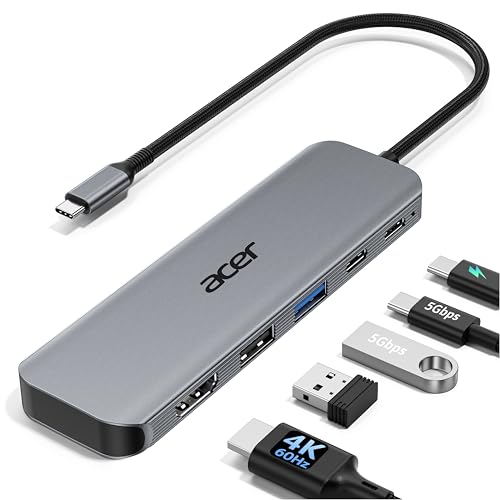
Acer 5-in-1 4K 60Hz USB-C Hub
Best for: 4K@60Hz display and fast data needs
- Host Interface
- USB-C
- Max Resolution
- 4K@60Hz
- Power Delivery
- 90W
- Port Count
- 5
- Video Ports
- HDMI 2.0
- Max Data Speed
- 5Gbps
View on Amazon: Acer 5-in-1 4K 60Hz USB-C Hub Affiliate link
This Acer hub expands a single USB-C port into five connections. It includes an HDMI output for 4K@60Hz video, a USB-C 3.0 port for 5Gbps data, and a USB-A 3.0 port. The device supports up to 90W pass-through charging for your laptop. The aluminum shell aids heat dissipation during use. It fits users who need a stable, high-resolution display connection and fast data transfer speeds without clutter.
Pros
- HDMI port supports 4K resolution at 60Hz for smooth visuals
- USB-C 3.0 port offers 5Gbps data transfer speeds
- Pass-through charging delivers up to 90W to host devices
- Aluminum shell provides durable construction and better cooling
Cons
- Includes a slower USB 2.0 port alongside the high-speed options
- Maximum charging output is 90W, not 100W
- Does not support ultrawide monitor resolutions
Good fit if
- You require 4K video at 60Hz for editing or streaming
- You need fast 5Gbps data transfers for large files
- You want a compact aluminum hub for travel
Skip if
- You need to connect an ultrawide monitor
- You require more than five total ports
- You need 100W charging output directly from the hub
Verdict: Acer 5-in-1 USB-C Hub 4K@60Hz suits professionals who prioritize high-refresh-rate video and fast data speeds in a portable, aluminum build.
Specifications side by side
| Spec | UGREEN 5-in-1 USB-C Hub with 100W PD | Acer 5-in-1 4K 60Hz USB-C Hub |
|---|---|---|
| Host Interface | USB-C | USB-C |
| Max Resolution | 4K | 4K@60Hz |
| Power Delivery | 100W | 90W |
| Port Count | 5 | 5 |
| Video Ports | HDMI | HDMI 2.0 |
| Max Data Speed | 5Gbps | 5Gbps |
| Resolution | 4K UHD | 4K UHD |
| Connectivity | USB-C, HDMI, USB-A | USB-C, HDMI, USB-A |
| Refresh Rate | not stated | 60Hz |
| Dimensions | 4.79 × 1.09 × 0.47 inches | not stated |
| Weight | 3.21 ounces | not stated |
| Size | 0.65 feet | not stated |
| Color | grey | Grey |
| Model | CM478 | ODK5U0 |
Frequently asked questions
Does the UGREEN hub support 4K video output?
Yes, the UGREEN 5-in-1 USB-C Hub supports 4K UHD resolution. It uses an HDMI port to connect to external displays. This makes it suitable for basic laptop setups where you need simple display expansion alongside power delivery.
What is the maximum refresh rate for the Acer hub?
The Acer 5-in-1 4K 60Hz USB-C Hub supports a 60Hz refresh rate. This specification allows for smoother motion during video playback and editing. The UGREEN model lists 4K resolution but does not specify a refresh rate in its data.
Can both hubs charge a laptop while in use?
Yes, both devices provide 100W power delivery. This allows you to charge your connected laptop while using the hub for other tasks. You get essential power management alongside video and data connectivity in a single compact device.
Which hub has an aluminum build?
The Acer 5-in-1 hub features an aluminum build. This design choice often aids in heat dissipation and adds durability for portable use. The UGREEN hub is described with specific dimensions but does not mention its material composition in the provided data.
How many ports do these docking stations have?
Both the UGREEN and Acer models are 5-in-1 hubs. This means each device offers five connection points for your peripherals. You can expand your laptop connectivity without needing multiple separate adapters for your monitor, data, and power needs.
Is the UGREEN hub lightweight for travel?
The UGREEN hub weighs 3.21 ounces. Its compact dimensions include a length of 4.79 inches and a height of 0.47 inches. This small footprint makes it easy to carry in a laptop bag for on-the-go work setups.
Which hub is better for fast data speeds?
The Acer hub is noted for fast data speeds alongside its 60Hz video. This makes it suitable for professionals who need quick file transfers. The UGREEN hub prioritizes power delivery and basic display expansion over advanced data performance metrics.