PULWTOP Dual 4K Vertical Docking Review: Specs, Pros and Cons
As an Amazon Associate we earn from qualifying purchases. Links on this page are affiliate links.
This pulwtop USB c docking station review covers the PULWTOP BD216C, a vertical dock designed for Windows laptops. It expands a single USB-C host connection into an 11-port hub. The defining specs are its dual monitor support and 4K@60Hz video output. This setup allows you to run two independent displays without installing extra drivers. The unit also includes Gigabit Ethernet and 10Gbps data ports. It combines a docking station with a vertical laptop stand to save desk space. The design prioritizes productivity and connectivity for users who need multiple screens.
What stands out
- Supports dual monitors at 4K@60Hz via two HDMI ports using MST technology
- Includes 11 ports: two HDMI, two USB-C Gen2 (10Gbps), one USB-A Gen2 (10Gbps), two USB 3.0 (5Gbps), one USB 2.0, Gigabit Ethernet, and USB-C PD
- Vertical stand design saves desk space while providing airflow for the laptop
- Delivers up to 85W of power delivery to charge your laptop while docked
- Features 10Gbps data transfer speeds for fast file movement between drives and the host
Who it fits
Good fit for
This dock suits Windows laptop users who need a high-productivity dual-screen setup. It is ideal for office multitasking, creative design work, or stock trading where two 4K displays are essential. The vertical stand helps users with limited desk space who want a clean, organized workspace. Gamers and streamers may appreciate the Gigabit Ethernet for stable connections and the high-speed USB ports for peripherals. It works well with Dell, Lenovo, HP, and ThinkPad models that support full-featured USB-C or Thunderbolt 3/4/5.
Who should skip it
Mac users should skip this product, as the listing explicitly states it does not support macOS. You should also avoid this dock if you need video output from the USB-C ports, as they are data-only. If you require a power adapter included in the box, note that one is not provided; you must supply your own 65W or higher PD charger. Users needing Thunderbolt 5 video passthrough should verify compatibility, as the dock relies on HDMI for display output. It is not a universal solution for all laptop types.
Verdict: The PULWTOP BD216C is a practical, spec-heavy dock for Windows users needing dual 4K displays. It offers robust connectivity and a space-saving vertical design without unnecessary extras.
Key specs explained for this dock
Max Resolution: 4K@60Hz
This spec indicates the dock can output video at a 4K UHD resolution with a 60Hz refresh rate. You get sharp images and smooth motion for standard office work, web browsing, and media consumption. It is ideal if you need crisp text for spreadsheets or detailed graphics for design. Note that this applies to the HDMI ports. The USB-C ports listed are data-only, so they cannot drive displays. This setup suits users who prioritize clarity over high-refresh gaming.
Display Support: Dual
The dock supports two independent monitors simultaneously using Multi-Stream Transport (MST). You can extend your desktop across both screens for multitasking, or mirror them for presentations. This is useful for traders, programmers, or writers who need multiple windows open. It works with Windows laptops. Mac users are not supported. This feature transforms a single laptop into a dual-screen workstation. It helps you compare this against single-monitor docks that limit your workspace to one external display.
Power Delivery: 85W
The dock delivers up to 85W of power to your laptop through the USB-C PD port. This keeps your device charged while you use the dock. You need a separate 65W or higher PD adapter for stable operation. This is sufficient for most ultrabooks and mid-range laptops. It is less than the 100W input capacity, so high-power gaming laptops may not charge fully. Compare this with docks offering 100W if you have a power-hungry device. It simplifies your desk by reducing cable clutter.
Max Data Speed: 10Gbps
This speed applies to the USB-C Gen2 and USB-A Gen2 ports. You can transfer large files, such as 4K videos or backups, much faster than with standard USB 3.0. It reduces wait times for heavy data moves. Other USB 3.0 ports offer 5Gbps, which is adequate for printers and external drives. The USB 2.0 port is reserved for mice and keyboards to ensure low latency. This spec ensures your peripherals and storage devices operate efficiently without bottlenecking your workflow.
Ethernet Speed: Gigabit
The built-in Gigabit Ethernet port provides a wired internet connection. It offers more stable and faster speeds than Wi-Fi, especially for large uploads or video calls. This is beneficial for remote workers who need reliable connectivity. It also helps with lag-free gaming and 4K streaming. You do not need to rely on wireless signals that may drop. Compare this to docks without Ethernet, which force you to use Wi-Fi. It is a practical feature for setups where stability matters more than convenience.
Design and build specs
According to the listing, the PULWTOP BD216C measures 5.91 inches in length, 4.53 inches in width, and 4.13 inches in height. The unit is finished in black. This compact form factor allows it to sit neatly beside your laptop without consuming excessive desk space. The vertical orientation combines a docking station with a laptop stand. This 2-in-1 design saves room while potentially improving airflow for your device. You do not need a separate stand for your computer.
The layout centers around a single USB-C host interface. This one cable connects your laptop to all eleven ports. You get two HDMI video outputs, two USB-C Gen2 data ports, and one USB-A Gen2 port. All support 10Gbps transfer speeds. Two USB 3.0 ports offer 5Gbps speeds, while a USB 2.0 port handles low-latency peripherals like a mouse. A Gigabit Ethernet port provides wired internet stability. A USB-C port delivers up to 85W of power delivery to your laptop.
There are no external controls or buttons listed. The device operates as a plug-and-play hub. It supports MST for dual independent displays on Windows systems. Note that it does not support Mac users. The vertical stand feature is built into the chassis. You place your laptop directly onto the dock. This setup keeps your workspace organized. You connect your monitors, drives, and network cable through the single upstream link. The design prioritizes connectivity density in a small footprint.
Setup and everyday use guide
Setting up this dock involves connecting a single USB-C cable from your laptop to the host port. This single connection expands into eleven ports, allowing you to attach peripherals without hunting for multiple adapters. The listing states it works with Windows laptops that support Thunderbolt 3, Thunderbolt 4, Thunderbolt 5, USB4, or full-featured USB-C. It does not support Mac users. You can plug in two external monitors via the HDMI ports. The dock supports Multi-Stream Transport, which lets you run two independent 4K@60Hz displays. This setup is useful for extended desktops or mirrored screens during office multitasking or stock trading. For data, you can use the two USB-C Gen2 ports for fast transfers at 10Gbps. The two USB-A 3.0 ports run at 5Gbps for printers or external drives. A dedicated USB-A 2.0 port offers stable connections for a mouse or keyboard. Power delivery is handled through the USB-C PD port. The dock delivers up to 85W to your laptop, though it accepts up to 100W input. You must provide your own power adapter, and the listing recommends using one rated at 65W or higher for stable charging. The vertical stand design keeps your laptop elevated, which aids cooling. If you use clamshell mode, you need to connect a PD adapter and a mouse to wake the screen. The Gigabit Ethernet port provides a wired internet connection, which is helpful for lag-free gaming or smooth video calls. No drivers are required for basic operation.
Before you buy this dock
This dock requires a compatible Windows laptop with a full-featured USB-C port. It does not support Mac users. You must provide your own power adapter for the PD port, as it is not included. A 65W or higher PD adapter is recommended to ensure stable charging for your laptop. The unit supports clamshell mode, but you need to connect a mouse to a USB 2.0 port to wake the screen. Keep the vents clear for proper cooling. This vertical design saves desk space compared to traditional horizontal docks. It fits well in setups where you want a clean, upright laptop profile. Consider your cable lengths and desk depth before buying. This option suits users who need high-speed data transfer and dual 4K displays without cluttering their workspace.
Check before you buy
- Verify your laptop supports MST for dual 4K displays.
- Confirm your laptop uses Windows, not macOS.
- Purchase a 65W+ USB-C PD power adapter.
- Ensure your desk has space for the vertical stand.
The product at a glance
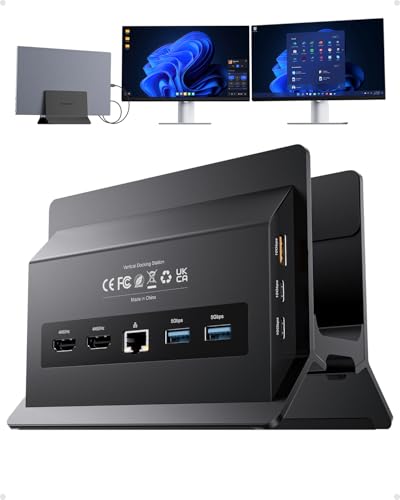
PULWTOP Dual 4K Vertical Docking Station Stand
Best for: Windows users needing dual 4K displays
- Host Interface
- USB-C
- Display Support
- Dual
- Max Resolution
- 4K@60Hz
- Power Delivery
- 85W
- Port Count
- 11
- Video Ports
- HDMI
View on Amazon: PULWTOP Dual 4K Vertical Docking Station Stand Affiliate link
This PULWTOP dock expands your laptop into a dual-monitor workstation. It supports two 4K@60Hz displays via HDMI, using MST for Windows systems. You get 11 ports, including 10Gbps data transfer and 85W power delivery. The vertical stand saves desk space and improves cooling. It fits Windows laptops with full-featured USB-C. It does not support Mac users.
Pros
- Drives two 4K@60Hz monitors simultaneously
- 11-in-1 connectivity with 10Gbps data ports
- Vertical design saves space and aids cooling
- 85W Power Delivery for laptop charging
- Gigabit Ethernet for stable wired internet
Cons
- No support for Mac users
- Power adapter is not included
- USB-C ports are data-only without video output
Good fit if
- You use a Windows laptop with a full-featured USB-C port
- You need a dual-monitor setup for productivity or trading
- You want to save desk space with a vertical stand
Skip if
- You use a Mac computer
- You need video output from the USB-C data ports
- You want a complete kit with a power adapter included
Verdict: PULWTOP Dual 4K Vertical USB-C Dock is a solid choice for Windows users who need dual 4K displays and a space-saving vertical design. It offers robust connectivity but requires you to provide your own power adapter.
Specifications side by side
| Spec | PULWTOP Dual 4K Vertical Docking Station Stand |
|---|---|
| Host Interface | USB-C |
| Display Support | Dual |
| Max Resolution | 4K@60Hz |
| Power Delivery | 85W |
| Port Count | 11 |
| Video Ports | HDMI |
| Max Data Speed | 10Gbps |
| Ethernet Speed | Gigabit |
| Resolution | 4K UHD |
| Connectivity | USB-C, Ethernet |
| Refresh Rate | 60Hz |
| Features | Kickstand |
| Use | Office |
| Recommended Use | Home |
| Dimensions | 5.91 × 4.53 × 4.13 inches |
| Color | Black |
| Model | BD216C |
Frequently asked questions
Does this dock support Mac computers?
No, this model is not compatible with Mac devices. The listing specifies it is designed for Windows users. You must have a Windows laptop with a full-featured USB-C port to use this hub. Mac users should look for a different docking station that explicitly lists macOS support in its specifications.
Is a power adapter included with the dock?
No, you must provide your own power adapter. The product data does not list a power supply as an included item. You need a 65W or higher PD adapter to ensure stable power delivery for your connected devices and the dock itself. Do not rely on the laptop’s USB-C port alone for power.
What is the maximum video resolution supported?
The dock supports 4K UHD resolution at a 60Hz refresh rate. This allows for sharp images and smooth motion on your external displays. You can connect two monitors simultaneously to achieve this dual 4K setup. This spec is ideal for standard office work, web browsing, and media consumption without lag.
How many monitors can this dock support?
This dock supports dual monitor setups. You can connect two external displays to your laptop simultaneously. The device expands a single USB-C connection into multiple ports, including the necessary video outputs for two screens. This vertical design helps save desk space while providing a dual-screen workflow.
What are the physical dimensions of the hub?
The unit measures 5.91 inches in length, 4.53 inches in width, and 4.13 inches in height. It is finished in black. This compact form factor allows it to sit neatly beside your laptop without consuming excessive desk space. The vertical orientation helps keep cables organized and out of the way.
Does the dock come with a kickstand?
Yes, the product attributes list a kickstand as a feature. This component likely assists in the vertical positioning of the dock or connected devices. It contributes to the space-saving design mentioned in the product description. Ensure your setup utilizes this feature for stability if the listing implies it is part of the stand mechanism.