PULWTOP Laptop Docking Station Dual Alternatives: 6 Similar Picks Compared
As an Amazon Associate we earn from qualifying purchases. Links on this page are affiliate links.
The PULWTOP 11-in-1 dock offers dual 4K@60Hz outputs and extensive port expansion for Windows users. If you are searching for pulwtop laptop docking station dual alternatives, you likely need different specs, size, or brand compatibility. This original model supports up to 85W power delivery and includes a built-in stand. However, its Windows-only focus and specific dimensions may not suit every workflow. Some buyers prefer Mac support, lighter weight, or additional Ethernet ports.
We selected 6 similar picks because their published specifications overlap with the original product. Each alternative provides dual 4K display support via USB-C or Thunderbolt connections. You will find options ranging from budget-friendly splitters to premium docks with varied port counts. The list includes models from MOKiN, Plugable, and NOVOO. These devices address common needs like wired networking, vertical storage, or broader OS compatibility. Review the specs to match your laptop’s capabilities and monitor requirements. The goal is to help you find a setup that fits your specific technical constraints.
Our top pick: PULWTOP 11-in-1 Dual 4K Dock.
How each alternative compares
MOKiN USB-C 5-in-1 Dual 4K@60Hz Splitter
The MOKiN USB-C 5-in-1 splitter focuses on lightweight portability rather than extensive connectivity. It weighs just 2.47 ounces, making it significantly smaller than the 1.04-pound PULWTOP dock. You get dual 4K@60Hz support and 100W charging pass-through, which exceeds the PULWTOP’s 85W output. However, you sacrifice the PULWTOP’s built-in laptop stand, Gigabit Ethernet, and multiple USB-A ports. This model is ideal if you prioritize a compact, budget-friendly solution for Windows laptops with Thunderbolt 4, especially when you do not need wired networking or extra peripheral ports.
Plugable Dual 4K USB-C Docking Station
The Plugable UD-6950PDH is designed specifically for Mac users who face display limitations with standard docks. While the PULWTOP is Windows-only for dual 4K, this model bypasses macOS restrictions to support dual 4K@60Hz displays. It offers a broader range of video outputs, including HDMI and DisplayPort, compared to the PULWTOP’s dual HDMI setup. The build is larger and heavier at 11.7 ounces. You should choose this option if you need reliable dual 4K performance on a Mac or value professional-grade build quality and port variety over the plug-and-play simplicity and integrated stand of the PULWTOP.
Plugable Dual 4K HDMI USB-C Docking Station
The Plugable UD-MSTH2 provides a simpler, driver-free experience for Windows and ChromeOS users. Like the PULWTOP, it supports dual 4K@60Hz displays via HDMI. It includes Gigabit Ethernet, which the PULWTOP also features, but lacks the PULWTOP’s integrated laptop stand and vertical design. This dock is smaller and lighter, weighing 8.1 ounces. It is a good fit if you want a straightforward, no-driver setup for dual monitors on compatible laptops. You give up the PULWTOP’s unique stand functionality and higher port count, but gain a more traditional, compact docking station form factor.
Selore&S-Global 5-in-1 Dual 4K 60Hz USB-C Hub
The Selore&S-Global hub targets Thunderbolt 4 and USB4 laptops with USB-C monitors. It supports dual 4K@60Hz outputs but relies on DisplayPort connectivity rather than the PULWTOP’s HDMI ports. This model is lighter and more compact, lacking the PULWTOP’s built-in stand and Gigabit Ethernet. It offers fewer total ports, focusing on essential connectivity for high-speed data and video. You should pick this alternative if your monitors use USB-C inputs and your laptop supports Thunderbolt 4. It is best for users who want a sleek, minimalist hub without the extra bulk and features of the larger PULWTOP dock.
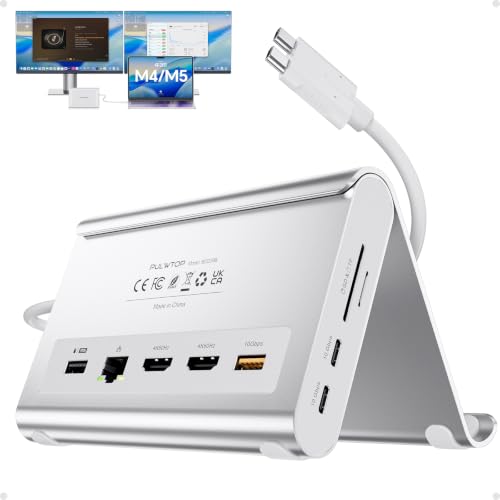
PULWTOP 11-in-2 USB-C Dock for MacBook
The PULWTOP 11-in-2 USB-C Dock is tailored for M-series MacBooks, unlike the original model which is Windows-only. It supports dual 4K@60Hz displays and includes a vertical stand design similar to the original. This dock is slightly larger and heavier, weighing 14.1 ounces. It is not suitable for Windows laptops or base-chip Macs requiring dual monitors. You should choose this version if you own an M-series MacBook and want dual 4K support with vertical storage. It offers the same brand ecosystem and stand utility but is optimized for macOS compatibility rather than the broad Windows support of the original.
NOVOO 14-in-1 USB-C Dock with VGA
The NOVOO 14-in-1 dock offers the highest port count in this list, including VGA, HDMI, DisplayPort, and Ethernet. It supports 100W power delivery, exceeding the PULWTOP’s 85W. However, it limits refresh rates at higher resolutions, which may affect your dual 4K@60Hz experience. This dock is compact and lightweight at 4.8 ounces but lacks the PULWTOP’s integrated laptop stand. It is ideal for users who need extensive port variety, including legacy VGA support, and wired networking. You trade the PULWTOP’s consistent 60Hz dual 4K performance and stand functionality for greater connectivity options and higher charging power.
Quick picks
Our 7 picks

PULWTOP 11-in-1 Dual 4K Dock
Best for: Windows users needing dual 4K displays
- Host Interface
- USB-C, Thunderbolt
- Display Support
- Dual
- Max Resolution
- 4K@60Hz
- Power Delivery
- 85W
- Port Count
- 11
- Video Ports
- HDMI
View on Amazon: PULWTOP 11-in-1 Dual 4K Dock Affiliate link
This 11-in-1 USB-C docking station supports dual 4K@60Hz HDMI outputs. It includes 10Gbps data ports, Gigabit Ethernet, and 85W power delivery. The design features a built-in stand for upright device placement. It works with Windows and ChromeOS devices via DP Alt Mode. This dock suits users needing expanded connectivity and dual monitor support for productivity workflows.
Pros
- Dual HDMI outputs support 4K@60Hz resolution
- 11 ports including 10Gbps USB and Gigabit Ethernet
- 85W Power Delivery for laptop charging
- Built-in stand holds device upright to save space
Cons
- Windows and ChromeOS only, no macOS support
- Surface Pro 7 series limited to single display
- 85W PD output may not charge high-power laptops fully
Good fit if
- You use Windows or ChromeOS laptops
- You need dual 4K monitors for multitasking
- You want Gigabit Ethernet and fast data transfer
Skip if
- You use a Mac or iPad
- You need Thunderbolt 4 speed
- You require macOS display support
Verdict: PULWTOP 11-in-1 Dual 4K Dock fits Windows users who need dual 4K displays and extensive port expansion without macOS compatibility.

MOKiN USB-C 5-in-1 Dual 4K@60Hz Splitter
Best for: Windows laptops with Thunderbolt 4 needing dual 4K displays
- Host Interface
- Thunderbolt 4, USB 4, USB-C
- Display Support
- Dual
- Max Resolution
- 4K@60Hz
- Power Delivery
- 87W
- Port Count
- 5
- Video Ports
- USB-C
View on Amazon: MOKiN USB-C 5-in-1 Dual 4K@60Hz Splitter Affiliate link
The MOKiN UC6101B is a 5-in-1 USB-C splitter designed for Windows laptops with Thunderbolt 4 or USB 4 ports. It delivers dual 4K@60Hz video output via DP Alt Mode 1.4, transforming a single port into a dual-monitor workstation. It includes two 10Gbps data ports and a 100W PD charging port. This compact, lightweight hub suits users seeking a budget-friendly dual display setup for Windows devices.
Pros
- Supports dual 4K@60Hz monitors via DP Alt Mode 1.4
- Includes two USB-C 3.1 ports with 10Gbps data transfer speeds
- Provides 100W pass-through PD charging capability
- Compact design weighing only 2.47 ounces
Cons
- Dual monitor MST functionality is not supported on macOS
- Requires a laptop with Thunderbolt 4 or USB 4 compatibility
- Charger and cables are not included in the package
Good fit if
- You use a Windows laptop with Thunderbolt 4 or USB 4
- You need dual 4K monitors at 60Hz refresh rates
- You want a lightweight hub with 100W charging pass-through
Skip if
- You use a macOS system for dual-monitor setups
- Your laptop lacks Thunderbolt 4 or USB 4 support
- You require included power adapters or display cables
Verdict: MOKiN 5-in-1 USB-C Dual 4K@60Hz Hub fits Windows users needing a lightweight, budget dual-display solution with fast data ports and 100W charging pass-through.

Plugable Dual 4K USB-C Docking Station
Best for: Mac users needing dual 4K displays
- Host Interface
- Thunderbolt, USB4, USB-C
- Display Support
- Dual
- Max Resolution
- 4K@60Hz
- Power Delivery
- 100W
- Port Count
- 14
- Video Ports
- HDMI, DisplayPort
View on Amazon: Plugable Dual 4K USB-C Docking Station Affiliate link
This Plugable dock enables dual 4K@60Hz displays on Macs that natively support only one screen. It uses DisplayLink technology to work around hardware limits. The unit features a premium aluminum housing and offers 14 ports, including HDMI, DisplayPort, and 100W power delivery. It supports Windows, macOS, and ChromeOS, making it a robust solution for productivity-focused setups requiring multiple monitors.
Pros
- Enables dual 4K@60Hz displays on single-display Macs
- 14-in-1 port configuration with 100W PD
- Premium aluminum housing with space gray finish
- Supports HDMI, DisplayPort, and SD card readers
Cons
- Requires driver installation for full functionality
- HDCP not supported for content protection
- Heavier than standard USB-C hubs at 11.7 ounces
Good fit if
- You use a Mac that only supports one external monitor
- You need dual 4K displays for productivity work
- You want a durable aluminum dock with many ports
Skip if
- You want a plug-and-play setup without drivers
- You need HDCP support for protected content
- You prefer a lightweight portable solution
Verdict: Plugable UD-6950PDH Dual 4K Dock is the right choice for Mac users who need to bypass display limits for dual 4K setups. It fits professionals who value build quality and port variety over plug-and-play simplicity.

Plugable Dual 4K HDMI USB-C Docking Station
Best for: Windows and ChromeOS dual 4K setups
- Host Interface
- USB-C, USB4, Thunderbolt
- Display Support
- Dual
- Max Resolution
- 4K@60Hz
- Power Delivery
- 65W
- Port Count
- 10
- Video Ports
- HDMI
View on Amazon: Plugable Dual 4K HDMI USB-C Docking Station Affiliate link
This Plugable dock turns your laptop into a workstation using a single USB-C connection. It supports dual HDMI monitors at 4K resolution and 60Hz refresh rate on compatible systems. The unit includes ten ports, covering Ethernet, audio, and multiple USB connections. It requires no driver installation for Windows and ChromeOS setups. You get a straightforward, cable-free desk arrangement if your computer supports DisplayPort Alt Mode.
Pros
- Supports dual 4K 60Hz HDMI displays on compatible hosts
- Includes Gigabit Ethernet for stable wired internet
- Ten ports total, including audio and USB-A options
- No drivers required for supported Windows and ChromeOS systems
Cons
- Limited to one external monitor on macOS systems
- Requires a host laptop with USB-C DisplayPort Alt Mode
- Maximum data speed for USB ports is 5Gbps
Good fit if
- You use Windows or ChromeOS devices with DP Alt Mode
- You need a wired Gigabit Ethernet connection for your desk
- You want to run two 4K monitors from one cable
Skip if
- You use a Mac and need dual extended displays
- Your laptop USB-C port does not support video output
- You require Thunderbolt 4 speeds for data transfer
Verdict: Plugable Dual 4K HDMI USB-C Dock works well for Windows and ChromeOS users who need two 4K screens and wired networking. It fits your needs if your laptop supports DisplayPort Alt Mode and you want a simple, driver-free setup.

Selore&S-Global 5-in-1 Dual 4K 60Hz USB-C Hub
Best for: Thunderbolt 4 laptops with USB-C monitors
- Host Interface
- USB-C
- Display Support
- Dual
- Max Resolution
- 4K@60Hz
- Power Delivery
- 87W
- Port Count
- 5
- Video Ports
- USB-C
View on Amazon: Selore&S-Global 5-in-1 Dual 4K 60Hz USB-C Hub Affiliate link
This USB-C splitter extends one port to dual 4K@60Hz displays via DP Alt Mode. It includes two 10Gbps data ports and 87W pass-through charging. The unit is designed for laptops with USB4 or Thunderbolt 4. It works with macOS and Windows systems. You get a compact silver hub that fits on a desk. It suits users who need dual screens without a full docking station.
Pros
- Supports dual 4K@60Hz video output via USB-C
- Includes two 10Gbps USB-C data ports
- Provides 87W pass-through charging for laptops
- Compatible with Thunderbolt 4 and USB4 hosts
- Compact 5-in-1 silver design
Cons
- Requires external power for the PD port to enable video output
- Only offers 87W charging instead of full 100W pass-through
- Limited to USB-C video connections, no HDMI ports
Good fit if
- You use a laptop with USB4 or Thunderbolt 4
- You need dual 4K displays at 60Hz
- You prefer USB-C to USB-C monitor connections
Skip if
- You rely on macOS for dual monitor support
- You need HDMI or DisplayPort video outputs
- You want a single cable for power and video
Verdict: Selore&S-Global 5-in-1 USB-C Dual Monitor Hub is a solid option for Thunderbolt 4 or USB4 users who need dual 4K screens and USB-C connectivity. It fits well if you already have compatible monitors and a powerful laptop.
PULWTOP 11-in-2 USB-C Dock for MacBook
Best for: M-series MacBooks needing dual 4K displays
- Host Interface
- USB-C
- Display Support
- Dual
- Max Resolution
- 4K@60Hz
- Power Delivery
- 95W
- Port Count
- 11
- Video Ports
- HDMI
View on Amazon: PULWTOP 11-in-2 USB-C Dock for MacBook Affiliate link
This PULWTOP dock targets M1–M5 MacBooks with dual 4K@60Hz HDMI output and 95W power delivery. It includes 10Gbps data ports, gigabit Ethernet, and card readers. The silver unit stands vertically to save desk space. It requires a 65W+ charger and Terminal commands for clamshell mode. It works with Intel and Apple Silicon Macs but excludes Windows and ChromeOS.
Pros
- Dual HDMI ports support 4K@60Hz displays
- 95W PD 3.0 charging for MacBooks
- 10Gbps USB-C data transfer speeds
- Vertical stand design saves desk space
- Gigabit Ethernet for stable wired internet
Cons
- Excludes Windows and ChromeOS users
- Base M1/M2/M3 chips only support single display
- Requires Terminal commands for clamshell mode
Good fit if
- You use a MacBook Pro or Air with M1–M5 chips
- You need dual 4K monitors at 60Hz
- You want a vertical dock to save desk space
Skip if
- You use a Windows or ChromeOS laptop
- You have a base M1/M2/M3 MacBook and need dual screens
- You prefer plug-and-play clamshell mode without Terminal commands
Verdict: PULWTOP 11-in-2 USB-C MacBook Dock fits M-series Mac users who need dual 4K displays and vertical storage. It is not suitable for Windows laptops or base-chip Macs requiring dual monitors.

NOVOO 14-in-1 USB-C Dock with VGA
Best for: Wired networking and quad display setups
- Host Interface
- USB-C, Thunderbolt 3
- Display Support
- Quad Display
- Max Resolution
- 8K@30Hz
- Power Delivery
- 100W
- Port Count
- 14
- Video Ports
- HDMI, DisplayPort, VGA
View on Amazon: NOVOO 14-in-1 USB-C Dock with VGA Affiliate link
The NOVOO 14-in-1 dock expands a single USB-C port into 14 connections. It supports quad displays with an 8K@30Hz DisplayPort and dual 4K@60Hz HDMI outputs. A Gigabit Ethernet port provides a stable wired connection, ideal for users who prioritize network reliability over wireless convenience. It also includes 100W power delivery and SD card readers for efficient workflows.
Pros
- Gigabit Ethernet port for stable wired networking
- Supports up to four displays simultaneously
- 8K@30Hz output via DisplayPort
- 100W Power Delivery for laptop charging
- Built-in SD and TF card readers
Cons
- 8K resolution limited to 30Hz refresh rate
- Triple display support restricted to 4K@30Hz on Windows
- Mac users limited to single monitor extension
Good fit if
- You need a reliable wired Ethernet connection
- You want to run multiple monitors from one port
- You require SD card access for photo transfers
Skip if
- You need 8K video at 60Hz
- You use a Mac and want triple displays
- You prefer a smaller 11-in-1 configuration
Verdict: NOVOO 14-in-1 USB-C Docking Station fits users who need a wired Ethernet connection and multi-monitor setups. It offers high resolution support but limits refresh rates at the highest settings.
Specifications side by side
| Spec | PULWTOP 11-in-1 Dual 4K Dock | MOKiN USB-C 5-in-1 Dual 4K@60Hz Splitter | Plugable Dual 4K USB-C Docking Station | Plugable Dual 4K HDMI USB-C Docking Station | Selore&S-Global 5-in-1 Dual 4K 60Hz USB-C Hub | PULWTOP 11-in-2 USB-C Dock for MacBook | NOVOO 14-in-1 USB-C Dock with VGA |
|---|---|---|---|---|---|---|---|
| Host Interface | USB-C, Thunderbolt | Thunderbolt 4, USB 4, USB-C | Thunderbolt, USB4, USB-C | USB-C, USB4, Thunderbolt | USB-C | USB-C | USB-C, Thunderbolt 3 |
| Display Support | Dual | Dual | Dual | Dual | Dual | Dual | Quad Display |
| Max Resolution | 4K@60Hz | 4K@60Hz | 4K@60Hz | 4K@60Hz | 4K@60Hz | 4K@60Hz | 8K@30Hz |
| Power Delivery | 85W | 87W | 100W | 65W | 87W | 95W | 100W |
| Port Count | 11 | 5 | 14 | 10 | 5 | 11 | 14 |
| Video Ports | HDMI | USB-C | HDMI, DisplayPort | HDMI | USB-C | HDMI | HDMI, DisplayPort, VGA |
| Max Data Speed | 10Gbps | 10Gbps | not stated | 5Gbps | 10Gbps | 10Gbps | 5Gbps |
| Ethernet Speed | Gigabit Ethernet | not stated | not stated | Gigabit Ethernet | not stated | 1Gbps | Gigabit Ethernet |
| Resolution | 4K UHD | 4K UHD | 4K UHD | 4K UHD | 4K UHD | 4K UHD | 4K UHD |
| Connectivity | USB-C, Ethernet | USB-C, DisplayPort | USB-C, HDMI, DisplayPort | USB-C, HDMI, Ethernet, USB-A | USB-C, DisplayPort | USB-C, HDMI, Ethernet, USB-A | USB-C, HDMI, DisplayPort, Ethernet, VGA |
| Refresh Rate | 60Hz | 60Hz | 60Hz | 60Hz | 60Hz | 60Hz | 60Hz |
| Features | Kickstand | not stated | DisplayLink | not stated | not stated | Kickstand | not stated |
| Dimensions | 4.9 × 0.6 × 4.9 inches | not stated | 9.4 × 3.1 × 1.2 inches | 9.25 × 5.71 × 3 inches | not stated | 5.4 × 4.21 × 3.37 inches | 2.36 × 0.65 × 5.7 inches |
| Weight | 1.04 pounds | 2.47 ounces | 11.7 ounces | 8.1 ounces | not stated | 14.1 ounces | 4.8 ounces |
| Color | Black | Grey | Space Grey | Black | Silvery | Silver | Grey |
| Model | BD239A-Black | UC6101B | UD-6950PDH | UD-MSTH2 | USB C 4K@60Hz DP Alt Mode | BD239B-Silver | NHM14S-632B2 |
| Size | not stated | 5-in-1 | 1.0" × 8.9" × 3.3" | Dual Display | Alt Mode 5-in-1 | not stated | 14 in 1 |
If you need integrated drive bays, specifications for the best dual bay SSD docking stations detail interface speeds.
Frequently asked questions
Can I use these docks with MacBooks?
Compatibility depends on the specific model. The Plugable UD-6950PDH is designed for Mac users needing dual 4K displays. The PULWTOP 11-in-2 dock fits M-series MacBooks. However, the original PULWTOP 11-in-1 dock is not suitable for macOS. Always check the verdict section for your specific device.
Which dock is best for wired internet?
The NOVOO 14-in-1 dock is the best choice for wired networking. It includes an Ethernet port for stable connectivity. Most other alternatives in this list focus on display output and USB expansion. If you need a reliable Ethernet connection alongside dual monitors, the NOVOO model is the clear winner.
Do all these docks support dual 4K monitors?
Yes, every product listed supports dual 4K UHD displays at 60Hz. This includes the PULWTOP, MOKiN, Plugable, Selore&S-Global, and NOVOO models. You can connect two 4K screens to any of these hubs. Ensure your laptop supports the required video output standards for the best performance.
Which option is the lightest and most portable?
The MOKiN USB-C 5-in-1 splitter is the lightest option. It weighs only 2.47 ounces, making it highly portable. The Plugable UD-6950PDH is also relatively compact at 11.7 ounces. If you travel frequently and need a lightweight solution for dual displays, the MOKiN model is the most convenient choice.
Are there docks with VGA ports available?
Yes, the NOVOO 14-in-1 dock includes a VGA port. This is useful for connecting older monitors that lack HDMI or DisplayPort inputs. Most other alternatives in this list use modern USB-C, HDMI, or DisplayPort connections. If you need legacy support, the NOVOO model is your best option.
Which dock is best for Thunderbolt 4 laptops?
The Selore&S-Global 5-in-1 hub is ideal for Thunderbolt 4 or USB4 laptops. It supports dual 4K screens via USB-C connectivity. The MOKiN splitter is also noted for Windows laptops with Thunderbolt 4. Both options leverage high-speed data ports for efficient display output and device connectivity.
Do I need drivers for these docking stations?
Most of these docks are plug-and-play and driver-free. The Plugable UD-MSTH2 is specifically noted for its simple, driver-free setup. It works well with Windows and ChromeOS. Other models generally follow this standard, but you should verify compatibility with your operating system before purchasing to ensure seamless operation.