Looking Beyond the PULWTOP 11-in-1 Vertical USB-C Docking? 6 Alternatives Worth a Look
As an Amazon Associate we earn from qualifying purchases. Links on this page are affiliate links.
Looking Beyond the PULWTOP 11-in-1 Vertical USB-C Docking? 6 Alternatives Worth a Look. This specific hub stands out for its vertical design, integrated M.2 NVMe SSD slot, and Gigabit Ethernet port. These specs allow you to expand storage and maintain a wired network connection without extra adapters. The 100W power delivery and 4K@60Hz HDMI output also support demanding workflows. However, you might prefer a different form factor or a simpler port layout. Some users find the vertical footprint takes up too much desk space or lack the need for internal drive expansion. Others may want dual HDMI outputs or a smaller, lighter device for travel.
The alternatives listed here were chosen because their specifications overlap with the original PULWTOP model. Each option provides USB-C connectivity and video output, ensuring basic compatibility with your laptop. We focused on devices that offer distinct advantages, such as dual monitor support, higher refresh rates, or more compact dimensions. This list helps you compare key features like port counts, charging speeds, and physical size. You can select a hub that better matches your specific setup requirements, whether that means prioritizing display smoothness, charging power, or physical portability.
How Each Alternative Compares
Anker PowerExpand 8-in-1 Dual HDMI USB-C Hub
The Anker 8-in-1 hub replaces the PULWTOP’s vertical form factor and NVMe slot with a compact, horizontal design. It offers dual HDMI outputs for 4K@60Hz displays, whereas the original provides only a single HDMI port. You gain Ethernet connectivity in both, but the Anker lacks the dedicated storage expansion of the PULWTOP. This makes it better for users who need multiple screens rather than extra internal storage. It is lighter and smaller, fitting easily into a laptop bag, though it does not support the clamshell mode setup features detailed for the PULWTOP.
Anker 332 5-in-1 USB-C Hub
The Anker 332 is a minimalist 5-in-1 hub that strips away the PULWTOP’s extra ports, Ethernet, and storage slot. It focuses on basic 4K@30Hz video output and 85W charging. While the PULWTOP supports 4K@60Hz and 100W charging, this Anker model is significantly lighter and smaller. You give up high refresh rates and wired networking for a simpler, more portable setup. It suits users who only need a single 4K display and reliable power delivery, without the need for the extensive I/O or storage expansion provided by the vertical dock.
UGREEN 5-in-1 USB-C Hub with 100W PD
The UGREEN 5-in-1 hub offers a simple, compact solution with 100W PD charging and 4K video output. It lacks the PULWTOP’s Ethernet port, SD card reader, and M.2 SSD slot. You trade the vertical docking station’s versatility for a smaller footprint and lower complexity. This model is ideal if you only need a single monitor connection and fast charging, without the need for multiple data ports or wired internet. It provides essential connectivity without the bulk or specialized features of the PULWTOP, making it a practical choice for basic laptop setups.
Acer 5-in-1 4K 60Hz USB-C Hub
The Acer 5-in-1 hub delivers 4K@60Hz display output, matching the PULWTOP’s smooth video performance. However, it lacks the Ethernet port, SD card reader, and NVMe storage slot found in the original. You gain reliable 60Hz visuals but lose the ability to expand storage or connect via wired network. This hub is best for users who prioritize display refresh rates over additional connectivity options. It offers a streamlined experience with fewer ports, focusing on video quality and charging rather than the comprehensive workstation capabilities of the PULWTOP.
Anker 5-in-1 USB-C Hub with 4K HDMI
The Anker 5-in-1 hub with 4K HDMI provides 90W charging and 4K@30Hz video, differing from the PULWTOP’s 100W charging and 4K@60Hz output. It omits the Ethernet port, SD card reader, and storage expansion features. This model is lighter and more portable, suitable for users who need basic video and power delivery without the need for high refresh rates or extra ports. It is a practical choice for those who prioritize charging speed and simple connectivity over the extensive I/O and storage options of the vertical docking station.
Selore 6-in-2 MacBook USB-C Hub
The Selore 6-in-2 Thunderbolt 3 hub offers high-speed data transfer and SD card access, differing from the PULWTOP’s USB-C connectivity and NVMe slot. It lacks the Ethernet port and HDMI output found in the original. This hub is designed for MacBook users who need Thunderbolt 3 speeds and direct SD card access. You gain faster data transfer capabilities but lose the ability to connect an external display or expand storage via NVMe. It is ideal for users who prioritize data speed and media card access over video output and wired networking.
Quick picks
Our 7 picks

PULWTOP 11-in-1 Vertical USB-C Dock
Best for: users needing NVMe storage and Ethernet
- Host Interface
- USB-C
- Max Resolution
- 4K@60Hz
- Power Delivery
- 100W
- Port Count
- 11
- Video Ports
- HDMI
- Max Data Speed
- 10Gbps
View on Amazon: PULWTOP 11-in-1 Vertical USB-C Dock Affiliate link
This vertical docking station transforms your USB-C laptop into a full workstation. It includes an M.2 NVMe SSD slot for up to 4TB of extra storage. The HDMI port supports 4K@60Hz output, and the Gigabit Ethernet port provides wired internet. You get dual USB-C and USB-A ports for data transfer. The 100W PD-IN charging keeps your device powered. It fits MacBook M1-M5 and Windows laptops.
Pros
- M.2 NVMe SSD slot supports up to 4TB expansion
- HDMI output delivers 4K resolution at 60Hz
- Gigabit Ethernet RJ45 port for stable wired connection
- 100W PD-IN charging capability
- Dual USB-C 3.2 (10Gbps) and dual USB-A 3.0 ports
Cons
- Requires sudo terminal command for MacBook clamshell mode
- SSD is sold separately
- Heavier and bulkier than standard flat hubs
Good fit if
- You need massive local storage via an NVMe drive
- You want a stable wired internet connection
- You prefer a vertical stand to save desk space
Skip if
- You want a plug-and-play setup without terminal commands
- You prefer a lightweight, flat adapter
- You do not need wired Ethernet connectivity
Verdict: PULWTOP 11-in-1 Vertical USB-C Dock is the right pick if you need built-in storage expansion and a wired network port. It suits users who value desk space and high-speed data transfer over a minimalist profile.

Anker PowerExpand 8-in-1 Dual HDMI USB-C Hub
Best for: Dual 4K monitors and Ethernet connectivity
- Host Interface
- USB-C
- Display Support
- Dual
- Max Resolution
- 4K @ 60Hz
- Power Delivery
- 85W
- Port Count
- 8
- Video Ports
- HDMI
View on Amazon: Anker PowerExpand 8-in-1 Dual HDMI USB-C Hub Affiliate link
This Anker hub expands a single USB-C port into an 8-in-1 docking station. It supports dual 4K displays, with one port reaching 60Hz and both at 30Hz. You get 85W pass-through charging, Gigabit Ethernet, and SD card reading. It works with Windows, ChromeOS, and macOS. The compact gray design fits easily on a desk. It is a solid choice for users needing multiple video outputs and stable connectivity without a complex setup.
Pros
- Dual HDMI ports support 4K@60Hz on one display
- 85W USB-C Power Delivery pass-through charging
- Includes Gigabit Ethernet and SD card reader
- Compact dimensions at 4.65 x 2.01 x 0.69 inches
- Supports USB-C, USB4, and Thunderbolt hosts
Cons
- Second HDMI port is limited to 4K@30Hz
- Not compatible with Linux operating systems
- Dual monitor mirroring on macOS instead of extended desktop
Good fit if
- You need two external displays for productivity
- You require wired Ethernet for stable internet
- You want 85W charging for your laptop
Skip if
- You use a Linux-based computer
- You need 60Hz refresh rate on both screens
- You require macOS extended desktop mode
Verdict: Anker 8-in-1 USB-C Dual HDMI Dock is a practical hub for professionals who need dual 4K monitors and Ethernet on a Windows or macOS laptop. It fits users who prioritize video expansion and wired connectivity over Linux support or high-refresh dual displays.

Anker 332 5-in-1 USB-C Hub
Best for: Basic 4K@30Hz video and 85W charging
- Host Interface
- USB-C
- Display Support
- 1
- Max Resolution
- 4K@30Hz
- Power Delivery
- 85W
- Port Count
- 5
- Video Ports
- HDMI
View on Amazon: Anker 332 5-in-1 USB-C Hub Affiliate link
The Anker 5-in-1 USB-C Hub offers a 4K HDMI port, two USB-A ports, and a USB-C data port. It supports 85W pass-through charging for your laptop. The HDMI output reaches 4K at 30Hz. It works with macOS, Windows, and ChromeOS. This hub is ideal for users needing basic video and data expansion without complex setup.
Pros
- Supports 85W pass-through charging
- 5 Gbps data transfer speeds
- 4K@30Hz HDMI video output
- Compact 1.44-ounce build
Cons
- HDMI limited to 30Hz refresh rate
- USB-C port does not support video output
- Not compatible with Linux systems
Good fit if
- You need simple 4K video at 30Hz
- You want 85W charging for your laptop
- You use Windows or macOS devices
Skip if
- You require 4K video at 60Hz
- You need Linux operating system support
- You want the USB-C port for video
Verdict: Anker 5-in-1 USB-C Hub provides reliable 4K@30Hz video and 85W charging for standard laptop setups. It fits users who prioritize stable pass-through power over high refresh rates.

UGREEN 5-in-1 USB-C Hub with 100W PD
Best for: Single monitor setups with charging needs
- Host Interface
- USB-C
- Max Resolution
- 4K
- Power Delivery
- 100W
- Port Count
- 5
- Video Ports
- HDMI
- Max Data Speed
- 5Gbps
View on Amazon: UGREEN 5-in-1 USB-C Hub with 100W PD Affiliate link
The UGREEN 5-in-1 USB-C Hub offers essential connectivity for your laptop setup. It features a 4K HDMI port for external displays and a 100W Power Delivery port to keep your device charged. With a 5 Gbps USB-A data port and two 480 Mbps ports, it handles peripherals efficiently. This compact grey adapter is ideal for users who need reliable video output and fast charging without bulk.
Pros
- 100W Power Delivery for fast laptop charging
- 4K HDMI output for external displays
- 5 Gbps USB-A data port for fast transfers
- Compact 3.21-ounce build
Cons
- Only one USB-A port supports 5 Gbps speeds
- Lacks additional video ports like DisplayPort
- No Ethernet connectivity for wired internet
Good fit if
- You need a single HDMI connection for a monitor
- You want your laptop to charge through the hub
- You carry a lightweight setup for travel
Skip if
- You require multiple external monitors simultaneously
- You need high-speed data transfer on all ports
- You rely on wired Ethernet for stable internet
Verdict: UGREEN 5-in-1 USB-C Hub provides a simple, compact solution for users needing 4K video and 100W charging. It fits perfectly for those who prioritize essential connectivity over extensive port variety.
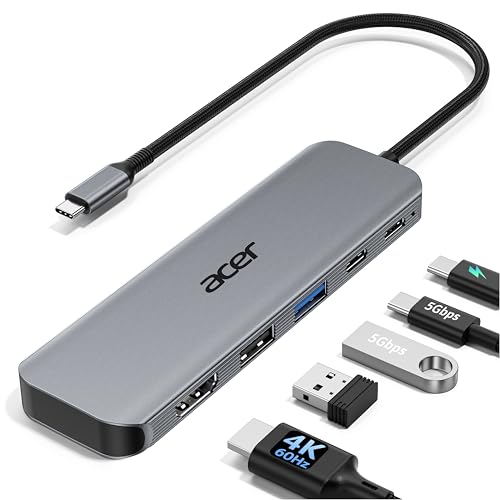
Acer 5-in-1 4K 60Hz USB-C Hub
Best for: Users needing 4K@60Hz display output
- Host Interface
- USB-C
- Max Resolution
- 4K@60Hz
- Power Delivery
- 90W
- Port Count
- 5
- Video Ports
- HDMI 2.0
- Max Data Speed
- 5Gbps
View on Amazon: Acer 5-in-1 4K 60Hz USB-C Hub Affiliate link
The Acer ODK5U0 expands a single USB-C port into a versatile workstation. It features a 4K@60Hz HDMI output, offering smoother visuals than standard 30Hz hubs. You get 100W pass-through charging, with up to 90W delivered to your laptop. Data transfers hit 5Gbps via USB-C 3.0 and USB-A 3.0 ports. The aluminum shell aids heat dissipation while keeping the unit slim for travel.
Pros
- 4K@60Hz HDMI display support
- 100W PD pass-through charging
- 5Gbps data transfer speeds
- Aluminum alloy heat dissipation
Cons
- Only one HDMI port
- No Ethernet or SD card slots
- Ultra-wide monitors not supported
Good fit if
- You need smooth 4K video playback without motion blur
- You want to charge your laptop while connected to a display
- You prefer a slim aluminum design for portability
Skip if
- You require multiple monitor connections from one hub
- You need built-in Ethernet or SD card readers
- You use an ultra-wide monitor that exceeds standard aspect ratios
Verdict: Acer 5-in-1 USB-C Hub 4K@60Hz delivers reliable 4K@60Hz visuals and robust charging for users who prioritize display smoothness and power delivery over extra port variety.

Anker 5-in-1 USB-C Hub with 4K HDMI
Best for: Laptop users needing 90W charging and 4K@30Hz video
- Host Interface
- USB-C
- Max Resolution
- 4K@30Hz
- Power Delivery
- 90W
- Port Count
- 5
- Video Ports
- HDMI
- Max Data Speed
- 5Gbps
View on Amazon: Anker 5-in-1 USB-C Hub with 4K HDMI Affiliate link
This Anker hub offers five ports, including one HDMI and three USB-A connections. It supports 4K video at 30Hz and delivers 90W of pass-through charging to your laptop. The device measures 4.8 inches long and weighs just over 2 ounces. It is a compact solution for users who need to connect external displays and peripherals to a single USB-C port on their computer.
Pros
- 90W pass-through charging supports up to 100W input
- HDMI port outputs 4K resolution at 30Hz
- USB 3.0 port provides 5Gbps data transfer speeds
- Compact design weighs only 2.03 ounces
Cons
- HDMI output is limited to 30Hz refresh rate
- Not compatible with Linux operating systems
- USB-C input port cannot power peripheral devices
Good fit if
- You need a single cable to connect a 4K display
- You want to charge your laptop while using the hub
- You require fast data transfers via USB 3.0
Skip if
- You require a 60Hz refresh rate for your external monitor
- You use a Linux-based computer
- You need to power peripherals directly from the hub
Verdict: Anker 5-in-1 USB-C Hub with 4K HDMI is a practical choice for Windows and macOS users who prioritize charging speed and basic video output over high refresh rates. It fits those who want a lightweight, single-cable setup for their laptop.

Selore 6-in-2 MacBook USB-C Hub
Best for: MacBook users needing Thunderbolt 3 speed and SD access
- Host Interface
- USB-C
- Display Support
- Dual
- Max Resolution
- 5K
- Power Delivery
- 100W
- Port Count
- 6
- Video Ports
- Thunderbolt 3
View on Amazon: Selore 6-in-2 MacBook USB-C Hub Affiliate link
This 6-in-1 hub expands your MacBook’s connectivity via a single Thunderbolt 3 port. It supports 100W power delivery and video output up to 5K or dual 4K@60Hz. You get three USB 3.0 ports for peripherals and a combined SD/MicroSD card reader. The aluminum body aids heat dissipation. It is designed for users needing high-speed data transfer and reliable video output without cluttering their desk.
Pros
- Thunderbolt 3 host interface with 40Gbps data speed
- 100W power delivery pass-through
- Video output up to 5K or dual 4K@60Hz
- Integrated SD and MicroSD card reader
- Three USB 3.0 ports for peripherals
Cons
- No dedicated HDMI port on this specific 6-in-1 model
- Does not work with protective cases
- Maximum of one hard drive supported
Good fit if
- You need Thunderbolt 3 speeds for fast data transfers
- You want to read SD cards directly from your laptop
- You require 100W power delivery for your MacBook
Skip if
- You require a standard HDMI port
- You use a protective case on your laptop
- You need to connect multiple hard drives simultaneously
Verdict: Selore 6-in-1 Thunderbolt 3 Hub offers robust Thunderbolt 3 performance and SD card access. It fits MacBook users who prioritize data speed and power delivery over having a standard HDMI port.
Specifications side by side
| Spec | PULWTOP 11-in-1 Vertical USB-C Dock | Anker PowerExpand 8-in-1 Dual HDMI USB-C Hub | Anker 332 5-in-1 USB-C Hub | UGREEN 5-in-1 USB-C Hub with 100W PD | Acer 5-in-1 4K 60Hz USB-C Hub | Anker 5-in-1 USB-C Hub with 4K HDMI | Selore 6-in-2 MacBook USB-C Hub |
|---|---|---|---|---|---|---|---|
| Host Interface | USB-C | USB-C | USB-C | USB-C | USB-C | USB-C | USB-C |
| Display Support | not stated | Dual | 1 | not stated | not stated | not stated | Dual |
| Max Resolution | 4K@60Hz | 4K @ 60Hz | 4K@30Hz | 4K | 4K@60Hz | 4K@30Hz | 5K |
| Power Delivery | 100W | 85W | 85W | 100W | 90W | 90W | 100W |
| Port Count | 11 | 8 | 5 | 5 | 5 | 5 | 6 |
| Video Ports | HDMI | HDMI | HDMI | HDMI | HDMI 2.0 | HDMI | Thunderbolt 3 |
| Max Data Speed | 10Gbps | not stated | 5Gbps | 5Gbps | 5Gbps | 5Gbps | 40Gbps |
| Ethernet Speed | Gigabit | 1Gbps | not stated | not stated | not stated | not stated | not stated |
| Resolution | 4K UHD | 4K UHD | 4K UHD | 4K UHD | 4K UHD | 4K UHD | not stated |
| Connectivity | USB-C, HDMI, Ethernet | USB-C, HDMI, Ethernet | USB-C, HDMI, USB-A | USB-C, HDMI, USB-A | USB-C, HDMI, USB-A | USB-C, HDMI, USB-A | USB-C, Thunderbolt 3 |
| Refresh Rate | 60Hz | not stated | not stated | not stated | 60Hz | not stated | not stated |
| Features | Kickstand | Card Reader | not stated | not stated | not stated | not stated | Card Reader |
| Dimensions | 5.91 × 2.56 × 4.57 inches | 4.65 × 2.01 × 0.69 inches | 4.78 × 1.59 × 0.45 inches | 4.79 × 1.09 × 0.47 inches | not stated | 4.8 × 1.2 × 0.46 inches | 4.72 × 1.37 × 0.48 inches |
| Weight | 1.21 pounds | 3.2 ounces | 1.44 ounces | 3.21 ounces | not stated | 2.03 ounces | 2.47 ounces |
| Color | Gray | Gray | Black | grey | Grey | Gray | Grey |
| Size | not stated | 8-in-1 USB C Hub | not stated | 0.65 feet | not stated | not stated | 6-in-2 |
| Model | not stated | A83800A1 | A8355011 | CM478 | ODK5U0 | A8357 | UC2205 |
Frequently asked questions
Does the PULWTOP dock support dual monitor setups?
No, the PULWTOP 11-in-1 Vertical USB-C Dock does not support dual monitors. It provides a single HDMI output for video expansion. If you need to drive two displays simultaneously, consider the Anker 8-in-1 Dual HDMI USB-C Hub. That alternative offers dual HDMI ports, allowing you to connect two 4K monitors at once.
What is the weight difference between the PULWTOP and Anker hubs?
The PULWTOP dock weighs 1.21 pounds, while most Anker alternatives are significantly lighter. For example, the Anker 8-in-1 Dual HDMI Hub weighs just 3.2 ounces. The Anker 332 5-in-1 Hub is even lighter at 1.44 ounces. These compact hubs are easier to carry in a laptop bag compared to the heavier, feature-rich PULWTOP unit.
Which alternative offers the highest charging wattage?
The UGREEN 5-in-1 USB-C Hub with 100W PD offers the highest charging wattage among these options. It supports up to 100W of power delivery. The PULWTOP dock provides charging, but specific wattage is not listed in its data. The UGREEN hub is ideal if you need to charge a high-power laptop while using the hub.
Can I use these hubs with a MacBook Pro?
Yes, most listed hubs work with MacBook Pro models. The Selore 6-in-2 MacBook USB-C Hub is specifically noted for Thunderbolt 3 speed, which suits MacBooks well. Other hubs like the Anker models also support macOS. Ensure your MacBook has the required USB-C or Thunderbolt ports to connect these devices effectively.
Does the PULWTOP dock include an SD card reader?
The provided data for the PULWTOP 11-in-1 Vertical USB-C Dock does not list an SD card reader. It focuses on NVMe storage expansion and Ethernet connectivity. If you need direct SD card access, the Selore 6-in-2 hub includes this feature. It is designed for users who prioritize data transfer from cameras or other devices.
Which hub is best for 4K at 60Hz refresh rate?
The Acer 5-in-1 4K 60Hz USB-C Hub is best for 4K at 60Hz. It delivers smooth visuals at this refresh rate. The PULWTOP dock does not specify a 60Hz capability in its data. The Anker 8-in-1 hub also supports dual 4K displays, though specific refresh rates are not detailed for both ports in the provided specs.
Is there a compact hub for basic 4K video?
The Anker 332 5-in-1 USB-C Hub is a compact option for basic 4K video. It supports 4K at 30Hz resolution. Its small dimensions make it easy to carry. This hub is suitable if you need reliable video output and 85W charging without the bulk of larger docking stations like the PULWTOP vertical model.