Port Count Explained: What It Means for Docking Stations
As an Amazon Associate we earn from qualifying purchases. Links on this page are affiliate links.
Understanding Port Count for Docking Stations
Port count explained reveals how many connection points a docking station offers. This number tells you the total number of physical interfaces available on the device. When you look at listings, you will see labels like 5-in-1, 6-in-1, or 13-in-1. These labels indicate the sum of all ports, including data, video, and power connections.
A 5-in-1 model typically includes HDMI, USB-A, and USB-C ports. It is sufficient for basic setups. You might connect a mouse, a keyboard, and a monitor. However, adding more peripherals quickly fills these slots. A 7-in-1 or 8-in-1 option adds more USB-A ports or an SD card reader. This helps if you use external drives or cameras frequently.
Higher counts like 9-in-1, 10-in-1, or 13-in-1 provide greater flexibility. These models often include additional USB-C ports for data transfer or video output. Some include DisplayPort or Thunderbolt connections. This variety allows you to connect multiple monitors, external storage, and network adapters simultaneously. For portable monitor users, this means you can expand your workspace without hunting for adapters.
The number does not indicate speed or quality. It only counts the physical holes on the device. You must check the specifications for each port type. A 14-in-1 dock may have many ports, but only a few support high-speed data. Ensure the ports match your needs. If you need dual monitor support, verify the video output options. If you need fast file transfers, check for USB 3.0 or USB-C speeds.
Choosing the right count depends on your gear. Count your current cables and devices. Add a buffer for future additions. This prevents buying a dock that lacks the necessary connections. The goal is a clean setup with minimal dongles. A higher port count reduces clutter and simplifies your desk arrangement.
Port Count Options Compared
5-in-1
A 5-in-1 port count offers basic expansion for users with minimal needs. This setup typically includes one HDMI output for a single display, along with USB-A and USB-C data ports. It is ideal for those who only need to connect a mouse, keyboard, and one monitor. The trade-off is limited connectivity. You cannot add multiple screens or high-speed storage simultaneously. This option suits travelers who prioritize a small form factor over extensive functionality. For example, the Anker 5-in-1 USB-C Hub fits single-monitor setups. It provides essential video and data connectivity without cluttering your workspace. Choose this if you do not need extra peripherals or dual displays.
7-in-1
A 7-in-1 port count is a popular middle ground for productivity. It often supports dual 4K displays alongside multiple USB ports and Ethernet. This setup suits Windows users who need two screens and wired networking in a compact package. The trade-off is compatibility limits. Some models, like the UGREEN 7-in-1, do not support extended displays on macOS. You must check your operating system requirements before buying. This count is ideal for professionals who need a reliable desktop replacement. The UGREEN 7-in-1 Dual 4K HDMI USB-C Dock fits this niche. It provides dual 4K screens and fast charging in a small aluminum frame. Choose this if you need dual monitors and Ethernet but have a limited desk space.
8-in-1
An 8-in-1 port count provides robust connectivity for standard office tasks. It typically includes dual HDMI outputs for two 4K displays, an Ethernet port, and several USB data ports. This setup is perfect for Windows users who need dual monitors and wired internet. The trade-off is potential driver requirements for advanced features. However, many 8-in-1 hubs are plug-and-play. The Anker PowerExpand 8-in-1 Dual HDMI USB-C Hub is a solid example. It fits users who want a compact hub with Ethernet without complex drivers. This count supports a complete dual-monitor workflow and data transfer simultaneously. It is less suitable for users needing triple displays or high-end audio interfaces. Choose this if you need two screens and networking in a reliable, compact device.
10-in-1
A 10-in-1 port count supports triple displays for power users. This setup often uses DisplayLink technology to drive three screens from one USB-C port. It also includes Ethernet and multiple USB ports. The trade-off is potential latency or lower refresh rates on primary displays. The Anker 10-in-1 Triple Display USB-C Dock fits users needing three screens and wired networking. It is less suitable for high-refresh-rate gaming or video editing. This count is ideal for professionals who need extensive screen real estate. You can connect a laptop, two external monitors, and peripherals simultaneously. Choose this if you must drive three screens from a single port and need wired internet. It is best for desktop-like productivity rather than high-performance graphics work.
13-in-1
A 13-in-1 port count is designed for comprehensive workstation setups. It offers extensive connectivity, including triple display support and a detachable hub for travel. The Anker Nano 13-in-1 Dock provides a versatile solution for professionals. It manages both stationary and mobile setups with one device. The trade-off is size and complexity. This dock is larger than standard hubs and may require more setup. It is ideal for users who need triple displays and travel flexibility. You get a full desktop experience with a portable component. The detachable hub allows you to take essential ports on the go. Choose this if you need triple displays, extensive ports, and a modular design for travel. It suits professionals who demand maximum connectivity without compromise.
14-in-1
A 14-in-1 port count represents the highest level of connectivity in this comparison. It offers the most physical interfaces for maximum device integration. This setup is ideal for users who need to connect numerous peripherals simultaneously. It often includes multiple display outputs, Ethernet, SD card slots, and various USB types. The trade-off is significant size and potential power requirements. These docks are large and may not be suitable for travel. They are best for fixed desk setups where connectivity is paramount. You can connect multiple monitors, storage drives, and networking equipment without adapters. Choose this if you need the absolute maximum number of ports. It is for users who prioritize extensive connectivity over portability and simplicity.
Who Needs More Ports
Who needs it
You should prioritize higher port counts if your workflow relies on multiple peripherals. A 10-in-1 or 14-in-1 docking station provides the necessary connectivity for complex setups. These models typically include several USB-A ports for mice and keyboards, multiple USB-C ports for data transfer, and dedicated video outputs. If you connect an external drive, a webcam, and a headset simultaneously, a lower count like 5-in-1 will force you to use hubs or adapters. This creates clutter and potential points of failure. Users who need to switch between displays or charge devices while transferring data benefit from the variety. The extra interfaces allow you to keep everything plugged in without rearranging cables daily. This stability is crucial for professional environments where time lost to troubleshooting connections is costly. You need the redundancy that a 13-in-1 or 9-in-1 model offers.
Who can skip it
You can ignore high port counts if your needs are simple. A 5-in-1 or 6-in-1 option is sufficient for basic tasks. If you only connect a single monitor and a mouse, extra ports add unnecessary bulk and cost. Focus on cable length and build quality instead. These factors affect daily convenience more than unused interfaces. Avoid overpaying for features you will never use. A minimalist setup reduces desk clutter and simplifies travel. You do not need to manage a tangle of unused cables. Prioritize a reliable connection over quantity. If you only need HDMI output and one USB port, a 7-in-1 is more than enough. Save your resources for a better display or a faster processor. The extra ports provide no value if you lack the peripherals to fill them. Stick to the minimum required for your current devices.
Port Count Glossary
HDMI
A standard digital video interface. Most docking stations include one HDMI port to connect directly to a monitor or TV without extra adapters.
USB-A
The classic rectangular USB connector. It supports data transfer and power for peripherals like mice, keyboards, and external hard drives.
USB-C
A reversible connector supporting data, video, and power. It is the primary link for modern laptops and portable monitors via DisplayPort Alt Mode.
DisplayPort
A digital display interface standard. It often carries higher bandwidth than HDMI, allowing for higher resolutions and refresh rates on external screens.
Ethernet
A wired network port. It provides a stable, high-speed internet connection, which is crucial for large file transfers or low-latency work.
SD Card Slot
A connector for memory cards. It allows direct data transfer from cameras or drones, useful for photographers and video editors using portable setups.
PD Passthrough
Power Delivery pass-through charging. It lets the docking station charge your laptop while drawing power from the wall, keeping your desk tidy.
Thunderbolt
A high-speed interface protocol. It supports data rates up to 40Gbps and can connect multiple devices or high-resolution displays through a single cable.
Quick picks
| # | Product | Best for | Price |
|---|---|---|---|
| 1 | Anker PowerExpand 8-in-1 Dual HDMI USB-C Hub | Dual 4K displays and wired Ethernet on Windows | Check price of Anker PowerExpand 8-in-1 Dual HDMI USB-C Hub on Amazon |
| 2 | Anker Nano 13-in-1 Dock with Detachable Hub | Users needing triple displays and travel flexibility | Check price of Anker Nano 13-in-1 Dock with Detachable Hub on Amazon |
| 3 | Selore Dual 4K HDMI USB-C Dock | Windows users needing dual 4K monitors and charging | Check price of Selore Dual 4K HDMI USB-C Dock on Amazon |
| 4 | Anker 332 5-in-1 USB-C Hub | Single monitor setups needing basic expansion | Check price of Anker 332 5-in-1 USB-C Hub on Amazon |
| 5 | UGREEN 7-in-1 Dual 4K HDMI USB-C Dock | Windows dual 4K setups with compact needs | Check price of UGREEN 7-in-1 Dual 4K HDMI USB-C Dock on Amazon |
| 6 | Anker 10-in-1 Triple Display USB-C Dock | Users needing triple displays and wired Ethernet | Check price of Anker 10-in-1 Triple Display USB-C Dock on Amazon |
Our 6 picks

Anker PowerExpand 8-in-1 Dual HDMI USB-C Hub
Best for: Dual 4K displays and wired Ethernet on Windows
- Port Count
- 8-in-1 (what this guide is about)
- Host Interface
- USB-C
- Display Support
- Dual
- Max Resolution
- 4K @ 60Hz
- Power Delivery
- 85W
- Video Ports
- HDMI
View on Amazon: Anker PowerExpand 8-in-1 Dual HDMI USB-C Hub Affiliate link
This Anker docking station expands a single USB-C port into eight connections. It features dual HDMI outputs supporting 4K resolution and 85W power delivery for pass-through charging. The hub includes an Ethernet port and SD card reader. It suits users needing dual displays and wired networking from one cable, provided their laptop supports DP Alt Mode.
Pros
- Dual HDMI ports for 4K@60Hz single or 4K@30Hz dual display
- 85W USB-C Power Delivery pass-through charging
- Includes Gigabit Ethernet and SD card reader
- Compact aluminum build at 3.2 ounces
Cons
- Not compatible with Linux operating systems
- Requires a 100W PD wall charger for full power delivery
- macOS users cannot extend displays across both monitors
Good fit if
- You need dual external monitors at 4K resolution
- You require a wired Ethernet connection for stable internet
- You use Windows or ChromeOS laptops with USB-C
Skip if
- You use a Linux-based computer
- You need to extend different content to two monitors on a Mac
- Your laptop charger is lower than 100W
Verdict: Anker 8-in-1 USB C Hub is a solid choice for Windows users who need dual 4K displays and wired networking. It fits those who want a compact hub with Ethernet without needing complex drivers.

Anker Nano 13-in-1 Dock with Detachable Hub
Best for: Users needing triple displays and travel flexibility
- Port Count
- 13-in-1 (what this guide is about)
- Host Interface
- USB-C
- Display Support
- Triple
- Max Resolution
- 4K@60Hz
- Power Delivery
- 100W
- Video Ports
- HDMI, DisplayPort
View on Amazon: Anker Nano 13-in-1 Dock with Detachable Hub Affiliate link
This Anker dock offers 13 ports, including dual HDMI and DisplayPort for triple displays. It supports 4K@60Hz on a single screen. You get 100W charging and 10Gbps data transfer. The design includes a detachable 6-in-1 hub for travel. It fits users needing a full desktop setup with mobile flexibility.
Pros
- 13-in-1 port count for extensive connectivity
- Triple display support via HDMI and DisplayPort
- 100W Power Delivery for laptop charging
- 10Gbps USB-C data transfer speed
- Detachable 6-in-1 hub for travel
Cons
- macOS only supports mirrored mode for multiple displays
- Requires external 140W power adapter
- No Bluetooth or Wi-Fi connectivity listed
Good fit if
- You need a single dock for both home and travel
- You require triple monitor setups for productivity
- You want high-speed data transfer for large files
Skip if
- You use macOS and need independent extended displays
- You prefer a compact, bus-powered hub without a brick
- You only need basic dual monitor connectivity
Verdict: Anker Nano 13-in-1 Laptop Dock provides a comprehensive port selection and triple display support for users needing a versatile desktop workstation. It is ideal for professionals who travel and require a single device to manage both stationary and mobile setups.

Selore Dual 4K HDMI USB-C Dock
Best for: Windows users needing dual 4K monitors and charging
- Port Count
- 9-in-1 (what this guide is about)
- Host Interface
- USB-C
- Display Support
- Dual
- Max Resolution
- 4K@60Hz
- Power Delivery
- 100W
- Video Ports
- HDMI
View on Amazon: Selore Dual 4K HDMI USB-C Dock Affiliate link
This Selore docking station offers an 8-in-1 port layout with dual HDMI outputs supporting 4K@60Hz resolution. It includes two USB-A ports, one USB-C data port, and SD/TF card slots for media transfer. The unit provides 100W Power Delivery to charge your laptop while connected. You get a dedicated button to toggle between mirror and extend display modes. It requires a full-featured USB-C host port on your computer.
Pros
- Dual HDMI ports support 4K@60Hz resolution for extended displays
- 100W Power Delivery allows simultaneous laptop charging
- Dedicated physical button toggles between mirror and extend modes
- Includes SD and MicroSD card readers for file access
Cons
- macOS users are limited to a single external monitor in extend mode
- Requires one-time system authorization on Windows and Mac before first use
- USB-C data port is limited to 5Gbps speeds
Good fit if
- You need dual 4K displays for productivity tasks
- You want a simple one-cable connection for charging and video
- You frequently transfer photos from SD cards to your laptop
Skip if
- You use a Mac and require dual external monitors
- You need Thunderbolt 3 or 4 connectivity for higher speeds
- You want plug-and-play functionality without initial system setup
Verdict: Selore 8-in-1 USB-C Dual HDMI Dock suits users who need dual 4K displays and fast charging without complex setup, provided they use Windows or accept single-monitor limits on Mac.

Anker 332 5-in-1 USB-C Hub
Best for: Single monitor setups needing basic expansion
- Port Count
- 5-in-1 (what this guide is about)
- Host Interface
- USB-C
- Display Support
- 1
- Max Resolution
- 4K@30Hz
- Power Delivery
- 85W
- Video Ports
- HDMI
View on Amazon: Anker 332 5-in-1 USB-C Hub Affiliate link
This Anker hub offers five ports for basic connectivity. It includes one HDMI port for 4K@30Hz video output. You get two USB-A ports and one USB-C data port for 5 Gbps transfers. The hub supports up to 85W pass-through charging for your laptop. It is a compact option for users who need simple display and data extension without complex docking features.
Pros
- HDMI port supports 4K@30Hz video output
- USB-C data port transfers files at 5 Gbps
- Supports up to 85W pass-through charging
- Compact aluminum build weighs 1.44 ounces
Cons
- Only five ports total, fewer than other docks
- HDMI limited to 30Hz refresh rate
- Single HDMI port prevents dual monitor setups
Good fit if
- You need a simple HDMI video extension
- You only require one external display
- You want a lightweight portable hub
Skip if
- You need to connect two monitors
- You require high refresh rate video
- You need multiple USB-A data ports
Verdict: Anker 5-in-1 USB-C Hub provides essential video and data connectivity for single-display users. It fits those who prioritize portability and basic functionality over extensive port expansion.

UGREEN 7-in-1 Dual 4K HDMI USB-C Dock
Best for: Windows dual 4K setups with compact needs
- Port Count
- 7-in-1 (what this guide is about)
- Host Interface
- USB-C
- Display Support
- Dual
- Max Resolution
- 4K@60Hz
- Power Delivery
- 100W
- Video Ports
- HDMI
View on Amazon: UGREEN 7-in-1 Dual 4K HDMI USB-C Dock Affiliate link
This UGREEN docking station offers a 7-in-1 port count with dual HDMI outputs supporting 4K@60Hz resolution. It includes two 10Gbps USB ports for fast data transfer and a PD 100W charging port. The aluminum build keeps it compact at 3.21 ounces. It suits Windows users needing dual extended displays. macOS users are limited to mirrored screens only.
Pros
- Dual HDMI ports support 4K@60Hz resolution
- PD 100W charging capability for laptops
- 10Gbps data transfer speeds on USB ports
- Compact aluminum construction at 3.21 ounces
Cons
- macOS devices only support mirrored display mode
- Charging port does not support data or video
- Requires USB-C cable with 10Gbps support for max speed
Good fit if
- You need dual 4K monitors on a Windows laptop
- You want a compact aluminum dock for travel
- You require 100W power delivery for your device
Skip if
- You use macOS and need extended dual monitors
- You need more than two external displays
- You require video output through USB-A ports
Verdict: UGREEN 7-in-1 Aluminum USB-C Dock fits Windows users who need dual 4K screens and fast charging in a small package. It is not suitable for macOS extended display setups.
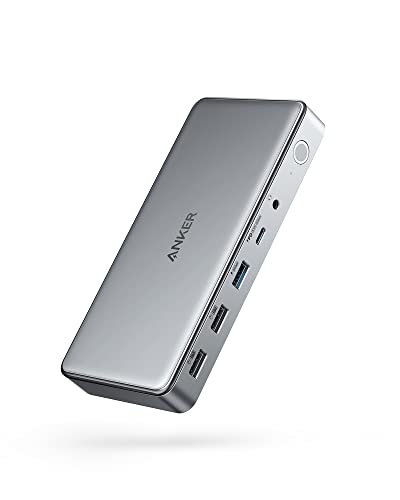
Anker 10-in-1 Triple Display USB-C Dock
Best for: Users needing triple displays and wired Ethernet
- Port Count
- 10-in-1 (what this guide is about)
- Host Interface
- USB-C
- Display Support
- Triple
- Max Resolution
- 4K@30Hz
- Power Delivery
- 100W
- Video Ports
- HDMI, DisplayPort
View on Amazon: Anker 10-in-1 Triple Display USB-C Dock Affiliate link
This 10-in-1 docking station expands a single USB-C port into three video outputs and multiple data connections. It supports triple displays with one HDMI port reaching 4K at 30Hz, while the second and third screens handle 1080p at 60Hz. The dock delivers 100W of power to your laptop and includes an Ethernet port for stable wired internet. It is designed for users who need to manage three monitors from one connection point without additional adapters.
Pros
- Supports triple monitor setups via DisplayLink technology
- Provides 100W Power Delivery for laptop charging
- Includes Gigabit Ethernet port for wired connectivity
- Offers 5 Gbps data transfer speeds on USB ports
Cons
- Primary HDMI output is limited to 4K at 30Hz
- Requires specific DisplayLink drivers for operation
- Heavier and bulkier than single-monitor USB-C hubs
Good fit if
- You need to run three displays from one laptop port
- You require a dedicated Ethernet connection for your setup
- You want to charge your laptop through the dock
Skip if
- You need 4K resolution at 60Hz on your main screen
- You prefer a plug-and-play setup without driver installation
- You only need to connect one or two monitors
Verdict: Anker DL6350 10-in-1 Triple Display Dock fits users who must drive three screens from a single USB-C port and need wired networking. It is less suitable for those requiring high refresh rates on the primary display.
Specifications side by side
| Spec | Anker PowerExpand 8-in-1 Dual HDMI USB-C Hub | Anker Nano 13-in-1 Dock with Detachable Hub | Selore Dual 4K HDMI USB-C Dock | Anker 332 5-in-1 USB-C Hub | UGREEN 7-in-1 Dual 4K HDMI USB-C Dock | Anker 10-in-1 Triple Display USB-C Dock |
|---|---|---|---|---|---|---|
| Host Interface | USB-C | USB-C | USB-C | USB-C | USB-C | USB-C |
| Display Support | Dual | Triple | Dual | 1 | Dual | Triple |
| Max Resolution | 4K @ 60Hz | 4K@60Hz | 4K@60Hz | 4K@30Hz | 4K@60Hz | 4K@30Hz |
| Power Delivery | 85W | 100W | 100W | 85W | 100W | 100W |
| Port Count | 8 | 13 | 8 | 5 | 7 | 10 |
| Video Ports | HDMI | HDMI, DisplayPort | HDMI | HDMI | HDMI | HDMI, DisplayPort |
| Max Data Speed | not stated | 10Gbps | 5Gbps | 5Gbps | 10Gbps | 5Gbps |
| Ethernet Speed | 1Gbps | Gigabit | not stated | not stated | not stated | not stated |
| Resolution | 4K UHD | not stated | 4K UHD | 4K UHD | 4K UHD | 4K UHD |
| Connectivity | USB-C, HDMI, Ethernet | USB-C, HDMI, DisplayPort, Ethernet, USB-A | USB-C, HDMI, USB-A | USB-C, HDMI, USB-A | USB-C, USB-A | HDMI, DisplayPort |
| Refresh Rate | not stated | not stated | 60Hz | not stated | 60Hz | not stated |
| Features | Card Reader | not stated | not stated | not stated | not stated | DisplayLink |
| Use | not stated | Office | not stated | not stated | not stated | not stated |
| Material | not stated | not stated | not stated | not stated | Aluminum | not stated |
| Recommended Use | not stated | Home | not stated | not stated | not stated | not stated |
| Dimensions | 4.65 × 2.01 × 0.69 inches | 3.74 × 1.57 × 5.51 inches | 4.5 × 2.1 × 0.7 inches | 4.78 × 1.59 × 0.45 inches | 3.1 × 0.8 × 0.49 inches | 6.7 × 3.15 × 0.96 inches |
| Weight | 3.2 ounces | not stated | 3.39 ounces | 1.44 ounces | 3.21 ounces | 1.6 ounces |
| Size | 8-in-1 USB C Hub | not stated | 9-in-1 | not stated | 7 in 1 | not stated |
| Color | Gray | Black | Grey | Black | Black or grey | Gray |
| Model | A83800A1 | A83C3 | SEUC0425 | A8355011 | 45365 | A83951A1 |
Frequently asked questions
Does a higher port count always mean better performance?
No. A higher count offers more connection points, not faster speeds. For example, the Anker 10-in-1 dock uses DisplayLink technology to drive three screens. This allows triple displays from one port. However, it may not support high refresh rates on the primary screen. You should check the specific features, not just the total number of ports.
Can I use a 13-in-1 dock for travel?
Yes, if it includes a detachable design. The Anker Nano 13-in-1 dock features a detachable hub. This design helps professionals manage both stationary and mobile setups. It provides a comprehensive port selection in a compact form. You can separate the hub for portability while keeping the main dock for your desk.
Is a 5-in-1 hub enough for dual monitors?
Usually not. A 5-in-1 hub typically supports only a single display. The Anker 5-in-1 USB-C Hub provides essential connectivity for single-display users. It includes one HDMI output for video. If you need dual monitors, you should look for a 7-in-1 or higher model with dual HDMI outputs or DisplayLink support.
Do all multi-port docks support Ethernet?
No. Ethernet support depends on the specific model. The Anker PowerExpand 8-in-1 includes wired Ethernet for stable networking. In contrast, the UGREEN 7-in-1 dock focuses on video and data without mentioning Ethernet. You must check the connectivity attributes. Do not assume all docks with many ports include a network interface.
What is the difference between 8-in-1 and 9-in-1 port counts?
The difference is the number of available interfaces. The Selore 9-in-1 dock offers more connections than an 8-in-1 model. Both can support dual 4K displays. The Selore model also includes 100W power delivery. You get an extra port for peripherals. Compare the specific port types to see which fits your device needs.
Are aluminum docks better than plastic ones?
Aluminum often provides better heat dissipation. The UGREEN 7-in-1 dock uses an aluminum build. This material helps manage temperature during heavy use. It also offers a sturdy feel. However, plastic models like the Anker 5-in-1 are lighter. Choose aluminum if you prioritize thermal management and durability in a compact package.