15 Best 8-in-1 Docking Stations, Compared
As an Amazon Associate we earn from qualifying purchases. Links on this page are affiliate links.
An 8-in-1 docking station expands a single laptop port into multiple display outputs, peripheral connections, and power delivery channels. We compared 15 models based strictly on the specifications published on their product listings.
The Anker PowerExpand 8-in-1 Dual HDMI USB-C Hub leads the list by pairing dual 4K display support with wired Ethernet connectivity and 85W pass-through charging in a compact 0.2-pound design. This guide helps you decide which video outputs, data transfer rates, and power capacities match your daily workflow and monitor setup.
Our top pick: HODO 8-in-1 USB-C Multi-Display Dock.
Quick picks
The best fit for you
- You need multi-monitor support with high pass-through power HODO 8-in-1 USB-C Multi-Display Dock It supports dual monitors and delivers 87W pass-through charging for your Windows workstation.
- You need dual 4K displays and wired Ethernet Anker PowerExpand 8-in-1 Dual HDMI USB-C Hub This hub includes an Ethernet port, dual 4K HDMI outputs, and 85W charging pass-through.
- You use dual DisplayPort monitors for your workstation MOKiN 8-in-1 Dual DisplayPort USB-C Dock It provides two DisplayPort outputs alongside 100W charging pass-through for Windows laptops.
- You want an integrated kickstand for desk elevation Mukiya Foldable Laptop Stand 8-in-1 USB-C Hub It integrates an adjustable kickstand with 4K HDMI output and USB-C peripheral ports.
Our 15 picks

HODO 8-in-1 USB-C Multi-Display Dock
Best for: multi-monitor Windows setups needing pass-through power
- Port Count
- 8-in-1 (what this guide is about)
- Host Interface
- USB-C
- Display Support
- Quadruple
- Max Resolution
- 4K@60Hz
- Power Delivery
- 87W
- Video Ports
- HDMI, DisplayPort, VGA
This 8-in-1 USB-C docking station expands your laptop with four video outputs: two HDMI ports, one DisplayPort, and one VGA port. It delivers up to 100W power input with 87W safe pass-through charging to keep your machine powered. Three USB 2.0 ports connect everyday accessories like mice and keyboards. It suits users who need versatile multi-monitor arrangements without needing high-speed USB data ports or integrated wired Ethernet.
Pros
- Four video output options: two HDMI, one DisplayPort, and one VGA
- Supports up to 100W power input with 87W safe pass-through charging
- Reaches 4K resolution at 60Hz over DisplayPort and primary HDMI
- Allows dual, triple, or quadruple display setups
Cons
- USB data ports are limited to USB 2.0 speeds up to 480Mbps
- Connecting VGA limits all attached external displays to 1080p
- External displays mirror rather than extend separately on macOS
Good fit if
- You need multiple video connections including DisplayPort, HDMI, and VGA.
- You want up to 87W pass-through charging to power your laptop.
- You use a Windows laptop with a DP 1.4 full-featured USB-C port.
Skip if
- You require high-speed USB 3.0 data transfers or an Ethernet port.
- You need extended dual or triple desktop screens on macOS.
- You run high-resolution monitors while relying on the VGA port.
Verdict: HODO 8-in-1 USB-C Multi-Display Dock provides exceptional multi-monitor connectivity with 87W pass-through charging for Windows workstations. It trades faster USB transfer speeds and Ethernet for extensive display connection options.

Anker PowerExpand 8-in-1 Dual HDMI USB-C Hub
Best for: Dual-monitor Windows laptop setups needing wired networking
- Port Count
- 8-in-1 (what this guide is about)
- Host Interface
- USB-C
- Display Support
- Dual
- Max Resolution
- 4K@60Hz
- Power Delivery
- 85W
- Video Ports
- HDMI
View on Amazon: Anker PowerExpand 8-in-1 Dual HDMI USB-C Hub
This 8-in-1 USB-C hub expands your laptop with two HDMI ports, an 85W Power Delivery input, two USB-A data ports, an Ethernet jack, and SD and microSD slots. You get single-screen output at 4K at 60Hz or dual-display support at 4K at 30Hz. It suits mobile desk setups requiring wired networking and dual monitors on Windows or ChromeOS laptops with DisplayPort Alt Mode support.
Pros
- Pass-through charging delivers up to 85W to host laptops
- Supports single 4K at 60Hz or dual 4K at 30Hz video output
- Includes Gigabit Ethernet alongside SD and microSD card slots
- Weighs 0.2 pounds for portable setups
Cons
- External displays mirror identically on macOS systems
- Incompatible with Linux operating systems
- Requires a separate 100W PD charger for maximum 85W pass-through
Good fit if
- You use Windows or ChromeOS and need dual 4K displays at 30Hz.
- You need wired Ethernet along with integrated SD card readers.
- You want up to 85W pass-through charging using a compatible USB-C charger.
Skip if
- You run Linux on your primary laptop.
- You need independent extended dual displays on macOS.
- You require 4K resolution at 60Hz across two simultaneous monitors.
Verdict: Anker PowerExpand 8-in-1 Dual HDMI Hub delivers balanced connectivity with dual 4K video, 85W charging pass-through, and Ethernet in a 0.2-pound enclosure. It functions effectively for Windows and ChromeOS users needing dual screens and media card access.

Selore 8-in-1 Dual HDMI USB-C Dock
Best for: Windows users needing dual 4K monitor support
- Port Count
- 8-in-1 (what this guide is about)
- Host Interface
- USB-C
- Display Support
- Dual
- Max Resolution
- 4K@60Hz
- Power Delivery
- 85W
- Video Ports
- HDMI
You get an 8-in-1 USB-C hub built for dual-display setups. It pairs two 4K at 60Hz HDMI outputs with 85W passthrough charging from a 100W Power Delivery input. Data connections include one 5Gbps USB-C port, two 5Gbps USB-A ports, and SD and microSD card slots running up to 104 Mbps. It suits Windows laptop users needing dual external displays, high-speed peripheral connections, and memory card access in a compact package.
Pros
- Dual HDMI outputs supporting up to 4K resolution at 60Hz
- 100W Power Delivery input delivering up to 85W passthrough charging
- Three 5Gbps USB ports across one USB-C and two USB-A connections
- Dedicated SD and microSD card slots operating at speeds up to 104 Mbps
Cons
- Does not support extended dual displays on macOS systems
- No power adapter or charging cable included in the box
- Lacks an integrated RJ45 Ethernet port
Good fit if
- You use a Windows laptop with a Thunderbolt or full-featured USB-C port for dual extended displays.
- You need SD and microSD card reading alongside standard 5Gbps USB connections.
- You already own a dedicated USB-C power supply for 85W passthrough charging.
Skip if
- You use a Mac laptop and require two independently extended external displays.
- You rely on a wired Ethernet connection for network access.
Verdict: Selore 8-in-1 Dual HDMI USB-C Dock delivers dual 4K 60Hz video output and 85W laptop charging for Windows setups. It covers core desktop connectivity if you do not require wired Ethernet or macOS multi-stream display extension.

VVB 8-in-1 USB-C Docking Station
Best for: Windows triple-monitor setups needing fast data transfer
- Port Count
- 8-in-1 (what this guide is about)
- Host Interface
- USB-C
- Display Support
- Triple
- Max Resolution
- 8K@30Hz
- Power Delivery
- 100W
- Video Ports
- HDMI, USB-C
This VVB 8-in-1 USB-C docking station expands a compatible laptop port into eight connections, including an 8K HDMI output and a 10Gbps USB-C video and data port. You get support for up to three external 4K displays on Windows systems, 100W Power Delivery pass-through, and gigabit Ethernet. It suits you if you need high-bandwidth 10Gbps data transfers alongside multi-monitor desktop setups.
Pros
- Supports single 8K@30Hz or triple 4K video outputs on Windows
- High-speed 10Gbps transfer rates on USB and Type-C ports
- 100W USB-C Power Delivery charging input
- Integrated 1000Mbps Gigabit Ethernet port
Cons
- MacBook setups restricted to mirrored external displays
- Requires full-featured USB-C with DP Alt Mode for video output
Good fit if
- You run a Windows laptop with DisplayPort 1.4 Alt Mode.
- You need 10Gbps data transfer speeds for external drives.
- You want up to three external 4K monitors on your desk.
Skip if
- You use macOS and need multiple extended external screens.
- You require dedicated native DisplayPort connections.
Verdict: VVB 8-in-1 USB-C Docking Station delivers fast 10Gbps data connectivity and multi-screen support up to 8K resolution. It provides a capable multi-display desktop hub for Windows laptops equipped with full-featured USB-C ports.

MOKiN 8-in-1 Dual DisplayPort USB-C Dock
Best for: Windows dual DisplayPort multi-monitor setups
- Port Count
- 8-in-1 (what this guide is about)
- Host Interface
- USB-C
- Max Resolution
- 4K@60Hz
- Power Delivery
- 100W
- Video Ports
- 2 DP, HDMI, VGA
- Max Data Speed
- 480Mbps
The MOKiN 8-in-1 Dual DisplayPort Dock expands your laptop with four display outputs, featuring two DisplayPort connections at 4K 60Hz, one HDMI port at 4K 60Hz, and one legacy VGA port at 1080p. It includes a 100W Power Delivery pass-through port alongside three USB 2.0 data ports. This hub suits you if you need DisplayPort monitor connectivity and multi-screen workstation setups on Windows laptops without needing high-speed USB data transfers.
Pros
- Dual DisplayPort and HDMI ports support 4K at 60Hz
- Provides up to 100W Power Delivery pass-through charging
- Includes legacy VGA video output at 1080p 60Hz
- Lightweight design at approximately 0.22 pounds
Cons
- All three USB data ports are limited to USB 2.0 480Mbps speeds
- Connected Mac laptops only support mirror mode, not extended mode
- Does not include an Ethernet port
Good fit if
- You need dual DisplayPort outputs running at 4K 60Hz.
- You use a Windows laptop with a full-featured USB-C port.
- You require 100W Power Delivery pass-through charging.
Skip if
- You require extended multi-monitor displays on a Mac laptop.
- You transfer large files and need USB 3.0 or faster data ports.
- You need a wired Ethernet connection.
Verdict: MOKiN 8-in-1 Dual DisplayPort Dock provides extensive video output flexibility with two DisplayPort connections and 100W charging pass-through. It is an effective multi-display option for Windows systems if you do not require USB 3.0 transfer speeds.

Selore&S-Global 8-in-1 Quad Video Dock
Best for: multi-monitor Windows setups requiring legacy VGA support
- Port Count
- 8-in-1 (what this guide is about)
- Host Interface
- USB-C
- Max Resolution
- 4K@60Hz
- Power Delivery
- 100W
- Video Ports
- HDMI, DisplayPort, VGA
- Connectivity
- USB-C, HDMI, DisplayPort, VGA
This 8-in-1 USB-C dock from Selore&S-Global focuses heavily on display connectivity. It gives you two HDMI ports, one DisplayPort output reaching up to 4K resolution, and an analog VGA port for legacy screens. The hub also includes a 100W USB-C Power Delivery input along with three USB 2.0 data ports. It suits Windows users who need multiple monitor options alongside basic peripheral connections.
Pros
- Four video options: two HDMI, one DisplayPort, and one VGA
- Supports up to 100W USB-C Power Delivery pass-through
- DisplayPort and primary HDMI support 4K resolution at 60Hz
Cons
- All USB data ports are limited to 480Mbps USB 2.0 speeds
- Lacks an Ethernet jack for wired internet connections
- macOS does not support different extended screen outputs via this dock
Good fit if
- You need multiple video connections, including HDMI, DisplayPort, and legacy VGA.
- You use a Windows laptop supporting full-featured USB-C, Thunderbolt, or USB4.
- You want up to 100W Power Delivery pass-through charging.
Skip if
- You need fast USB 3.0 or 10Gbps data speeds for external drives.
- You use a Mac and want separate desktop content on multiple external monitors.
- You need an RJ45 Ethernet port for wired network access.
Verdict: Selore&S-Global 8-in-1 Quad Video Dock pairs four display outputs with 100W power delivery for versatile Windows workstation setups. Its data ports are capped at USB 2.0 speeds, so it works best when display expansion outweighs transfer performance.

MOKiN 8-in-1 Triple Display Docking Station
Best for: mixed DisplayPort, HDMI, and VGA multi-monitor setups
- Port Count
- 8-in-1 (what this guide is about)
- Host Interface
- USB-C
- Display Support
- Triple
- Power Delivery
- 100W
- Video Ports
- HDMI, DisplayPort, VGA
- Max Data Speed
- 480Mbps
The MOKiN 8-in-1 Triple Display USB-C Dock expands your laptop with four video output options: two HDMI ports, one DisplayPort, and one legacy VGA port. It delivers 100W USB-C Power Delivery pass-through to power your host machine. Data connectivity includes two USB-A 2.0 ports and one USB-C 2.0 port running at 480Mbps. It suits you if you need versatile display routing.
Pros
- Four video output options: two HDMI, one DisplayPort, and one VGA
- 100W USB-C Power Delivery pass-through charging
- Triple display support on compatible systems
- 18-month warranty coverage
Cons
- USB data ports transfer at 480Mbps USB 2.0 speeds
- macOS limits external displays to mirrored mode only
Good fit if
- You need both modern digital and legacy VGA display connections.
- You require 100W USB-C pass-through charging for your laptop.
- You use a Windows computer with Thunderbolt or full-featured USB-C.
Skip if
- You require high-speed USB 3.0 data transfer rates.
- You use macOS and need multiple extended external displays.
Verdict: MOKiN 8-in-1 Triple Display USB-C Dock provides broad display flexibility with HDMI, DisplayPort, and VGA outputs plus 100W pass-through power. It fits multi-screen workstations that do not require high-speed USB peripheral data.

Mukiya Foldable Laptop Stand 8-in-1 USB-C Hub
Best for: elevating laptops while adding essential desk ports
- Port Count
- 8-in-1 (what this guide is about)
- Host Interface
- USB-C
- Max Resolution
- 4K@30Hz
- Power Delivery
- 90W
- Video Ports
- HDMI
- Max Data Speed
- 5Gbps
View on Amazon: Mukiya Foldable Laptop Stand 8-in-1 USB-C Hub
This unit merges an eight-in-one USB-C hub with a nine-level adjustable laptop stand. You get one 4K HDMI output capped at 30Hz, two 5Gbps USB-A ports, one USB-C data port, SD and TF slots, and 100W Power Delivery with up to 90W passthrough charging. It weighs 0.7 pounds and folds down for transport, making it suitable if you want an elevated screen and expanded ports in one compact piece of hardware.
Pros
- Built-in 9-level adjustable laptop stand holds up to 40 pounds
- Delivers up to 90W passthrough laptop charging via USB-C PD
- Folds down to 10.5 by 2.2 by 0.9 inches and weighs 0.7 pounds
- Includes both SD and TF card reader slots
Cons
- HDMI video output is limited to 4K at 30Hz
- SD and TF card transfer speeds top out at 25MB/s
- No Ethernet port for wired network access
Good fit if
- You want an integrated laptop stand with multiple height angles.
- You need up to 90W USB-C passthrough charging while using accessories.
- You prioritize a folding, 0.7-pound design for mobile setups.
Skip if
- You need 4K monitor output running at 60Hz.
- You require a wired Ethernet connection.
- You need multiple external display outputs.
Verdict: Mukiya Foldable Laptop Stand 8-in-1 USB-C Hub integrates essential peripheral ports directly into an adjustable aluminum stand. It provides convenient desk elevation and basic port expansion, though video output is limited to 4K at 30Hz.

Anker 8-in-1 USB-C Hub with Ethernet
Best for: mixed HDMI and VGA multi-monitor setups
- Port Count
- 8-in-1 (what this guide is about)
- Host Interface
- USB-C, USB4, Thunderbolt
- Display Support
- Triple
- Max Resolution
- 4K@60Hz
- Power Delivery
- 85W
- Video Ports
- HDMI, VGA
This Anker 8-in-1 USB-C hub expands your laptop with HDMI supporting 4K video at 60Hz, a 1080p VGA port, Ethernet, and 5Gbps USB-A and USB-C data ports. It supports up to 85W pass-through Power Delivery to keep your laptop charged. This hub suits you if you need multi-monitor output across mixed display inputs, wired networking, and standard peripheral connections on your desk.
Pros
- Supports 4K video at 60Hz via HDMI
- Pass-through charging up to 85W with Power Delivery
- Includes Gigabit Ethernet and legacy 1080p VGA output
- 5Gbps data transfer speeds across USB-A and USB-C ports
Cons
- Not compatible with Linux operating systems
- macOS limits external displays to mirror mode only
- Requires a separate 100W PD charger for maximum 85W pass-through power
Good fit if
- You need both modern 4K HDMI and legacy 1080p VGA display connections.
- You want up to 85W pass-through laptop charging alongside wired Ethernet.
- You use Windows or ChromeOS and want multi-monitor output.
Skip if
- You run Linux on your primary machine.
- You use macOS and require extended desktop across multiple external monitors.
Verdict: Anker 8-in-1 USB-C Hub with 4K HDMI provides versatile multi-display options and 85W pass-through charging in a compact format. It works well for Windows workstations needing Ethernet and mixed video outputs.

Selore 8-in-1 USB-C Hub
Best for: single 4K 60Hz monitor portable setups
- Port Count
- 8-in-1 (what this guide is about)
- Host Interface
- USB-C
- Max Resolution
- 4K@60Hz
- Power Delivery
- 87W
- Video Ports
- HDMI, USB-C
- Max Data Speed
- 5Gbps
This portable 8-in-1 hub gives you single-display output up to 4K resolution at 60Hz over HDMI. It provides 100W Power Delivery pass-through delivering up to 87W to your laptop, alongside two 5Gbps USB 3.0 ports, a USB-C data port, and microSD and TF card slots. At under 0.02 pounds, it suits you if you need a lightweight travel adapter for basic peripheral connectivity and smooth 4K video.
Pros
- HDMI port supports 4K resolution at 60Hz
- 100W Power Delivery input with 87W host charging output
- Two USB 3.0 ports delivering up to 5Gbps transfer speeds
- Dedicated USB-C data port alongside separate charging port
Cons
- Only supports connecting one external HDD or SSD at a time
- Does not support Apple USB SuperDrive
- Limited to a single external display output
Good fit if
- You need 4K video output at a 60Hz refresh rate
- You want up to 87W pass-through charging for your laptop
- You require dedicated SD and TF card slots alongside standard USB ports
Skip if
- You need dual or triple external monitor support
- You plan to run multiple bus-powered hard drives at once
- You require compatibility with an Apple USB SuperDrive
Verdict: Selore 8-in-1 4K 60Hz USB-C Hub delivers smooth 4K video at 60Hz and 87W laptop charging in a lightweight, pocketable build. It serves as a dependable travel companion for single-monitor USB-C setups.

Baseus Quadruple Display 8-in-1 USB-C Dock
Best for: multi-monitor workstations needing physical screen controls
- Port Count
- 8-in-1 (what this guide is about)
- Host Interface
- USB-C
- Display Support
- Quadruple
- Max Resolution
- 8K@30Hz
- Power Delivery
- 92W
- Video Ports
- DisplayPort, HDMI, VGA
The Baseus Quadruple Display 8-in-1 USB-C Dock connects up to four displays using DisplayPort, HDMI, and VGA outputs. You get up to 8K at 30Hz over DisplayPort, 5Gbps data speeds via USB 3.0, and 92W passthrough power to your laptop from a 100W input. Dedicated hardware buttons allow you to turn off individual connected screens instantly. It suits power users who require multi-monitor workstations with dedicated display shutoff controls.
Pros
- DisplayPort output supports up to 8K at 30Hz
- Provides up to 92W laptop charging and 20W USB-C output
- Individual hardware buttons to power down connected displays
- Offers DisplayPort, HDMI, and VGA video outputs
Cons
- USB data transfer rates max out at 5Gbps
- No integrated Ethernet port or memory card reader listed
Good fit if
- You need to connect up to four monitors using DisplayPort, HDMI, and VGA.
- You want physical buttons to quickly power down specific displays for privacy.
- You want a separate 20W USB-C output for charging phones alongside host charging.
Skip if
- You require USB data transfer speeds faster than 5Gbps.
- You need a wired Ethernet connection built directly into your dock.
Verdict: Baseus Quadruple Display 8-in-1 USB-C Dock delivers high-resolution DisplayPort output up to 8K at 30Hz alongside dedicated physical monitor controls. It provides versatile multi-display expansion with 92W host power delivery and auxiliary 20W device charging.

UANTIN 8-in-1 Triple Display USB-C Dock
Best for: Windows multi-monitor setups needing DisplayPort and HDMI
- Port Count
- 8-in-1 (what this guide is about)
- Host Interface
- USB-C, Thunderbolt
- Display Support
- Triple
- Max Resolution
- 4K@60Hz
- Power Delivery
- 100W
- Video Ports
- HDMI, DisplayPort
The UANTIN 8-in-1 Triple Display USB-C Dock connects to your laptop using a built-in nylon braided cable to provide three video outputs: dual HDMI and one DisplayPort at up to 4K@60Hz. It also adds three 5Gbps USB-A ports, a 5Gbps USB-C data port, and 100W Power Delivery pass-through charging. It suits Windows users who want to run up to three external monitors alongside standard USB accessories.
Pros
- Three 4K@60Hz display outputs with two HDMI and one DisplayPort
- 100W USB-C Power Delivery pass-through charging port
- Four 5Gbps data ports across three USB-A and one USB-C
- Aluminum alloy housing with an integrated nylon braided cable
Cons
- External displays mirror identical content on macOS
- No Ethernet port, SD card reader, or audio jack
Good fit if
- You use a Windows laptop with DP 1.4 support and need triple external displays.
- You require a setup with both DisplayPort and dual HDMI connections.
- You want 100W power pass-through with multiple 5Gbps USB peripheral ports.
Skip if
- You use macOS and require multiple independent extended displays.
- You need an RJ45 Ethernet port for wired internet connectivity.
Verdict: UANTIN 8-in-1 Triple Display USB-C Dock provides high-density video output with dual HDMI and DisplayPort options for Windows laptops. It offers strong display flexibility and 5Gbps peripheral connectivity, provided you do not require wired Ethernet or independent multi-display output on Mac.

UGREEN Triple Display 4K USB-C Dock
Best for: Windows users running triple 4K monitor setups
- Port Count
- 8-in-1 (what this guide is about)
- Host Interface
- USB-C
- Display Support
- Triple
- Max Resolution
- 4K
- Power Delivery
- 85W
- Video Ports
- HDMI, DisplayPort
This 8-in-1 USB-C hub expands your laptop with two HDMI outputs and one DisplayPort connection, supporting up to three 4K displays on Windows systems. You get four high-speed 10Gbps USB 3.2 Gen 2 ports split evenly between USB-A and USB-C for fast data transfers. The dock accepts up to 100W Power Delivery to deliver 85W pass-through charging. It suits multi-monitor workstation setups requiring fast peripheral connectivity without extra bulk.
Pros
- Three 4K video outputs via two HDMI ports and one DisplayPort
- Four 10Gbps USB 3.2 Gen 2 ports across USB-C and USB-A
- Up to 85W laptop pass-through charging from 100W PD input
Cons
- No integrated Ethernet port or memory card reader
- Mac systems limited to SST display mirroring
- USB-C 10Gbps data ports do not support video output or charging
Good fit if
- You need to drive up to three 4K displays from a Windows laptop
- You connect high-speed 10Gbps USB-A or USB-C storage drives
- You require up to 85W pass-through power delivery
Skip if
- You need a wired RJ45 Ethernet network connection
- You use macOS and want extended independent displays across three external screens
Verdict: UGREEN Triple Display 4K USB-C Dock delivers triple 4K video outputs and fast 10Gbps transfer speeds for multi-screen Windows setups.

UGREEN 8-in-1 Triple Display USB-C Dock
Best for: triple-monitor Windows setups needing fast USB ports
- Port Count
- 8-in-1 (what this guide is about)
- Host Interface
- USB-C
- Display Support
- Triple
- Max Resolution
- 4K
- Power Delivery
- 85W
- Video Ports
- HDMI, VGA
This UGREEN 8-in-1 USB-C dock expands your laptop with two 4K HDMI ports, a 1080p VGA port, four 10 Gbps USB 3.2 Gen 2 ports, and 100W Power Delivery. It supplies up to 85W of pass-through charging to your computer while retaining 15W for dock operation. It suits you if you need multi-monitor output and fast peripheral data transfers on a Windows or macOS laptop setup.
Pros
- Four 10 Gbps USB 3.2 Gen 2 ports across two USB-A and two USB-C connectors
- Triple display support using two HDMI ports and one legacy VGA port
- 100W Power Delivery input provides up to 85W laptop pass-through charging
Cons
- USB-C 10 Gbps data ports do not support video output or device charging
- Dual and triple display modes are limited to 1080p at 60Hz resolution
- Mac systems do not support MST triple display extension
Good fit if
- You need four 10 Gbps USB ports for high-speed external storage and peripherals.
- You want to connect legacy VGA monitors alongside HDMI displays.
- You use a Windows laptop that supports MST multi-monitor setups.
Skip if
- You require external display resolutions above 1080p in multi-monitor mode.
- You need video output or laptop charging from the secondary USB-C ports.
- You want extended independent triple displays on macOS.
Verdict: UGREEN 8-in-1 Triple Display USB-C Dock delivers high-speed 10 Gbps USB connectivity and triple-display support for multi-screen desktop workstations. Its dual HDMI, legacy VGA, and 85W pass-through charging cover versatile desktop docking needs.
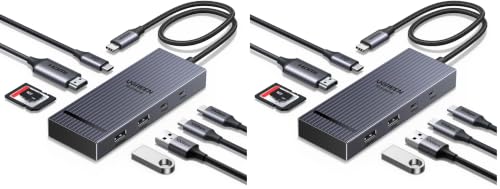
UGREEN 8-in-1 USB-C Hub 2-Pack
Best for: equipping two separate single-display workstations
- Port Count
- 8-in-1 (what this guide is about)
- Host Interface
- USB-C
- Max Resolution
- 4K@60Hz
- Power Delivery
- 85W
- Video Ports
- HDMI
- Max Data Speed
- 10Gbps
This bundle provides two matching 8-in-1 USB-C hubs designed for single-display desktop or mobile setups. Each hub features one HDMI port supporting 4K resolution at 60Hz, two 10 Gbps USB-C data ports, two 10 Gbps USB-A ports, an SD/microSD card reader, and 100W Power Delivery pass-through delivering up to 85W to your laptop. It suits you if you need to equip two distinct workstations with identical high-speed data connectivity.
Pros
- Supports 4K video output at 60Hz over HDMI
- Four 10 Gbps data ports split between USB-C and USB-A
- Provides up to 85W pass-through charging with 100W PD input
- Includes both SD and microSD card slots
- Supplied as a two-pack bundle
Cons
- Single HDMI port offers no multi-monitor connectivity
- No integrated RJ45 Ethernet port for wired networks
- Reserves 15W of power for internal hub operation
Good fit if
- You want two matching single-monitor hubs in one package.
- You need 10 Gbps transfer rates across USB-C and USB-A accessories.
- You frequently offload photos and media from SD or microSD cards.
Skip if
- You require dual or triple external display configurations.
- You need a dedicated Ethernet port for wired network access.
Verdict: UGREEN 8-in-1 USB-C Hub 2-Pack delivers fast 10 Gbps data transfers and 4K video at 60Hz across two separate multiport adapters. It is an ideal package if you manage two standard single-screen desk setups.
Specifications side by side
| Spec | HODO 8-in-1 USB-C Multi-Display Dock | Anker PowerExpand 8-in-1 Dual HDMI USB-C Hub | Selore 8-in-1 Dual HDMI USB-C Dock | VVB 8-in-1 USB-C Docking Station | MOKiN 8-in-1 Dual DisplayPort USB-C Dock | Selore&S-Global 8-in-1 Quad Video Dock | MOKiN 8-in-1 Triple Display Docking Station | Mukiya Foldable Laptop Stand 8-in-1 USB-C Hub | Anker 8-in-1 USB-C Hub with Ethernet | Selore 8-in-1 USB-C Hub | Baseus Quadruple Display 8-in-1 USB-C Dock | UANTIN 8-in-1 Triple Display USB-C Dock | UGREEN Triple Display 4K USB-C Dock | UGREEN 8-in-1 Triple Display USB-C Dock | UGREEN 8-in-1 USB-C Hub 2-Pack |
|---|---|---|---|---|---|---|---|---|---|---|---|---|---|---|---|
| Host Interface | USB-C | USB-C | USB-C | USB-C | USB-C | USB-C | USB-C | USB-C | USB-C, USB4, Thunderbolt | USB-C | USB-C | USB-C, Thunderbolt | USB-C | USB-C | USB-C |
| Display Support | Quadruple | Dual | Dual | Triple | not specified | not specified | Triple | not specified | Triple | not specified | Quadruple | Triple | Triple | Triple | not specified |
| Max Resolution | 4K@60Hz | 4K@60Hz | 4K@60Hz | 8K@30Hz | 4K@60Hz | 4K@60Hz | not specified | 4K@30Hz | 4K@60Hz | 4K@60Hz | 8K@30Hz | 4K@60Hz | 4K | 4K | 4K@60Hz |
| Power Delivery | 87W | 85W | 85W | 100W | 100W | 100W | 100W | 90W | 85W | 87W | 92W | 100W | 85W | 85W | 85W |
| Port Count | 8 | 8 | 8 | 8 | 8 | 8 | 8 | 8 | 8 | 8 | not specified | 8 | 8 | 8 | 8 |
| Video Ports | HDMI, DisplayPort, VGA | HDMI | HDMI | HDMI, USB-C | 2 DP, HDMI, VGA | HDMI, DisplayPort, VGA | HDMI, DisplayPort, VGA | HDMI | HDMI, VGA | HDMI, USB-C | DisplayPort, HDMI, VGA | HDMI, DisplayPort | HDMI, DisplayPort | HDMI, VGA | HDMI |
| Max Data Speed | 480Mbps | not specified | 5Gbps | 10Gbps | 480Mbps | not specified | 480Mbps | 5Gbps | 5Gbps | 5Gbps | 5Gbps | 5Gbps | 10Gbps | 10Gbps | 10Gbps |
| Ethernet Speed | not specified | not specified | not specified | 1Gbps | not specified | not specified | not specified | not specified | not specified | not specified | not specified | not specified | not specified | not specified | not specified |
| Resolution | not specified | 4K UHD | not specified | not specified | not specified | 4K UHD | not specified | 4K UHD | 4K UHD | 4K UHD | 4K UHD | not specified | 4K UHD | 4K UHD | 4K UHD |
| Connectivity | USB-C | USB-C, HDMI, Ethernet | USB-C, HDMI | USB-C, HDMI | USB-C, HDMI, DisplayPort, VGA | USB-C, HDMI, DisplayPort, VGA | USB-C, HDMI, DisplayPort, VGA | USB-C, HDMI | USB-C, HDMI, Ethernet, VGA | USB-C, HDMI | USB-C, HDMI, DisplayPort, USB-A, VGA | USB-C, HDMI, DisplayPort | USB-C, DisplayPort | USB-C, HDMI, USB-A, VGA | USB-C, HDMI |
| Refresh Rate | not specified | not specified | not specified | not specified | not specified | not specified | not specified | not specified | 60Hz | 60Hz | not specified | not specified | not specified | not specified | 60Hz |
| Features | not specified | not specified | not specified | not specified | not specified | not specified | not specified | Kickstand | not specified | not specified | not specified | not specified | not specified | not specified | not specified |
| Dimensions | not specified | 4.65 × 2.01 × 0.69 inches | 5 × 0.7 × 0.13 inches | not specified | not specified | not specified | 5.47 × 3.19 × 0.75 inches | not specified | 4.5 × 2.1 × 0.7 inches | not specified | not specified | not specified | 5.28 × 2.24 × 0.63 inches | 5.28 × 2.27 × 0.63 inches | 4.69 × 1.77 × 0.63 inches |
| Weight | not specified | 3.2 ounces | 3.53 ounces | not specified | 3.53 ounces | not specified | not specified | 11.2 ounces | 3.56 ounces | not specified | not specified | not specified | 8.47 ounces | not specified | 5.64 ounces |
| Size | 8-in-1 | 8-in-1 USB C Hub | 8-in-1 | 4.6 inches | not specified | 8-IN-1 | 2 HDMI+DP+VGA | not specified | 8-in-1 USB-C Hub | Portable | small | 11INCH | not specified | not specified | USB C (Pack of 2) |
| Color | Black | Gray | Grey | Medium Gray | Grey | White | 8 in 1 | black | Gray | Dark Grey | black | Grey | grey | grey | black |
| Model | not specified | A83800A1 | SEUC0422 | not specified | not specified | Dual HDMI Docking Station | not specified | HUB-M48 | A8379 | USB C Hub HDMI Adapter | not specified | Docking Station 3 Monitors | 35625 | 35588 | 75027 |
If you track compact cookware specifications alongside your desktop gear, you can examine best 8 Inch skillets sorted strictly by base diameter, weight, and construction material.
How to Choose an 8-in-1 Docking Station
-
Match Pass-Through Charging Power
Examine your laptop power adapter before picking a hub. 8-in-1 docking stations draw internal power to operate their ports, which reduces the wattage passed to your machine. Standard options offer 85W to 100W input power delivery. For power-hungry setups, the Baseus Quadruple Display 8-in-1 USB-C Dock supplies 92W host power delivery alongside dedicated auxiliary 20W device charging. If your laptop requires high wattage under load, ensure the station's stated pass-through meets your system requirements so your battery continues to charge steadily during heavy work sessions.
-
Verify Video Resolution and Refresh
Examine the refresh rate specifications if you connect external monitors. While many hubs list 4K resolution, basic models output 4K video at 30Hz, which creates visible cursor lag during daily navigation. For smooth productivity or multimedia playback, target hubs that support 4K at 60Hz. The Selore 8-in-1 USB-C Hub provides dedicated 4K 60Hz video output for a single external display. If you run ultra-high-resolution hardware, verify whether the hub supports high bandwidth outputs such as 8K resolution to match your monitor capabilities.
-
Check Operating System Display Support
Review your laptop operating system before selecting a multi-display dock. Many hubs provide dual or triple video ports, including HDMI, DisplayPort, and VGA, but handle multi-stream transport differently across platforms. Windows systems commonly support extending different content across two or three separate screens. In contrast, macOS often mirrors external screens when attached to standard hubs. The UANTIN 8-in-1 Triple Display USB-C Dock, for example, powers triple monitors on Windows setups but cannot provide independent multi-display output on Mac. Always verify operating system display support prior to purchasing.
-
Select 10Gbps USB Transfer Speeds
Assess your data transfer requirements if you use external solid-state drives or transfer large files. Standard USB connections often operate at 5Gbps, but heavy file workflows benefit from hubs equipped with 10Gbps USB ports. The VVB 8-in-1 USB-C Docking Station provides 10Gbps data connectivity to move files quickly between drives and your computer. If your workstation relies primarily on input peripherals like keyboards and mice, slower USB ports suffice. However, choosing 10Gbps transfer speeds prevents bottlenecks when moving high-resolution media across external storage drives on modern full-featured USB-C laptops.
-
Prioritize Dedicated Ethernet Ports
Consider your networking environment when reviewing connectivity specs. While built-in Wi-Fi handles routine browsing, docking stations with dedicated Ethernet ports provide stable, low-latency internet connections for video conferencing and large downloads. Not all 8-in-1 hubs include a network jack, as some allocate those ports to extra video or USB connections instead. The Anker 8-in-1 USB-C Hub with Ethernet integrates a wired network port alongside video outputs and pass-through charging. If you work in environments with congested wireless networks, verify that Ethernet is explicitly listed among the eight available ports.
-
Evaluate Form Factor and Mounting
Assess the physical form factor of the dock based on your workspace setup. Most 8-in-1 docking stations are pocket-sized dongles weighing around 0.2 to 0.3 pounds, designed to lie flat on a desk or travel in a bag. However, specialized designs integrate port hubs directly into functional workstation accessories. The Mukiya Foldable Laptop Stand 8-in-1 USB-C Hub combines an aluminum kickstand with dock ports, elevating your screen to improve posture while cutting cable clutter. If desk space is restricted, integrated stands save surface area compared to loose hubs.
Frequently asked questions
Can an 8-in-1 docking station support three external monitors?
Yes, select 8-in-1 docking stations support triple-monitor setups on Windows laptops. Models like the MOKiN 8-in-1 Triple Display dock and the UANTIN 8-in-1 dock provide triple display support using dual HDMI and DisplayPort connections. The UGREEN model 35625 also delivers triple 4K video outputs. Check your operating system compatibility and laptop port capabilities before connecting.
Do all 8-in-1 USB-C docking stations include an Ethernet port?
No, many 8-in-1 docks omit wired Ethernet to make room for extra display connections. For instance, the Anker PowerExpand 8-in-1 and Anker model A8379 include Ethernet ports for wired networking. In contrast, models like the HODO 8-in-1, Selore SEUC0422, and UANTIN 8-in-1 dock leave out Ethernet entirely. You should verify port specifications beforehand if you need a wired setup.
Can an 8-in-1 docking station output 8K resolution video?
Yes, certain 8-in-1 docking stations support 8K video output when connected to compatible host systems. The VVB 8-in-1 dock supports multi-screen setups with resolutions up to 8K, while the Baseus Quadruple Display dock supports 8K video at 30Hz through DisplayPort. To achieve 8K output, you must pair the dock with a laptop and a monitor that both support that resolution.
Do 8-in-1 USB-C docks support independent extended displays on Mac?
Most standard 8-in-1 USB-C docks do not support multiple independent extended displays on macOS. Docks such as the Selore SEUC0422 and UANTIN 8-in-1 explicitly do not support multi-stream extended screens on Mac operating systems. External monitors will mirror rather than extend independently. You should verify operating system display limitations before buying if you require multiple unique desktop screens.
Can you get 10Gbps data transfer speeds from an 8-in-1 dock?
Yes, select 8-in-1 docks provide USB ports running at 10Gbps data transfer speeds. For example, the VVB 8-in-1 dock, the UGREEN model 35625, UGREEN model 35588, and the UGREEN 2-Pack all feature 10Gbps transfer capabilities. In contrast, models prioritizing extra video ports, such as the Selore quad dock, cap data at USB 2.0. Check port specs carefully.
Can you find an 8-in-1 USB-C dock built into a laptop stand?
Yes, some 8-in-1 hubs integrate directly into physical desk hardware. The Mukiya Foldable Laptop Stand 8-in-1 USB-C Hub features an adjustable aluminum stand with built-in ports, weighing 11.2 ounces. It gives you 4K HDMI video output capped at 30Hz along with peripheral expansion. This design elevates your laptop screen while saving desk space and cutting down cable clutter.
Do 8-in-1 docking stations support legacy VGA monitors?
Yes, multiple 8-in-1 docking stations include legacy VGA ports alongside modern digital connections. For example, the MOKiN 8-in-1 Dual DisplayPort dock, Selore&S-Global Quad Video dock, Anker A8379, and UGREEN model 35588 all provide VGA outputs. These docks allow you to connect older office monitors or projectors without separate video adapters, giving you flexible connectivity options across older displays.