MOKiN 5-in-1 Dual USB-C Monitor Review (2026): A Spec-Based Look
As an Amazon Associate we earn from qualifying purchases. Links on this page are affiliate links.
This mokin USB c splitter dual review focuses on the MOKiN 5-in-1 Hub, a compact adapter designed to expand your laptop’s connectivity. It transforms a single USB 4 or Thunderbolt 4 port into a multi-device workstation. The two defining specs are its ability to drive dual 4K@60Hz displays and its 100W power delivery pass-through. This device targets users who need to extend their workspace without buying a dock. It relies on DP Alt Mode technology to send video signals. The hub also includes high-speed data ports for peripherals. You get five total ports in a small, lightweight package. This spec-based look explains who benefits from these exact capabilities.
What stands out
- Dual 4K@60Hz video output via USB-C
- 100W PD pass-through charging (87W to device)
- Two USB-C 3.1 data ports at 10Gbps
- Compact 1.92-ounce weight for portability
- Compatible with Thunderbolt 4 and USB 4 hosts
Who it fits
Good fit for
This hub suits Windows users with Thunderbolt 4 or USB 4 laptops who need two external monitors. It is ideal for professionals working with USB-C monitors who want to keep their desk tidy. You will benefit if you need to charge your laptop while connecting storage or other peripherals. The 10Gbps data ports support fast file transfers. It also works well with Steam Deck or Android devices that support DP Alt Mode. If you rely on a single port for video and data, this setup simplifies your connections effectively.
Who should skip it
You should look elsewhere if you use a Mac. The data states that dual-monitor MST functionality is not supported on macOS systems. You will only get a single display on Apple devices. Also, skip this if your laptop lacks Thunderbolt 4 or USB 4 support. The hub requires DP Alt Mode to function for video output. If you need HDMI outputs, this USB-C only model will not work for you. Additionally, the charger is not included, so you must provide your own power brick for pass-through charging.
Verdict: The MOKiN 5-in-1 Hub is a solid choice for Windows users needing dual 4K displays and fast charging. It fits well in setups requiring Thunderbolt 4 or USB 4 connectivity.
Key specs explained for MOKiN Hub
Max Resolution: 4K@60Hz
This adapter supports dual monitors running at 4K resolution with a 60Hz refresh rate. You get sharp, fluid images for work or media. This matches the standard for most portable monitors. It ensures smooth motion without stuttering. Check your laptop and monitors to confirm they support this output level for the best experience.
Host Interface: USB4, Thunderbolt 4
The hub requires a host port that supports USB4 or Thunderbolt 4 standards. This ensures sufficient bandwidth for dual 4K displays. Standard USB-C ports may not work for dual screens. Verify your laptop has these specific ports. This compatibility is critical for achieving the advertised dual-monitor performance without signal loss.
Power Delivery: 87W
You can pass up to 87W of power from your charger to your laptop through the hub. This allows you to charge your device while using it. Most laptops require less than this amount. It keeps your workflow uninterrupted. Ensure your charger meets the power requirements for stable operation during extended use sessions.
Max Data Speed: 10Gbps
The data ports transfer information at speeds up to 10Gbps. This is faster than standard USB 3.0 speeds. It benefits you when moving large files between storage devices and your computer. This speed is adequate for most external drives. It ensures quick data access without significant delays during file transfers.
Display Support: Dual
This hub enables connection to two external monitors simultaneously. It expands your workspace significantly for multitasking. You can run applications side by side on separate screens. This feature is ideal for productivity-focused setups. Note that this dual-display function is specific to Windows systems and not supported on macOS devices.
Build, Size, And Layout
The listing describes the MOKiN UC2208 as a compact, 5-in-1 USB-C hub. It weighs 1.92 ounces and measures roughly 0.6 to 2 inches in height, depending on the specific variation you choose. The finish is listed as grey, though some options appear black. This small form factor means it fits easily into a laptop sleeve or bag. You can carry it without adding significant bulk to your setup.
The layout places five ports on a single unit. You get two USB-C video ports for your monitors, two USB-C 3.1 data ports, and one 100W PD charging port. The data ports support speeds up to 10Gbps. This arrangement keeps your desk tidy by centralizing connections. You do not need multiple adapters cluttering your workspace. The single input connects to your laptop, while the outputs fan out to your peripherals.
According to the listing, the device uses an upgraded professional chip to handle dual 4K@60Hz video via DP Alt Mode 1.4. It supports MST/SST modes for Windows laptops with Thunderbolt 4 or USB 4. This chip choice ensures stable performance for multitasking. The design prioritizes function over fancy aesthetics. You get a straightforward tool that expands your screen real estate and connectivity without taking up much space.
Setup and daily workflow use
Setting up this hub requires a laptop with USB4 or Thunderbolt 4 support. You must use a device that enables DisplayPort Alt Mode. The listing notes that dual-monitor functionality is exclusive to Windows systems using MST or SST modes. macOS users cannot activate the second screen through this adapter. You connect your single laptop port to the hub, then attach two USB-C monitors. This configuration turns one port into a dual-monitor workstation. You also plug in storage devices into the two USB-C 3.1 data ports. These ports support 10Gbps transfer speeds. For power, you connect a charger to the PD port. The hub passes up to 87W of power to your laptop. This keeps your device charged while you work. The setup is straightforward if your hardware matches the requirements. You can connect peripherals like keyboards or drives to the available ports. The hub supports various devices, including Steam Deck and Android gadgets. However, you must verify your laptop’s compatibility before purchasing. The weight is 1.92 ounces, making it easy to carry. You get a stable connection for multitasking across multiple screens. Just remember that the charger and cables are not included. You need to provide your own power adapter and display cables to complete the setup.
Before You Buy This Hub
Owning this hub means you need specific cables and power. The listing states that the charger and cable are not included. You must purchase a USB-C cable that supports DP Alt Mode for video. You also need a USB-C power adapter for the PD port. This adapter delivers up to 87W pass-through charging. Ensure your laptop supports Thunderbolt 4 or USB 4. Dual monitor use requires Windows. macOS systems do not support dual displays with this device. Keep the hub clean with a dry cloth. Store it in a safe place to avoid damage. This hub fits well if you need dual 4K monitors on a Windows laptop. It does not work for Mac users seeking dual screens. Check your laptop ports before buying. Make sure you have the right cables. Verify your operating system compatibility. This ensures you get the full 4K@60Hz experience. Avoid buying if you use a Mac for dual monitors.
Check before you buy
- Verify your laptop has Thunderbolt 4 or USB 4 ports.
- Confirm your OS is Windows for dual monitor support.
- Purchase a USB-C cable that supports DP Alt Mode.
- Get a USB-C power adapter for pass-through charging.
The product at a glance
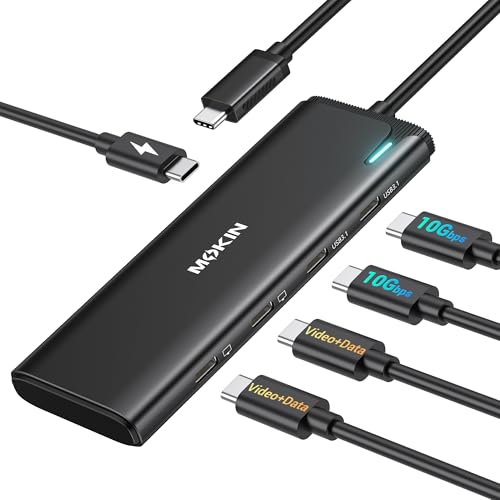
MOKiN 5-in-1 Dual USB-C Monitor Hub
Best for: Windows laptops with Thunderbolt 4 or USB4
- Host Interface
- USB4, Thunderbolt 4
- Display Support
- Dual
- Max Resolution
- 4K@60Hz
- Power Delivery
- 87W
- Port Count
- 5
- Video Ports
- USB-C
View on Amazon: MOKiN 5-in-1 Dual USB-C Monitor Hub Affiliate link
This MOKiN hub transforms a single USB4 or Thunderbolt 4 port into a dual-monitor workstation. It supports dual 4K@60Hz video output via DP Alt Mode 1.4. The device includes two 10Gbps data ports and a 100W PD charging port. It weighs 1.92 ounces and fits compact setups. You should use this if you need dual displays on Windows laptops with Thunderbolt 4 or USB4. It is not compatible with macOS for dual-monitor use.
Pros
- Dual 4K@60Hz video output via DP Alt Mode 1.4
- 100W Power Delivery pass-through charging
- Two USB-C 3.1 ports with 10Gbps data speed
- Compact 1.92-ounce weight
Cons
- Dual-monitor MST mode is not supported on macOS
- Requires a laptop with Thunderbolt 4 or USB4 compatibility
- Charger and cable are not included
Good fit if
- You use a Windows laptop with Thunderbolt 4 or USB4
- You need dual 4K@60Hz displays from a single port
- You want high-speed data transfer alongside video output
Skip if
- You use a macOS system for dual monitors
- Your laptop lacks Thunderbolt 4 or USB4 support
- You need HDMI output instead of USB-C video
Verdict: MOKiN 5-in-1 USB-C Dual Monitor Hub is a solid choice for Windows users needing dual 4K displays. It delivers stable video and fast data transfer for compatible Thunderbolt 4 laptops.
Specifications side by side
| Spec | MOKiN 5-in-1 Dual USB-C Monitor Hub |
|---|---|
| Host Interface | USB4, Thunderbolt 4 |
| Display Support | Dual |
| Max Resolution | 4K@60Hz |
| Power Delivery | 87W |
| Port Count | 5 |
| Video Ports | USB-C |
| Max Data Speed | 10Gbps |
| Resolution | 4K UHD |
| Connectivity | USB-C, DisplayPort |
| Refresh Rate | 60Hz |
| Weight | 1.92 ounces |
| Size | 5-in-1-Black |
| Color | Grey |
| Model | UC2208 |
Frequently asked questions
Does the MOKiN 5-in-1 hub support dual 4K monitors?
Yes, this hub supports dual 4K UHD displays. It maintains a 60Hz refresh rate for smooth video output. This setup works best with Windows laptops that have Thunderbolt 4 or USB4 ports. You get sharp images for both screens simultaneously.
Is this hub compatible with MacBooks?
No, dual monitor functionality is exclusive to Windows systems. The listing notes that macOS does not support the dual-monitor setup on this device. You can still use single displays, but you cannot run two 4K screens at once on a Mac.
What ports are included on the MOKiN UC2208?
The device is a 5-in-1 hub featuring USB-C and DisplayPort connectivity. It allows you to connect multiple peripherals while driving video output. The compact design weighs just 1.92 ounces. It fits easily into your laptop bag for mobile use.
Do I need a special cable for video output?
Yes, you must use a USB-C cable that supports DisplayPort Alt Mode. The listing states that the charger and cable are not included. You need to purchase a compatible cable separately to ensure your dual monitors receive the correct video signal.
Can I use this hub with Thunderbolt 3 laptops?
The best use case is for Thunderbolt 4 or USB4 laptops. The review highlights stability for compatible Thunderbolt 4 systems. While it may work with older ports, dual 4K performance is optimized for the newer standards. Check your laptop specs first.
How heavy is the MOKiN hub?
The MOKiN UC2208 weighs 1.92 ounces. This lightweight design makes it highly portable. You can carry it effortlessly alongside your laptop. The grey finish adds a professional look to your workspace without adding bulk to your setup.