Magedok 13.3-Inch 2K OLED Touch Review: Specs, Pros and Cons
As an Amazon Associate we earn from qualifying purchases. Links on this page are affiliate links.
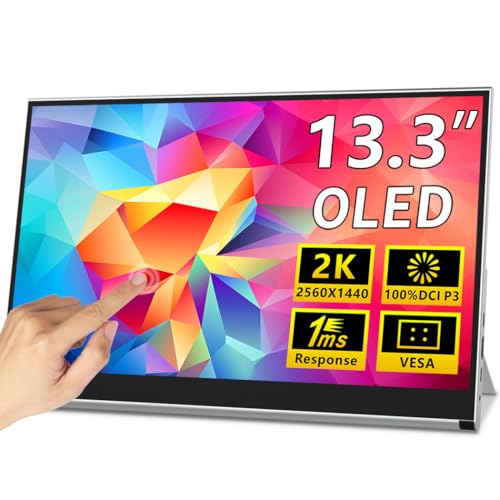
This magedok OLED portable touch monitor review focuses on the Magedok X12, a 13.3-inch external display designed for mobile productivity. It stands out for two main reasons: its 2K QHD OLED panel and its capacitive touch interface. The OLED technology provides high contrast and accurate colors, while the touch screen adds a layer of interactivity usually missing in portable monitors. This combination targets users who need a compact, high-quality second screen that responds to direct input. The device weighs 1.76 pounds and features a slim metal frame, making it easy to transport in a backpack or suitcase.
What stands out
- 13.3-inch 2K QHD OLED panel with 100% DCI-P3 color gamut
- 10-point capacitive touch screen compatible with Windows and Android
- Lightweight 1.76 lbs design with a slim 0.26-inch metal frame
- Dual full-featured USB-C ports and one Mini-HDMI port
- Built-in adjustable kickstand and VESA mount compatibility
Who it fits
Good fit for
This monitor suits creative professionals, gamers, and travelers who value color accuracy and touch interaction. The OLED panel and 100% DCI-P3 coverage make it ideal for photo editing or media consumption. The touch feature is useful for Android devices or Windows tablets. Its compact size and light weight fit easily into travel bags. Users with laptops supporting Thunderbolt 3/4 or USB 3.1 with DisplayPort Alt Mode will enjoy the single-cable connection for video and power.
Who should skip it
You should look elsewhere if you need a large screen, as the 13.3-inch size may feel small for desktop replacement. The Mini-HDMI port requires a separate power connection if your device lacks DisplayPort Alt Mode, adding cable clutter. It is not ideal for users who prefer a remote control or built-in speakers, as none are mentioned. Also, if you require 4K resolution, this 2K panel will not meet your needs. The touch feature only works with compatible operating systems like Windows and Android.
Verdict: The Magedok X12 offers a high-quality OLED display with touch capabilities in a portable package. It is a strong choice for users needing a compact, color-accurate secondary screen with interactive features.
Key specs explained
Panel Type: OLED
OLED panels use organic light-emitting diodes that generate their own light. This allows each pixel to turn off completely for true black levels. You get high contrast ratios and vivid colors without the backlight bleed common in LCD screens. This technology is ideal for media consumption and creative work where color accuracy matters. It also offers wide viewing angles, ensuring the image stays consistent even if you look at the screen from the side.
Resolution: 2K QHD
This resolution provides a sharp, detailed image that is clearer than standard 1080p displays. You will notice fine text and crisp graphics, which is helpful for productivity tasks like coding or spreadsheets. The higher pixel density makes small elements easier to read on a 13.3-inch screen. When shopping for portable monitors, this spec ensures you get a balanced mix of clarity and performance without demanding excessive graphics power from your laptop.
Screen Size: 13.3"
A 13.3-inch diagonal measurement offers a compact form factor that fits easily into most laptop bags and backpacks. This size is large enough to provide a useful second screen for multitasking, yet small enough to remain truly portable. It strikes a practical balance for travelers and students who need extra workspace without the bulk of larger 15-inch or 17-inch monitors. It is easy to set up on small desks or airplane trays.
Connectivity: USB-C, Mini HDMI
These ports allow you to connect to a wide range of devices, including laptops, tablets, and gaming consoles. USB-C supports video, data, and power transfer in a single cable if your device supports DisplayPort Alt Mode. Mini HDMI provides a fallback option for older devices that lack USB-C video output. This dual approach ensures compatibility with most modern gear, though you may need adapters for single-cable setups depending on your laptop's capabilities.
Design and Build Quality
The Magedok X12 features a slim metal frame that contributes to its compact footprint. According to the listing, the device measures 0.39 inches in length, which keeps the profile low when stacked with a laptop. The overall dimensions are 12.6 inches wide by 7.87 inches high. This size fits standard laptop bags without adding bulk. The unit weighs 1.76 pounds. This light weight makes it easy to carry for travelers, students, or remote workers who need a second screen on the go.
The finish is black, providing a neutral look that matches most computer setups. The listing notes an integrated adjustable kickstand. This stand allows you to switch between landscape and portrait orientations. You can set it at various angles for ergonomic viewing. The design also includes VESA mount compatibility. This feature lets you attach the monitor to desk arms or wall mounts if you prefer a fixed position over a portable one.
Connectivity ports are located on the bottom edge. You get two full-feature USB-C ports and one Mini-HDMI port. The placement keeps cables organized and prevents them from interfering with your laptop screen. The touch interface uses a 10-point capacitive system. This layout allows for direct interaction with Windows or Android devices. The build choices prioritize portability and flexible setup options for mobile users.
Setup And Daily Use Guide
Setting up this portable monitor is straightforward due to its plug-and-play design. You do not need to install any drivers. The device offers two full-featured USB-C ports and one Mini-HDMI port. This variety allows you to connect to a wide range of devices, including laptops, PCs, smartphones, tablets, and gaming consoles like the Switch, PS5, or Xbox.
For the simplest setup, use a single USB-C cable for both video and power. This requires your host device to support Thunderbolt 3/4 or USB 3.1 Type-C with DisplayPort Alt Mode. If your computer lacks this specific capability, you must use the Mini-HDMI port for video and connect a separate USB-C power adapter. This dual-cable approach ensures compatibility with older systems.
In daily use, the 10-point capacitive touch interface adds functionality. You can interact with Windows and Android systems directly on the screen. The OLED panel delivers sharp 2K QHD details and 100% DCI-P3 color accuracy, which is beneficial for creative work or media consumption. The metal frame and slim profile keep the unit lightweight at 1.76 lbs, making it easy to transport in a backpack.
You can also adjust the viewing angle using the built-in adjustable kickstand. It supports both landscape and portrait orientations. If you prefer a fixed desk setup, the monitor includes VESA mount compatibility. This allows you to attach it to a standard desk arm or wall mount, providing a stable and ergonomic viewing position for extended work sessions.
Key Checks Before Buying
Before adding this Magedok X12 to your setup, verify your host device supports DisplayPort Alt Mode over USB-C for single-cable video and power transfer. If your laptop lacks Thunderbolt 3 or 4, you will need a Mini-HDMI connection and a separate USB-C power source. The 10-point capacitive touch works with Windows and Android, but compatibility with macOS touch features is not listed. Keep the screen clean with a microfiber cloth, as OLED panels can be sensitive to pressure. This model suits travelers and creatives needing vivid color accuracy and touch input. It differs from standard LCD portables by offering higher contrast and sharper gradients. Check your bag space, as the 1.76-pound weight and slim frame fit most backpacks. Ensure your workspace allows for the adjustable kickstand or Vesa mount options for stable viewing angles during long sessions.
Check before you buy
- Confirm your laptop supports USB-C DisplayPort Alt Mode or Thunderbolt 3/4 for single-cable use.
- Check if your primary device runs Windows or Android for full touch functionality.
- Ensure you have a Mini-HDMI cable and power adapter if single-cable is not possible.
- Verify your bag has enough space for the 12.6-inch width and slim profile.
- Decide if you need the built-in kickstand or plan to use a Vesa mount.
The product at a glance
Magedok 13.3-Inch 2K OLED Touch Monitor
Best for: portable creative work and gaming with touch
- Screen Size
- 13.3"
- Resolution
- 2K QHD
- Panel Type
- OLED
- Connectivity
- USB-C, Mini-HDMI
- Color Gamut
- 100% DCI-P3
- Weight
- 1.76 lbs
View on Amazon: Magedok 13.3-Inch 2K OLED Touch Monitor Affiliate link
The Magedok X12 is a 13.3-inch portable monitor with a 2K OLED panel. It offers 100% DCI-P3 color coverage and 10-point capacitive touch. The device weighs 1.76 pounds and features a slim metal frame. It connects via two USB-C ports or one Mini-HDMI port. This setup suits users needing a high-contrast secondary display for creative work or gaming on the go.
Pros
- 13.3-inch 2K OLED panel with 100% DCI-P3 color gamut
- 10-point capacitive touch support for Windows and Android
- Lightweight 1.76-pound design with slim metal frame
- Vesa mount compatibility and built-in adjustable kickstand
Cons
- Requires Mini-HDMI cable for non-USB-C devices like consoles
- Single USB-C connection needs Thunderbolt 3/4 or DisplayPort Alt Mode
- 13.3-inch screen may be small for detailed multitasking
Good fit if
- You need vivid contrast and accurate colors for creative work
- You want touch functionality on a portable secondary display
- You travel frequently and need a lightweight, slim monitor
Skip if
- You require a larger screen for extensive multitasking
- Your devices lack USB-C with DisplayPort Alt Mode
- You prefer standard HDMI connectivity without adapters
Verdict: Magedok 13.3-inch 2K OLED Touch Monitor delivers sharp visuals and touch control for travelers and creatives who prioritize color accuracy and portability over screen size.
Specifications side by side
| Spec | Magedok 13.3-Inch 2K OLED Touch Monitor |
|---|---|
| Screen Size | 13.3" |
| Resolution | 2K QHD |
| Panel Type | OLED |
| Connectivity | USB-C, Mini-HDMI |
| Color Gamut | 100% DCI-P3 |
| Weight | 1.76 lbs |
| Features | Kickstand |
| Dimensions | 0.39 × 12.6 × 7.87 inches |
| Size | 13.3" |
| Color | black |
| Model | PI-X12 |
Frequently asked questions
Does the Magedok 13.3-inch OLED monitor support touch input?
Yes, this portable display includes a capacitive touch interface. You can interact directly with your content using your finger. This feature is useful for creative work or gaming on the go. It adds a layer of control that standard non-touch portable monitors do not offer.
What is the panel type used in this Magedok monitor?
The Magedok X12 uses an OLED panel type. OLED technology allows each pixel to emit its own light. This results in true black levels and high contrast ratios. You get vivid colors without the backlight bleed often found in LCD screens, making images appear sharper.
How heavy is the Magedok 13.3-inch portable monitor?
The device weighs 1.76 pounds. This weight makes it easy to carry in a laptop bag. Its compact dimensions of 12.6 inches by 7.87 inches also contribute to its portability. You can set it up quickly next to your main laptop for a dual-screen workspace.
What resolution does the Magedok OLED touch monitor have?
It features a 2K resolution. This provides sharp visuals for detailed work. You benefit from clear text and precise image rendering. The high pixel density ensures that graphics and documents look crisp, which is essential for creative professionals who need accurate color representation.
Is the Magedok X12 suitable for gaming?
Yes, it is best for gaming with touch capabilities. The OLED panel offers high contrast and fast response times. You can enjoy immersive visuals with deep blacks. The touch interface also allows for direct interaction in compatible games, enhancing the mobile gaming experience for travelers.
What are the physical dimensions of the Magedok portable monitor?
The monitor measures 12.6 inches in width and 7.87 inches in height. The depth is only 0.39 inches. These slim dimensions allow it to stack neatly with a laptop. You can easily fit it into a backpack or sleeve for travel without taking up much space.