Lenovo ThinkPad USB-C UltraDock 90W Alternatives: 6 Similar Picks Compared
As an Amazon Associate we earn from qualifying purchases. Links on this page are affiliate links.
You may be looking for lenovo thinkpad USB c ultradock 90w alternatives if the original dock does not fit your current setup. The Lenovo ThinkPad USB-C UltraDock 90W provides robust port expansion for compatible Lenovo laptops. It supports dual FHD displays and includes an Ethernet port, making it ideal for users who prioritize wired connectivity. However, its resolution limit of UHD at 30Hz may not suit everyone. Some buyers need higher refresh rates or different port configurations.
The alternatives listed here were chosen because their specs overlap with the original. This list covers 6 similar picks compared to the UltraDock. You will find options with dual 4K support, Thunderbolt connectivity, or more USB-A ports. Each dock offers 90W power delivery, ensuring your laptop charges while connected. We focused on practical differences in display support and physical dimensions. This helps you find a dock that matches your specific hardware needs without unnecessary features.
How alternatives compare to the original
Lenovo USB-C Universal Business Dock
The Lenovo USB-C Universal Business Dock supports dual 4K displays, which is a significant upgrade from the original UltraDock’s limit of dual FHD or single UHD at 30Hz. It offers nine expansion ports, providing more USB-A options than the original’s five total USB ports. This dock weighs slightly less at 9.12 ounces. You should choose this model if you need higher resolution output and more peripheral connectivity. It retains the 90W power delivery capability. The compact form factor makes it suitable for smaller desks. It is ideal for users who prioritize resolution and port count over the specific legacy port layout of the original dock.
Dell WD19 90W Docking Station
The Dell WD19 90W Docking Station is heavier at 2.25 pounds compared to the original’s 10.2 ounces. It supports dual monitors and includes wired networking similar to the original. However, it lacks the specific USB-C form factor compatibility of the Lenovo dock. You might prefer this option if you have a Dell laptop or need a standard USB-C connection rather than a proprietary Lenovo interface. It provides a stable setup for stationary desk use. The larger size may not suit portable needs. It is a practical alternative for users who prioritize wired connectivity and dual monitor support over brand-specific optimization.
ANYHDD ThinkPad Dual 4K USB-C Dock
The ANYHDD ThinkPad Dual 4K USB-C Dock supports dual 4K UHD resolutions, exceeding the original’s dual FHD limit. It includes cables in the package, which the original dock does not. This model weighs 1 pound, making it heavier than the original. It is designed for users who want a complete setup without buying extra accessories. The dual 4K capability is a major advantage for high-resolution workflows. You should pick this dock if you prioritize included cables and higher resolution support. It offers a comprehensive solution for dual monitor setups. The brand recognition is lower than Lenovo, but the feature set is robust.
ANYHDD ThinkPad Docking Station Gen 2
The ANYHDD ThinkPad Docking Station Gen 2 features Thunderbolt 3 connectivity, which the original USB-C UltraDock lacks. It supports 90W charging and single 4K display output. The original dock supports dual FHD displays but without Thunderbolt speeds. You should choose this model if you need Thunderbolt 3 performance for high-speed data transfer. It is suitable for users who prioritize connectivity speed over dual monitor support. The single 4K limit is a trade-off for the Thunderbolt capability. It provides reliable wired networking. This dock is ideal for Thunderbolt 3 users who need 90W charging and high-bandwidth connectivity.
Koncept ThinkPad USB-C Dual Monitor Dock
The Koncept ThinkPad USB-C Dual Monitor Dock is a direct alternative with dual-display support similar to the original. It includes cables, which the original dock does not. This model is designed as a replacement for the Lenovo ThinkPad UltraDock. It provides essential dual-display connectivity without Thunderbolt features. You should choose this option if you prioritize included cables and standard USB-C support. It is suitable for users who do not need Thunderbolt capabilities. The model number 40AY0090US suggests compatibility with similar ThinkPad systems. It offers a practical solution for budget dual-monitor setups. The included accessories make it a convenient choice for immediate use.
Smartlinx Thunderbolt 4 21-Port Dock
The Smartlinx Thunderbolt 4 21-Port Dock supports dual 4K@60Hz displays, which is a significant improvement over the original’s dual FHD limit. It features Thunderbolt 4 connectivity, offering higher bandwidth than the original USB-C interface. This dock weighs 12.8 ounces, slightly heavier than the original. It is designed for Windows users with 8th Gen Intel processors. You should choose this model if you need high-resolution dual displays and Thunderbolt 4 performance. The 21 ports provide extensive connectivity options. It is a practical option for users needing robust connectivity and high refresh rate displays. The Thunderbolt 4 support ensures future-proofing for compatible devices.
Quick picks
Our 7 picks

Lenovo ThinkPad USB-C UltraDock 90W
Best for: Lenovo laptops needing dual FHD displays and Ethernet
- Host Interface
- USB-C
- Display Support
- Dual
- Max Resolution
- UHD @ 30Hz
- Power Delivery
- 60W
- Dimensions
- 6.73 × 3.15 × 1.28 inches
- Weight
- 10.2 ounces
View on Amazon: Lenovo ThinkPad USB-C UltraDock 90W Affiliate link
The Lenovo ThinkPad USB-C UltraDock connects your laptop to multiple peripherals and displays via a single USB-C cable. It supports dual Full HD monitors or one UHD screen at 30Hz. The dock includes three USB 3.0 ports, two USB 2.0 ports, an Ethernet jack, and a headset port. It delivers up to 60W of power delivery to compatible devices. This setup suits users needing extensive connectivity in a compact, lightweight form factor.
Pros
- Supports dual FHD displays or single UHD at 30Hz
- Includes 3x USB 3.0 and 2x USB 2.0 ports
- Features built-in Ethernet RJ45 and 3.5mm audio jack
- Compact dimensions of 6.73 x 3.15 x 1.28 inches
- Lightweight design at just 10.2 ounces
Cons
- UHD resolution is limited to 30Hz refresh rate
- Power delivery caps at 60W despite 90W adapter
- Limited to specific compatible ThinkPad and Yoga models
Good fit if
- You need a wired Ethernet connection for stable internet
- You want to run two Full HD monitors simultaneously
- You use a compatible Lenovo laptop like the T470 or X1 Carbon
Skip if
- You require 60Hz refresh rates for 4K displays
- You need more than two external video outputs
- You use a non-Lenovo laptop without USB-C display support
Verdict: Lenovo ThinkPad USB-C UltraDock 90W provides robust port expansion for compatible Lenovo laptops. It is ideal for users who prioritize wired connectivity and dual monitor support over high refresh rate 4K performance.

Lenovo USB-C Universal Business Dock
Best for: dual 4K setups needing USB-A expansion
- Host Interface
- USB-C
- Display Support
- Dual
- Max Resolution
- 4K
- Power Delivery
- 65W
- Port Count
- 9
- Video Ports
- DP 1.4, HDMI 2.0
View on Amazon: Lenovo USB-C Universal Business Dock Affiliate link
This Lenovo USB-C dock connects your laptop to dual 4K monitors using one DisplayPort 1.4 and one HDMI 2.0 output. It provides 65W of power delivery via the included 90W AC adapter and expands your setup with nine total ports, including USB-A and USB-C. You will find it suits workstations needing dual displays and legacy peripheral connectivity.
Pros
- Dual 4K display support via DisplayPort 1.4 and HDMI 2.0
- Nine expansion ports including USB-A and USB-C
- Supplies 65W notebook charging with included 90W adapter
- Compact footprint measuring 6.06 by 3.15 by 0.94 inches and 9.12 ounces
Cons
- Standard power delivery caps at 65W unless you buy an optional 135W adapter
- Requires a host USB-C port supporting DisplayPort Alt Mode or Thunderbolt
Good fit if
- You need to run dual 4K monitors through DisplayPort and HDMI.
- You connect USB-A peripherals alongside USB-C devices across nine ports.
- You have a laptop that charges at 65W or lower over USB-C.
Skip if
- You need more than 65W charging out of the box without purchasing a 135W adapter.
- You use a laptop without DisplayPort Alt-Mode or Thunderbolt over USB-C.
Verdict: Lenovo USB-C Universal Business Dock delivers dual 4K video outputs and nine expansion ports for users who need dependable USB-A connectivity alongside 65W laptop charging.
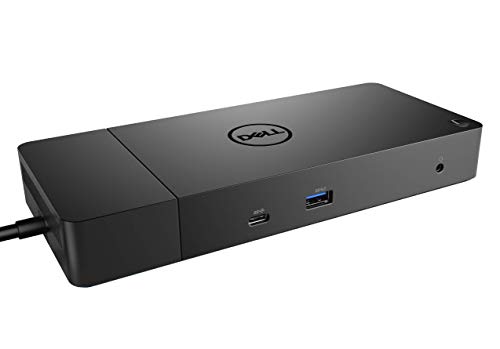
Dell WD19 90W Docking Station
Best for: Dual monitor setups with wired networking
- Host Interface
- USB-C
- Power Delivery
- 90W
- Video Ports
- DisplayPort, HDMI, USB-C
- Ethernet Speed
- Gigabit Ethernet
- Dimensions
- 3.5 × 1.1 × 8.1 inches
- Weight
- 2.25 pounds
View on Amazon: Dell WD19 90W Docking Station Affiliate link
The Dell WD19 130W docking station offers a 90W power delivery output via its USB-C host interface. It supports dual displays through two DisplayPort 1.4 ports and one HDMI 2.0B port. The unit includes a Gigabit Ethernet connection and multiple USB-A ports. It measures 8.1 by 3.5 by 1.1 inches and weighs 2.25 pounds. This dock suits users who need reliable dual monitor support and wired networking.
Pros
- 90W power delivery for connected laptops
- Dual display support via DisplayPort and HDMI
- Gigabit Ethernet for wired internet
- Multiple USB-A and USB-C ports
Cons
- Only one HDMI port limits flexible display setups
- No Thunderbolt support for faster data transfer
- Heavier build at 2.25 pounds
Good fit if
- You need dual monitors for productivity
- You require a wired Gigabit Ethernet connection
- You want a dock with 90W power delivery
Skip if
- You need Thunderbolt 4 speeds
- You prefer a lighter, more portable dock
- You require more than one HDMI output
Verdict: Dell WD19 130W USB-C Dock is a solid choice for users who prioritize dual monitor capability and wired networking over high-speed Thunderbolt connectivity. It fits those who need a stable, feature-rich docking station for a stationary desk setup.

ANYHDD ThinkPad Dual 4K USB-C Dock
Best for: Dual 4K monitor setups with included cables
- Host Interface
- Thunderbolt 4
- Display Support
- Dual
- Max Resolution
- 4K
- Power Delivery
- 90W
- Video Ports
- HDMI, DisplayPort
- Connectivity
- USB-C, HDMI, DisplayPort
View on Amazon: ANYHDD ThinkPad Dual 4K USB-C Dock Affiliate link
This ANYHDD docking station supports dual 4K displays via Thunderbolt 4 or USB-C. It includes a 90W power adapter and necessary cables for HDMI and DisplayPort connections. The unit weighs 1 pound and measures 8 by 3 inches. You get a complete setup for dual monitors without extra purchases. It fits users who need reliable video output and power delivery for their laptop.
Pros
- Supports dual 4K displays
- Includes 90W AC adapter
- Comes with HDMI and DisplayPort cables
- Compact 8 x 3 inch size
Cons
- Brand is ANYHDD, not Lenovo
- No Thunderbolt certification listed
- Limited to dual monitor output
Good fit if
- You need dual 4K monitors
- You want included display cables
- You prefer a compact dock
Skip if
- You require official Lenovo branding
- You need more than two screens
- You want Thunderbolt 4 certification
Verdict: ANYHDD ThinkPad Dock 4K Dual Monitor offers a complete cable package for dual 4K setups. It suits buyers who prioritize included accessories over brand name recognition.
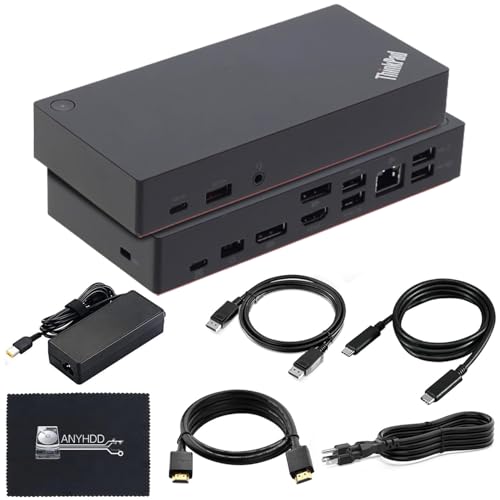
ANYHDD ThinkPad Docking Station Gen 2
Best for: Thunderbolt 3 users needing 90W charging
- Host Interface
- Thunderbolt 3, USB-C
- Display Support
- 1
- Max Resolution
- 4K at 60Hz
- Video Ports
- HDMI, DisplayPort
- Ethernet Speed
- Gigabit
- Connectivity
- USB-C, HDMI, DisplayPort, Thunderbolt 3
View on Amazon: ANYHDD ThinkPad Docking Station Gen 2 Affiliate link
This docking station offers Thunderbolt 3 and USB-C connectivity with 90W power delivery. It features one HDMI port and two DisplayPort outputs, supporting up to 4K at 60Hz. The unit includes a Gigabit Ethernet port and multiple USB ports for peripheral connections. You get a complete cable kit for immediate setup. It suits users needing dual monitor support and reliable wired networking for their laptop.
Pros
- Thunderbolt 3 and USB-C host interface
- 90W power delivery for laptop charging
- Supports 4K resolution at 60Hz
- Includes Gigabit Ethernet port
- Comes with HDMI, DisplayPort, and USB-C cables
Cons
- Only supports one 4K display at 60Hz maximum
- Requires firmware updates for compatibility
- No mention of Thunderbolt 4 support
Good fit if
- You need Thunderbolt 3 connectivity
- You want 90W power delivery
- You require a Gigabit Ethernet port
Skip if
- You need Thunderbolt 4 support
- You want more than one 4K display
- You prefer plug-and-play without firmware updates
Verdict: ANYHDD Lenovo ThinkPad Docking Station Gen 2 provides solid Thunderbolt 3 performance with 90W charging. It fits users who need reliable wired networking and single 4K display support.

Koncept ThinkPad USB-C Dual Monitor Dock
Best for: Budget dual-monitor USB-C setups
- Host Interface
- USB-C
- Display Support
- Dual
- Max Resolution
- 4K
- Power Delivery
- 90W
- Video Ports
- HDMI, DisplayPort
- Connectivity
- USB-C, HDMI, DisplayPort
View on Amazon: Koncept ThinkPad USB-C Dual Monitor Dock Affiliate link
This Koncept docking station offers dual monitor support via HDMI and DisplayPort. It connects to your laptop through a USB-C host interface and provides 90W power delivery. The bundle includes the necessary cables for setup. It serves as a practical alternative to the Lenovo ThinkPad USB-C UltraDock 90W. You get a black unit with a microfiber cloth for maintenance. It fits users who need a simple, wired dual-display setup.
Pros
- Supports dual monitor output
- Includes HDMI and DisplayPort cables
- Provides 90W power delivery
- Uses standard USB-C host interface
Cons
- Brand is Koncept, not Lenovo
- No Thunderbolt certification listed
- Missing Ethernet port in specs
Good fit if
- You need dual monitors on a budget
- You prefer a wired USB-C connection
- You want included HDMI and DisplayPort cables
Skip if
- You require Thunderbolt 4 speeds
- You need a native Lenovo dock
- You require built-in Ethernet connectivity
Verdict: Koncept 40AY0090US 90W USB-C Dock provides essential dual-display connectivity for users who do not need Thunderbolt features. It is a suitable replacement for the Lenovo ThinkPad UltraDock if you prioritize included cables and standard USB-C support.

Smartlinx Thunderbolt 4 21-Port Dock
Best for: Windows users needing dual 4K@60Hz and 90W charging
- Host Interface
- Thunderbolt 4
- Display Support
- Dual
- Max Resolution
- 8K@60Hz
- Power Delivery
- 90W
- Port Count
- 21
- Max Data Speed
- 40Gbps
View on Amazon: Smartlinx Thunderbolt 4 21-Port Dock Affiliate link
This Smartlinx dock uses a Thunderbolt 4 host interface to provide 40Gbps data speeds. It supports dual 4K@60Hz displays on macOS or a single 8K@60Hz output on Windows. You get 90W power delivery for your laptop and 20W fast charging for mobile devices. It weighs 12.8 ounces and includes a 12-month warranty. It suits users needing high-resolution dual monitor setups with reliable charging.
Pros
- Thunderbolt 4 host interface with 40Gbps max data speed
- Supports dual 4K@60Hz displays or single 8K@60Hz output
- Provides 90W power delivery for laptops
- Includes 20W fast charging for phones or tablets
- Backed by a 12-month warranty
Cons
- Limited to 90W power delivery, which may charge devices over 90W unstably
- Does not support dual 4K@60Hz on M1 Macs
- Requires 8th Gen Intel processors or newer for full compatibility
Good fit if
- You need dual 4K monitors at 60Hz on Windows
- You require 90W power delivery for your laptop
- You use an 8th Gen Intel processor or newer
Skip if
- You own a device over 90W that needs stable charging
- You use an M1 Mac and need dual 4K@60Hz support
- You rely on 7th Gen Intel processors or older
Verdict: Smartlinx Thunderbolt 4 Dock 21-Ports delivers high-resolution dual display support and 90W charging for compatible Windows laptops. It is a practical option for users with 8th Gen Intel processors needing robust connectivity.
Specifications side by side
| Spec | Lenovo ThinkPad USB-C UltraDock 90W | Lenovo USB-C Universal Business Dock | Dell WD19 90W Docking Station | ANYHDD ThinkPad Dual 4K USB-C Dock | ANYHDD ThinkPad Docking Station Gen 2 | Koncept ThinkPad USB-C Dual Monitor Dock | Smartlinx Thunderbolt 4 21-Port Dock |
|---|---|---|---|---|---|---|---|
| Host Interface | USB-C | USB-C | USB-C | Thunderbolt 4 | Thunderbolt 3, USB-C | USB-C | Thunderbolt 4 |
| Display Support | Dual | Dual | not stated | Dual | 1 | Dual | Dual |
| Max Resolution | UHD @ 30Hz | 4K | not stated | 4K | 4K at 60Hz | 4K | 8K@60Hz |
| Power Delivery | 60W | 65W | 90W | 90W | not stated | 90W | 90W |
| Port Count | not stated | 9 | not stated | not stated | not stated | not stated | 21 |
| Video Ports | not stated | DP 1.4, HDMI 2.0 | DisplayPort, HDMI, USB-C | HDMI, DisplayPort | HDMI, DisplayPort | HDMI, DisplayPort | not stated |
| Max Data Speed | not stated | not stated | not stated | not stated | not stated | not stated | 40Gbps |
| Ethernet Speed | not stated | not stated | Gigabit Ethernet | not stated | Gigabit | not stated | not stated |
| Resolution | not stated | not stated | not stated | 4K UHD | not stated | 4K UHD | 4K UHD |
| Connectivity | USB-C | USB-C, HDMI, DisplayPort, USB-A | USB-C, HDMI, DisplayPort | USB-C, HDMI, DisplayPort | USB-C, HDMI, DisplayPort, Thunderbolt 3 | USB-C, HDMI, DisplayPort | USB-C, Thunderbolt 4 |
| Slot Count | not stated | not stated | not stated | not stated | not stated | not stated | 1 Slot |
| Dimensions | 6.73 × 3.15 × 1.28 inches | 6.06 × 3.15 × 0.94 inches | 3.5 × 1.1 × 8.1 inches | not stated | not stated | not stated | 7.5 × 3.2 × 1.2 inches |
| Weight | 10.2 ounces | 9.12 ounces | 2.25 pounds | 1 pounds | not stated | not stated | 12.8 ounces |
| Color | Black | Multicolor | black | Black | Black | Black | Gray |
| Model | 40A90090US | 40B30090US | WD19 130W | DOCK-40AY0090US-New | DOCK-40AS0090US-NEW | 40AY0090US | SL-019 |
| Size | not stated | not stated | not stated | 8 x 3 inch | not stated | not stated | not stated |
For a related comparison, read lenovo thinkpad l15 alternatives.
Frequently asked questions
Does the Lenovo ThinkPad USB-C UltraDock 90W support dual 4K displays?
No, it does not support dual 4K displays. The dock is designed for dual FHD monitors or a single 4K display at 30Hz. If you need dual 4K performance, consider the Lenovo USB-C Universal Business Dock or the ANYHDD ThinkPad Dual 4K USB-C Dock, both of which explicitly support dual 4K resolutions.
Which alternative dock supports Thunderbolt 3?
The ANYHDD ThinkPad Docking Station Gen 2 supports Thunderbolt 3. It provides 90W charging and reliable wired networking for users who require this specific interface. This model is distinct from standard USB-C docks, offering higher bandwidth capabilities for compatible laptops.
Can I use the Dell WD19 with a Lenovo ThinkPad?
Yes, the Dell WD19 90W Docking Station is listed as an alternative for dual monitor setups. It provides wired networking and dual monitor capability. While it is a solid choice for stationary desk setups, it lacks the specific Thunderbolt features found in some other options.
Which dock is best for users who need USB-A ports?
The Lenovo USB-C Universal Business Dock is best for users needing USB-A expansion. It offers nine expansion ports alongside dual 4K video outputs. This makes it a strong choice for those who prioritize dependable USB-A connectivity alongside 65W laptop charging.
Does the Koncept dock include cables?
The Koncept ThinkPad USB-C Dual Monitor Dock is described as a suitable replacement if you prioritize included cables. It provides essential dual-display connectivity via standard USB-C. This makes it a practical option for users who do not need Thunderbolt features but want a complete setup.
What is the weight of the Lenovo ThinkPad USB-C UltraDock 90W?
The Lenovo ThinkPad USB-C UltraDock 90W weighs 10.2 ounces. Its dimensions are 6.73 inches in length, 3.15 inches in width, and 1.28 inches in height. This compact size makes it easy to place on a desk alongside your laptop.
Does the Smartlinx dock support dual 4K monitors?
Yes, the Smartlinx Thunderbolt 4 21-Port Dock supports dual 4K displays at 60Hz. It delivers 90W charging and robust connectivity for compatible Windows laptops. This dock is particularly suitable for users with 8th Gen Intel processors needing high-resolution performance.
Which dock is best for budget-conscious buyers?
The Dell WD19 90W Docking Station is labeled as the best budget option. It provides solid dual monitor capability and wired networking. This makes it a practical choice for users who prioritize stable, feature-rich connectivity over high-speed Thunderbolt performance.