Looking Beyond the Lenovo ThinkPad Gen 2 USB-C? 6 Alternatives Worth a Look
As an Amazon Associate we earn from qualifying purchases. Links on this page are affiliate links.
The Lenovo ThinkPad Gen 2 USB-C Dock offers enterprise management and stable 4K video output. If you are searching for lenovo thinkpad USB c dock gen alternatives, you may need a different form factor or feature set. This dock provides 10Gbps data transfer and supports PXE boot, which suits ThinkPad owners who prioritize wired network stability and single-display performance. However, its larger size and specific port layout might not fit every workspace.
The 6 options listed here share core specifications with the original Lenovo dock. Each alternative provides USB-C connectivity and supports 4K resolution, ensuring basic compatibility with your laptop. You might choose a smaller hub if portability is your main concern, or select a model with dual HDMI outputs for multi-monitor setups. Some options include Ethernet ports for wired internet, while others focus on higher refresh rates or faster data speeds. These products were selected because their technical specs overlap with the Lenovo dock’s capabilities, giving you practical choices based on your specific hardware needs.
How each alternative compares
Anker PowerExpand 8-in-1 Dual HDMI USB-C Hub
The Anker PowerExpand 8-in-1 Hub replaces the dock’s singular 4K output with dual monitor support. This allows you to run two displays simultaneously, a capability the ThinkPad dock does not offer. It also includes a dedicated Ethernet port for a stable wired connection, matching the dock’s networking strength. However, it lacks the enterprise management features like PXE boot and MAC address passing found in the ThinkPad solution. You should choose this if you need multiple screens and wired internet in a compact, portable form factor rather than a fixed workstation setup.
Anker 332 5-in-1 USB-C Hub
The Anker 332 5-in-1 Hub offers a much lighter and smaller profile than the bulky ThinkPad dock. It supports 4K UHD output, similar to the dock’s maximum resolution, but focuses on basic expansion rather than high-speed data transfer. The dock provides 10Gbps speeds, whereas this hub prioritizes charging and essential ports. It is ideal for travelers who need a simple 4K display and power delivery without the weight of a full-sized dock. You will give up enterprise features and high-speed data ports, but gain significant portability and a lower physical footprint for mobile use.
UGREEN 5-in-1 USB-C Hub with 100W PD
The UGREEN 5-in-1 Hub with 100W PD emphasizes power delivery over the ThinkPad dock’s data-centric design. It provides 100W charging, which is useful for laptops that need significant power, while the dock focuses on connectivity and management. Like the dock, it supports 4K UHD output, but it lacks the dock’s 10Gbps data speeds and enterprise networking controls. This option suits users who prioritize fast charging and basic video output in a small package. You will sacrifice the dock’s professional management features and higher data throughput for a simpler, charging-focused device that fits easily in a bag.
Acer 5-in-1 4K 60Hz USB-C Hub
The Acer 5-in-1 Hub specifically targets users who need a smooth 60Hz refresh rate for a single 4K display. The ThinkPad dock also supports 4K@60Hz, so the video quality is comparable. However, the Acer unit offers robust 90W charging and a compact aluminum build, differing from the dock’s larger plastic chassis. It lacks the dock’s enterprise features like System Wake-on-LAN and PXE boot. This hub is best for professionals who want a high-refresh-rate single monitor setup with fast charging. You get a premium build and smooth video, but you give up the extensive port selection and management tools of the ThinkPad dock.
Anker 5-in-1 USB-C Hub with 4K HDMI
The Anker 5-in-1 Hub with 4K HDMI is designed for portability, weighing just 2.03 ounces compared to the dock’s 11.5 ounces. It provides basic 4K output, matching the dock’s resolution capability, but does not offer the dock’s 10Gbps data transfer speeds. It also lacks enterprise management features like PXE boot. This hub is suitable for users who need a reliable secondary display and basic connectivity without the bulk of a full dock. You will trade the dock’s high-speed data ports and professional management capabilities for a lightweight, easy-to-carry solution that fits seamlessly into a mobile workflow.
Selore 6-in-2 MacBook USB-C Hub
The Selore 6-in-2 Thunderbolt 3 Hub offers significantly higher data speeds of 40Gbps, far exceeding the ThinkPad dock’s 10Gbps limit. It also supports 5K display resolution, which is higher than the dock’s 4K maximum. This makes it ideal for users needing extreme bandwidth and high-resolution video. However, it is designed for caseless MacBook setups and may not fit all laptops. You gain massive speed and resolution but lose the dock’s enterprise management features and universal compatibility. Choose this if you require Thunderbolt 3 performance and high-res output over the ThinkPad dock’s balanced feature set.
Quick picks
Our 7 picks

Lenovo ThinkPad Gen 2 USB-C Dock
Best for: ThinkPad users needing enterprise management and 4K display
- Host Interface
- USB-C
- Max Resolution
- 4K@60Hz
- Video Ports
- DisplayPort, HDMI
- Max Data Speed
- 10Gbps
- Dimensions
- 6.73 × 3.15 × 1.18 inches
- Weight
- 11.5 ounces
View on Amazon: Lenovo ThinkPad Gen 2 USB-C Dock Affiliate link
This docking station connects via USB-C to expand your laptop's capabilities. It supports DisplayPort 1.4 and HDMI 2.0 for outputs up to 4K at 60Hz. Data transfer reaches 10Gbps for fast peripheral connections. It includes PXE Boot and Wake-on-LAN for enterprise management. This dock suits ThinkPad users needing a stable, wired network and multi-display setup.
Pros
- Supports up to 4K@60Hz resolution via HDMI or DisplayPort
- USB data transfer speeds up to 10Gbps
- Includes PXE Boot and Wake-on-LAN management features
- Passes ThinkPad MAC address through the dock
Cons
- Video output capability depends on your laptop's specific system output
- Supports only a single 4K display rather than dual monitors
- Limited to one USB-C host connection
Good fit if
- You use a Lenovo ThinkPad and need enterprise management features
- You require a stable wired network connection for your workstation
- You want fast 10Gbps data transfer for peripherals
Skip if
- You need to connect two external monitors simultaneously
- Your laptop lacks USB-C video output capabilities
- You prefer a compact multi-port hub over a full docking station
Verdict: Lenovo ThinkPad USB-C Dock Gen 2 is a robust docking solution for ThinkPad owners who need enterprise features and high-speed data. It fits users who prioritize a stable wired connection and single 4K display support over multi-monitor setups.

Anker PowerExpand 8-in-1 Dual HDMI USB-C Hub
Best for: Wired Ethernet and dual monitor setups
- Host Interface
- USB-C
- Display Support
- Dual
- Max Resolution
- 4K @ 60Hz
- Power Delivery
- 85W
- Port Count
- 8
- Video Ports
- HDMI
View on Amazon: Anker PowerExpand 8-in-1 Dual HDMI USB-C Hub Affiliate link
This Anker docking station expands a single USB-C port into eight connections, including two HDMI outputs and a dedicated Ethernet jack. It supports dual 4K displays at 60Hz on one screen or 30Hz on both. Pass-through charging delivers up to 85W. It works with Windows, ChromeOS, and macOS, though Linux is not supported. You get a compact unit with SD card reading capabilities for media workflows.
Pros
- Includes Gigabit Ethernet port for wired networking
- Supports dual 4K HDMI displays simultaneously
- 85W pass-through charging for laptops
- Built-in SD and microSD card readers
Cons
- Dual monitor setup limits resolution to 4K@30Hz
- Not compatible with Linux operating systems
- Requires 100W PD wall charger for full power
Good fit if
- You need reliable wired Ethernet connectivity
- You use Windows or ChromeOS laptops
- You want dual 4K display support
Skip if
- You use a Linux-based computer
- You require dual 4K@60Hz output
- You only have a single monitor setup
Verdict: Anker 8-in-1 USB-C Hub with Ethernet provides essential wired networking and dual display support for Windows and macOS users. It suits professionals who prioritize stable internet connections and expanded ports over maximum video refresh rates.

Anker 332 5-in-1 USB-C Hub
Best for: basic 4K display and charging needs
- Host Interface
- USB-C
- Display Support
- 1
- Max Resolution
- 4K@30Hz
- Power Delivery
- 85W
- Port Count
- 5
- Video Ports
- HDMI
View on Amazon: Anker 332 5-in-1 USB-C Hub Affiliate link
This Anker hub offers five ports including HDMI, USB-C, and two USB-A connections. It supports 4K resolution at 30Hz and up to 85W pass-through charging. The device connects via USB-C and works with macOS, Windows, and ChromeOS. It suits users needing a simple, compact expansion solution for laptops with limited ports. The build is lightweight and small enough for travel.
Pros
- 5-in-1 connectivity with HDMI, USB-C, and two USB-A ports
- Supports 4K@30Hz video output
- Up to 85W pass-through charging
- Compact dimensions at 4.78 x 1.59 x 0.45 inches
Cons
- HDMI output limited to 30Hz refresh rate
- USB-C data port does not support video output
- Not compatible with Linux operating systems
Good fit if
- You need a basic HDMI connection for a secondary display
- You want to charge your laptop while using the hub
- You use a MacBook or Windows laptop with USB-C ports
Skip if
- You require a 60Hz refresh rate for smooth video
- You need video output from a USB-C port
- You use a Linux-based computer
Verdict: Anker 5-in-1 USB-C Hub provides essential expansion for users who prioritize charging and basic 4K display output over high refresh rates. It is a practical choice for travelers with macOS or Windows laptops.

UGREEN 5-in-1 USB-C Hub with 100W PD
Best for: single-display setups with charging needs
- Host Interface
- USB-C
- Max Resolution
- 4K
- Power Delivery
- 100W
- Port Count
- 5
- Video Ports
- HDMI
- Max Data Speed
- 5Gbps
View on Amazon: UGREEN 5-in-1 USB-C Hub with 100W PD Affiliate link
This UGREEN USB-C hub adds a 4K HDMI port, a 100W Power Delivery pass-through, and two USB-A data ports to your laptop. It supports 4K UHD resolution and offers 5 Gbps transfer speeds on the primary USB-A port. The compact grey design weighs just 3.21 ounces. It suits users who need basic display expansion and charging without extra complexity.
Pros
- 100W USB-C Power Delivery pass-through
- 4K UHD HDMI video output
- 5 Gbps USB-A data port
- Compact 3.21-ounce weight
Cons
- Only one USB-A port supports 5 Gbps speeds
- Two additional USB-A ports limited to 480 Mbps
- No Ethernet or SD card slots included
Good fit if
- You need a single 4K display connection
- You want to charge your laptop through the hub
- You require basic USB-A data ports
Skip if
- You need multi-monitor setups beyond one HDMI output
- You require high-speed 5 Gbps transfers on multiple ports
- You need built-in Ethernet or card readers
Verdict: UGREEN 5-in-1 USB-C Hub with 100W PD provides essential connectivity for single-display setups. It fits users who prioritize charging and basic video output over high-speed data expansion.
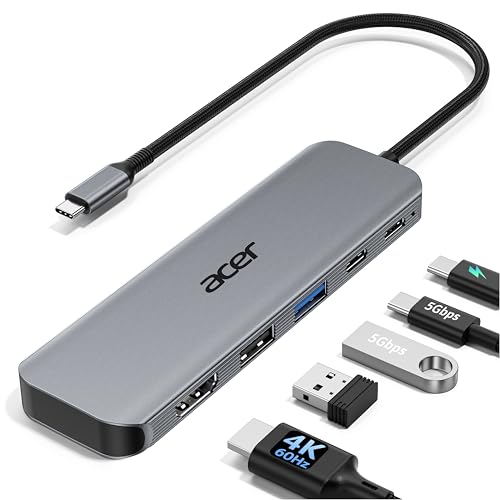
Acer 5-in-1 4K 60Hz USB-C Hub
Best for: single 4K@60Hz display setups
- Host Interface
- USB-C
- Max Resolution
- 4K@60Hz
- Power Delivery
- 90W
- Port Count
- 5
- Video Ports
- HDMI 2.0
- Max Data Speed
- 5Gbps
View on Amazon: Acer 5-in-1 4K 60Hz USB-C Hub Affiliate link
The Acer ODK5U0 is a 5-in-1 USB-C hub that expands your laptop's connectivity. It features an HDMI port supporting 4K resolution at 60Hz, which provides smoother visuals than standard 30Hz options. The hub includes a 100W Power Delivery input and delivers up to 90W to your device. It also offers USB-C and USB-A 3.0 ports for 5Gbps data transfer. This aluminum-built adapter suits users needing reliable video output and fast charging.
Pros
- Supports 4K@60Hz HDMI output for smoother display performance
- 100W PD input with up to 90W output for laptop charging
- 5Gbps data transfer speeds via USB-C and USB-A 3.0 ports
- Aluminum shell design for improved heat dissipation
Cons
- Only one video output port limits dual-monitor setups
- Includes only a single USB-A 2.0 port for peripherals
- Does not support ultra-wide monitors
Good fit if
- You need 4K video at 60Hz for presentations or editing
- You want a single hub for charging and data transfer
- You use a laptop with a full-featured USB-C port
Skip if
- You require two simultaneous external displays
- You need support for ultra-wide monitors
- You require more than one USB-A 3.0 port
Verdict: Acer 5-in-1 USB-C Hub 4K@60Hz delivers smooth 4K@60Hz video and robust 90W charging in a compact aluminum design. It fits professionals who prioritize high-refresh-rate single displays and fast data speeds over multi-monitor expansion.

Anker 5-in-1 USB-C Hub with 4K HDMI
Best for: Users needing basic 4K display and charging
- Host Interface
- USB-C
- Max Resolution
- 4K@30Hz
- Power Delivery
- 90W
- Port Count
- 5
- Video Ports
- HDMI
- Max Data Speed
- 5Gbps
View on Amazon: Anker 5-in-1 USB-C Hub with 4K HDMI Affiliate link
This Anker hub adds an HDMI port and three USB-A ports to your laptop via a single USB-C connection. It supports 4K video at 30Hz and delivers 90W of pass-through charging to keep your device powered. The compact design fits easily into a bag. It is a solid option for users who need basic display expansion and data transfer without the bulk of a full docking station.
Pros
- HDMI port supports 4K resolution at 30Hz
- 90W pass-through charging for laptops
- Includes one USB 3.0 port for 5Gbps data transfer
- Compact and lightweight build at 2.03 ounces
Cons
- HDMI output is limited to 30Hz refresh rate
- Does not support Linux operating systems
- USB-C input port cannot power peripheral devices
Good fit if
- You need a simple HDMI connection for a second screen
- You want to charge your laptop while using the hub
- You prefer a lightweight adapter for travel
Skip if
- You require a 60Hz refresh rate for smooth video
- You use a Linux-based computer
- You need to power multiple peripherals from the hub
Verdict: Anker 5-in-1 USB-C Hub 4K HDMI offers essential connectivity for users who prioritize portability and basic charging over high refresh rates. It is best for professionals who need a reliable secondary display without a complex setup.

Selore 6-in-2 MacBook USB-C Hub
Best for: Caseless MacBook setups needing high-speed Thunderbolt 3
- Host Interface
- USB-C
- Display Support
- Dual
- Max Resolution
- 5K
- Power Delivery
- 100W
- Port Count
- 6
- Video Ports
- Thunderbolt 3
View on Amazon: Selore 6-in-2 MacBook USB-C Hub Affiliate link
This 6-in-2 aluminum hub attaches directly to your compatible MacBook Pro or MacBook Air. You get one 40Gbps Thunderbolt 3 port supporting 100W pass-through charging and up to 5K video, three 5Gbps USB 3.0 ports, and dual SD card slots. It suits you if you need fast data transfer and charging without carrying a loose cable dock.
Pros
- Thunderbolt 3 port supports 40Gbps data and 100W power delivery
- Outputs video up to 5K resolution or dual 4K at 60Hz
- SD and microSD slots transfer at 104Mbps simultaneously
- Three USB 3.0 ports deliver data transfers up to 5Gbps
Cons
- Will not fit MacBooks equipped with protective cases
- Supports a maximum of one connected external hard drive
- Does not support Apple SuperDrive or high-power peripherals
Good fit if
- You use a compatible MacBook Pro or MacBook Air without an external case.
- You need 100W power delivery alongside 40Gbps Thunderbolt 3 speeds.
- You transfer media using simultaneous SD and microSD card reading.
Skip if
- You keep a protective case mounted on your MacBook.
- You need to connect multiple external hard drives or high-power devices.
Verdict: Selore&S-Global 6-in-2 Thunderbolt 3 Hub gives caseless MacBook Pro and MacBook Air users 40Gbps transfer speeds, 5K display capability, and 100W pass-through charging in a flush-fitting chassis.
Specifications side by side
| Spec | Lenovo ThinkPad Gen 2 USB-C Dock | Anker PowerExpand 8-in-1 Dual HDMI USB-C Hub | Anker 332 5-in-1 USB-C Hub | UGREEN 5-in-1 USB-C Hub with 100W PD | Acer 5-in-1 4K 60Hz USB-C Hub | Anker 5-in-1 USB-C Hub with 4K HDMI | Selore 6-in-2 MacBook USB-C Hub |
|---|---|---|---|---|---|---|---|
| Host Interface | USB-C | USB-C | USB-C | USB-C | USB-C | USB-C | USB-C |
| Display Support | not stated | Dual | 1 | not stated | not stated | not stated | Dual |
| Max Resolution | 4K@60Hz | 4K @ 60Hz | 4K@30Hz | 4K | 4K@60Hz | 4K@30Hz | 5K |
| Power Delivery | not stated | 85W | 85W | 100W | 90W | 90W | 100W |
| Port Count | not stated | 8 | 5 | 5 | 5 | 5 | 6 |
| Video Ports | DisplayPort, HDMI | HDMI | HDMI | HDMI | HDMI 2.0 | HDMI | Thunderbolt 3 |
| Max Data Speed | 10Gbps | not stated | 5Gbps | 5Gbps | 5Gbps | 5Gbps | 40Gbps |
| Ethernet Speed | not stated | 1Gbps | not stated | not stated | not stated | not stated | not stated |
| Resolution | not stated | 4K UHD | 4K UHD | 4K UHD | 4K UHD | 4K UHD | not stated |
| Connectivity | USB-C | USB-C, HDMI, Ethernet | USB-C, HDMI, USB-A | USB-C, HDMI, USB-A | USB-C, HDMI, USB-A | USB-C, HDMI, USB-A | USB-C, Thunderbolt 3 |
| Refresh Rate | not stated | not stated | not stated | not stated | 60Hz | not stated | not stated |
| Features | not stated | Card Reader | not stated | not stated | not stated | not stated | Card Reader |
| Dimensions | 6.73 × 3.15 × 1.18 inches | 4.65 × 2.01 × 0.69 inches | 4.78 × 1.59 × 0.45 inches | 4.79 × 1.09 × 0.47 inches | not stated | 4.8 × 1.2 × 0.46 inches | 4.72 × 1.37 × 0.48 inches |
| Weight | 11.5 ounces | 3.2 ounces | 1.44 ounces | 3.21 ounces | not stated | 2.03 ounces | 2.47 ounces |
| Color | Black | Gray | Black | grey | Grey | Gray | Grey |
| Model | 40AS0090JP | A83800A1 | A8355011 | CM478 | ODK5U0 | A8357 | UC2205 |
| Size | not stated | 8-in-1 USB C Hub | not stated | 0.65 feet | not stated | not stated | 6-in-2 |
Another guide worth a look: lenovo gen 12 thinkpad x1 alternatives.
Frequently asked questions
Which dock is best for enterprise ThinkPad users?
The Lenovo ThinkPad Gen 2 USB-C Dock is the top choice for ThinkPad owners. It provides robust enterprise management features and supports a single 4K display. This dock is ideal for users who prioritize a stable wired connection and high-speed data transfer over multi-monitor setups. It fits those who need dedicated business tools.
What is the best alternative for dual monitor setups?
The Anker PowerExpand 8-in-1 Dual HDMI USB-C Hub is the best premium option for dual monitors. It allows you to run two displays simultaneously, which the ThinkPad dock does not support. It also includes a dedicated Ethernet port for a stable internet connection, making it suitable for professionals who need expanded ports and networking.
Which hub is best for basic 4K and charging needs?
The Anker 332 5-in-1 USB-C Hub is a practical choice for basic needs. It provides essential expansion for users who prioritize charging and basic 4K display output over high refresh rates. This compact hub is suitable for travelers using macOS or Windows laptops who need a simple, reliable connection without complex setup requirements.
Is there a budget-friendly option with high power delivery?
The UGREEN 5-in-1 USB-C Hub with 100W PD is the best budget option. It provides essential connectivity for single-display setups and includes 100W Power Delivery for charging. This hub fits users who prioritize charging and basic video output over high-speed data expansion. It is a cost-effective solution for single-monitor workflows.
Which hub supports 4K at 60Hz refresh rate?
The Acer 5-in-1 4K 60Hz USB-C Hub delivers smooth 4K video at a 60Hz refresh rate. It offers robust 90W charging in a compact aluminum design. This hub is ideal for professionals who prioritize high-refresh-rate single displays and fast data speeds over multi-monitor expansion. It ensures smooth visuals for compatible monitors.
What is a portable option for secondary displays?
The Anker 5-in-1 USB-C Hub with 4K HDMI is a great portable option. It offers essential connectivity for users who prioritize portability and basic charging over high refresh rates. This hub is best for professionals who need a reliable secondary display without a complex setup. It provides a simple solution for basic video output.
Which hub is best for caseless MacBook Pro users?
The Selore 6-in-2 Thunderbolt 3 Hub is designed for caseless MacBook Pro and Air users. It provides 40Gbps transfer speeds and 5K display capability. The hub features 100W pass-through charging and a flush-fitting chassis. This makes it an excellent choice for users needing high-speed data and high-resolution video output in a compact form.