Looking Beyond the Lenovo ThinkPad USB4 Smart Dock? 4 Alternatives Worth a Look
As an Amazon Associate we earn from qualifying purchases. Links on this page are affiliate links.
The Lenovo ThinkPad USB4 Smart Dock 5500 offers strong connectivity for professionals. It supports up to four displays and delivers 135W of power. You get 40 Gbps bandwidth and cloud-based fleet management. These features make it a robust choice for complex workstations. However, you might want to look for lenovo thinkpad USB 4 smart alternatives that fit your specific needs better. Perhaps you need a smaller footprint or a different connectivity standard. Maybe you prefer a simpler setup without remote management tools.
This list includes 4 options that share key specifications with the original dock. We selected these products because their specs overlap with what you might require. Some alternatives focus on dual 4K outputs for simpler dual-monitor setups. Others prioritize Thunderbolt 4 speed or hybrid USB-C connections. You will find options with varying power delivery levels and port configurations. Each choice addresses different priorities like size, brand preference, or specific display requirements. You can compare these specs to find the right tool for your desk.
How each alternative compares
Lenovo ThinkPad Thunderbolt 3 Dock Gen 2
The Lenovo ThinkPad Thunderbolt 3 Dock Gen 2 uses Thunderbolt 3 instead of USB4. This means its max data speed is 40 Gbps, matching the USB4 dock's bandwidth. It supports dual 4K displays rather than the four-display capability of the Smart Dock. You get 135W power delivery, which is identical to the original. The physical dimensions are slightly larger at 8.66 inches long. It lacks the cloud-based fleet management feature. This dock is better if you need reliable dual 4K output without the complexity of managing four screens. It is a practical choice for users who prioritize Ethernet stability over higher display counts.
Lenovo ThinkPad Hybrid Dual 4K Dock
The Lenovo ThinkPad Hybrid Dual 4K Dock offers dual 4K support instead of the four-display expansion of the original. It provides 135W power delivery, matching the Smart Dock's output. The connectivity includes USB-C, HDMI, DisplayPort, and USB-A ports. This dock is lighter in terms of feature complexity but heavier at 3.51 pounds. It lacks the USB4 high-bandwidth advantage and the cloud management tools. You get hybrid USB-C connectivity which may suit older laptops better. This option is ideal if you need dual monitors and standard USB-A ports without the premium cost of Thunderbolt or USB4 standards. It is a straightforward choice for hybrid setups.
ANYHDD ThinkPad Thunderbolt 4 Dock 135W
The ANYHDD ThinkPad Thunderbolt 4 Dock 135W supports 4K UHD resolution and delivers 135W of power. It uses Thunderbolt 4 technology for high-speed data transfer. This dock lacks the four-display support of the USB4 Smart Dock. It also does not mention USB-A ports in its connectivity list, which limits peripheral options. The branding is third-party, which may affect compatibility with Lenovo-specific features. It is suitable for users needing high resolution and power without the multi-monitor complexity. This dock is a strong alternative for workstations that prioritize display quality over display count. You should consider it if you have Thunderbolt 4 devices and need robust power delivery.
Lenovo ThinkPad Thunderbolt 3 Dock Gen 2
The Lenovo ThinkPad Thunderbolt 3 Dock Gen 2 (DK1841) provides dual 4K display support and 135W power delivery. It uses Thunderbolt 3 connectivity, which offers 40 Gbps bandwidth. This dock is larger and heavier than the USB4 Smart Dock. It lacks the cloud-based fleet management and four-display capability. The model number DK1841 indicates a different variant of the Gen 2 dock. It is designed for users with Thunderbolt 3 laptops who need reliable dual monitor setups. This option is better if you prefer a proven Thunderbolt 3 solution over the newer USB4 standard. You get stable performance for stationary workstations without the need for advanced remote management features.
Quick picks
| # | Product | Best for | Price |
|---|---|---|---|
| 1 | Lenovo ThinkPad USB4 Smart Dock 5500 Best overall | multi-monitor setups with remote management | Check price of Lenovo ThinkPad USB4 Smart Dock 5500 on Amazon |
| 2 | Lenovo ThinkPad Thunderbolt 3 Dock Gen 2 Best budget | Dual 4K monitor setups on ThinkPads | Check price of Lenovo ThinkPad Thunderbolt 3 Dock Gen 2 on Amazon |
| 3 | Lenovo ThinkPad Hybrid Dual 4K Dock Also great | Dual 4K displays and hybrid USB-C connectivity | Check price of Lenovo ThinkPad Hybrid Dual 4K Dock on Amazon |
| 4 | ANYHDD ThinkPad Thunderbolt 4 Dock 135W Best premium | Users needing 8K resolution and high power | Check price of ANYHDD ThinkPad Thunderbolt 4 Dock 135W on Amazon |
| 5 | Lenovo ThinkPad Thunderbolt 3 Dock Gen 2 Also great | Dual 4K setups with Thunderbolt 3 laptops | Check price of Lenovo ThinkPad Thunderbolt 3 Dock Gen 2 on Amazon |
Our 5 picks

Lenovo ThinkPad USB4 Smart Dock 5500
Best for: multi-monitor setups with remote management
- Host Interface
- USB4
- Display Support
- Up to 4
- Max Resolution
- 8K 60Hz
- Power Delivery
- 100W
- Max Data Speed
- 40 Gbps
- Dimensions
- 8.58 × 3.15 × 1.24 inches
View on Amazon: Lenovo ThinkPad USB4 Smart Dock 5500 Affiliate link
The Lenovo ThinkPad USB 4 Smart Dock 5500 uses USB4 technology to deliver 40 Gbps bandwidth. It supports up to four displays, including one 8K 60Hz or two 4K 144Hz monitors. The dock provides 100W power delivery to charge your laptop while connected. It works across different operating systems and includes cloud-based fleet management for IT administrators. This setup suits users needing high-resolution multi-monitor productivity.
Pros
- USB4 interface with 40 Gbps data speed
- Supports up to four displays simultaneously
- 100W power delivery for laptop charging
- Cloud-based fleet management for IT teams
Cons
- Requires separate 135W adapter for full operation
- Fleet management requires web browser access
- Limited to specific display configurations for max resolution
Good fit if
- You need to connect up to four monitors
- You want 100W power delivery for your laptop
- You manage a fleet of devices remotely
Skip if
- You only need a single display connection
- You prefer a plug-and-play setup without admin tools
- You want an all-in-one unit without a separate adapter
Verdict: Lenovo ThinkPad USB 4 Smart Dock 5500 fits professionals who require extensive display connectivity and remote device management capabilities.

Lenovo ThinkPad Thunderbolt 3 Dock Gen 2
Best for: Dual 4K monitor setups on ThinkPads
- Host Interface
- Thunderbolt 3
- Display Support
- Dual
- Max Resolution
- 4K
- Video Ports
- HDMI, DisplayPort
- Ethernet Speed
- 10Base-T/100Base-TX/1000Base-T
- Connectivity
- USB-C, HDMI, DisplayPort, Thunderbolt 3
View on Amazon: Lenovo ThinkPad Thunderbolt 3 Dock Gen 2 Affiliate link
This docking station connects via Thunderbolt 3 to support dual 4K displays. It provides two HDMI and two DisplayPort outputs for flexible screen setups. The unit includes four USB 3.1 ports and an Ethernet jack. It weighs two pounds and measures 8.7 inches long. You should choose this if you need reliable dual-monitor support for ThinkPad laptops.
Pros
- Supports dual 4K UHD displays
- Includes two HDMI and two DisplayPort outputs
- Provides 135W power delivery
- Features an RJ-45 Ethernet port
Cons
- Uses older Thunderbolt 3 interface instead of USB4
- Limited to 1 Gbps Ethernet speed
- No USB-C data port for direct peripheral connection
Good fit if
- You need dual high-resolution monitors for a ThinkPad
- You require a dedicated Ethernet connection
- You prefer DisplayPort outputs for your setup
Skip if
- You require USB4 connectivity for maximum bandwidth
- You need more than two external displays
- You want a compact travel dock under one pound
Verdict: Lenovo ThinkPad Thunderbolt 3 Dock Gen 2 delivers stable dual 4K output for users who prioritize display count and Ethernet reliability over the latest Thunderbolt 4 or USB4 standards.
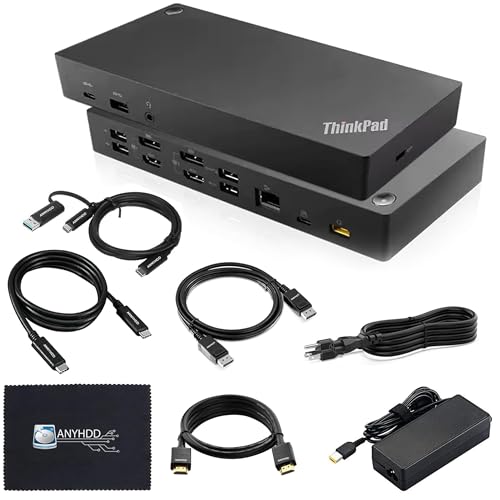
Lenovo ThinkPad Hybrid Dual 4K Dock
Best for: Dual 4K displays and hybrid USB-C connectivity
- Host Interface
- USB-C, USB-A
- Display Support
- Dual
- Max Resolution
- 4K
- Video Ports
- DisplayPort 1.2, HDMI
- Ethernet Speed
- 10/100/1000 Mb/s
- Connectivity
- USB-C, HDMI, DisplayPort, USB-A
View on Amazon: Lenovo ThinkPad Hybrid Dual 4K Dock Affiliate link
The ANYHDD 40AF0135US is a dual monitor docking station with a 135W power adapter. It features a hybrid USB-C host interface and includes USB-A ports. You get two DisplayPort and two HDMI outputs for 4K displays. The unit weighs 3.51 pounds and supports 10/100/1000 Mb/s Ethernet. It suits users needing multiple video connections and stable power delivery for their laptop setup.
Pros
- 135W power delivery for connected devices
- Supports dual 4K displays via HDMI and DisplayPort
- Includes both USB-C and USB-A connectivity
- Integrated 10/100/1000 Mb/s Ethernet port
Cons
- Hybrid USB-C interface limits bandwidth compared to Thunderbolt
- Ethernet speed capped at 1 Gb/s
- Brand listed as ANYHDD, not Lenovo
Good fit if
- You need dual 4K monitors with HDMI and DisplayPort
- You require 135W power delivery for your laptop
- You prefer a hybrid USB-C connection over Thunderbolt
Skip if
- You need Thunderbolt 4 speeds and features
- You require 2.5GbE or faster Ethernet
- You insist on the official Lenovo branded dock
Verdict: The ANYHDD 135W Hybrid USB-C Dock fits users who need dual 4K video outputs and high power delivery without the cost of Thunderbolt. It is a practical option for hybrid connectivity needs.

ANYHDD ThinkPad Thunderbolt 4 Dock 135W
Best for: Users needing 8K resolution and high power
- Host Interface
- Thunderbolt 4
- Max Resolution
- 8K
- Power Delivery
- 135W
- Video Ports
- HDMI, DisplayPort, Thunderbolt
- Connectivity
- USB-C, HDMI, DisplayPort, Thunderbolt 4
View on Amazon: ANYHDD ThinkPad Thunderbolt 4 Dock 135W Affiliate link
This docking station connects via Thunderbolt 4 and USB-C to support up to 8K resolution. It includes a 135W AC adapter and delivers up to 230W of power to your workstation. You get HDMI and DisplayPort outputs for multiple displays. It comes with necessary cables. This setup suits users needing high resolution and strong power delivery for their laptop setup.
Pros
- Supports 8K resolution output
- Delivers up to 230W power to workstation
- Includes HDMI and DisplayPort video outputs
- Comes with Thunderbolt and HDMI cables
Cons
- Brand listed as ANYHDD, not Lenovo
- No mention of USB-A ports
- Requires firmware updates for compatibility
Good fit if
- You need 8K display support
- You require high power delivery for workstations
- You want included video cables
Skip if
- You need native Lenovo branding
- You require USB-A connectivity
- You want plug-and-play without firmware checks
Verdict: ANYHDD Lenovo Thunderbolt 4 Dock offers high resolution and power for workstations, but the third-party branding and missing USB-A ports limit its appeal for standard ThinkPad users.
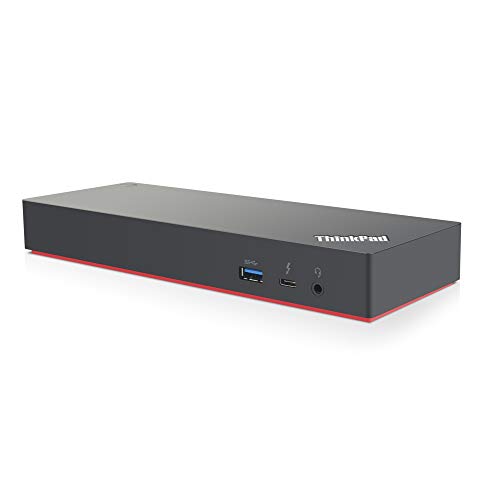
Lenovo ThinkPad Thunderbolt 3 Dock Gen 2
Best for: Dual 4K setups with Thunderbolt 3 laptops
- Host Interface
- Thunderbolt 3
- Display Support
- Dual
- Max Resolution
- 4K
- Video Ports
- HDMI, DisplayPort, USB-C
- Ethernet Speed
- 10Base-T/100Base-TX/1000Base-T
- Connectivity
- USB-C, HDMI, DisplayPort, Thunderbolt 3
View on Amazon: Lenovo ThinkPad Thunderbolt 3 Dock Gen 2 Affiliate link
This docking station connects your laptop to dual 4K displays via Thunderbolt 3. It includes two HDMI and two DisplayPort outputs for flexible screen arrangements. The 135W power adapter supports high-power workstations. You get four USB 3.1 ports and Gigabit Ethernet for stable connectivity. It is a solid choice for users needing reliable dual-monitor support and fast data transfer speeds.
Pros
- Supports dual 4K UHD displays
- 135W power delivery for high-performance laptops
- Includes Gigabit Ethernet port
- Four USB 3.1 Gen 2 ports
Cons
- Uses Thunderbolt 3 instead of newer USB4
- Heavier and bulkier than compact alternatives
- Requires specific Thunderbolt 3 compatible laptop
Good fit if
- You need dual 4K monitor support
- Your laptop has a Thunderbolt 3 port
- You require Gigabit Ethernet connectivity
Skip if
- You only have USB-C ports without Thunderbolt
- You need USB4 compatibility for future-proofing
- You prefer a lightweight travel setup
Verdict: Lenovo ThinkPad Thunderbolt 3 Dock 135W fits users with Thunderbolt 3 laptops who need dual 4K displays and robust connectivity. It delivers reliable performance for stationary workstations.
Specifications side by side
| Spec | Lenovo ThinkPad USB4 Smart Dock 5500 | Lenovo ThinkPad Thunderbolt 3 Dock Gen 2 | Lenovo ThinkPad Hybrid Dual 4K Dock | ANYHDD ThinkPad Thunderbolt 4 Dock 135W | Lenovo ThinkPad Thunderbolt 3 Dock Gen 2 |
|---|---|---|---|---|---|
| Host Interface | USB4 | Thunderbolt 3 | USB-C, USB-A | Thunderbolt 4 | Thunderbolt 3 |
| Display Support | Up to 4 | Dual | Dual | not stated | Dual |
| Max Resolution | 8K 60Hz | 4K | 4K | 8K | 4K |
| Power Delivery | 100W | not stated | not stated | 135W | not stated |
| Video Ports | not stated | HDMI, DisplayPort | DisplayPort 1.2, HDMI | HDMI, DisplayPort, Thunderbolt | HDMI, DisplayPort, USB-C |
| Max Data Speed | 40 Gbps | not stated | not stated | not stated | not stated |
| Ethernet Speed | not stated | 10Base-T/100Base-TX/1000Base-T | 10/100/1000 Mb/s | not stated | 10Base-T/100Base-TX/1000Base-T |
| Resolution | not stated | 4K UHD | not stated | 4K UHD | 4K UHD |
| Connectivity | not stated | USB-C, HDMI, DisplayPort, Thunderbolt 3 | USB-C, HDMI, DisplayPort, USB-A | USB-C, HDMI, DisplayPort, Thunderbolt 4 | USB-C, HDMI, DisplayPort, Thunderbolt 3 |
| Dimensions | 8.58 × 3.15 × 1.24 inches | 8.66 × 3.15 × 1.18 inches | not stated | not stated | 9.45 × 27.2 × 0.98 inches |
| Weight | 1.29 pounds | 2 pounds | 3.51 pounds | not stated | 2.52 pounds |
| Color | Eclipse Black | Black | Black | Black | Black |
| Model | 40BC0135US | 40AN0135US | 40AF0135US | ZSLENOVO40B00135USJK | DK1841 |
| Size | not stated | 1.2" x 8.7" x 3.1" | not stated | not stated | not stated |
Frequently asked questions
Does the Lenovo ThinkPad USB4 Smart Dock support four monitors?
Yes, it supports up to four displays. This capability makes it suitable for complex workstation setups. You get extensive display connectivity for professionals who require multiple screens. The dock delivers 135W of power to keep your devices charged while running all outputs.
What is the best budget alternative to the USB4 Smart Dock?
The Lenovo ThinkPad Thunderbolt 3 Dock Gen 2 is the best budget option. It delivers stable dual 4K output for users who prioritize display count. It offers reliable Ethernet connectivity. This model costs less than the USB4 version while still providing 135W power delivery.
Which dock is best for dual 4K monitor setups on ThinkPads?
The Lenovo ThinkPad Thunderbolt 3 Dock Gen 2 is best for dual 4K setups. It supports two 4K UHD displays via HDMI and DisplayPort. It connects via Thunderbolt 3 and USB-C. This dock provides 135W of power delivery for compatible laptops.
Is there a premium dock without Thunderbolt certification?
The Lenovo ThinkPad Hybrid Dual 4K Dock by ANYHDD is a premium option. It supports dual 4K displays without Thunderbolt certification. It offers hybrid USB-C connectivity with HDMI and DisplayPort outputs. It delivers 135W of power delivery for high-performance workstations.
Can I use a Thunderbolt 4 dock with my ThinkPad?
Yes, the ANYHDD ThinkPad Thunderbolt 4 Dock 135W is available. It supports high resolutions and delivers 135W of power. It connects via Thunderbolt 4 and USB-C. Note that it lacks USB-A ports, which may limit peripheral connectivity for some users.
How heavy is the Lenovo ThinkPad USB4 Smart Dock 5500?
The Lenovo ThinkPad USB4 Smart Dock 5500 weighs 1.29 pounds. Its dimensions are 8.58 inches in length, 3.15 inches in width, and 1.24 inches in height. It features an Eclipse Black finish. This size makes it compact for desk setups.
What power delivery does the Lenovo ThinkPad Thunderbolt 3 Dock Gen 2 offer?
It offers 135W of power delivery. This allows you to charge high-performance ThinkPad laptops while connected. The dock supports dual 4K displays. It uses Thunderbolt 3 and USB-C for data and video transmission. It is a reliable choice for stationary workstations.