InnoView 23.8-Inch 100Hz Portable Monitor vs InnoView 15.6" Foldable Dual Stacked (2026): Key Differences
As an Amazon Associate we earn from qualifying purchases. Links on this page are affiliate links.
Choosing between the innoview large portable monitor vs dual portable monitor depends on your workspace needs. Both units offer 1080p IPS panels for clear visuals. The primary difference lies in form factor and screen count. One provides a single, expansive 23.8-inch display with a 100Hz refresh rate. The other offers two 15.6-inch screens in a foldable, stacked design for expanded multitasking. You must decide between a large single canvas or dual compact displays.
Key differences
| Aspect | InnoView 23.8-Inch 100Hz Portable Monitor | InnoView 15.6" Foldable Dual Stacked Monitor |
|---|---|---|
| Screen Count and Size | Single 23.8-inch panel | Dual 15.6-inch panels |
| Refresh Rate | 100Hz | 60Hz |
| Connectivity | USB-C, HDMI, DP | USB-C, HDMI |
| Portability Design | Fixed stand with handle | Foldable and stackable |
| Weight | 3.31 pounds | 3.1 pounds |
Which one should you choose?
Choose InnoView 23.8-Inch 100Hz Portable Monitor if
- You need a single, large canvas for gaming or detailed creative work
- You require DisplayPort connectivity for desktop PCs or specific laptops
- You prefer a higher 100Hz refresh rate for smoother motion
Choose InnoView 15.6" Foldable Dual Stacked Monitor if
- You need extra screen real estate for multitasking without a desk
- You want a compact, foldable design that stacks for travel
- You primarily use USB-C for simple signal and power delivery
Verdict: The 23.8-inch model suits users who prioritize a large, single screen with higher refresh rates and versatile connectivity. The dual stacked monitor is better for those who need two screens for multitasking and value a foldable, space-saving design. Choose based on whether you prefer one large display or two compact ones.
Single Large vs Dual Foldable
Screen count and layout
Product A is a single 23.8-inch display. This large format gives you one expansive canvas for multitasking or gaming. Product B offers two 15.6-inch panels stacked together. This dual-screen setup provides separate windows for different tasks, such as coding on one side and browsing on the other. The dual configuration allows for vertical split-screen modes that are difficult to achieve on a single wide monitor. If you need distinct visual separation for multiple applications, the dual stacked design offers more functional workspace area than the single large panel.
Refresh rate
Product A specifies a 100Hz refresh rate. This higher frame rate helps reduce motion blur and provides smoother visuals for fast-paced gaming or video playback. Product B lists 1080p resolution but does not state a refresh rate in the provided data. Without that specification, we cannot confirm if it matches the 100Hz capability of the larger monitor. For users who prioritize smooth motion in games or media, the documented 100Hz spec on the single monitor is a clear advantage. The dual monitor’s refresh rate remains unknown based on the available specifications.
Connectivity options
Product A supports USB-C, HDMI, and DisplayPort (DP) connections. The inclusion of DisplayPort offers flexibility for connecting to desktops or specific laptops that require DP signals. Product B lists only USB-C and HDMI connectivity. While USB-C can handle video and power, the lack of DisplayPort limits some connection scenarios. If your setup relies on DisplayPort outputs, Product A provides a more versatile connection profile. Both units support USB-C for signal transmission, but the single monitor’s extra port gives it a slight edge in hardware compatibility.
Portability and form factor
Product B is designed as a foldable unit with a slim profile. It weighs 3.1 pounds and folds down for easy carrying, making it suitable for travel or compact desks. Product A weighs 3.31 pounds and includes an integrated handle, but the 23.8-inch size is noted as not recommended for take-out use. The large panel is better suited for stationary setups in home offices or meeting rooms. If you frequently move your monitor between locations, the foldable dual design is significantly more practical than the large, rigid single screen.
Power requirements
Product B explicitly recommends connecting to a 30W or higher power adapter for optimal performance, especially when using USB-C for signal and power. This ensures stable operation for the dual panels. Product A does not specify a wattage requirement in the provided data. While it likely draws power via USB-C, the lack of a stated minimum wattage makes it unclear if it needs an external power brick like the dual monitor. Users with limited USB-C power output on their laptops might find the dual monitor’s specific power needs a constraint to manage.
Which portable monitor fits your workflow
Single screen gamers and media users
You need a smooth visual experience for games and videos. This 23.8-inch model features a 100Hz refresh rate, which reduces motion blur. The 100% sRGB color gamut ensures accurate colors. Its large 1080p canvas fills your view, making it ideal for immersive entertainment or focused single-task work without the clutter of multiple screens.
Multitaskers needing split window layouts
You benefit from having two separate 15.6-inch displays side by side. This dual-stacked design lets you view spreadsheets and reference documents simultaneously. The foldable form factor saves desk space when not in use. It supports extension and copy modes, allowing you to arrange windows efficiently for coding, writing, or managing multiple applications at once.
Users wanting wide connectivity options
You require flexibility in how you connect your devices. This monitor includes DisplayPort alongside USB-C and HDMI inputs. This extra port lets you link to more devices or use specific adapters without dongles. The included kickstand and handle also support easy repositioning between home office and meeting rooms, offering a versatile setup for various environments.
The products compared

InnoView 23.8-Inch 100Hz Portable Monitor
Best for: stationary dual-screen desk setups
- Screen Size
- 23.8"
- Resolution
- 1080P
- Refresh Rate
- 100Hz
- Panel Type
- IPS
- Connectivity
- USB-C, HDMI, DP
- Color Gamut
- 100% sRGB
View on Amazon: InnoView 23.8-Inch 100Hz Portable Monitor Affiliate link
This 23.8-inch portable monitor delivers Full HD 1080p resolution with a 100Hz refresh rate and 100% sRGB color coverage. It uses an IPS panel for consistent viewing angles. The unit includes USB-C, HDMI, and DisplayPort connections. You can adjust the viewing angle using the integrated 180-degree kickstand. Weighing 2.2 kg, it is designed for stationary desk setups rather than frequent travel.
Pros
- 23.8-inch IPS display with 1080p resolution
- 100Hz refresh rate for smooth motion
- 100% sRGB color gamut for accurate colors
- Integrated 180-degree adjustable kickstand
- USB-C, HDMI, and DisplayPort connectivity
Cons
- 2.2 kg weight makes it bulky for travel
- Large 23.8-inch screen limits portability
- 1500:1 contrast ratio is standard for IPS
Good fit if
- You need a large secondary screen for a desk
- You want 100Hz refresh rate for gaming
- You prefer 100% sRGB color accuracy
Skip if
- You need a lightweight screen for travel
- You require a dual stacked monitor setup
- You want a smaller 15.6-inch display
Verdict: InnoView 23.8" 100Hz Portable Monitor is a stationary display solution for users who prioritize screen real estate and color accuracy over portability. It suits desk-bound workflows where a large, high-refresh-rate second screen is needed.
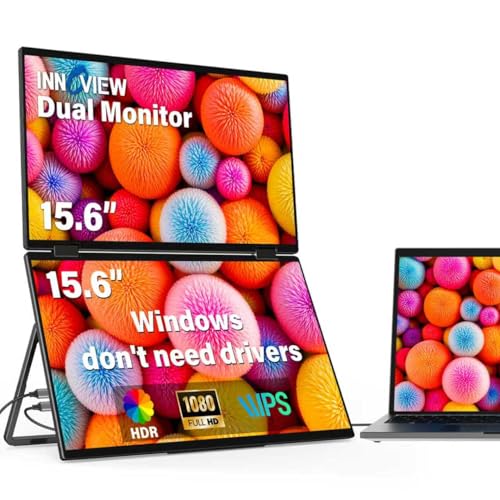
InnoView 15.6" Foldable Dual Stacked Monitor
Best for: Windows users needing dual 1080p screens
- Screen Size
- 15.6"
- Resolution
- 1920x1080
- Refresh Rate
- 60Hz
- Panel Type
- IPS
- Connectivity
- USB-C, HDMI
- Weight
- 3.1 lbs
View on Amazon: InnoView 15.6" Foldable Dual Stacked Monitor Affiliate link
This InnoView setup gives you two 15.6-inch 1080p IPS screens in one foldable unit. It weighs 3.1 pounds and connects via USB-C or HDMI. The design allows for stacked or side-by-side layouts, offering significant screen real estate for multitasking. You get a 315-degree adjustment range and a 180-degree gravity sensor for orientation. It is ideal for users who need a large dual-screen workspace without the bulk of two separate monitors.
Pros
- Two 15.6-inch 1080p IPS panels for expanded workspace
- Foldable design saves space and aids portability
- 315-degree screen adjustment for flexible viewing angles
- Supports extension, splicing, and copy display modes
- Connects via USB-C and HDMI for versatility
Cons
- Requires a 30W power adapter for optimal performance
- Mac users must install a driver for extended display
- No mention of a built-in battery for power independence
Good fit if
- You need dual screens for heavy multitasking
- You want a foldable setup for travel
- You have a Windows PC for driver-free use
Skip if
- You require a single large screen
- You want a battery-powered wireless display
- You use a Mac and dislike driver installation
Verdict: InnoView Dual 15.6" Foldable Portable Monitor is a practical dual-screen solution for Windows users who need extra workspace on the go. It fits professionals who value screen count over portability weight.
Specifications side by side
| Spec | InnoView 23.8-Inch 100Hz Portable Monitor | InnoView 15.6" Foldable Dual Stacked Monitor |
|---|---|---|
| Screen Size | 23.8" | 15.6" |
| Resolution | 1080P | 1920x1080 |
| Refresh Rate | 100Hz | 60Hz |
| Panel Type | IPS | IPS |
| Connectivity | USB-C, HDMI, DP | USB-C, HDMI |
| Color Gamut | 100% sRGB | not stated |
| Weight | 2.2 kg | 3.1 lbs |
| Features | Kickstand | Foldable |
| Dimensions | 18.3 × 12 × 2.01 inches | 8.5 × 14 × 0.85 inches |
| Size | 23.8" 1080P 100Hz | 15.6 inch-FHD-60Hz |
| Color | black | black |
| Model | 23.8" FHD 100Hz | INVPM009 |
Frequently asked questions
Which InnoView monitor is better for a stationary desk setup?
The 23.8-inch model is the better choice for stationary use. It offers a large single canvas that reduces the need to switch windows frequently. Its 100Hz refresh rate also helps with smooth motion. The included kickstand allows for stable placement on a desk. This makes it ideal for users who prioritize screen real estate over portability.
Does the dual monitor come with a built-in battery?
The product data does not mention a built-in battery for either model. Both units rely on external power sources for operation. You will need to connect them to a power adapter or a powered USB hub. This design keeps the devices lighter but requires access to an outlet or a power bank.
How thick is the foldable dual monitor compared to the single screen?
The foldable dual monitor is significantly thinner when closed. It measures 0.85 inches in height. In contrast, the 23.8-inch single monitor is 2.01 inches thick. The dual model’s slim profile aids in storage and transport. The larger single screen is bulkier due to its rigid frame and kickstand mechanism.
Can I use the 23.8-inch monitor with a laptop via USB-C?
Yes, the 23.8-inch monitor supports USB-C connectivity. This port allows for video signal transmission and power delivery. You can connect it directly to compatible laptops. It also supports HDMI and DisplayPort inputs for broader device compatibility. This flexibility helps you integrate it into various desktop setups.
Is the dual monitor suitable for Windows users needing extra workspace?
Yes, the dual monitor is well-suited for Windows users. It provides two separate 1080p displays for distinct tasks. This setup allows you to spread applications across both screens efficiently. The foldable design makes it practical for travel. It is a strong option if you need increased screen count without a permanent desk installation.
What is the weight difference between the two monitors?
The 23.8-inch monitor weighs 3.31 pounds. The foldable dual monitor weighs 3.1 pounds. The weight difference is minimal despite the size disparity. The dual monitor achieves this by using two smaller panels. The larger single screen includes a sturdier build for its size. Both weights are manageable for portable use.
Does the large monitor support high refresh rates for gaming?
Yes, the 23.8-inch monitor features a 100Hz refresh rate. This specification helps reduce motion blur in games and videos. It provides a smoother visual experience compared to standard 60Hz panels. The IPS panel also ensures accurate colors. This makes it a good choice for casual gaming and media consumption.