FOPO 16-Inch Triple Screen Laptop Review: Who It Fits and Who Should Skip It
As an Amazon Associate we earn from qualifying purchases. Links on this page are affiliate links.
This fopo 16 laptop screen extender review covers the FOPO S11, a portable triple-monitor solution designed for users needing extra screen real estate without cluttering their desk. It connects via a single cable to support Windows and macOS systems, including M1, M2, and M3 chips. The device features three 16-inch IPS panels with a 16:10 aspect ratio and 1920x1200 resolution. Weighing just 3.88 lb, it offers a lightweight setup for mobile professionals. The 100% sRGB color gamut ensures clear visuals for design and editing tasks.
What stands out
- Single-cable connection using USB-C or two USB-A ports for simplified setup
- Three 16-inch FHD (1920x1200) IPS panels with 16:10 aspect ratio
- 100% sRGB color gamut for accurate color reproduction
- Lightweight design at 3.88 lb with a 1.14-inch thickness
- Wide compatibility with Windows and macOS, including Apple Silicon chips
Who it fits
Good fit for
This extender suits remote workers, designers, and editors who need multiple displays while traveling. Its lightweight build and included carry bag make it ideal for digital nomads or anyone working in cafes or co-working spaces. The wide compatibility with modern laptops, including those with M1, M2, and M3 chips, ensures it fits most current setups. Users who benefit from expanded horizontal space for multitasking will appreciate the triple-screen configuration and easy single-cable connection.
Who should skip it
You should look elsewhere if you require a single large screen rather than multiple smaller ones. This product is a triple-monitor extender, not a standalone display for gaming or media consumption. It requires a laptop with specific USB ports and data transfer support, so older computers may not work. If you prefer a simpler dual-monitor setup or need higher resolution than 1080p, this device may not meet your needs. The driver installation step also adds a layer of complexity for some users.
Verdict: The FOPO 16-inch triple screen extender offers a compact, multi-display solution for mobile professionals. Its single-cable design and wide compatibility make it a practical choice for boosting productivity on the go.
FOPO S11 Key Specs Explained
Resolution: 1920*1200P
This resolution offers more vertical space than standard 1080p. You get a 16:10 aspect ratio, which fits more document lines or code on screen. It provides clear text for office work and design tasks. If you read reports or edit spreadsheets, this extra height reduces scrolling. It is a practical upgrade over lower resolutions for productivity-focused users.
Panel Type: IPS
IPS panels deliver consistent colors and wide viewing angles. You can see the screen clearly from the side without color shifting. This is useful when sharing your display with a colleague or working in a group setting. It ensures accurate color representation for design work. Compared to TN panels, IPS offers a more reliable visual experience for everyday laptop tasks.
Color Gamut: 100% sRGB
This coverage ensures colors appear accurate and vibrant on the web. Photos and videos look natural without oversaturation. It is sufficient for general office work, web browsing, and standard video editing. If you need professional color grading, you might look for higher gamuts. For most users, 100% sRGB provides a solid baseline for daily digital content creation.
Weight: 3.88 lb
This weight makes the unit portable but requires a sturdy support. You can carry it in the included bag for travel. However, it is heavier than single portable monitors. You need a stable surface or a laptop stand to prevent strain. It suits users who move their setup occasionally rather than those needing ultra-lightweight daily carry solutions.
Connectivity: USB-C, USB-A
You can connect using either USB-C or two USB-A ports. This flexibility helps if your laptop lacks USB-C video output. You still need data transfer capability for the triple display function. It simplifies setup by reducing cable clutter. Check your laptop ports before buying to ensure compatibility with your available connectors for a seamless connection.
Design and Build Quality
The FOPO S11 features a grey finish with a 16-inch display area. According to the listing, the unit measures 13.3 inches in width and 7.8 inches in height. The thickness is listed at 1.5 inches, though another spec notes 1.14 inches. This compact footprint allows it to sit beside a laptop without taking up much desk space. The design includes a backrest that protects your laptop screen from scratches when the extender is attached.
Weighing 3.88 lb, the monitor is lightweight for its size. It folds for storage and includes a dedicated carry bag. This portability makes it suitable for travel or outdoor work setups. The build prioritizes ease of transport over rigid durability claims. You can carry it to cafes or client sites without significant bulk.
Controls are physical. Each of the three screens has a dedicated brightness adjustment button. This allows quick tweaks without navigating software menus. The layout is straightforward, with no hidden touch controls or complex interfaces. The matte grey casing blends with most laptop designs. The simple construction focuses on function, keeping the device easy to use in various lighting conditions.
Setup and Daily Workflow
Setting up the FOPO S11 requires minimal hardware changes. You need a laptop with either a USB-C port or two USB-A ports. The connection relies on a single cable that carries both video and power signals. This design reduces desk clutter by eliminating multiple adapters. Before connecting, you must install the driver included in the package. The listing confirms compatibility with Windows and macOS systems, including devices with M1, M2, and M3 chips. It supports laptops ranging from 13.3 to 18.5 inches. You can choose between expansion mode for extended desktop space or mirroring mode to duplicate your screen. The unit weighs 3.88 lb and folds to 1.14 inches thick, making it easy to store in the included carry bag. Daily use benefits from the 16:10 aspect ratio, which provides more vertical space for documents and code. The 100% sRGB color gamut ensures accurate colors for design work. Each screen has dedicated brightness buttons for quick adjustments. Low blue light technology helps reduce eye fatigue during long sessions. The backrest design protects your laptop screen when the extender is open. You can increase your workspace efficiency by managing three screens simultaneously. The package includes a dual USB-A to USB-C cable and a 60cm USB-C to USB-C cable. This setup allows you to establish a portable workstation anywhere. The lightweight design ensures you can carry your entire multi-screen setup without significant bulk.
Before You Buy This Extender
Before you buy, verify your laptop ports. You need one USB-C port or two USB-A ports that support data transfer. The listing notes driver installation is required. Ensure your system runs Windows or macOS with M1, M2, or M3 chips. Check your laptop size compatibility, as it supports devices from 13.3 to 18.5 inches. This extender adds significant screen real estate but requires desk space for the triple display. Keep the included carry bag for travel, as the unit weighs 3.88 pounds. Clean the IPS panel with a dry cloth to maintain the 100% sRGB color accuracy. Avoid using harsh chemicals. Consider your workflow needs. If you edit video or code, the 16:10 aspect ratio provides useful vertical space. However, if you only need a second screen, this three-display setup may be overkill. It fits well alongside single portable monitors for users needing maximum multitasking capability without permanent desk installation.
Check before you buy
- Confirm laptop has USB-C or two USB-A data ports
- Check if your OS is Windows or macOS with M-series chips
- Measure your laptop size to ensure 13.3 to 18.5 inch compatibility
- Ensure you have desk space for three simultaneous displays
The product at a glance
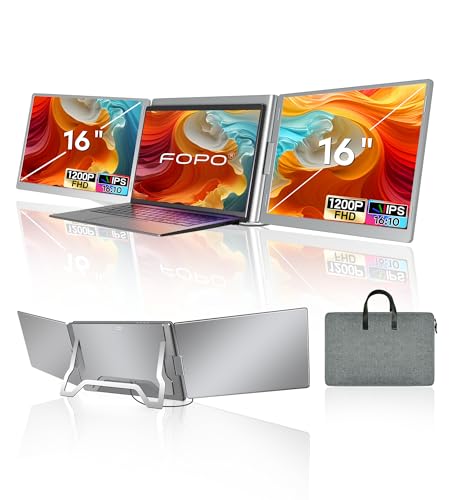
FOPO 16-Inch Triple Screen Laptop Extender
Best for: professionals needing triple displays while traveling
- Screen Size
- 16"
- Resolution
- 1920*1200P
- Panel Type
- IPS
- Connectivity
- USB-C, USB-A
- Color Gamut
- 100% sRGB
- Aspect Ratio
- 16:10
View on Amazon: FOPO 16-Inch Triple Screen Laptop Extender Affiliate link
This FOPO portable monitor extends your laptop display into three 16-inch screens using a single USB-C or USB-A connection. Each panel offers 1920x1200 FHD resolution on an IPS panel with 100% sRGB coverage. The unit weighs 3.88 lb and folds for travel. It suits users needing extra workspace for design or editing on Windows or Mac systems.
Pros
- Connects three 16-inch screens via one cable
- 1920x1200 FHD resolution on IPS panels
- 100% sRGB color gamut for accurate visuals
- Lightweight 3.88 lb design with carry bag
Cons
- Requires driver installation for setup
- Bulky compared to single-screen portable monitors
- Limited to 60Hz refresh rate
Good fit if
- You need three additional displays for multitasking
- You travel frequently and need a foldable setup
- You use Windows or Mac laptops with USB-C
Skip if
- You want a single high-refresh-rate gaming screen
- You prefer plug-and-play without driver installation
- You need a lightweight single-display alternative
Verdict: FOPO 16-Inch Triple Screen Extender delivers three high-resolution displays in a portable package, making it ideal for professionals who need expanded workspace on the go.
Specifications side by side
| Spec | FOPO 16-Inch Triple Screen Laptop Extender |
|---|---|
| Screen Size | 16" |
| Resolution | 1920*1200P |
| Panel Type | IPS |
| Connectivity | USB-C, USB-A |
| Color Gamut | 100% sRGB |
| Aspect Ratio | 16:10 |
| Weight | 3.88 lb |
| Size | 16 Inch |
| Dimensions | 1.5 × 13.3 × 7.8 inches |
| Color | Grey |
| Model | S11 |
Frequently asked questions
Does the FOPO 16-inch triple screen extender work with MacBooks?
Yes, it supports macOS systems. The device connects via a single cable to laptops with M1, M2, or M3 chips. You can use it with Apple silicon Macs without compatibility issues. Just ensure your port supports data transfer and video output for proper functionality.
What is the resolution of the FOPO S11 displays?
Each screen offers 1920x1200 pixel resolution. This provides a 16:10 aspect ratio, which gives more vertical space than standard 1080p. You get clear text for office work and design tasks. The 1080p FHD rating ensures sharp visuals for your daily workflow.
How portable is the FOPO 16-inch triple screen setup?
The unit measures 13.3 inches wide and 7.8 inches high. It has a thickness of 1.5 inches according to the listing. This compact form factor makes it suitable for travel. You can carry it easily while maintaining a triple-monitor workspace on the go.
What connection type does the FOPO S11 use?
It connects via a single cable that carries both video and power signals. You need a laptop with either a USB-C port or two USB-A ports. This design reduces desk clutter. It simplifies setup by minimizing the number of cables you need to manage.
Who is the FOPO 16-inch extender best for?
It is ideal for professionals needing triple displays while traveling. The device delivers three high-resolution displays in a portable package. You get expanded workspace without cluttering your desk. It suits users who require extra screen real estate for productivity tasks outside the office.
Does the FOPO S11 require driver installation?
Yes, the listing notes driver installation is required. You must install the drivers before using the device. Ensure your system runs Windows or macOS. This step is necessary for the screens to function correctly with your laptop's operating system.
What panel type does the FOPO S11 use?
The device uses an IPS panel type. IPS technology provides wide viewing angles and accurate color reproduction. You get consistent image quality from different positions. This panel type is suitable for design tasks and general office work where color accuracy matters.