Dell Pro USB-C 100W Docking vs Dell WD19 180W USB-C Docking (2026): Key Differences
As an Amazon Associate we earn from qualifying purchases. Links on this page are affiliate links.
When comparing the dell pro USB c 100w docking vs wd19 180w USB c docking, you see two reliable Dell options for expanding your workspace. Both docks use a USB-C host interface and provide HDMI and DisplayPort video outputs. They also both deliver significant power to your laptop via their respective power delivery features. The main difference lies in their power output and specific connectivity options. One offers higher wattage for more demanding devices, while the other focuses on modern sustainability and streamlined design.
Key differences
| Aspect | Dell Pro USB-C 100W Docking Station | Dell WD19 180W USB-C Docking Station |
|---|---|---|
| Power Delivery | 100W | 130W |
| Ethernet | not listed | Gigabit Ethernet RJ45 |
| DisplayPort Count | 1x DisplayPort | 2x DisplayPort |
| USB-C Video | not listed | 1x USB-C Multifunction DisplayPort |
| Weight | 1.21 pounds | 1.29 pounds |
Which one should you choose?
Choose Dell Pro USB-C 100W Docking Station if
- You prioritize a lighter dock with a sustainable design using recycled materials.
- You need a dock that supports up to 100W power delivery for newer AI PCs.
- You prefer an ambidextrous USB-C cable for flexible desk setup routing.
Choose Dell WD19 180W USB-C Docking Station if
- You require built-in Gigabit Ethernet for wired network connections.
- You need higher power delivery at 130W for more power-hungry laptops.
- You want to connect more displays using two native DisplayPort outputs.
Verdict: Choose the Dell Pro Dock if you value a lighter, more sustainable design with flexible cable routing. Pick the WD19 if you need built-in Ethernet and higher power delivery for more demanding setups. Both docks provide essential connectivity for a productive dual-monitor workspace.
Docking Station Specs Compared
Power delivery
The Dell Pro USB-C 100W Docking Station offers up to 100W of power delivery to your laptop. This is sufficient for many mainstream Dell AI PCs and non-Dell systems. The Dell WD19 180W USB-C Docking Station provides 130W of power delivery. Although its adapter is rated at 180W, the output to the host is lower than the WD19S but higher than the Pro dock. If you need maximum charging speed for power-hungry laptops, the WD19 gives you more watts. For standard productivity machines, the Pro dock meets the basic requirements.
Display support
The Dell Pro USB-C 100W Docking Station features native support for up to four high-resolution displays. This allows for a highly expanded multi-monitor setup. The Dell WD19 180W USB-C Docking Station includes two DisplayPort 1.4 outputs and one HDMI port. It also lists a USB-C multifunction DisplayPort. The data does not explicitly state the maximum number of simultaneous displays for the WD19, but it clearly supports dual external monitors. If you plan to use three or four screens, the Pro dock offers a clear advantage in display capacity.
Connectivity ports
The Dell WD19 180W USB-C Docking Station includes a Gigabit Ethernet RJ45 port. This is essential for stable wired internet connections in office environments. The Dell Pro USB-C 100W Docking Station does not list an Ethernet port in its specifications. Both docks provide USB-C, HDMI, and DisplayPort video outputs. The WD19 also offers multiple USB-A ports, including one with PowerShare. The Pro dock mentions faster USB speeds but does not detail the specific port count. For users needing wired networking, the WD19 is the better choice.
Physical design
The Dell Pro USB-C 100W Docking Station features an ambidextrous USB-C cable. You can route this cable to the left or right side of your desk. It also uses a robust USB-C connector designed for enhanced durability. The Dell WD19 180W USB-C Docking Station includes a 3.3-foot SuperSpeed USB-C cable. Its dimensions are 8.1 x 3.5 x 1.1 inches. The Pro dock is slightly wider at 3.54 inches and taller at 1.39 inches. The cable routing flexibility on the Pro dock offers a practical benefit for desk organization.
Sustainability
The Dell Pro USB-C 100W Docking Station is built with at least 65% postconsumer recycled materials. It is packaged with 100% recycled or renewable packaging. It also reduces standby power consumption by up to 72%. The Dell WD19 180W USB-C Docking Station data does not mention recycled materials or packaging details. It does not list standby power reduction statistics. If environmental impact and energy efficiency in idle mode are priorities for your setup, the Pro dock provides verified sustainable specifications.
Choose the Dell dock that fits your needs
Users needing Ethernet connectivity for stable internet
The Dell WD19 includes a Gigabit Ethernet RJ45 port. This wired connection ensures stable network speeds without relying on Wi-Fi. It is ideal for offices where consistent bandwidth is critical for large file transfers or video calls.
Buyers prioritizing modern sustainability and design
The Dell Pro Dock uses at least 65% postconsumer recycled materials. It features a robust ambidextrous USB-C cable for flexible routing. It also reduces standby power consumption by up to 72%, making it a more eco-friendly choice for your workspace.
Those wanting native support for multiple displays
The Dell Pro Dock offers native support for up to four high-resolution displays. This expands your view significantly compared to standard setups. It keeps you productive by connecting more screens directly through the dock without additional adapters.
The products compared

Dell Pro USB-C 100W Docking Station
Best for: Users needing 100W power and dual video outputs
- Host Interface
- USB-C
- Display Support
- Quad
- Power Delivery
- 100W
- Video Ports
- DisplayPort, HDMI
- Connectivity
- USB-C, HDMI, DisplayPort, Ethernet, USB-A
- Use
- Office
View on Amazon: Dell Pro USB-C 100W Docking Station Affiliate link
The Dell WD25 is a USB-C docking station with 100W power delivery. It features DisplayPort and HDMI outputs for multi-monitor setups. The unit weighs 1.21 pounds and measures 8.07 inches long. It supports up to four high-resolution displays. This dock suits users who need reliable connectivity and moderate power output for their laptops.
Pros
- 100W power delivery for compatible laptops
- Dual video outputs via DisplayPort and HDMI
- Ambidextrous USB-C cable routing
- Supports up to four high-res displays
Cons
- 100W power delivery is lower than the 130W option on this list
- Only two video ports (HDMI and DisplayPort)
- No mention of Thunderbolt support
Good fit if
- You need a compact dock for dual monitors
- Your laptop requires up to 100W of power
- You prefer a left or right cable routing option
Skip if
- You require more than 100W of power delivery
- You need Thunderbolt 4 connectivity
- You want more than two simultaneous video outputs
Verdict: Dell WD25 100W USB-C Dock is a solid choice for users who prioritize cable flexibility and sufficient power for mainstream laptops over maximum output.
Dell WD19 180W USB-C Docking Station
Best for: Dual monitor setups with high power needs
- Host Interface
- USB-C
- Power Delivery
- 130W
- Video Ports
- HDMI, DisplayPort 1.4, USB-C
- Ethernet Speed
- Gigabit Ethernet
- Dimensions
- 8.1 × 3.5 × 1.1 inches
- Weight
- 3.1 pounds
View on Amazon: Dell WD19 180W USB-C Docking Station Affiliate link
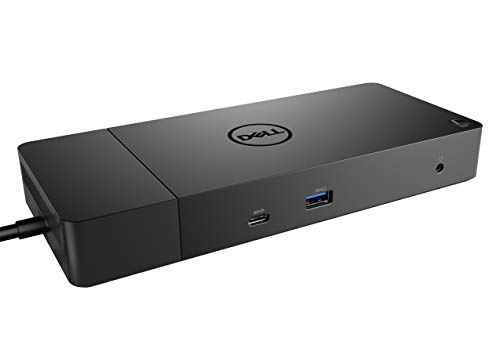
The Dell WD19 180W dock provides robust connectivity for your laptop. It delivers 130W of power delivery to keep your device charged while connected. You get two DisplayPort 1.4 outputs and one HDMI port for dual monitor setups. The unit includes a Gigabit Ethernet port for stable wired internet. Its dimensions are 8.1 by 3.5 by 1.1 inches. It weighs 1.29 pounds. This dock suits users needing high power output and multiple video ports.
Pros
- 130W Power Delivery supports high-power laptops
- Dual DisplayPort 1.4 and HDMI for multi-monitor setups
- Gigabit Ethernet RJ45 port for wired networking
- USB-C 3.1 Gen 2 host interface
Cons
- Heavier at 1.29 pounds compared to lighter docks
- Larger footprint at 8.1 inches in length
- No USB-C video output listed alongside HDMI
Good fit if
- You need 130W power delivery for your laptop
- You require two external monitors via DisplayPort
- You want a Gigabit Ethernet connection
Skip if
- You need a lightweight travel dock
- You require Thunderbolt 3 or 4 connectivity
- You only need a single video output
Verdict: Dell WD19 180W USB-C Dock fits users who prioritize high power delivery and dual display outputs over compact size. It is a sturdy option for stationary desk setups.
Specifications side by side
| Spec | Dell Pro USB-C 100W Docking Station | Dell WD19 180W USB-C Docking Station |
|---|---|---|
| Host Interface | USB-C | USB-C |
| Display Support | Quad | not stated |
| Power Delivery | 100W | 130W |
| Video Ports | DisplayPort, HDMI | HDMI, DisplayPort 1.4, USB-C |
| Ethernet Speed | not stated | Gigabit Ethernet |
| Connectivity | USB-C, HDMI, DisplayPort, Ethernet, USB-A | USB-C, HDMI, DisplayPort |
| Use | Office | not stated |
| Dimensions | 8.07 × 3.54 × 1.39 inches | 8.1 × 3.5 × 1.1 inches |
| Weight | 1.21 pounds | 3.1 pounds |
| Color | Black | black |
| Model | WD25 | WD19 180W |
| Size | not stated | 8.1 x 3.5 x 1.1 inches |
Frequently asked questions
Which dock supports more video outputs?
Both the Dell Pro USB-C 100W and the WD19 180W support dual video outputs. Each unit includes one HDMI port and one DisplayPort. This allows you to connect two external displays to your laptop. You can arrange these screens for an expanded workspace. Neither model offers more than two dedicated video ports in its standard configuration.
Does the WD19 have Ethernet connectivity?
Yes, the Dell WD19 180W includes a Gigabit Ethernet RJ45 port. This provides a wired connection for stable internet speeds. It is useful for offices requiring consistent bandwidth without relying on Wi-Fi. The Dell Pro USB-C 100W does not list built-in Ethernet in its specified attributes. You would need a separate adapter for wired networking with the Pro model.
What is the difference in power delivery?
The Dell WD19 180W delivers 130W of power to your laptop. The Dell Pro USB-C 100W provides up to 100W. The higher wattage on the WD19 supports more power-hungry devices. Both options are sufficient for many mainstream systems. You should choose the WD19 if your laptop requires higher charging speeds than 100W.
How do the physical dimensions compare?
The Dell Pro USB-C 100W measures 8.07 inches in length. The WD19 180W is slightly longer at 8.1 inches. Both units share similar widths around 3.5 inches. The Pro model is marginally thinner at 1.39 inches compared to the WD19 at 1.1 inches. The weight difference is minimal, with the WD19 being slightly heavier at 1.29 pounds.
Which dock is better for dual monitors?
Both docks support dual monitor setups via HDMI and DisplayPort outputs. The WD19 180W offers higher power delivery at 130W, which may benefit larger laptops driving multiple screens. The Pro USB-C 100W provides 100W, which is adequate for most mainstream laptops. Your choice depends on whether you need the extra power headroom provided by the WD19.
Is the Dell Pro USB-C dock compact?
The Dell Pro USB-C 100W is a compact option for desk setups. It measures 3.54 inches wide and 1.39 inches high. Its weight is 1.21 pounds. This makes it slightly lighter and dimensionally distinct from the WD19. It fits well on desks where space is limited but you still need reliable video and power connections.
Can I use these docks with non-Dell laptops?
Yes, both docks work with non-Dell systems via USB-C. The Dell Pro USB-C 100W is noted as sufficient for non-Dell systems. The WD19 180W also supports various laptops through its USB-C interface. You should verify that your laptop supports USB-C Power Delivery and DisplayPort Alternate Mode for full functionality with either dock.
What ports are on each dock?
Both docks feature USB-C, HDMI, and DisplayPort connections. The WD19 180W also includes a Gigabit Ethernet RJ45 port for wired networking. The Dell Pro USB-C 100W lists USB-C, HDMI, and DisplayPort in its connectivity attributes. You should check the full specification sheet for additional USB-A ports or other connectivity options not listed in the summary.