Dell Pro USB-C 100W Docking vs Dell 180W USB-C Docking Station (2026): Key Differences
As an Amazon Associate we earn from qualifying purchases. Links on this page are affiliate links.
When comparing the dell pro USB c 100w docking vs 180w USB c docking station, you are looking at two reliable Dell solutions for expanding your workspace. Both docks use a USB-C host interface and offer HDMI and DisplayPort outputs to connect external displays. They share a similar black color scheme and compact footprint. The main difference lies in their power delivery capabilities and specific port configurations, which affect how they support your laptop and peripherals.
Key differences
| Aspect | Dell Pro USB-C 100W Docking Station | Dell 180W USB-C Docking Station |
|---|---|---|
| Power Delivery | 100W | 130W |
| Video Ports | DisplayPort, HDMI | 2x DisplayPort, HDMI, USB-C |
| Ethernet | not listed | Gigabit Ethernet RJ45 |
| USB-A Ports | not listed | 3x USB-A 3.1 |
Which one should you choose?
Choose Dell Pro USB-C 100W Docking Station if
- You need a lighter dock for frequent travel.
- Your laptop requires up to 100W of power.
- You prefer a modern, ambidextrous cable design.
Choose Dell 180W USB-C Docking Station if
- You need built-in Gigabit Ethernet connectivity.
- Your laptop requires up to 130W of power.
- You need multiple USB-A ports for peripherals.
Verdict: The Dell Pro 100W dock is better for users who prioritize portability and a modern cable design. The 180W dock suits those who need wired Ethernet and more USB-A ports. Choose based on your specific power and connectivity needs.
Dell Docking Stations Compared
Power Delivery
Power delivery determines how much energy the dock sends to your laptop. The Dell 180W USB-C Docking Station provides 130W of power. This higher output helps charge larger laptops or devices with bigger batteries more efficiently. The Dell Pro USB-C 100W Docking Station offers 100W. This is sufficient for most mainstream devices, including many AI PCs. If your laptop requires more than 100W to charge at full speed, the 130W option is better. For standard office laptops, both provide ample power for daily tasks.
Video Outputs
Both docks support HDMI and DisplayPort connections. The Dell 180W USB-C Docking Station includes two DisplayPort 1.4 outputs and one HDMI port. This allows you to connect two monitors via DisplayPort and one via HDMI. The Dell Pro USB-C 100W Docking Station lists DisplayPort and HDMI as its video ports. It mentions support for up to four high-res displays, but does not list the specific number of ports in the key specs. The 180W dock gives you a clearer view of its physical connection options right away.
Network Connectivity
Network connectivity is vital for stable internet access in a docked setup. The Dell 180W USB-C Docking Station features a Gigabit Ethernet RJ45 port. This ensures a wired connection for reliable data transfer and low latency. The Dell Pro USB-C 100W Docking Station does not list an Ethernet port in its key specs or attributes. While it mentions faster network speeds, the absence of a dedicated Ethernet port means you may need a separate adapter. For users who rely on wired connections, the 180W dock is the stronger choice.
Physical Design
The physical design affects how the dock fits on your desk. The Dell Pro USB-C 100W Docking Station features an ambidextrous USB-C cable. You can route the cable to the left or right, which helps keep your workspace tidy. It also has a robust USB-C connector for durability. The Dell 180W USB-C Docking Station comes with a 3.3-foot SuperSpeed USB-C cable. Both units are similar in size, with the 180W model being slightly lighter at 1.3 pounds compared to 1.21 pounds for the Pro model.
Sustainability
Environmental impact is a growing concern for many buyers. The Dell Pro USB-C 100W Docking Station is built with at least 65% postconsumer recycled materials. It also uses 100% recycled or renewable packaging. Additionally, it reduces power consumption by up to 72% in standby mode. The Dell 180W USB-C Docking Station does not provide specific details about recycled materials or packaging in the provided data. If sustainable manufacturing is a priority for you, the Pro model offers verified eco-friendly credentials.
Choose the Right Dock for You
Users needing maximum laptop charging power
The Dell 180W USB-C Docking Station delivers 130W of power delivery. This higher output ensures your laptop stays charged even during intensive tasks. If your device requires significant energy, this dock provides the necessary wattage to maintain performance and battery health without draining the system.
Buyers prioritizing port connectivity options
This model includes a Gigabit Ethernet port for stable wired internet. It also offers multiple USB-A and USB-C ports for peripherals. The Dell Pro Dock focuses on video and power but lacks the extensive I/O variety found here, making it less ideal for heavy peripheral users.
Users seeking modern sustainability features
The Dell Pro USB-C 100W Docking Station uses at least 65% postconsumer recycled materials. It also reduces standby power consumption by up to 72%. If environmental impact and energy efficiency are important to you, this dock offers a more sustainable design compared to the older 180W model.
The products compared

Dell Pro USB-C 100W Docking Station
Best for: multi-monitor setups with 100W power needs
- Host Interface
- USB-C
- Display Support
- Quad
- Power Delivery
- 100W
- Video Ports
- DisplayPort, HDMI
- Connectivity
- USB-C, HDMI, DisplayPort, Ethernet, USB-A
- Use
- Office
View on Amazon: Dell Pro USB-C 100W Docking Station Affiliate link
The Dell WD25 is a USB-C docking station delivering up to 100W of power to your laptop. It supports up to four high-resolution displays via DisplayPort and HDMI. This dock is designed for commercial environments, offering flexible management and durable connectivity. It suits users who need reliable multi-monitor setups and efficient power delivery for their daily workflow.
Pros
- Delivers up to 100W power delivery
- Supports up to four high-res displays
- Ambidextrous USB-C cable routing
- Built with 65% postconsumer recycled materials
Cons
- Lower 100W power delivery compared to 180W alternatives
- No mention of Thunderbolt support
- No mention of Ethernet port for wired networking
Good fit if
- You need reliable power for mainstream AI PCs
- You want to connect up to four monitors
- You prefer a durable USB-C connector
Skip if
- You require 180W power delivery for high-end laptops
- You need Thunderbolt connectivity for faster data speeds
- You rely on a built-in Ethernet port
Verdict: The Dell WD25 100W USB-C Dock is a solid choice for users who prioritize multi-monitor support and sustainable design over maximum power output. It fits professionals who need a stable, manageable docking solution for their daily tasks.
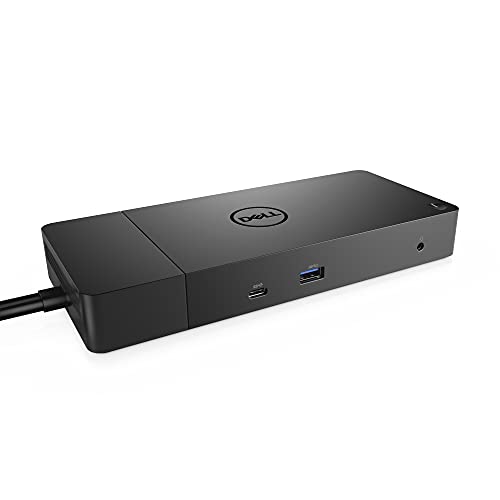
Dell 180W USB-C Docking Station
Best for: Dual monitor setups with high power needs
- Host Interface
- USB-C
- Power Delivery
- 130W
- Video Ports
- DisplayPort, HDMI, USB-C
- Ethernet Speed
- Gigabit Ethernet
- Dimensions
- 3.5 × 8.1 × 1.1 inches
- Weight
- 1.3 pounds
View on Amazon: Dell 180W USB-C Docking Station Affiliate link
The Dell WD19 provides 130W power delivery over USB-C to support high-performance laptops. It features dual DisplayPort 1.4 outputs and one HDMI port for multi-monitor setups. The dock includes Gigabit Ethernet and multiple USB-A ports for peripherals. Its compact 8.1 by 3.5 by 1.1 inch chassis fits easily on desks. This station suits users needing robust video connectivity and steady power for demanding workloads.
Pros
- 130W Power Delivery for compatible laptops
- Dual DisplayPort 1.4 and HDMI video outputs
- Gigabit Ethernet RJ45 port
- Multiple USB-A 3.1 ports
Cons
- No Thunderbolt support
- No USB-C video output
- Single HDMI port limits triple-monitor setups
Good fit if
- You need dual external monitors with DisplayPort
- You require 130W power delivery for your laptop
- You want a reliable Gigabit Ethernet connection
Skip if
- You need Thunderbolt 3 or 4 connectivity
- You require more than two DisplayPort outputs
- You want USB-C video output instead of DisplayPort
Verdict: Dell WD19 180W Docking Station delivers strong dual-monitor support and 130W charging for laptops that benefit from stable power and multiple display options.
Specifications side by side
| Spec | Dell Pro USB-C 100W Docking Station | Dell 180W USB-C Docking Station |
|---|---|---|
| Host Interface | USB-C | USB-C |
| Display Support | Quad | not stated |
| Power Delivery | 100W | 130W |
| Video Ports | DisplayPort, HDMI | DisplayPort, HDMI, USB-C |
| Ethernet Speed | not stated | Gigabit Ethernet |
| Connectivity | USB-C, HDMI, DisplayPort, Ethernet, USB-A | USB-C, HDMI, DisplayPort |
| Use | Office | not stated |
| Dimensions | 8.07 × 3.54 × 1.39 inches | 3.5 × 8.1 × 1.1 inches |
| Weight | 1.21 pounds | 1.3 pounds |
| Color | Black | black |
| Model | WD25 | DELL DOCK-WD19 180W |
Frequently asked questions
Can the Dell Pro 100W dock support three monitors?
No, this model does not support three monitors. It features HDMI and DisplayPort outputs for dual-screen setups. The Dell 180W dock also provides dual display connectivity. You cannot connect a third display to either dock simultaneously.
What is the physical size difference between the two docks?
The Dell Pro 100W dock is slightly more compact. It measures 8.07 inches in length and weighs 1.21 pounds. The 180W dock is 8.1 inches long and weighs 1.3 pounds. The size difference is minimal for desk placement.
Does the 100W dock charge laptops at full speed?
It provides up to 100W of power delivery. This is sufficient for many ultrabooks and standard laptops. The 180W dock offers 130W for devices with higher power requirements. Choose the 100W model if your laptop does not need extra charging headroom.
Are both docks compatible with USB-C laptops?
Yes, both docks use a USB-C host interface. This allows connection to modern laptops with USB-C ports. They both include HDMI and DisplayPort outputs for video. Ensure your laptop supports video output through its USB-C port.
Which dock is better for a sustainable workspace?
The Dell Pro 100W dock is noted for its sustainable design. It fits professionals who prioritize eco-friendly options. Both docks offer stable connectivity for daily tasks. If sustainability is a key factor, the Pro model is the recommended choice.
Can I use both docks with a single monitor?
Yes, you can use either dock with a single monitor. Both provide HDMI and DisplayPort connections. The 180W dock offers more power for your laptop. The 100W dock is lighter and more compact. Your choice depends on power needs and desk space.