Dell 180W USB-C Docking Station Review: Who It Fits and Who Should Skip It
As an Amazon Associate we earn from qualifying purchases. Links on this page are affiliate links.
This dell 180w USB c docking station review covers the Dell WD19, a hub designed to expand your laptop’s connectivity. It connects via a single USB-C cable and includes a 180W power adapter. The dock delivers up to 130W of Power Delivery to your host device while providing video output through HDMI and DisplayPort. It also features Gigabit Ethernet for wired networking. This setup allows you to manage multiple displays and peripherals from one central unit.
What stands out
- 130W Power Delivery output for compatible laptops
- Triple video support: HDMI and two DisplayPort 1.4 ports
- Gigabit Ethernet RJ45 port for stable wired internet
- USB-C 3.1 Gen 2 and USB-A 3.1 ports for data and accessories
Who it fits
Good fit for
This dock suits professionals who need a single-cable connection for their laptop. It is ideal for users with USB-C laptops that support video output and power delivery. The inclusion of Gigabit Ethernet makes it a solid choice for offices where Wi-Fi is unreliable. You will also appreciate the multiple USB-A and USB-C ports if you connect several peripherals like mice, keyboards, and external drives without needing additional hubs.
Who should skip it
Skip this model if your laptop lacks a USB-C port with DisplayPort Alternate Mode. It will not work with older USB-A only laptops. Also, avoid it if you require Thunderbolt 3 or 4 speeds for high-bandwidth data transfer, as this dock uses standard USB-C protocols. Users needing native Thunderbolt connectivity for fast storage or daisy-chaining devices should look for a Thunderbolt-specific docking station instead.
Verdict: The Dell WD19 is a practical, spec-driven dock for users needing reliable video and network expansion via USB-C. It delivers solid performance for standard office setups without the premium cost of Thunderbolt solutions.
Key specs explained for Dell WD19
Power Delivery 130W
This dock supplies up to 130 watts to your laptop through the USB-C connection. You can charge high-performance machines while using the dock. This reduces the need for a separate power brick on your desk. Check your laptop’s charging requirements to ensure 130W is sufficient for your model.
Host Interface USB-C
The dock connects to your computer using a single USB-C cable. You need a laptop port that supports video output and data transfer. This simplifies your desk setup by requiring only one cable for video, data, and power. Verify your laptop has a compatible USB-C port before purchasing.
Video Ports DisplayPort, HDMI, USB-C
The unit offers multiple display outputs including DisplayPort, HDMI, and a USB-C multifunction port. You can connect various monitors and projectors from different manufacturers. This flexibility helps you build a multi-monitor setup without needing extra adapters. Ensure your monitors match the available input types on the dock.
Ethernet Speed Gigabit Ethernet
The built-in RJ45 port provides Gigabit Ethernet connectivity for stable wired internet. Wired connections offer lower latency and higher reliability than Wi-Fi for video calls or large file transfers. This is useful for professionals who need consistent network performance. It keeps your desk cable-free by replacing wireless dongles.
Ports 1x USB-C 3.1, 3x USB-A 3.1
You get one high-speed USB-C port and three USB-A ports for peripherals. These ports allow you to connect keyboards, mice, and external drives. The USB-A ports are Gen 1, suitable for standard input devices and storage. This variety ensures you can connect legacy and modern accessories simultaneously without extra hubs.
Design and build details
The Dell WD19 dock measures 8.1 by 3.5 by 1.1 inches and weighs 1.3 pounds. According to the listing, the unit is black. Its compact footprint allows it to sit comfortably beside your laptop without consuming excessive desk space. The low profile ensures it does not obstruct airflow or other peripherals nearby. You can place it on a standard workstation or a narrow desk edge with ease.
The casing appears to be a solid, single-piece design typical for docking stations. There are no visible moving parts or external controls on the top surface. All connectivity is managed through the rear and side ports. This layout keeps the front of your workspace clean and uncluttered. You only need to manage cables on one side, which simplifies cable management significantly.
The included SuperSpeed USB-C cable is 3.3 feet long. This length provides enough slack for flexible placement of the dock relative to your laptop. You are not restricted to a rigid, fixed position. The 180W power adapter is separate from the dock body. This design choice means the heavy power brick can be positioned away from heat-sensitive areas, though it does add another item to your desk setup. The overall build prioritizes function over form, offering a sturdy base for your daily computing needs.
Setup and daily operation guide
Setting up the Dell WD19 requires connecting the included SuperSpeed USB-C cable to your laptop and plugging the 180W AC adapter into a wall outlet. The dock supports 120V and 230V inputs at 50 or 60 Hz, allowing use in most regions. You connect your peripherals to the rear ports. The host interface is USB-C, so your laptop must have a compatible port. The listing notes that you should check the description for important compatibility information before connecting. This suggests verifying your laptop’s USB-C capabilities, such as Thunderbolt support, to ensure full functionality.
For daily use, the dock provides a single cable solution for video, data, and power. You can connect up to two external displays using the two DisplayPort 1.4 outputs or the HDMI port. The USB-C multifunction DisplayPort allows for a third display if your laptop supports it. The Gigabit Ethernet RJ45 port offers wired network connectivity, which is stable for large file transfers or video calls. You can connect up to four USB devices using the three USB-A 3.1 ports and the one USB-C 3.1 port. The USB-A port with Power Share can charge devices even when the laptop is off. Audio devices plug into the combo audio/headset jack or the dedicated audio out port. The 130W Power Delivery charges your laptop while you work, reducing cable clutter on your desk.
Check compatibility and setup needs
Before you buy the Dell WD19, verify your laptop’s USB-C port supports DisplayPort Alternate Mode. The dock relies on this feature for video output. Without it, you will only get data and charging. You must also check your laptop’s power delivery requirements. Since the dock supplies up to 130W, ensure your machine can handle that input without overheating. This setup is ideal for users who need dual external displays and a single-cable connection. It fits well into a stationary desk environment alongside portable monitors. However, it is not designed for travel due to its 180W brick and size. Keep the included cable organized to prevent wear. Regularly dust the vents to maintain thermal performance. If you move your workspace daily, consider a lighter alternative. For a fixed office setup, this dock provides robust connectivity. Just confirm your host device compatibility first. The listing notes important compatibility details you should read carefully.
Check before you buy
- Verify laptop USB-C supports DisplayPort Alternate Mode
- Confirm laptop accepts 130W power delivery input
- Check listing for specific host device compatibility
- Ensure desk space fits 8.1 inch footprint
The product at a glance
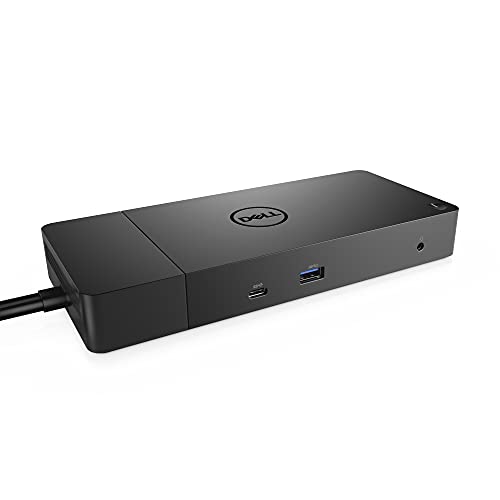
Dell 180W USB-C Docking Station
Best for: Dual monitor setups with wired networking
- Host Interface
- USB-C
- Power Delivery
- 130W
- Video Ports
- DisplayPort, HDMI, USB-C
- Ethernet Speed
- Gigabit Ethernet
- Dimensions
- 3.5 × 8.1 × 1.1 inches
- Weight
- 1.3 pounds
View on Amazon: Dell 180W USB-C Docking Station Affiliate link
The Dell WD19 provides 130W power delivery to your laptop while expanding connectivity through a single USB-C host interface. It includes dual DisplayPort 1.4 outputs, an HDMI port, and a Gigabit Ethernet connection for wired networking. This dock supports dual displays and features multiple USB-A ports for peripherals. It suits users who need a reliable, wired connection hub for their workspace setup.
Pros
- 130W Power Delivery output
- Dual DisplayPort 1.4 and HDMI video outputs
- Gigabit Ethernet RJ45 port
- Multiple USB-A 3.1 ports for peripherals
Cons
- No built-in Wi-Fi or Bluetooth
- Requires separate 180W power adapter
- Limited to 130W charging for host laptop
Good fit if
- You need wired Gigabit Ethernet connectivity
- You want to drive dual external monitors
- You require stable USB-C docking for work
Skip if
- You need wireless Wi-Fi or Bluetooth connectivity
- You require more than 130W power delivery
- You prefer a compact all-in-one wireless hub
Verdict: Dell WD19 180W Docking Station fits professionals who need dual display support and wired networking. It provides a stable connection for laptops needing 130W charging.
Specifications side by side
| Spec | Dell 180W USB-C Docking Station |
|---|---|
| Host Interface | USB-C |
| Power Delivery | 130W |
| Video Ports | DisplayPort, HDMI, USB-C |
| Ethernet Speed | Gigabit Ethernet |
| Connectivity | USB-C, HDMI, DisplayPort |
| Dimensions | 3.5 × 8.1 × 1.1 inches |
| Weight | 1.3 pounds |
| Color | black |
| Model | DELL DOCK-WD19 180W |
Frequently asked questions
Can this dock support two external monitors?
Yes, the Dell WD19 is designed for dual monitor setups. It provides both HDMI and DisplayPort outputs to connect two screens simultaneously. This makes it suitable for professionals who need expanded desktop space for multitasking or data-heavy workflows.
Does it work with MacBooks?
The dock connects via USB-C, which is compatible with many modern MacBooks. However, you must ensure your specific MacBook model supports DisplayPort Alternate Mode over USB-C for video output to function correctly. Without this feature, video signals will not pass through.
How much power does it deliver to the laptop?
The unit supplies up to 130W of Power Delivery to your host laptop. This allows you to charge high-performance machines while using the dock. You can reduce desk clutter by using a single cable for both data and power.
Is a wired Ethernet connection included?
Yes, this model is best for users who need wired networking. It includes an Ethernet port to provide a stable internet connection. This is useful for environments where Wi-Fi is unreliable or when you need consistent bandwidth for large file transfers.
What are the physical dimensions of the dock?
The Dell WD19 measures 8.1 inches in width, 3.5 inches in length, and 1.1 inches in height. It weighs 1.3 pounds and comes in black. Its compact footprint allows it to sit comfortably beside your laptop without consuming excessive desk space.
Does it support USB 3.0 data transfer speeds?
Yes, the dock includes SuperSpeed USB-C ports for data transfer. You can connect peripherals like keyboards, mice, and external drives. These ports allow for fast data exchange while you are connected to your external displays and charging your laptop.