CalDigit TS5 15-Port Thunderbolt 5 Alternatives: 6 Similar Picks Compared
As an Amazon Associate we earn from qualifying purchases. Links on this page are affiliate links.
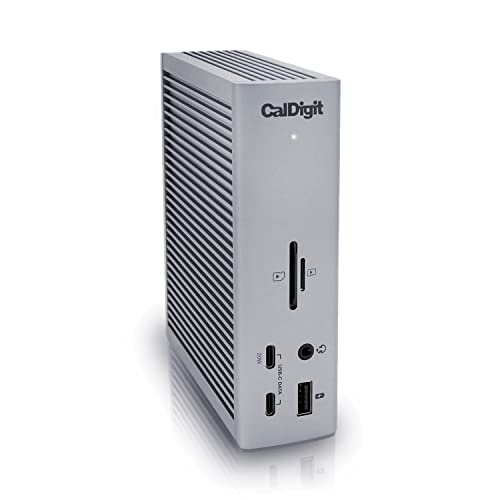
If you are looking for caldigit ts5 thunderbolt 5 dock alternatives, you need to weigh the original’s 140W power delivery and 80Gb/s bandwidth against other needs. The CalDigit TS5 excels at driving dual 8K displays and providing 2.5GbE networking for professional workstations. Its aluminum chassis acts as a heat sink for sustained performance.
However, you might prefer a different form factor or feature set. Some users need triple display support, which the TS5 does not offer. Others may prioritize higher wattage charging or a smaller footprint. This list includes 6 similar picks chosen because their specifications overlap with the TS5’s core capabilities. We compare port counts, video outputs, and power delivery to help you find the right fit for your setup.
Our top pick: CalDigit TS5 15-Port Thunderbolt 5 Dock.
How each alternative compares
Lenovo ThinkPad Thunderbolt 5 Smart Dock
The Lenovo ThinkPad Thunderbolt 5 Smart Dock offers higher power delivery at 180W, which exceeds the CalDigit TS5’s 140W output. This makes it better suited for high-draw workstations. It supports 120Gbps bandwidth, providing more throughput than the TS5’s 80Gb/s limit. However, it is significantly larger and heavier, measuring 9.25 inches long and weighing 1.29 pounds. The TS5 is more compact at 4.5 inches and 8.9 ounces. Choose the Lenovo if you need maximum charging speed and bandwidth for a stationary setup. Pick the TS5 for a smaller footprint and easier desktop integration.
Anker Prime 14-in-1 Thunderbolt 5 Dock
The Anker Prime 14-in-1 Thunderbolt 5 Dock matches the CalDigit TS5 with 140W power delivery and dual 8K display support. It uses active cooling to handle sustained workloads, whereas the TS5 relies on an aluminum heat sink chassis. The Anker unit is much bulkier, standing 4.6 inches tall and weighing 2.37 pounds. The TS5 is slimmer at 1.12 inches and lighter at 8.9 ounces. Both offer 80Gb/s bandwidth. Select the Anker if you prioritize active cooling for heavy continuous use. Choose the TS5 if you prefer a lower profile and passive cooling design for a cleaner desk appearance.
Anker Prime 14-in-1 Triple Display Dock
The Anker Prime DL7400 provides 140W charging and 8K display support, similar to the CalDigit TS5. It supports triple monitor setups, which the TS5 does not. However, it lacks the full 80Gb/s Thunderbolt 5 bandwidth, relying on USB connectivity instead. It is also larger and heavier at 1.84 pounds. The TS5 offers superior data speeds and 2.5GbE networking. Pick the Anker DL7400 if you need three screens and do not require maximum Thunderbolt bandwidth. Choose the TS5 if you need high-speed data transfer and Ethernet connectivity for professional workflows.
CalDigit TS4 Thunderbolt 4 Dock
The CalDigit TS4 is a Thunderbolt 4 dock, offering 40Gb/s bandwidth compared to the TS5’s 80Gb/s. It provides 140W power delivery and 2.5GbE networking, matching the TS5 in these areas. The TS4 has more ports, totaling 18, versus the TS5’s 15. It is also taller at 5.55 inches and heavier at 1.41 pounds. The TS5 is more compact and faster. Choose the TS4 if you have a Thunderbolt 4 host and need maximum port count. Pick the TS5 if you have a compatible host and want faster data speeds and a smaller footprint.
Plugable Dual 4K HDMI USB-C Dock with Ethernet
The Plugable Dual 4K USB-C Dock supports dual 4K 60Hz displays, which is lower resolution than the TS5’s dual 8K capability. It uses USB-C connectivity rather than Thunderbolt 5, offering lower bandwidth. It includes Ethernet and basic USB ports. The Plugable dock is larger at 9.25 inches long and weighs 1.52 pounds. The TS5 is smaller and faster. Choose the Plugable dock for Windows or Chromebook users who need basic dual 4K support without Thunderbolt complexity. Pick the TS5 if you need high-resolution displays, fast data transfer, and Thunderbolt 5 connectivity.
UGREEN Maxidok Thunderbolt 5 Dock with NVMe Slot
The UGREEN Maxidok Thunderbolt 5 Dock supports triple 8K displays on Windows, exceeding the TS5’s dual display limit. It includes an NVMe slot for built-in storage. It offers high bandwidth and power delivery. However, it limits Mac users to two screens, while the TS5 supports dual 8K on macOS. The UGREEN unit is bronze and measures 5.24 inches square. The TS5 is Space Gray and more compact. Choose the UGREEN dock if you use Windows and need triple 8K displays with internal storage. Pick the TS5 for Mac compatibility, a smaller size, and 2.5GbE networking.
Quick picks
Our 7 picks

CalDigit TS5 15-Port Thunderbolt 5 Dock
Best for: high-power laptops and dual high-res displays
- Host Interface
- Thunderbolt 5
- Display Support
- Dual
- Max Resolution
- 8K 60Hz
- Power Delivery
- 140W
- Port Count
- 15
- Video Ports
- DisplayPort 2.1, Thunderbolt 5
View on Amazon: CalDigit TS5 15-Port Thunderbolt 5 Dock Affiliate link
The CalDigit TS5 is a 15-port Thunderbolt 5 dock designed for high-performance setups. It features a 240W power supply and 140W host charging, supporting 16-inch MacBook Pro models. The dock handles dual 8K displays or dual 4K at 240Hz. It includes a 2.5GbE port and SD card readers. This dock suits users needing maximum bandwidth and power delivery for professional workflows.
Pros
- 140W host power delivery for high-end laptops
- Dual 8K@60Hz or dual 4K@240Hz display support
- 2.5GbE Ethernet for faster network transfers
- 15 ports including SD and microSD readers
Cons
- Requires Thunderbolt 5 or USB4 v2 host for full performance
- Aluminum chassis generates heat requiring clearance
- Limited to dual display support on macOS
Good fit if
- You need 140W charging for a 16-inch MacBook Pro
- You require dual high-resolution displays at high refresh rates
- You use a Thunderbolt 5 or USB4 v2 host computer
Skip if
- You only have Thunderbolt 3 or Thunderbolt 4 hosts
- You need triple display support on macOS
- You cannot provide ample clearance around the dock
Verdict: CalDigit TS5 Thunderbolt 5 Dock delivers essential high-bandwidth connectivity and 140W charging for professional users with compatible hosts. It is the right fit for those driving dual 8K displays or needing fast 2.5GbE networking.

Lenovo ThinkPad Thunderbolt 5 Smart Dock
Best for: high-display-count commercial workstations
- Host Interface
- Thunderbolt 5
- Display Support
- 4
- Max Resolution
- 8K@60Hz
- Power Delivery
- 180W
- Video Ports
- Thunderbolt 5, HDMI, DisplayPort
- Max Data Speed
- 120Gbps
View on Amazon: Lenovo ThinkPad Thunderbolt 5 Smart Dock Affiliate link
The Lenovo ThinkPad Thunderbolt 5 Smart Dock 7500 delivers 120Gbps connectivity and 180W power delivery for high-performance laptops. It supports up to four displays, including dual 4K at 240Hz or triple 8K at 60Hz. This dock targets commercial users who need robust port selection and remote fleet management via Lenovo Accessories Fleet Manager. It is a substantial unit designed for stationary desk setups.
Pros
- Thunderbolt 5 host interface with 120Gbps data transfer speed
- 180W Power Delivery 3.1 output for rapid laptop charging
- Supports up to four monitors, including 8K 60Hz or dual 4K 240Hz
- Includes 2.5Gbps Ethernet and HDMI 2.1/DisplayPort 2.1 outputs
Cons
- Heavier build at 1.29 pounds compared to lighter alternatives
- No mention of built-in USB-C or USB-A ports for direct peripheral connection
- Cloud management requires IT setup, limiting simple plug-and-play use
Good fit if
- You need 180W power delivery for high-power laptops
- You require support for up to four high-resolution displays
- You manage a fleet of devices and need remote configuration
Skip if
- You prefer a lightweight dock for frequent travel
- You need direct USB-A or USB-C ports for peripherals
- You want a simple setup without cloud management software
Verdict: The Lenovo ThinkPad Thunderbolt 5 Smart Dock 7500 fits users who prioritize maximum display output and high-wattage charging for stationary workstations. It is ideal for environments where remote fleet management and 120Gbps bandwidth are essential.

Anker Prime 14-in-1 Thunderbolt 5 Dock
Best for: users needing dual 8K video and 140W charging
- Host Interface
- Thunderbolt 5
- Display Support
- Dual
- Max Resolution
- 8K@60Hz
- Power Delivery
- 140W
- Port Count
- 14
- Video Ports
- HDMI 2.1, DisplayPort 2.1, TB5
View on Amazon: Anker Prime 14-in-1 Thunderbolt 5 Dock Affiliate link
This 14-in-1 Thunderbolt 5 dock offers high-speed connectivity for laptops. It features a 140W power delivery upstream port and supports dual 8K displays. The unit includes two Thunderbolt 5 downstream ports, three USB-A ports, and an SD card reader. Active cooling helps manage heat during heavy use. It suits users who need fast data transfer and multiple high-resolution video outputs.
Pros
- 140W Power Delivery via Thunderbolt 5 upstream port
- Supports dual 8K@60Hz displays on Windows laptops
- Active cooling system prevents overheating under load
- Includes SD and TF card readers
- 2.5Gbps Ethernet port for stable networking
Cons
- Front-facing USB-C ports share only 45W total
- No mention of built-in Wi-Fi or Bluetooth
- Larger footprint than standard laptop docks
Good fit if
- You need to drive dual 8K displays
- You transfer large files frequently
- You require SD card access on your desk
Skip if
- You need more than 14 ports
- You require built-in wireless connectivity
- You need 4K displays at 120Hz
Verdict: Anker Prime 14-in-1 Thunderbolt 5 Dock delivers robust performance for users requiring dual 8K video outputs and fast data speeds. It is ideal for professionals who need extensive port variety and active cooling for sustained workloads.

Anker Prime 14-in-1 Triple Display Dock
Best for: users needing 140W charging and 8K display support
- Host Interface
- USB-C
- Display Support
- Triple
- Max Resolution
- 8K
- Power Delivery
- 140W
- Port Count
- 14
- Video Ports
- HDMI, DisplayPort
View on Amazon: Anker Prime 14-in-1 Triple Display Dock Affiliate link
This 14-port dock supports triple displays, including one at 8K resolution. It delivers 140W power delivery to your laptop and offers 10Gbps data speeds. The unit includes a smart display for real-time status updates and ActiveShield 3.0 cooling. It suits users needing high bandwidth and extensive connectivity without requiring Thunderbolt 5.
Pros
- 140W Power Delivery via upstream USB-C port
- Supports triple monitors with one 8K output
- 10Gbps max data transfer speed
- Built-in smart display for system monitoring
- 2.5Gbps Ethernet port included
Cons
- Max data speed is 10Gbps, lower than Thunderbolt 5 docks
- Requires DisplayLink driver installation for display support
- Front USB-C ports do not support video output
Good fit if
- You need 140W charging for high-power laptops
- You want to drive three monitors including 8K
- You prefer USB-C docks over Thunderbolt 5
Skip if
- You require Thunderbolt 5 native data speeds
- You want front ports to support video output
- You prefer plug-and-play without driver installation
Verdict: Anker Prime DL7400 14-Port Dock fits users who prioritize high wattage and 8K display support over Thunderbolt 5 bandwidth. It is a solid choice for desktop setups needing extensive USB connectivity.
CalDigit TS4 Thunderbolt 4 Dock
Best for: Mac Pro, Ultra, or high port count needs
- Host Interface
- Thunderbolt 4
- Display Support
- Dual
- Max Resolution
- 8K@30Hz
- Power Delivery
- 98W
- Port Count
- 18
- Video Ports
- DisplayPort
View on Amazon: CalDigit TS4 Thunderbolt 4 Dock Affiliate link
The CalDigit TS4 is an 18-port Thunderbolt 4 dock offering 98W power delivery and 40Gb/s data speeds. It supports dual displays up to 6K 60Hz on compatible Macs or a single 8K screen on Windows. The 2.5GbE port provides faster network speeds. This dock suits users needing extensive connectivity and reliable video output for demanding workflows.
Pros
- 18 total ports for high connectivity
- 98W power delivery for laptops
- 2.5GbE Ethernet for faster networking
- Supports dual 6K 60Hz displays on Mac
Cons
- Thunderbolt 4 is older than the TS5
- Max resolution capped at 8K 30Hz
- Single display limit on non-Pro Macs
Good fit if
- You need 18 ports for many devices
- You use a Mac Pro or Ultra
- You want 2.5GbE wired speed
Skip if
- You require Thunderbolt 5 speeds
- You need 8K 60Hz video
- You use a base M1 Mac
Verdict: CalDigit TS4 18-Port Thunderbolt 4 Dock fits professionals who prioritize port count and 2.5GbE speed over the latest Thunderbolt 5 bandwidth.

Plugable Dual 4K HDMI USB-C Dock with Ethernet
Best for: Windows users needing dual 4K 60Hz displays
- Host Interface
- USB-C
- Display Support
- Dual
- Max Resolution
- 4K@60Hz
- Power Delivery
- 65W
- Port Count
- 10
- Video Ports
- HDMI
View on Amazon: Plugable Dual 4K HDMI USB-C Dock with Ethernet Affiliate link
This Plugable UD-MSTH2 dock offers dual 4K 60Hz HDMI output and 65W power delivery over a single USB-C connection. It includes gigabit Ethernet, three USB-A ports, and one USB-C data port. The unit weighs 1.52 pounds and supports Windows and Chromebook systems with DP Alt Mode. It suits users needing a simple, driver-free setup for dual monitors without Thunderbolt 5 speeds.
Pros
- Supports dual 4K 60Hz displays via HDMI
- Provides 65W power delivery to host laptop
- Includes gigabit Ethernet and multiple USB-A ports
- No drivers required for plug-and-play operation
Cons
- Limited to USB-C host interface, not Thunderbolt 5
- USB data ports max out at 5Gbps
- Dual extended displays not supported on macOS
Good fit if
- You need dual 4K monitors on a Windows or Chromebook laptop
- You want a simple setup without installing drivers
- You require gigabit Ethernet and basic USB connectivity
Skip if
- You need Thunderbolt 5 speeds or 120Gbps data transfer
- You use a Mac and need dual extended displays
- You require USB4 or high-speed USB-C data ports
Verdict: Plugable Dual 4K USB-C Dock is a practical option for Windows and Chromebook users who need dual 4K 60Hz monitors and basic connectivity without the complexity or cost of Thunderbolt docks.

UGREEN Maxidok Thunderbolt 5 Dock with NVMe Slot
Best for: Windows users needing triple 8K displays and storage
- Host Interface
- Thunderbolt 5
- Display Support
- Triple
- Max Resolution
- 8K@60Hz
- Power Delivery
- 140W
- Port Count
- 17
- Video Ports
- DisplayPort, Thunderbolt 5
View on Amazon: UGREEN Maxidok Thunderbolt 5 Dock with NVMe Slot Affiliate link
The UGREEN Maxidok Thunderbolt 5 Dock offers 17 ports and 240W total power. It features Intel-certified 120Gbps bandwidth and supports triple 8K displays on Windows. A built-in M.2 NVMe slot allows for up to 8TB of fast storage. The aluminum chassis includes AI cooling. This dock suits users needing high-speed data, extensive connectivity, and local storage expansion in a single unit.
Pros
- 120Gbps Thunderbolt 5 bandwidth for fast data transfer
- Supports triple 8K@60Hz displays on Windows
- Built-in M.2 NVMe slot for up to 8TB SSDs
- 240W total power output for connected devices
- 17 ports including 2.5GbE and SD/TF readers
Cons
- Mac users are limited to dual displays
- Requires an active adapter for HDMI monitors
- M.2 slot restricts SSD width to 24 mm
Good fit if
- You need triple 8K displays on Windows
- You want built-in high-speed SSD storage
- You require 240W total power output
Skip if
- You use a Mac and need three monitors
- You prefer passive HDMI adapters
- You use SSDs wider than 24 mm
Verdict: UGREEN Maxidok Thunderbolt 5 Dock fits professionals who need triple 8K displays and built-in storage on Windows. It offers high bandwidth and power but limits Mac users to two screens.
Specifications side by side
| Spec | CalDigit TS5 15-Port Thunderbolt 5 Dock | Lenovo ThinkPad Thunderbolt 5 Smart Dock | Anker Prime 14-in-1 Thunderbolt 5 Dock | Anker Prime 14-in-1 Triple Display Dock | CalDigit TS4 Thunderbolt 4 Dock | Plugable Dual 4K HDMI USB-C Dock with Ethernet | UGREEN Maxidok Thunderbolt 5 Dock with NVMe Slot |
|---|---|---|---|---|---|---|---|
| Host Interface | Thunderbolt 5 | Thunderbolt 5 | Thunderbolt 5 | USB-C | Thunderbolt 4 | USB-C | Thunderbolt 5 |
| Display Support | Dual | 4 | Dual | Triple | Dual | Dual | Triple |
| Max Resolution | 8K 60Hz | 8K@60Hz | 8K@60Hz | 8K | 8K@30Hz | 4K@60Hz | 8K@60Hz |
| Power Delivery | 140W | 180W | 140W | 140W | 98W | 65W | 140W |
| Port Count | 15 | not stated | 14 | 14 | 18 | 10 | 17 |
| Video Ports | DisplayPort 2.1, Thunderbolt 5 | Thunderbolt 5, HDMI, DisplayPort | HDMI 2.1, DisplayPort 2.1, TB5 | HDMI, DisplayPort | DisplayPort | HDMI | DisplayPort, Thunderbolt 5 |
| Max Data Speed | 80Gb/s | 120Gbps | 120Gbps | 10Gbps | 40Gb/s | 5Gbps | 120Gbps |
| Ethernet Speed | 2.5GbE | 2.5Gbps | 2.5Gbps | 2.5Gbps | 2.5GbE | Gigabit | 2.5GbE |
| Resolution | not stated | not stated | not stated | 4K UHD | not stated | 4K UHD | not stated |
| Connectivity | not stated | Ethernet | Ethernet | not stated | USB-C, USB-A, Thunderbolt 4 | USB-C, HDMI, Ethernet, USB-A | USB-C |
| Refresh Rate | not stated | not stated | not stated | 60Hz | 60Hz | 60Hz | 60Hz |
| Features | not stated | not stated | not stated | DisplayLink | not stated | not stated | not stated |
| Slot Count | not stated | not stated | not stated | not stated | not stated | not stated | 1 Slot |
| Dimensions | 4.5 × 2.75 × 1.12 inches | 9.25 × 3.15 × 1.18 inches | 3 × 4.6 × 4.6 inches | 3.62 × 1.85 × 7.68 inches | 4.46 × 1.65 × 5.55 inches | 9.25 × 5.71 × 3 inches | 5.24 × 5.24 × 2.09 inches |
| Weight | 8.9 ounces | 1.29 pounds | 2.37 pounds | 1.84 pounds | 1.41 pounds | 1.52 pounds | not stated |
| Size | 4.25 | 1 Count (Pack of 1) | 4.60" x 4.60" x 3" | not stated | compact | Dual Display (Pack of 3) | not stated |
| Color | Space Gray | Eclipse Black | Gray | Phantom Black | Space Gray | Black | Bronze |
| Model | TBT5-TS5-US-AMZ | 40BA0265US | A83B5 | A83B3 | TS4-US 500971 | UD-MSTH2 | U716 |
Readers of this guide also look at seagate lacie 2big dock thunderbolt alternatives.
Frequently asked questions
Which dock offers the highest power delivery for workstations?
The Lenovo ThinkPad Thunderbolt 5 Smart Dock provides 180W power delivery. This exceeds the CalDigit TS5’s 140W output. It is designed for high-draw commercial workstations. The dock also supports 120Gbps bandwidth for faster data transfer. This makes it ideal for stationary setups requiring maximum charging speed.
Can these docks support triple display setups?
Yes, the Anker Prime DL7400 supports triple monitor displays. It offers 8K display support and 140W charging. The UGREEN Maxidok also handles triple 8K displays on Windows systems. Most other options focus on dual high-resolution outputs. Check your host laptop’s capabilities for multi-screen configurations.
Is there a Thunderbolt 4 alternative to the TS5?
The CalDigit TS4 is the primary Thunderbolt 4 alternative. It features an 18-port layout and 2.5GbE connectivity. It lacks the 80Gb/s bandwidth of the TS5 but offers extensive port variety. It is suitable for Mac Pro or Ultra users who prioritize port count over newer speeds.
Which dock is best for users needing Ethernet connectivity?
The CalDigit TS5 includes 2.5GbE networking for professional workstations. The Lenovo ThinkPad dock also supports Ethernet for fleet management. The Plugable dock offers basic Ethernet connectivity for Windows users. These options ensure stable wired internet access without relying on Wi-Fi or USB adapters.
How does the Anker Prime 14-in-1 compare to the TS5?
The Anker Prime 14-in-1 Dock delivers dual 8K video and 140W charging. It matches the TS5’s display and power capabilities. It features active cooling for sustained workloads. The TS5 offers higher bandwidth at 80Gb/s. Choose the Anker model if you need extensive port variety and thermal management.
Are there budget-friendly options for dual 4K displays?
The Plugable Dual 4K USB-C Dock is a practical choice. It supports dual 4K 60Hz monitors without Thunderbolt complexity. It is suitable for Windows and Chromebook users. It provides basic USB-A and HDMI connectivity. This dock avoids the premium cost of Thunderbolt 5 solutions while handling standard dual-screen tasks.
Which dock includes built-in storage expansion?
The UGREEN Maxidok Thunderbolt 5 Dock features a built-in NVMe slot. It allows for direct storage expansion on Windows systems. It supports triple 8K displays with high bandwidth. Mac users are limited to two screens with this model. It is ideal for professionals needing integrated fast storage alongside display outputs.