IVANKY FusionDock Max 2 Thunderbolt Review: Who It Fits and Who Should Skip It
As an Amazon Associate we earn from qualifying purchases. Links on this page are affiliate links.
This ivanky fusiondock max 2 upgraded review covers a docking station built for high-end Macs. It connects via Thunderbolt 5, offering a maximum data speed of 120Gbps. The device features 23 ports in total, including ten USB ports and an SD/TF 4.0 slot. Its most defining specifications are its triple display support and 2.5Gbps Ethernet capability. The chassis is made of full aluminum to help manage heat without a fan. You need to check your Mac chip compatibility before buying, as support varies significantly by model.
What stands out
- Triple display support with resolutions up to 6K@60Hz for compatible M-series chips
- 120Gbps data transfer speeds via three Thunderbolt 5 ports
- Fanless design using a full-aluminum chassis for silent, passive cooling
- 2.5Gbps Ethernet connection for stable wired networking
- 23 total ports including 10 USB connections and SD/TF 4.0 slots
Who it fits
Good fit for
This dock suits Mac users with M1/M2/M3/M4/M5 Max chips who need three extended displays at high resolutions. It also fits professionals requiring fast data transfers and stable 2.5Gbps internet. If you work with large files and need multiple high-speed USB connections, this setup provides the necessary throughput. The silent operation benefits those who work in quiet environments. You must have a compatible Mac to utilize the full feature set.
Who should skip it
You should look elsewhere if you use a Windows or Chrome laptop, as this dock is not compatible with those systems. It is also restricted to a single Mac and does not support switching between multiple Macs. Users with M1/M2/M3 base chips will only get one 6K display, not triple. If you need cross-platform flexibility or multi-Mac switching, this product lacks those capabilities. Check your specific chip model to ensure it meets the display requirements.
Verdict: This is a high-performance dock for compatible Macs with Max chips, offering triple displays and fast data speeds. It is not suitable for Windows users or those needing multi-Mac switching.
Key Specs Explained For You
Host Interface: Thunderbolt 5
This interface provides the connection between your computer and the dock. It supports data speeds up to 120Gbps, which is significantly faster than older standards. You will benefit from rapid file transfers and stable connections for high-bandwidth devices. When shopping for laptop setups, this ensures future-proof connectivity for demanding workflows.
Max Data Speed: 120Gbps
This figure indicates the maximum bandwidth available through the Thunderbolt 5 ports. It allows you to move large video files or backup data much faster than with standard USB connections. This speed is crucial for creators using external storage or high-resolution displays. Compare this to slower docks to see the efficiency gain in your daily tasks.
Port Count: 23
The dock offers twenty-three total connection points, including ten USB ports. This reduces cable clutter by consolidating multiple peripherals into a single hub. You can connect keyboards, mice, drives, and card readers simultaneously without needing multiple adapters. This high count is ideal for complex desktop setups requiring many simultaneous connections.
Ethernet Speed: 2.5Gbps
The built-in RJ45 port supports 2.5Gbps Ethernet, offering faster wired internet than standard 1Gbps ports. This ensures stable, low-latency connections for video calls, large downloads, and cloud backups. Wired connections are often more reliable than Wi-Fi for critical work. This spec is important for users who prioritize consistent network performance in their workspace.
Max Resolution: 6K@60Hz
The dock supports display outputs up to 6K resolution at 60Hz refresh rate. This provides sharp, clear images suitable for detailed graphic design or video editing work. Note that triple display support depends on your specific Mac chip. This high resolution ensures you have ample screen real estate for multitasking with multiple windows open.
Design and Build Overview
The listing describes the iVANKY FusionDock Max 2 as having a full-aluminum chassis available in Midnight Blue or Black. This all-metal enclosure serves a dual purpose. It provides a sturdy physical structure while acting as a large cooling surface. The design eliminates internal fans entirely. According to the listing, aerospace-grade thermal materials draw heat from critical components through the metal frame. This spreads warmth across the entire unit rather than concentrating it in one spot. You can expect surface warmth under heavy load. In a stated 12-hour full-load test, the hottest outer-frame point reached 49°C. This remains well below the 60°C UL touch-temperature limit, supporting safe long-term use without noise.
The layout centers on a Thunderbolt 5 host interface with three ports supporting 120Gbps data transfer. You get ten USB ports for peripherals, plus an SD/TF 4.0 card slot and an RJ45 Gigabit Ethernet port. The Ethernet connection maintains a stable 2.5Gbps speed. There are no visible controls or buttons mentioned in the specifications. The design relies on plug-and-play connectivity. The solid aluminum build suggests it is meant to sit securely on a desk. The passive cooling means it operates silently, which suits quiet office environments or home studios where fan noise would be distracting. The compact, dense layout keeps your workspace organized while providing extensive connectivity for Mac users.
Setup And Daily Use Guide
Setting up this dock requires a Mac with an M1, M2, M3, M4, or M5 chip. The listing explicitly states it is not compatible with Windows or Chrome laptops. You must also note that the dock is restricted to one Mac and does not support switching between multiple Macs. This limitation is critical for your workflow.
Display performance depends entirely on your specific Mac chip. If you have an M1/M2/M3/M4/M5 Max chip, you can run triple extended displays, specifically dual 6K@60Hz and a single 4K@60Hz. Macs with M4/M5 base or Pro chips support dual 6K@60Hz displays. Older base chips like M1/M2/M3 are limited to a single 6K@60Hz output. You will need to verify your chip to know your maximum resolution.
Daily use involves connecting peripherals through its 23 ports. The ten USB ports handle data transfer up to 10Gbps, while the three Thunderbolt 5 ports manage high-speed upstream and downstream data at 120Gbps. The SD/TF 4.0 slot supports speeds up to 312Mb/s, and the RJ45 port provides a stable 2.5Gbps Ethernet connection.
The dock uses a fanless cooling system. Heat moves from internal components through aerospace-grade materials into the full-aluminum chassis. Under a 12-hour full-load test, the outer frame reached 49°C (120°F). This is below the 60°C (140°F) safety limit. You can expect surface warmth during heavy use, but it remains safe for touch. The design ensures silent operation without internal fan noise.
Before You Buy This Dock
This dock is built for specific Mac configurations, so you must verify your chip before purchasing. If you use a Windows or Chrome laptop, this product will not work for you. Even with a Mac, display performance varies by model. Users with M1, M2, or M3 base chips can only run one 6K display. Those with Pro or base M4/M5 chips support dual 6K screens. Only Max series chips handle the full triple-display setup. Because the device uses passive cooling, the aluminum chassis will feel warm during heavy use. This is normal and indicates heat is moving away from internal components. You do not need to worry about fan noise, as there is no fan. For the best results, ensure your Mac has sufficient Thunderbolt 5 ports. You may also need compatible 6K monitors to take full advantage of the display capabilities. This dock fits best in high-end Mac setups where multiple high-resolution screens are essential for your workflow.
Check before you buy
- Confirm your Mac uses an M-series chip.
- Check if your model supports triple displays.
- Verify you do not use Windows or Chrome OS.
- Ensure you have compatible 6K monitors ready.
- Accept that the chassis will feel warm under load.
The product at a glance
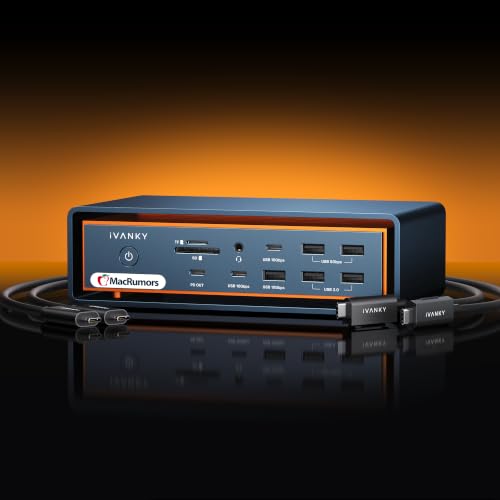
iVANKY FusionDock Max 2 Thunderbolt 5 Dock
Best for: Silent Mac setups requiring triple 6K displays
- Host Interface
- Thunderbolt 5
- Display Support
- Up to 4
- Max Resolution
- 6K@60Hz
- Power Delivery
- 140W
- Port Count
- 23
- Video Ports
- Thunderbolt, HDMI
View on Amazon: iVANKY FusionDock Max 2 Thunderbolt 5 Dock Affiliate link
The iVANKY FusionDock Max 2 is a 23-in-1 Thunderbolt 5 dock designed exclusively for specific Mac models. It supports triple displays up to 6K@60Hz on Max chips and offers 120Gbps data transfer. The aluminum chassis uses passive cooling to eliminate fan noise. It includes 2.5Gbps Ethernet and multiple USB ports. This dock suits Mac users needing high-speed connectivity and silent operation.
Pros
- Thunderbolt 5 host interface with 120Gbps data speed
- Triple display support up to 6K@60Hz for compatible Macs
- Passive aluminum cooling eliminates fan noise
- 2.5Gbps Ethernet port for stable network connections
Cons
- Incompatible with Windows and Chrome laptops
- Restricted to a single Mac connection without switching
- Display support varies significantly by Mac chip generation
Good fit if
- You use a Mac with M1/M2/M3/M4/M5 Max chips for triple displays
- You need silent operation without internal fans
- You require 2.5Gbps Ethernet and high-speed data transfer
Skip if
- You use a Windows or Chrome laptop
- You need to switch between multiple Macs
- You have a base or Pro Mac chip and need triple displays
Verdict: The iVANKY FusionDock Max 2 Thunderbolt 5 Dock fits Mac users with Max chips who need silent, high-bandwidth connectivity. It is not suitable for Windows users or those requiring multi-Mac switching.
Specifications side by side
| Spec | iVANKY FusionDock Max 2 Thunderbolt 5 Dock |
|---|---|
| Host Interface | Thunderbolt 5 |
| Display Support | Up to 4 |
| Max Resolution | 6K@60Hz |
| Power Delivery | 140W |
| Port Count | 23 |
| Video Ports | Thunderbolt, HDMI |
| Max Data Speed | 120Gbps |
| Ethernet Speed | 2.5Gbps |
| Refresh Rate | 60Hz |
| Weight | 6.08 pounds |
| Color | Midnight Blue |
Frequently asked questions
Is the iVANKY FusionDock Max 2 compatible with Windows laptops?
No, it is not compatible with Windows or Chrome laptops. The listing explicitly states it is restricted to Mac computers with M1, M2, M3, M4, or M5 chips. You must verify your device runs macOS before attempting to use this Thunderbolt 5 dock.
Does this dock support multiple Mac computers simultaneously?
No, the device is restricted to one Mac at a time. It does not support multi-Mac switching. You can only connect a single host computer to the dock for operation. If you need to switch between different Macs, you will need to manually disconnect and reconnect the Thunderbolt cable.
What is the maximum data transfer speed of this dock?
The dock supports data speeds up to 120Gbps via Thunderbolt 5. This high bandwidth ensures rapid file transfers and stable connections for demanding tasks. It provides significantly faster performance compared to older Thunderbolt standards, making it suitable for high-resolution display outputs and fast peripheral communication.
How many ports are available on the iVANKY FusionDock Max 2?
The dock features a total of 23 ports. This includes ten USB ports and an SD/TF 4.0 slot for memory card access. The extensive port count allows you to connect multiple peripherals, storage devices, and accessories simultaneously without needing additional hubs or adapters for your Mac setup.
Is the dock suitable for users who need silent operation?
Yes, it is designed for silent Mac setups. The full-aluminum chassis acts as a large cooling surface, helping to dissipate heat passively. This design choice supports quiet operation, which is particularly beneficial for users who work in noise-sensitive environments or require a completely fan-free docking experience.
What color options are available for this Thunderbolt 5 dock?
The listing describes the dock as available in Midnight Blue or Black. The Midnight Blue option is specifically highlighted in the current product data. Both colors feature a full-aluminum chassis, providing a sturdy physical structure while maintaining a professional aesthetic that complements modern Mac hardware designs.