2 Best InnoView Portable Monitors Under $500, Compared
As an Amazon Associate we earn from qualifying purchases. Links on this page are affiliate links.
Finding the best InnoView portable monitors under $500 requires a close look at published specifications. We compared 2 models to help you choose. The top pick is the InnoView 15.6-Inch 4K Dual Portable Monitor. It leads because it offers 4K UHD resolution for sharp visuals. This guide compares specs like resolution, connectivity, and portability. You will use these details to decide which monitor fits your workflow. We focus on practical data to help you build a better setup.
Quick picks
| # | Product | Best for | Price |
|---|---|---|---|
| 1 | InnoView 15.6-Inch 4K Dual Portable Monitor Best overall | High-resolution dual-screen laptop setups | Check price of InnoView 15.6-Inch 4K Dual Portable Monitor on Amazon |
| 2 | InnoView 18.5" 2K 100Hz Dual Portable Monitor Best budget | Dual-screen productivity on the go | Check price of InnoView 18.5" 2K 100Hz Dual Portable Monitor on Amazon |
The best fit for you
- You need the sharpest resolution for detailed work InnoView 15.6-Inch 4K Dual Portable Monitor It provides 4K UHD resolution for crisp text and images.
- You want smoother motion for video or gaming InnoView 18.5" 2K 100Hz Dual Portable Monitor It features a 100Hz refresh rate for fluid motion.
- You prefer a compact foldable design for travel InnoView 15.6-Inch 4K Dual Portable Monitor It includes a foldable form factor and built-in kickstand.
Our 2 picks
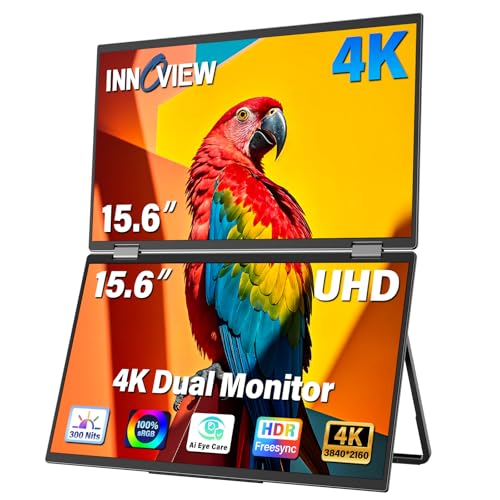
InnoView 15.6-Inch 4K Dual Portable Monitor
Best for: High-resolution dual-screen laptop setups
- Screen Size
- 15.6"
- Resolution
- 3840x2160
- Connectivity
- USB-C, HDMI, DP
- Color Gamut
- 100% sRGB
- Weight
- 3.4 pounds
- Features
- Kickstand, Foldable
View on Amazon: InnoView 15.6-Inch 4K Dual Portable Monitor Affiliate link
This InnoView dual monitor setup gives you two 15.6-inch 4K UHD screens with 100% sRGB color accuracy. The foldable design and 178-degree viewing angles make it easy to share or split your workspace. It connects via USB-C, HDMI, or DisplayPort to laptops and phones. The included stand allows 180-degree tilt adjustment for comfortable viewing. It is ideal for users who need high-resolution clarity and extra screen real estate on the go.
Pros
- 4K UHD 3840x2160 resolution for sharp detail
- 100% sRGB color gamut for accurate visuals
- Foldable design with 180-degree adjustable stand
- Supports dual monitor configuration for expanded workspace
Cons
- Heavier at 3.4 pounds compared to single-panel options
- Built-in speakers are basic for professional audio needs
- No mention of built-in battery for cordless use
Good fit if
- You need high-resolution 4K displays for design work
- You want a foldable setup for easy transport
- You require dual-screen productivity on a laptop
Skip if
- You prioritize lightweight portability under 2 pounds
- You need a standalone monitor without a laptop
- You require high-fidelity built-in audio speakers
Verdict: InnoView 15.6" 4K Dual Portable Monitor delivers sharp 4K visuals and flexible dual-screen productivity for professionals who value color accuracy and portability in a foldable package.

InnoView 18.5" 2K 100Hz Dual Portable Monitor
Best for: Dual-screen productivity on the go
- Screen Size
- 18.5"
- Resolution
- 2560 x 1440
- Refresh Rate
- 100Hz
- Panel Type
- IPS
- Connectivity
- DP, USB-C, HDMI
- Color Gamut
- 100% sRGB
View on Amazon: InnoView 18.5" 2K 100Hz Dual Portable Monitor Affiliate link
This InnoView portable monitor features two 18.5-inch screens with 2560 x 1440 resolution and a 100Hz refresh rate. It covers 100% of the sRGB color gamut for accurate visuals. The foldable design allows for a stackable dual setup. You get USB-C, HDMI, and DisplayPort connectivity. It weighs 5.15 pounds. This setup suits users who need extra screen real estate for multitasking without sacrificing color fidelity or smooth motion.
Pros
- 2560 x 1440 2K resolution on each screen
- 100Hz refresh rate for smooth motion
- 100% sRGB color gamut coverage
- Foldable and stackable dual-screen design
- IPS panel with 178-degree viewing angles
Cons
- Heavier at 5.15 pounds compared to single screens
- Smaller 18.5-inch size limits detail for complex tasks
- No mention of built-in speakers or battery
Good fit if
- You need a dual-screen setup for multitasking
- You prioritize color accuracy for creative work
- You want a 100Hz refresh rate for smooth scrolling
Skip if
- You prefer a single large screen for detailed work
- You need a lightweight, single-screen portable display
- You require a 4K resolution for maximum sharpness
Verdict: InnoView 18.5" Dual 2K 100Hz Monitor delivers a compact dual-screen workspace with solid color accuracy. It fits users who need two screens for productivity but want to keep their setup portable and visually precise.
Specifications side by side
| Spec | InnoView 15.6-Inch 4K Dual Portable Monitor | InnoView 18.5" 2K 100Hz Dual Portable Monitor |
|---|---|---|
| Screen Size | 15.6" | 18.5" |
| Resolution | 3840x2160 | 2560 x 1440 |
| Refresh Rate | not stated | 100Hz |
| Panel Type | not stated | IPS |
| Connectivity | USB-C, HDMI, DP | DP, USB-C, HDMI |
| Color Gamut | 100% sRGB | 100% sRGB |
| Weight | 3.4 pounds | 5.15 lbs |
| Features | Kickstand, Foldable | Foldable |
| Display Support | Dual Monitor | not stated |
| Size | 15.6 in-4K | 18.5 Inch |
| Dimensions | 8.5 × 14 × 1.03 inches | 0.96 × 16.7 × 10.2 inches |
| Color | Black | black |
| Model | PM109 | INVPM809 |
How to choose the right one
-
Prioritize resolution for clarity
Start by checking the resolution specification. Higher pixel counts deliver sharper text and finer image details. The top pick features 4K UHD resolution, which is ideal if you need crisp visuals for detailed work. The second option offers 2K resolution, which remains clear but less dense. Choose 4K if sharpness is your primary goal. Select 2K if you are satisfied with standard clarity. This spec directly impacts how professional your display looks during extended use.
-
Check refresh rate for motion
Look at the refresh rate if you watch video or play games. A higher number means smoother motion. The second model specifies a 100Hz refresh rate, which reduces blur during fast movement. The top pick does not list this spec in the provided data. If you prioritize fluid motion, the 100Hz option is the better choice. For static productivity tasks, this spec matters less. Verify the rate in the attributes to ensure it meets your needs for video or gaming.
-
Verify dual display support
Decide if you need two screens or one. Both listed models support dual monitor setups. This feature allows you to connect two portable units to a single laptop. It creates a larger workspace for multitasking. The top pick is explicitly designed for dual-screen productivity. The second option also supports this configuration. If you only need one extra screen, verify compatibility. Dual support is key for users who want to expand their desktop area significantly.
-
Assess connectivity options
Examine the available ports for connection flexibility. Both models include USB-C, HDMI, and DisplayPort inputs. This variety ensures compatibility with most laptops and devices. USB-C often handles both video and power. HDMI is standard for many computers. DisplayPort offers high-bandwidth options. Check your device's ports before buying. Having multiple connection types reduces the need for adapters. This spec ensures you can hook up the monitor to your specific hardware without issues.
-
Consider portability and weight
Evaluate the physical dimensions and weight for travel. The top pick weighs 3.4 pounds and measures 14 inches wide. The second option weighs 5.15 pounds and is 16.7 inches wide. Lighter models are easier to carry in a bag. The top pick is more compact and portable. If you travel frequently, the lower weight and smaller size are advantageous. Heavier models may feel cumbersome on the go. Check the weight spec to match your mobility needs.
Frequently asked questions
Which InnoView portable monitor offers the best resolution?
The InnoView 15.6-Inch 4K Dual Portable Monitor provides the highest resolution on this list. It features 4K UHD resolution for sharp visuals. This model is ideal if you prioritize color accuracy and detailed text for professional work. It supports dual monitor setups in a foldable package.
Does InnoView offer a portable monitor with a high refresh rate?
Yes, the InnoView 18.5" 2K 100Hz Dual Portable Monitor includes a 100Hz refresh rate. This specification ensures smoother motion for video playback or gaming. It pairs this speed with 2K resolution across two screens. This setup suits users who need fluid visuals alongside expanded workspace.
How many screens do the top InnoView portable monitors support?
Both top picks support dual monitor configurations. The first option is a 15.6-inch 4K dual portable monitor. The second is an 18.5-inch 2K dual portable monitor. These designs allow you to connect two displays for increased productivity while traveling or working remotely.
What connectivity options are available on InnoView portable monitors?
The listed models feature USB-C, HDMI, and DisplayPort connectivity. These ports provide flexible connection options for various laptops and devices. You can use these inputs to establish stable video signals. The inclusion of multiple port types ensures compatibility with most modern computing equipment.
Are InnoView portable monitors designed to be portable?
Yes, both models include foldable designs for easy transport. The 15.6-inch 4K model weighs 3.4 pounds and measures 1.03 inches in height. The 18.5-inch dual model weighs 5.15 pounds. These dimensions and weights make them suitable for carrying in a laptop bag during travel.
Which InnoView monitor is best for dual-screen productivity?
The InnoView 18.5" 2K 100Hz Dual Portable Monitor is optimized for dual-screen productivity. It provides two 2K displays with a 100Hz refresh rate. This configuration offers a compact workspace with solid color accuracy. It fits users who need extra screen real estate without sacrificing portability.
What is the screen size of the best overall InnoView monitor?
The best overall model is the InnoView 15.6-Inch 4K Dual Portable Monitor. It features a 15.6-inch display with 4K UHD resolution. This size balances visual detail with manageable dimensions for a portable setup. It is designed for professionals who value sharpness in a foldable form factor.