3 Best InnoView 120Hz Portable Monitors, Compared
As an Amazon Associate we earn from qualifying purchases. Links on this page are affiliate links.
Finding the best InnoView 120Hz portable monitors requires comparing specific display traits. We analyzed 3 models strictly from their published specifications. The InnoView 27-Inch 4K 120Hz Portable Monitor leads because its 4K UHD resolution delivers sharp detail for high-resolution gaming and creative work. Each option here offers a 120Hz refresh rate for smooth motion. This guide helps you decide which size and connectivity suite fits your setup.
Quick picks
| # | Product | Best for | Price |
|---|---|---|---|
| 1 | InnoView 27-Inch 4K 120Hz Portable Monitor Best overall | high-resolution gaming and creative work | Check price of InnoView 27-Inch 4K 120Hz Portable Monitor on Amazon |
| 2 | InnoView 18.5-Inch 2K 120Hz Portable Monitor Best premium | Users wanting 18.5-inch 2K portability | Check price of InnoView 18.5-Inch 2K 120Hz Portable Monitor on Amazon |
| 3 | InnoView 15.6-Inch 1440p 120Hz Portable Monitor Best budget | Travelers needing a lightweight 15.6-inch secondary display | Check price of InnoView 15.6-Inch 1440p 120Hz Portable Monitor on Amazon |
The best fit for you
- You want the best all-around 27-inch 4K display InnoView 27-Inch 4K 120Hz Portable Monitor Its 4K UHD resolution and 120Hz refresh rate deliver sharp visuals and smooth motion for gaming.
- You need a lightweight 15.6-inch screen for travel InnoView 15.6-Inch 1440p 120Hz Portable Monitor The compact 15.6-inch size and 2K resolution offer a portable balance for mobile professionals.
- You prefer a mid-size 18.5-inch model with portability InnoView 18.5-Inch 2K 120Hz Portable Monitor The 18.5-inch 2K panel provides extra screen space without the bulk of larger displays.
Our 3 picks

InnoView 27-Inch 4K 120Hz Portable Monitor
Best for: high-resolution gaming and creative work
- Refresh Rate
- 120Hz (what this guide is about)
- Screen Size
- 27 Inch
- Resolution
- 4K UHD, FHD
- Panel Type
- IPS
- Connectivity
- Type-C, HDMI, 3.5mm
- Color Gamut
- 100% sRGB
View on Amazon: InnoView 27-Inch 4K 120Hz Portable Monitor Affiliate link
This InnoView monitor offers a 27-inch IPS display with 4K UHD resolution and 120Hz refresh rate. It supports dual-mode switching to FHD at 288Hz for gaming. The panel covers 100% sRGB with 500 nits brightness. You get dual USB-C and HDMI ports for connectivity. It includes built-in speakers and VESA mount compatibility. The 9.5 lb weight makes it better for fixed desks than travel.
Pros
- 27-inch 4K UHD IPS panel with 120Hz refresh rate
- Switches to FHD 288Hz mode for competitive gaming
- 100% sRGB color gamut and 500 nits brightness
- Dual USB-C and HDMI ports for broad compatibility
Cons
- Heavy 9.5 lb build limits portable use
- 27-inch size is large for small desks
- Requires external adapter for mobile power
Good fit if
- You want 4K clarity for creative work
- You need high refresh rates for gaming
- You prefer a large fixed secondary screen
Skip if
- You need a lightweight travel monitor
- You have limited desk space
- You require battery-powered operation
Verdict: InnoView 27-inch 4K 120Hz Portable Monitor is best for users who prioritize high resolution and smooth motion on a large screen. It suits those who want a stable, high-quality display for gaming or editing at a fixed location.
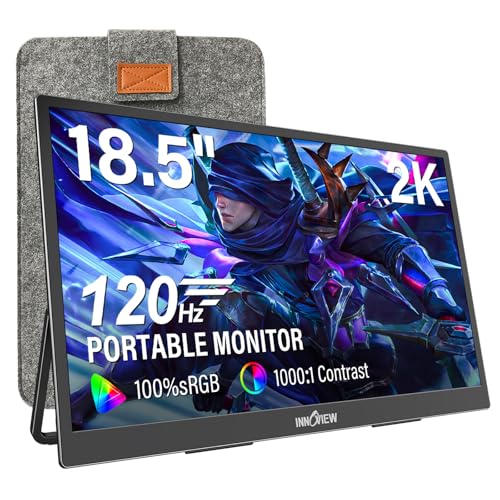
InnoView 18.5-Inch 2K 120Hz Portable Monitor
Best for: Users wanting 18.5-inch 2K portability
- Refresh Rate
- 120Hz (what this guide is about)
- Screen Size
- 18.5"
- Resolution
- 2560x1440p
- Panel Type
- IPS
- Connectivity
- USB-C, HDMI, DP
- Color Gamut
- 100% sRGB
View on Amazon: InnoView 18.5-Inch 2K 120Hz Portable Monitor Affiliate link
This 18.5-inch portable display offers a 2560x1440 resolution with a 120Hz refresh rate. It covers 100% sRGB for vivid colors and supports FreeSync for smoother motion. The IPS panel includes HDR technology. You get two USB-C ports, one HDMI, and a DP port for broad device compatibility. At 3.2 pounds, it balances screen real estate with portability for travel or desk setups.
Pros
- 2560x1440p QHD resolution on an 18.5-inch IPS panel
- 120Hz refresh rate with FreeSync support
- 100% sRGB color gamut coverage
- Multiple connection options including USB-C, HDMI, and DisplayPort
Cons
- Heavier at 3.2 pounds compared to smaller 15.6-inch models
- Requires external power if host device output is insufficient
- Standard HDMI port only on one specific variant mode
Good fit if
- You need a larger 18.5-inch screen for detailed work
- You want 120Hz refresh rates for smoother gaming
- You require multiple connection types for various devices
Skip if
- You prioritize ultra-lightweight portability under 3 pounds
- You need a 4K resolution for maximum clarity
- You want a 15.6-inch form factor for maximum compactness
Verdict: InnoView 18.5" 2K 120Hz Portable Monitor provides a solid mid-size option for users who want more screen space than a 15.6-inch model without the bulk of a 27-inch display. It fits travelers who need a balance of resolution and weight.

InnoView 15.6-Inch 1440p 120Hz Portable Monitor
Best for: Travelers needing a lightweight 15.6-inch secondary display
- Refresh Rate
- 120Hz (what this guide is about)
- Screen Size
- 15.6"
- Resolution
- 2560x1440
- Panel Type
- IPS
- Connectivity
- USB-C, HDMI
- Color Gamut
- 100% sRGB
View on Amazon: InnoView 15.6-Inch 1440p 120Hz Portable Monitor Affiliate link
This 15.6-inch portable monitor delivers 2560x1440 resolution and a 120Hz refresh rate. It features an IPS panel with 100% sRGB color coverage and hardware low-blue-light mode. The display weighs 1.65 lbs and connects via USB-C and HDMI. It suits users needing a lightweight secondary screen for travel or mobile work setups.
Pros
- 120Hz refresh rate with FreeSync for smooth visuals
- 100% sRGB color gamut for accurate colors
- Lightweight 1.65 lbs design for portability
- Hardware low-blue-light mode reduces eye strain
Cons
- 15.6-inch screen is smaller than 27-inch or 18.5-inch alternatives
- Requires HDMI 2.0 or later for 120Hz operation
- May flicker if connected device cannot supply sufficient power
Good fit if
- You need a compact 15.6-inch screen for travel
- You prioritize color accuracy with 100% sRGB coverage
- You want a lightweight display under 2 lbs
Skip if
- You require a larger display for immersive gaming
- Your device lacks HDMI 2.0 ports for high refresh rates
- You need a higher resolution than 2K QHD
Verdict: InnoView 15.6-Inch 120Hz 2K Portable Monitor offers a balanced mix of portability and color accuracy for mobile professionals. It fits users who value a lightweight 15.6-inch screen with reliable 120Hz performance.
Specifications side by side
| Spec | InnoView 27-Inch 4K 120Hz Portable Monitor | InnoView 18.5-Inch 2K 120Hz Portable Monitor | InnoView 15.6-Inch 1440p 120Hz Portable Monitor |
|---|---|---|---|
| Screen Size | 27 Inch | 18.5" | 15.6" |
| Resolution | 4K UHD, FHD | 2560x1440p | 2560x1440 |
| Refresh Rate | 120Hz, 288Hz | 120Hz | 120Hz |
| Panel Type | IPS | IPS | IPS |
| Connectivity | Type-C, HDMI, 3.5mm | USB-C, HDMI, DP | USB-C, HDMI |
| Color Gamut | 100% sRGB | 100% sRGB | 100% sRGB |
| Weight | not stated | 3.2 pounds | 1.65 lbs |
| Features | Built-in Speakers, HDR, Kickstand | HDR | not stated |
| Use | Gaming | Travel, Gaming | not stated |
| Size | 27-Inch | 18.5 | 15.6 inch 120Hz |
| Dimensions | 0.72 × 14.7 × 24.2 inches | 16.7 × 0.57 × 10.2 inches | 0.6 × 14.1 × 8.87 inches |
| Color | Ink Black | Black | Black |
| Model | INCPM703 | INVPM502 | INVPM409 |
How to choose the right one
-
Match resolution to size
Select a resolution that aligns with your screen size for optimal clarity. The 27-inch InnoView model uses 4K UHD, which provides sharp detail for gaming and editing tasks. Smaller screens like the 18.5-inch and 15.6-inch options use 2K resolution. This pairing ensures clear visuals without making pixels too dense. Check the resolution spec to ensure the display meets your visual standards for the chosen size.
-
Check connectivity options
Verify that the monitor supports the ports on your devices. The 27-inch and 15.6-inch models offer USB-C and HDMI connections. The 18.5-inch model adds a DisplayPort for extra flexibility. USB-C allows for video and power delivery through a single cable. HDMI is a standard alternative for older laptops. Ensure your source device has compatible outputs to avoid needing extra adapters.
-
Consider panel type
Look for IPS panels for better viewing angles and color accuracy. The 27-inch 4K model features an IPS panel, which is ideal for creative work. IPS technology ensures colors remain consistent even when viewed from the side. This is important if you share your screen or work in varied lighting. Check the panel type in the specs to confirm you get reliable color reproduction for your specific use case.
-
Evaluate built-in features
Decide if you need integrated audio or a stand. The 27-inch model includes built-in speakers and a kickstand. Speakers allow you to listen to media without external devices. The kickstand provides stability on flat surfaces. Other models may lack these features. Consider your setup environment. If you use external speakers or a laptop stand, you might prioritize other specs over built-in accessories.
-
Assess portability needs
Choose a size based on how often you travel. The 15.6-inch model is lightweight and compact, fitting easily into bags. It suits mobile professionals who need a secondary display on the go. The 27-inch model is larger and better for fixed locations. The 18.5-inch option offers a middle ground. Check the dimensions and weight in the specs to determine if the monitor fits your lifestyle and transport requirements.
Frequently asked questions
Which InnoView portable monitor is best for gaming?
The InnoView 27-Inch 4K 120Hz Portable Monitor is the top choice for gaming. It features a 4K UHD IPS panel with a 120Hz refresh rate. This combination provides sharp visuals and smooth motion. The model includes built-in speakers and a kickstand. It is ideal for users who want a stable, high-quality display for gaming at a fixed location.
Does InnoView offer a 15.6-inch 120Hz portable monitor?
Yes, the InnoView 15.6-Inch 1440p 120Hz Portable Monitor is available. It uses a 2K resolution on a 15.6-inch IPS panel. The device connects via USB-C and HDMI. It is designed for travelers needing a lightweight secondary display. The compact size makes it suitable for mobile professionals who value portability and reliable 120Hz performance.
What connectivity options do these InnoView monitors have?
Connectivity varies by model. The 27-inch and 15.6-inch models support USB-C and HDMI connections. The 18.5-inch model offers USB-C, HDMI, and DisplayPort. These ports allow you to connect to various devices. You can use USB-C for power and video or HDMI for video output depending on your setup needs.
Are these monitors suitable for creative work?
The InnoView 27-Inch 4K 120Hz Portable Monitor is best for creative work. Its 4K UHD resolution delivers sharp detail for editing tasks. The IPS panel ensures accurate color reproduction. The 18.5-inch and 15.6-inch models also offer 2K resolution. They provide clear detail for general creative tasks while maintaining portability for on-the-go work.
Which InnoView monitor is best for travel?
The InnoView 15.6-Inch 1440p 120Hz Portable Monitor is ideal for travel. It offers a balanced mix of portability and screen size. The 15.6-inch display is lightweight and easy to carry. It connects via USB-C and HDMI. This model fits users who need a compact secondary display for mobile professionals who value portability.
Do these monitors support HDR?
Yes, the InnoView 27-Inch 4K 120Hz and 18.5-Inch 2K 120Hz models support HDR. This feature enhances contrast and color range for better visuals. The 15.6-inch model does not list HDR in its attributes. If HDR is important for your workflow, choose the 27-inch or 18.5-inch option for enhanced display performance.
What is the difference between the 18.5-inch and 15.6-inch models?
The 18.5-inch model provides more screen space than the 15.6-inch option. Both feature 2K resolution and 120Hz refresh rates. The 18.5-inch model includes DisplayPort connectivity, while the 15.6-inch model uses USB-C and HDMI. The 18.5-inch size fits travelers needing a balance of resolution and weight without the bulk of a 27-inch display.
Which InnoView monitor has the highest resolution?
The InnoView 27-Inch 4K 120Hz Portable Monitor has the highest resolution. It offers 4K UHD clarity on a 27-inch IPS panel. The other models provide 2K resolution. The 18.5-inch and 15.6-inch screens use 2K to balance detail with portability. Choose the 27-inch model if you prioritize sharp detail for gaming or editing.