Best Docking Stations with 100W in 2026: 15 Picks Ranked by Specs
As an Amazon Associate we earn from qualifying purchases. Links on this page are affiliate links.
A docking station with 100W power delivery charges your laptop while routing video and accessories through a single cable. We compared 15 models strictly using the specifications published on their listings.
The UGREEN 5-in-1 USB-C Hub with 100W PD leads the ranking by delivering 4K UHD video, HDMI and USB-C connectivity, and 100W Power Delivery in a compact 0.20-pound frame. This guide helps you choose the right dock based on your display needs, port counts, and mobility requirements.
Quick picks
The best fit for you
- You need single display output with 100W power UGREEN 5-in-1 USB-C Hub with 100W PD It provides 100W Power Delivery and 4K UHD video output over HDMI in a 5-in-1 design.
- You want an integrated stand for your laptop setup Mukiya 10-in-1 Triple Display Laptop Stand Dock Its built-in kickstand design provides 100W Power Delivery and triple monitor support.
- You need 120Hz refresh rates for your setup UGREEN Foldable 6-in-1 4K 120Hz Dock It supports a 120Hz refresh rate at 4K UHD resolution with 100W Power Delivery.
- You require Thunderbolt 4 connectivity with 100W delivery Lenovo ThinkPad Universal Thunderbolt 4 Dock It features dedicated Thunderbolt 4 connectivity while delivering 100W Power Delivery to your laptop.
Our 15 picks

UGREEN 5-in-1 USB-C Hub with 100W PD
Best for: single-display setups needing 100W power delivery
- Power Delivery
- 100W (what this guide is about)
- Host Interface
- USB-C
- Max Resolution
- 4K
- Port Count
- 5
- Video Ports
- HDMI
- Max Data Speed
- 5Gbps
This compact hub gives you 100W USB-C Power Delivery pass-through alongside a 4K HDMI port for an external monitor. It expands your setup with one 5 Gbps USB-A port and two 480 Mbps USB-A ports for everyday peripherals. Measuring under five inches long and weighing about 0.2 pounds, it suits you if you need reliable power delivery and basic display connectivity in a lightweight travel-friendly format.
Pros
- Supports up to 100W USB-C Power Delivery pass-through
- Outputs 4K UHD video via HDMI
- Provides one 5 Gbps USB-A port and two 480 Mbps USB-A ports
- Weighs approximately 0.2 pounds with a 0.65-foot cable
Cons
- Limited to a single external monitor connection
- Two of the three USB-A ports run at 480 Mbps speeds
- Lacks Ethernet and DisplayPort connections
Good fit if
- You need 100W Power Delivery pass-through for your laptop.
- You connect to a single 4K HDMI display.
- You want a lightweight, pocket-sized hub weighing roughly 0.2 pounds.
Skip if
- You need dual monitor outputs or DisplayPort support.
- You require high-speed data transfer across all USB ports.
- You need a hardwired Gigabit Ethernet port.
Verdict: UGREEN 5-in-1 USB-C Hub with 100W PD provides essential 4K video output and high-wattage charging in a compact enclosure. It is a practical, lightweight choice for powering your laptop while driving a single external display.

HODO 5-in-1 Dual 4K 60Hz USB-C Hub
Best for: USB4 laptops needing compact 100W power delivery
- Power Delivery
- 100W (what this guide is about)
- Host Interface
- Thunderbolt 4, USB4, USB-C
- Display Support
- Dual
- Max Resolution
- 8K@30Hz
- Video Ports
- USB-C
- Max Data Speed
- 10Gbps
The HODO 5-in-1 USB-C Hub with 100W PD expands a single USB4 or Thunderbolt 4 port into dual USB-C display outputs and high-speed data paths. It supports 100W power input with up to 87W pass-through charging to your laptop. You can output video up to 4K at 60Hz or 8K at 30Hz, alongside 10Gbps file transfers. It suits you if you need compact display routing and fast data on a compatible laptop.
Pros
- Supports 100W Power Delivery input with 87W laptop charging
- Up to 8K at 30Hz or 4K at 60Hz video output
- Dedicated USB-C data port with 10Gbps transfer speeds
- Compact footprint measuring 0.47 inches thick and 0.15 pounds
Cons
- Does not include a power adapter or charging cable
- Multifunction USB-C port cannot output video and transfer data simultaneously
- Requires a host laptop with USB4 or Thunderbolt 4
Good fit if
- You have a laptop with USB4 or Thunderbolt 4 ports.
- You want up to 87W power delivery from a 100W power source.
- You need 10Gbps USB-C data transfer speeds.
Skip if
- You need an included power supply in the box.
- You want to transmit video and transfer data simultaneously through the upgraded port.
- You use a laptop without USB4 or Thunderbolt 4 support.
Verdict: HODO 5-in-1 USB-C Hub with 100W PD provides compact 87W laptop charging alongside high-resolution video and 10Gbps data for USB4 systems. It delivers solid connectivity if you supply your own 65W or higher power adapter.

Selore Dual 4K HDMI USB-C Dock
Best for: budget dual 4K 60Hz monitor setups
- Power Delivery
- 100W (what this guide is about)
- Host Interface
- USB-C
- Display Support
- Dual
- Max Resolution
- 4K@60Hz
- Port Count
- 8
- Video Ports
- HDMI
The Selore Dual HDMI 100W USB-C Dock gives you dual 4K display output at 60Hz alongside 100W Power Delivery pass-through charging. It adds five peripheral connections, including two 5Gbps USB-A ports, one 5Gbps USB-C data port, and SD/MicroSD card readers operating at 104Mbps. A physical button controls display privacy and mirroring modes directly. This compact adapter suits mobile laptop setups requiring dual external monitors without carrying a bulky desktop docking unit.
Pros
- Dual HDMI ports output 4K resolution at 60Hz
- Supports 100W Power Delivery pass-through charging
- Hardware button toggles display modes and screen privacy
- SD and MicroSD card slots transfer data at 104Mbps
Cons
- Lacks a wired RJ-45 Ethernet port
- No integrated 3.5mm audio jack
- macOS supports only one extended external monitor
Good fit if
- You need dual 4K 60Hz HDMI video outputs on a Windows laptop
- You want 100W charging pass-through with SD card slots
- You value a physical button for rapid monitor blackout
Skip if
- You require a wired Gigabit Ethernet network connection
- You use macOS and want two independent extended displays
- You need an integrated 3.5mm headphone or microphone jack
Verdict: Selore Dual HDMI 100W USB-C Dock delivers dual 4K at 60Hz and 100W power delivery in a pocket-sized package. It offers reliable multi-monitor expansion and quick privacy controls for portable workstations.

Dell Pro USB-C 100W Docking Station
Best for: multi-display setups needing 100W USB-C charging
- Power Delivery
- 100W (what this guide is about)
- Host Interface
- USB-C
- Video Ports
- DisplayPort, HDMI
- Connectivity
- USB-C, HDMI, DisplayPort
- Dimensions
- 8.07 × 3.54 × 1.39 inches
- Weight
- 1.21 pounds
This Dell docking station connects to your laptop via USB-C and supplies up to 100W of power delivery. It features DisplayPort and HDMI outputs with native support for up to four displays. An ambidextrous host cable routes to the left or right side of your workspace. It weighs 1.21 pounds and measures 8.07 inches long. It suits you if you run multi-monitor setups needing reliable 100W laptop charging.
Pros
- Delivers up to 100W power delivery over USB-C
- Native video output support for up to four displays
- Includes both DisplayPort and HDMI connections
- Ambidextrous host cable routes left or right
Cons
- Weighs 1.21 pounds, making it heavier than pocket-sized hubs
- Requires a desk footprint of 8.07 by 3.54 inches
Good fit if
- You need 100W power delivery for a Dell or compatible USB-C laptop.
- You want to connect up to four monitors using DisplayPort and HDMI.
- You need flexible cable routing to either side of your computer.
Skip if
- You need an ultra-compact adapter weighing under one pound for travel.
- You specifically require Thunderbolt-branded hardware specifications.
Verdict: Dell USB-C Dock with DisplayPort delivers 100W of power and supports up to four external screens via HDMI and DisplayPort. It is an effective multi-display desktop hub for compatible USB-C laptops.
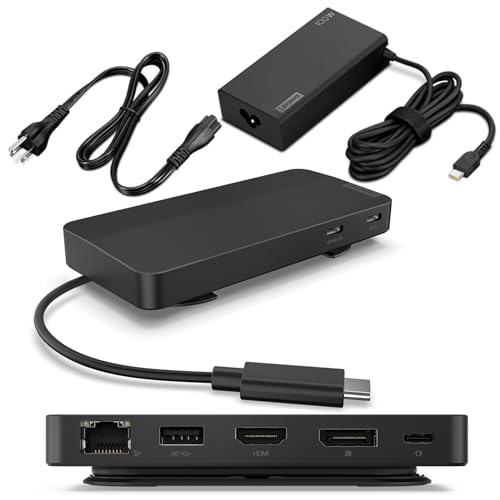
Lenovo Dual Display USB-C Travel Dock
Best for: travelers needing dual 4K and fast ports
- Power Delivery
- 100W (what this guide is about)
- Host Interface
- USB-C
- Display Support
- Dual
- Max Resolution
- 4K
- Port Count
- 7
- Video Ports
- DP 1.4, HDMI 2.0
This compact travel dock expands your laptop with seven ports, including HDMI 2.0, DisplayPort 1.4, and three 10 Gbps USB ports. It supports dual 4K external displays and Gigabit Ethernet. While it includes a 100W power adapter, that adapter delivers 65W to your laptop. Reaching full 100W Power Delivery requires an optional 135W charger. It suits you if you need multi-monitor output and fast data transfers on the go.
Pros
- Dual 4K video output via DisplayPort 1.4 and HDMI 2.0
- Three USB ports with 10 Gbps data transfer speeds
- Always-on USB-C port provides 5V/2.4A charging
- Includes 100W power adapter in the box
Cons
- Included 100W power adapter provides only 65W to the laptop
- Achieving 100W Power Delivery requires an optional 135W charger
Good fit if
- You need dual 4K display connectivity in a compact form factor.
- You want 10 Gbps USB ports and wired Ethernet during travel.
- Your laptop charges adequately at 65W using the included brick.
Skip if
- You need 100W charging out of the box without buying an optional power brick.
- You require a dock with a detachable host connection cable.
Verdict: Lenovo USB-C Dual Display Travel Dock offers fast 10 Gbps data ports and dual 4K video outputs in a portable chassis. Reaching full 100W Power Delivery requires purchasing a separate 135W power supply.

Plugable USB-C Triple HDMI Docking Station
Best for: triple-monitor setups on Apple Silicon laptops
- Power Delivery
- 100W (what this guide is about)
- Host Interface
- USB-C, USB4, Thunderbolt
- Display Support
- Triple
- Max Resolution
- 4K @ 30Hz
- Port Count
- 12
- Video Ports
- HDMI
This 12-in-1 docking station provides 100W Power Delivery to keep your laptop charged through a single USB-C cable. It features three HDMI ports, delivering one 4K display at 30Hz and two 1080p displays at 60Hz using DisplayLink technology. It also includes six USB 3.0 ports, Gigabit Ethernet, and audio. This setup suits you if you need triple external displays from a base Apple Silicon or Windows laptop.
Pros
- 100W USB-C Power Delivery host charging
- Triple HDMI outputs with DisplayLink support
- Bypasses native single-display limit on Apple M-series MacBooks
- Six USB 3.0 Type-A ports for peripherals
Cons
- Primary 4K display output tops out at 30Hz
- Does not support HDCP playback or Linux
- Requires DisplayLink driver installation on macOS
Good fit if
- You need 100W charging paired with three external HDMI monitors.
- You use a base Apple Silicon MacBook limited to a single native external display.
- You connect up to six USB-A accessories at your desk.
Skip if
- You use Linux as your primary operating system.
- You require 4K output at 60Hz or native DisplayPort connectors.
- You stream copy-protected media requiring HDCP support.
Verdict: Plugable USB-C Triple HDMI Dock delivers reliable 100W charging and unlocks three external displays on laptops normally limited to one screen. Its mix of DisplayLink video and six USB 3.0 ports makes it an effective multi-display workstation hub.
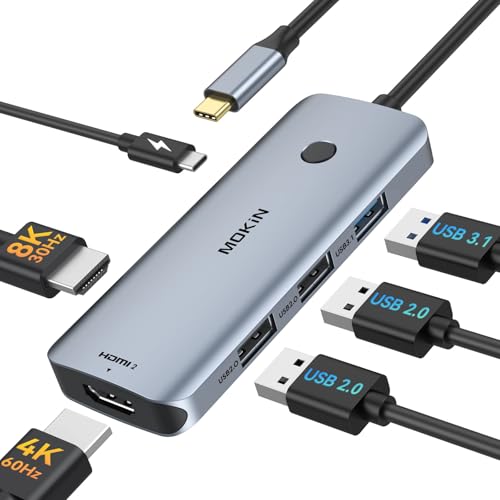
MOKiN 6-in-1 Dual HDMI USB-C Hub
Best for: dual 4K monitor Windows laptop setups
- Power Delivery
- 100W (what this guide is about)
- Host Interface
- USB-C
- Display Support
- Triple
- Max Resolution
- 4K@60Hz
- Port Count
- 6
- Video Ports
- HDMI
The MOKiN 6-in-1 Dual HDMI Docking Station expands a single USB-C port into six ports with 100W Power Delivery pass-through. It features two HDMI outputs that support 4K resolution at 60Hz simultaneously for Windows systems via MST. You also get one 10Gbps USB 3.1 port and two USB 2.0 ports. It suits Windows laptop users who need dual external monitor support alongside full 100W charging in a compact desktop hub.
Pros
- Supports dual 4K displays at 60Hz simultaneously via HDMI
- 100W USB-C Power Delivery pass-through charging
- Includes one high-speed USB 3.1 data port reaching 10Gbps
- Compact footprint measuring 2 by 2 inches and weighing under 0.17 pounds
Cons
- macOS does not support MST extended multi-display mode
- Two of the three USB-A ports use slower USB 2.0 speeds
- No Ethernet or DisplayPort connections included
Good fit if
- You run a Windows laptop and need dual 4K 60Hz displays via MST.
- You want 100W Power Delivery charging alongside basic USB peripherals.
Skip if
- You use a Mac laptop and require extended dual external monitors.
- You require wired Gigabit Ethernet or native DisplayPort outputs.
Verdict: MOKiN 6-in-1 Dual HDMI Docking Station delivers 100W pass-through charging and dual 4K 60Hz display support for Windows laptops. It provides an efficient multi-screen setup if you do not need Ethernet or macOS MST expansion.

Lenovo ThinkPad Universal Thunderbolt 4 Dock
Best for: quad-display 4K Windows laptop setups
- Power Delivery
- 100W (what this guide is about)
- Host Interface
- Thunderbolt 4
- Display Support
- Up to 4
- Max Resolution
- 8K @ 30 Hz
- Video Ports
- DisplayPort, HDMI, Thunderbolt 4
- Max Data Speed
- 40 Gbps
View on Amazon: Lenovo ThinkPad Universal Thunderbolt 4 Dock
This Lenovo docking station uses Thunderbolt 4 to provide up to 100W of dynamic power delivery to your laptop. It supports data transfer rates up to 40 Gbps and can drive a single 8K display at 30 Hz or up to four 4K displays at 60 Hz. With dedicated DisplayPort, HDMI, USB 3.1 Gen 2, and Gigabit Ethernet ports, it fits multi-monitor desk setups needing high bandwidth.
Pros
- Delivers up to 100W dynamic charging to notebooks using included 135W power adapter
- Supports up to four 4K displays at 60 Hz or one 8K display at 30 Hz
- Thunderbolt 4 downstream port with 40 Gbps data bandwidth
- Includes four USB 3.1 Gen 2 ports, one USB-C port, and Gigabit Ethernet
Cons
- Documented support specifies Windows-based systems
- Ethernet is limited to 1 Gbps speed
Good fit if
- You need to drive up to four 4K monitors or an 8K display from one dock.
- You want 100W notebook charging alongside 40 Gbps Thunderbolt 4 throughput.
Skip if
- You run an operating system other than Windows.
- You require network speeds faster than Gigabit Ethernet.
Verdict: Lenovo ThinkPad Thunderbolt 4 Dock provides reliable 100W laptop charging and high-bandwidth video support for complex multi-monitor Windows workstations.

HP G6 USB-C 100W Dock
Best for: high-refresh setups needing 100W laptop power
- Power Delivery
- 100W (what this guide is about)
- Host Interface
- USB-C
- Video Ports
- HDMI
- Connectivity
- USB-C, HDMI
- Refresh Rate
- 120Hz
- Dimensions
- 15.6 × 6.81 × 3.74 inches
The HP USB-C G6 100W Dock provides 100W Power Delivery to your laptop over a single USB-C connection. It includes an extra USB-C cable, supports a 120Hz refresh rate, and offers USB-C and HDMI connectivity. Measuring 4.76 by 4.76 inches and weighing 1.49 pounds, this compact hub suits you if you want high-refresh display output and status notifications for your desktop setup.
Pros
- Supplies 100W Power Delivery over single USB-C connection
- Supports up to 120Hz refresh rate
- Includes one extra USB-C cable
- Compact 4.76 x 4.76 inch footprint
Cons
- No DisplayPort connections listed in specifications
- Weighs 1.49 pounds
Good fit if
- You need 100W laptop power delivery and 120Hz output.
- You want built-in on-screen display notifications and LED lighting.
- You prefer a compact square desktop dock design.
Skip if
- You require dedicated DisplayPort monitor connections.
- You need a lightweight hub for mobile travel.
Verdict: HP USB-C G6 100W Dock delivers 100W laptop power and 120Hz support in a compact square frame. It covers essential USB-C and HDMI desk connections cleanly.

UGREEN Foldable 6-in-1 4K 120Hz Dock
Best for: Handheld gaming setups needing 4K 120Hz output
- Power Delivery
- 100W (what this guide is about)
- Host Interface
- USB-C
- Max Resolution
- 4K@120Hz
- Port Count
- 6
- Video Ports
- HDMI 2.1
- Max Data Speed
- 5Gbps
The UGREEN 6-in-1 Foldable 4K 120Hz Dock is a portable docking station and stand built for handheld gaming devices and laptops. It supports 100W Power Delivery 3.0, supplying up to 85W to your host device while powering connected accessories. With an HDMI 2.1 port delivering 4K at 120Hz, Gigabit Ethernet, and three 5Gbps USB ports, it suits you if you want high-refresh external video and wired networking on the go.
Pros
- HDMI 2.1 output supports 4K at 120Hz with VRR, FreeSync, and G-Sync
- 100W Power Delivery 3.0 passthrough charges hosts at up to 85W
- Includes Gigabit Ethernet, two 5Gbps USB-A ports, and one 5Gbps USB-C data port
- Built-in foldable stand constructed from aluminum alloy and PC+ABS
Cons
- Single video output with only one HDMI port
- Host power delivery caps at 85W rather than full 100W
- Not compatible with Nintendo Switch 2
Good fit if
- You need 4K 120Hz video output for a handheld gaming console or laptop.
- You want an integrated foldable stand with wired Gigabit Ethernet.
- You use an 85W or lower host device that charges via USB-C Power Delivery.
Skip if
- You need multiple external monitor displays.
- You need a full 100W delivered directly to your host device.
- You want to dock a Nintendo Switch 2.
Verdict: UGREEN 6-in-1 Foldable 4K 120Hz Dock delivers high-refresh HDMI 2.1 output and reliable 85W host charging in a portable stand design. It is a solid choice if you need fast wired networking and smooth 4K display support for handhelds or compact laptops.

Mukiya 10-in-1 Triple Display Laptop Stand Dock
Best for: mobile Windows setups needing an integrated riser
- Power Delivery
- 100W (what this guide is about)
- Host Interface
- USB-C
- Display Support
- Triple
- Max Resolution
- 4K@60Hz
- Port Count
- 10
- Video Ports
- HDMI, DisplayPort
View on Amazon: Mukiya 10-in-1 Triple Display Laptop Stand Dock
The Mukiya 10-in-1 USB-C Docking Station Stand combines a foldable aluminum laptop riser with an integrated multi-port hub. It accepts up to 100W Power Delivery to provide 85W of charging to your laptop while powering connected accessories. You get triple-display output up to 4K at 60Hz across two HDMI ports and one DisplayPort on Windows, alongside three 5Gbps USB ports. This suits you if you want an elevated workspace without carrying a separate stand.
Pros
- Integrated 9-level adjustable aluminum stand supports up to 40 lbs
- Pass-through Power Delivery accepts up to 100W with 85W host charging
- Triple display output via two HDMI ports and one DisplayPort at up to 4K@60Hz
- Foldable 0.7 lb frame with included storage bag
- Three 5Gbps USB data ports alongside SD and TF card slots
Cons
- macOS laptops are restricted to mirrored display mode
- Pass-through charging caps host delivery at 85W
- No integrated Ethernet port
Good fit if
- You need an adjustable 9-level kickstand that doubles as a multi-port hub.
- You use a Windows laptop with DP 1.4 Alt Mode to run up to three external screens.
- You want a lightweight 0.7-pound foldable unit for travel.
Skip if
- You use macOS and need multiple extended external desktop displays.
- You require a built-in wired Ethernet connection.
- You need a full 100W delivered directly to your laptop.
Verdict: Mukiya 10-in-1 USB-C Docking Station Stand delivers 85W host charging and triple 4K monitor support inside a 9-level adjustable riser. It provides a compact, all-in-one ergonomic desk solution for Windows users on the move.

Plugable Thunderbolt 4 Dual HDMI Dock
Best for: Thunderbolt 4 Mac and Windows multi-display setups
- Power Delivery
- 100W (what this guide is about)
- Host Interface
- Thunderbolt 4
- Display Support
- Dual
- Max Resolution
- 4K@60Hz
- Port Count
- 13
- Video Ports
- HDMI
This 13-in-1 Thunderbolt 4 dock delivers 100W host power delivery alongside dual 4K 60Hz HDMI outputs. You get 40Gbps downstream Thunderbolt 4 connectivity, four USB-A ports, SD and microSD UHS-II slots, Ethernet, and an audio jack in an aluminum chassis. It suits you if you need high-bandwidth peripheral expansion and dual-monitor output for compatible Apple silicon MacBooks or Windows USB4 laptops without installing display drivers.
Pros
- Delivers 100W host power delivery over Thunderbolt 4
- Supports dual 4K displays at 60Hz via two HDMI ports without extra drivers
- Features a 40Gbps downstream Thunderbolt 4 port and UHS-II card slots
- Provides 13 total connection ports including Ethernet and four USB-A ports
Cons
- Limits base M1 and M2 MacBooks to a single external display
- Requires clamshell mode for dual display output on base M3 MacBooks
- Lacks native DisplayPort video connectors
Good fit if
- You have a compatible Mac or Windows USB4 laptop requiring up to 100W charging.
- You want dual 4K 60Hz HDMI output without installing driver software.
- You need a downstream 40Gbps Thunderbolt 4 port for high-speed peripherals.
Skip if
- You use a base M1 or M2 MacBook and need two external screens.
- You require native DisplayPort outputs instead of HDMI.
- Your host computer lacks a Thunderbolt 4 or USB4 port.
Verdict: Plugable Thunderbolt 4 Dual HDMI Dock delivers full 100W charging and driverless dual 4K video for compatible Thunderbolt and USB4 systems. Its 13-port layout provides high-speed data transfer and desktop expansion in an aluminum chassis.

Plugable 13-in-1 Triple HDMI Dock
Best for: triple-monitor setups on Apple Silicon laptops
- Power Delivery
- 100W (what this guide is about)
- Host Interface
- USB-C
- Display Support
- Triple
- Max Resolution
- 4K @ 30Hz
- Port Count
- 13
- Video Ports
- HDMI
This 13-in-1 USB-C docking station supplies up to 100W of Power Delivery to charge your laptop while adding an independent 20W front USB-C port for mobile devices. It expands your setup with three HDMI outputs, four 5Gbps USB-A ports, Gigabit Ethernet, and an SD card reader. It suits you if you need multi-monitor support across macOS, Windows, or ChromeOS machines, including base Apple Silicon laptops.
Pros
- Delivers 100W host charging plus a separate 20W front USB-C charging port
- Drives up to three HDMI displays on Windows, ChromeOS, and macOS
- Bypasses native display limits on M1 through M5 MacBooks using DisplayLink
- Includes 13 ports featuring Gigabit Ethernet, SD reader, and four 5Gbps USB-A ports
Cons
- HDMI 1 tops out at 4K 30Hz while HDMI 2 and 3 max out at 1920x1200 60Hz
- Does not support HDCP playback for protected streaming services
- Requires DisplayLink driver installation to enable multiple displays on macOS
Good fit if
- You want to connect up to three HDMI displays to a laptop using a single USB-C cable.
- You need 100W laptop charging combined with a dedicated 20W port for accessories.
- You use a base M1 through M5 Mac that natively supports only one external monitor.
Skip if
- You require 4K resolution at 60Hz on your external monitors.
- You need HDCP support to stream copy-protected video from services like Netflix or Hulu.
- You cannot install DisplayLink software drivers due to operating system or IT restrictions.
Verdict: Plugable 13-in-1 Triple Display USB-C Dock provides 100W laptop charging alongside a balanced 13-port selection. It gives multi-display capability to systems with native external monitor limitations, though refresh rates and resolutions remain lower than direct video connections.

MOKiN 17-in-1 Triple Display USB-C Dock
Best for: Triple-monitor desks requiring gigabit Ethernet
- Power Delivery
- 100W (what this guide is about)
- Host Interface
- USB-C, USB4, Thunderbolt
- Display Support
- Triple
- Max Resolution
- 4K@60Hz
- Port Count
- 17
- Video Ports
- HDMI, DisplayPort
This 17-in-1 docking station gives you up to three 4K displays at 60Hz across Windows and macOS setups. It accepts 100W power input to supply up to 85W pass-through charging to your laptop. With a 1Gbps Gigabit Ethernet port, fast 10Gbps USB ports, and a real-time LCD status screen, it suits users who need reliable wired networking and triple monitor outputs.
Pros
- Triple 4K at 60Hz display support for macOS and Windows
- 1Gbps Gigabit Ethernet port for stable wired networking
- 10Gbps USB-C and USB-A transfer speeds
- Integrated LCD screen showing charging wattage and resolution
Cons
- Power adapter not included in the package
- Pass-through charging tops out at 85W from 100W input
- Requires driver download before video ports function
Good fit if
- You need a 1Gbps Ethernet connection alongside triple 4K monitors.
- You want an on-device LCD screen to track real-time power and resolution.
- You already own a compatible high-wattage USB-C power supply.
Skip if
- You need a full 100W delivered directly to your laptop.
- You want a docking station that comes with its own power adapter.
- You cannot install driver software on your laptop.
Verdict: MOKiN 17-in-1 Triple Display Docking Station delivers wired gigabit networking and triple 4K monitor support for demanding desks. It offers steady 85W pass-through charging when connected to a 100W power adapter.

Lenovo ThinkPad USB4 Dock 5000
Best for: high-refresh dual 4K setups needing 100W PD
- Power Delivery
- 100W (what this guide is about)
- Host Interface
- USB4
- Max Resolution
- 8K 60Hz
- Max Data Speed
- 40Gbps
- Dimensions
- 8.58 × 3.13 × 1.24 inches
- Weight
- 1.04 pounds
The Lenovo ThinkPad USB4 Dock 5000 expands your workstation using USB4 connectivity. It provides up to 100W Power Delivery 3.1 to keep your laptop charged while running peripherals. With 40 Gbps of bandwidth, you can drive a single 8K monitor at 60Hz or dual 4K screens at 144Hz. It suits you if you need high-bandwidth video output alongside reliable 100W power over a single cable connection.
Pros
- Up to 100W Power Delivery 3.1 charging capability
- 40 Gbps USB4 bandwidth
- Supports a single 8K 60Hz display or dual 4K 144Hz displays
- Universal compatibility across multiple operating systems
Cons
- At 8.58 inches long and 1.04 pounds, it has a relatively large desktop footprint
- Exact port types and quantities are omitted from published specifications
Good fit if
- You need up to 100W Power Delivery 3.1 to charge your laptop.
- You run high-refresh displays up to dual 4K at 144Hz or a single 8K at 60Hz.
- You want 40 Gbps USB4 data throughput for connected accessories.
Skip if
- You need a compact, pocketable adapter for travel.
- You plan to connect three or more external monitors.
Verdict: Lenovo ThinkPad USB4 Dock 5000 provides high-speed 40 Gbps connectivity and 100W Power Delivery for heavy desktop workloads. It is well suited for setups requiring demanding single 8K or dual 4K 144Hz video output.
Specifications side by side
| Spec | UGREEN 5-in-1 USB-C Hub with 100W PD | HODO 5-in-1 Dual 4K 60Hz USB-C Hub | Selore Dual 4K HDMI USB-C Dock | Dell Pro USB-C 100W Docking Station | Lenovo Dual Display USB-C Travel Dock | Plugable USB-C Triple HDMI Docking Station | MOKiN 6-in-1 Dual HDMI USB-C Hub | Lenovo ThinkPad Universal Thunderbolt 4 Dock | HP G6 USB-C 100W Dock | UGREEN Foldable 6-in-1 4K 120Hz Dock | Mukiya 10-in-1 Triple Display Laptop Stand Dock | Plugable Thunderbolt 4 Dual HDMI Dock | Plugable 13-in-1 Triple HDMI Dock | MOKiN 17-in-1 Triple Display USB-C Dock | Lenovo ThinkPad USB4 Dock 5000 |
|---|---|---|---|---|---|---|---|---|---|---|---|---|---|---|---|
| Host Interface | USB-C | Thunderbolt 4, USB4, USB-C | USB-C | USB-C | USB-C | USB-C, USB4, Thunderbolt | USB-C | Thunderbolt 4 | USB-C | USB-C | USB-C | Thunderbolt 4 | USB-C | USB-C, USB4, Thunderbolt | USB4 |
| Display Support | not specified | Dual | Dual | not specified | Dual | Triple | Triple | Up to 4 | not specified | not specified | Triple | Dual | Triple | Triple | not specified |
| Max Resolution | 4K | 8K@30Hz | 4K@60Hz | not specified | 4K | 4K @ 30Hz | 4K@60Hz | 8K @ 30 Hz | not specified | 4K@120Hz | 4K@60Hz | 4K@60Hz | 4K @ 30Hz | 4K@60Hz | 8K 60Hz |
| Power Delivery | 100W | 87W | 100W | 100W | 65W (up to 100W) | 100W | 100W | 100W | 100W | 85W | 100W | 100W | 100W | 85W | 100W |
| Port Count | 5 | not specified | 8 | not specified | 7 | 12 | 6 | not specified | not specified | 6 | 10 | 13 | 13 | 17 | not specified |
| Video Ports | HDMI | USB-C | HDMI | DisplayPort, HDMI | DP 1.4, HDMI 2.0 | HDMI | HDMI | DisplayPort, HDMI, Thunderbolt 4 | HDMI | HDMI 2.1 | HDMI, DisplayPort | HDMI | HDMI | HDMI, DisplayPort | not specified |
| Max Data Speed | 5Gbps | 10Gbps | 5Gbps | not specified | 10Gbps | not specified | 10Gbps | 40 Gbps | not specified | 5Gbps | 5Gbps | 40Gbps | 5Gbps | 10Gbps | 40Gbps |
| Ethernet Speed | not specified | not specified | not specified | not specified | 1000M | Gigabit | not specified | Gigabit Ethernet | not specified | Gigabit | not specified | not specified | Gigabit Ethernet | 1Gbps | not specified |
| Resolution | 4K UHD | 4K UHD | 4K UHD | not specified | 4K UHD | not specified | not specified | not specified | not specified | 4K UHD | 4K UHD | not specified | not specified | not specified | not specified |
| Connectivity | USB-C, HDMI | USB-C | USB-C, HDMI, USB-A | USB-C, HDMI, DisplayPort | USB-C | USB-C, HDMI | USB-C, HDMI | Thunderbolt 4 | USB-C, HDMI | HDMI | USB-C, HDMI, DisplayPort | Thunderbolt 4 | USB-C | USB-C, HDMI, DisplayPort, Ethernet, USB-A | not specified |
| Refresh Rate | not specified | 60Hz | 60Hz | not specified | not specified | not specified | not specified | not specified | 120Hz | 120Hz | not specified | not specified | not specified | not specified | not specified |
| Features | not specified | not specified | not specified | not specified | not specified | not specified | not specified | not specified | not specified | not specified | Kickstand | not specified | not specified | not specified | not specified |
| Use | not specified | not specified | not specified | not specified | Travel | not specified | not specified | not specified | not specified | not specified | not specified | not specified | not specified | not specified | not specified |
| Dimensions | 4.79 × 1.09 × 0.47 inches | 5.7 × 2.32 × 0.47 inches | 4.5 × 2.1 × 0.7 inches | 8.07 × 3.54 × 1.39 inches | 4.72 × 2.6 × 0.79 inches | 7.87 × 3.54 × 1.18 inches | 2 × 1 × 2 inches | 6 × 3 × 1 inches | 15.6 × 6.81 × 3.74 inches | 5.79 × 3.35 × 1.13 inches | not specified | 3.35 × 8.86 × 0.91 inches | 4.7 × 2.6 × 6.9 inches | not specified | 8.58 × 3.13 × 1.24 inches |
| Weight | 3.21 ounces | 2.47 ounces | 3.39 ounces | 1.21 pounds | 1.44 pounds | 11.7 ounces | 2.72 ounces | 1.16 pounds | 1.49 pounds | 10.6 ounces | not specified | 2.85 pounds | 14.1 ounces | not specified | 1.04 pounds |
| Size | 0.65 feet | not specified | 9-in-1 | not specified | 0.79" x 2.17" | 7.9 x 3.3 x 1.2 inches | 6-in-1 | 1.18" x 3.15" | 4.76 x 4.76 x2 IN | not specified | not specified | not specified | 6.9" | not specified | 3.10 |
| Color | grey | not specified | Grey | Black | Black | Black | Grey | Black | BLACK | Grey | Silver | Space Grey | Black | not specified | Eclipse Black |
| Model | CM478 | not specified | SEUC0425 | WD25 | 40B9 | UD-3900PDZ | not specified | 40B00135US | BS7S9AA#ABA | 75126 | HUB-M94 | TBT-UDM | UD-ULTCDL | not specified | 40BF0100US |
If you need off-grid power to run your dock and monitor setup, review published specs for the best 100W generators.
How to Choose the Right Docking Station
-
Match Host Connection Protocols
Examine your laptop port standards before choosing a dock. Basic USB-C ports handle standard peripherals and display output, but high-bandwidth workflows demand more throughput. If you work with multiple ultra-high-resolution screens or need fast external storage transfers, look for Thunderbolt 4 or USB4 connectivity. A unit like the Lenovo ThinkPad USB4 Dock 5000 uses 40 Gbps bandwidth to manage demanding video streams. Check your laptop specifications to verify whether its USB-C port supports Thunderbolt 4, USB4, or DisplayPort Alternate Mode so you can utilize every dock capability.
-
Verify Monitor Refresh Rates
Review the supported refresh rate on the dock specification sheet to match your external monitor. Standard productivity docks limit 4K output to 60Hz, which works well for everyday office documents, spreadsheets, and web browsing. If you require smoother visual motion for fast content review or high-frame-rate monitors, target docks that support 120Hz output. The HP G6 USB-C 100W Dock lists 120Hz support, providing fluid movement on compatible panels. Make sure your monitor and connecting cables support high refresh rates over the dock video connection before setting up your workstation.
-
Check Display Connector Types
Examine the video ports on your external screens to ensure direct compatibility without adapters. Many docks only feature HDMI outputs, which connect easily to consumer televisions and modern displays. However, commercial office monitors often utilize DisplayPort connections to deliver their highest resolutions. Choosing a dock with native DisplayPort output, such as the Dell Pro USB-C 100W Docking Station, lets you connect DisplayPort monitors directly. Inspect your display inputs beforehand to see whether you need HDMI, DisplayPort, or a combination of both connector types across your desk setup.
-
Count Your Essential Peripherals
Calculate how many accessories you plug in simultaneously. Compact hubs offer five to six ports, which suffices for a single mouse, keyboard, and display connection. If you run hard drives, audio equipment, webcams, and wired networks at the same desk, a small hub leaves you swapping cables constantly. High-capacity models like the Plugable 16-in-1 Thunderbolt 4 Dock provide sixteen ports to keep every peripheral wired permanently. Count your USB-A, USB-C, and networking cables in advance so you pick a port count that accommodates all your stationary hardware.
-
Assess Weight and Desk Footprint
Evaluate whether your setup stays anchored to a desk or travels in a laptop bag. Heavy desktop stations provide steady cable routing, but they take up considerable surface area and add noticeable weight. If you commute between home and office, look for pocketable hubs under a quarter pound. The HODO 5-in-1 Dual 4K 60Hz USB-C Hub weighs just 0.154 pounds, slipping into bags without adding bulk. Conversely, permanent desktop docks weighing over a pound anchor thick cables without shifting across your workspace. Check the dimensions and weight specifications to match your daily mobility needs.
Frequently asked questions
Does a 100W docking station provide 100W directly to your laptop?
Not always. Some docks reserve power for internal circuitry and connected accessories, passing slightly less wattage to your laptop. For example, the HODO 5-in-1 passes 87W, and the Mukiya 10-in-1 delivers 85W host charging despite accepting 100W input. Others, like the Lenovo Travel Dock, require an external 135W supply to deliver a full 100W to your machine.
Can a 100W docking station output video at 120Hz refresh rates?
Yes, specific 100W docking stations support high refresh rates like 120Hz. The HP G6 USB-C 100W Dock supports 120Hz display output over its video connections. Additionally, the UGREEN Foldable 6-in-1 features an HDMI 2.1 port capable of handling 4K at 120Hz. If your setup requires high refresh rates for gaming or smooth motion, verify the exact video standard listed.
Can you run three monitors from a single 100W USB-C dock?
Yes, several 100W models support triple-display setups. Docks like the Plugable UD-3900PDZ and Plugable UD-ULTC4K offer triple external display support while maintaining 100W laptop charging. The Mukiya 10-in-1 dock also provides triple 4K monitor support. You must check whether your laptop operating system supports multi-stream transport or requires dedicated DisplayLink drivers to run three independent displays.
Do all 100W docking stations include a built-in power supply?
No, many compact 100W docks use pass-through power delivery and require your own charger. Hubs like the UGREEN 5-in-1 and HODO 5-in-1 rely on an external USB-C power brick that you plug directly into the dock. In contrast, larger desktop units such as the Dell WD25 or Plugable Thunderbolt 4 dock operate as standalone powered stations with dedicated power inputs.
Can you connect up to four external monitors to a 100W dock?
Yes, certain advanced 100W docks support up to four external displays. The Dell Pro WD25 supports up to four screens using its HDMI and DisplayPort outputs. Similarly, the Lenovo ThinkPad Universal Thunderbolt 4 Dock supports quad 4K monitor configurations for compatible Windows workstations. Ensure your laptop graphics hardware has sufficient display lanes to drive that many simultaneous displays.
What is the difference between USB-C and Thunderbolt 4 in 100W docks?
Bandwidth is the main technical difference. While both can provide 100W charging, Thunderbolt 4 docks, like the Plugable TBT-UDM or Lenovo 40B00135US, deliver fixed 40 Gbps data bandwidth. Standard USB-C docks operate on lower bandwidth limits, often 5 Gbps or 10 Gbps. Higher bandwidth allows Thunderbolt docks to handle dual 4K video streams and multi-gigabit data transfers simultaneously without throttling.
Will a 100W dock work with laptops that require less wattage?
Yes, USB Power Delivery is backward compatible and negotiates power safely. A 100W dock will only deliver the specific wattage your laptop requests, such as 45W or 65W. Your laptop controls the power draw to prevent battery damage. Using a 100W dock on a lower-wattage laptop ensures the dock runs cool and has surplus capacity for connected accessories.