Best Docking Stations with USB-A: 15 Spec-Based Picks
As an Amazon Associate we earn from qualifying purchases. Links on this page are affiliate links.
A docking station with USB connectivity allows you to link standard desktop peripherals like keyboards and external drives to your laptop. We evaluated 15 models based strictly on the specifications published on the listings.
The Selore Dual 4K HDMI USB-C Dock takes the top spot by providing two 5Gbps USB-A ports alongside dual 4K 60Hz video connections and 100W power delivery. This comparison helps you decide which port assortment, video output configuration, and charging capacity best fit your desk setup.
Quick picks
The best fit for you
- You need dual 4K displays and USB-A connectivity Selore Dual 4K HDMI USB-C Dock This dock provides dual 4K 60Hz HDMI outputs and two 5Gbps USB-A ports with 100W power delivery.
- You require maximum USB-A speed and Thunderbolt 4 CalDigit TS4 Thunderbolt 4 Dock It features five 10Gbps USB-A ports alongside three Thunderbolt 4 connections and 98W host charging.
- You want the lightest portable hub for travel Dell 4-in-1 USB-C Travel Hub Weighing only 0.1 pounds, this compact hub includes USB-A and 4K UHD HDMI outputs.
- You need dual DisplayPort monitors from legacy USB-A StarTech USB-A Dual 4K DisplayPort Mini Dock It uses DisplayLink over a USB-A connection to drive dual 4K displays at 60Hz.
Our 15 picks

Selore Dual 4K HDMI USB-C Dock
Best for: dual 4K displays and USB-A desktop accessories
- Connectivity
- USB-C, HDMI, USB-A (what this guide is about)
- Host Interface
- USB-C
- Display Support
- Dual
- Max Resolution
- 4K@60Hz
- Power Delivery
- 100W
- Port Count
- 8
This compact hub pairs two 5Gbps USB-A ports with dual 4K 60Hz HDMI outputs and 100W Power Delivery pass-through. If you need desktop peripheral connectivity without a heavy power brick, you get dedicated legacy USB ports, SD card slots, and a physical privacy button. It serves you well if your laptop has a full-featured USB-C port and requires both dual displays and external USB accessories.
Pros
- Two 5Gbps USB-A ports for legacy peripherals
- Dual HDMI outputs supporting up to 4K resolution at 60Hz
- 100W USB-C Power Delivery pass-through charging
- Physical button toggles display modes or blacks out screens
Cons
- macOS limits external displays to a single extended screen
- Lacks a built-in Ethernet port
- Requires a host laptop with full-function USB-C or Thunderbolt
Good fit if
- You need two 5Gbps USB-A ports alongside dual 4K 60Hz display outputs.
- You want 100W Power Delivery pass-through on a lightweight portable hub.
- You use a Windows laptop that supports multi-stream display over USB-C.
Skip if
- You use macOS and require two distinct extended desktop displays.
- You need a hardwired Gigabit Ethernet connection.
Verdict: Selore Dual 4K HDMI USB-C Dock with USB-A delivers two 5Gbps USB-A ports and dual 4K 60Hz video outputs in a lightweight pocket form factor. It gives you essential desktop expansion provided your laptop provides full-featured USB-C connectivity.
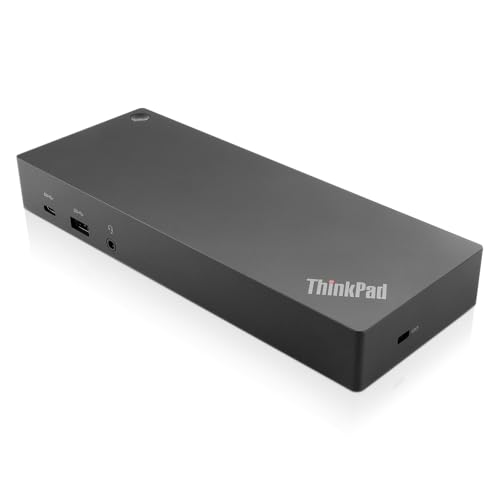
Lenovo ThinkPad Hybrid USB-C and USB-A Dock
Best for: mixed USB-A and USB-C laptop setups
- Connectivity
- USB-C, USB-A (what this guide is about)
- Host Interface
- USB-C, USB-A
- Video Ports
- DisplayPort, HDMI
- Max Data Speed
- 10Gbps
- Ethernet Speed
- Gigabit Ethernet
- Dimensions
- 8.3 × 3.1 × 1.2 inches
This Lenovo ThinkPad docking station connects to USB-C or USB-A host laptops to expand your desktop setup. You get five USB-A ports, including three 10Gbps USB 3.1 Gen 2 ports and two USB 2.0 ports for accessories. It also includes dual DisplayPort and dual HDMI outputs alongside Gigabit Ethernet and audio. It suits you if you need extensive USB-A peripheral connections across both newer USB-C notebooks and older USB-A laptops.
Pros
- Three 10Gbps USB 3.1 Gen 2 ports and two USB 2.0 ports
- Dual DisplayPort and dual HDMI video outputs
- Gigabit Ethernet and stereo/mic combo audio port
- Always-on USB-A port provides 10.5W charging for mobile devices
Cons
- USB-C port limited to data and 15W power output
- Two USB ports use slower USB 2.0 speeds
- No integrated SD card reader
Good fit if
- You need five USB-A ports to connect legacy and high-speed peripherals.
- You connect external displays using either HDMI or DisplayPort cables.
- You alternate between USB-C and legacy USB-A laptops.
Skip if
- You need built-in memory card slots for SD or microSD cards.
- You need high-wattage power delivery directly from the dock's USB-C port.
Verdict: Lenovo ThinkPad Hybrid USB-C and USB-A Dock provides five USB-A ports alongside dual HDMI and DisplayPort video connections. It offers reliable connectivity for mixed USB-C and older USB-A workstations.

CalDigit TS4 Thunderbolt 4 Dock
Best for: high-bandwidth workstations needing multiple USB-A ports
- Connectivity
- USB-C, USB-A, Thunderbolt 4 (what this guide is about)
- Host Interface
- Thunderbolt 4
- Display Support
- Dual
- Max Resolution
- 8K@30Hz
- Power Delivery
- 98W
- Port Count
- 18
The CalDigit TS4 Thunderbolt 4 Dock provides 18 ports of connectivity for your workstation setup. For legacy accessories, you get five USB-A ports running at 10Gb/s. The unit also includes three Thunderbolt 4 ports, three USB-C ports, and 98W host power delivery over a single connection. It suits you if you need fast data transfer across multiple external USB-A peripherals while charging your laptop and running up to dual 60Hz monitors.
Pros
- Five USB-A ports with 10Gb/s transfer speeds
- Delivers up to 98W power delivery to host laptops
- 2.5GbE Ethernet port for high-speed wired networking
- Three 40Gb/s Thunderbolt 4 ports for daisy-chaining and displays
Cons
- Base Apple M1 to M3 laptops support only one external monitor
- Full 2.5GbE network speed requires a Thunderbolt host connection
- Lacks built-in HDMI ports
Good fit if
- You need five high-speed 10Gb/s USB-A ports for accessories.
- You require up to 98W of laptop charging over a single cable.
- You connect to high-bandwidth 2.5GbE local networks.
Skip if
- You need native HDMI video ports without using adapters.
- You run a base M1, M2, or M3 Mac and need dual external displays.
Verdict: CalDigit TS4 Thunderbolt 4 Dock delivers class-leading peripheral expansion with five 10Gb/s USB-A ports, three Thunderbolt 4 connections, and 98W charging for heavy-duty setups.

Koncept 13-Port Thunderbolt 4 Dock
Best for: quad-display Windows setups needing legacy USB-A ports
- Connectivity
- USB-C, USB-A, Thunderbolt 4 (what this guide is about)
- Host Interface
- Thunderbolt 4
- Display Support
- Up to 4
- Max Resolution
- 4K@60Hz
- Port Count
- 13
- Video Ports
- DisplayPort 1.4, HDMI 2.0, USB-C, TB4
This dock expands your workstation through a 40Gbps Thunderbolt 4 connection and 13 total ports. For legacy peripherals, you get three USB-A 3.2 Gen 1 ports running at 5Gbps. It supplies 130 of energy delivery to your host laptop, along with dual Thunderbolt 4 downstream ports, dual DisplayPort 1.4, and HDMI 2.0 outputs. It suits you if you need multi-monitor support alongside dependable USB-A connectivity for desktop accessories.
Pros
- Three USB-A 3.2 Gen 1 ports running at 5Gbps
- Dual 40Gbps Thunderbolt 4 downstream ports
- Delivers up to 130 of energy delivery to host devices
- Supports up to four 4K 60Hz displays on Windows
Cons
- USB-A ports limited to 5Gbps rather than 10Gbps
- Base M1 and M2 Macs limited to a single external display
- Dual external displays on macOS may require DisplayLink
Good fit if
- You need to connect up to three standard 5Gbps USB-A devices.
- You use a Windows laptop and plan to run up to four 4K monitors.
- You want downstream 40Gbps Thunderbolt 4 ports for high-speed peripherals.
Skip if
- You require 10Gbps transfer speeds across your USB-A connections.
- You use a base M1 or M2 Mac and require native dual external displays.
Verdict: Dell Thunderbolt 4 Dock delivers 13 connectivity ports with three 5Gbps USB-A connections and dual Thunderbolt 4 outputs. It provides broad display flexibility and high energy delivery for multi-screen workstations.

MOKiN 13-in-1 Triple Display USB-C Dock
Best for: multi-monitor Windows setups needing mixed USB-A ports
- Connectivity
- USB-C, HDMI, DisplayPort, Ethernet, USB-A (what this guide is about)
- Host Interface
- USB-C
- Display Support
- Triple
- Max Resolution
- 4K@144Hz
- Power Delivery
- 100W
- Port Count
- 13
This 13-in-1 docking station connects to your laptop via USB-C and adds three dedicated USB-A ports alongside two HDMI outputs and a DisplayPort. You get two 5Gbps USB-A 3.0 ports for external storage or peripherals, plus one USB-A 2.0 port for basic accessories. Powered by an included 150W DC supply delivering 100W laptop charging, it suits you if you need mixed USB-A connectivity and multi-monitor support at your desk.
Pros
- Three USB-A ports: two 5Gbps USB-A 3.0 and one 480Mbps USB-A 2.0
- Included 150W DC adapter delivers 100W laptop charging and 30W USB-C peripheral charging
- Three video outputs with two HDMI ports and one DisplayPort
- Two 10Gbps USB-C data ports and a 1Gbps Ethernet port
Cons
- macOS does not support extending different content across multiple external monitors
- 4K at 144Hz output works only on a single external display
Good fit if
- You need both 5Gbps and standard 480Mbps USB-A ports for desktop accessories
- You want 100W host charging supplied by an included 150W DC power brick
- You run a Windows laptop with up to three external displays
Skip if
- You use macOS and need an extended desktop across multiple external displays
- You need to drive multiple external screens at 4K 144Hz simultaneously
Verdict: MOKiN Triple Display USB-C Dock delivers versatile USB-A expansion alongside 100W laptop power delivery and triple video outputs for Windows setups. It provides steady desktop connectivity if you do not require extended multi-display support on macOS.

Anker 14-in-1 USB-C Triple Display Dock
Best for: 1080p VGA and multi-monitor USB-A setups
- Connectivity
- USB-C, HDMI, USB-A, VGA (what this guide is about)
- Host Interface
- USB-C, USB4, Thunderbolt
- Display Support
- Triple
- Max Resolution
- 4K
- Power Delivery
- 80W
- Port Count
- 14
The Anker 14-in-1 USB-C Triple Display Dock connects legacy and modern desktop gear through a single host cable. For peripheral connectivity, you get five 5 Gbps USB-A ports, an SD/microSD card reader, and gigabit Ethernet. It handles three external monitors simultaneously using two 4K HDMI ports and one 1080p VGA connection. With 80W pass-through charging support, it suits multi-device setups needing heavy USB-A expansion and mixed-generation video outputs.
Pros
- Five 5 Gbps USB-A ports for extensive peripheral connectivity
- Triple monitor support via dual 4K HDMI and 1080p VGA
- Supports up to 80W pass-through charging to host laptops
- Includes gigabit Ethernet, AUX audio, and SD/microSD slots
Cons
- Wall charger is not included for pass-through power
- macOS displays mirror identical content on external monitors
- Incompatible with Linux operating systems
Good fit if
- You need five standard USB-A ports for accessories and drives.
- You use an older 1080p VGA monitor alongside HDMI displays.
- You run Windows or ChromeOS and want triple extended screens.
Skip if
- You run a laptop powered by Linux.
- You use macOS and require independent extended desktops across multiple displays.
- You do not already own a compatible USB-C power adapter.
Verdict: Anker 14-in-1 USB-C Triple Display Dock delivers expansive connectivity with five USB-A ports, dual HDMI, and legacy VGA display support. It is a capable choice for Windows workstations needing mixed-display outputs and high peripheral capacity.

Plugable Dual 4K HDMI USB-C Dock with Ethernet
Best for: dual 4K HDMI displays and USB-A peripherals
- Connectivity
- USB-C, HDMI, Ethernet, USB-A (what this guide is about)
- Host Interface
- USB-C
- Display Support
- Dual
- Max Resolution
- 4K@60Hz
- Power Delivery
- 65W
- Port Count
- 10
View on Amazon: Plugable Dual 4K HDMI USB-C Dock with Ethernet
This Plugable USB-C docking station adds legacy and modern connectivity to your desk setup. It gives you three USB-A ports—two 5Gbps USB 3.0 and one 480Mbps USB 2.0—alongside a 5Gbps USB-C data port. It also delivers dual 4K 60Hz HDMI video outputs and 65W power delivery over a single connection. It suits you if you run a Windows or ChromeOS laptop with DisplayPort Alt Mode and multi-stream transport.
Pros
- Three USB-A ports (two 5Gbps USB 3.0 and one 480Mbps USB 2.0)
- Dual 4K 60Hz HDMI display output via DP Alt Mode and MST
- 65W host charging via included 110W power adapter
- Dedicated Gigabit Ethernet and 3.5mm audio in/out ports
Cons
- Limited to one extended external monitor on macOS systems
- Requires host laptop to support DP Alt Mode and MST
- One USB-A port is limited to 480Mbps transfer rates
Good fit if
- You use a Windows or ChromeOS laptop with DP Alt Mode and MST support.
- You need to connect three USB-A peripherals alongside dual 4K 60Hz HDMI monitors.
- You want 65W laptop charging and wired Gigabit Ethernet through one dock.
Skip if
- You use a Mac and require two independent extended external displays.
- You need faster than 5Gbps USB data transfer speeds.
- You have a laptop USB-C port that lacks DisplayPort Alt Mode.
Verdict: Plugable Dual 4K HDMI USB-C Dock provides practical everyday expansion with three USB-A ports, Gigabit Ethernet, and 65W power delivery. It offers reliable dual 4K display output for Windows and ChromeOS setups without extra driver software.

Lenovo USB-C Universal Business Dock
Best for: compact dual-monitor setups needing USB-A connectivity
- Connectivity
- USB-C, HDMI, DisplayPort, USB-A (what this guide is about)
- Host Interface
- USB-C
- Display Support
- Dual
- Max Resolution
- 4K
- Power Delivery
- 65W
- Port Count
- 9
This compact dock expands your laptop setup with USB-A, USB-C, and dual-display connections. It features nine expansion ports, including one HDMI 2.0 and one DisplayPort 1.4 output that support dual 4K monitors. The included 90W power adapter delivers up to 65W of charging to your laptop over USB-C PD 3.0. It suits you if you need standard USB-A peripheral access and dual displays in a compact 0.57-pound desktop footprint.
Pros
- Nine expansion ports including USB-A, USB-C, HDMI 2.0, and DisplayPort 1.4
- Supplies up to 65W laptop charging using the included 90W power adapter
- Supports dual 4K monitor setups
- Lightweight form factor weighing 0.57 pounds
Cons
- Requires host laptop support for USB-C Alt-Mode or Thunderbolt protocols
- Reaching 100W charging requires purchasing a separate 135W adapter
Good fit if
- You need USB-A connectivity alongside HDMI and DisplayPort monitor outputs.
- You want 65W USB-C Power Delivery using the included 90W power supply.
- You have a notebook that supports USB-C Alt-Mode or Thunderbolt.
Skip if
- You need higher than 65W laptop charging out of the box.
- You use a host laptop lacking USB-C Alt-Mode or Thunderbolt compatibility.
Verdict: Lenovo USB-C Business Dock with USB-A delivers nine ports, dual 4K display connections, and 65W power delivery in a lightweight footprint. It provides essential USB-A and display expansion for compatible USB-C systems.

Dell Universal Triple 4K Display Dock
Best for: triple 4K setups with USB-A laptops
- Connectivity
- USB-C, USB-A (what this guide is about)
- Host Interface
- USB-C, USB-A
- Display Support
- Up to 3
- Max Resolution
- 4K
- Dimensions
- 3.1 × 3.1 × 1.2 inches
- Weight
- 13.4 ounces
This Dell universal dock connects to your laptop using either USB-C or USB-A. It supports up to three 4K UHD displays alongside your keyboard, mouse, and audio gear. Measuring 3.1 by 3.1 by 1.2 inches and weighing 13.4 ounces, the compact black unit occupies minimal desk space. It suits you if you need multi-monitor 4K output across mixed USB-A and USB-C laptop setups.
Pros
- Supports both USB-C and USB-A laptop connections
- Connects up to three 4K UHD displays
- Includes USB-C and USB-A PowerShare options
- Compact 3.1 by 3.1 inch footprint weighing 13.4 ounces
Cons
- Specific video port types are not stated in the data
- Host charging wattage is not specified
Good fit if
- You need to connect up to three 4K displays to one dock
- You share peripherals between USB-C and legacy USB-A laptops
- You want a compact desk device measuring 3.1 by 3.1 inches
Skip if
- You need documented video port types before purchasing
- You require specific laptop charging wattage numbers
Verdict: Dell Universal Triple 4K Display Dock delivers flexible USB-C and USB-A connectivity with support for up to three 4K displays. Its compact footprint makes it a capable choice for multi-monitor workstations.

Baseus 7-in-1 USB-C Hub with 3 USB-A Ports
Best for: single-display setups needing card reader access
- Connectivity
- USB-C, HDMI, USB-A (what this guide is about)
- Host Interface
- USB-C
- Max Resolution
- 4K@60Hz
- Power Delivery
- 100W
- Port Count
- 7
- Video Ports
- HDMI
The Baseus 7-in-1 USB-C Hub expands your laptop setup with three USB-A 3.0 ports running at 5Gbps, dedicated SD and TF card slots, and an HDMI port supporting 4K at 60Hz. It also features a 100W USB-C Power Delivery input to route power to your device. This hub suits you if you need compact desktop connectivity for external drives, peripherals, and memory cards alongside a single high-resolution display.
Pros
- Three USB-A 3.0 ports supporting data speeds up to 5Gbps
- Integrated SD and TF card slots for direct memory card access
- HDMI output supports 4K at 60Hz and 1080p at 120Hz
- Supports up to 100W USB-C Power Delivery input
Cons
- Limited to a single external display output
- No Ethernet port for wired network connections
Good fit if
- You need multiple USB-A ports alongside integrated SD and TF card slots.
- You want to run a single external monitor at 4K 60Hz or 1080p 120Hz.
- You require up to 100W USB-C pass-through power delivery.
Skip if
- You need dual or triple external monitor support.
- You require a wired Gigabit Ethernet connection.
Verdict: Baseus 7-in-1 USB-C Hub with Card Reader delivers essential USB-A connectivity, media card access, and 4K 60Hz video in a portable format. It is a solid match for single-screen workstations that require standard peripheral ports and pass-through charging.

StarTech USB-A Dual 4K DisplayPort Mini Dock
Best for: dual 4K DisplayPort output on USB-A
- Connectivity
- USB-A (what this guide is about)
- Host Interface
- USB-A
- Display Support
- Dual
- Max Resolution
- 4K @ 60Hz
- Video Ports
- DisplayPort
- Ethernet Speed
- GbE
View on Amazon: StarTech USB-A Dual 4K DisplayPort Mini Dock
The StarTech USB-A Dual 4K DisplayPort Mini Dock connects to your computer through a built-in one-foot USB-A cable. Powered entirely by the host bus, it uses a DisplayLink DL-6950 chipset to drive two 4K displays at 60Hz over DisplayPort. It also adds a Gigabit Ethernet port for wired networking. This compact adapter suits you if you need multi-monitor output from a legacy USB-A port without carrying an external power brick.
Pros
- Dual 4K video output at 60Hz via DisplayPort
- DisplayLink DL 6950 chipset for broad OS support
- Integrated Gigabit Ethernet port
- Bus-powered design requires no external power adapter
- Lightweight 0.28 lb enclosure with attached 1 ft cable
Cons
- No downstream USB peripheral ports
- Video outputs limited exclusively to DisplayPort
- Does not deliver host laptop charging
Good fit if
- You need dual 4K 60Hz monitors driven over a standard USB-A connection.
- You want a lightweight, bus-powered dock for travel or small desks.
- You require a wired Gigabit Ethernet connection alongside dual displays.
Skip if
- You need power delivery to charge your laptop through the dock.
- Your monitors only accept HDMI inputs without adapters.
- You need extra USB ports to attach accessories.
Verdict: StarTech USB-A Dual 4K DisplayPort Mini Dock delivers dual 4K 60Hz DisplayPort outputs and wired Ethernet through a single bus-powered USB-A connection. It is an efficient, compact solution for multi-monitor setups where laptop power delivery is not required.
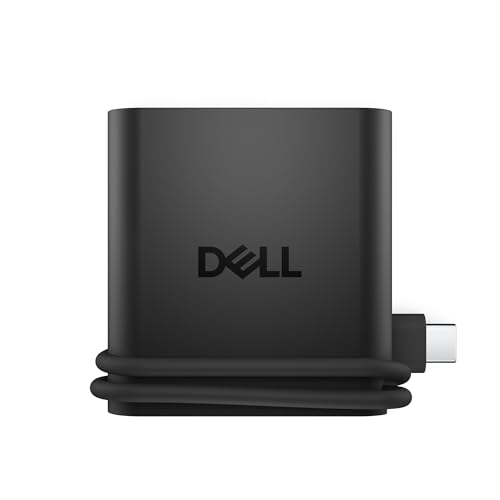
Dell 4-in-1 USB-C Travel Hub
Best for: mobile setups needing lightweight port expansion
- Connectivity
- USB-C, HDMI, USB-A (what this guide is about)
- Host Interface
- USB-C
- Max Resolution
- 4K
- Port Count
- 4
- Video Ports
- HDMI
- Use
- Travel
This travel hub provides you with one USB-A port, two USB-C ports, and one HDMI port supporting 4K UHD video. At 0.1 pounds and measuring 2.36 by 2.24 by 0.6 inches, it fits directly into a bag or laptop sleeve. Built-in Smart Power Management monitors real-time consumption across connected hardware. It suits you if you need compact connectivity on the go.
Pros
- Weighs 0.1 pounds for easy travel
- Supports 4K UHD resolution through HDMI
- Features Smart Power Management to balance power draw
- Compact dimensions of 2.36 by 2.24 by 0.6 inches
Cons
- Offers only one USB-A port
- Supports only a single external monitor via HDMI
Good fit if
- You need a pocket-sized 0.1-pound adapter for travel.
- You need to connect one USB-A accessory alongside a 4K HDMI screen.
Skip if
- You require multiple USB-A ports for wired peripherals.
- You need to drive two or more external displays.
Verdict: Dell 4-in-1 USB-C Travel Hub offers pocket-sized 4K HDMI and USB-A connectivity weighing just 0.1 pounds. It gives you essential peripheral expansion without adding bulk to your mobile bag.

Lenovo GaN 60W Multiport Charging Dock
Best for: compact desks needing an upright GaN dock
- Connectivity
- USB-C, HDMI, USB-A (what this guide is about)
- Host Interface
- USB-C
- Max Resolution
- 4K@60Hz
- Power Delivery
- 60W
- Video Ports
- HDMI 2.1
- Max Data Speed
- 10Gbps
This Lenovo unit combines a GaN wall charger and a multiport dock into one compact device. You get one 10Gbps USB-A port delivering 4.5W, two 10Gbps USB-C ports, an HDMI 2.1 output for 4K video at 60Hz, and a Micro SD slot. It supplies 60W power delivery to your laptop and includes a silicone stand for upright positioning. It fits travel setups requiring basic USB-A peripheral connections without a separate power brick.
Pros
- Includes a silicone stand for vertical kickstand use
- 10Gbps USB-A port delivers fast data transfer speeds
- Integrated GaN design provides 60W host power delivery
- HDMI 2.1 output supports 4K video at 60Hz
Cons
- Offers only one USB-A port
- USB-A power output is limited to 4.5W
- Lacks an integrated Ethernet port
Good fit if
- You need a compact dock with an included vertical kickstand.
- You only need to connect a single 10Gbps USB-A accessory.
- You want an all-in-one GaN power adapter and dock with 60W delivery.
Skip if
- You need multiple USB-A ports for legacy devices.
- You require a wired Gigabit Ethernet connection.
- You need more than 60W of power delivery for your laptop.
Verdict: Lenovo GaN 60W Multiport Charging Dock serves as an all-in-one GaN charger and portable dock with a bundled silicone stand. It handles single-monitor 4K setups and one 10Gbps USB-A connection efficiently.
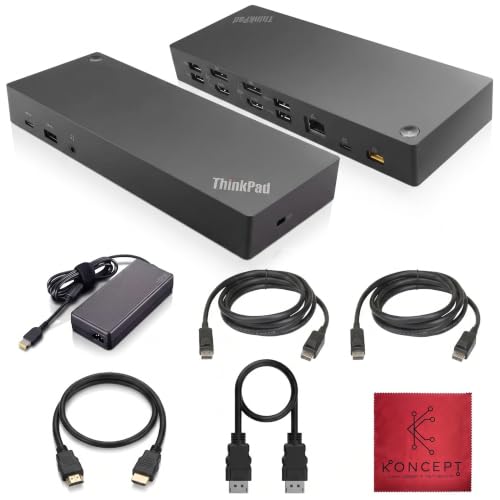
Koncept 135W Dual Display Hybrid Dock
Best for: Dual monitors and high-count USB-A setups
- Connectivity
- USB-C, USB-A (what this guide is about)
- Host Interface
- USB-C, USB-A
- Display Support
- Dual
- Video Ports
- DisplayPort 1.2, HDMI
- Max Data Speed
- 10Gbps
- Ethernet Speed
- Gigabit
This desktop dock connects via USB-C or USB-A using the included cables. For peripheral connectivity, you get five USB-A ports, including three 10Gbps USB 3.1 Gen 2 ports and two USB 2.0 ports. Video outputs include two HDMI and two DisplayPort 1.2 ports for dual-monitor setups. It includes a 135W power adapter and gigabit Ethernet, making it suitable if you need legacy USB-A compatibility alongside multi-screen output.
Pros
- Five USB-A ports (three 10Gbps Gen 2, two USB 2.0)
- Dual monitor support via two HDMI and two DisplayPort 1.2 ports
- Includes 135W power supply, HDMI, DisplayPort, and host cables
- Gigabit Ethernet and 3.5mm combo audio port
Cons
- DisplayPort connections limited to version 1.2
- Only one downstream USB-C data port
Good fit if
- You need five USB-A ports for accessories and peripherals.
- You connect using either USB-C or standard USB-A host laptops.
- You require dual monitor output via DisplayPort or HDMI.
Skip if
- You require DisplayPort 1.4 video connections.
- You need multiple downstream USB-C peripheral ports.
Verdict: Koncept 135W Dual Display Hybrid Dock provides extensive USB-A peripheral expansion and dual video outputs for mixed-port laptop setups.

NOVOO 7-in-1 USB-C Hub with Gigabit Ethernet
Best for: compact single-monitor setups needing multiple USB-A ports
- Connectivity
- USB-C, HDMI, Ethernet, USB-A (what this guide is about)
- Host Interface
- USB-C
- Max Resolution
- 4K@60Hz
- Power Delivery
- 88W
- Port Count
- 7
- Video Ports
- HDMI
View on Amazon: NOVOO 7-in-1 USB-C Hub with Gigabit Ethernet
The NOVOO 7-in-1 USB-C Hub expands your laptop with three 5Gbps USB-A data ports, a 5Gbps USB-C data port, and a 4K@60Hz HDMI output. It handles wired networking via a 1Gbps Ethernet port and provides up to 88W pass-through charging from a 100W Power Delivery source. A physical screen-off button lets you instantly cut video. It suits you if you need compact desktop expansion for multiple legacy peripherals.
Pros
- Three 5Gbps USB-A data ports for peripherals
- Supports 4K video at 60Hz via HDMI
- Up to 88W Power Delivery laptop charging output
- Gigabit Ethernet port for 1Gbps wired networking
Cons
- Single video output limits setup to one external monitor
- USB data speeds max out at 5Gbps
Good fit if
- You need three USB-A ports alongside a 4K@60Hz display output
- You want a physical screen-off privacy button on your hub
- You need 1Gbps wired Ethernet connectivity
Skip if
- You require dual or triple external monitor connections
- You need data transfer speeds exceeding 5Gbps
Verdict: NOVOO 7-in-1 USB-C Hub with USB-A delivers three standard USB ports, gigabit networking, and 4K@60Hz video in a lightweight build. It gives you essential desktop ports without requiring a bulky dedicated power brick.
Specifications side by side
| Spec | Selore Dual 4K HDMI USB-C Dock | Lenovo ThinkPad Hybrid USB-C and USB-A Dock | CalDigit TS4 Thunderbolt 4 Dock | Koncept 13-Port Thunderbolt 4 Dock | MOKiN 13-in-1 Triple Display USB-C Dock | Anker 14-in-1 USB-C Triple Display Dock | Plugable Dual 4K HDMI USB-C Dock with Ethernet | Lenovo USB-C Universal Business Dock | Dell Universal Triple 4K Display Dock | Baseus 7-in-1 USB-C Hub with 3 USB-A Ports | StarTech USB-A Dual 4K DisplayPort Mini Dock | Dell 4-in-1 USB-C Travel Hub | Lenovo GaN 60W Multiport Charging Dock | Koncept 135W Dual Display Hybrid Dock | NOVOO 7-in-1 USB-C Hub with Gigabit Ethernet |
|---|---|---|---|---|---|---|---|---|---|---|---|---|---|---|---|
| Host Interface | USB-C | USB-C, USB-A | Thunderbolt 4 | Thunderbolt 4 | USB-C | USB-C, USB4, Thunderbolt | USB-C | USB-C | USB-C, USB-A | USB-C | USB-A | USB-C | USB-C | USB-C, USB-A | USB-C |
| Display Support | Dual | not specified | Dual | Up to 4 | Triple | Triple | Dual | Dual | Up to 3 | not specified | Dual | not specified | not specified | Dual | not specified |
| Max Resolution | 4K@60Hz | not specified | 8K@30Hz | 4K@60Hz | 4K@144Hz | 4K | 4K@60Hz | 4K | 4K | 4K@60Hz | 4K @ 60Hz | 4K | 4K@60Hz | not specified | 4K@60Hz |
| Power Delivery | 100W | not specified | 98W | not specified | 100W | 80W | 65W | 65W | not specified | 100W | not specified | not specified | 60W | not specified | 88W |
| Port Count | 8 | not specified | 18 | 13 | 13 | 14 | 10 | 9 | not specified | 7 | not specified | 4 | not specified | not specified | 7 |
| Video Ports | HDMI | DisplayPort, HDMI | DisplayPort | DisplayPort 1.4, HDMI 2.0, USB-C, TB4 | HDMI, DisplayPort | HDMI, VGA | HDMI | DP 1.4, HDMI 2.0 | not specified | HDMI | DisplayPort | HDMI | HDMI 2.1 | DisplayPort 1.2, HDMI | HDMI |
| Max Data Speed | 5Gbps | 10Gbps | 40Gb/s | 40Gbps | 10Gbps | 5 Gbps | 5Gbps | not specified | not specified | 5Gbps | not specified | not specified | 10Gbps | 10Gbps | 5Gbps |
| Ethernet Speed | not specified | Gigabit Ethernet | 2.5GbE | Gigabit | 1Gbps | 1 Gbps | Gigabit | not specified | not specified | not specified | GbE | not specified | not specified | Gigabit | 1Gbps |
| Resolution | 4K UHD | not specified | not specified | not specified | not specified | 1080p FHD | 4K UHD | not specified | 4K UHD | 4K UHD | 4K UHD | 4K UHD | not specified | not specified | 4K UHD |
| Connectivity | USB-C, HDMI, USB-A | USB-C, USB-A | USB-C, USB-A, Thunderbolt 4 | USB-C, USB-A, Thunderbolt 4 | USB-C, HDMI, DisplayPort, Ethernet, USB-A | USB-C, HDMI, USB-A, VGA | USB-C, HDMI, Ethernet, USB-A | USB-C, HDMI, DisplayPort, USB-A | USB-C, USB-A | USB-C, HDMI, USB-A | USB-A | USB-C, HDMI, USB-A | USB-C, HDMI, USB-A | USB-C, USB-A | USB-C, HDMI, Ethernet, USB-A |
| Refresh Rate | 60Hz | not specified | 60Hz | not specified | not specified | not specified | 60Hz | not specified | not specified | 60Hz | 60Hz | not specified | not specified | not specified | not specified |
| Features | not specified | not specified | not specified | not specified | not specified | not specified | not specified | not specified | not specified | Card Reader | DisplayLink | not specified | Kickstand | not specified | not specified |
| Use | not specified | not specified | not specified | not specified | not specified | not specified | not specified | not specified | not specified | not specified | not specified | Travel | Gaming, Office | not specified | not specified |
| Recommended Use | not specified | not specified | not specified | not specified | not specified | not specified | not specified | not specified | not specified | not specified | not specified | not specified | Home | not specified | not specified |
| Dimensions | 4.5 × 2.1 × 0.7 inches | 8.3 × 3.1 × 1.2 inches | 4.46 × 1.65 × 5.55 inches | 10 × 6 × 4 inches | not specified | 5.91 × 2.13 × 0.67 inches | 9.25 × 5.71 × 3 inches | 6.06 × 3.15 × 0.94 inches | 3.1 × 3.1 × 1.2 inches | 5.31 × 1.93 × 0.63 inches | 5.1 × 2.3 × 0.8 inches | 2.36 × 2.24 × 0.6 inches | 3.15 × 1.32 × 3.15 inches | 8.27 × 3.15 × 1.18 inches | 1.57 × 0.39 × 3.94 inches |
| Weight | 3.39 ounces | 1.05 pounds | 1.41 pounds | 0.63 ounces | 2.03 pounds | 9.45 ounces | 1.52 pounds | 9.12 ounces | 13.4 ounces | not specified | 4.48 ounces | 1.6 ounces | 8.82 ounces | 1.05 pounds | 2.79 ounces |
| Size | 9-in-1 | not specified | compact | not specified | 10 in 1 USB C Hub | 14 in 1 USB C Hub (Pack of 2) | Dual Display (Pack of 3) | not specified | not specified | 7 in 1 | 0.8" x 2.3" x 5.1" | DA225 | not specified | 135W | 7-in-1 |
| Color | Grey | Black | Space Gray | Black | Black | Grey | Black | Multicolor | Black | Black | Black | Black | Black | Black | Champagne |
| Model | SEUC0425 | 40AF0135US | TS4-US 500971 | Docking-WD22TB4-Station New | MODK1407 | A8389 | UD-MSTH2 | 40B30090US | D6000S | 7 in 1 | USBA2DPGB | DA225 | not specified | 40AF0135US | NH07D-168D |
If you need an expansive display instead of dedicated hub ports, compare the best ultrawide monitors with USB-C to check integrated video inputs and power delivery.
How to Choose the Right USB-A Dock
-
Check Available USB-A Ports
Count the wired peripherals you plan to connect at the same time. Standard devices like keyboards, mice, flash drives, and external webcams rely on USB-A connections. If your setup requires only a wireless receiver and an occasional thumb drive, a dock with two USB-A ports handles your needs easily. Workstations with multiple legacy accessories require four or five ports. The Anker 14-in-1 USB-C Triple Display Dock includes five USB-A ports to keep all your legacy desktop accessories linked directly without adding external splitters to your workspace.
-
Match Monitor Quantity Support
Determine how many external screens your workstation requires before picking a dock. Basic hubs support a single external monitor, whereas advanced docking stations accommodate dual or triple screen setups. If you need two monitors, verify that the dock lists dual monitor capability. For setups requiring three independent external screens, verify multi-display support in the hardware specifications. The MOKiN 13-in-1 Triple Display USB-C Dock provides triple video outputs for Windows systems, ensuring you have enough video channels to route your desktop across three displays simultaneously without hardware bottlenecks.
-
Verify Resolution and Refresh Rate
Check the maximum resolution and refresh rate supported by the dock video outputs. Standard productivity tasks on basic office screens work well with 1080p FHD resolution. If you connect high-resolution monitors for detailed creative work or programming, look for 4K UHD output running at a 60Hz refresh rate. A 60Hz rate ensures smooth cursor movement and fluid window scrolling across your screens. The Baseus 7-in-1 USB-C Hub lists 4K UHD resolution at 60Hz, giving you sharp display output alongside its USB-A connections and integrated media card reader.
-
Identify Required Display Connectors
Inspect the video input ports on your existing monitors to avoid buying adapter cables. Common docking station video outputs include HDMI and DisplayPort, but older office monitors or conference room projectors may still require legacy connections. Choosing a dock with native ports matching your display hardware simplifies cable management on your desk. The Lenovo USB-C Universal Business Dock features both HDMI and DisplayPort connections, allowing you to attach modern monitors directly without searching for specialized conversion cables or occupying extra USB-A ports with external display adapters.
-
Consider Dock Weight and Dimensions
Decide whether your docking station will remain permanently on a desk or travel inside your laptop bag. Heavy desktop units stay planted firmly when heavy peripheral cables pull on them, but they add noticeable bulk to a commuter pack. Portable travel hubs use slim, lightweight designs that slide into small pockets. The Dell 4-in-1 USB-C Travel Hub weighs only 0.1 pounds and measures 2.36 inches long, making it suitable for mobile use where saving bag space and minimizing carrying weight matter most.
-
Review Network and Card Slots
Review whether your daily workflow requires specialized connections beyond standard USB-A and video ports. Photographers and content creators benefit from integrated card readers to transfer camera files directly without dongles. Users in offices with spotty wireless networks need hardwired Gigabit Ethernet ports for stable internet speeds. The Plugable Dual 4K HDMI USB-C Dock includes a dedicated Ethernet port alongside its three USB-A ports, providing a direct wired network connection that keeps your laptop online during large downloads or video meetings.
Frequently asked questions
Can you run dual monitors through a computer USB-A port?
Yes, you can run displays through a standard USB-A host port using dedicated DisplayLink hardware. The StarTech USB-A Dual 4K DisplayPort Mini Dock connects through a single USB-A port to deliver two 4K 60Hz DisplayPort video outputs and wired Ethernet. This allows laptops lacking video-enabled USB-C ports to drive multi-monitor setups reliably.
How many USB-A ports can you get on a desktop docking station?
Several desktop docking stations provide up to five USB-A ports for peripheral-heavy workstations. Models such as the Lenovo ThinkPad Hybrid, CalDigit TS4, and Anker 14-in-1 feature five USB-A connections to support your gear. This capacity lets you keep keyboards, mice, webcams, and external storage drives plugged in together without constantly swapping cables.
Do docking stations with USB-A ports support legacy VGA displays?
Yes, select multi-display docking stations maintain legacy VGA ports alongside modern connections. The Anker 14-in-1 USB-C Triple Display Dock includes five USB-A ports, dual HDMI outputs, and a dedicated VGA connection supporting 1080p FHD resolution. This combination lets you route modern USB peripherals alongside older office monitors and conference room projectors without buying separate display adapters.
Can a compact travel hub provide USB-A ports and 4K video?
Yes, lightweight travel hubs provide standard USB-A connectivity alongside 4K video outputs. The Dell 4-in-1 USB-C Travel Hub weighs just 0.1 pounds while offering 4K HDMI and USB-A connectivity for mobile bags. If you need more ports, the Baseus 7-in-1 Hub delivers three USB-A ports, an integrated card reader, and 4K 60Hz HDMI video output.
What is the difference between 5Gbps and 10Gbps USB-A ports on a dock?
The primary difference is data transfer speed between the dock and your connected external drives. Standard 5Gbps USB-A ports easily handle input devices like mice, keyboards, and basic flash drives. Higher-speed 10Gbps USB-A ports, found on docks like the CalDigit TS4 and Lenovo GaN 60W, double the potential throughput, speeding up backups and large file transfers on external solid-state storage.
Can you get a docking station with an integrated GaN charger?
Yes, certain docks integrate GaN power circuitry directly into the docking enclosure. The Lenovo GaN 60W Multiport Charging Dock combines an internal 60W power supply, a 10Gbps USB-A port, and 4K HDMI video output into a compact footprint. It includes a bundled silicone stand, allowing you to run a streamlined desk setup without a separate laptop power brick.
Do docking stations with USB-A ports include wired Ethernet?
Yes, many docking stations combine USB-A expansion with a dedicated Ethernet jack for wired internet access. Docks such as the Plugable Dual 4K HDMI Dock, MOKiN 13-in-1, and StarTech USB-A Mini Dock feature RJ-45 Ethernet connections alongside standard USB-A ports. This provides reliable, low-latency network performance for workstations where wireless connectivity is congested or intermittent.