15 Best Docking Stations with Thunderbolt 4, Compared
As an Amazon Associate we earn from qualifying purchases. Links on this page are affiliate links.
Finding the best docking stations with Thunderbolt 4 ensures your desk setup gets high-speed bandwidth, reliable video output, and steady charging through one cable. The Dell Pro Thunderbolt 4 Dock with 130W Charging leads the list because it combines 130W power delivery with quad 4K display support.
To help you build an efficient workstation, 15 options are compared strictly using the specifications published on the listings. This guide helps you decide which hub matches your display requirements, charging needs, and peripheral ports.
Quick picks
The best fit for you
- You need high-wattage charging for quad 4K monitors Dell Pro Thunderbolt 4 Dock with 130W Charging It delivers 130W power delivery and quad 4K display connectivity via HDMI, DisplayPort, and Thunderbolt 4.
- You need maximum port variety and fast wired networking CalDigit TS4 Thunderbolt 4 Dock It features 18 total ports and a 2.5GbE Ethernet port for high-bandwidth setups.
- You want dual 4K HDMI outputs without extra adapters Plugable Thunderbolt 4 Dual HDMI Dock It provides two HDMI video outputs with dual 4K support and 100W power delivery.
- You want a compact hub with a small footprint Belkin Connect 5-in-1 Thunderbolt 4 Hub It measures 5.3 by 2.9 by 0.7 inches and provides a 5-in-1 port layout.
Our 15 picks

Dell Pro Thunderbolt 4 Dock with 130W Charging
Best for: quad 4K monitor workstation setups
- Connectivity
- USB-C, HDMI, DisplayPort, Thunderbolt 4 (what this guide is about)
- Host Interface
- Thunderbolt 4
- Display Support
- Up to 4
- Max Resolution
- 4K
- Power Delivery
- Up to 130W
- Video Ports
- HDMI 2.1, DP 1.4, USB-C, Thunderbolt 4
View on Amazon: Dell Pro Thunderbolt 4 Dock with 130W Charging
This Dell Thunderbolt 4 docking station connects to your laptop via a single host cable and drives up to four 4K displays using HDMI 2.1, DisplayPort 1.4, USB-C, and Thunderbolt 4 ports. It provides up to 130W power delivery for Dell laptops and 96W for other systems, alongside a 2.5GbE wired network port. It suits you if you run multiple external monitors and need high-power charging for demanding daily workflows.
Pros
- Supports up to four 4K displays via HDMI 2.1, DisplayPort 1.4, USB-C, and Thunderbolt 4
- Delivers up to 130W power to Dell laptops and 96W to other systems
- Includes a 2.5GbE Ethernet port for high-speed wired networking
- Allows daisy chaining for up to six devices
Cons
- Maximum display resolution is limited to 4K
- Non-Dell systems receive a lower maximum charging speed of 96W
Good fit if
- You need to output video to as many as four 4K displays.
- You use a Dell laptop that can draw up to 130W over USB-C.
- You require 2.5GbE wired local network connectivity.
Skip if
- You need monitor resolutions exceeding 4K.
- You use a non-Dell laptop that requires more than 96W of continuous power.
Verdict: Dell Pro Thunderbolt 4 Smart Dock delivers expansive quad-display support and up to 130W charging in a compact chassis. It is a capable choice if your setup centers on multi-monitor productivity and high-speed Thunderbolt connectivity.

Lenovo ThinkPad Universal Thunderbolt 4 Dock
Best for: quad-display setups and 100W laptop charging
- Connectivity
- Thunderbolt 4 (what this guide is about)
- Host Interface
- Thunderbolt 4
- Display Support
- Up to 4
- Max Resolution
- 8K @ 30 Hz
- Power Delivery
- 100W
- Video Ports
- DisplayPort, HDMI, Thunderbolt 4
View on Amazon: Lenovo ThinkPad Universal Thunderbolt 4 Dock
This Thunderbolt 4 docking station connects your notebook via a single cable to drive up to four external displays or one 8K screen at 30 Hz. It supplies up to 100W of dynamic power delivery using an included 135W adapter. With dual DisplayPort 1.4 outputs, an HDMI 2.1 port, four 10 Gbps USB ports, and Gigabit Ethernet, it suits you if you run a multi-monitor desk setup requiring high data throughput and laptop charging.
Pros
- Up to 100W notebook power delivery with included 135W power adapter
- Supports up to four 4K displays at 60 Hz or one 8K display at 30 Hz
- Comprehensive video array with two DisplayPort 1.4 and one HDMI 2.1
- Four 10 Gbps USB 3.1 Gen 2 ports plus downstream Thunderbolt 4
- Supports vPro pass-through and Gigabit Ethernet networking
Cons
- Maximum refresh rate capped at 30 Hz when outputting to an 8K display
- Wired network connection limited to 1 Gbps rather than multi-gigabit
- No integrated SD or microSD card slot listed
Good fit if
- You need to drive up to four 4K displays at 60 Hz from one host cable.
- You require up to 100W power delivery to charge your laptop over Thunderbolt 4.
- You want multiple native video outputs including DisplayPort 1.4 and HDMI 2.1.
Skip if
- You need an integrated memory card reader for direct photo transfers.
- You require 2.5 Gbps or faster wired Ethernet connectivity.
- You want 8K video output at a 60 Hz refresh rate.
Verdict: Lenovo ThinkPad Universal Thunderbolt 4 Dock delivers reliable 100W laptop charging and expansive connectivity across four external displays. It provides 40 Gbps data bandwidth, legacy USB ports, and enterprise management features for demanding desk setups.

Plugable Thunderbolt 4 Dual HDMI Dock
Best for: MacBook users needing dual 4K HDMI displays
- Connectivity
- Thunderbolt 4 (what this guide is about)
- Host Interface
- Thunderbolt 4
- Display Support
- Dual
- Max Resolution
- 4K@60Hz
- Power Delivery
- 100W
- Port Count
- 13
The Plugable 13-in-1 Thunderbolt 4 Dock links your workstation via a 40Gbps connection and supplies up to 100W of power delivery to your host laptop. You get thirteen ports, including dual HDMI outputs supporting two 4K displays at 60Hz, a downstream Thunderbolt 4 port, Ethernet, and SD card readers. It suits your desk setup if you need multi-monitor expansion and wired peripherals without installing external display drivers.
Pros
- Up to 100W Power Delivery to the host laptop
- Dual 4K display output at 60Hz via HDMI
- Includes 40Gbps downstream Thunderbolt 4 port
- UHS-II SD and microSD card slots built in
Cons
- Video outputs limited to HDMI with no DisplayPort connections
- Base M1 and M2 MacBooks only support a single external monitor
- Maximum external display resolution caps at 4K 60Hz
Good fit if
- You need 100W power delivery alongside dual 4K 60Hz HDMI monitor support.
- You want built-in SD and microSD card slots alongside a downstream Thunderbolt 4 port.
- You use an M4, M5, or Pro/Max Apple silicon Mac or a compatible Windows PC.
Skip if
- You require native DisplayPort outputs instead of HDMI.
- You own a base M1 or M2 Mac and require dual external displays.
Verdict: Plugable 13-in-1 Thunderbolt 4 Dock provides 100W charging and dual 4K HDMI outputs in a streamlined 13-port design. It is a practical connectivity hub if you want essential Thunderbolt 4 performance without driver requirements.

CalDigit TS4 Thunderbolt 4 Dock
Best for: heavy workstation connectivity and high-speed networking
- Connectivity
- USB-C, USB-A, Thunderbolt 4 (what this guide is about)
- Host Interface
- Thunderbolt 4
- Display Support
- Dual
- Max Resolution
- 8K@30Hz
- Power Delivery
- 98W
- Port Count
- 18
The CalDigit TS4 18-Port Thunderbolt 4 Dock expands your setup through 18 physical ports, offering 98W host power delivery and 40Gb/s transfer speeds. It features three Thunderbolt 4 ports, eight 10Gb/s USB connections, and a fast 2.5GbE Ethernet port. You can run up to dual 6K monitors at 60Hz depending on your host machine. It suits you if you need extensive peripheral connectivity and high-speed network access through one cable.
Pros
- Provides 18 connection ports including 3 Thunderbolt 4 and 8 USB 10Gb/s ports
- Supports 2.5GbE wired network speeds
- Delivers up to 98W power delivery to host laptops
- Features SD and microSD 4.0 UHS-II card slots
Cons
- Only includes one dedicated DisplayPort video port
- Full 2.5GbE network speed requires a Thunderbolt host connection
- Base Apple M1 to M3 laptops support only one external monitor
Good fit if
- You need to connect numerous USB accessories and Thunderbolt 4 hardware simultaneously.
- You require 2.5GbE networking speeds for high-bandwidth local transfers.
- You charge a laptop that accepts up to 98W power delivery.
Skip if
- You require built-in native HDMI ports without using downstream adapters.
- You use a base M1, M2, or M3 Mac laptop and require dual external displays.
Verdict: CalDigit TS4 18-Port Thunderbolt 4 Dock delivers massive expansion with 18 ports, 98W charging, and 2.5GbE networking. It is a solid choice if you need maximum connectivity for high-bandwidth creative workflows.

Microsoft Surface Thunderbolt 4 Dock
Best for: dual 4K setups needing 2.5GbE networking
- Connectivity
- Thunderbolt 4 (what this guide is about)
- Host Interface
- Thunderbolt 4
- Max Resolution
- 4K
- Ethernet Speed
- 2.5GbE
- Dimensions
- 11 × 4.4 × 3.2 inches
- Weight
- 14.4 ounces
The Microsoft Surface Thunderbolt 4 Dock provides desktop expansion through a single Thunderbolt 4 connection. You get three USB-C ports, three USB-A ports, a 3.5mm audio jack, and a 2.5GbE Ethernet port for high-speed wired networking. It drives dual 4K external displays and features raised tactile indicators across its ports. This dock suits you if you want multi-monitor connectivity alongside multi-gigabit networking for your Thunderbolt-equipped workstation.
Pros
- 2.5GbE high-speed Ethernet port
- Dual 4K external display output support
- Six total USB ports including three USB-C and three USB-A
- Raised tactile indicators for port identification
Cons
- Maximum resolution limited to 4K
- No dedicated HDMI or DisplayPort connections listed
Good fit if
- You need 2.5GbE wired network speeds.
- You connect up to two 4K external monitors.
- You want tactile indicators to easily locate ports.
Skip if
- You need native HDMI or DisplayPort slots without adapters.
- You require external monitor resolutions above 4K.
Verdict: Microsoft Surface Thunderbolt 4 Dock delivers balanced peripheral connectivity with dual 4K display capability and fast 2.5GbE Ethernet. It is an effective docking solution for setups centered around Thunderbolt 4 and USB-C displays.

Koncept 13-Port Thunderbolt 4 Dock
Best for: Windows multi-monitor setups needing downstream Thunderbolt ports
- Connectivity
- USB-C, USB-A, Thunderbolt 4 (what this guide is about)
- Host Interface
- Thunderbolt 4
- Display Support
- Up to 4
- Max Resolution
- 4K@60Hz
- Port Count
- 13
- Video Ports
- DisplayPort 1.4, HDMI 2.0, USB-C, TB4
This docking station links to your computer through a 40Gbps Thunderbolt 4 host connection and expands your setup with 13 total ports. You get support for up to four 4K monitors at 60Hz on Windows, paired with Gigabit Ethernet and high-speed downstream Thunderbolt ports. It suits you if you run multiple external displays, fast external accessories, and need wired network access from a single desktop docking unit.
Pros
- Includes two 40Gbps downstream Thunderbolt 4 ports
- Supports up to four 4K displays at 60Hz on Windows
- Features 13 total ports including Gigabit Ethernet and audio combo jack
- Offers dual DisplayPort 1.4 and dedicated HDMI 2.0 video outputs
Cons
- Standard M1 and M2 Mac computers are restricted to one external display
- USB-A data ports cap at 5Gbps transfer speeds
- Dual external display output on macOS may require DisplayLink
Good fit if
- You use a Windows laptop and want up to four 4K displays running at 60Hz.
- You require downstream Thunderbolt 4 ports alongside DisplayPort and HDMI.
- You need a wired Gigabit Ethernet connection and multiple USB connections at your desk.
Skip if
- You use a standard M1 or M2 Mac and expect dual native external displays without extra software.
- You require 10Gbps speeds across all of your USB-A peripheral ports.
Verdict: Koncept 13-Port Thunderbolt 4 Dock provides versatile multi-display video outputs and high-bandwidth connectivity for complex desktop setups. It gives you 13 expansion ports through a single 40Gbps Thunderbolt host cable.

Plugable 16-in-1 Thunderbolt 4 Dock
Best for: dual 4K setups needing high port variety
- Connectivity
- Thunderbolt 4 (what this guide is about)
- Host Interface
- Thunderbolt 4
- Display Support
- Dual
- Max Resolution
- 4K@60Hz
- Power Delivery
- 100W
- Port Count
- 16
The Plugable 16-in-1 Thunderbolt 4 Dock expands your laptop setup through a 40Gbps host connection. You get support for dual 4K monitors at 60Hz using HDMI or DisplayPort connections without extra drivers. It supplies 100W Power Delivery to charge your system while providing 2.5Gbps Ethernet, seven USB ports, and SD card slots. This dock suits users who need multi-display output, fast wired networking, and heavy peripheral connectivity.
Pros
- Delivers up to 100W Power Delivery to host laptops
- Supports dual 4K displays at 60Hz via HDMI or DisplayPort
- Includes 2.5Gbps Ethernet and 7 USB ports
- Built-in SD and microSD card slots
Cons
- Caps external video resolution at 4K at 60Hz
- Limited to a maximum of two displays
Good fit if
- You need 100W Power Delivery alongside dual 4K monitor support.
- You require fast 2.5Gbps wired networking and integrated card readers.
- You connect multiple peripherals across up to seven USB ports.
Skip if
- You need native support for three or more external displays.
- You require display resolutions higher than 4K.
Verdict: Plugable 16-in-1 Thunderbolt 4 Dock provides dependable 100W power delivery, versatile display outputs, and expansive port selection. It delivers a comprehensive dual-display desktop setup without requiring extra display drivers.
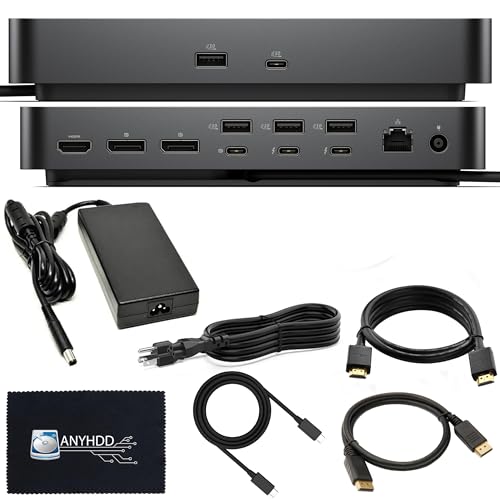
Dell Pro Thunderbolt 4 Modular Dock
Best for: Modular multi-display setups needing 8K output
- Connectivity
- Thunderbolt 4 (what this guide is about)
- Host Interface
- Thunderbolt 4
- Max Resolution
- 8K
- Video Ports
- DisplayPort 1.4, HDMI 2.0, USB-C, TB4
- Max Data Speed
- 40 GB/s
- Ethernet Speed
- Gigabit Ethernet
This docking station connects to your setup using Thunderbolt 4 at transfer speeds up to 40 GB/s. It features a modular swappable design and comes bundled with a 180W power adapter. For displays, you get two DisplayPort 1.4 outputs, an HDMI 2.0 port, and two Thunderbolt 4 ports supporting up to 8K resolution. It suits your workspace if you require high display bandwidth, wired Gigabit Ethernet, and multi-monitor flexibility across Windows, macOS, or Ubuntu.
Pros
- Supports up to 8K video output
- Bundled with a 180W power adapter
- Swappable modular design allows physical upgrades
- Dual DisplayPort 1.4 and dual Thunderbolt 4 video connections
Cons
- Weighs 4.06 pounds
- HDMI output is version 2.0 rather than 2.1
- Ethernet is limited to Gigabit rather than multi-gigabit speeds
Good fit if
- You need display resolutions up to 8K.
- You want a dock with a swappable modular upgrade capability.
- You run your system on macOS, Windows 10, Windows 11, or Ubuntu.
Skip if
- You need a lightweight dock for portable travel use.
- You require HDMI 2.1 display support.
Verdict: ANYHDD Thunderbolt 4 Dock with 180W Adapter provides 40 GB/s bandwidth, swappable modularity, and support for up to 8K displays. It delivers comprehensive video and peripheral connectivity for stationary multi-monitor setups.

Belkin Connect 5-in-1 Thunderbolt 4 Hub
Best for: compact dual-monitor Thunderbolt 4 setups
- Connectivity
- USB-C, Thunderbolt 4 (what this guide is about)
- Host Interface
- Thunderbolt 4
- Display Support
- Dual
- Max Resolution
- 8K@30Hz
- Power Delivery
- 96W
- Port Count
- 5
The Belkin Connect 5-in-1 Thunderbolt 4 Dock is a compact desktop hub designed for streamlined workstations. It provides 40Gbps data transfer speeds, up to 96W of host power delivery, and supports either dual 4K monitors at 60Hz or a single 8K display at 30Hz. You also get 15W downstream port charging. It suits you if you need high-speed Thunderbolt expansion without extra desktop clutter.
Pros
- Up to 96W host Power Delivery with 15W downstream charging
- Dual 4K monitor support at 60Hz or single 8K at 30Hz
- High-speed 40Gbps Thunderbolt 4 data transfers
- Supports daisy chaining up to six devices
Cons
- Limited to five total ports
- Single 8K display output capped at 30Hz
- No dedicated HDMI, DisplayPort, or Ethernet ports listed
Good fit if
- You need up to 96W charging for your connected laptop.
- You run dual 4K monitors at 60Hz using Thunderbolt connections.
- You want a slim 5.3-inch hub with daisy-chaining capability.
Skip if
- You require native HDMI or DisplayPort monitor outputs.
- You need more than five ports for extensive legacy accessories.
- You want 8K video output running at 60Hz.
Verdict: Belkin Connect 5-in-1 Thunderbolt 4 Dock delivers 40Gbps speeds and 96W power delivery in a slim, low-profile footprint. It is a solid choice for dual-4K setups that prioritize space efficiency over high port variety.

Belkin Thunderbolt 4 Triple Display Dock
Best for: triple 4K setups needing fast wired networking
- Connectivity
- USB-C, Thunderbolt 4 (what this guide is about)
- Host Interface
- Thunderbolt 4
- Display Support
- Triple
- Max Resolution
- 4K@60Hz
- Power Delivery
- 96W
- Port Count
- 14
The Belkin 14-in-1 Thunderbolt 4 Dock connects your laptop to external hardware through a single cable. It supports up to three extended 4K displays at 60Hz via HDMI and delivers up to 96W of host power delivery. You also get 40Gbps transfer speeds and a 2.5Gb Ethernet port for wired networks. It suits you if you run multiple monitors and need high-bandwidth networking on your desk.
Pros
- Supports up to three 4K monitors at 60Hz
- Provides up to 96W host laptop charging
- Includes a 2.5Gb Ethernet port
- Supports 40Gbps transfer speeds and daisy chaining
Cons
- Video outputs rely on HDMI without DisplayPort listed
- Power delivery tops out at 96W
Good fit if
- You need to drive up to three extended 4K displays at 60Hz.
- You require a 2.5Gb Ethernet port for fast local networking.
- You use a laptop that charges within a 96W power budget.
Skip if
- You require dedicated native DisplayPort connections.
- You need more than 96W of laptop power delivery.
Verdict: Belkin 14-in-1 Thunderbolt 4 Dock provides reliable triple-monitor 4K support, 2.5Gb networking, and 96W charging in a single hub.

UGREEN 13-in-1 Thunderbolt 4 Dock
Best for: Silent setups needing downstream Thunderbolt ports
- Connectivity
- Thunderbolt 4 (what this guide is about)
- Host Interface
- Thunderbolt 4
- Display Support
- Dual
- Max Resolution
- 8K@30Hz
- Power Delivery
- 96W
- Port Count
- 13
The UGREEN 13-in-1 Thunderbolt 4 Dock expands your setup through three 40Gbps Thunderbolt 4 ports and a DisplayPort 1.4 connection. It supplies up to 96W of Power Delivery to charge your laptop using an included 180W power supply. You can drive dual 4K displays at 60Hz or a single 8K monitor at 30Hz without cooling noise. This dock suits you if you need multi-port Thunderbolt connectivity and silent, fanless operation on your desk.
Pros
- Three 40Gbps Thunderbolt 4 ports for daisy-chaining and peripherals
- Supplies up to 96W Power Delivery via included 180W power adapter
- Fanless passive cooling design operates silently
- Supports dual 4K at 60Hz or single 8K at 30Hz video output
Cons
- DisplayPort lacks DP++ support, requiring active adapters for HDMI
- Ethernet is limited to Gigabit speed rather than 2.5Gbps
Good fit if
- You need downstream Thunderbolt 4 ports for high-bandwidth accessories.
- You require silent passive cooling without fan noise in your workspace.
- You want up to 96W charging for your host laptop.
Skip if
- You need a native HDMI port without buying an active adapter.
- You require network speeds higher than Gigabit Ethernet.
Verdict: UGREEN 13-in-1 Thunderbolt 4 Dock provides dependable 96W charging, dual 4K video outputs, and three Thunderbolt 4 ports in a silent chassis. It delivers solid workstation expansion without active fan noise.

ANYHDD ThinkPad Thunderbolt 4 Dock 135W
Best for: workstations needing 135W power and multi-monitor output
- Connectivity
- USB-C, HDMI, DisplayPort, Thunderbolt 4 (what this guide is about)
- Host Interface
- Thunderbolt 4, USB-C
- Display Support
- Multiple
- Max Resolution
- 8K
- Power Delivery
- Up to 230W
- Video Ports
- HDMI, DisplayPort
This docking station bridges your setup using Thunderbolt 4 and USB-C connectivity. It comes supplied with a 135W AC power adapter capable of providing up to 230W power delivery to workstations. For video output, it handles a single 8K display or multiple 4K monitors through HDMI and DisplayPort connections. It suits you if you need bundled display cables and high-wattage power delivery for a compatible laptop workstation.
Pros
- Includes a 135W AC power adapter supporting up to 230W workstation power delivery
- Supports a single 8K monitor or multiple 4K displays
- Ships with Thunderbolt, HDMI, and DisplayPort cables included in the box
- Dual host interface compatibility covering Thunderbolt 4 and USB-C
Cons
- Exact total count of USB peripheral ports is unspecified
- Limited to a 1-year warranty
Good fit if
- You need a dock packaged with dedicated HDMI, DisplayPort, and Thunderbolt cables.
- You run an 8K screen or multiple 4K monitors from a Thunderbolt or USB-C laptop.
- You require workstation charging support from an included 135W power adapter.
Skip if
- You want detailed documentation specifying every auxiliary USB peripheral port.
- You need a manufacturer warranty longer than one year.
Verdict: ANYHDD ThinkPad Thunderbolt 4 Dock delivers high-wattage workstation charging and video output up to 8K resolution. It provides a complete setup bundle with essential display and host cables included in the box.

Lenovo ThinkPad Thunderbolt 4 Workstation Dock
Best for: Thunderbolt 4 workstation setups
- Connectivity
- Thunderbolt 4 (what this guide is about)
- Host Interface
- Thunderbolt 4
- Dimensions
- 10.7 × 7.7 × 3.5 inches
- Weight
- 15.9 ounces
View on Amazon: Lenovo ThinkPad Thunderbolt 4 Workstation Dock
The Lenovo ThinkPad Thunderbolt 4 Workstation Dock provides a Thunderbolt 4 host interface for your desk setup. Weighing 15.9 ounces and measuring 10.7 by 7.7 by 3.5 inches, this black and red unit connects directly to compatible hardware to support your workstation needs. It suits you if you want dedicated Thunderbolt 4 connectivity in a desktop hub format.
Pros
- Thunderbolt 4 host interface
- Weighs 15.9 ounces
- 10.7 x 7.7 x 3.5-inch footprint
- Black and red finish
Cons
- No individual port counts listed in official specs
- Power delivery wattage not stated in published specifications
Good fit if
- You need a Thunderbolt 4 host connection for your workstation.
- You want a desktop dock weighing under 1 pound.
Skip if
- You require explicit port types and quantities listed in specs.
- You need verified host charging wattage data before purchasing.
Verdict: Lenovo ThinkPad Thunderbolt 4 Workstation Dock delivers Thunderbolt 4 connectivity in a 15.9-ounce desktop chassis. It provides a standard host connection for compatible hardware setups.

WAVLINK Thunderbolt 4 Dual HDMI Dock
Best for: dual 4K displays and fast networking
- Connectivity
- HDMI, Thunderbolt 4 (what this guide is about)
- Host Interface
- Thunderbolt 4
- Display Support
- Dual
- Max Resolution
- 8K@60Hz
- Power Delivery
- 96W
- Video Ports
- HDMI, Thunderbolt 4
This silver Thunderbolt 4 docking station connects to your laptop at 40 Gbps and delivers up to 96W of host charging using its included 160W power adapter. It features dual HDMI outputs capable of dual 4K at 60Hz or a single 8K display, alongside a downstream Thunderbolt 4 port, a 2.5Gbps Ethernet jack, and an SD/MicroSD V4.0 card reader. It suits users needing multi-monitor productivity and high-speed wired networking.
Pros
- Up to 96W power delivery to host laptops with included 160W adapter
- Dual 4K at 60Hz display support and single display up to 8K at 60Hz
- 2.5Gbps Ethernet port backward compatible with gigabit networks
- SD and microSD V4.0 card reader with transfer speeds up to 312MB/s
- Downstream Thunderbolt 4 port supporting 40 Gbps and up to 4K at 120Hz
Cons
- Dual extended displays on macOS require one HDMI and one downstream Thunderbolt 4 port instead of both HDMI ports
- Base M1 and M2 MacBooks are limited to a single external display
Good fit if
- You need 2.5Gbps wired Ethernet alongside dual 4K display connectivity.
- You want to charge a laptop at up to 96W while running 40 Gbps Thunderbolt devices.
- You transfer media using high-speed UHS-II SD or microSD cards.
Skip if
- You use a base M1 or M2 MacBook and need extended dual external monitors.
- You need native support for three or more extended displays from one dock.
Verdict: WAVLINK Dual Monitor Thunderbolt 4 Dock provides dual 4K video output, 96W laptop charging, and fast 2.5Gbps networking through a single 40 Gbps connection. It is a capable hub for Windows and compatible Mac workstations requiring dependable dual-screen configurations.

Dell Thunderbolt 4 Dock
Best for: Dell laptop users needing high power delivery
- Connectivity
- USB-C, Thunderbolt 4 (what this guide is about)
- Host Interface
- Thunderbolt 4, Thunderbolt 3, USB-C
- Display Support
- Dual, Triple
- Max Resolution
- 4K@60Hz
- Power Delivery
- 130W (Dell), 90W (non-Dell)
- Port Count
- 13
This 13-port Thunderbolt 4 docking station provides high-speed 40Gbps connectivity and supplies up to 130W of power delivery to compatible Dell laptops or 90W to other systems. You get dual DisplayPort 1.4 outputs, one HDMI 2.0 port, and two downstream Thunderbolt 4 ports for multiple external displays. It includes a 180W power adapter and accessory cables, making it a practical workstation hub if you need high charging power and multi-monitor productivity.
Pros
- Delivers up to 130W power delivery to Dell hosts and 90W to non-Dell laptops
- Provides 13 total ports including two 40Gbps Thunderbolt 4 connections
- Includes a 180W power adapter plus HDMI, DisplayPort, Ethernet, and USB-C cables
- Supports dual DisplayPort 1.4 and HDMI 2.0 video outputs
Cons
- HDMI port and rear USB-C Alt Mode port are shared and cannot run simultaneously
- Power delivery drops to 90W when connected to non-Dell laptops
- Base M1, M2, and M3 MacBooks support only one external monitor
Good fit if
- You use a Dell laptop that supports 130W power delivery over Thunderbolt
- You need a complete kit with included DisplayPort, HDMI, and USB-C cables
- You run multiple monitors using DisplayPort or Thunderbolt connections
Skip if
- You need to use both the HDMI port and rear USB-C Alt Mode port simultaneously
- You have a non-Dell laptop that requires more than 90W of power delivery
- You use a standard M1, M2, or M3 MacBook and require dual native displays
Verdict: TechTray Dell Thunderbolt 4 Dock delivers reliable 13-port connectivity and up to 130W charging for compatible Dell workstations. It is a solid desktop hub as long as your monitor configuration works around the shared HDMI and USB-C video bus.
Specifications side by side
| Spec | Dell Pro Thunderbolt 4 Dock with 130W Charging | Lenovo ThinkPad Universal Thunderbolt 4 Dock | Plugable Thunderbolt 4 Dual HDMI Dock | CalDigit TS4 Thunderbolt 4 Dock | Microsoft Surface Thunderbolt 4 Dock | Koncept 13-Port Thunderbolt 4 Dock | Plugable 16-in-1 Thunderbolt 4 Dock | Dell Pro Thunderbolt 4 Modular Dock | Belkin Connect 5-in-1 Thunderbolt 4 Hub | Belkin Thunderbolt 4 Triple Display Dock | UGREEN 13-in-1 Thunderbolt 4 Dock | ANYHDD ThinkPad Thunderbolt 4 Dock 135W | Lenovo ThinkPad Thunderbolt 4 Workstation Dock | WAVLINK Thunderbolt 4 Dual HDMI Dock | Dell Thunderbolt 4 Dock |
|---|---|---|---|---|---|---|---|---|---|---|---|---|---|---|---|
| Host Interface | Thunderbolt 4 | Thunderbolt 4 | Thunderbolt 4 | Thunderbolt 4 | Thunderbolt 4 | Thunderbolt 4 | Thunderbolt 4 | Thunderbolt 4 | Thunderbolt 4 | Thunderbolt 4 | Thunderbolt 4 | Thunderbolt 4, USB-C | Thunderbolt 4 | Thunderbolt 4 | Thunderbolt 4, Thunderbolt 3, USB-C |
| Display Support | Up to 4 | Up to 4 | Dual | Dual | not specified | Up to 4 | Dual | not specified | Dual | Triple | Dual | Multiple | not specified | Dual | Dual, Triple |
| Max Resolution | 4K | 8K @ 30 Hz | 4K@60Hz | 8K@30Hz | 4K | 4K@60Hz | 4K@60Hz | 8K | 8K@30Hz | 4K@60Hz | 8K@30Hz | 8K | not specified | 8K@60Hz | 4K@60Hz |
| Power Delivery | Up to 130W | 100W | 100W | 98W | not specified | not specified | 100W | not specified | 96W | 96W | 96W | Up to 230W | not specified | 96W | 130W (Dell), 90W (non-Dell) |
| Port Count | not specified | not specified | 13 | 18 | not specified | 13 | 16 | not specified | 5 | 14 | 13 | not specified | not specified | not specified | 13 |
| Video Ports | HDMI 2.1, DP 1.4, USB-C, Thunderbolt 4 | DisplayPort, HDMI, Thunderbolt 4 | HDMI | DisplayPort | not specified | DisplayPort 1.4, HDMI 2.0, USB-C, TB4 | HDMI, DisplayPort | DisplayPort 1.4, HDMI 2.0, USB-C, TB4 | not specified | HDMI | Thunderbolt 4, DisplayPort | HDMI, DisplayPort | not specified | HDMI, Thunderbolt 4 | DisplayPort, HDMI, USB-C, Thunderbolt |
| Max Data Speed | not specified | 40 Gbps | 40Gbps | 40Gb/s | not specified | 40Gbps | 40Gbps | 40 GB/s | 40Gbps | 40Gbps | 40Gbps | not specified | not specified | 40 Gbps | 40Gbps |
| Ethernet Speed | 2.5GbE | Gigabit Ethernet | not specified | 2.5GbE | 2.5GbE | Gigabit | 2.5Gbps | Gigabit Ethernet | not specified | 2.5Gb | Gigabit Ethernet | not specified | not specified | 2.5Gbps | Gigabit Ethernet |
| Resolution | 4K UHD | not specified | not specified | not specified | not specified | not specified | 4K UHD | not specified | 4K UHD | not specified | 4K UHD | 4K UHD | not specified | 4K UHD | 4K UHD |
| Connectivity | USB-C, HDMI, DisplayPort, Thunderbolt 4 | Thunderbolt 4 | Thunderbolt 4 | USB-C, USB-A, Thunderbolt 4 | Thunderbolt 4 | USB-C, USB-A, Thunderbolt 4 | Thunderbolt 4 | Thunderbolt 4 | USB-C, Thunderbolt 4 | USB-C, Thunderbolt 4 | Thunderbolt 4 | USB-C, HDMI, DisplayPort, Thunderbolt 4 | Thunderbolt 4 | HDMI, Thunderbolt 4 | USB-C, Thunderbolt 4 |
| Refresh Rate | not specified | not specified | not specified | 60Hz | not specified | not specified | not specified | not specified | not specified | not specified | 60Hz | not specified | not specified | not specified | not specified |
| Slot Count | not specified | not specified | not specified | not specified | not specified | not specified | not specified | not specified | 1 Slot | not specified | not specified | not specified | not specified | not specified | not specified |
| Dimensions | 8.07 × 3.54 × 1.39 inches | 6 × 3 × 1 inches | 3.35 × 8.86 × 0.91 inches | 4.46 × 1.65 × 5.55 inches | 11 × 4.4 × 3.2 inches | 10 × 6 × 4 inches | 11.9 × 6 × 4.3 inches | not specified | 5.3 × 2.9 × 0.7 inches | not specified | 3.7 × 1.96 × 5.78 inches | not specified | 10.7 × 7.7 × 3.5 inches | not specified | not specified |
| Weight | 1.28 pounds | 1.16 pounds | 2.85 pounds | 1.41 pounds | 14.4 ounces | 0.63 ounces | 1.42 pounds | 4.06 pounds | 1.98 pounds | not specified | not specified | not specified | 15.9 ounces | not specified | not specified |
| Size | Talla única | 1.18" x 3.15" | not specified | compact | (Pack of 1) | not specified | 11.6" × 5.8" × 4.1" | not specified | 5.3 x 2.9 x 0.7 Inch | not specified | 13-in-1 | not specified | 1.18" x 3.15" | not specified | not specified |
| Color | Black/White | Black | Space Grey | Space Gray | Black | Black | Silver | Black | Gray | Gray | not specified | Black | Black/Red | silver | Black |
| Model | SD25TB4 | 40B00135US | TBT-UDM | TS4-US 500971 | T8H-00001 | Docking-WD22TB4-Station New | TBT4-UDZ | DOCK-SD25TB4 | INW017ttSGY | INC030ttSGY | U707 | ZSLENOVO40B00135USJK | 40B00300US | WL-UTD45-New | WD22TB4-DOCK NEW |
If you configure a desktop workstation instead of a laptop dock, specifications for the best motherboards with pcie 4 0 detail lane distribution and interface speeds.
How to Choose a Thunderbolt 4 Dock
-
Check Laptop Charging Requirements
Verify your laptop manufacturer's exact wattage specifications before picking a dock. Thunderbolt 4 docks supply variable Power Delivery ratings, ranging from 96W up to 180W. Standard ultraportables operate efficiently on 96W or 100W power delivery. Demanding workstation laptops with discrete graphics cards require higher continuous input to prevent battery drain under load. Units like the ANYHDD ThinkPad Thunderbolt 4 Dock 135W supply 135W charging over the host cable. Check your original power supply label to ensure the dock matches or exceeds that rating.
-
Match Native Display Connector Types
Review the video input ports on your monitors to avoid purchasing extra adapters. Docking stations offer different configurations of HDMI, DisplayPort, and USB-C display outputs. If your monitors only take HDMI, choose a model with native HDMI outputs, such as the Plugable Thunderbolt 4 Dual HDMI Dock. Setups using DisplayPort screens require dedicated DP sockets or native Thunderbolt 4 display passthrough. Matching your dock outputs to your monitor cables maintains a clean desk, ensures stable video signal transmission, and prevents the need for intermediate signal converters.
-
Evaluate Downstream Thunderbolt Ports
Consider how many high-bandwidth peripherals you plan to daisy-chain directly to the dock. Basic docking stations route their 40Gbps bandwidth primarily to fixed legacy ports, while advanced models offer downstream Thunderbolt 4 ports. The UGREEN 13-in-1 Thunderbolt 4 Dock provides three downstream Thunderbolt ports alongside standard connections. This configuration is essential if you connect high-speed external NVMe storage drives, dedicated Thunderbolt audio interfaces, or native USB-C monitors. If you only connect basic USB-A mice, keyboards, and standard monitors, downstream Thunderbolt ports are unnecessary.
-
Check Network Port Speeds
Examine the wired networking speed if your workspace relies on stable local data transfers. Many docking stations provide standard 1Gbps Ethernet ports, which handle general web browsing and standard video calls. If you routinely move large files to a local network-attached storage drive or subscribe to multi-gigabit internet plans, look for 2.5GbE connectivity. The Microsoft Surface Thunderbolt 4 Dock includes a built-in 2.5GbE Ethernet port. Selecting 2.5GbE over standard Gigabit prevents the wired connection from becoming a network bottleneck during continuous, high-volume file transfers.
-
Compare Physical Chassis Dimensions
Measure your available desk area before choosing between a full desktop dock and a compact hub. Docking stations range from low-profile hubs measuring around 5.3 inches long to expansive desktop enclosures exceeding 11 inches. The Belkin Connect 5-in-1 Thunderbolt 4 Hub measures 5.3 by 2.9 by 0.7 inches, making it easy to tuck under a monitor riser or transport in a laptop bag. Larger docks remain stationary and weigh significantly more, but offer broader port variety. Choose based on whether you need portability or permanent desk expansion.
Frequently asked questions
Can a Thunderbolt 4 dock drive an 8K monitor?
Yes, specific Thunderbolt 4 docks output video signals up to 8K resolution. The ANYHDD Thunderbolt 4 Dock and ANYHDD ThinkPad Dock both support up to 8K output for high-resolution displays. You connect through standard Thunderbolt 4, DisplayPort, or HDMI connections depending on your target screen. These units deliver up to 40 Gbps bandwidth to carry dense visual data to compatible external monitors without compressing the display feed.
Do Thunderbolt 4 docks support 2.5GbE high-speed networking?
Yes, several Thunderbolt 4 docking stations feature integrated 2.5GbE Ethernet ports for faster wired networking. The CalDigit TS4, Microsoft Surface Thunderbolt 4 Dock, WAVLINK Dual HDMI Dock, and Belkin 14-in-1 Dock include 2.5Gbps network ports. This hardware interface delivers higher data transfer speeds than legacy gigabit ports over standard local networks, providing reliable bandwidth when you transfer large files or handle heavy networked workstation tasks.
How many displays can you run through one Thunderbolt 4 dock?
You can run between two and four external monitors depending on the specific dock hardware. Units like the WAVLINK Dual HDMI Dock and Plugable Dual HDMI Dock run dual 4K setups. The Belkin 14-in-1 Dock supports triple displays. For maximum screen coverage, the Dell Pro Thunderbolt 4 Dock and Lenovo ThinkPad Universal Dock power up to quad external displays via HDMI, DisplayPort, and downstream Thunderbolt connections.
Can you attach additional Thunderbolt accessories directly to a dock?
Yes, models with downstream Thunderbolt 4 ports allow daisy-chaining and direct peripheral connections. The UGREEN 13-in-1 Dock includes three Thunderbolt 4 ports for attaching fast storage drives or secondary hardware. The Koncept 13-Port Dock also provides downstream Thunderbolt ports alongside standard USB ports. This allows you to expand high-bandwidth external storage arrays or portable monitors while retaining your laptop's primary 40 Gbps host connection.
Do you need special drivers to run dual 4K monitors on Thunderbolt 4?
No, standard Thunderbolt 4 docks output native video without third-party display drivers. The Plugable Thunderbolt 4 Dual HDMI Dock and Plugable 16-in-1 Dock run dual 4K screens natively over the Thunderbolt protocol without supplemental software installations. Your laptop routes native DisplayPort or HDMI signals directly through the 40 Gbps bus. This ensures native refresh rates up to 60Hz and reduces CPU overhead during intensive tasks.
What port counts are available on Thunderbolt 4 docks?
Port counts range from 5 ports on ultra-compact hubs up to 18 ports on full-sized workstation docks. The Belkin Connect 5-in-1 Hub provides a streamlined profile for simple dual-screen desks. Mid-tier hubs like the UGREEN and Koncept docks feature 13 ports. For extensive peripheral connectivity, the Plugable 16-in-1 Dock and CalDigit TS4 offer 16 and 18 ports across USB-A, USB-C, audio, Ethernet, and video jacks.
Can a Thunderbolt 4 dock handle silent operation without fan noise?
Yes, certain docks are engineered with passive cooling to operate completely silently under load. The UGREEN 13-in-1 Thunderbolt 4 Dock uses a silent chassis that dissipates heat without internal cooling fans. This design prevents distracting fan noise on your desk while still supplying 96W charging, dual 4K 60Hz video output, and 40 Gbps data transfers across all connected peripherals and downstream Thunderbolt devices.