Best Docking Stations with DisplayLink in 2026: 15 Picks Ranked by Specs
As an Amazon Associate we earn from qualifying purchases. Links on this page are affiliate links.
Adding a docking station with DisplayLink allows you to run multiple monitors from a single port, even on laptops with native external display limits. We compared 15 models based on the specifications published on their listings to help you find the right hub for your desk.
The Anker 10-in-1 Triple Display USB-C Dock leads the rankings because it provides triple-display expansion alongside 100W host charging across a 10-in-1 port layout. This guide helps you decide which display resolution, port variety, and power delivery profile best support your daily workflow.
Quick picks
The best fit for you
- You need triple-monitor support with 100W laptop charging Anker 10-in-1 Triple Display USB-C Dock This 10-in-1 dock provides DisplayLink triple-display expansion and delivers 100W power delivery to your laptop.
- You need a lightweight bus-powered dual 4K dock StarTech USB-A Dual 4K DisplayPort Mini Dock It runs on USB-A power, weighs 4.48 ounces, and drives dual 4K screens at 60Hz.
- You need to connect up to five external displays Plugable 5-Monitor USB-C Docking Station It supports five display outputs and supplies 140W host power delivery over USB-C.
- You need quad 4K monitors with 100W charging Tobenone Quad 4K 20-in-1 DisplayLink Dock It delivers quad 4K 60Hz video output and 100W power delivery across 20 ports.
Our 15 picks
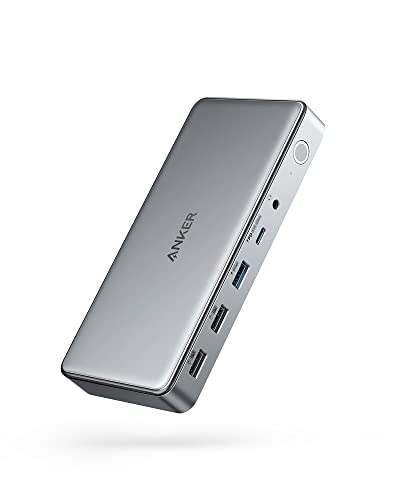
Anker 10-in-1 Triple Display USB-C Dock
Best for: triple-monitor MacBook and laptop productivity setups
- Features
- DisplayLink (what this guide is about)
- Host Interface
- USB-C
- Display Support
- Triple
- Max Resolution
- 4K@30Hz
- Power Delivery
- 100W
- Port Count
- 10
This 10-in-1 docking station uses DisplayLink to drive up to three external screens from a single laptop port. You get one 4K display output capped at 30Hz alongside two 1080p outputs at 60Hz. It provides 100W Power Delivery to keep your laptop charged using the included 180W power supply. It suits you if you need multi-monitor expansion on a MacBook or Windows laptop with integrated wired networking and audio.
Pros
- Delivers up to 100W Power Delivery to the host laptop
- Supports triple-display setups using DisplayLink
- Includes a dedicated 180W power adapter and USB-C cable
- Provides ten ports including Ethernet, AUX, and 5 Gbps USB
Cons
- Maximum 4K resolution is limited to 30Hz
- Secondary displays cap at 1080p at 60Hz
- Two USB-A ports use USB 2.0 data speeds
Good fit if
- You need to drive three external monitors from a single USB-C port.
- You want 100W laptop charging without buying a separate power brick.
- You use a MacBook that requires DisplayLink for multi-monitor support.
Skip if
- You require 4K resolution output at 60Hz.
- You need higher than 1080p resolution across your secondary monitors.
- You want all USB-A ports to operate at 5 Gbps speeds.
Verdict: Anker Triple Display USB-C Docking Station delivers 100W host charging and triple-display expansion for DisplayLink setups. It works well if 1080p secondary monitors match your workflow needs.

Giq 11-in-1 DisplayLink Dual Monitor Dock
Best for: portable dual-display setups with separate laptop charging
- Features
- DisplayLink (what this guide is about)
- Host Interface
- USB-C
- Display Support
- Dual
- Max Resolution
- UHD@30Hz
- Port Count
- 11
- Video Ports
- HDMI
The Giq 11-in-1 DisplayLink Dual Monitor Dock adds dual HDMI video outputs, three 5Gbps USB 3.0 ports, Gigabit Ethernet, and card readers to your setup. Weighing 0.225 pounds and measuring 4.53 inches long, this compact adapter connects using DisplayLink to mirror or extend displays up to 4K at 30Hz or 1080p. It suits you if you need a lightweight hub for travel or multi-monitor work without laptop power delivery.
Pros
- Dual HDMI ports supporting extended displays via DisplayLink
- Gigabit Ethernet port supporting 10/100/1000Mbps speeds
- Three USB 3.0 ports with transfer rates up to 5Gbps
- Compact form factor weighing 0.225 pounds
Cons
- USB-C port powers the dock only and does not charge laptops
- 4K video output is limited to 30Hz
- SD and microSD card slots cannot read simultaneously
Good fit if
- You need dual HDMI outputs and wired Ethernet in a travel-friendly size.
- You have a separate power adapter to charge your host laptop.
Skip if
- You require 4K resolution at a 60Hz refresh rate.
- You need your dock to supply power directly to your laptop.
- You plan to transfer data from SD and microSD cards at the same time.
Verdict: Giq 11-in-1 DisplayLink Dual Monitor Dock packs dual-screen HDMI and wired Ethernet into a pocketable footprint. It is a solid expansion option if you carry your own laptop charger and do not need 60Hz at 4K.

WAVLINK Triple Display DisplayLink Dock
Best for: triple-display office desks needing fast USB ports
- Features
- DisplayLink (what this guide is about)
- Host Interface
- USB-C
- Display Support
- Triple
- Max Resolution
- 4K@60Hz
- Power Delivery
- 100W
- Video Ports
- HDMI, DisplayPort
This WAVLINK docking station uses DisplayLink to run up to three external displays, outputting two 4K screens at 60Hz and one 2K screen at 60Hz over HDMI and DisplayPort. It delivers 100W Power Delivery to your laptop using an included 130W power adapter. With six 10Gbps USB ports and Gigabit Ethernet, it suits busy desk environments where you need fast peripheral connections and reliable wired networking.
Pros
- Supports up to three external monitors with two at 4K 60Hz and one at 2K 60Hz
- Provides 100W laptop power delivery via an included 130W power adapter
- Offers six 10Gbps USB ports split across two USB-C and four USB-A connections
- Includes Gigabit Ethernet for stable wired network access
Cons
- Third display output is capped at 2K 60Hz instead of 4K
- Does not support host laptops that only have USB-A ports
- Not recommended for HDCP-protected 4K streaming or gaming
Good fit if
- You want to connect up to three displays to a USB-C or Thunderbolt laptop.
- You need 100W charging and multiple 10Gbps ports for external drives.
- You prefer a wired Gigabit Ethernet connection for work tasks.
Skip if
- You require all three external monitors to run at 4K resolution simultaneously.
- You need a dock compatible with legacy USB-A host computers.
- You stream HDCP-protected 4K video or play games on your setup.
Verdict: WAVLINK Triple Display 100W DisplayLink Dock provides practical triple-screen expansion, 100W laptop charging, and six 10Gbps USB ports for office workstations. It fits users who need dependable multi-monitor productivity and high-speed peripheral connectivity.

Baseus Nomos Air 12-in-1 Dual Display Dock
Best for: dual 2K monitor setups needing fast USB-C
- Features
- DisplayLink (what this guide is about)
- Display Support
- Dual
- Max Resolution
- 2K@60Hz
- Port Count
- 12
- Video Ports
- HDMI, DisplayPort
- Max Data Speed
- 10Gbps
The Baseus Nomos Air 12-in-1 is a desktop docking station built around DisplayLink technology to drive two external monitors at up to 2K resolution at 60Hz. It features 12 total ports, including two DisplayPort, two HDMI, and 10Gbps USB-C connections, alongside Gigabit Ethernet. It supports 100W Power Delivery input with dynamic power allocation, making it a practical hub if you need dual-screen expansion across macOS, Windows, Linux, or ChromeOS.
Pros
- Dual monitor output at 2K@60Hz via HDMI and DisplayPort
- 12 ports including two 10Gbps USB-C and Gigabit Ethernet
- Supports up to 100W PD input with dynamic power allocation
- Hardware button for one-touch screen lock and energy-saving mode
Cons
- Power adapter and host cables are not included
- Maximum external display resolution is limited to 2K@60Hz
- Requires DisplayLink driver installation to function
Good fit if
- You want dual external 2K monitors on macOS M1, M2, or M3 laptops.
- You need 10Gbps USB-C transfer speeds alongside legacy USB-A ports.
- You prefer hardware buttons for instant screen locking and peripheral sleep.
Skip if
- You require 4K resolution on your external monitors.
- You want a dock that includes a power supply and cables in the box.
- You are restricted from installing DisplayLink drivers on your system.
Verdict: Baseus Nomos Air 12-in-1 Dual Display Dock delivers comprehensive port variety and dual 2K monitor support with dynamic power management. Its lack of an included charger and 2K resolution ceiling require you to supply hardware and accept lower display density.

WAVLINK Dual 4K DisplayLink Docking Station
Best for: dual 4K setups needing ample USB-A ports
- Features
- DisplayLink (what this guide is about)
- Host Interface
- USB-A, USB-C, Thunderbolt
- Display Support
- Dual
- Max Resolution
- 4K@60Hz
- Video Ports
- HDMI, DisplayPort
- Ethernet Speed
- Gigabit Ethernet
This WAVLINK dock runs dual 4K monitors at 60Hz using DisplayLink technology through two HDMI and two DisplayPort connections. It features six USB 3.0 Type-A ports, Gigabit Ethernet, and 3.5mm audio connectivity. The unit works across USB-A, USB-C, and Thunderbolt ports on Windows, macOS, and ChromeOS systems. It suits your multi-monitor workstation if you need extensive peripheral inputs and power your laptop with a standalone dedicated charger.
Pros
- Dual 4K video output at 60Hz via HDMI or DisplayPort
- Six USB 3.0 Type-A ports for external peripherals
- Compatible with USB-A, USB-C, and Thunderbolt host ports
- Includes Gigabit Ethernet and 3.5mm audio connectivity
Cons
- Provides no power delivery or laptop charging
- Lacks Linux operating system support
- Unsupported for DRM-protected video streaming
Good fit if
- You need dual 4K 60Hz displays on Apple Silicon or Windows.
- You connect multiple legacy USB-A peripherals.
- You already use a dedicated laptop power adapter.
Skip if
- You need single-cable host laptop charging.
- You operate a Linux system.
- You stream DRM-protected media content.
Verdict: WAVLINK Dual 4K DisplayLink Dock delivers dual 4K 60Hz monitor outputs and abundant USB-A connectivity. It suits productivity desks where laptop charging is handled by a separate power adapter.

StarTech USB-A Dual 4K DisplayPort Mini Dock
Best for: bus-powered dual 4K DisplayPort setups on USB-A
- Features
- DisplayLink (what this guide is about)
- Host Interface
- USB-A
- Display Support
- Dual
- Max Resolution
- 4K @ 60Hz
- Video Ports
- DisplayPort
- Ethernet Speed
- GbE
View on Amazon: StarTech USB-A Dual 4K DisplayPort Mini Dock
The StarTech.com Dual 4K DisplayPort USB-A Mini Dock gives you dual 4K 60Hz DisplayPort outputs powered by the DisplayLink DL-6950 chipset. It connects through an attached 1-foot USB-A cable and runs entirely on bus power, removing the need for an external power brick. Integrated Gigabit Ethernet provides stable networking. At 0.28 pounds, it suits mobile workers who need high-resolution dual-monitor output on legacy USB-A laptops without carrying a bulky charging adapter.
Pros
- Dual 4K 60Hz video output via DisplayPort
- DisplayLink DL-6950 chipset for multi-OS display compatibility
- Bus-powered design requires no external power brick
- Built-in Gigabit Ethernet port for hardwired networks
- Compact 0.28-pound body with an attached 1-foot cable
Cons
- Does not supply Power Delivery charging to the host laptop
- Video outputs are limited to DisplayPort with no built-in HDMI
- Provides no downstream USB ports for external accessories
Good fit if
- You need dual 4K 60Hz DisplayPort monitors from a standard USB-A laptop port.
- You want a lightweight, bus-powered travel dock weighing under 0.3 pounds.
- You require a dedicated Gigabit Ethernet connection on a compact adapter.
Skip if
- You need your docking station to charge your laptop over USB-C.
- You connect to monitors using native HDMI cables without DisplayPort adapters.
- You need extra USB ports to attach mice, keyboards, or storage drives.
Verdict: StarTech.com Dual 4K DisplayPort USB-A Mini Dock delivers dual 4K 60Hz DisplayPort outputs and Gigabit Ethernet from a bus-powered USB-A connection. It works best if you need a lightweight 0.28-pound dock and do not require host charging.

Belkin 15-in-1 Triple DisplayLink Dock
Best for: triple 4K setups needing ample USB-A ports
- Features
- DisplayLink (what this guide is about)
- Host Interface
- USB-C
- Display Support
- Triple
- Max Resolution
- 4K
- Power Delivery
- 85W
- Port Count
- 15
This 15-in-1 desktop dock uses DisplayLink technology to drive up to three 4K monitors simultaneously across three HDMI and two DisplayPort outputs. It provides 85W power delivery pass-through charging to your host laptop, a gigabit Ethernet jack, an SD card slot, and five USB-A ports. It suits you if you need a multi-screen workstation connecting legacy USB-A peripherals, memory cards, and wired networking to a MacBook, Windows PC, or Chromebook over USB-C.
Pros
- Triple 4K monitor support via three HDMI and two DisplayPort options
- 85W USB-C Power Delivery pass-through charging
- Integrated SD card reader and Gigabit Ethernet port
- Five USB-A ports for connecting external accessories
Cons
- Requires manual DisplayLink driver installation for triple display output
- Provides 85W host charging rather than 100W
- Large desk footprint measuring 10.5 inches long
Good fit if
- You run up to three 4K monitors on macOS, Windows, or ChromeOS.
- You need five USB-A ports and an integrated SD card reader at your desk.
- You want 85W laptop charging combined with wired Gigabit Ethernet.
Skip if
- You require 100W or higher power delivery for your laptop.
- You cannot install third-party DisplayLink drivers on your managed system.
Verdict: Belkin 15-in-1 Triple 4K DisplayLink Dock delivers comprehensive port variety and triple 4K display capability for multi-monitor workstations. Its 85W power delivery and five USB-A ports provide ample connectivity if you do not require 100W charging.

WAVLINK Triple DisplayLink Docking Station
Best for: triple-monitor office productivity on Apple silicon
- Features
- DisplayLink (what this guide is about)
- Host Interface
- USB-C
- Display Support
- Triple
- Max Resolution
- 4K@60Hz
- Power Delivery
- 100W
- Video Ports
- HDMI, DisplayPort
This docking station uses DisplayLink technology to drive up to three external screens, including on base Apple silicon machines. You get one 4K HDMI port at 60Hz and two 2K ports running via HDMI or DisplayPort at 60Hz. It provides 100W power delivery, six 10Gbps USB ports, and Gigabit Ethernet. It suits productivity workflows on Windows, macOS, or ChromeOS setups requiring multiple monitors from a single USB-C connection.
Pros
- Drives three external displays on M1 through M5 Macs
- Delivers up to 100W power delivery to host laptops
- Provides six total 10Gbps USB ports across Type-A and Type-C
- Includes Gigabit Ethernet and a 3.5mm combination audio jack
Cons
- Lacks HDCP support for playing encrypted video
- Secondary external display outputs are limited to 2K at 60Hz
- Not compatible with Linux operating systems
Good fit if
- You need three extended displays on an Apple silicon MacBook.
- You want 100W laptop power delivery and multiple 10Gbps data ports.
Skip if
- You stream copy-protected media requiring HDCP compliance.
- You need dual or triple displays running at full 4K resolution.
- You use a laptop running Linux.
Verdict: WAVLINK Triple DisplayLink Docking Station provides three-monitor expansion and 100W charging for multi-display workstations. Its lack of HDCP support and 2K secondary display limit focus it squarely on office productivity.
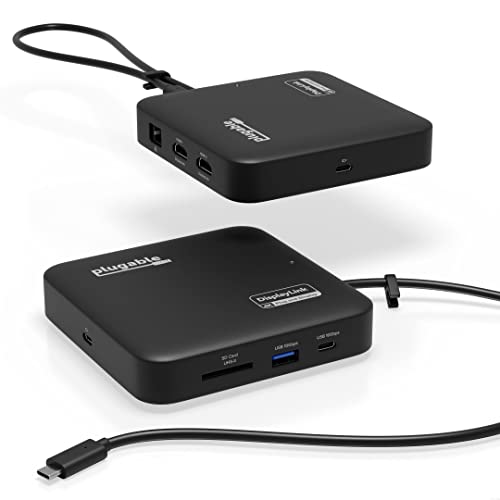
Plugable 7-in-1 Dual 4K HDMI USB-C Dock
Best for: dual 4K HDMI travel setups
- Features
- DisplayLink (what this guide is about)
- Host Interface
- USB-C
- Display Support
- Dual
- Max Resolution
- 4K@60Hz
- Power Delivery
- 82W
- Port Count
- 7
The Plugable 7-in-1 Dual 4K DisplayLink Dock lets you drive two 4K 60Hz displays over HDMI, even on laptops lacking native multi-monitor output. It connects via USB-C and supplies up to 82W pass-through charging when you attach a compatible 100W power adapter. Featuring Gigabit Ethernet, an SD card reader, and standard USB ports in a compact frame, this hub suits you if you need dual external displays and basic desk connectivity.
Pros
- Dual 4K HDMI video output at 60Hz via DisplayLink
- Up to 82W USB-C pass-through charging from a 100W input
- Built-in SD slot with dual-lane SDR104/DDR transfer support
- Compact footprint measuring 4.72 by 4.72 inches and weighing 0.55 pounds
Cons
- Manual DisplayLink driver installation required on macOS
- Only includes one USB-A and one USB-C peripheral port
- Host charging requires an external USB-C power adapter and cable
Good fit if
- You need to run two extended 4K 60Hz HDMI monitors from a single USB-C port.
- You want an SD card slot and Gigabit Ethernet integrated into a portable hub.
- You have an existing 45W to 100W USB-C power brick for host pass-through power.
Skip if
- You need DisplayPort outputs instead of dual HDMI connections.
- You require more than two USB peripheral ports for external accessories.
- You prefer an included dedicated power brick rather than pass-through charging.
Verdict: Plugable 7-in-1 Dual 4K DisplayLink Dock provides reliable dual 4K 60Hz HDMI video output and 82W pass-through power in a compact enclosure. It is a straightforward choice for dual-screen workspaces needing essential data and network ports without excess bulk.

UGREEN DisplayLink Dual 4K Docking Station
Best for: dual 4K setups needing 10Gbps transfer
- Features
- DisplayLink (what this guide is about)
- Host Interface
- USB-C
- Display Support
- Dual
- Max Resolution
- 4K@60Hz
- Power Delivery
- 100W
- Port Count
- 9
This UGREEN dock expands your workstation through a single USB-C port using DisplayLink technology. It provides dual 4K display output at 60Hz across two HDMI and two DisplayPort options for macOS and Windows systems. You get three 10Gbps USB 3.2 Gen 2 ports, Gigabit Ethernet, and 100W Power Delivery pass-through. It suits you if you need high-resolution dual displays and fast peripheral data transfers without extra bulk.
Pros
- Dual 4K display output at 60Hz via HDMI or DisplayPort
- Three 10Gbps USB 3.2 Gen 2 ports (one USB-C, two USB-A)
- Supports up to 100W Power Delivery laptop charging
- Includes Gigabit Ethernet port for wired networks
Cons
- Does not include a power adapter or HDMI cable
- Requires driver installation for video output and Ethernet
Good fit if
- You need dual extended 4K screens at 60Hz on macOS or Windows
- You transfer files frequently using 10Gbps USB-A or USB-C peripherals
- You already have a 100W USB-C power adapter
Skip if
- You need a dock that comes with its own power supply
- You cannot install third-party DisplayLink drivers on your computer
Verdict: UGREEN 9-in-1 Dual 4K DisplayLink Dock delivers dual 4K video at 60Hz and 10Gbps data transfer in a compact design. It is a solid choice if you have a standalone USB-C charger and need multi-monitor support.

WAVLINK Dual Monitor DisplayLink Dock
Best for: dual 1080p setups with legacy displays
- Features
- DisplayLink (what this guide is about)
- Display Support
- Dual
- Max Resolution
- 2560x1440 @ 50Hz
- Video Ports
- HDMI, DVI
- Ethernet Speed
- Gigabit Ethernet
- Dimensions
- 8.5 × 3.5 × 1 inches
This WAVLINK docking station uses DisplayLink technology to drive two external monitors via HDMI and DVI ports at up to 1920x1200 at 60Hz. It features six USB ports, including two USB 3.0 and four USB 2.0 connections, alongside Gigabit Ethernet and a 3.5mm audio jack. It suits you if you run standard 1080p or 1200p desktop monitors and need legacy port support without requiring 4K video.
Pros
- Dual display output via HDMI and DVI up to 1920x1200 at 60Hz
- Six USB ports including two USB 3.0 and four USB 2.0
- Gigabit Ethernet and 3.5mm audio jack built in
- Includes a DVI to HDMI adapter in the box
Cons
- Lacks 4K resolution support
- Four of the six USB ports run at USB 2.0 speeds
- Does not list laptop Power Delivery charging
Good fit if
- You need dual monitors running at 1920x1200 resolution or lower.
- You use legacy DVI displays or need the included DVI to HDMI adapter.
- You want wired Gigabit Ethernet and multiple USB accessory ports.
Skip if
- You need 4K display resolutions.
- You want host laptop charging through a single cable via USB Power Delivery.
- You require high-speed USB 3.0 data transfer across all connected USB ports.
Verdict: WAVLINK Dual Monitor DisplayLink Dock provides reliable dual 1200p monitor connectivity and basic peripheral expansion for legacy setups. It is practical if you do not require 4K output or integrated laptop charging.

OREI Triple Monitor DisplayLink Dock
Best for: Triple 4K HDMI setups needing 100W charging
- Features
- DisplayLink (what this guide is about)
- Host Interface
- USB-C
- Display Support
- Triple
- Max Resolution
- 4K@60Hz
- Power Delivery
- 100W
- Port Count
- 14
The OREI Triple Monitor DisplayLink Dock is a 14-in-1 desktop hub designed to expand your laptop screen setup. It features three HDMI ports delivering up to 4K resolution at 60Hz, paired with 100W power delivery to charge your host machine. Two video outputs operate via DisplayLink, while the third requires DP Alt mode. This docking station fits your desk if you need multi-display output alongside Gigabit Ethernet and six USB ports.
Pros
- Supports three 4K 60Hz HDMI displays (two via DisplayLink, one via DP Alt mode)
- Delivers 100W laptop charging via included 150W power adapter
- Provides 14 ports including six USB ports, Gigabit Ethernet, and SD/TF card slots
- Offers a dedicated 20W charging output for phones and accessories
Cons
- Third display port relies on laptop USB-C DP Alt mode support
- Offers HDMI connections only with no DisplayPort outputs
- System requirements require an Intel Core i5 processor or higher
Good fit if
- You want to connect up to three 4K 60Hz HDMI monitors to your setup.
- You need high-wattage 100W power delivery to charge your laptop.
- You connect many accessories and need six USB ports plus memory card readers.
Skip if
- You need native DisplayPort outputs for your external displays.
- You lack DP Alt mode on your laptop USB-C port but require three external screens.
Verdict: OREI Triple Monitor DisplayLink Dock delivers 14 connectivity ports and up to 100W charging for multi-display workstations. It is a capable hub when you need dual DisplayLink outputs alongside a third DP Alt mode display.

WAVLINK Triple Display Docking Station
Best for: triple-screen office productivity and high-power laptop charging
- Features
- DisplayLink (what this guide is about)
- Host Interface
- USB-C, Thunderbolt 3/4
- Display Support
- Triple
- Max Resolution
- 2K@60Hz
- Power Delivery
- 100W
- Port Count
- 15
The WAVLINK 15-in-1 Triple Display Docking Station expands your laptop setup with 15 ports powered by the DisplayLink-6350 chipset. It supports up to three displays, delivering up to dual 2K at 60Hz across HDMI and DisplayPort connections alongside a third display via USB-C Alt Mode. You also get up to 100W Power Delivery, two 10Gbps USB-C ports, three 5Gbps USB-A ports, Gigabit Ethernet, and SD/TF card slots for office multitasking.
Pros
- Provides up to 100W Power Delivery to host laptops via a 130W adapter
- Offers 15 ports including two 10Gbps USB-C and three 5Gbps USB-A connections
- Supports triple monitor configurations across three HDMI and two DisplayPort options
- Includes dedicated SD and TF card slots with read speeds up to 104MB/s
Cons
- DisplayLink video channels cap resolution at dual 2K@60Hz rather than 4K
- Requires DisplayLink driver installation and does not support plug-and-play operation
- HDMI and DisplayPort on the same display channel cannot output simultaneously
Good fit if
- You need to run up to three external displays for productivity workflows on Mac or Windows.
- You want up to 100W host charging alongside high-speed 10Gbps USB-C peripheral ports.
- You require wired Gigabit Ethernet and integrated SD/TF media card readers at your desk.
Skip if
- You need native 4K resolution on every display or high-refresh gaming capabilities.
- You cannot install third-party DisplayLink drivers on an IT-restricted work computer.
- Your laptop USB-C port lacks video output support needed for the Alt Mode HDMI port.
Verdict: WAVLINK 15-in-1 Triple Display Docking Station delivers a wide selection of 15 ports and 100W charging for multi-screen business workstations. Its DisplayLink design enables triple-monitor setups across macOS and Windows, provided dual 2K resolution meets your visual requirements.

Tobenone Quad 4K 20-in-1 DisplayLink Dock
Best for: quad-monitor workstations needing high host power delivery
- Features
- DisplayLink (what this guide is about)
- Host Interface
- Thunderbolt 4
- Display Support
- Quad
- Max Resolution
- 4K@60Hz
- Power Delivery
- 100W
- Port Count
- 20
This 20-port docking station expands your laptop setup to four external 4K displays running at 60Hz via four HDMI and four DisplayPort options. It delivers up to 100W Power Delivery to your host laptop using the included 150W power adapter, plus 18W charging on a dedicated USB-C port. It fits your workspace if you need extensive peripheral connectivity, including high-speed USB 3.2, Ethernet, and SD card slots alongside multi-monitor DisplayLink capability.
Pros
- Supports up to four external 4K displays at 60Hz
- Provides 100W host charging and 18W USB-C device charging
- Offers 20 total connection ports including SD and microSD slots
- Features physical power button to control all external devices
Cons
- Does not support HDCP playback
- Restricts M1 chip MacBooks to a maximum of three displays
- Requires DisplayLink driver installation prior to operation
Good fit if
- You need to drive up to four 4K 60Hz external monitors simultaneously.
- You require up to 100W Power Delivery to charge your laptop.
- You need varied ports including USB 3.2, Gigabit Ethernet, and memory card readers.
Skip if
- You need HDCP compatibility to stream copy-protected video.
- You use an M1 MacBook and expect four extended external screens.
Verdict: Tobenone 20-in-1 Quad 4K DisplayLink Dock delivers quad 4K 60Hz video output and 100W laptop charging for demanding workstation setups. Note that it lacks HDCP support for protected media playback.

Plugable 5-Monitor USB-C Docking Station
Best for: five-display workstations requiring high-wattage laptop charging
- Features
- DisplayLink (what this guide is about)
- Host Interface
- USB-C, Thunderbolt
- Display Support
- 5
- Max Resolution
- 8K@30Hz
- Power Delivery
- 140W
- Video Ports
- HDMI 2.1, HDMI 2.0, USB-C
The Plugable 5-Monitor 140W DisplayLink Dock connects up to five external displays to your USB-C or Thunderbolt laptop, supporting resolutions up to 8K at 30Hz or five 4K screens at 60Hz. It provides 140W host charging, a secondary 30W charging port, and a 2.5Gbps Ethernet connection. This dock suits power users and multi-monitor workstations needing heavy screen setups on Windows 10 or later and macOS 14 or later systems.
Pros
- Supports up to five external displays simultaneously
- Provides up to 140W laptop charging plus 30W device charging
- Includes high-speed 2.5Gbps Ethernet port
- Supports up to 8K resolution at 30Hz on HDMI 2.1
Cons
- Does not support HDCP playback such as Netflix or Hulu
- Requires manual DisplayLink software installation on macOS
- Lacks dedicated full-size DisplayPort outputs
Good fit if
- You need to connect up to five 4K displays to a single laptop
- You require up to 140W of host power delivery
- You need a fast 2.5Gbps wired Ethernet connection
Skip if
- You stream HDCP-protected media like Netflix or Hulu
- You rely on standard full-size DisplayPort cables without adapters
Verdict: Plugable 5-Monitor 140W DisplayLink Dock delivers extensive display expansion with support for up to five screens and 140W host power delivery. It serves high-density workstation setups effectively, provided you do not require HDCP streaming support.
Specifications side by side
| Spec | Anker 10-in-1 Triple Display USB-C Dock | Giq 11-in-1 DisplayLink Dual Monitor Dock | WAVLINK Triple Display DisplayLink Dock | Baseus Nomos Air 12-in-1 Dual Display Dock | WAVLINK Dual 4K DisplayLink Docking Station | StarTech USB-A Dual 4K DisplayPort Mini Dock | Belkin 15-in-1 Triple DisplayLink Dock | WAVLINK Triple DisplayLink Docking Station | Plugable 7-in-1 Dual 4K HDMI USB-C Dock | UGREEN DisplayLink Dual 4K Docking Station | WAVLINK Dual Monitor DisplayLink Dock | OREI Triple Monitor DisplayLink Dock | WAVLINK Triple Display Docking Station | Tobenone Quad 4K 20-in-1 DisplayLink Dock | Plugable 5-Monitor USB-C Docking Station |
|---|---|---|---|---|---|---|---|---|---|---|---|---|---|---|---|
| Host Interface | USB-C | USB-C | USB-C | not specified | USB-A, USB-C, Thunderbolt | USB-A | USB-C | USB-C | USB-C | USB-C | not specified | USB-C | USB-C, Thunderbolt 3/4 | Thunderbolt 4 | USB-C, Thunderbolt |
| Display Support | Triple | Dual | Triple | Dual | Dual | Dual | Triple | Triple | Dual | Dual | Dual | Triple | Triple | Quad | 5 |
| Max Resolution | 4K@30Hz | UHD@30Hz | 4K@60Hz | 2K@60Hz | 4K@60Hz | 4K @ 60Hz | 4K | 4K@60Hz | 4K@60Hz | 4K@60Hz | 2560x1440 @ 50Hz | 4K@60Hz | 2K@60Hz | 4K@60Hz | 8K@30Hz |
| Power Delivery | 100W | not specified | 100W | not specified | not specified | not specified | 85W | 100W | 82W | 100W | not specified | 100W | 100W | 100W | 140W |
| Port Count | 10 | 11 | not specified | 12 | not specified | not specified | 15 | not specified | 7 | 9 | not specified | 14 | 15 | 20 | not specified |
| Video Ports | HDMI, DisplayPort | HDMI | HDMI, DisplayPort | HDMI, DisplayPort | HDMI, DisplayPort | DisplayPort | HDMI, DisplayPort | HDMI, DisplayPort | HDMI | HDMI, DP | HDMI, DVI | HDMI | HDMI, DisplayPort | HDMI, DP | HDMI 2.1, HDMI 2.0, USB-C |
| Max Data Speed | 5 Gbps | 5Gbps | 10Gbps | 10Gbps | not specified | not specified | not specified | 10Gbps | not specified | 10Gbps | not specified | not specified | 10Gbps | not specified | not specified |
| Ethernet Speed | not specified | 1000Mbps | Gigabit | Gigabit | Gigabit Ethernet | GbE | Gigabit | 1Gbps | Gigabit | Gigabit Ethernet | Gigabit Ethernet | Gigabit | Gigabit | not specified | 2.5Gbps |
| Resolution | not specified | not specified | not specified | not specified | 4K UHD | 4K UHD | 4K UHD | not specified | 4K UHD | 4K UHD | not specified | 4K UHD | not specified | 4K UHD | not specified |
| Connectivity | not specified | HDMI | HDMI, DisplayPort, Ethernet | not specified | not specified | USB-A | USB-C, HDMI | not specified | USB-C, HDMI | USB-C | HDMI | not specified | HDMI, DisplayPort, Ethernet | not specified | USB-C |
| Refresh Rate | not specified | not specified | not specified | not specified | 60Hz | 60Hz | not specified | not specified | 60Hz | 60Hz | not specified | 60Hz | not specified | 60Hz | not specified |
| Features | DisplayLink | DisplayLink | DisplayLink | DisplayLink | DisplayLink | DisplayLink | DisplayLink | DisplayLink | DisplayLink | DisplayLink | DisplayLink | DisplayLink | DisplayLink | DisplayLink | DisplayLink |
| Use | not specified | not specified | Office | not specified | not specified | not specified | not specified | not specified | not specified | not specified | not specified | not specified | not specified | not specified | not specified |
| Recommended Use | not specified | not specified | Home | not specified | not specified | not specified | not specified | not specified | not specified | not specified | not specified | not specified | not specified | not specified | not specified |
| Dimensions | 6.7 × 3.15 × 0.96 inches | 4.53 × 2.36 × 0.59 inches | 3.6 × 8.7 × 1 inches | 6.34 × 4.29 × 3.74 inches | 12.6 × 6.1 × 2.36 inches | 5.1 × 2.3 × 0.8 inches | 10.5 × 6 × 3.5 inches | 3.6 × 8.7 × 1 inches | 4.72 × 4.72 × 1.02 inches | 6 × 3 × 0.9 inches | 8.5 × 3.5 × 1 inches | 7.69 × 3.03 × 0.77 inches | 5.4 × 4.8 × 7.8 inches | 11.8 × 3.14 × 0.86 inches | 3.74 × 8.27 × 0.67 inches |
| Weight | 1.6 ounces | 3.6 ounces | 15 ounces | not specified | 8.8 ounces | 4.48 ounces | not specified | 15 ounces | 8.82 ounces | 1.12 pounds | 12 ounces | not specified | 12.1 ounces | 2.27 pounds | not specified |
| Color | Gray | Gray | not specified | Black | 69DK1 | Black | black | 63PD25 | Black | Black | Black | Charcoal Black | not specified | Grey | Space Grey |
| Model | A83951A1 | D3908-giq | WL-UG63PD25(4K) | not specified | 8541562306 | USBA2DPGB | INC007TTBK | WL-UG63PD25 | USBC-6950PDZ | 90912 | WL-UG39DK1 | SX-3C4K-D150W | not specified | not specified | UD-7400PD |
| Size | not specified | 11 in 1 | not specified | not specified | not specified | 0.8" x 2.3" x 5.1" | 85W | not specified | not specified | not specified | not specified | 3x Display Docking | not specified | small | 1.7 x 21 x 9.5 centimeters |
If you need matching seating for your workstation, compare dimensions and frame materials across the best GTPLAYER blue gaming chairs to complete your desk layout.
Key Specs for Choosing a DisplayLink Dock
-
Check External Display Count Support
Check how many external monitors the docking station handles through its DisplayLink chip. Basic models support dual displays, whereas larger office units support triple or quad setups. If you plan to expand your desktop across three external screens, confirm that the hardware specifications explicitly state triple monitor capability. The Belkin 15-in-1 Triple DisplayLink Dock provides triple-display support directly. Selecting a dock with fewer screen channels than your monitor setup requires will leave extra displays inactive or mirrored on your desk.
-
Verify 4K 60Hz Output Support
Review the resolution and refresh rate ratings for every video channel. Some DisplayLink docks deliver dual 4K UHD output at a full 60Hz refresh rate, while others max out at 2K, 1200p, or 1080p. If you work on high-resolution panels, running at 30Hz or lower resolutions will cause noticeable cursor stutter and blurry text. The UGREEN DisplayLink Dual 4K Docking Station lists dual 4K UHD video at 60Hz. Verify that each video port matches the native resolution and 60Hz frequency of your external screens.
-
Match DisplayPort and HDMI Ports
Examine the physical video ports on the docking station against the input cables on your monitors. Some models provide dedicated HDMI sockets, while others supply DisplayPort outputs or a mix of both formats. If your screens only have DisplayPort inputs, choose a dock built with matching connections to avoid buying passive adapters. The StarTech USB-A Dual 4K DisplayPort Mini Dock offers dual DisplayPort ports directly. Checking your display inputs beforehand ensures you can connect monitors directly without needing conversion cables.
-
Confirm Protected Streaming HDCP Compliance
Determine whether you plan to stream protected digital media on your connected monitors. Certain DisplayLink docking stations lack HDCP compliance, which prevents playback of copy-protected content from streaming platforms on external screens. If your workstation is strictly for business spreadsheets, document editing, and general office tasks, this restriction will not impact your daily workflow. The WAVLINK Triple DisplayLink Docking Station specifies a lack of HDCP support, focusing its hardware strictly on office productivity. Always check HDCP compatibility if media consumption matters for your setup.
-
Check USB Data Transfer Rates
Evaluate the transfer speeds of the integrated USB ports if you connect external drives. Many docks offer standard USB ports suitable for basic input peripherals like keyboards and mice, but high-throughput workflows require faster connections. Look for docks that specify 10Gbps USB ports if you regularly back up files or move large media libraries. The WAVLINK Triple Display DisplayLink Dock includes six 10Gbps USB ports alongside its video outputs. Matching port bandwidth to your peripheral needs prevents data bottlenecks across your connected storage devices.
-
Evaluate Dock Portability and Weight
Check physical dimensions and total weight if you commute between workspaces or travel frequently. Larger multi-monitor hubs often weigh close to a pound or more and require dedicated desk space. For mobile bags, compact options provide essential display expansion without excessive bulk. The Giq 11-in-1 DisplayLink Dual Monitor Dock weighs 0.225 pounds and measures under five inches in length, making it pocketable for mobile work. If your dock stays permanently anchored to a desk, weight matters less than port variety and spacing.
Frequently asked questions
Do DisplayLink docking stations require driver software to work?
Yes, DisplayLink docking stations require drivers installed on your host computer to transmit video over standard USB connections. The software compresses video data using your CPU before sending it across the USB cable to the dock's onboard chipset. Operating systems like Windows and macOS typically download drivers automatically, though manual installation ensures compatibility across different desktop environments and multi-display hubs.
Can you stream protected media through any DisplayLink dock?
No, media playback depends on HDCP support, which certain DisplayLink docks lack. For example, listings for the WAVLINK WL-UG63PD25, Tobenone Quad 4K, and Plugable 5-Monitor dock specifically indicate a lack of HDCP support for protected streaming video. If your daily routine includes watching encrypted content on streaming services, check the hardware specifications for explicit HDCP compliance before selecting a workstation hub.
Can a DisplayLink docking station operate through a standard USB-A port?
Yes, DisplayLink can transmit display data over legacy USB-A ports because it converts video into standard USB data packets. The StarTech USBA2DPGB mini dock connects via USB-A, drawing bus power to run dual 4K 60Hz DisplayPort monitors alongside a Gigabit Ethernet connection. While USB-A connections cannot supply charging power back to your laptop, they still provide full video output and networking capabilities.
What refresh rates do 4K DisplayLink docking stations support?
Most 4K DisplayLink docking stations support a maximum refresh rate of 60Hz at 4K resolution. Hardware such as the UGREEN 9-in-1, WAVLINK 69DK1, and Plugable 7-in-1 docks deliver dual 4K output at 60Hz. If you connect higher refresh rate gaming displays, the docks will cap output to standard 60Hz or step down resolutions based on individual port bandwidth specifications.
Can you connect more than three external monitors using a single dock?
Yes, specialized DisplayLink docking stations support high-density configurations beyond three displays. The Tobenone 20-in-1 dock provides quad 4K 60Hz video outputs, while the Plugable UD-7400PD expands setups to accommodate up to five separate external screens. These multi-display hubs consolidate dense monitor arrangements into a single cable link, provided your laptop's operating system supports the necessary DisplayLink display outputs.
How much power delivery do DisplayLink docks provide to laptops?
Laptop power delivery ranges from zero watts on bus-powered docks to 140W on larger desktop stations. The bus-powered StarTech mini dock provides no host charging, while Belkin supplies 85W and Plugable UD-7400PD delivers up to 140W. Several full-size models, including the WAVLINK WL-UG63PD25(4K), Tobenone 20-in-1, and OREI Triple Monitor dock, provide 100W power delivery to charge laptops under heavy workloads.
What peripheral data transfer speeds do DisplayLink docking stations provide?
Peripheral transfer speeds depend on the USB generation implemented across the dock's ports, with modern units reaching up to 10Gbps. For example, the WAVLINK WL-UG63PD25(4K) provides six 10Gbps USB ports, and the UGREEN 9-in-1 dock incorporates 10Gbps data transfer capability. These high-speed connections ensure fast external drive transfers and smooth accessory operation alongside your connected video displays.