Looking Beyond the Baseus 12-in-1 Triple 4K Docking? 6 Alternatives Worth a Look
As an Amazon Associate we earn from qualifying purchases. Links on this page are affiliate links.
The Baseus 12-in-1 Triple 4K Docking Station offers triple 4K display support and 85W power delivery. If you are looking for baseus laptop docking station alternatives, you may want different specs or features. This dock includes Gigabit Ethernet and a card reader. It weighs 12 ounces and fits on most desks. The design elevates your laptop for better posture. However, you might prefer a lighter dock or one with higher power output. Some users need VGA ports for older monitors. Others want 100W charging for faster device replenishment. The alternatives listed here overlap with the original in key areas. They all support high-resolution displays and connect via USB-C. Each option provides distinct advantages based on your specific needs. You can choose a model with more ports or better ergonomics. The selection includes options for dual or triple monitor setups. Some docks prioritize wired internet stability. Others focus on compact size or budget-friendly pricing. All listed products meet the core requirement of expanding your laptop’s connectivity. You can compare their port counts and display capabilities to find the best fit. The following list ranks these alternatives by their practical value. Each entry highlights specific strengths for different workflows. You can review the details below to decide which dock suits your setup best.
How each alternative compares
Baseus Triple Display Dock with SD and TF Reader
This Baseus model supports 120Hz refresh rates on dual monitors, which the original dock does not specify. It is lighter at 7.04 ounces and slightly smaller in footprint. You lose triple display support and the ergonomic stand found on the original. If you need higher frame rates for gaming or smooth scrolling on two screens, this is a better fit. The original is better if you require three simultaneous 4K outputs or prefer the elevated laptop positioning. Both include SD and TF card readers and Gigabit Ethernet for stable wired networking.
MOKiN 13-in-1 USB-C Docking Station
The MOKiN dock offers 100W power delivery, which is higher than the original’s 85W output. It also includes 13 ports compared to the Baseus 12-in-1 count. However, it weighs only 4.66 ounces and lacks the integrated stand. It supports triple displays and Gigabit Ethernet, matching the original’s core video and network capabilities. Choose this if you need more charging power for your laptop or extra USB ports. The original is preferable if you want the included stand for better ergonomics and cable management. Both are gray and support 4K UHD resolution.
Baseus Quadruple Display 8-in-1 USB-C Dock
This Baseus dock supports four displays, exceeding the original’s triple monitor limit. It includes a VGA port, which the original lacks, making it useful for older projectors or monitors. It provides 100W power delivery, an upgrade from the 85W original. You give up the ergonomic stand and Gigabit Ethernet, which are present in the Baseus 12-in-1. If you need four screens or legacy VGA connectivity, this is the right choice. The original is better for setups requiring wired internet or the elevated laptop design. Both support 4K UHD resolution.
NOVOO 14-in-1 USB-C Dock with VGA
The NOVOO dock supports four monitors and includes 14 ports, offering more expansion than the original. It provides 100W power delivery and Gigabit Ethernet. However, it does not mention an integrated stand, unlike the original. It is heavier at 4.8 ounces and lacks the ergonomic elevation feature. This dock is ideal for Windows users needing four screens and extensive peripheral connections. The original is better if you prioritize the built-in stand for laptop elevation and organization. Both support 4K UHD resolution and include USB-C connectivity.
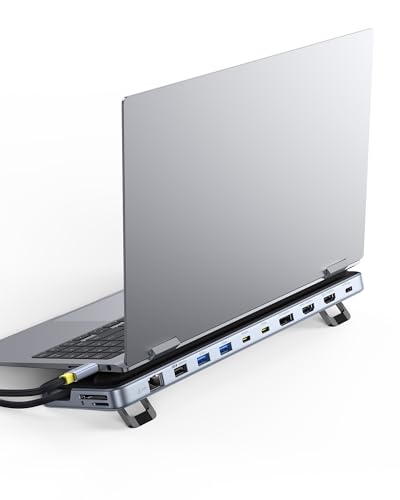
Baseus 12-in-1 Triple Display Laptop Stand Dock
This Baseus model features a built-in kickstand, similar to the original’s ergonomic design. It supports triple 4K displays and includes Gigabit Ethernet. It offers 100W power delivery, which is higher than the original’s 85W output. It weighs less than the original but has a different form factor with a height of 11.2 inches. If you need higher charging speeds while keeping the stand feature, this is a strong option. The original is preferable if you are satisfied with 85W charging. Both are silver and designed for triple-screen productivity.
Plugable Dual 4K HDMI USB-C Dock with Ethernet
The Plugable dock supports dual 4K monitors, which is fewer than the original’s triple display capability. It includes Gigabit Ethernet and USB-A ports. It weighs 1.52 pounds, making it significantly heavier than the original. It lacks an integrated stand and card readers. This dock is suitable for users who only need two screens and prioritize stable video output over multi-monitor expansion. The original is better if you require three displays, a lighter weight, or the included stand. Both support 4K UHD resolution and USB-C connectivity.
Quick picks
Our 7 picks

Baseus 12-in-1 Triple 4K Docking Station
Best for: Triple 4K setups with wired internet
- Host Interface
- USB-C
- Display Support
- Triple
- Max Resolution
- 4K
- Power Delivery
- 85W
- Port Count
- 12
- Video Ports
- HDMI, DisplayPort
View on Amazon: Baseus 12-in-1 Triple 4K Docking Station Affiliate link
This Baseus docking station offers twelve ports for comprehensive connectivity. It supports triple 4K displays via two HDMI and one DisplayPort. The unit includes Gigabit Ethernet for stable wired internet and a 100W PD port that delivers 85W to your laptop. Its silver stand elevates your device for better airflow and posture. It suits users needing multiple screens and fast charging in one compact hub.
Pros
- Supports triple 4K displays simultaneously
- Includes Gigabit Ethernet port
- Delivers 85W power to laptop
- Ergonomic stand design for heat dissipation
Cons
- Max resolution limited to 4K, not 8K
- No wireless Bluetooth connectivity listed
- Single DisplayPort limits high-refresh options
Good fit if
- You need three external monitors
- You require Gigabit Ethernet
- You want 85W laptop charging
Skip if
- You need 8K display support
- You require wireless Bluetooth
- You prefer a single HDMI setup
Verdict: Baseus 12-in-1 Triple 4K Dock fits professionals needing triple 4K screens and wired internet. It is ideal for desk setups requiring 85W charging and stable connectivity.

Baseus Triple Display Dock with SD and TF Reader
Best for: Dual monitors with 120Hz refresh rates
- Host Interface
- USB-C
- Display Support
- Dual
- Max Resolution
- 4K@120Hz
- Power Delivery
- 85W
- Video Ports
- HDMI, DisplayPort
- Max Data Speed
- 5Gbps
View on Amazon: Baseus Triple Display Dock with SD and TF Reader Affiliate link
This Baseus docking station connects dual monitors via HDMI and DisplayPort, supporting 4K resolution at 120Hz on a single display. It includes a Gigabit Ethernet port for stable wired networking and a 100W PD input that delivers up to 85W to your laptop. The unit also features SD and TF card readers, three USB-A ports, and audio jacks. Its compact design suits users needing high refresh rates and reliable connectivity.
Pros
- Supports 4K@120Hz on a single HDMI display
- Gigabit Ethernet port for stable internet connection
- 100W PD input delivers 85W to laptop
- Built-in SD and TF card readers
- Three USB-A ports for peripherals
Cons
- Supports only dual monitor setups
- No DisplayPort output at 120Hz resolution
- Consumes 15W of power itself
Good fit if
- You need 120Hz refresh rates for gaming or smooth scrolling
- You require a wired Gigabit Ethernet connection
- You frequently transfer files from SD or TF cards
Skip if
- You need to connect three or more displays simultaneously
- You require DisplayPort output at high refresh rates
- You want the maximum possible power delivery to your laptop
Verdict: Baseus 12-in-1 4K@120Hz Docking Station is ideal for users who prioritize high refresh rates and wired networking over multi-monitor expansion. It fits professionals who need fast card transfers and stable internet but do not require triple display support.

MOKiN 13-in-1 USB-C Docking Station
Best for: Triple monitor setups with Ethernet needs
- Host Interface
- USB-C
- Display Support
- Triple
- Max Resolution
- 4K
- Power Delivery
- 85W
- Port Count
- 13
- Video Ports
- HDMI, DisplayPort
View on Amazon: MOKiN 13-in-1 USB-C Docking Station Affiliate link
The MOKiN 13-in-1 USB-C docking station supports triple displays via dual HDMI and DisplayPort outputs. It offers 10Gbps data transfer speeds and includes a Gigabit Ethernet port for stable connectivity. The unit provides up to 85W power delivery to your laptop. It also features SD and microSD card readers alongside audio jacks. This setup suits users needing multiple screens and high-speed peripheral connections.
Pros
- Supports triple display output with dual HDMI and DP ports
- Includes Gigabit Ethernet for reliable wired network connection
- Features 10Gbps USB 3.1 ports for fast data transfer
- Provides up to 85W power delivery to connected laptops
- Built-in SD and microSD card readers for media access
Cons
- macOS users are limited to a single 4K display in docking mode
- Power delivery output caps at 85W, not the full 100W input
- Does not support the use of video signal converters
Good fit if
- You need to drive three monitors from a single connection
- You require a Gigabit Ethernet port for stable internet
- You frequently transfer large files using USB 3.1 devices
Skip if
- You use a macOS laptop and need dual 4K displays
- Your laptop requires more than 85W of power delivery
- You need VGA connectivity without using external adapters
Verdict: MOKiN 13-in-1 USB-C Docking Station fits users who need triple displays and Gigabit Ethernet. It is less suitable for macOS users requiring dual 4K screens or devices needing higher power delivery.

Baseus Quadruple Display 8-in-1 USB-C Dock
Best for: users needing four screens with individual control
- Host Interface
- USB-C
- Display Support
- Quadruple
- Max Resolution
- 8K@30Hz
- Power Delivery
- 92W
- Video Ports
- DisplayPort, HDMI, VGA
- Max Data Speed
- 5Gbps
View on Amazon: Baseus Quadruple Display 8-in-1 USB-C Dock Affiliate link
This Baseus docking station supports quadruple displays via DisplayPort, HDMI, and VGA. It reaches 8K@30Hz on DP and 4K on HDMI. You get 92W PD for your laptop and 20W for mobile devices. Data transfer hits 5Gbps. Individual buttons let you power down each screen. It features a glass finish and won a Red Dot Design Award.
Pros
- Supports four simultaneous displays
- 8K@30Hz output on DisplayPort
- 92W PD laptop charging
- Individual screen power buttons
Cons
- DisplayPort limited to 30Hz refresh rate
- Only 5Gbps data transfer speed
- No mention of Ethernet port
Good fit if
- You need four screens for heavy multitasking
- You want to turn off specific monitors easily
- You prefer a glass-finish design
Skip if
- You require high refresh rates above 30Hz on DP
- You need faster than 5Gbps data transfer
- You require built-in Ethernet connectivity
Verdict: Baseus 8-in-1 Quad Display Dock suits users who prioritize screen count and individual monitor control over high refresh rates or fast data speeds. It is ideal for static multi-screen workflows.

NOVOO 14-in-1 USB-C Dock with VGA
Best for: Windows users needing four monitors and many ports
- Host Interface
- USB-C, Thunderbolt 3
- Display Support
- Quad Display
- Max Resolution
- 8K@30Hz
- Power Delivery
- 100W
- Port Count
- 14
- Video Ports
- HDMI, DisplayPort, VGA
View on Amazon: NOVOO 14-in-1 USB-C Dock with VGA Affiliate link
This NOVOO docking station connects up to four displays, including one DisplayPort at 8K@30Hz and two HDMI ports at 4K@60Hz. It offers 14 ports total, featuring a 100W power delivery input, gigabit Ethernet, and five USB 3.1 data ports. You get reliable wired connectivity and high-resolution video output. It suits users needing extensive port expansion and multi-monitor setups from a single USB-C connection.
Pros
- Supports quad displays with 8K@30Hz DP and dual 4K@60Hz HDMI
- 14-in-1 connectivity includes SD/TF readers and gigabit Ethernet
- 100W Power Delivery pass-through charging for laptops
- Five USB 3.1 ports with 5Gbps transfer speeds
Cons
- 8K resolution is limited to 30Hz refresh rate
- MacBook users restricted to single monitor extension only
- Power cord not included in the package
Good fit if
- You need a single dock to drive four separate screens
- You require gigabit Ethernet for stable wired internet
- You want 100W charging while using multiple peripherals
Skip if
- You use a MacBook and need multiple extended displays
- You require 8K resolution at 60Hz refresh rate
- You prefer a compact dock with fewer ports
Verdict: NOVOO 14-in-1 Quad Display Dock is ideal for Windows users who need to connect four monitors and require extensive peripheral support from a single USB-C hub.
Baseus 12-in-1 Triple Display Laptop Stand Dock
Best for: Users needing ergonomic laptop elevation with triple 4K support
- Host Interface
- USB-C
- Display Support
- Triple
- Max Resolution
- 4K
- Power Delivery
- 85W
- Port Count
- 12
- Video Ports
- HDMI, DisplayPort
View on Amazon: Baseus 12-in-1 Triple Display Laptop Stand Dock Affiliate link
This Baseus docking station offers 12 ports, including dual HDMI and one DisplayPort for triple 4K displays. It features an ergonomic kickstand that elevates your laptop for better posture and heat dissipation. The unit supports 85W Power Delivery output and 10Gbps data transfer speeds. A Gigabit Ethernet port ensures stable wired connectivity. This setup suits users who want a clean, organized workspace with multiple high-resolution screens.
Pros
- Triple 4K display support via two HDMI and one DisplayPort
- Integrated kickstand improves laptop posture and cooling
- 85W Power Delivery output for fast laptop charging
- Gigabit Ethernet port for stable wired internet
- 10Gbps data transfer speed on USB ports
Cons
- Lower 85W power output compared to competitors offering 100W
- Only one DisplayPort limits flexible multi-monitor configurations
- No mention of audio jacks or card reader types beyond SD/TF
Good fit if
- You need a stable wired connection for video calls
- You want to elevate your laptop for better ergonomics
- You require three separate 4K displays for multitasking
Skip if
- You need more than 85W of power delivery for your laptop
- You prefer a compact hub without a built-in stand
- You require Thunderbolt 4 speeds for high-bandwidth devices
Verdict: Baseus 12-in-1 Triple 4K Docking Station with Stand provides a solid ergonomic solution for users prioritizing workspace organization and triple-screen productivity. It is ideal for professionals who value stable Ethernet connectivity and elevated laptop positioning over maximum power delivery speeds.

Plugable Dual 4K HDMI USB-C Dock with Ethernet
Best for: Windows users needing dual 4K monitors
- Host Interface
- USB-C
- Display Support
- Dual
- Max Resolution
- 4K@60Hz
- Power Delivery
- 65W
- Port Count
- 10
- Video Ports
- HDMI
View on Amazon: Plugable Dual 4K HDMI USB-C Dock with Ethernet Affiliate link
This Plugable docking station turns a single USB-C port into a dual-monitor workstation. It supports two HDMI displays at 4K resolution and 60Hz refresh rate, provided your host system allows it. The dock includes a 65W power delivery port for charging, plus gigabit Ethernet and multiple USB-A ports for peripherals. It is designed for Windows and Chromebook users who need a stable, driver-free setup for productivity tasks.
Pros
- Dual HDMI outputs support 4K resolution at 60Hz
- 65W USB-C power delivery for laptop charging
- Includes gigabit Ethernet and three USB-A ports
- Plug-and-play setup with no drivers required
Cons
- Limited to dual displays, unlike quad options
- Not recommended for macOS extended desktop use
- Max data speed capped at 5Gbps
Good fit if
- You need dual 4K monitors for Windows or Chromebook
- You want a simple plug-and-play connection
- You require built-in gigabit Ethernet
Skip if
- You use macOS and need dual extended displays
- You need more than two external monitors
- You require higher than 5Gbps data transfer speeds
Verdict: Plugable UD-MSTH2 Dual 4K Dock offers a reliable dual-monitor solution for Windows and Chromebook users who prioritize stable video output and essential connectivity over multi-display expansion.
Specifications side by side
| Spec | Baseus 12-in-1 Triple 4K Docking Station | Baseus Triple Display Dock with SD and TF Reader | MOKiN 13-in-1 USB-C Docking Station | Baseus Quadruple Display 8-in-1 USB-C Dock | NOVOO 14-in-1 USB-C Dock with VGA | Baseus 12-in-1 Triple Display Laptop Stand Dock | Plugable Dual 4K HDMI USB-C Dock with Ethernet |
|---|---|---|---|---|---|---|---|
| Host Interface | USB-C | USB-C | USB-C | USB-C | USB-C, Thunderbolt 3 | USB-C | USB-C |
| Display Support | Triple | Dual | Triple | Quadruple | Quad Display | Triple | Dual |
| Max Resolution | 4K | 4K@120Hz | 4K | 8K@30Hz | 8K@30Hz | 4K | 4K@60Hz |
| Power Delivery | 85W | 85W | 85W | 92W | 100W | 85W | 65W |
| Port Count | 12 | not stated | 13 | not stated | 14 | 12 | 10 |
| Video Ports | HDMI, DisplayPort | HDMI, DisplayPort | HDMI, DisplayPort | DisplayPort, HDMI, VGA | HDMI, DisplayPort, VGA | HDMI, DisplayPort | HDMI |
| Max Data Speed | not stated | 5Gbps | 10Gbps | 5Gbps | 5Gbps | 10Gbps | 5Gbps |
| Ethernet Speed | Gigabit | 1000Mbps | Gigabit | not stated | Gigabit Ethernet | Gigabit Ethernet | Gigabit |
| Resolution | 4K UHD | 4K UHD | 4K UHD | 4K UHD | 4K UHD | 4K UHD | 4K UHD |
| Connectivity | HDMI, DisplayPort, Ethernet, USB-A | USB-C, HDMI, DisplayPort, Ethernet, USB-A | USB-C, HDMI, DisplayPort, Ethernet | USB-C, HDMI, DisplayPort, USB-A, VGA | USB-C, HDMI, DisplayPort, Ethernet, VGA | USB-C, HDMI, DisplayPort, Ethernet, USB-A | USB-C, HDMI, Ethernet, USB-A |
| Refresh Rate | not stated | not stated | not stated | not stated | 60Hz | not stated | 60Hz |
| Features | Card Reader | Card Reader | Card Reader | not stated | not stated | Kickstand | not stated |
| Weight | 12 ounces | 7.04 ounces | 4.66 ounces | not stated | 4.8 ounces | not stated | 1.52 pounds |
| Dimensions | not stated | 5.9 × 2.8 × 2.91 inches | not stated | not stated | 2.36 × 0.65 × 5.7 inches | 3.15 × 1 × 11.2 inches | 9.25 × 5.71 × 3 inches |
| Color | Silver | Gray | Gray | black | Grey | Silver | Black |
| Size | not stated | not stated | 13 IN 1 | small | 14 in 1 | not stated | Dual Display (Pack of 3) |
| Model | not stated | not stated | 0231 | not stated | NHM14S-632B2 | not stated | UD-MSTH2 |
If you need dedicated drive cloning instead of display outputs, compare orico m 2 nvme docking station alternatives.
Frequently asked questions
Which dock supports the highest refresh rate for gaming?
The Baseus Triple Display Dock with SD and TF Reader supports 120Hz refresh rates on dual monitors. This makes it ideal for users who prioritize smooth motion and fast visuals. Other options like the NOVOO and Plugable docks are limited to 60Hz. If you need high refresh rates for gaming or fast-paced work, this Baseus model is the strongest choice among the alternatives.
Can I connect four monitors to one USB-C hub?
Yes, the Baseus Quadruple Display 8-in-1 USB-C Dock and the NOVOO 14-in-1 USB-C Dock both support four displays. The Baseus 8-in-1 model is designed for users who need individual control over each screen. The NOVOO 14-in-1 also offers extensive port options for Windows users. These hubs allow you to expand your workspace significantly beyond standard dual-monitor setups.
Which docking station provides the most ports for peripherals?
The NOVOO 14-in-1 USB-C Dock with VGA offers the highest port count at 14 connections. It is ideal for Windows users needing extensive peripheral support. The MOKiN 13-in-1 USB-C Docking Station is the next closest option with 13 ports. Both provide ample connectivity for keyboards, mice, and storage devices without requiring additional hubs.
Is there a dock with an integrated laptop stand?
The Baseus 12-in-1 Triple Display Laptop Stand Dock includes a built-in kickstand for ergonomic elevation. This design helps organize your workspace by raising the laptop screen to eye level. It supports triple 4K displays and provides stable Ethernet connectivity. This option is best for professionals who value physical workspace organization and monitor positioning over maximum power delivery speeds.
Which dock is best for users who need wired internet?
Most listed docks include Gigabit Ethernet ports for stable wired connections. The Baseus 12-in-1 Triple 4K Docking Station, the Baseus Triple Display Dock, and the MOKiN 13-in-1 all feature Ethernet ports. The NOVOO 14-in-1 also includes wired networking capabilities. These docks ensure reliable internet access for video calls and large file transfers, which is crucial for professional desk setups.
Does any dock support dual 4K displays at 60Hz?
The Plugable Dual 4K HDMI USB-C Dock supports dual 4K monitors at 60Hz. It is a reliable solution for Windows and Chromebook users who prioritize stable video output. The NOVOO 14-in-1 also supports dual 4K displays at 60Hz. These options are suitable for users who do not require triple or quad monitor expansion but need high-resolution dual-screen productivity.
Which dock is the lightest and most portable?
The MOKiN 13-in-1 USB-C Docking Station is the lightest option at 4.66 ounces. It is compact and easy to transport for mobile professionals. The NOVOO 14-in-1 is slightly heavier at 4.8 ounces but remains portable. The Baseus 12-in-1 with the stand is significantly larger and heavier due to its structural design. For maximum portability, the MOKiN model is the best choice.