Baseus 7-in-1 USB-C Dock VGA Review (2026): A Spec-Based Look
As an Amazon Associate we earn from qualifying purchases. Links on this page are affiliate links.
This baseus docking station dual monitor review focuses on a compact aluminum alloy hub designed for users needing multiple displays. It features seven ports, including two HDMI and one VGA output, allowing for triple monitor setups. The device supports up to 4K resolution at 60Hz via HDMI 1, provided your source device uses DP 1.4. It also includes USB 3.0 and USB 2.0 ports for data transfer, along with a USB-C power delivery port capable of outputting 100W. This dock aims to expand laptop capabilities efficiently for professionals and creatives who require stable connectivity and display expansion.
What stands out
- Supports triple display output with two HDMI ports and one VGA port
- HDMI 1 delivers 4K resolution at 60Hz when connected to a DP 1.4 source
- Includes a 100W USB-C power delivery port for fast laptop charging
- Features USB 3.0 for fast data transfer and two USB 2.0 ports for peripherals
- Compact aluminum alloy design measures 4.33 by 1.46 by 0.55 inches
Who it fits
Good fit for
This dock suits users with Windows laptops that have USB-C or Thunderbolt 3/4 ports with video output support. It is ideal for professionals who need three screens to boost productivity, such as developers or traders. The 100W power delivery is useful for laptops that need charging while connected. The compact size makes it suitable for commuters who travel frequently. It works well for setups where VGA legacy devices are still in use alongside modern HDMI monitors.
Who should skip it
MacBook users should look elsewhere, as macOS does not support true extended desktops with this dock. All extended screens will mirror the same content on macOS devices, limiting its utility for multi-monitor workflows. Users requiring more than three displays will find this insufficient, as it caps at triple outputs. Those needing Ethernet or SD card slots will also need a different hub, as these ports are not listed in the specifications. Ensure your laptop's USB-C port supports video output before purchasing.
Verdict: This dock offers a practical solution for Windows users needing triple displays and fast charging in a small package. It is a solid choice for productivity-focused setups, provided you are not using a Mac.
Baseus 7-in-1 Dock Key Specs
Port Count: 7
This listing indicates the device provides seven distinct connection points. You gain access to video outputs, data ports, and power delivery through a single USB-C host interface. This count allows you to connect a mouse, keyboard, and drives without needing extra adapters. Compare this total to other hubs to ensure you have enough physical connections for your daily peripherals.
Video Ports: HDMI, VGA
The hub includes both HDMI and VGA connectors for display output. HDMI supports modern digital signals for crisp images, while VGA offers compatibility with older projectors or monitors that lack digital inputs. This combination ensures you can connect to a wide range of screens. Check your existing displays to see which cable type they require before relying on this setup.
Max Resolution: 4K@60Hz
The device supports a maximum resolution of 4K at 60 frames per second. This provides sharp, smooth visuals suitable for detailed work or media consumption. It meets the standards for high-definition content. When shopping for portable monitors or laptop setups, verify that your source device also supports 4K@60Hz output to fully utilize this capability without bottlenecking the image quality.
Power Delivery: 100W
The USB-C power delivery port supports up to 100 watts of output. This allows the dock to charge your laptop while simultaneously powering connected peripherals. It reduces cable clutter by combining power and data. Ensure your laptop requires 100W or less for charging. This spec is critical for users who need to maintain battery life while running multiple high-power accessories.
Display Support: Triple
The listing states the dock supports triple monitor configurations. You can connect three external displays for an expanded workspace. This is useful for multitasking across various applications. Note that macOS may limit extended displays to mirrored mode only. Windows users typically gain full extended desktop functionality. Verify your operating system capabilities to ensure the triple setup meets your workflow requirements.
Design and build overview
The listing describes the Baseus dock as a compact unit built from aluminum alloy. This material choice suggests a rigid structure that helps dissipate heat during operation. The device measures 4.33 inches in length, 1.46 inches in width, and 0.55 inches in height. It weighs 2.26 ounces. These dimensions indicate a small footprint that sits easily on a desk without consuming much space. The low profile allows it to slide under a laptop or fit into a bag for travel.
According to the listing, the dock features an intelligent internal chip to maintain stable connectivity. It connects to your computer via a single USB-C host interface. This single cable carries video, data, and power. The unit provides seven ports in total. You get two HDMI ports and one VGA port for display output. There is also one USB 3.0 port for fast data transfer and two USB 2.0 ports for peripherals like a mouse or keyboard. A USB-C power delivery port supports up to 100W output to charge your laptop.
The layout prioritizes essential connections in a small form factor. The aluminum finish likely provides a durable surface that resists scratches. The compact size makes it suitable for commuters who need multiple displays in a hotel room or office. The single USB-C connection simplifies setup by reducing cable clutter on your desk.
Setup and everyday use guide
Setting up this dock requires a USB-C host interface. You connect the single cable to your laptop. This single link provides video, data, and power. The listing notes that some USB-C ports do not support video output. If your laptop port lacks this function, the HDMI indicator will flash. You must ensure your device supports DisplayPort Alternate Mode for the displays to work. For Thunderbolt 3 or 4 devices, compatibility is confirmed. macOS users should note a specific limitation. The operating system restricts extended desktop functionality. All external screens will mirror the main laptop display rather than extending it. This is a system constraint, not a hardware failure. Daily use involves connecting peripherals through the remaining ports. You have two USB 2.0 ports for slower devices like mice or keyboards. One USB 3.0 port offers faster data transfer for drives. The 100W Power Delivery port charges your laptop while you work. This allows you to keep your power adapter plugged into the dock. The compact aluminum design fits easily on a desk or in a bag. You can carry it for commuting without much bulk. The intelligent chip inside manages stability and safety during operation. You get three video outputs via two HDMI and one VGA port. You can run up to 4K at 60Hz on one HDMI if your source supports DP1.4. This setup streamlines your workflow by reducing cable clutter on your desk.
Before You Buy This Dock
This dock expands your laptop into a triple-display workstation. You need a USB-C port that supports DisplayPort Alt Mode for video output. Some laptops lack this feature. Check your device specifications first. The listing notes macOS limitations. Extended screens mirror on Apple systems. You cannot use all three monitors independently on Mac. This dock suits Windows users needing high productivity. It fits well with portable monitors for extra screen real estate. You may need a separate power adapter if your laptop does not support 100W charging through the hub. Keep the aluminum surface clean. Dust can block ventilation. This hub is small but powerful. It works best when paired with a sturdy laptop stand. Avoid placing it on soft surfaces that trap heat. Ensure your cables are long enough for your desk layout. This setup requires careful cable management to stay tidy.
Check before you buy
- Verify your laptop USB-C port supports video output.
- Check if macOS will mirror screens instead of extending.
- Confirm your laptop supports 100W power delivery charging.
- Ensure you have enough desk space for three displays.
- Check if your laptop has a DisplayPort Alt Mode.
The product at a glance
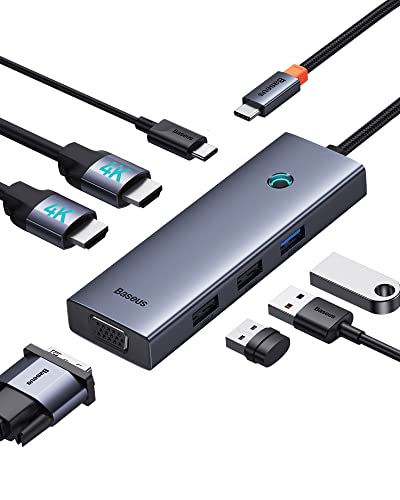
Baseus 7-in-1 USB-C Dock with VGA & Dual HDMI
Best for: Triple monitor setups with 100W charging
- Host Interface
- USB-C
- Display Support
- Triple
- Max Resolution
- 4K@60Hz
- Power Delivery
- 100W
- Port Count
- 7
- Video Ports
- HDMI, VGA
View on Amazon: Baseus 7-in-1 USB-C Dock with VGA & Dual HDMI Affiliate link
This Baseus dock expands your laptop via a single USB-C connection. It supports triple displays using two HDMI ports and one VGA port. You get up to 4K resolution at 60Hz on one HDMI output. The unit includes USB 3.0 and USB 2.0 ports for data. It also provides 100W power delivery to charge your device. The aluminum alloy build keeps it compact and portable for travel.
Pros
- Supports triple monitor setups with two HDMI and one VGA port
- Delivers 100W power delivery to charge your laptop
- Includes USB 3.0 port for fast data transfer
- Compact aluminum alloy design is easy to carry
Cons
- macOS users are limited to mirrored displays only
- Only one HDMI port supports 4K@60Hz resolution
- Requires a USB-C host with video output capability
Good fit if
- You need to run three external screens from one port
- You want 100W charging while connected to peripherals
- You use Windows or Linux for extended desktop space
Skip if
- You use a Mac and need extended desktop mirroring
- You require 4K output on all connected displays
- Your laptop USB-C port lacks video output support
Verdict: Baseus 7-in-1 USB-C Dock VGA gives you triple display support and 100W charging in a small package. It fits users who need more screen real estate on Windows or Linux systems.
Specifications side by side
| Spec | Baseus 7-in-1 USB-C Dock with VGA & Dual HDMI |
|---|---|
| Host Interface | USB-C |
| Display Support | Triple |
| Max Resolution | 4K@60Hz |
| Power Delivery | 100W |
| Port Count | 7 |
| Video Ports | HDMI, VGA |
| Resolution | 4K UHD |
| Connectivity | USB-C, HDMI, VGA |
| Dimensions | 4.33 × 1.46 × 0.55 inches |
| Weight | 2.26 ounces |
| Size | 6 in 1 |
Frequently asked questions
Does this Baseus dock support dual monitor setups?
Yes, the device supports dual monitor configurations. The product data lists dual monitor display support as a key attribute. You can connect two external screens via the HDMI ports. This allows for an expanded desktop workspace on compatible systems.
What is the maximum resolution for the displays?
The dock supports 4K UHD resolution. This specification is listed under the attributes for the Baseus unit. You can achieve high-definition video output for your connected monitors. Ensure your source device and cables support this bandwidth for optimal clarity.
Can I charge my laptop through this dock?
Yes, it provides 100W power delivery. The specifications confirm 100W PD support for connected devices. You can pass power from your charger to your laptop while using the dock. This reduces cable clutter by combining data, video, and power into one connection.
Is the Baseus dock compatible with VGA monitors?
Yes, it includes a VGA port. The connectivity attributes list VGA alongside USB-C and HDMI. You can connect legacy monitors or projectors using a VGA cable. This adds versatility for older display equipment that lacks digital inputs.
How heavy is the Baseus docking station?
The unit weighs 2.26 ounces. The specs section provides this exact weight measurement. It is a lightweight accessory that adds minimal bulk to your laptop bag. The compact size makes it easy to transport for mobile workstation setups.
What is the size of the dock?
The dock measures 4.33 inches in length. It is 1.46 inches wide and 0.55 inches high. These dimensions indicate a small footprint that fits easily on a desk. The compact form factor helps save space in tight work areas.
Does this dock work with Windows and Linux?
Yes, it is suitable for Windows and Linux. The verdict notes it fits users on these operating systems. The hardware relies on standard USB-C video protocols. This ensures broad compatibility with most modern laptops running these platforms.